Home › Utilities

 US
US
1 of 1 storefronts
Content in en-US
Content in en-US
Information
Preview 1 platform
iPhone 6 images




What’s New Version 1.4.4
This update brings enhanced QR customization, a redesigned detail view, and visual improvements throughout the app.
ADVANCED QR CUSTOMIZATION
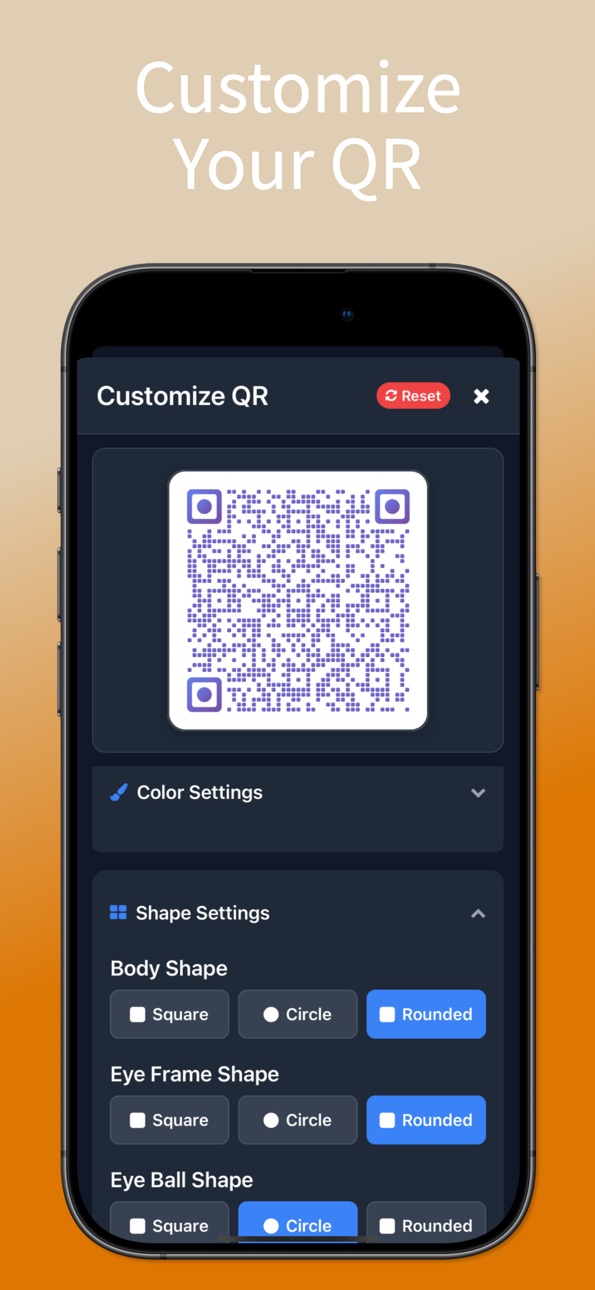
Take full control of your QR code appearance with powerful new settings:
• Error Correction Level: Choose between L, M, Q, and H levels to balance data recovery and code density. Higher levels make codes more scannable even when partially damaged.
• Quiet Zone Control: Adjust the padding around your QR code for optimal scanning reliability. Fine-tune the spacing from zero to maximum for the perfect look.
• All customization changes apply instantly with live preview, so you can see exactly how your code will look before saving.
REDESIGNED QR DETAIL VIEW
The QR code detail modal has been completely refreshed with a cleaner layout and more functionality:
• Download Button: Save QR codes directly to your Photos with a single tap. A sleek toast notification confirms the save instantly.
• Share and Delete: Quick access to sharing and deleting codes right from the header.
• Inline Customization: Open the customization panel directly within the detail view. Adjust colors, shapes, error correction, and quiet zone without leaving the modal.
• Every change saves automatically with live preview - no save button needed.
IMPROVED QR CODE GENERATOR
The generation screen now features a streamlined download experience. Instead of modal dialogs, a clean toast notification confirms when your QR code has been saved successfully. Faster and less intrusive.
VISUAL AND INTERFACE IMPROVEMENTS
• Color picker inputs and apply buttons are now properly aligned for a polished look
• Reduced spacing in customization panels for a more compact and usable layout
• QR code background color now extends seamlessly to the wrapper for a cleaner appearance
• Modal title centering improved for balanced header layout
• Smaller, more refined header action buttons
• Consistent toast notifications across all screens
PLATFORM DETECTION IN HISTORY
Your scan history now intelligently detects and displays platform names for social media, messaging, and media links. See "Social · Instagram" or "Messaging · WhatsApp" at a glance instead of generic type labels.
HISTORY MANAGEMENT
• Clear history with a redesigned single-modal flow for reliable touch handling
• Filter modal reset button highlighted in red for better visibility
• Improved scroll behavior across all screens with consistent bottom spacing
DEFAULT QR STYLE
Set your preferred QR customization as the default style. Every new QR code you generate or view will automatically use your saved preferences including colors, shapes, gradients, error correction level, and quiet zone settings.
PRIVACY AND SECURITY
All scanning, generation, and customization happens locally on your device. No data is collected, stored, or transmitted. Your QR codes and scan history remain completely private.
Thank you for using our app. We regularly update to bring you new features and improvements. Your feedback helps us make the app better with every release.
EXPANDED QR CODE TYPES
Full support for messaging platforms including WhatsApp, Telegram, Viber, Signal, Line, KakaoTalk, and WeChat. Create QR codes for music and media platforms like Spotify, YouTube Music, Apple Music, SoundCloud, and Deezer. Share your social media profiles on Instagram, TikTok, X, LinkedIn, Snapchat, Pinterest, Reddit, and Threads with a single scan.
SCANNING IMPROVEMENTS
• Faster QR code detection and recognition
• Better performance in various lighting conditions
• Enhanced accuracy for all QR code formats
• Optimized battery usage during scanning sessions
Whether you are scanning restaurant menus, sharing WiFi passwords, creating branded QR codes for your business, or sharing your social media profiles, this update delivers a smoother and more powerful experience. Download the update and enjoy the improvements.Scan smarter. Create better.
Description
The fastest way to scan and create QR codes on your iPhone. Scan with your camera or from photos. Generate custom QR codes with colors, logos, and advanced styling. Everything works offline with complete privacy.
INSTANT QR CODE SCANNING
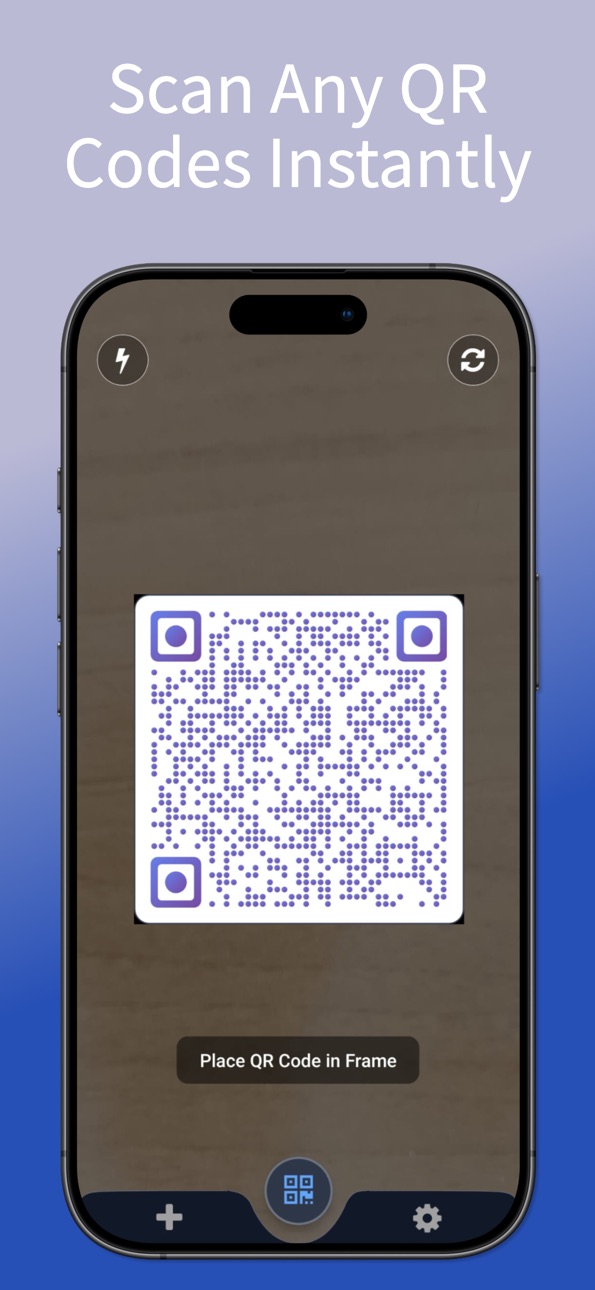
Point your camera at any QR code and scan instantly. No buttons to press - just open the app and scan. Works with all QR code types including URLs, WiFi passwords, contact information, calendar events, and plain text.
• Lightning-fast recognition in under 1 second
• Scan from camera or photo library
• Works in low light with flashlight control
• Automatic content detection and smart actions
• Complete scan history with search and filters
SCAN FROM PHOTOS
Received a QR code via message or email? No problem. Select any image from your photo library and scan instantly. Perfect for screenshots, saved images, and codes you can't scan directly.
PROFESSIONAL QR CODE GENERATOR
Create custom QR codes for any purpose. Share WiFi passwords, contact details, website links, social media profiles, or text messages. Customize with colors, logos, and multiple design patterns.
• WiFi QR codes for instant network sharing
• Contact cards (vCard) for business networking
• Website URLs with custom styling
• Calendar events and appointments
• Social media profiles (Instagram, TikTok, X, LinkedIn, and more)
• Messaging apps (WhatsApp, Telegram, Viber, Signal, Line, WeChat, KakaoTalk)
• Music and media platforms (Spotify, YouTube, Apple Music, SoundCloud)
• Email addresses with pre-filled subjects
• Phone numbers and SMS messages
• Geographic locations
ADVANCED QR CUSTOMIZATION
Make your QR codes stand out with professional styling options:
• Custom foreground and background colors
• Gradient color effects
• Logo embedding for brand identity
• Multiple body, eye frame, and eye ball shapes (square, circle, rounded)
• Error correction level control (L, M, Q, H)
• Quiet zone padding adjustment
• Save your style as default for all future codes
• Live preview while customizing
• High-resolution output for printing
COMPLETE PRIVACY
Your privacy matters. All scanning and generation happens on your device. No data collection, no tracking, no cloud storage. Works completely offline - no internet required.
• Zero data collection
• No account or login required
• Offline functionality
• Secure local processing
SMART FEATURES
• Automatic URL opening in Safari
• One-tap WiFi network connection
• Quick contact saving to your address book
• Calendar event creation
• Copy to clipboard with toast confirmation
• Download QR codes directly to your device
• Share via Messages, Mail, or any app
• Export QR codes as high-quality images
SCAN HISTORY
Never lose a scanned code. Complete history of all scans and generated codes with powerful management:
• Organized by date and type
• Search by content
• Filter by QR code type and date range
• Platform detection for social media and messaging links
• Customize QR style for individual saved codes
• Quick actions: share, download, delete
• Clear history with selective options
PERFECT FOR
• Restaurant menus and WiFi passwords
• Business cards and networking events
• Product information and price comparison
• Event tickets and boarding passes
• Marketing materials and flyers
• Social media profile sharing
• Music and playlist sharing
• Payment codes and digital wallets
MULTI-LANGUAGE SUPPORT
Available in 16 languages including English, Turkish, German, French, Spanish, Portuguese, Italian, Dutch, Russian, Japanese, Korean, Chinese, Arabic, Hindi, Thai, and Vietnamese.
WHY CHOOSE THIS APP
• Fastest scanning speed
• Most customization options
• Complete privacy protection
• Works offline
• Regular updates with new features
Download now and experience the best QR code scanner and generator. Scan smarter. Create better. Stay private.
Capabilities
In-App Purchases
Accessibility
ipadiphonemacrealityDevicetvoswatch
Version history 7 versions
Build 882728046v1.4.42026-02-28 08:04:30
This update brings enhanced QR customization, a redesigned detail view, and visual improvements throughout the app.
ADVANCED QR CUSTOMIZATION
Take full control of your QR code appearance with powerful new settings:
• Error Correction Level: Choose between L, M, Q, and H levels to balance data recovery and code density. Higher levels make codes more scannable even when partially damaged.
• Quiet Zone Control: Adjust the padding around your QR code for optimal scanning reliability. Fine-tune the spacing from zero to maximum for the perfect look.
• All customization changes apply instantly with live preview, so you can see exactly how your code will look before saving.
REDESIGNED QR DETAIL VIEW
The QR code detail modal has been completely refreshed with a cleaner layout and more functionality:
• Download Button: Save QR codes directly to your Photos with a single tap. A sleek toast notification confirms the save instantly.
• Share and Delete: Quick access to sharing and deleting codes right from the header.
• Inline Customization: Open the customization panel directly within the detail view. Adjust colors, shapes, error correction, and quiet zone without leaving the modal.
• Every change saves automatically with live preview - no save button needed.
IMPROVED QR CODE GENERATOR
The generation screen now features a streamlined download experience. Instead of modal dialogs, a clean toast notification confirms when your QR code has been saved successfully. Faster and less intrusive.
VISUAL AND INTERFACE IMPROVEMENTS
• Color picker inputs and apply buttons are now properly aligned for a polished look
• Reduced spacing in customization panels for a more compact and usable layout
• QR code background color now extends seamlessly to the wrapper for a cleaner appearance
• Modal title centering improved for balanced header layout
• Smaller, more refined header action buttons
• Consistent toast notifications across all screens
PLATFORM DETECTION IN HISTORY
Your scan history now intelligently detects and displays platform names for social media, messaging, and media links. See "Social · Instagram" or "Messaging · WhatsApp" at a glance instead of generic type labels.
HISTORY MANAGEMENT
• Clear history with a redesigned single-modal flow for reliable touch handling
• Filter modal reset button highlighted in red for better visibility
• Improved scroll behavior across all screens with consistent bottom spacing
DEFAULT QR STYLE
Set your preferred QR customization as the default style. Every new QR code you generate or view will automatically use your saved preferences including colors, shapes, gradients, error correction level, and quiet zone settings.
PRIVACY AND SECURITY
All scanning, generation, and customization happens locally on your device. No data is collected, stored, or transmitted. Your QR codes and scan history remain completely private.
Thank you for using our app. We regularly update to bring you new features and improvements. Your feedback helps us make the app better with every release.
EXPANDED QR CODE TYPES
Full support for messaging platforms including WhatsApp, Telegram, Viber, Signal, Line, KakaoTalk, and WeChat. Create QR codes for music and media platforms like Spotify, YouTube Music, Apple Music, SoundCloud, and Deezer. Share your social media profiles on Instagram, TikTok, X, LinkedIn, Snapchat, Pinterest, Reddit, and Threads with a single scan.
SCANNING IMPROVEMENTS
• Faster QR code detection and recognition
• Better performance in various lighting conditions
• Enhanced accuracy for all QR code formats
• Optimized battery usage during scanning sessions
Whether you are scanning restaurant menus, sharing WiFi passwords, creating branded QR codes for your business, or sharing your social media profiles, this update delivers a smoother and more powerful experience. Download the update and enjoy the improvements.Scan smarter. Create better.
Build 882051135v1.4.22026-02-10 23:25:31
# What's New in This Version
## PERFORMANCE IMPROVEMENTS
• Faster QR code detection and recognition
• Better scanning in low-light conditions
• Enhanced auto-focus for quick scanning
• Optimized battery usage during scanning sessions
• Improved app stability and responsiveness
## UI ENHANCEMENTS
• Streamlined interface for easier one-handed operation
• Improved history management with better organization
• Enhanced dark mode support
• Smoother animations and transitions
• Faster navigation between scan and generate modes
## PACKAGE UPDATES
• Updated to latest dependencies
• Improved compatibility with latest iOS version
• Enhanced security with updated libraries
• Better performance with optimized packages
## BUG FIXES
• Fixed camera-related issues and crashes
• Resolved scanning problems in certain lighting conditions
• Improved WiFi QR code generation stability
• Better handling of complex QR code data
• Enhanced app stability across all features
## EXPANDED LANGUAGE SUPPORT
Now available in 16 languages with improved translations for better accessibility worldwide.
## PRIVACY & SECURITY
All scanning and generation happens locally on your device. No data is collected, stored, or shared. Complete offline functionality ensures your information stays private and secure.
---
Thank you for using our app! We regularly update to bring you new features and improvements. Keep your app updated for the best experience.
Build 881544927v1.4.12026-01-16 22:15:04
New in this version: Enhanced scanning from photos and improved customization options.
PHOTO LIBRARY SCANNING
Scan QR codes directly from your saved photos and screenshots. Perfect for codes you've received via messaging apps, emails, or social media. No need to display codes on another screen - just select from your photo library and scan instantly.
IMPROVED SCANNING PERFORMANCE
• Faster QR code detection and recognition
• Better performance in low-light conditions
• Enhanced auto-focus for quick scanning
• Improved accuracy for damaged or partial codes
• Optimized battery usage during scanning sessions
ENHANCED QR CODE GENERATOR
• More customization options for colors and patterns
• Logo embedding for branded QR codes
• High-resolution output for professional printing
• Preview before saving or sharing
• Quick templates for common use cases
BETTER USER EXPERIENCE
• Streamlined interface for one-handed operation
• Improved history management with search
• Faster navigation between scan and generate modes
• Enhanced dark mode support
• Smoother animations and transitions
EXPANDED LANGUAGE SUPPORT
Now available in 16 languages for global users. Improved translations and localization for better accessibility worldwide.
BUG FIXES & STABILITY
• Fixed scanning issues in certain lighting conditions
• Resolved crashes when switching between modes
• Improved stability for WiFi QR code generation
• Enhanced compatibility with latest iOS versions
• Better handling of complex QR code data
PRIVACY & SECURITY
All scanning and generation happens locally on your device. No data is collected, stored, or shared. Complete offline functionality means your information stays private and secure.
This update continues our commitment to providing the fastest, most reliable QR code solution while respecting your privacy. Whether you're scanning restaurant menus, WiFi credentials, business cards, or creating custom codes for your business, this version delivers improved performance and new features to make your experience even better.
Thank you for using our app. We regularly update to bring you new features and improvements. Keep your app updated for the best experience.
Build 879612714v1.4.02025-11-11 12:05:45
This major update brings powerful new scanning capabilities and enhanced user experience to make QR code scanning and generation even more efficient.
NEW FEATURES:
- Folder QR Scanning: Now scan QR codes directly from your photo library and saved images - perfect for screenshots, photos, and stored documents
- Enhanced Visual Design: Completely refreshed interface with improved navigation and modern aesthetics for better usability
- Multi-Language Support: Expanded language support for global accessibility with improved translations
IMPROVEMENTS:
- Faster Scanning Engine: Optimized QR code detection algorithm for instant recognition and processing
- Better Camera Integration: Enhanced auto-focus system and improved low-light scanning performance
- Streamlined User Interface: Simplified navigation with intuitive controls for one-handed operation
- Enhanced History Management: Improved organization and search capabilities for all scanned and generated codes
- Performance Optimization: Reduced app size and improved battery efficiency for extended usage
BUG FIXES:
- Resolved scanning issues in challenging lighting conditions
- Fixed occasional crashes during batch scanning operations
- Corrected QR code generation errors for complex data types
- Improved stability when switching between scan and generate modes
- Enhanced compatibility with latest iOS versions
TECHNICAL ENHANCEMENTS:
- Advanced QR Code Formats: Full support for all standard QR code types including WiFi credentials, contact information, URLs, and plain text
- Smart Content Recognition: Automatic detection and appropriate action suggestions for different QR code content types
- Secure Processing: All operations handled locally on device with no data collection or privacy concerns
- Offline Functionality: Complete feature set available without internet connection
The app continues to deliver professional-grade QR code solutions with zero learning curve. Whether you need quick scanning for shopping, event check-ins, or WiFi connections, or require custom QR code generation for business cards, marketing materials, or network sharing, this update provides the tools you need.
Our commitment to user privacy remains unchanged - no personal data collection, no unnecessary permissions, and complete offline functionality. The lightweight design ensures minimal storage impact while delivering maximum performance across all device types.
Experience the perfect balance of simplicity and power with features designed for both casual users and professionals who rely on QR codes daily.
Build 878211244v1.3.02025-09-20 04:25:05
This major update brings powerful customization features and enhanced user experience to make QR code scanning and generation even more efficient.
NEW FEATURES:
- Custom QR Code Generator: Create personalized QR codes with advanced styling options including color customization, logo embedding, and pattern selection
- Enhanced Visual Design: Completely refreshed interface with improved navigation and modern aesthetics for better usability
- Multi-Language Support: Added Dutch and Portuguese language support, bringing total supported languages to 12 for global accessibility
IMPROVEMENTS:
- Faster Scanning Engine: Optimized QR code detection algorithm for instant recognition and processing
- Better Camera Integration: Enhanced auto-focus system and improved low-light scanning performance
- Streamlined User Interface: Simplified navigation with intuitive controls for one-handed operation
- Enhanced History Management: Improved organization and search capabilities for all scanned and generated codes
- Performance Optimization: Reduced app size and improved battery efficiency for extended usage
BUG FIXES:
- Resolved scanning issues in challenging lighting conditions
- Fixed occasional crashes during batch scanning operations
- Corrected QR code generation errors for complex data types
- Improved stability when switching between scan and generate modes
- Enhanced compatibility with latest iOS versions
TECHNICAL ENHANCEMENTS:
- Advanced QR Code Formats: Full support for all standard QR code types including WiFi credentials, contact information, URLs, and plain text
- Smart Content Recognition: Automatic detection and appropriate action suggestions for different QR code content types
- Secure Processing: All operations handled locally on device with no data collection or privacy concerns
- Offline Functionality: Complete feature set available without internet connection
The app continues to deliver professional-grade QR code solutions with zero learning curve. Whether you need quick scanning for shopping, event check-ins, or WiFi connections, or require custom QR code generation for business cards, marketing materials, or network sharing, this update provides the tools you need.
Our commitment to user privacy remains unchanged - no personal data collection, no unnecessary permissions, and complete offline functionality. The lightweight design ensures minimal storage impact while delivering maximum performance across all device types.
Experience the perfect balance of simplicity and power with features designed for both casual users and professionals who rely on QR codes daily.
Build 875364477v1.1.12025-06-06 08:26:14
Hello QR Scanner & Generator Plus users! In this version, we've made some updates and improvements to enhance your experience:
Improved "Rate Us" Experience:
* We value your feedback! We've introduced a new, more user-friendly way for you to share your thoughts about the app.
* When you choose to rate us, you'll now see a clear prompt that directs you straight to our App Store page. This replaces the previous in-app review pop-up for a smoother experience.
* Bug Fixes: Addressed a minor issue with saving generated QR codes to the gallery on certain devices. Fixed a bug related to history filtering.
We're always working to make QR Scanner & Generator Plus the best QR tool for you. Thanks for your support! If you encounter any issues or have suggestions, please don't hesitate to contact us.
Build 875076865v1.02025-06-03 16:46:52
No pricing data captured yet — comparisons appear once the app has paid storefronts or in-app purchases.
Availability 1 of 1 storefronts
| Region | Language | Price | Ratings | Avg | Version |
|---|---|---|---|---|---|
| US | en-US | Free | 0 | — | 1.4.4 |
Change log 11 changes · US
✎
releaseNotes updated
This update brings enhanced QR customization, a redesigned detail view, and visual improvements throughout the app.
ADVANCED QR CUSTOMIZATION
Take full co
✎
description updated
The fastest way to scan and create QR codes on your iPhone. Scan with your camera or from photos. Generate custom QR codes with colors, logos, and advanced styl
✎
subtitle updated
Simple Scan & Create QR Codes
✎
name updated
QR-Barcode Generator & Scanner
◆
Version 1.4.4 released
This update brings enhanced QR customization, a redesigned detail view, and visual improvements throughout the app.
ADVANCED QR CUSTOMIZATION
Take full control of your QR code appearance with powerful new settings:
• Error Correcti
◆
Version 1.4.2 released
# What's New in This Version
## PERFORMANCE IMPROVEMENTS
• Faster QR code detection and recognition
• Better scanning in low-light conditions
• Enhanced auto-focus for quick scanning
• Optimized battery usage during scanning sessions
• Im
◆
Version 1.4.1 released
New in this version: Enhanced scanning from photos and improved customization options.
PHOTO LIBRARY SCANNING
Scan QR codes directly from your saved photos and screenshots. Perfect for codes you've received via messaging apps, emails, or s
◆
Version 1.4.0 released
This major update brings powerful new scanning capabilities and enhanced user experience to make QR code scanning and generation even more efficient.
NEW FEATURES:
- Folder QR Scanning: Now scan QR codes directly from your photo library a
◆
Version 1.3.0 released
This major update brings powerful customization features and enhanced user experience to make QR code scanning and generation even more efficient.
NEW FEATURES:
- Custom QR Code Generator: Create personalized QR codes with advanced stylin
◆
Version 1.1.1 released
Hello QR Scanner & Generator Plus users! In this version, we've made some updates and improvements to enhance your experience:
Improved "Rate Us" Experience:
* We value your feedback! We've introduced a new, more user-friendly way for yo
◆
Version 1.0 released