Home › Productivity

 US
US
1 of 1 storefronts
Content in en-US
Content in en-US
Information
Preview 3 platforms
iPhone 6 images




iPad 5 images



Mac 5 images


What’s New Version 2.3.2
Better document and setting syncs across devices
Checklist enhancements
Improved live PDF preview and export
Improved markdown paste into Steno
Purchase thank-you
Description
Steno is a fast, distraction-free Markdown editor designed for focused, beautiful writing.
Built natively for Apple platforms with CloudKit, Steno keeps your documents automatically synced across your devices—without ads, tracking, or external servers.
Why Steno?
• Seamless iCloud sync across Mac, iPhone, and iPad
• Native performance—no bloat, no lag, just fast
• Clean typography with powerful, design-forward customization
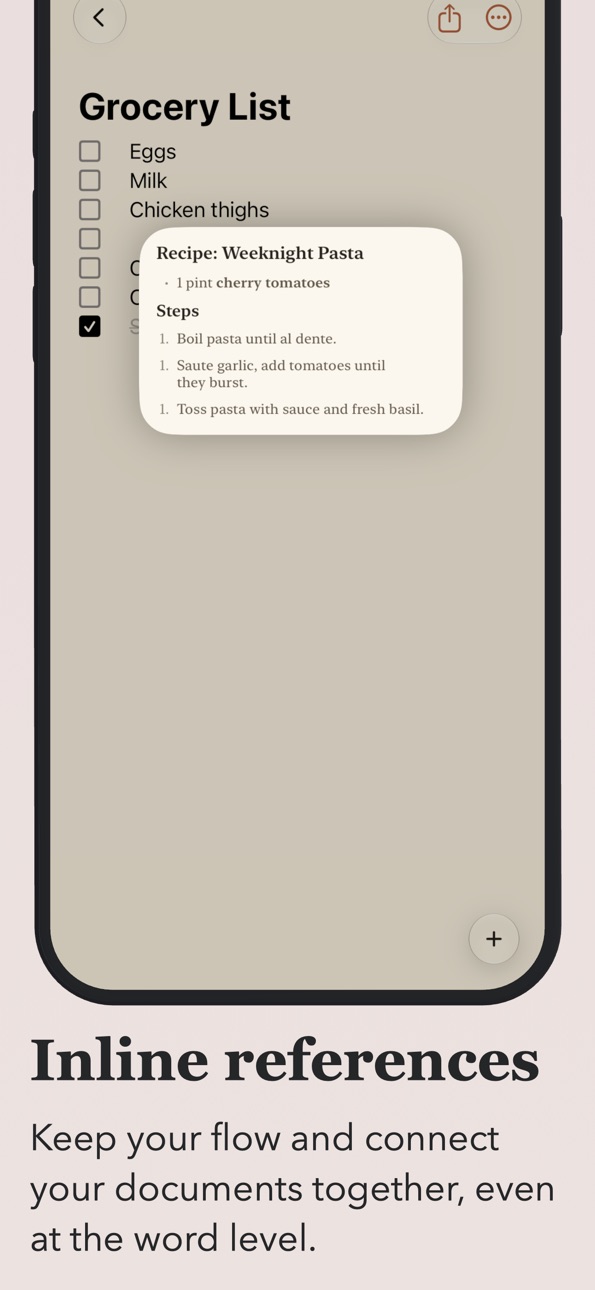
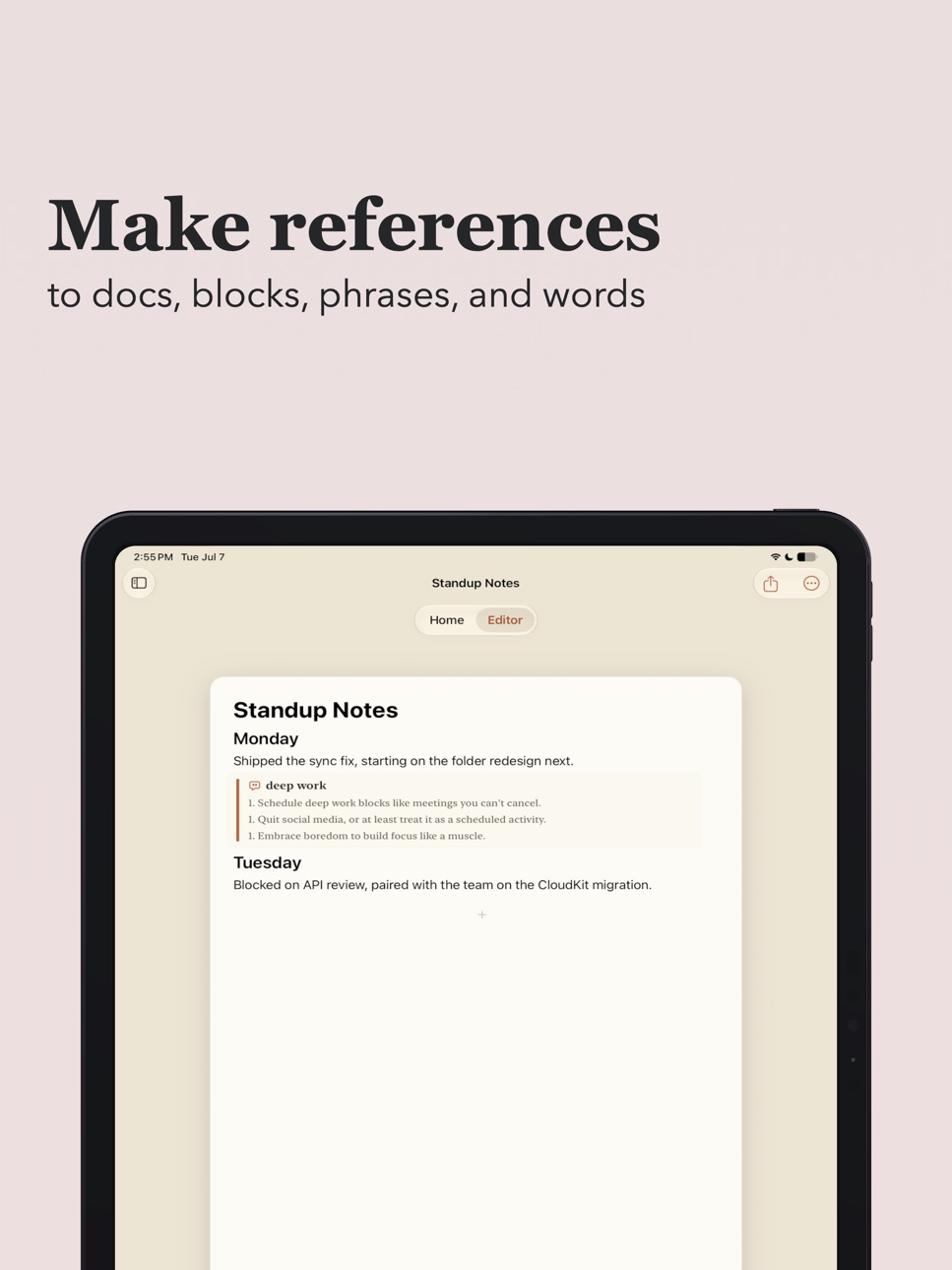
• Sub-block-level references for linking directly to the exact passage you mean
• Deep system integration—Handoff, Spotlight, Siri, and Widgets
• Customizable PDF export for polished sharing
• No data collection, no AI. Your documents stay on your device and in iCloud
• All documents stored as plain Markdown files
Whether you're drafting essays, making lists, or capturing ideas, Steno combines speed, clarity, and privacy in a focused writing environment.
In-App Purchases US pricing
One-Time Purchases
Tip Jar (Small)$0.99
Tip Jar (Medium)$2.99
Steno Complete$4.99
Steno Tip (Large)$4.99
Capabilities
In-App Purchases
Accessibility
ipadiphonemacrealityDevicetvoswatch
Version history 7 versions
Build 888034560v2.3.22026-07-09 17:09:47
Better document and setting syncs across devices
Checklist enhancements
Improved live PDF preview and export
Improved markdown paste into Steno
Purchase thank-you
Build 887973616v2.3.12026-07-08 23:02:15
Steno is enhanced in these areas:
Widgets,
Document scrolling performance,
Home Page interactions
Build 887814934v2.32026-07-04 21:33:53
~Widgets
- New checklist widget — interact with documents right from your Home Screen
- New document widget
- Favorited document widget
~Enhanced Customization
- Choose from a much larger list of fonts in settings
~Fixes
- Drag and drop to rearrange blocks on iPhone
- Some fonts would not render with a bold style
- Toggling bold, underline, or italics would not start text with that styling
Build 887264988v2.22026-07-03 02:06:02
Steno has a new look and feel, featuring tighter vertical spacing between blocks, serif fonts, subdued hues, smarter layouts, and more.
Also in this version:
Inline bold, italic, underline, and strikethrough;
Improved markdown document handling;
More reliable tabbing between blocks;
Inline shortcuts using '/' and '@' feel more responsive;
More accurate PDF preview;
Many more options for customization.
Build 881833830v2.12026-01-26 06:36:06
Steno 2.1
Fixes
• Fixed a crash when opening the first document
• Fixed a bug where scrolling would
• Faster document opening for small files
• Improved image rendering quality
• Visual and UI refinements
• Smoother scrolling and typing performance, especially in large documents
New & Improved
• Create new tabs with ⌘+N
• Expanded keyboard navigation across documents
• Save Markdown files directly to an iCloud folder
• Handoff support from Mac to iPhone and iPad
• Copy the entire document with ⌘+Shift+C
• Improved Export and Print keyboard shortcuts
• Expanded Markdown support
• Tables
• Numbered lists
• Smarter paste behavior
• Automatically parses Markdown
• Supports pasted images
Build 881863480v2.1.12026-01-26 21:22:49
Steno 2.1.1
Fixed bug where document body would not load.
Build 878048842v2.02025-09-16 12:59:00
Price history by region
Currency
Show
Columns
Search
Availability 1 of 1 storefronts
| Region | Language | Price | Ratings | Avg | Version |
|---|---|---|---|---|---|
| US | en-US | Free | 0 | — | 2.3.2 |
Change log 11 changes · US
✎
releaseNotes updated
Better document and setting syncs across devices
Checklist enhancements
Improved live PDF preview and export
Improved markdown paste into Steno
Purchase thank-y
✎
description updated
Steno is a fast, distraction-free Markdown editor designed for focused, beautiful writing.
Built natively for Apple platforms with CloudKit, Steno keeps your d
✎
subtitle updated
Stunning, Simple Notes
✎
name updated
Steno Notes
◆
Version 2.3.2 released
Better document and setting syncs across devices
Checklist enhancements
Improved live PDF preview and export
Improved markdown paste into Steno
Purchase thank-you
◆
Version 2.3.1 released
Steno is enhanced in these areas:
Widgets,
Document scrolling performance,
Home Page interactions
◆
Version 2.3 released
~Widgets
- New checklist widget — interact with documents right from your Home Screen
- New document widget
- Favorited document widget
~Enhanced Customization
- Choose from a much larger list of fonts in settings
~Fixes
- Drag and drop t
◆
Version 2.2 released
Steno has a new look and feel, featuring tighter vertical spacing between blocks, serif fonts, subdued hues, smarter layouts, and more.
Also in this version:
Inline bold, italic, underline, and strikethrough;
Improved markdown document
◆
Version 2.1.1 released
Steno 2.1.1
Fixed bug where document body would not load.
◆
Version 2.1 released
Steno 2.1
Fixes
• Fixed a crash when opening the first document
• Fixed a bug where scrolling would
• Faster document opening for small files
• Improved image rendering quality
• Visual and UI refinements
• Smoother scrolling and typing p
◆
Version 2.0 released