Home › Business

Printer App: Photo & Scan Pdf
Printer & Scanner For All Docs
 US
US
1 of 1 storefronts
Content in en-US
Content in en-US
Information
Preview 2 platforms
iPhone 5 images


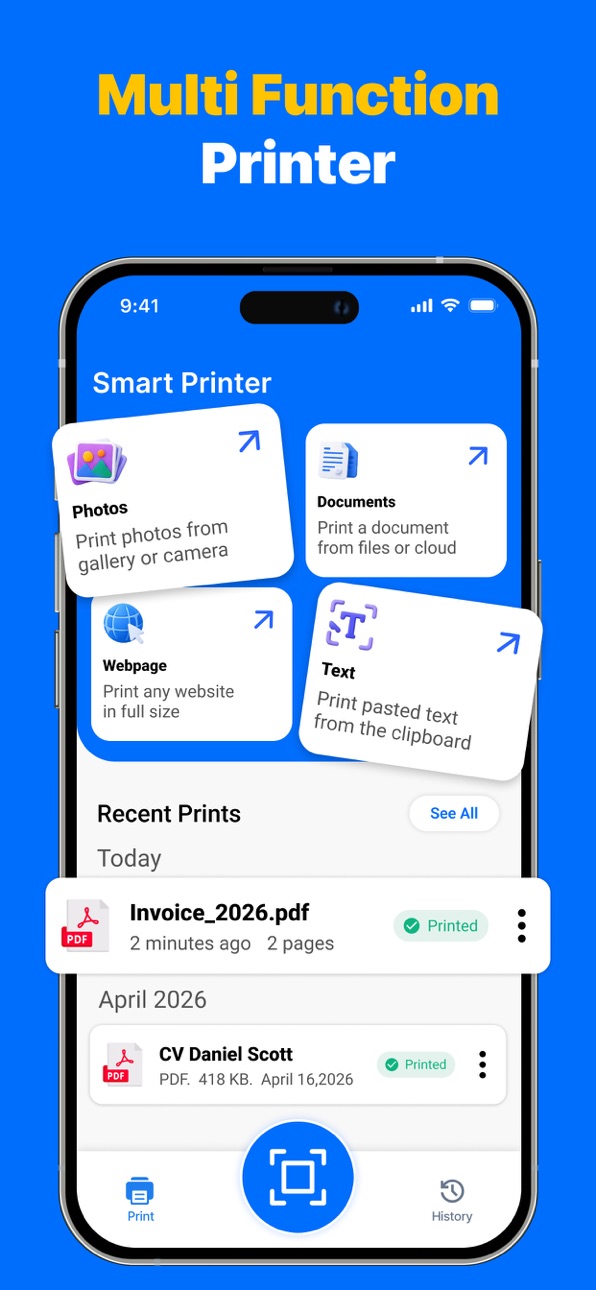


iPad 5 images


What’s New Version 1.14
Performance enhancements.
Description
Printer App: Photo & Scan Pdf is a powerful all-in-one solution that turns your iPhone or iPad into a smart printer, scanner, and document manager. Designed for speed, accuracy, and ease of use, this app helps you scan documents, print photos, and manage files effortlessly without watermarks or complicated setup.
With Printer App: Photo & Scan Pdf, you can enjoy seamless wireless printing using AirPrint technology. The app automatically detects nearby compatible printers and connects instantly, eliminating the need for drivers or manual configuration. It works smoothly with popular printer brands such as HP, Canon, Epson, Brother, Pixma, Kodak, inkjet printers, and mini photo printers, delivering reliable and professional print quality every time.
Print photos, PDFs, emails, labels, calendars, webpages, and documents directly from your device. Printer App: Photo & Scan Pdf supports unlimited, watermark-free printing, making it ideal for home, office, school, and business use. Whether you are printing important contracts or everyday documents, the results remain clean, sharp, and professional.
The built-in scanner in Printer App: Photo & Scan Pdf comes with advanced OCR technology, allowing you to scan documents and convert them into searchable and editable text. Quickly digitize receipts, invoices, notes, ID cards, passports, contracts, and multi-page files. Automatic edge detection, smart cropping, and perspective correction ensure high-quality scans with minimal effort.
Powerful PDF and photo tools give you complete control over your documents. With Printer App: Photo & Scan Pdf, you can convert images to PDF or JPG, merge multiple pages, rearrange files, adjust layouts, and enhance scan quality. Sensitive documents can be protected using secure encryption, ensuring your files stay private and safe. Organize everything easily using the built-in file manager. Create folders, move files with drag-and-drop, rename documents, and edit content effortlessly. Printer App: Photo & Scan Pdf allows you to store unlimited files and access them anytime. You can also upload documents to Google Drive, Dropbox, or OneDrive, or share them directly via email. The app works offline, so you can scan and organize documents anywhere.
Perfect for students, professionals, remote workers, travelers, and small business owners, Printer App: Photo & Scan Pdf simplifies your daily document tasks. Download now and experience a smarter, faster, and more organized way to print, scan, and manage your documents.
Privacy Policy: https://sites.google.com/view/blendatom-privacypolicy/home
Terms of Use: https://sites.google.com/view/blendatom-terms-of-use/home
Capabilities
In-App Purchases
Accessibility
ipadiphonemacrealityDevicetvoswatch
Version history 15 versions
Build 885497257v1.142026-05-18 09:43:46
Performance enhancements.
Build 882685238v1.132026-02-24 18:45:58
Improved performance and enhanced stability.
Build 882156753v1.122026-02-04 21:04:09
Performance Improvements.
Build 881718986v1.112026-01-27 00:11:29
Minor Bugs Fixed
Build 881596677v1.102026-01-21 05:41:35
User experience and performance improvements.
Build 880700744v1.92025-12-17 22:44:12
UI Improvements & Feature Enhancements:
Enhanced AirPrint printer detection algorithm for faster, more reliable connections
Redesigned scanning interface with improved OCR accuracy for text recognition
New automatic edge detection for perfectly aligned document scans every time
Improved PDF merge and page editing interface for seamless document modification
Streamlined file manager with enhanced drag-and-drop functionality
Better folder organization and intuitive navigation
Advanced OCR text recognition for clearer, more accurate conversions
Faster multi-page scanning processing speed
Improved cloud upload speeds to Dropbox, OneDrive, Google Drive
Better ID card and passport scanning alignment and detection
Enhanced photo printing quality and accurate color reproduction
Optimized overall app performance and memory efficiency
Bug Fixes:
Fixed AirPrint connection timeout issues with certain printer models
Resolved PDF merge crashes when combining large documents
Corrected OCR text extraction for improved accuracy and readability
Fixed file manager drag-and-drop lag on large document collections
Improved stability when encrypting sensitive files
Resolved cloud upload interruption issues
Fixed email sharing attachment encoding problems
Corrected automatic page alignment detection for receipt scanning
Enhanced document editor responsiveness
Fixed occasional app crashes during multi-page scanning sessions
Improved passport and ID card recognition accuracy
Fixed watermark settings persistence across app sessions
Build 878042118v1.82025-09-21 03:32:47
Added some new features and improved minor bugs
Build 877167167v1.72025-08-19 21:08:05
We've tried to make improvements and added a few enhancements to make your experience even better.
Build 876849789v1.62025-07-31 11:06:55
We've tried to make improvements and added a few enhancements to make your experience even better.
Build 876360382v1.52025-07-23 12:31:56
We've tried to make improvements and added a few enhancements to make your experience even better.
Build 875900177v1.42025-07-08 15:55:18
We've made performance improvements and added a few enhancements to make your experience even better.
Build 875825219v1.32025-06-24 19:15:51
We've made performance improvements and added a few enhancements to make your experience even better.
Build 875591312v1.22025-06-15 13:00:38
- Performance and Stability Updates
- Fixed Minor UI Bugs
Build 875246092v1.12025-06-11 20:57:37
Minor Bug Fixes!
Build 874817472v1.02025-05-19 21:12:46
No pricing data captured yet — comparisons appear once the app has paid storefronts or in-app purchases.
Availability 1 of 1 storefronts
| Region | Language | Price | Ratings | Avg | Version |
|---|---|---|---|---|---|
| US | en-US | Free | 2 | 4.5 | 1.14 |
Change log 19 changes · US
✎
releaseNotes updated
Performance enhancements.
✎
description updated
Printer App: Photo & Scan Pdf is a powerful all-in-one solution that turns your iPhone or iPad into a smart printer, scanner, and document manager. Designed for
✎
subtitle updated
Printer & Scanner For All Docs
✎
name updated
Printer App: Photo & Scan Pdf
◆
Version 1.14 released
Performance enhancements.
◆
Version 1.13 released
Improved performance and enhanced stability.
◆
Version 1.12 released
Performance Improvements.
◆
Version 1.11 released
Minor Bugs Fixed
◆
Version 1.10 released
User experience and performance improvements.
◆
Version 1.9 released
UI Improvements & Feature Enhancements:
Enhanced AirPrint printer detection algorithm for faster, more reliable connections
Redesigned scanning interface with improved OCR accuracy for text recognition
New automatic edge detection for pe
◆
Version 1.8 released
Added some new features and improved minor bugs
◆
Version 1.7 released
We've tried to make improvements and added a few enhancements to make your experience even better.
◆
Version 1.6 released
We've tried to make improvements and added a few enhancements to make your experience even better.
◆
Version 1.5 released
We've tried to make improvements and added a few enhancements to make your experience even better.
◆
Version 1.4 released
We've made performance improvements and added a few enhancements to make your experience even better.
◆
Version 1.3 released
We've made performance improvements and added a few enhancements to make your experience even better.
◆
Version 1.2 released
- Performance and Stability Updates
- Fixed Minor UI Bugs
◆
Version 1.1 released
Minor Bug Fixes!
◆
Version 1.0 released