Home › Lifestyle

 US
US
 AGen-GB
 AIen-GB
 AOen-GB
 ARes-MX
 BBen-GB
 BFen-GB
 BJen-GB
 BOes-MX
 BRpt-BR
 BSen-GB
 BWen-GB
 BZen-GB
 CDen-GB
 CGen-GB
 CIfr-FR
 CLes-MX
 CMfr-FR
 COes-MX
 CRes-MX
 CVen-GB
 DMen-GB
 DOes-MX
 DZen-GB
 ECes-MX
 GAfr-FR
 GDen-GB
 GHen-GB
 GMen-GB
 GTes-MX
 GWen-GB
 GYen-GB
 HNes-MX
 JMen-GB
 KEen-GB
 KNen-GB
 KYen-GB
 LCen-GB
 LRen-GB
 LYen-GB
 MAen-GB
 MGen-GB
 MLen-GB
 MSen-GB
 MUen-GB
 MWen-GB
 MXes-MX
 MZen-GB
 NAen-GB
 NEen-GB
 NGen-GB
 NIes-MX
 PAes-MX
 PEes-MX
 PYes-MX
 RWen-GB
 SCen-GB
 SLen-GB
 SNen-GB
 SRen-GB
 STen-GB
 SVes-MX
 SZen-GB
 TCen-GB
 TDen-GB
 TNen-GB
 TTen-GB
 TZen-GB
 UGen-GBUSen-US
 UYen-GB
 VCen-GB
 VEes-MX
 VGen-GB
 ZMen-GB
 ZWen-GB
75 of 75 storefronts
Content in en-US
Content in en-US
Information
Preview 3 platforms
iPhone 7 images





iPad 7 images





Apple Watch 1 image

What’s New Version 1.37
Version 1.37 — Puzzle Sessions
This update introduces Puzzle Sessions: a focused full-screen mode designed for active puzzling.
Puzzle Sessions
Start a Puzzle Session on an active puzzle for a clean, distraction-free view while you puzzle.
During a session you can:
* Pause or resume your puzzle
* Quickly add +25 or +50 pieces to your progress
* Mark edges as completed with automatic progress updates
* Set an optional 30 or 60 minute session goal with haptic feedback when reached
* Keep your screen awake while puzzling
The session view also shows:
* Your puzzle image
* Effective puzzle time (for timer-based puzzles)
* Current progress
* Edge completion status
Leaving a session only closes the session screen — your puzzle remains active in the background.
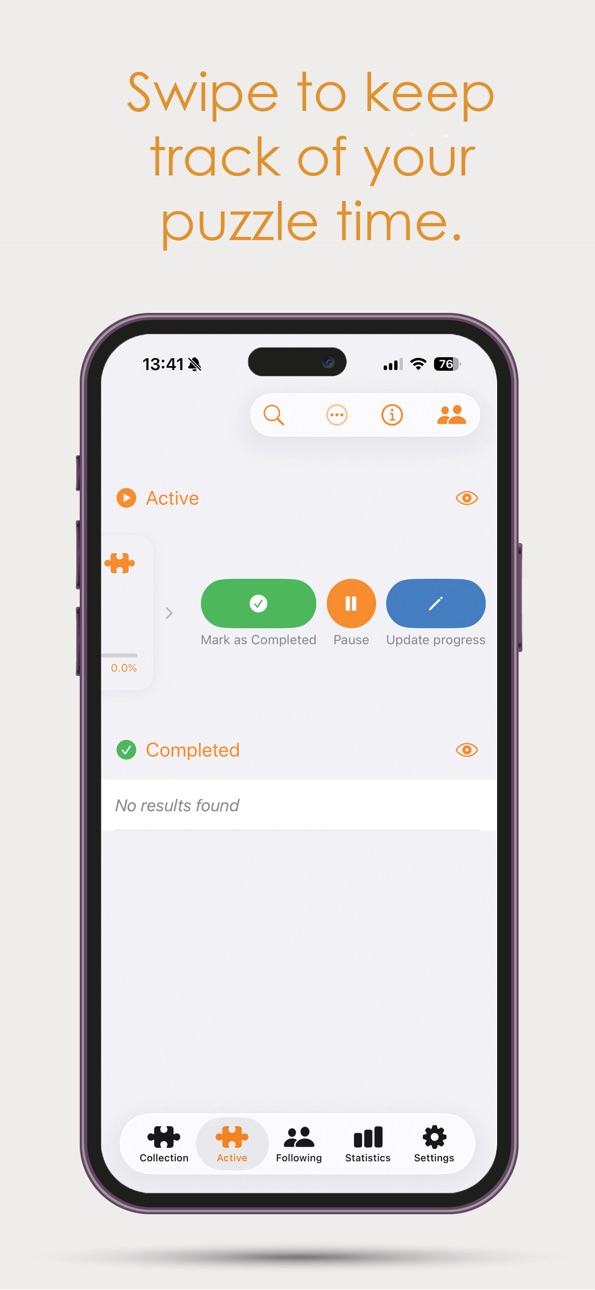
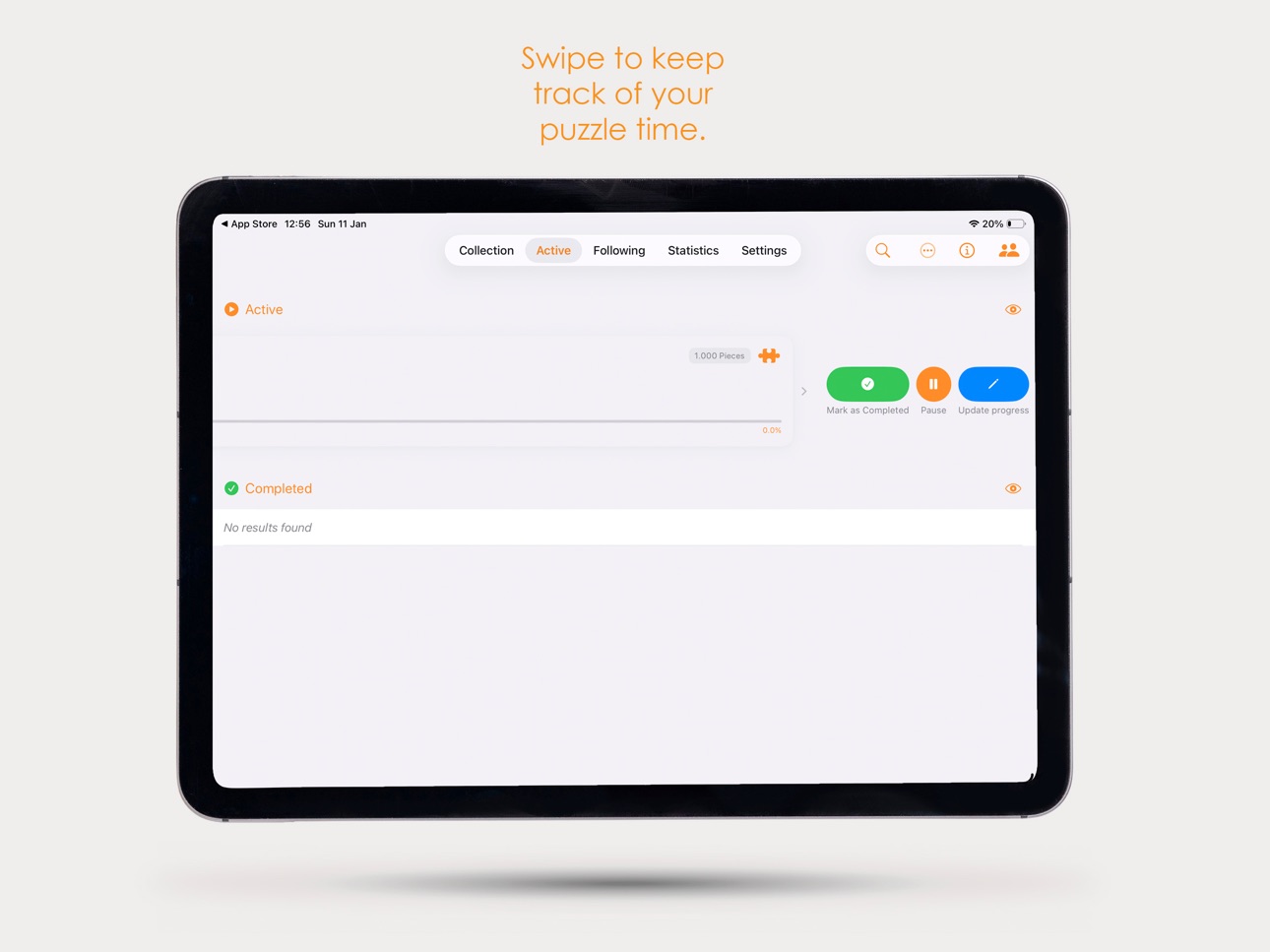
You can launch Puzzle Sessions from the puzzle detail page, active puzzle list swipe actions, and other active puzzle management screens.
Description
Track Your Puzzle Progress Like Never Before!
Are you a fan of Jan van Haasteren puzzles? This is the ultimate app to organize, track, and share your puzzling journey.
Keep a clear overview of your entire puzzle collection
Log each session and track your progress piece by piece
Follow fellow puzzlers and discover their latest additions
Share your collection with friends and puzzle fans
Built for puzzlers, by puzzlers whether you're completing your first puzzle or your hundredth!
Accessibility
ipadiphonemacrealityDevicetvoswatch
Version history 25 versions
Build 886138768v1.372026-05-26 17:59:03
Version 1.37 — Puzzle Sessions
This update introduces Puzzle Sessions: a focused full-screen mode designed for active puzzling.
Puzzle Sessions
Start a Puzzle Session on an active puzzle for a clean, distraction-free view while you puzzle.
During a session you can:
* Pause or resume your puzzle
* Quickly add +25 or +50 pieces to your progress
* Mark edges as completed with automatic progress updates
* Set an optional 30 or 60 minute session goal with haptic feedback when reached
* Keep your screen awake while puzzling
The session view also shows:
* Your puzzle image
* Effective puzzle time (for timer-based puzzles)
* Current progress
* Edge completion status
Leaving a session only closes the session screen — your puzzle remains active in the background.
You can launch Puzzle Sessions from the puzzle detail page, active puzzle list swipe actions, and other active puzzle management screens.
Build 885783160v1.362026-05-18 16:02:26
Version 1.36 — Customize your statistics & improved scanning
This update makes the app more flexible and fixes scanning for puzzles with multiple barcodes.
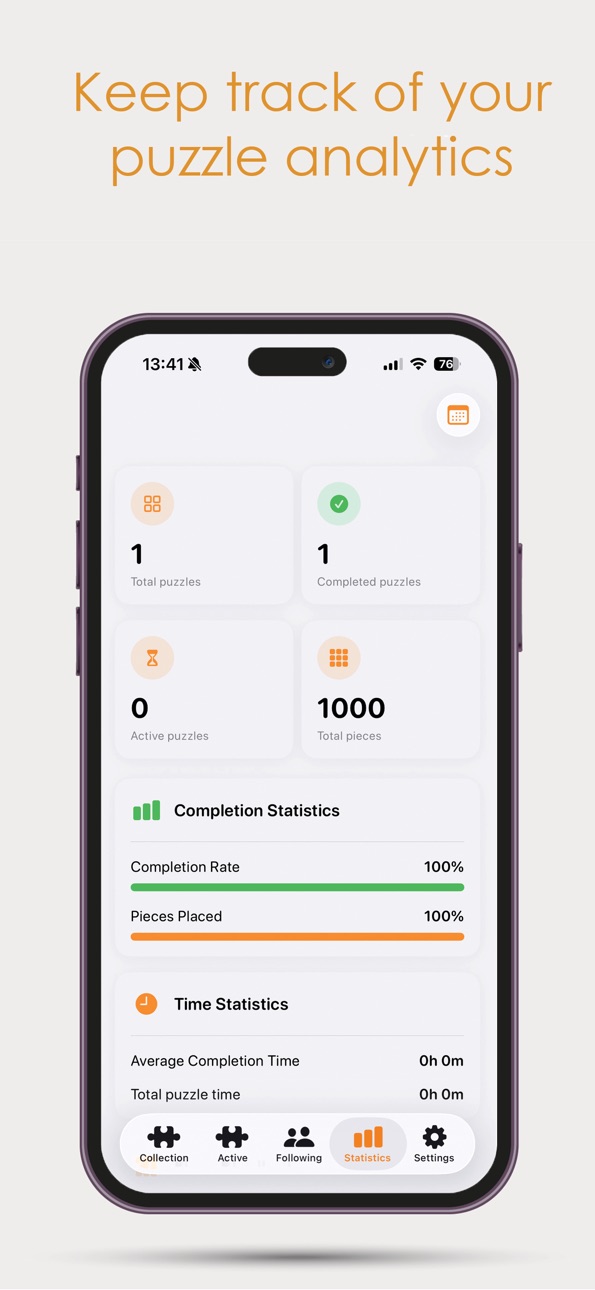
Modular Statistics Page Your statistics screen is now built from widgets you can arrange yourself:
Turn statistics on or off and drag them into the order you prefer
New statistics widgets added (categories, progress, ratings, monthly activity, and more)
The familiar look stays, with a cleaner and more polished layout
Empty categories hide automatically so you only see what’s relevant
Improved EAN Scanning Some puzzles have more than one barcode The app now supports that:
A second EAN code (ean2) can be stored for the same puzzle
Scanning works whether you scan the primary or secondary barcode
Fixes cases where a valid puzzle wasn’t found because only one code was recognized
Build 885316416v1.352026-05-06 18:24:25
Following recent improvements, this update focuses on refining the search and user experience, along with clearer in-app feedback.
Improved Search & Following Experience
Finding and following users is now more reliable and intuitive:
* Searching via the keyboard (Enter) now works as expected
* You’ll see a clear message when no users are found
* Search results now include profile photos for better recognition
* Fixed an issue where profiles incorrectly showed “Unfollow”
New Privacy Settings
More control over your visibility in the app:
* Hide your profile photo
* Hide your profile from search results
Improved Scanner Experience
The scanner has been enhanced with better guidance:
* Added a new info button explaining EAN codes and how to use the catalog
* Clearer message when an EAN code is not found
→ This helps users understand that a puzzle may still exist even if the code isn’t recognized
New: App Shortcuts
Faster access to key features directly from your device:
* Open the scanner instantly (e.g. via the Action Button)
* Quickly complete your active puzzle
* Pause or resume your current puzzle
User Data & Performance Improvements
* Fixed an issue where only a limited number of users were loaded in search results
* Resolved the “Unknown user” issue (e.g. with Apple login)
→ These users can now be properly found and followed
Build 885046467v1.342026-04-29 02:02:38
After the major redesign in 1.33, this update focuses on refining the scanning experience and fixing key issues.
Improved Puzzle Scanning
The scanning workflow has been enhanced to be faster and more intuitive:
* Scanned EAN codes are now automatically filled in, saving time during manual entry
* Improved in-app notifications while scanning, now clearer and more visually polished
New: Zoom Controls in Scanner
Scanning puzzles from a distance is now much easier:
* Added pinch-to-zoom support
* Added a zoom slider for more precise control
Perfect for situations like busy markets where puzzles aren’t always within reach.
Fixed
* Resolved an issue where scanned puzzles were detected but not opened correctly
Build 884762558v1.332026-04-21 20:12:10
After a long time, a major update is finally here.
Completely Redesigned Groups
The Groups view has been fully rebuilt from the ground up. What used to feel cluttered is now clean, structured, and visually refined, making everything easier to navigate.
New Group Widgets
Groups are now more powerful with the introduction of widgets:
Group Wishlist, Announcements, Links, Rules, Events, and Polls.
These additions create many new ways to collaborate and organize within your group.
Improved Following View
The Following view has been updated to better match the new Groups design, resulting in a more consistent experience across the app.
Unified Design Language
The “eye” icons have been replaced with a cleaner arrow style, aligning with the rest of the app for a more consistent design system.
King’s Day Feature: Smart Puzzle Scanning
Scan a puzzle with the app and instantly see if it’s in your Wishlist. You’ll receive a clear in-app notification, making it much faster to spot great deals.
This also works with Group Wishlists, making it easy to share and use a wishlist with friends while searching together.
Build 883155448v1.322026-03-09 18:12:29
Version 1.32 introduces new sorting functionality, improvements to the Groups feature, and refinements to account handling and UI consistency.
This update focuses on improving usability while continuing development of the social group system.
What’s New & Improved
• New Sorting Option: Release Year
A new sorting option has been added that allows puzzles to be sorted by Release Year.
Available sorting options:
• Newest first
• Oldest first
This sorting option is available in both the Collection view and the Active puzzles page.
• Improved Puzzle Number Formatting
Puzzle numbers in the Add Puzzle view previously displayed formatting such as 1.026.
The separator has been removed to keep numbering consistent with the rest of the app.
• Groups Section Improvements (Following View)
The Groups section now includes a new toolbar for easier navigation and discovery.
New functionality includes:
• Search for groups based on location
• When creating a group, you can now specify a location
• Option to allow your group to be discoverable via the new Discover feature
The Groups feature will continue to evolve over time and remains a work in progress as new functionality is gradually introduced.
• Improved Apple Sign-In Username Handling
Sign in with Apple provides strong privacy protection, but some users were assigned the default name “User”.
Previously, when users changed this name, it could revert back due to repeated validation checks.
This has now been resolved by storing the custom name locally so it will no longer reset.
Additional Improvements
• Ongoing development of social features
The Groups functionality will continue to receive incremental improvements as development progresses.
Build 882942604v1.312026-03-02 22:21:03
Version 1.31 introduces new social functionality, account management improvements, and important fixes to statistics tracking and time calculations.
This update improves accuracy, usability, and overall polish across the app.
What’s new and improved:
• New Followers Widget
A new widget has been added, allowing you to quickly see:
• Who follows you
• Who you are following
This makes social activity more visible and accessible at a glance.
• Email address change option
Users who signed in with email can now change their email address directly within the app.
You can find this option under Settings → Account Management.
This feature was added based on user feedback.
• Statistics tracking fix (Completed puzzles)
An issue was reported where some completed puzzles did not update statistics correctly.
This occurred when a puzzle was marked as completed directly via swipe in the Collection view.
In certain cases, the validation logic was too strict, causing statistics not to update.
This logic has now been corrected.
Statistics update reliably again including when completing via swipe.
• Negative time calculation fix (Android feedback)
An issue was identified where adjusting the completion date (for example, setting it to yesterday after marking a puzzle as completed) could result in a negative time value being displayed.
This has been resolved.
Time values will now never go below 00:00.
• Swipe action text refinement (English)
In the English version of the app, the text “Mark as completed” was visually truncated in the Collection swipe action due to limited space.
The label has been refined to:
“Mark Completed”
This improves readability and visual consistency.
• General stability improvements
Minor internal refinements and cleanup for improved reliability.
Build 882706181v1.302026-02-23 21:08:21
Version 1.30 is a major optimization update focused on performance, data control, scanner reliability, and overall consistency across the app.
This update introduces significant internal improvements and structural refinements to make the app faster, smarter, and more future-proof.
What’s improved:
• Major internal optimization
Large parts of the app now store data locally instead of relying on external requests.
This results in noticeably faster performance, improved stability, and reduced dependency on third-party services.
• New internal EAN mapping system
The puzzle scanner relies on EAN barcodes, but no complete public EAN database for puzzles exists.
Previously, the app depended fully on an external barcode lookup service. While this worked well for older puzzles, newer releases often lacked proper mapping.
A new internal EAN-to-article-number system has now been built and self-hosted.
The app now:
• First checks the internal database
• Falls back to the external lookup service if needed
This ensures faster recognition of new puzzles and allows missing codes to be added quickly.
• Scan improvements
The Scan feature now uses the new internal EAN system, improving reliability and future expandability.
• Duplicate article number resolution
An issue was identified where some puzzles shared the same article number, causing catalog inconsistencies.
This has been resolved while maintaining strict duplicate puzzle detection.
Duplicate puzzles are now detected more reliably when adding them to your collection.
• “Missing pieces” option during add flow
Users can now indicate missing pieces directly while adding a puzzle.
For combo boxes, this is requested per individual puzzle.
This removes the need to edit puzzles afterward.
• EAN submission option
A new option allows users to submit unknown EAN codes.
• Available in Settings under Feedback
• Prompted automatically when a scan cannot find a match
This helps expand and improve the internal database over time.
• Active page empty state refinement
The empty state of the Active page has been redesigned to better match the Collection view, creating stronger visual consistency.
• Settings feedback restructuring
All feedback-related options are now grouped together in one dedicated section.
Previously, options were shown only after selecting “Send Feedback.”
The layout is now clearer and more consistent with the rest of Settings.
• Advent Calendar fixes
While working on the Advent Calendar feature:
• Collection view icons were resized for better visual balance
• An issue affecting Day 20 has been resolved
• iPad add flow consistency
When adding a puzzle on iPad, the source selection previously differed from iPhone.
This has now been unified for a consistent cross-device experience.
Build 882503789v1.292026-02-16 17:32:52
Version 1.29 is a refinement update focused entirely on quality, consistency, and usability improvements across the app.
This update includes many carefully considered adjustments and visual improvements to make the overall experience feel more polished and intuitive.
What’s improved:
• Clearer add puzzle options:
When tapping the + in the collection view, you now see three clearly defined options:
• Catalog
• Scan
• Article number
These options already existed but were named inconsistently. They have now been unified into three clear and logical ways to add puzzles.
• Expanded Catalog functionality
The Catalog has been improved and extended:
• A new multi-select button allows selecting multiple puzzles at once.
• Puzzle information now shows the release year instead of the build time, which is more relevant when adding puzzles to your collection.
• An issue where puzzles without an article number were not being retrieved correctly has been resolved. All puzzles without an article number are now properly loaded and displayed.
• Fully improved Article number flow
The Article number feature has been completely reworked.
It previously lacked functionality available in Scan and Catalog. All options have now been aligned to provide a consistent experience across all three add methods.
• Custom section ordering
In the collection view toolbar, tapping Edit now reveals a new option: Section order.
This allows you to rearrange sections and create your own custom layout.
• Collection scrolling fix
Scrolling in the collection view has been fully rebuilt.
Previously, puzzle items visually overlapped section headers during scrolling. This has now been resolved, resulting in a much cleaner and more stable scrolling experience.
• Active puzzle visual refinement
The large puzzle piece icon shown when starting a puzzle has been removed.
Active puzzles are now indicated solely by a subtle orange border.
When marked as completed, the border disappears. This creates a cleaner and more minimal visual hierarchy.
• Improved piece count formatting
Piece counts are now displayed without thousand separators (e.g. 1000 instead of 1.000), creating a cleaner and more consistent appearance.
• Timer logic correction
If a puzzle is started without a timer, pause and timer controls are no longer available in the active state.
This ensures consistent behavior and removes unnecessary options.
• Settings layout improvements
• Improved spacing at the bottom of the Settings screen.
• Version information is now better aligned with consistent margins.
• Background color has been corrected to match the rest of the app for visual consistency.
• Refined rating flow
When tapping “Rate this puzzle” in the detail view, only the rating component is now shown.
The full completion sheet is no longer displayed unnecessarily, making the flow faster and more focused.
Build 882307527v1.282026-02-10 02:04:36
Version 1.28 includes several user-requested improvements, new collection options, and quality-of-life enhancements across the app.
What’s new and improved :
• New collection source: Loaned out
A new Loaned out source has been added to the collection.
This option has been implemented across multiple screens to ensure a consistent and natural user experience.
• Improved puzzle adding flow
When adding a puzzle and selecting it from the list, you can now return to the list instead of closing the entire flow.
•Sorting and filtering improvements
The sorting menu has been simplified with less text while remaining fully functional.
• A new filter option has been added to filter puzzles by completed or not completed.
• Section counters
Sections now display puzzle counts in clear labels, making it easy to see how many puzzles each section contains.
• Collection export
A new export option has been added in Settings to generate a list of all puzzles in your collection.
• Start option with or without timer
When starting a puzzle, you can now choose to start with timer or without timer.
• Missing pieces tracking
An option has been added in the puzzle detail view to indicate whether pieces are missing.
You can specify the number of missing pieces and add a note.
The number of missing pieces is now visible in the collection view, so you always know which puzzles are incomplete.
• Manual completion date
In the puzzle detail view, you can now manually adjust the completion date to a different (including past) date.
•Statistics: piece distribution
The piece distribution now better reflects standard Jan van Haasteren puzzle formats, making the statistics clearer and more meaningful.
Build 882112067v1.272026-02-03 18:00:54
Version 1.27 introduces expanded Group functionality, enhanced puzzle management, and new competition logging features.
What’s new and improved :
- Expanded Group functionality :
• Groups are now visually improved and fully expanded: only the group owner can invite members or delete the group.
• In the Group Members list, it is now clear who is the owner and who are members.
• Profiles of group members are clickable for more details.
• New competition tool added, with further expansions planned for future updates.
- Manual completion date
• When marking a puzzle as completed, you can now select any date, including past dates.
- Combo box improvements
• The combo box sheet has been completely redesigned for a more consistent app experience.
• You can now remove a puzzle from a combo box without deleting the rest of the box, useful if added by accident.
- New AS Watson puzzle support / Nieuwe AS Watson puzzels
• Two missing 950-piece puzzles are now available:
• 1119802117 – The Park / Het Park
• 1119802118 – Technical Highlights / Technische Hoogstandjes
• New database structure allows easy addition of puzzles in the future.
- Competition logging
• New option to log participation in puzzle competitions (e.g., NK Snelpuzzelen).
• Visible both in the completion sheet and in puzzle details.
Build 881904119v1.262026-01-27 23:30:29
Version 1.26 introduces several quality-of-life improvements, smarter collection management, and the first version of Groups, a brand-new social feature that will continue to evolve in upcoming updates.
What’s new and improved:
• Clearer duplicate indication when adding puzzles
When adding a puzzle, puzzles that are already in your collection are now highlighted with an orange outline and a checkmark, making it instantly clear which ones you already own.
• New filter by number of pieces
A new filter button has been added, allowing you to quickly search and filter puzzles by piece count.
• Swipe action: Mark as completed
In the Collection view, you can now swipe a puzzle to mark it as completed, without having to start the timer.
• Updated Info button
The Info button has been updated to include explanations for newly added features.
• Improved handling of combo puzzles when marking as sold
When marking a puzzle from a combo box as sold, the app now asks whether you want to mark all puzzles from that combo box as sold as well.
• Enhanced combo box detection
Combo boxes are now automatically detected based on:
• / between puzzle names
• & between puzzle names (added using article numbers)
All of these are now correctly recognized and handled as combo boxes.
• New feature (V1): Groups
The first version of Groups has been introduced:
• Create groups in the Following tab
• Other users can join your group
• This is a V1 release and will receive more updates and improvements over time
Build 881627197v1.252026-01-20 10:45:46
Version 1.25 focuses on fixes and improvements requested by the community, along with multiple quality-of-life enhancements.
What’s new and improved:
• Duplicate puzzle check when adding
When adding a puzzle, the app now checks whether a puzzle with the same name already exists in your collection and asks if you want to add it anyway.
• Multi-select edit mode in Collection view
A new Edit button has been added to the toolbar in the Collection view.
This allows you to select multiple puzzles at once and mark them as completed or delete them in a single action.
• New customization options in Settings
Three new settings have been added for a cleaner interface. These options can be found in the Display section of Settings:
• Hide the progress bar under puzzles in the Collection view
• Hide the 00:00 time for puzzles that were added as already completed
• Hide date and time for all puzzles
• Logout issue fixed + backup option added
Previously, locally stored puzzles remained after logging out and then logging in with a different account. This issue has been resolved.
You are now prompted to create a backup before logging out.
• Improved Detail view
The Detail view has received several improvements:
• Added Artist and Article Number to the information section
• Fixed oversized typography in the information section
• Improved spacing between sections for better readability
• Added a Print option to the “View Illustration” screen
• New Status section with manual time input
A new Status section allows you to manually enter your own completion time (for example, when using an external stopwatch).
This is also available in the Completion sheet when finishing a puzzle.
• Redesigned Completion sheet
The Completion sheet has been fully redesigned with an improved layout and visual clarity.
• App icon badge issue resolved
Some users saw a “1” badge on the app icon caused by a notification that was never displayed.
This was related to App Store Connect account hosting changes and has now been resolved.
After installing this update and opening the app, the badge will be cleared.
• Sign in with Apple refresh fix
Due to the account migration, users signed in with Apple could experience stale authentication or profile data (such as usernames stuck on “loading”).
A refresh now runs automatically when the app starts after updating, ensuring user data is properly reloaded and features like feedback work correctly.
Build 881395623v1.242026-01-12 16:26:40
Version 1.24 – Major update under the hood
This update includes several important improvements, many of which happened behind the scenes.
What’s new and improved:
• New Apple Developer Account
The app has been migrated to a new Apple Developer Account. This was a major technical change, but I have kept the impact on users to a minimum.
• Apple Watch Companion App
A new Apple Watch app is now available, making it easier to track your collection and followers directly from your wrist.
• Improved feedback flow
An email address is now required when submitting feedback. This ensures I can properly assist users who request support.
(Recently, I was unable to contact a user who signed in with Sign in with Apple, which hid their email address.)
• Push notifications for new JVH puzzles
You can now receive push notifications when a new Jan van Haasteren puzzle is released and added to the app.
Build 881193440v1.232026-01-05 06:54:35
What’s New in Version 1.23
Happy New Year!
I hope you’ve had some wonderful days to start the year.
This changelog was written on January 4, and version 1.23 brings some major improvements to the app.
• Completely redesigned onboarding experience
→ All onboarding steps have been redesigned and improved
→ The account creation flow has been updated as part of the new visual direction
• Brand-new notification system
→ Receive notifications when people you follow add a new puzzle
→ Get notified when a puzzle is started, completed, or removed
→ Notifications are fully configurable per followed user
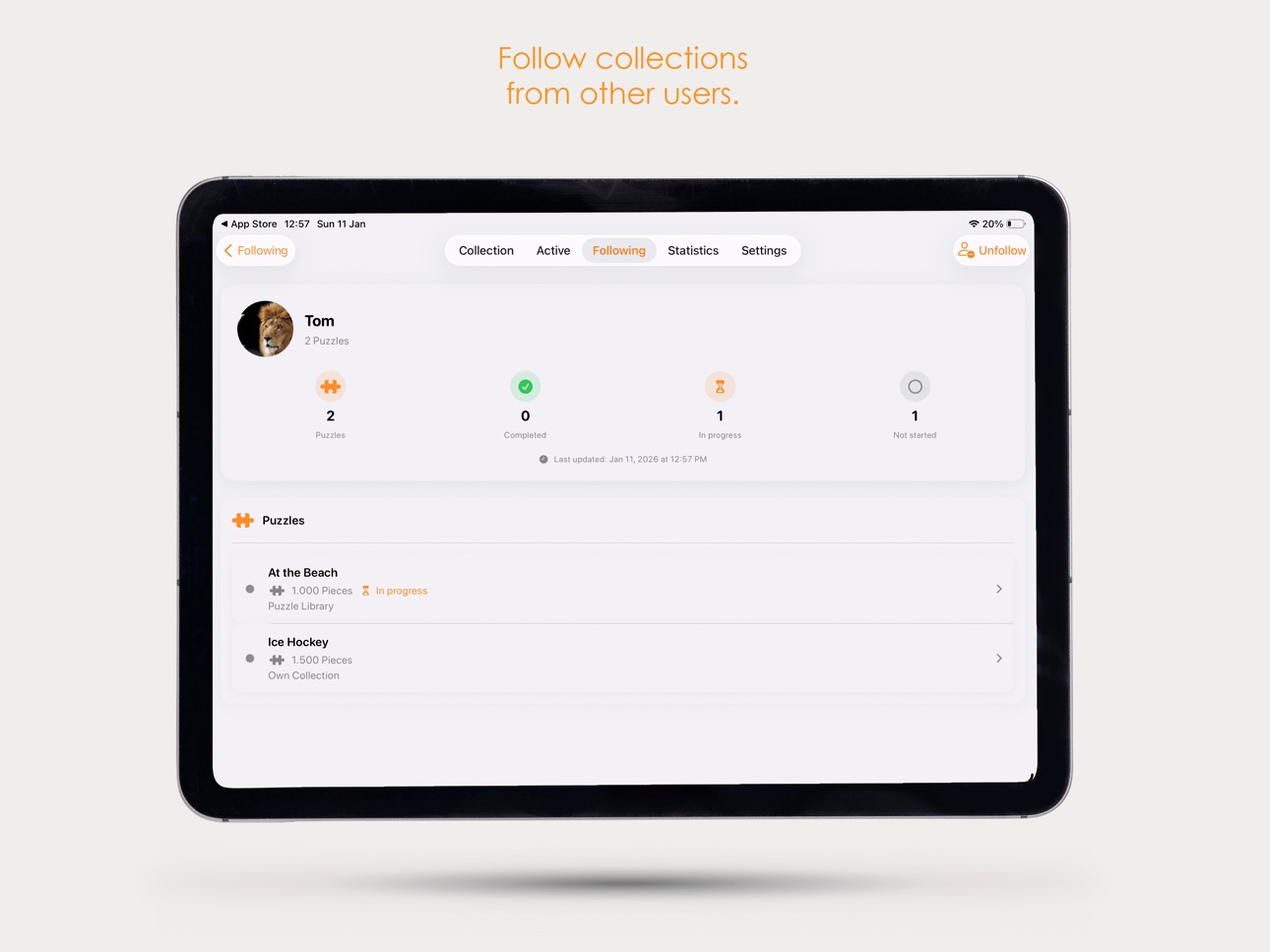
• New and improved Following view
→ A completely new design that better matches the app
→ Dedicated iPad layout optimized for larger screens
→ SharePlay is now better integrated into the Following view
→ You’ll now receive a notification when someone invites you to a SharePlay session
• Improved Google account photo handling
→ Profile photos from Google accounts are now fetched more reliably
• Interface refinements
→ Removed the title header in iPhone settings for a cleaner, more focused layout
Build 880726900v1.222025-12-17 18:14:19
What’s New in Version 1.22
• Fixed an issue where puzzle ratings were not displayed correctly in the detail view and collection view
→ Ratings are now shown consistently everywhere
• Added a behind-the-scenes improvement to the rating system
→ This prepares the app for upcoming rating-related features in future updates
• Fixed a language issue where Collection appeared in English while the app was set to Dutch
• Added a new “Add your own photo” button (fully bilingual)
→ You can now upload a local photo directly from the detail view
→ Ideal if you forgot to add a photo earlier or want to update it later
• Introduced a new Source option: Sold
→ Available when adding a puzzle
→ Also selectable via the Change Source sheet in the collection view
→ Puzzles marked as Sold can no longer be started, as they are no longer part of your active collection
• Collection view cleanup
→ Removed individual puzzle tags from the collection view
→ Section headers already communicate this information, reducing duplication and visual clutter
• Added the option to edit your rating from the puzzle detail view
→ You can now easily adjust your Difficulty and Enjoyment ratings after completion
• Improved the widget configuration
→ More statistics can now be selected
→ Added support for a light (white) widget theme
Build 880516031v1.212025-12-10 21:50:47
JVH Version 1.21 – A Massive Design & Experience Upgrade
This is one of the biggest updates so far. Almost every part of the app has been polished, redesigned, or made faster. The goal: a cleaner look, a snappier feel, and a smoother experience everywhere.
A Faster, Cleaner Collection View
The collection view has received a refined layout — same philosophy, but more modern and cohesive.
Snappier Swipe Interactions
Previously, swiping triggered a frame around the item and animated buttons, which made it feel slow.
This has now been completely rebuilt:
• No more bulky frame animations
• Swipe actions trigger instantly
• Much faster, much cleaner, much more responsive
Delete Confirmation + New Delete Animation
Accidentally deleting a puzzle is now impossible:
• You now get a confirmation popup before deletion
• After confirming, a new clean removal animation plays
Updated Section Headers
The section headers have been redesigned:
• Replacing memo-style headers with fresh orange icon-based sections
• Result: a cleaner, more consistent feel across the whole app
Updated “Change Source” UI
The Change Source flow now follows the new design language and feels much more natural.
Revamped Active View
The active view now matches the new collection design system:
• Updated layout
• New icons for Active and Completed
• More visual clarity overall
New Empty State
If you have no active puzzles, you now see a crafted empty state explaining what to do next.
New Completion Flow
Swiping a puzzle to “Complete” now shows:
• A fully redesigned completion view
• A style consistent with the new app design
• Half-star ratings for “How did you experience this puzzle?”
Improved Progress Update Screen
The Update Progress screen is updated to match the new UI.
iPhone Save Button Fix
iPhone users sometimes couldn’t tap the save button after adjusting piece counts.
This is now fixed by:
• Adding a persistent top Save button
Edge Pieces Fix
If you deselect the edge pieces toggle, the previously entered piece count now clears properly.
Smarter Statistics
When adding a puzzle that is already marked as completed, it now:
• No longer counts toward certain stats, like average solving time
This fixes unfair “00:00” results in your statistics.
Cleaner Settings
The entire settings section has been refreshed:
• New orange icons
• More consistent layout
• Sections neatly collapsed with clean open/close behavior
A more modern and tidy feel overall.
Improved Add Puzzle Flow
From start to finish, adding a puzzle has been polished:
Updated List Design
The puzzle list now follows the same updated design as the collection view.
Redesigned Puzzle Detail (Before Adding)
When you tap a puzzle to add:
• The whole view has been redesigned
• Much more user-friendly
• Styled to match the rest of Version 1.21
Mobile-Friendly Source Selector (iPhone)
The source selector is adjusted specifically for iPhone:
• More compact
•Easier to tap
• Still consistent with the design language
Build 880244293v1.202025-12-01 21:40:26
Version 1.20 — Advent Fix, New Widget & Daily Puzzle Time Tracking
This update includes an important Advent Calendar fix, a brand-new widget, and improved daily time tracking in the timeline.
Advent Calendar 2025 – Piece Count Fixed
The 2025 Advent Calendar puzzle was incorrectly set to 1000 pieces, but the correct count is 1296.
This has now been fully fixed.
• Adding the puzzle now shows the correct piece count immediately
• Already have it in your collection? → It updates automatically when you launch the app after installing this update
No manual action needed
New Advent Calendar Widget
A dedicated widget for the 2025 Advent Calendar puzzle has been added.
How to set it up:
1 .Add the widget to your Home Screen
2. Edit the widget
3. Link your Advent puzzle
4 .Done — it will display your personal puzzle data and progress
Perfect for counting down to Christmas!
Timeline Per Day – Now Tracking Puzzle Duration
The daily timeline view has been improved.
The app now automatically logs:
• the time between two events
• your total puzzle time per day
This gives you a clear overview of how much you’ve puzzled each day great for stats and insights.
Build 880183912v1.192025-11-29 01:42:10
Version 1.19 — Timeline for iPhone, Smarter Time Tracking & New Widget
This update brings some great improvements to the puzzle experience across iPhone and iPad especially for progress tracking and timeline clarity.
Timeline Now Available on iPhone
The timeline was previously exclusive to iPad, but starting in Version 1.19, it’s now fully available on iPhone as well.
Every action you take start, pause, resume, progress updates is cleanly recorded and displayed, just like on iPad.
Progress Tracking: Edge Pieces Included
When updating your puzzle progress, selecting “Edge Pieces / Randstukjes done” is now also added to the timeline automatically.
This keeps your puzzle history complete and consistent.
Two Timeline Views
Long timelines can get… really long.
So now you can choose between:
• Full Timeline — the classic, complete event list
• Day View — grouped per day, so you can tap a date and instantly see only the events for that day (start, pause, resume, progress, etc.)
Much clearer, much easier to navigate.
New Buttons in the Detail Page: “Add Pause” & “Add Resume”
Sometimes you forget to pause a puzzle.
Or to resume it again.
Starting now, you can easily fix this directly in the detail page:
• Add Pause — appears when your last action was Start
→ perfect if you realize later that you should’ve paused earlier.
• Add Resume — appears when the puzzle is currently paused
→ lets you add the correct resume time afterward.
This results in far more accurate time tracking, without hassle.
Added: Log Out Option
In the Settings, you can now log out of your account.
Simple but essential especially for users switching devices.
New Stats Widget
A brand-new widget is now available, showing your:
• Puzzles in collection
• Puzzles completed
• Puzzles active
See your puzzle stats right from your Home Screen.
Build 879938195v1.182025-11-20 22:15:54
Version 1.18 – A Major Stability, Safety & Usability Upgrade
This update is big not in looks, but in the things you don’t see:
your data is now safer, the app is smarter, and the whole experience just became a lot more reliable.
Over the past week I’ve put a ton of work into rewriting the backup, sync and restore systems from scratch.
The goal: no more data loss, no more sync confusion, and full control over your puzzle collection.
Let’s dive in :
Safe Data Recovery Fully Rebuild :
Previously, the “Restore Data” button could cause serious issues:
• local puzzles were wiped immediately
• only the cloud version was restored
• f the backup was empty or outdated, users could permanently lose puzzles
With Version 1.18, that will never happen again.
All-new safe MERGE system :
The app now:
• reads cloud data without deleting local data
• compares each puzzle based on ID
• merges intelligently:
• If a puzzle exists locally → it updates using the most recent lastUpdated timestamp
• If it exists only in the cloud → it gets added
• If it exists only locally → it stays
Protection layers
• If the cloud backup is empty → local data is preserved
• No data is overwritten blindly
• No more destructive “delete everything first” logic
New Local Backup System :
A brand-new backup option is added:
• The app now creates a local reserve copy
• Your entire database is exported into a file
• You can import this file later if needed
Perfect for extra security or manual archiving.
Improved “Add Multiple Puzzles” Tool :
The old workflow asked repeatedly if you wanted to add another puzzle.
Now there’s a completely new flow:
• Enter multiple article numbers at once
• Mark each as completed or not completed
• Add them all in one action
• Much faster, cleaner, and perfect for growing collections
Google Cast & Zoom Controls for Illustrations
Viewing puzzle illustrations just got a major upgrade not only can you open them fullscreen, but now you have an powerful new tool:
Cast to Your TV :
You can now cast puzzle images directly to your TV.
Perfect when puzzling with multiple people no more passing the box around
Just tap View Illustration → Cast and you’re ready
Zoom & Pan Controls
The illustration viewer now includes a dedicated zoom button.
After zooming in, you can use the on-screen pan controls to move across the image left, right, up, and down.
This makes it much easier to focus on the small details while puzzling.
Real-Time Sync (No More Force Quit Needed)
Previously, puzzle updates only appeared on your other devices after force-quitting and restarting the app.
That’s now completely fixed.
When you’re logged in with the same account:
•Add a puzzle on your iPad, and it appears on your iPhone within seconds
• Update progress on your iPhone, and it instantly syncs to your iPad
• No manual refresh, no restarting — it all happens automatically
A much smoother and more reliable experience across all your devices.
Build 879799492v1.17.12025-11-15 20:19:05
JVH Update 1.17.1 — Critical Sync Fix (ENG)
What went wrong :
Here's what caused some players to lose puzzles:
The app started with two different lists:
List A: what you see (ex. 100 puzzles)
List B: used for cloud sync (but was empty)
The sync system checked List B, saw 0 puzzles, and assumed the cloud should also be empty.
It then overwrote Firebase with an empty list, deleting all cloud data.
When the app downloaded data again from the cloud, it replaced your local puzzles with 0 puzzles as well.
Why this happened :
The app maintained two separate puzzle lists:
List A = visible puzzles
List B = sync data source (empty by mistake)
The sync trusted List B and pushed an empty dataset to Firebase, wiping all cloud data.
What is now fixed :
Single source of truth
The app now uses one unified puzzle list for everything.
Safe sync checks
If the list appears empty, nothing will be sent to Firebase.
Prevents accidental deletion of cloud data.
Protected cloud updates
Puzzles are only added or updated, not wiped first.
If something goes wrong, existing Firebase data stays intact.
Local data protection
If Firebase is empty, your local puzzles stay safe.
No more overwriting local data with an empty sync.
Result
Your puzzle progress is now much safer, both locally and in Firebase.
Thanks for your patience while we resolved this issue.
Build 879526015v1.172025-11-05 19:14:25
Version 1.17 – The #1 Update
On October 31st, we reached an incredible milestone JVH Puzzle hit number 1 in the Lifestyle (paid) category.
After many times being number 2, it finally happened: JVH Puzzle is officially number 1.
There are over 6,100 apps in the Lifestyle category, so being at the very top feels truly unreal.
I’m incredibly proud, but most of all grateful to the amazing community that made this possible.
This called for a big, celebratory update.
I spent more than 16 hours working on this version, and you can definitely see the results.
Redesigned Layouts :
Settings
The Settings screen has been completely redesigned to look more modern, refined, and consistent with the rest of the app.
Feedback View
The feedback screen has been fully updated and redesigned to match the new overall style of JVH Puzzle.
Statistics View
The Statistics view has been visually improved with updated colors and a cleaner layout.
You can now switch between all puzzles or only completed puzzles in both the piece and collection distribution charts.
Date Filtering
The date filter has been moved to the toolbar for a more intuitive experience.
Puzzle Detail – Complete Redesign
The puzzle detail screen has been completely restructured with a clearer layout and a major new feature.
View Illustration
When puzzling together, it can be frustrating if someone else has the box, or if it’s too dark to see the image properly.
From now on, you can use the new “View Illustration” button to open the puzzle box image directly in the app.
That way, you can easily view the reference image on your iPhone or iPad next to your puzzle.
This is a feature I’ve wanted for a long time, and I’m very happy it’s finally here.
Toolbar and iPad Layout
The Start, Change Source, and Delete buttons are now located in the toolbar.
On iPad, the layout has been improved so both sides scroll together more smoothly.
Smarter Puzzle Adding
When adding puzzles, sometimes the wrong image appeared because multiple puzzles shared the same name.
This has now been fixed. The app now uses the article number as well to correctly match the right puzzle.
On iPhone, you can now see the article number while adding a puzzle, making it easier to choose the right one.
This is a major update built with a lot of care and attention.
Thank you all so much for the support JVH Puzzle wouldn’t be number 1 without you.
Build 879447394v1.162025-11-03 20:14:23
Version 1.16 – Local Photo Storage
I’ve taken some time to tackle one of the bigger technical challenges in the app: how personal photos are stored.
From now on, all your custom images are stored locally on your device no longer through UserDefaults.
UserDefaults worked fine in the beginning, but Apple has a strict size limit, which caused issues with large or multiple photos. With this update, that’s completely fixed.
New
Local Photo Storage
Your own photos are now stored in Documents/PuzzleImages/ instead of UserDefaults.
A new ImageStorageManager takes care of everything automatically, safely, and efficiently.
All existing photos are automatically migrated when you start the app nothing is lost.
The app also clearly shows that your photos stay local and are not synced to the cloud.
Improvements
Faster and more stable
No more issues with large or multiple photos in UserDefaults thanks to the new local storage system.
The app feels noticeably faster and smoother when creating puzzles with your own images.
Photos are automatically deleted when a puzzle is removed keeping your storage clean.
Privacy-friendly
Your photos stay entirely on your device.
Only puzzle metadata is synced to the cloud.
Build 879278834v1.152025-10-28 11:03:11
What’s New in Version 1.15
Fixed an issue where the “Edge Pieces Placed” switch in the Active tab bounced back unexpectedly
Corrected the “Single Puzzle” label when using the app in Dutch
Added automatic photo resizing when uploading your own puzzle photo
→ Prevents large image uploads from hitting Apple’s limits or disappearing
Improved Live Activity with two new buttons:
→ Pause / Pauze and Complete / Voltooi, allowing you to control your puzzle directly from the lock screen
Added a new onboarding experience for new users
→ The first time you open the Active or Collection views, you’ll see a short explanation of how things work including swiping
→ Added info buttons so you can reopen this guide anytime
Introduced SharePlay (Beta)
→ You can now share an active puzzle live with another user and solve it together
→ The user who wants to share must have an active puzzle
→ Both users need to follow each other to start a SharePlay session
→ You’ll see a new two-person icon in the Active view to invite a follower
→ The invited user will see the invitation in a new SharePlay section in the Following view
→ Once accepted, the puzzle appears in their Active view as well
→ This is the first version of SharePlay we’ll continue improving it in the coming months!
Added support for the 2024 Advent Calendar
→ It now works the same way as the 2025 version
Build 879120627v1.142025-10-22 20:25:43
Version 1.14 – Major Update:
I’ve been back at it with two major new features in this release!
New :
Edge Pieces Status in Active View
When you swipe in the Active View and tap Update Progress, you’ll now see a new Edge Pieces status.
It detects how many pieces your puzzle has and how many are corner pieces.
Once you complete the edge, it automatically updates your progress — and this appears in your timeline on iPad.
Live Activity Widget :
When you start a puzzle and lock your device, a Live Activity widget now appears on your screen.
This is the first version of Live Activity, and it will be expanded with more functionality in future updates.
The Live Activity supports both English and Dutch.
Extra :
Since the last update, I’ve been working hard on a new app, which is now live!
With that launched, I’ve got more time again to keep improving this app.
Price history by region
Currency
Show
Columns
Search
Availability 75 of 75 storefronts
| Region | Language | Price | Ratings | Avg | Version |
|---|---|---|---|---|---|
| AG | en-GB | USD 2.99 | 0 | — | 1.37 |
| AI | en-GB | USD 2.99 | 0 | — | 1.37 |
| AO | en-GB | USD 2.99 | 0 | — | 1.37 |
| AR | es-MX | USD 2.99 | 0 | — | 1.37 |
| BB | en-GB | USD 3.99 | 0 | — | 1.37 |
| BF | en-GB | USD 2.99 | 0 | — | 1.37 |
| BJ | en-GB | USD 3.99 | 0 | — | 1.37 |
| BO | es-MX | USD 2.99 | 0 | — | 1.37 |
| BR | pt-BR | BRL 19.9 | 0 | — | 1.37 |
| BS | en-GB | USD 2.99 | 0 | — | 1.37 |
| BW | en-GB | USD 2.99 | 0 | — | 1.37 |
| BZ | en-GB | USD 2.99 | 0 | — | 1.37 |
| CD | en-GB | USD 2.99 | 0 | — | 1.37 |
| CG | en-GB | USD 2.99 | 0 | — | 1.37 |
| CI | fr-FR | USD 3.99 | 0 | — | 1.37 |
| CL | es-MX | CLP 2990 | 0 | — | 1.37 |
| CM | fr-FR | USD 3.99 | 0 | — | 1.37 |
| CO | es-MX | COP 14900 | 0 | — | 1.37 |
| CR | es-MX | USD 2.99 | 0 | — | 1.37 |
| CV | en-GB | USD 2.99 | 0 | — | 1.37 |
| DM | en-GB | USD 2.99 | 0 | — | 1.37 |
| DO | es-MX | USD 2.99 | 0 | — | 1.37 |
| DZ | en-GB | USD 2.99 | 0 | — | 1.37 |
| EC | es-MX | USD 2.99 | 0 | — | 1.37 |
| GA | fr-FR | USD 2.99 | 0 | — | 1.37 |
| GD | en-GB | USD 2.99 | 0 | — | 1.37 |
| GH | en-GB | USD 3.99 | 0 | — | 1.37 |
| GM | en-GB | USD 2.99 | 0 | — | 1.37 |
| GT | es-MX | USD 2.99 | 0 | — | 1.37 |
| GW | en-GB | USD 2.99 | 0 | — | 1.37 |
| GY | en-GB | USD 2.99 | 0 | — | 1.37 |
| HN | es-MX | USD 2.99 | 0 | — | 1.37 |
| JM | en-GB | USD 2.99 | 0 | — | 1.37 |
| KE | en-GB | USD 3.99 | 0 | — | 1.37 |
| KN | en-GB | USD 2.99 | 0 | — | 1.37 |
| KY | en-GB | USD 2.99 | 0 | — | 1.37 |
| LC | en-GB | USD 2.99 | 0 | — | 1.37 |
| LR | en-GB | USD 2.99 | 0 | — | 1.37 |
| LY | en-GB | USD 2.99 | 0 | — | 1.37 |
| MA | en-GB | USD 2.99 | 0 | — | 1.37 |
| MG | en-GB | USD 2.99 | 0 | — | 1.37 |
| ML | en-GB | USD 2.99 | 0 | — | 1.37 |
| MS | en-GB | USD 2.99 | 0 | — | 1.37 |
| MU | en-GB | USD 3.99 | 0 | — | 1.37 |
| MW | en-GB | USD 2.99 | 0 | — | 1.37 |
| MX | es-MX | MXN 69 | 0 | — | 1.37 |
| MZ | en-GB | USD 2.99 | 0 | — | 1.37 |
| NA | en-GB | USD 2.99 | 0 | — | 1.37 |
| NE | en-GB | USD 2.99 | 0 | — | 1.37 |
| NG | en-GB | NGN 4900 | 0 | — | 1.37 |
| NI | es-MX | USD 2.99 | 0 | — | 1.37 |
| PA | es-MX | USD 2.99 | 0 | — | 1.37 |
| PE | es-MX | PEN 12.9 | 0 | — | 1.37 |
| PY | es-MX | USD 2.99 | 0 | — | 1.37 |
| RW | en-GB | USD 2.99 | 0 | — | 1.37 |
| SC | en-GB | USD 2.99 | 0 | — | 1.37 |
| SL | en-GB | USD 2.99 | 0 | — | 1.37 |
| SN | en-GB | USD 3.99 | 0 | — | 1.37 |
| SR | en-GB | USD 2.99 | 0 | — | 1.37 |
| ST | en-GB | USD 2.99 | 0 | — | 1.37 |
| SV | es-MX | USD 2.99 | 0 | — | 1.37 |
| SZ | en-GB | USD 2.99 | 0 | — | 1.37 |
| TC | en-GB | USD 2.99 | 0 | — | 1.37 |
| TD | en-GB | USD 2.99 | 0 | — | 1.37 |
| TN | en-GB | USD 2.99 | 0 | — | 1.37 |
| TT | en-GB | USD 2.99 | 0 | — | 1.37 |
| TZ | en-GB | TZS 9900 | 0 | — | 1.37 |
| UG | en-GB | USD 3.99 | 0 | — | 1.37 |
| US | en-US | USD 2.99 | 0 | — | 1.37 |
| UY | en-GB | USD 2.99 | 0 | — | 1.37 |
| VC | en-GB | USD 2.99 | 0 | — | 1.37 |
| VE | es-MX | USD 2.99 | 0 | — | 1.37 |
| VG | en-GB | USD 2.99 | 0 | — | 1.37 |
| ZM | en-GB | USD 3.99 | 0 | — | 1.37 |
| ZW | en-GB | USD 3.99 | 0 | — | 1.37 |
Change log 29 changes · US
✎
releaseNotes updated
Version 1.37 — Puzzle Sessions
This update introduces Puzzle Sessions: a focused full-screen mode designed for active puzzling.
Puzzle Sessions
Start a Puzzl
✎
description updated
Track Your Puzzle Progress Like Never Before!
Are you a fan of Jan van Haasteren puzzles? This is the ultimate app to organize, track, and share your puzzling
✎
subtitle updated
A Puzzle tracker app
✎
name updated
Jvh Puzzle
◆
Version 1.37 released
Version 1.37 — Puzzle Sessions
This update introduces Puzzle Sessions: a focused full-screen mode designed for active puzzling.
Puzzle Sessions
Start a Puzzle Session on an active puzzle for a clean, distraction-free view while you puzzl
◆
Version 1.36 released
Version 1.36 — Customize your statistics & improved scanning
This update makes the app more flexible and fixes scanning for puzzles with multiple barcodes.
Modular Statistics Page Your statistics screen is now built from widgets you can a
◆
Version 1.35 released
Following recent improvements, this update focuses on refining the search and user experience, along with clearer in-app feedback.
Improved Search & Following Experience
Finding and following users is now more reliable and intuitive:
* Se
◆
Version 1.34 released
After the major redesign in 1.33, this update focuses on refining the scanning experience and fixing key issues.
Improved Puzzle Scanning
The scanning workflow has been enhanced to be faster and more intuitive:
* Scanned EAN codes are now
◆
Version 1.33 released
After a long time, a major update is finally here.
Completely Redesigned Groups
The Groups view has been fully rebuilt from the ground up. What used to feel cluttered is now clean, structured, and visually refined, making everything easier
◆
Version 1.32 released
Version 1.32 introduces new sorting functionality, improvements to the Groups feature, and refinements to account handling and UI consistency.
This update focuses on improving usability while continuing development of the social group syst
◆
Version 1.31 released
Version 1.31 introduces new social functionality, account management improvements, and important fixes to statistics tracking and time calculations.
This update improves accuracy, usability, and overall polish across the app.
What’s new a
◆
Version 1.30 released
Version 1.30 is a major optimization update focused on performance, data control, scanner reliability, and overall consistency across the app.
This update introduces significant internal improvements and structural refinements to make the
◆
Version 1.29 released
Version 1.29 is a refinement update focused entirely on quality, consistency, and usability improvements across the app.
This update includes many carefully considered adjustments and visual improvements to make the overall experience feel
◆
Version 1.28 released
Version 1.28 includes several user-requested improvements, new collection options, and quality-of-life enhancements across the app.
What’s new and improved :
• New collection source: Loaned out
A new Loaned out source has been added to th
◆
Version 1.27 released
Version 1.27 introduces expanded Group functionality, enhanced puzzle management, and new competition logging features.
What’s new and improved :
- Expanded Group functionality :
• Groups are now visually improved and fully expanded: only
◆
Version 1.26 released
Version 1.26 introduces several quality-of-life improvements, smarter collection management, and the first version of Groups, a brand-new social feature that will continue to evolve in upcoming updates.
What’s new and improved:
• Clearer
◆
Version 1.25 released
Version 1.25 focuses on fixes and improvements requested by the community, along with multiple quality-of-life enhancements.
What’s new and improved:
• Duplicate puzzle check when adding
When adding a puzzle, the app now checks whether a
◆
Version 1.24 released
Version 1.24 – Major update under the hood
This update includes several important improvements, many of which happened behind the scenes.
What’s new and improved:
• New Apple Developer Account
The app has been migrated to a new Apple Deve
◆
Version 1.23 released
What’s New in Version 1.23
Happy New Year!
I hope you’ve had some wonderful days to start the year.
This changelog was written on January 4, and version 1.23 brings some major improvements to the app.
• Completely redesigned onboarding ex
◆
Version 1.22 released
What’s New in Version 1.22
• Fixed an issue where puzzle ratings were not displayed correctly in the detail view and collection view
→ Ratings are now shown consistently everywhere
• Added a behind-the-scenes improvement to the rating sys
◆
Version 1.21 released
JVH Version 1.21 – A Massive Design & Experience Upgrade
This is one of the biggest updates so far. Almost every part of the app has been polished, redesigned, or made faster. The goal: a cleaner look, a snappier feel, and a smoother expe
◆
Version 1.20 released
Version 1.20 — Advent Fix, New Widget & Daily Puzzle Time Tracking
This update includes an important Advent Calendar fix, a brand-new widget, and improved daily time tracking in the timeline.
Advent Calendar 2025 – Piece Count Fixed
The
◆
Version 1.19 released
Version 1.19 — Timeline for iPhone, Smarter Time Tracking & New Widget
This update brings some great improvements to the puzzle experience across iPhone and iPad especially for progress tracking and timeline clarity.
Timeline Now Availabl
◆
Version 1.18 released
Version 1.18 – A Major Stability, Safety & Usability Upgrade
This update is big not in looks, but in the things you don’t see:
your data is now safer, the app is smarter, and the whole experience just became a lot more reliable.
Over the
◆
Version 1.17.1 released
JVH Update 1.17.1 — Critical Sync Fix (ENG)
What went wrong :
Here's what caused some players to lose puzzles:
The app started with two different lists:
List A: what you see (ex. 100 puzzles)
List B: used for cloud sync (but was empty)
◆
Version 1.17 released
Version 1.17 – The #1 Update
On October 31st, we reached an incredible milestone JVH Puzzle hit number 1 in the Lifestyle (paid) category.
After many times being number 2, it finally happened: JVH Puzzle is officially number 1.
There are o
◆
Version 1.16 released
Version 1.16 – Local Photo Storage
I’ve taken some time to tackle one of the bigger technical challenges in the app: how personal photos are stored.
From now on, all your custom images are stored locally on your device no longer through Us
◆
Version 1.15 released
What’s New in Version 1.15
Fixed an issue where the “Edge Pieces Placed” switch in the Active tab bounced back unexpectedly
Corrected the “Single Puzzle” label when using the app in Dutch
Added automatic photo resizing when uploading you
◆
Version 1.14 released
Version 1.14 – Major Update:
I’ve been back at it with two major new features in this release!
New :
Edge Pieces Status in Active View
When you swipe in the Active View and tap Update Progress, you’ll now see a new Edge Pieces status.