Home › Productivity

Arabic OCR: Text Scanner & PDF
Image to Text & AI Translator
 US
US
 FRfr-FR
 LBen-GB
 CNzh-Hans-CN
 SAen-GBUSen-US
 AEen-GB
 CAen-CA
 DEde-DE
 EGen-GB
 PKen-GB
 QAen-GB
 AFen-GB
 ALen-GB
 AMen-GB
 ATde-DE
 AUen-AU
 AZen-GB
 BAen-GB
 BEen-GB
 BGen-GB
 BHen-GB
 BMen-GB
 BNen-GB
 BTen-GB
 BYen-GB
 CHde-CH
 CYen-GB
 CZen-GB
 DKen-GB
 EEen-GB
 ESes-ES
 FIen-GB
 FJen-GB
 FMen-GB
 GBen-GB
 GEen-GB
 GRen-GB
 HKzh-Hant-HK
 HRen-GB
 HUen-GB
 IDen-GB
 IEen-GB
 ILen-GB
 INen-GB
 IQen-GB
 ISen-GB
 ITit
ITit JOen-GB
 JPja
JPja KGen-GB
 KHen-GB
 KRko
KRko KWen-GB
 KZen-GB
 LAen-GB
 LKen-GB
 LTen-GB
 LUen-GB
 LVen-GB
 MDen-GB
 MEen-GB
 MKen-GB
 MMen-GB
 MNen-GB
 MOzh-Hant-HK
 MRen-GB
 MTen-GB
 MVen-GB
 MYen-GB
 NLnl
NLnl NOen-GB
 NPen-GB
 NRen-GB
 NZen-AU
 OMen-GB
 PGen-GB
 PHen-GB
 PLen-GB
 PTpt-PT
 PWen-GB
 ROen-GB
 RSen-GB
 RUru
RUru SBen-GB
 SEsv
SEsv SGen-GB
 SIen-GB
 SKen-GB
 THen-GB
 TJen-GB
 TMen-GB
 TOen-GB
 TRen-GB
 TWzh-Hant-TW
 UAen-GB
 UZen-GB
 VNen-GB
 VUen-GB
 XKen-GB
 YEen-GB
 ZAen-GB
101 of 101 storefronts
Content in en-US
Content in en-US
Information
Preview 2 platforms
iPhone 5 images


Mac 3 images


What’s New Version 4.3
Version 4.3 — Supercharged iOS
Arabic OCR is now everywhere on your iPhone — no unlocking required.
Action Button & Camera Control
Map the physical Action Button (iPhone 15 Pro / 16 series) directly to Arabic OCR. One press opens the scanner
instantly from anywhere — locked screen, mid-call, or any app.
Control Center Tile
Add the Arabic OCR scan tile to your Control Center (iOS 18+). Swipe down, tap once, scan.
Live Activity — Batch PDF OCR
Processing a multi-page PDF? Minimize the app. A Live Activity tracks real-time progress on your Dynamic Island and
Lock Screen — page count, progress bar, and a text preview. Auto-dismisses when done.
Home Screen Widgets
• Recent Documents widget (small & medium) — your last 3 scans always one tap away, with a Summarize button right on
the widget
• Clipboard Lens widget — detects Arabic text in your clipboard and lets you summarize it without opening the app
Share Extension
Arabic OCR now appears in the iOS Share Sheet from any app. Share an image or PDF from Photos, Files, or Safari, then
choose: Run OCR, Save to Vault, or Summarize — all on-device, never uploaded.
Quick Dictate Widget
Lock Screen widget that opens a voice capture sheet and starts Arabic dictation automatically. Live transcript preview
with copy and save controls.
Rename Documents
Long-press any document in your list to rename it inline.
Dark Mode Support
Toggle dark or light mode directly from the main screen — persists across launches and applies instantly to every view
in the app.
Smarter Pro Features
Translate, Auto Format, Auto Correct, and Voice Notes are now Pro-only features, clearly gated with a subscription
prompt. Free users get full OCR — AI tools require a subscription
Welcome Screen — Simplified
Cleaner single-page widget showcase. The step-by-step setup guide is now accessible anytime from Settings → Widget
Setup Guide.
Arabic Localization Improvements
All new UI strings — page limit alerts, history controls, dark mode toggle, widget guide — are fully translated into
Arabic.
Description
Unlock the full potential of your documents with Arabic OCR – the most advanced tool for extracting, summarizing, and translating Arabic text. Powered by the latest Apple AI and on-device LLM technology, this app delivers unparalleled accuracy and speed for both printed text and complex handwriting.
Key Features
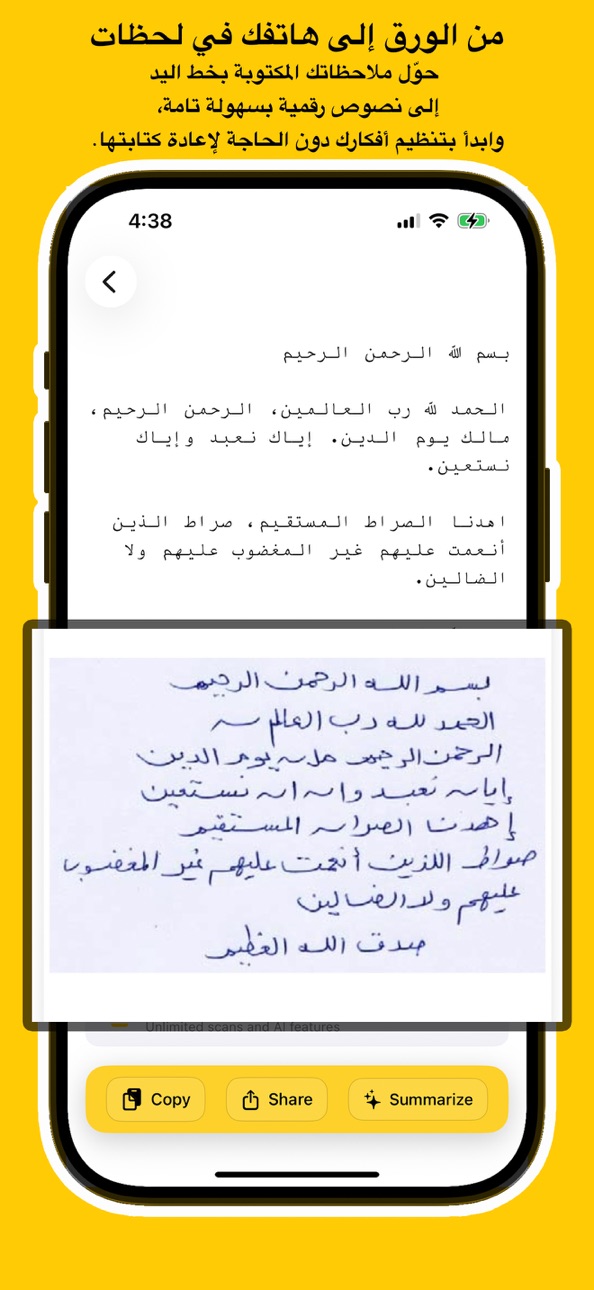
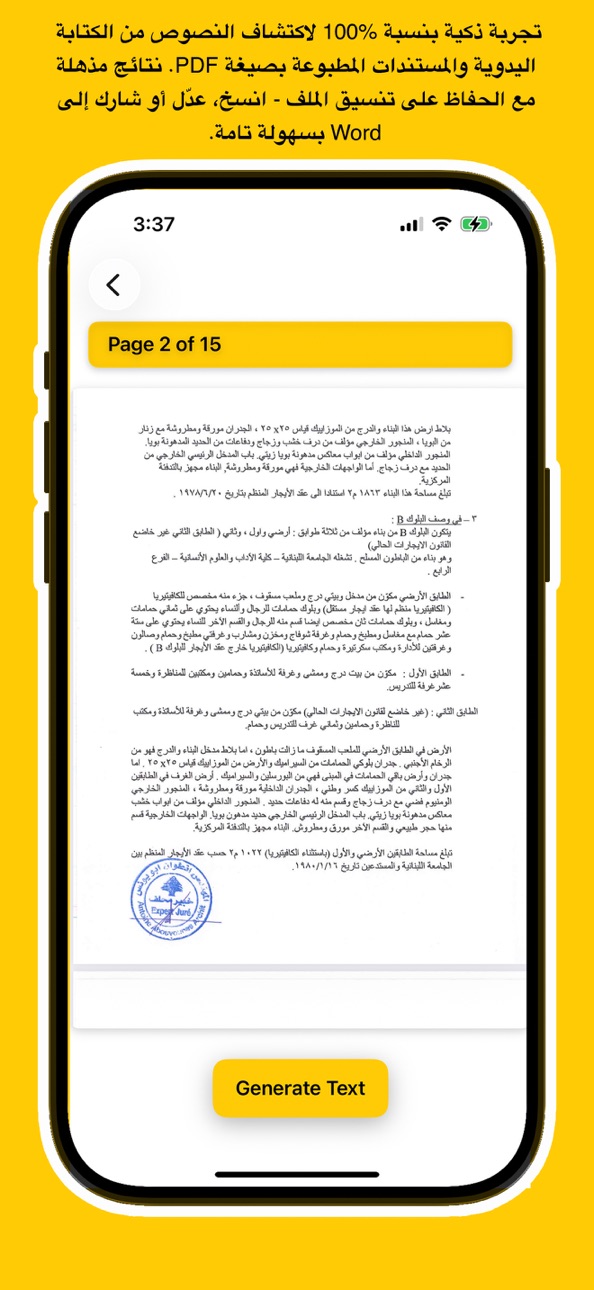
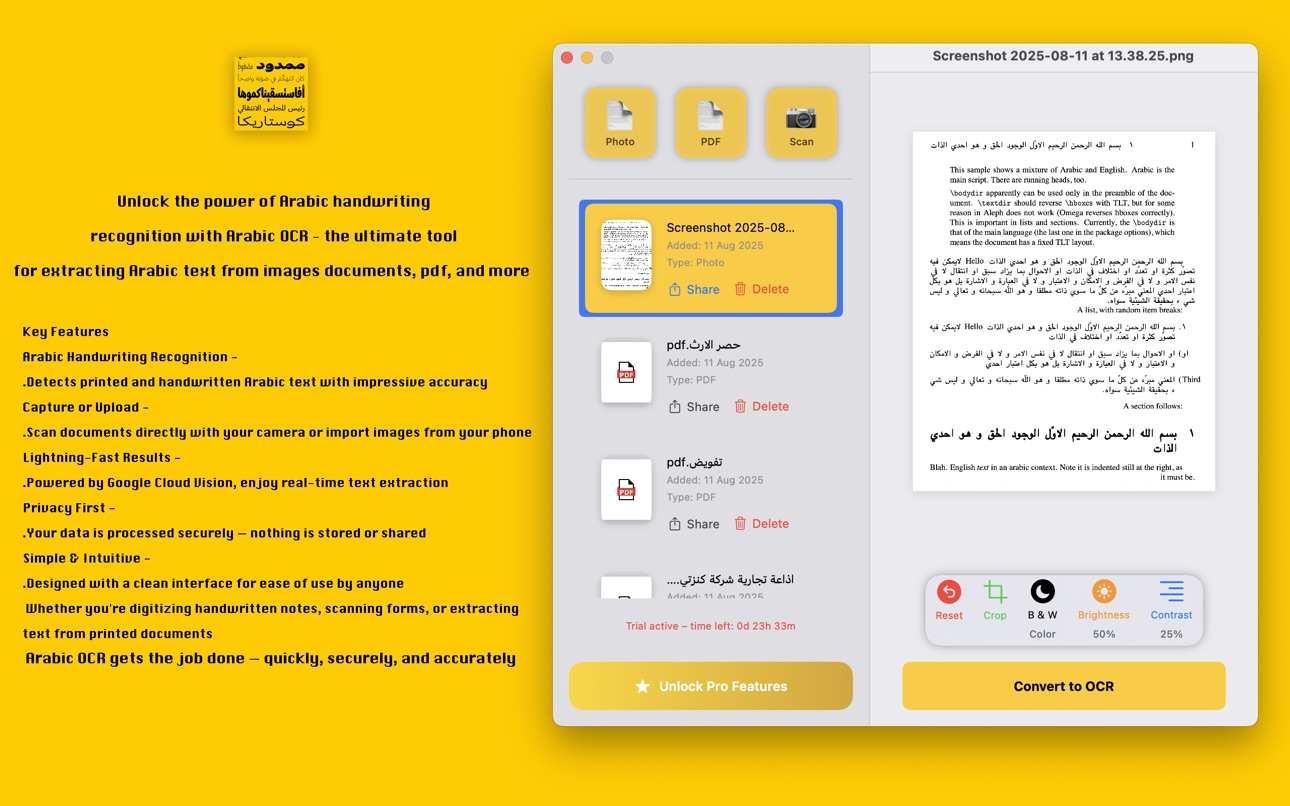
Advanced Arabic OCR & Handwriting Recognition Instantly convert images, scanned documents, and PDFs into editable text. Our state-of-the-art engine accurately recognizes even the most difficult handwritten Arabic script, preserving formatting and details better than ever before.
Smart Summarization & Translation Overwhelmed by long documents? Let our built-in AI summarize pages into concise, easy-to-read points. Need it in another language? Translate your scanned text instantly with high-fidelity accuracy.
Comprehensive Document Management Organize your digital life. Scan multiple pages, group them into folders, and manage your files with ease. Export as PDF, text, or share directly to other apps. Your personal mobile office is now ready.
Powered by Apple Intelligence Experience lightning-fast performance using the newest iOS machine learning and Apple’s Large Language Models (LLM). Enjoy smoother, smarter, and more reliable results tailored specifically for your device.
100% Private & Secure Your data belongs to you. All processing is optimized for on-device security, ensuring your sensitive documents never leave your control unless you choose to share them. No hidden servers, no data mining.
Premium Access Unlock the full power of the app with our Monthly or Yearly subscriptions. Get unlimited scans, advanced summarization, and priority access to new AI features. Try it free!
Why Choose Arabic OCR?
Speed: Instant text extraction.
Accuracy: Best-in-class recognition for Arabic script.
Versatility: Scan, translate, summarize, and edit in one place.
Design: A beautiful, user-friendly interface designed for iOS.
Privacy Policy: https://www.arabic-ocr.com/privacy.html
Terms of Service: https://www.arabic-ocr.com/terms.html
Download now and experience the future of intelligent text recognition!
Capabilities
In-App Purchases
Accessibility
ipadiphonemacrealityDevicetvoswatch
Version history 25 versions
Build 887623165v4.32026-06-30 17:15:42
Version 4.3 — Supercharged iOS
Arabic OCR is now everywhere on your iPhone — no unlocking required.
Action Button & Camera Control
Map the physical Action Button (iPhone 15 Pro / 16 series) directly to Arabic OCR. One press opens the scanner
instantly from anywhere — locked screen, mid-call, or any app.
Control Center Tile
Add the Arabic OCR scan tile to your Control Center (iOS 18+). Swipe down, tap once, scan.
Live Activity — Batch PDF OCR
Processing a multi-page PDF? Minimize the app. A Live Activity tracks real-time progress on your Dynamic Island and
Lock Screen — page count, progress bar, and a text preview. Auto-dismisses when done.
Home Screen Widgets
• Recent Documents widget (small & medium) — your last 3 scans always one tap away, with a Summarize button right on
the widget
• Clipboard Lens widget — detects Arabic text in your clipboard and lets you summarize it without opening the app
Share Extension
Arabic OCR now appears in the iOS Share Sheet from any app. Share an image or PDF from Photos, Files, or Safari, then
choose: Run OCR, Save to Vault, or Summarize — all on-device, never uploaded.
Quick Dictate Widget
Lock Screen widget that opens a voice capture sheet and starts Arabic dictation automatically. Live transcript preview
with copy and save controls.
Rename Documents
Long-press any document in your list to rename it inline.
Dark Mode Support
Toggle dark or light mode directly from the main screen — persists across launches and applies instantly to every view
in the app.
Smarter Pro Features
Translate, Auto Format, Auto Correct, and Voice Notes are now Pro-only features, clearly gated with a subscription
prompt. Free users get full OCR — AI tools require a subscription
Welcome Screen — Simplified
Cleaner single-page widget showcase. The step-by-step setup guide is now accessible anytime from Settings → Widget
Setup Guide.
Arabic Localization Improvements
All new UI strings — page limit alerts, history controls, dark mode toggle, widget guide — are fully translated into
Arabic.
Build 885511121v4.22026-05-11 21:35:41
• Open to everyone — no more scan limits. Try the app freely and see a preview of your OCR results before subscribing.
• Auto Format — tap the new button in the result screen to let AI instantly reconstruct and clean up your scanned document, just like the Mac version.
• Smarter paywall — choose "Give it a try" to explore the app in demo mode before committing.
• Performance — fixed memory crashes that occurred when processing certain high-resolution photos.
Build 884360807v4.02026-04-10 17:02:52
• Choose your plan — Monthly or Yearly subscription now available in the app
• Redesigned subscription screen for a cleaner, faster checkout experience
• Bug fixes and performance improvements for a smoother scanning experience
Build 883662052v3.92026-03-23 20:20:49
Fix bugs and improve performance
Build 882303659v3.82026-02-13 00:34:47
We’ve completely transformed the Arabic OCR experience to make it faster, more powerful, and fully native for our Arabic-speaking users!
1. 24-Hour Free Trial Flow
Automatic Activation: Experience the full power of Arabic OCR instantly. If you skip our initial offer, a 24-hour full-access trial starts automatically!
Premium Feature Preview: Try AI-powered summarization and professional document sharing features without commitment.
Trial Countdown: Keep track of your trial time with a live, localized countdown timer in the Settings menu.
2. Full Arabic Localization & RTL Mastery
Native Experience: The entire app—including onboarding, settings, and subscription screens—is now fully translated into Arabic.
RTL Layout Optimization: Every screen has been redesigned to follow a natural Right-to-Left (RTL) flow, ensuring a premium feel for Arabic users.
Perfect Document Alignment: Your OCR results and AI summaries now automatically align to the right, guaranteeing correct punctuation and reading flow.
3. Advanced Document Editor & Studio
New Creative Tools: Add custom highlights, professional watermarks, and your personal signature to any scanned document.
Enhanced PDF Handling: Improved navigation with dynamic page indicators and smoother scrolling.
Quick Scan: A new "Scan Now" button in the home view allows for one-tap document capture.
4. Rich Home Screen Widgets
Redesigned Layouts: Modern, informative widgets that look beautiful on your Home Screen.
New Sizes: Now supporting multiple sizes for better visibility and instant access to your recent scans.
5. Premium Dark Mode Support
The entire application now supports a high-end Dark Mode experience. All interfaces, including special offers and the subscription studio, adapt gracefully to your system’s appearance.
6. Stability & Performance
Standardized the subscription experience for improved reliability.
Faster OCR processing and various bug fixes for a smoother experience.
Enhanced analytics to help us keep improving the app for you.
Build 881189601v3.72026-01-04 21:15:54
Unlock the full potential of your documents with Arabic OCR – the most advanced tool for extracting, summarizing, and translating Arabic text. Powered by the latest Apple AI and on-device LLM technology, this app delivers unparalleled accuracy and speed for both printed text and complex handwriting.
Build 881145884v3.62026-01-02 22:48:04
Apple LLM OCR Engine: We’ve rebuilt our text recognition core using Apple’s advanced on-device Intelligence.
Experience significantly faster and more accurate Arabic OCR.
Smarter PDF Processing: Enhanced text extraction for multi-page documents.
Build 881002012v3.52025-12-26 08:39:47
Arabic OCR has been updated to version 3.5.
What’s new:
• Fixed multiple bugs for better stability
• Improved OCR performance and accuracy
• Added new subscription plans
• Introduced a 3-day free trial so you can try all premium features before subscribing
Update now to enjoy a faster, more reliable Arabic OCR experience.
Build 879912354v3.42025-11-19 21:40:32
What’s New in Version 3.4
This update introduces powerful new PDF editing tools and major improvements to your document workflow.
New Features
Delete pages inside any PDF
Add new pages from your photo library or files
Rotate pages inside the PDF
Combine multiple PDF files into one
Reorder and move pages
Save and export updated PDFs
Share your documents easily
Improved viewing performance and smoother scrolling
Enhanced processing for large documents
This version continues our mission to provide the most accurate Arabic OCR and the most complete document editor for everyday use.
Build 879430948v3.32025-11-03 04:03:01
Arabic OCR V3.3 introduces a redesigned document workspace and several new tools that improve productivity and document preparation.
New features:
• Document editing studio with the ability to add signatures, type text, insert images, highlight sections, apply watermarks, and add footers.
• Faster OCR processing with improved recognition quality, especially for Arabic printed and handwritten text.
• The document list now supports folder creation, allowing better organization and easier management of scanned files.
• Translation now supports additional major languages:
English, Arabic, French, Spanish, Portuguese, German, Turkish, Italian, Russian, Chinese, Japanese, and Hindi.
• Interface updated for a cleaner look and more efficient workflow.
This update focuses on professional document handling, clarity, and overall performance improvements.
Build 879083016v3.22025-10-21 14:33:54
Arabic OCR version 3.2 is now available, bringing major improvements to your scanning experience.
The new Live Scan feature automatically detects document edges and crops them in real time, making your scans faster and more accurate. You can now capture multiple documents in one session and save them directly as a single PDF file, perfect for organizing multi-page materials.
We've also added folder creation to the scanned document list, allowing you to group and manage your files more efficiently. Whether you're sorting by project, client, or topic, staying organized is now easier than ever.
This update also includes important bug fixes and performance enhancements to ensure a smoother, more reliable experience.
Download the latest version and take your Arabic OCR workflow to the next level.
Build 878660785v3.12025-10-04 03:14:11
We’ve fixed some bugs and improved performance to make your experience smoother and faster. Thanks for using our app—keep the feedback coming!
Build 878319923v2.92025-09-22 22:25:04
Arabic OCR v2.8 – New Update
What’s New:
* Export recognition results as PDF or Word (DOCX) files.
* Summarize any recognized text and export it to PDF or DOCX.
* Improved support for Arabic and other RTL languages in exported files.
Upgrade now to make your OCR workflow faster and more professional.
Build 878242130v2.82025-09-19 02:32:46
Introducing Arabic OCR V2.8! Our latest update adds a powerful new pinch-to-zoom capture feature that lets you zoom in, frame exactly the text or table you need, and scan only what’s most important—and under the hood, we’ve fine-tuned our recognition engine for unparalleled precision with Arabic scripts, handling complex ligatures, diacritics, and preserving original layouts so your scans come out crisper, cleaner, and more reliable than ever.
Build 877931385v2.72025-09-08 23:15:19
Fix bugs and improve performance
Build 877704883v2.62025-08-30 17:45:01
We’ve fixed the Copy All Text feature for summarize results
Now you can easily copy the entire summary in one tap, without missing any text!
Update now and enjoy smoother summarizing.
Build 877544438v2.52025-08-25 18:25:55
We’ve taken your feedback and made the app smarter and smoother than ever!
What’s New:
Enhanced Document Scanning – Faster detection and cleaner crops with improved brightness and contrast for sharper results.
Better OCR Accuracy – Optimized text recognition for clearer, more reliable extractions.
Performance Boost – Smoother processing and improved stability across devices.
Bug Fixes – Minor glitches resolved for a more seamless experience.
Update now and enjoy a sharper, faster, and more powerful document scanning experience!
Build 877277954v2.42025-08-17 08:46:08
What’s new:
* AI Summarize: Get instant summaries of your scanned text.
* Reformat OCR Results: Automatically clean up and reformat your extracted text for easier reading.
* Improved Accuracy: Amazing results for both printed and handwritten Arabic text.
Upgrade now to experience smarter, faster text extraction.
Build 877019659v2.32025-08-06 16:51:38
New Update v2.3 is now available
Crop Feature
You can now crop any part of the document before generating OCR.
PDF Page Selection
You can choose to process a specific page or all pages in a PDF file before starting OCR.
Translate Result
In the final result view, you can translate the recognized text to English, Arabic, French, Spanish, or Portuguese. You can also copy or share the translated text.
Bug Fixes and Performance Improvements
We have fixed several bugs and improved overall performance for a smoother experience.
Build 876922208v2.22025-08-02 18:23:41
Fix bugs and improve performance
Build 876728726v2.12025-07-26 17:31:40
What's New in Arabic-OCR v2.1
We’re excited to announce the release of Arabic-OCR version 2.1, which brings several important improvements:
Improved text detection with formatting
The OCR engine now better preserves the structure of scanned text, including line breaks and table formatting.
Enhanced document capture
The camera capture area has been adjusted, and image quality is now higher to ensure more accurate text recognition.
This update delivers a more reliable and accurate scanning experience for all document types. Thank you for using Arabic-OCR.
Build 876649963v2.02025-07-23 22:27:39
We are pleased to announce a significant update with the following improvements:
* Enhanced Arabic text recognition for more accurate OCR results.
* Improved extraction of table formats to preserve structure better.
* A new 24-hour free trial of the Pro version to experience all premium features.
* Bug fixes and performance improvements for a smoother user experience.
Please update to version 2.0 to benefit from these enhancements.
Build 875912599v1.52025-06-26 14:58:09
Arabic OCR v1.5 is Now Available
We're excited to introduce a new update for Arabic OCR.
What's New in Version 1.5:
Free Trial Access: You can now try Arabic OCR on 3 PDF files for free, with no subscription required.
Full Access to OCR from Photo: The Generate OCR from Photo feature is now fully unlocked for all users.
Update now to take advantage of powerful Arabic handwriting and text recognition from both images and PDFs.
Build 875681792v1.42025-06-20 15:58:50
Arabic OCR – Update v1.4
We’re excited to announce version 1.4 of the Arabic OCR app. This update introduces a new feature to enhance your scanning experience:
New: Zoom slider for live document capture
You can now adjust the camera zoom in real-time while scanning, making it easier to focus on handwritten or printed Arabic text for better recognition results.
Update now and experience improved control during document capture.
Build 875254610v1.32025-06-03 02:14:14
What's New in Arabic OCR v1.3
We’re excited to bring you a powerful new update:
PDF Thumbnails
You can now preview your PDF documents directly in the document list with clear first-page thumbnails.
Performance Improvements
The app is now faster and smoother when browsing and managing your documents.
Improved OCR Detection
Text recognition is now more accurate, helping you extract text from images and documents more reliably.
Update now to enjoy the enhanced experience.
No pricing data captured yet — comparisons appear once the app has paid storefronts or in-app purchases.
Availability 101 of 101 storefronts
| Region | Language | Price | Ratings | Avg | Version |
|---|---|---|---|---|---|
| FR | fr-FR | Free | 4 | 4.0 | 4.3 |
| LB | en-GB | Free | 4 | 5.0 | 4.3 |
| CN | zh-Hans-CN | Free | 2 | 5.0 | 4.3 |
| SA | en-GB | Free | 2 | 4.5 | 4.3 |
| US | en-US | Free | 2 | 3.0 | 4.3 |
| AE | en-GB | Free | 1 | 5.0 | 4.3 |
| CA | en-CA | Free | 1 | 5.0 | 4.3 |
| DE | de-DE | Free | 1 | 5.0 | 4.3 |
| EG | en-GB | Free | 1 | 3.0 | 4.3 |
| PK | en-GB | Free | 1 | 5.0 | 4.3 |
| QA | en-GB | Free | 1 | 4.0 | 4.3 |
| AF | en-GB | Free | 0 | — | 4.3 |
| AL | en-GB | Free | 0 | — | 4.3 |
| AM | en-GB | Free | 0 | — | 4.3 |
| AT | de-DE | Free | 0 | — | 4.3 |
| AU | en-AU | Free | 0 | — | 4.3 |
| AZ | en-GB | Free | 0 | — | 4.3 |
| BA | en-GB | Free | 0 | — | 4.3 |
| BE | en-GB | Free | 0 | — | 4.3 |
| BG | en-GB | Free | 0 | — | 4.3 |
| BH | en-GB | Free | 0 | — | 4.3 |
| BM | en-GB | Free | 0 | — | 4.3 |
| BN | en-GB | Free | 0 | — | 4.3 |
| BT | en-GB | Free | 0 | — | 4.3 |
| BY | en-GB | Free | 0 | — | 4.3 |
| CH | de-CH | Free | 0 | — | 4.3 |
| CY | en-GB | Free | 0 | — | 4.3 |
| CZ | en-GB | Free | 0 | — | 4.3 |
| DK | en-GB | Free | 0 | — | 4.3 |
| EE | en-GB | Free | 0 | — | 4.3 |
| ES | es-ES | Free | 0 | — | 4.3 |
| FI | en-GB | Free | 0 | — | 4.3 |
| FJ | en-GB | Free | 0 | — | 4.3 |
| FM | en-GB | Free | 0 | — | 4.3 |
| GB | en-GB | Free | 0 | — | 4.3 |
| GE | en-GB | Free | 0 | — | 4.3 |
| GR | en-GB | Free | 0 | — | 4.3 |
| HK | zh-Hant-HK | Free | 0 | — | 4.3 |
| HR | en-GB | Free | 0 | — | 4.3 |
| HU | en-GB | Free | 0 | — | 4.3 |
| ID | en-GB | Free | 0 | — | 4.3 |
| IE | en-GB | Free | 0 | — | 4.3 |
| IL | en-GB | Free | 0 | — | 4.3 |
| IN | en-GB | Free | 0 | — | 4.3 |
| IQ | en-GB | Free | 0 | — | 4.3 |
| IS | en-GB | Free | 0 | — | 4.3 |
| IT | it | Free | 0 | — | 4.3 |
| JO | en-GB | Free | 0 | — | 4.3 |
| JP | ja | Free | 0 | — | 4.3 |
| KG | en-GB | Free | 0 | — | 4.3 |
| KH | en-GB | Free | 0 | — | 4.3 |
| KR | ko | Free | 0 | — | 4.3 |
| KW | en-GB | Free | 0 | — | 4.3 |
| KZ | en-GB | Free | 0 | — | 4.3 |
| LA | en-GB | Free | 0 | — | 4.3 |
| LK | en-GB | Free | 0 | — | 4.3 |
| LT | en-GB | Free | 0 | — | 4.3 |
| LU | en-GB | Free | 0 | — | 4.3 |
| LV | en-GB | Free | 0 | — | 4.3 |
| MD | en-GB | Free | 0 | — | 4.3 |
| ME | en-GB | Free | 0 | — | 4.3 |
| MK | en-GB | Free | 0 | — | 4.3 |
| MM | en-GB | Free | 0 | — | 4.3 |
| MN | en-GB | Free | 0 | — | 4.3 |
| MO | zh-Hant-HK | Free | 0 | — | 4.3 |
| MR | en-GB | Free | 0 | — | 4.3 |
| MT | en-GB | Free | 0 | — | 4.3 |
| MV | en-GB | Free | 0 | — | 4.3 |
| MY | en-GB | Free | 0 | — | 4.3 |
| NL | nl | Free | 0 | — | 4.3 |
| NO | en-GB | Free | 0 | — | 4.3 |
| NP | en-GB | Free | 0 | — | 4.3 |
| NR | en-GB | Free | 0 | — | 4.3 |
| NZ | en-AU | Free | 0 | — | 4.3 |
| OM | en-GB | Free | 0 | — | 4.3 |
| PG | en-GB | Free | 0 | — | 4.3 |
| PH | en-GB | Free | 0 | — | 4.3 |
| PL | en-GB | Free | 0 | — | 4.3 |
| PT | pt-PT | Free | 0 | — | 4.3 |
| PW | en-GB | Free | 0 | — | 4.3 |
| RO | en-GB | Free | 0 | — | 4.3 |
| RS | en-GB | Free | 0 | — | 4.3 |
| RU | ru | Free | 0 | — | 4.3 |
| SB | en-GB | Free | 0 | — | 4.3 |
| SE | sv | Free | 0 | — | 4.3 |
| SG | en-GB | Free | 0 | — | 4.3 |
| SI | en-GB | Free | 0 | — | 4.3 |
| SK | en-GB | Free | 0 | — | 4.3 |
| TH | en-GB | Free | 0 | — | 4.3 |
| TJ | en-GB | Free | 0 | — | 4.3 |
| TM | en-GB | Free | 0 | — | 4.3 |
| TO | en-GB | Free | 0 | — | 4.3 |
| TR | en-GB | Free | 0 | — | 4.3 |
| TW | zh-Hant-TW | Free | 0 | — | 4.3 |
| UA | en-GB | Free | 0 | — | 4.3 |
| UZ | en-GB | Free | 0 | — | 4.3 |
| VN | en-GB | Free | 0 | — | 4.3 |
| VU | en-GB | Free | 0 | — | 4.3 |
| XK | en-GB | Free | 0 | — | 4.3 |
| YE | en-GB | Free | 0 | — | 4.3 |
| ZA | en-GB | Free | 0 | — | 4.3 |
Change log 29 changes · US
✎
releaseNotes updated
Version 4.3 — Supercharged iOS
Arabic OCR is now everywhere on your iPhone — no unlocking required.
✎
description updated
Unlock the full potential of your documents with Arabic OCR – the most advanced tool for extracting, summarizing, and translating Arabic text. Powered by the la
✎
subtitle updated
Image to Text & AI Translator
✎
name updated
Arabic OCR: Text Scanner & PDF
◆
Version 4.3 released
Version 4.3 — Supercharged iOS
Arabic OCR is now everywhere on your iPhone — no unlocking required.
◆
Version 4.2 released
• Open to everyone — no more scan limits. Try the app freely and see a preview of your OCR results before subscribing.
• Auto Format — tap the new button in the result screen to let AI instantly reconstruct and clean up your scanned documen
◆
Version 4.0 released
• Choose your plan — Monthly or Yearly subscription now available in the app
• Redesigned subscription screen for a cleaner, faster checkout experience
• Bug fixes and performance improvements for a smoother scanning experience
◆
Version 3.9 released
Fix bugs and improve performance
◆
Version 3.8 released
We’ve completely transformed the Arabic OCR experience to make it faster, more powerful, and fully native for our Arabic-speaking users!
1. 24-Hour Free Trial Flow
Automatic Activation: Experience the full power of Arabic OCR instantly.
◆
Version 3.7 released
Unlock the full potential of your documents with Arabic OCR – the most advanced tool for extracting, summarizing, and translating Arabic text. Powered by the latest Apple AI and on-device LLM technology, this app delivers unparalleled accur
◆
Version 3.6 released
Apple LLM OCR Engine: We’ve rebuilt our text recognition core using Apple’s advanced on-device Intelligence.
Experience significantly faster and more accurate Arabic OCR.
Smarter PDF Processing: Enhanced text extraction for multi-page docu
◆
Version 3.5 released
Arabic OCR has been updated to version 3.5.
What’s new:
• Fixed multiple bugs for better stability
• Improved OCR performance and accuracy
• Added new subscription plans
• Introduced a 3-day free trial so you can try all premium features be
◆
Version 3.4 released
What’s New in Version 3.4
This update introduces powerful new PDF editing tools and major improvements to your document workflow.
New Features
Delete pages inside any PDF
Add new pages from your photo library or files
Rotate pages inside th
◆
Version 3.3 released
Arabic OCR V3.3 introduces a redesigned document workspace and several new tools that improve productivity and document preparation.
New features:
• Document editing studio with the ability to add signatures, type text, insert images, highl
◆
Version 3.2 released
Arabic OCR version 3.2 is now available, bringing major improvements to your scanning experience.
The new Live Scan feature automatically detects document edges and crops them in real time, making your scans faster and more accurate. You c
◆
Version 3.1 released
We’ve fixed some bugs and improved performance to make your experience smoother and faster. Thanks for using our app—keep the feedback coming!
◆
Version 2.9 released
Arabic OCR v2.8 – New Update
What’s New:
* Export recognition results as PDF or Word (DOCX) files.
* Summarize any recognized text and export it to PDF or DOCX.
* Improved support for Arabic and other RTL languages in exported files.
Upg
◆
Version 2.8 released
Introducing Arabic OCR V2.8! Our latest update adds a powerful new pinch-to-zoom capture feature that lets you zoom in, frame exactly the text or table you need, and scan only what’s most important—and under the hood, we’ve fine-tuned our r
◆
Version 2.7 released
Fix bugs and improve performance
◆
Version 2.6 released
We’ve fixed the Copy All Text feature for summarize results
Now you can easily copy the entire summary in one tap, without missing any text!
Update now and enjoy smoother summarizing.
◆
Version 2.5 released
We’ve taken your feedback and made the app smarter and smoother than ever!
What’s New:
Enhanced Document Scanning – Faster detection and cleaner crops with improved brightness and contrast for sharper results.
Better OCR Accuracy – Optimize
◆
Version 2.4 released
What’s new:
* AI Summarize: Get instant summaries of your scanned text.
* Reformat OCR Results: Automatically clean up and reformat your extracted text for easier reading.
* Improved Accuracy: Amazing results for both printed and handwritt
◆
Version 2.3 released
New Update v2.3 is now available
Crop Feature
You can now crop any part of the document before generating OCR.
PDF Page Selection
You can choose to process a specific page or all pages in a PDF file before starting OCR.
Translate Result
In
◆
Version 2.2 released
Fix bugs and improve performance
◆
Version 2.1 released
What's New in Arabic-OCR v2.1
We’re excited to announce the release of Arabic-OCR version 2.1, which brings several important improvements:
Improved text detection with formatting
The OCR engine now better preserves the structure of scanne
◆
Version 2.0 released
We are pleased to announce a significant update with the following improvements:
* Enhanced Arabic text recognition for more accurate OCR results.
* Improved extraction of table formats to preserve structure better.
* A new 24-hour free t
◆
Version 1.5 released
Arabic OCR v1.5 is Now Available
We're excited to introduce a new update for Arabic OCR.
What's New in Version 1.5:
Free Trial Access: You can now try Arabic OCR on 3 PDF files for free, with no subscription required.
Full Access to OCR
◆
Version 1.4 released
Arabic OCR – Update v1.4
We’re excited to announce version 1.4 of the Arabic OCR app. This update introduces a new feature to enhance your scanning experience:
New: Zoom slider for live document capture
You can now adjust the camera zoom
◆
Version 1.3 released
What's New in Arabic OCR v1.3
We’re excited to bring you a powerful new update:
PDF Thumbnails
You can now preview your PDF documents directly in the document list with clear first-page thumbnails.
Performance Improvements
The app is now