Home › Photo & Video

 US
US
 MNen-GB
 KRkoUSen-US
 AFen-GB
 AGen-GB
 AIen-GB
 ALen-GB
 AOen-GB
 ARes-MX
 ATde-DE
 AUen-AU
 AZen-GB
 BBen-GB
 BEen-GB
 BFen-GB
 BGen-GB
 BHen-GB
 BJen-GB
 BMen-GB
 BOes-MX
 BRpt-BR
 BSen-GB
 BTen-GB
 BWen-GB
 BYen-GB
 BZen-GB
 CAen-CA
 CDen-GB
 CGen-GB
 CHde-CH
 CIfr-FR
 CLes-MX
 CMfr-FR
 CNzh-Hans-CN
 COes-MX
 CRes-MX
 CVen-GB
 CYen-GB
 CZen-GB
 DEde-DE
 DKen-GB
 DMen-GB
 DOes-MX
 DZen-GB
 ECes-MX
 EEen-GB
 EGen-GB
 ESes-ES
 FRfr-FR
 GAfr-FR
 GBen-GB
 GDen-GB
 GEen-GB
 GHen-GB
 GMen-GB
 GRen-GB
 GTes-MX
 GWen-GB
 GYen-GB
 HKzh-Hant-HK
 HNes-MX
 HRen-GB
 HUen-GB
 IEen-GB
 ILen-GB
 INen-GB
 ISen-GB
 ITit
ITit JMen-GB
 JOen-GB
 KEen-GB
 KHen-GB
 KNen-GB
 KYen-GB
 KZen-GB
 LAen-GB
 LCen-GB
 LKen-GB
 LRen-GB
 LTen-GB
 LUen-GB
 LVen-GB
 LYen-GB
 MAen-GB
 MDen-GB
 MEen-GB
 MGen-GB
 MKen-GB
 MLen-GB
 MMen-GB
 MRen-GB
 MSen-GB
 MTen-GB
 MUen-GB
 MVen-GB
 MWen-GB
 MXes-MX
 MYen-GB
 MZen-GB
 NAen-GB
 NEen-GB
 NGen-GB
 NIes-MX
 NLnl
NLnl NZen-AU
 OMen-GB
 PAes-MX
 PEes-MX
 PGen-GB
 PKen-GB
 PLen-GB
 PTpt-PT
 PYes-MX
 QAen-GB
 RSen-GB
 RWen-GB
 SAen-GB
 SBen-GB
 SCen-GB
 SEsv
SEsv SGen-GB
 SIen-GB
 SKen-GB
 SLen-GB
 SNen-GB
 SRen-GB
 STen-GB
 SVes-MX
 SZen-GB
 TCen-GB
 TDen-GB
 THen-GB
 TNen-GB
 TOen-GB
 TTen-GB
 TZen-GB
 UAen-GB
 UGen-GB
 UYen-GB
 VCen-GB
 VEes-MX
 VGen-GB
 XKen-GB
 ZAen-GB
 ZMen-GB
 ZWen-GB
146 of 146 storefronts
Content in en-US
Content in en-US
Information
Preview 2 platforms
iPhone 3 images


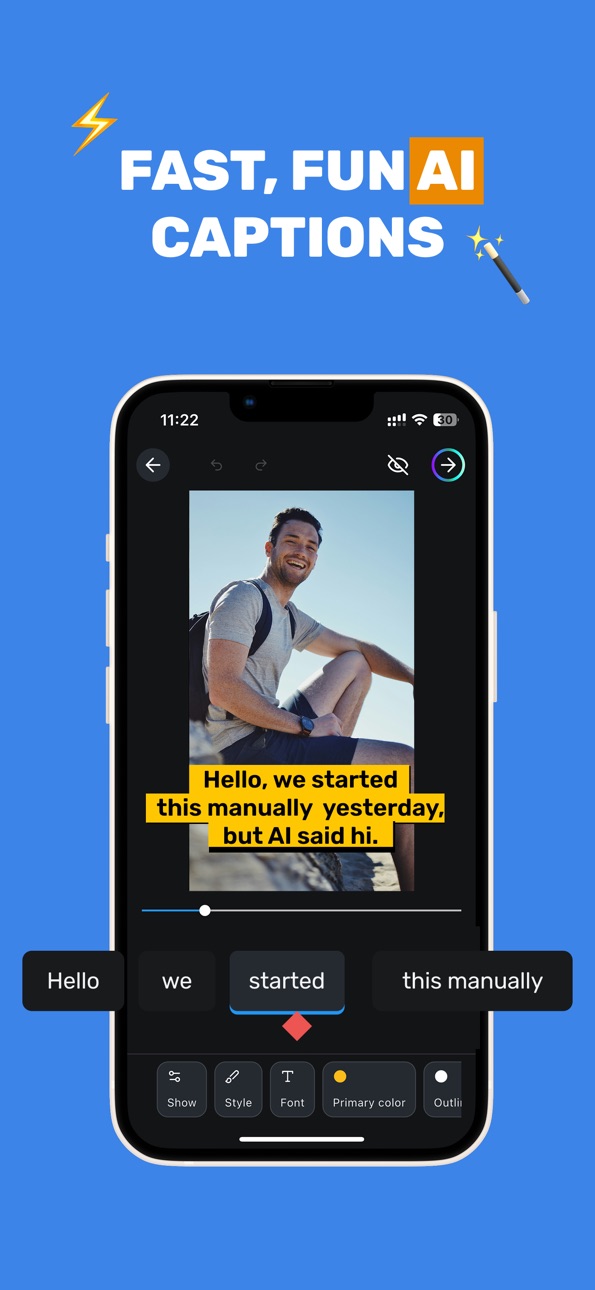
iPad 3 images


What’s New Version 2.1.5
- Improved UI/UX
- Bug fixes
- General improvements
Description
Create Stunning Videos with AI Subtitles – All-in-One Video Studio
Transform your videos into powerful, engaging, and accessible content with our completely rebuilt AI-powered video editing app. Whether you're a creator, educator, marketer, or agency, our app gives you everything you need to produce professional videos - from automatic subtitles to full video editing, AI voice generation, and multi-platform publishing.
With advanced voice recognition and leading AI technology, our app delivers fast, accurate subtitles directly from your mobile device. Create, customize, translate, and share your captioned videos in just a few taps.
How It Works:
1. Upload your video
2. Generate subtitles automatically
3. Customize - edit text, fonts, colors, styles, and effects
4. Export in Ultra HD or publish directly to social media
Everything You'll Love:
Powerful Video Editor
- Cut, trim, and arrange clips with ease
- Text, image, audio, and video overlays
- Crop, color adjust, and zoom effects
- Ultra HD (4K) export at 60 FPS
AI-Powered Tools
- AI subtitle generation with up to 97% accuracy
- AI voice generation (Text-to-Speech)
- AI video generation (up to 20 per month)
- Emojis fully rendered in subtitles
Translate & Localize
- Translate subtitles between 10 languages: English, German, French, Spanish, Portuguese, Japanese, Korean, Russian, Chinese and Mongolian.
- Download SRT files for use anywhere
Custom Styling & Branding
- Up to 5 fully configurable custom subtitle styles
- Premium emoji & themes
- Brand kit support: logo, colors, fonts (up to 5 kits)
- Multi-brand support — perfect for agencies
Team Collaboration
- Invite up to 10 team members (plan-dependent)
- Shared library & analytics dashboards
- Priority support with SLA
Publish Everywhere
- Share directly to YouTube, TikTok, Facebook, and Instagram
Subscription Plans
Unlock the full power of the app with a subscription:
Basic
- Basic_subscription_month – $9.99 / month
- Basic_subscription_year – $89.90 / year
Standard
Standard_subscription_month – $18.99 / month
Standard_subscription_year – $188.99 / year
Pro (for power users & agencies)
Pro_subscription_month – $55.99 / month
Pro_subscription_year – $589.99 / year
All subscriptions auto-renew. Monthly plans last 1 month; yearly plans last 12 months. Payment is charged to your Apple ID account at confirmation of purchase. Subscriptions automatically renew unless auto-renew is turned off at least 24 hours before the end of the current period. You can manage and cancel your subscriptions in your App Store account settings at any time.
Free for New Users
Get started with up to 3 videos (2 minutes each) — completely free!
Note: While our AI provides high accuracy, occasional errors may occur with unclear speech or noisy backgrounds. Quick manual editing ensures perfect results every time.
Start creating better videos today - faster, easier, and more accessible for everyone.
Terms of Use (EULA): https://www.apple.com/legal/internet-services/itunes/dev/stdeula/
Capabilities
In-App Purchases
Accessibility
ipadiphonemacrealityDevicetvoswatch
Version history 25 versions
Build 887852788v2.1.52026-07-06 02:37:36
- Improved UI/UX
- Bug fixes
- General improvements
Build 887420046v2.1.32026-06-25 23:02:15
- Design Tab
New Design tab — browse style presets with visual covers, customize font, color, size, position, and alignment for each subtitle language.
- Save to Files
Export your rendered video directly to Files app, photo gallery, or share — your choice.
- Download Feedback
Download button now shows progress with a spinner so you know it's working.
- Bug Fixes & Localization
Gallery save text corrected across all 10 languages. Stability improvements throughout.
Build 887317232v2.1.22026-06-23 16:57:11
- New Design Tab
Browse and apply subtitle styles with visual cover previews. Customize font, color, size, position, and alignment for each language independently.
- Background Controls
Full background customization — solid, gradient, or blur with adjustable opacity, padding, corner radius, and border.
- Live Preview
All design changes now update the subtitle preview in real-time as you adjust.
Build 886986659v2.1.12026-06-15 20:14:42
Video Player
- Fixed video not loading on long editing sessions — the player now automatically recovers when the session token expires.
Editor Performance
- Fixed freezing during editing when a render or transcription is running in the background. Progress events no longer flood the editor with redundant reloads.
Rendering
- Subtitle font sizes now use resolution-relative units matching the web editor. Subtitles render at the correct size regardless of video resolution.
Stability
- Fixed potential crashes when navigating subtitle lines with incomplete timing data.
- Fixed NaN propagation in crop-preset detection.
- Hardened font-size handling against unexpected server responses.
Build 886845389v2.1.02026-06-11 20:46:25
Improved following modules:
- Playback & editor
- Style panel
- Clip list & media
- Sign-in
Build 886649093v2.0.92026-06-07 22:54:08
• Smaller install (~97%) + faster updates — fonts now download on first
launch, and new fonts can ship without a new app release.
• SRT/VTT download for everyone, on every plan.
• Smoother uploads: deduped retries, cover picker fixes, clearer error
states when a source video is corrupted.
• YouTube publishing fixed.
• Many under-the-hood reliability and payment fixes.
Build 886555120v2.0.82026-06-05 20:05:54
English:
• More reliable plan upgrades - immediate tier change when you switch from a lower to a higher plan.
• Smarter purchase recovery - if a previous purchase didn't finish properly, the app now restores it automatically.
• Fixed a freezing issue on the plans screen.
• Onboarding language picker keeps the Continue button visible no matter how long the list grows.
• Various subtitle export and rendering reliability fixes.
Build 886460787v2.0.72026-06-03 17:25:56
General improvements and bug fixes.
Build 886308018v2.0.62026-05-30 17:44:17
Fixed critical bugs related to new backends. General improvements.
Build 885600525v2.0.52026-05-29 23:45:24
We rebuilt the subtitle engine from the ground up. Every style you pick in the editor now renders exactly the same in your exported video pixel-perfect, frame for frame.
What's unlocked:
- Cinematic animations — bounce, typewriter, karaoke, motion typography
- Rich backgrounds — rounded boxes, glassmorphism blur, gradients, glow
- Per-word highlights with real timing — sing-along captions that feel alive
- Emoji reactions woven into your subtitles
- Custom fonts, weights, outlines, drop shadows — full creative control
Same one-tap workflow. A whole new look. This is the biggest visual upgrade we've ever shipped. Open any clip, pick a style, and feel the difference.
4 new languages are supported.
Build 884492876v1.0.242026-04-15 03:24:47
Fixed bug on clip upload and download
Build 882738508v1.0.232026-02-25 02:00:18
Export Bug Fixed
Build 881736671v1.0.222026-01-23 03:16:03
You can now use promo codes!
Build 880985340v1.0.212025-12-25 05:16:00
- Fixed an issue with video export.
Build 880508631v1.0.202025-12-11 04:29:27
Clip Download error handler Improved
Build 880380237v1.0.192025-12-07 07:01:52
Fixed permission issue.
Build 880214596v1.0.182025-12-04 08:43:53
Added Background processing
Build 879832861v1.0.172025-11-18 01:28:35
- Fixed a bug when downloading clips
Build 879766541v1.0.162025-11-17 02:48:51
Fixed minor bugs
Build 879471357v1.0.152025-11-06 05:14:07
Fixed minor bugs
Build 879198774v1.0.142025-10-28 02:21:05
Fixed minor bugs
Build 879143708v1.0.132025-10-24 02:25:58
Fixed bug where downloaded clip is not appearing in bottom of Photos.
Build 878893041v1.0.122025-10-17 01:57:35
Fixed minor bugs
Build 877848321v1.0.112025-10-06 02:26:24
Added subtitle support for Japanese, Korean, and Chinese
New sign-in options: Apple, Google, and Email
Fixed issues with exporting and uploading
Improved subtitle editing with a smoother, more intuitive UX
Build 877430802v1.0.102025-08-21 23:25:23
Fixed minor bugs
No pricing data captured yet — comparisons appear once the app has paid storefronts or in-app purchases.
Availability 146 of 146 storefronts
| Region | Language | Price | Ratings | Avg | Version |
|---|---|---|---|---|---|
| MN | en-GB | Free | 16 | 2.6 | 2.1.6 |
| KR | ko | Free | 3 | 1.0 | 2.1.6 |
| US | en-US | Free | 2 | 1.0 | 2.1.5 |
| AF | en-GB | Free | 0 | — | 2.1.6 |
| AG | en-GB | Free | 0 | — | 2.1.6 |
| AI | en-GB | Free | 0 | — | 2.1.6 |
| AL | en-GB | Free | 0 | — | 2.1.6 |
| AO | en-GB | Free | 0 | — | 2.1.5 |
| AR | es-MX | Free | 0 | — | 2.1.6 |
| AT | de-DE | Free | 0 | — | 2.1.6 |
| AU | en-AU | Free | 0 | — | 2.1.6 |
| AZ | en-GB | Free | 0 | — | 2.1.6 |
| BB | en-GB | Free | 0 | — | 2.1.6 |
| BE | en-GB | Free | 0 | — | 2.1.6 |
| BF | en-GB | Free | 0 | — | 2.1.5 |
| BG | en-GB | Free | 0 | — | 2.1.6 |
| BH | en-GB | Free | 0 | — | 2.1.6 |
| BJ | en-GB | Free | 0 | — | 2.1.5 |
| BM | en-GB | Free | 0 | — | 2.1.6 |
| BO | es-MX | Free | 0 | — | 2.1.6 |
| BR | pt-BR | Free | 0 | — | 2.1.6 |
| BS | en-GB | Free | 0 | — | 2.1.6 |
| BT | en-GB | Free | 0 | — | 2.1.6 |
| BW | en-GB | Free | 0 | — | 2.1.5 |
| BY | en-GB | Free | 0 | — | 2.1.6 |
| BZ | en-GB | Free | 0 | — | 2.1.6 |
| CA | en-CA | Free | 0 | — | 2.1.6 |
| CD | en-GB | Free | 0 | — | 2.1.5 |
| CG | en-GB | Free | 0 | — | 2.1.5 |
| CH | de-CH | Free | 0 | — | 2.1.6 |
| CI | fr-FR | Free | 0 | — | 2.1.5 |
| CL | es-MX | Free | 0 | — | 2.1.6 |
| CM | fr-FR | Free | 0 | — | 2.1.5 |
| CN | zh-Hans-CN | Free | 0 | — | 2.1.6 |
| CO | es-MX | Free | 0 | — | 2.1.6 |
| CR | es-MX | Free | 0 | — | 2.1.6 |
| CV | en-GB | Free | 0 | — | 2.1.5 |
| CY | en-GB | Free | 0 | — | 2.1.6 |
| CZ | en-GB | Free | 0 | — | 2.1.6 |
| DE | de-DE | Free | 0 | — | 2.1.6 |
| DK | en-GB | Free | 0 | — | 2.1.6 |
| DM | en-GB | Free | 0 | — | 2.1.6 |
| DO | es-MX | Free | 0 | — | 2.1.6 |
| DZ | en-GB | Free | 0 | — | 2.1.5 |
| EC | es-MX | Free | 0 | — | 2.1.6 |
| EE | en-GB | Free | 0 | — | 2.1.6 |
| EG | en-GB | Free | 0 | — | 2.1.6 |
| ES | es-ES | Free | 0 | — | 2.1.6 |
| FR | fr-FR | Free | 0 | — | 2.1.6 |
| GA | fr-FR | Free | 0 | — | 2.1.5 |
| GB | en-GB | Free | 0 | — | 2.1.6 |
| GD | en-GB | Free | 0 | — | 2.1.6 |
| GE | en-GB | Free | 0 | — | 2.1.6 |
| GH | en-GB | Free | 0 | — | 2.1.5 |
| GM | en-GB | Free | 0 | — | 2.1.6 |
| GR | en-GB | Free | 0 | — | 2.1.6 |
| GT | es-MX | Free | 0 | — | 2.1.6 |
| GW | en-GB | Free | 0 | — | 2.1.5 |
| GY | en-GB | Free | 0 | — | 2.1.6 |
| HK | zh-Hant-HK | Free | 0 | — | 2.1.6 |
| HN | es-MX | Free | 0 | — | 2.1.6 |
| HR | en-GB | Free | 0 | — | 2.1.6 |
| HU | en-GB | Free | 0 | — | 2.1.6 |
| IE | en-GB | Free | 0 | — | 2.1.6 |
| IL | en-GB | Free | 0 | — | 2.1.6 |
| IN | en-GB | Free | 0 | — | 2.1.6 |
| IS | en-GB | Free | 0 | — | 2.1.6 |
| IT | it | Free | 0 | — | 2.1.6 |
| JM | en-GB | Free | 0 | — | 2.1.6 |
| JO | en-GB | Free | 0 | — | 2.1.6 |
| KE | en-GB | Free | 0 | — | 2.1.5 |
| KH | en-GB | Free | 0 | — | 2.1.6 |
| KN | en-GB | Free | 0 | — | 2.1.6 |
| KY | en-GB | Free | 0 | — | 2.1.6 |
| KZ | en-GB | Free | 0 | — | 2.1.6 |
| LA | en-GB | Free | 0 | — | 2.1.6 |
| LC | en-GB | Free | 0 | — | 2.1.6 |
| LK | en-GB | Free | 0 | — | 2.1.6 |
| LR | en-GB | Free | 0 | — | 2.1.6 |
| LT | en-GB | Free | 0 | — | 2.1.6 |
| LU | en-GB | Free | 0 | — | 2.1.6 |
| LV | en-GB | Free | 0 | — | 2.1.6 |
| LY | en-GB | Free | 0 | — | 2.1.5 |
| MA | en-GB | Free | 0 | — | 2.1.5 |
| MD | en-GB | Free | 0 | — | 2.1.6 |
| ME | en-GB | Free | 0 | — | 2.1.6 |
| MG | en-GB | Free | 0 | — | 2.1.5 |
| MK | en-GB | Free | 0 | — | 2.1.6 |
| ML | en-GB | Free | 0 | — | 2.1.5 |
| MM | en-GB | Free | 0 | — | 2.1.6 |
| MR | en-GB | Free | 0 | — | 2.1.6 |
| MS | en-GB | Free | 0 | — | 2.1.6 |
| MT | en-GB | Free | 0 | — | 2.1.6 |
| MU | en-GB | Free | 0 | — | 2.1.5 |
| MV | en-GB | Free | 0 | — | 2.1.6 |
| MW | en-GB | Free | 0 | — | 2.1.6 |
| MX | es-MX | Free | 0 | — | 2.1.6 |
| MY | en-GB | Free | 0 | — | 2.1.6 |
| MZ | en-GB | Free | 0 | — | 2.1.5 |
| NA | en-GB | Free | 0 | — | 2.1.5 |
| NE | en-GB | Free | 0 | — | 2.1.5 |
| NG | en-GB | Free | 0 | — | 2.1.5 |
| NI | es-MX | Free | 0 | — | 2.1.6 |
| NL | nl | Free | 0 | — | 2.1.6 |
| NZ | en-AU | Free | 0 | — | 2.1.6 |
| OM | en-GB | Free | 0 | — | 2.1.6 |
| PA | es-MX | Free | 0 | — | 2.1.6 |
| PE | es-MX | Free | 0 | — | 2.1.6 |
| PG | en-GB | Free | 0 | — | 2.1.6 |
| PK | en-GB | Free | 0 | — | 2.1.6 |
| PL | en-GB | Free | 0 | — | 2.1.6 |
| PT | pt-PT | Free | 0 | — | 2.1.6 |
| PY | es-MX | Free | 0 | — | 2.1.6 |
| QA | en-GB | Free | 0 | — | 2.1.6 |
| RS | en-GB | Free | 0 | — | 2.1.6 |
| RW | en-GB | Free | 0 | — | 2.1.6 |
| SA | en-GB | Free | 0 | — | 2.1.6 |
| SB | en-GB | Free | 0 | — | 2.1.6 |
| SC | en-GB | Free | 0 | — | 2.1.6 |
| SE | sv | Free | 0 | — | 2.1.6 |
| SG | en-GB | Free | 0 | — | 2.1.6 |
| SI | en-GB | Free | 0 | — | 2.1.6 |
| SK | en-GB | Free | 0 | — | 2.1.6 |
| SL | en-GB | Free | 0 | — | 2.1.6 |
| SN | en-GB | Free | 0 | — | 2.1.5 |
| SR | en-GB | Free | 0 | — | 2.1.6 |
| ST | en-GB | Free | 0 | — | 2.1.6 |
| SV | es-MX | Free | 0 | — | 2.1.6 |
| SZ | en-GB | Free | 0 | — | 2.1.6 |
| TC | en-GB | Free | 0 | — | 2.1.6 |
| TD | en-GB | Free | 0 | — | 2.1.5 |
| TH | en-GB | Free | 0 | — | 2.1.6 |
| TN | en-GB | Free | 0 | — | 2.1.5 |
| TO | en-GB | Free | 0 | — | 2.1.6 |
| TT | en-GB | Free | 0 | — | 2.1.6 |
| TZ | en-GB | Free | 0 | — | 2.1.5 |
| UA | en-GB | Free | 0 | — | 2.1.6 |
| UG | en-GB | Free | 0 | — | 2.1.5 |
| UY | en-GB | Free | 0 | — | 2.1.6 |
| VC | en-GB | Free | 0 | — | 2.1.6 |
| VE | es-MX | Free | 0 | — | 2.1.6 |
| VG | en-GB | Free | 0 | — | 2.1.6 |
| XK | en-GB | Free | 0 | — | 2.1.6 |
| ZA | en-GB | Free | 0 | — | 2.1.6 |
| ZM | en-GB | Free | 0 | — | 2.1.5 |
| ZW | en-GB | Free | 0 | — | 2.1.5 |
Change log 29 changes · US
✎
releaseNotes updated
- Improved UI/UX
- Bug fixes
- General improvements
✎
description updated
Create Stunning Videos with AI Subtitles – All-in-One Video Studio
Transform your videos into powerful, engaging, and accessible content with our completely reb
✎
subtitle updated
Automatic subtitle editor
✎
name updated
Chimege Sub
◆
Version 2.1.5 released
- Improved UI/UX
- Bug fixes
- General improvements
◆
Version 2.1.3 released
- Design Tab
New Design tab — browse style presets with visual covers, customize font, color, size, position, and alignment for each subtitle language.
- Save to Files
Export your rendered video directly to Files app, photo gallery, or s
◆
Version 2.1.2 released
- New Design Tab
Browse and apply subtitle styles with visual cover previews. Customize font, color, size, position, and alignment for each language independently.
- Background Controls
Full background customization — solid, gradient,
◆
Version 2.1.1 released
Video Player
- Fixed video not loading on long editing sessions — the player now automatically recovers when the session token expires.
Editor Performance
- Fixed freezing during editing when a render or transcription is running in the back
◆
Version 2.1.0 released
Improved following modules:
- Playback & editor
- Style panel
- Clip list & media
- Sign-in
◆
Version 2.0.9 released
• Smaller install (~97%) + faster updates — fonts now download on first
launch, and new fonts can ship without a new app release.
• SRT/VTT download for everyone, on every plan.
• Smoother uploads: deduped retries, cover picker fixes, c
◆
Version 2.0.8 released
English:
• More reliable plan upgrades - immediate tier change when you switch from a lower to a higher plan.
• Smarter purchase recovery - if a previous purchase didn't finish properly, the app now restores it automatically.
• Fixed
◆
Version 2.0.7 released
General improvements and bug fixes.
◆
Version 2.0.6 released
Fixed critical bugs related to new backends. General improvements.
◆
Version 2.0.5 released
We rebuilt the subtitle engine from the ground up. Every style you pick in the editor now renders exactly the same in your exported video pixel-perfect, frame for frame.
What's unlocked:
- Cinematic animations — bounce, typewriter, karaok
◆
Version 1.0.24 released
Fixed bug on clip upload and download
◆
Version 1.0.23 released
Export Bug Fixed
◆
Version 1.0.22 released
You can now use promo codes!
◆
Version 1.0.21 released
- Fixed an issue with video export.
◆
Version 1.0.20 released
Clip Download error handler Improved
◆
Version 1.0.19 released
Fixed permission issue.
◆
Version 1.0.18 released
Added Background processing
◆
Version 1.0.17 released
- Fixed a bug when downloading clips
◆
Version 1.0.16 released
Fixed minor bugs
◆
Version 1.0.15 released
Fixed minor bugs
◆
Version 1.0.14 released
Fixed minor bugs
◆
Version 1.0.13 released
Fixed bug where downloaded clip is not appearing in bottom of Photos.
◆
Version 1.0.12 released
Fixed minor bugs
◆
Version 1.0.11 released
Added subtitle support for Japanese, Korean, and Chinese
New sign-in options: Apple, Google, and Email
Fixed issues with exporting and uploading
Improved subtitle editing with a smoother, more intuitive UX
◆
Version 1.0.10 released
Fixed minor bugs