Home › Productivity

 US
US
1 of 1 storefronts
Content in en-US
Content in en-US
Information
Apple ID6744610682
Bundle IDio.impawsible.Vividay
SellerSeller
Min iOS17.0
Min macOS14.0
Device familiesiphone, ipad
Released2025-04-28
Copyright© 2025 Vividay
Privacy policyLink ↗
Preview 2 platforms
iPhone 10 images


iPad 9 images




What’s New Version 1.19
This update brings global search — find any task, instantly.
# Search Across All Your Tasks
Tap the search icon in the header to search across every task you've ever created. Results appear grouped by date, and matching keywords are highlighted directly in the task cards.
# Works With Your Filters
Already using a filter? Search within the filtered results to zero in on exactly what you need. Search and filters are fully independent — use either one, or combine both.
We hope you're enjoying Vividay. If you are, we'd love your support:
• Rate us on the App Store
• Share the app with friends and family
• Send us your feedback -- we're always listening
Description
Make Every Day a Vividay
Vividay transforms daily task management into a colorful, intuitive experience that keeps you organized and focused on what matters most.
# Vibrant Visual Organization
Bring life to your tasks with colorful tags that make organization effortless. A quick glance is all you need to understand your priorities and categories.
# Distraction-Free Focus
Our content-first design hides controls until you need them, creating a calm, focused environment for your daily planning and task completion.
# Voice-Powered Task Management
• Voice Input: Speak your tasks instead of typing with real-time transcription
• Siri Integration: Manage tasks with voice commands like "Hey Siri, add a task in Vividay"
• Shortcuts Automation: Create custom workflows in the Shortcuts app
# Instant Batch Import (Pro Feature)
• Smart Text Parsing: Copy any list from Notes, messages, or emails—instantly transforms into organized tasks
• Quick Editing: Review and edit task text before importing
• Custom Icon Sets: Batch add or remove icons for imported tasks
• Flexible Tag Positioning: Choose from always left, always right, or alternating positions
# Smart Filters (Pro Feature)
• Date Range Filtering: View tasks by today, this week, this month, or custom date range
• Status Filtering: Show all tasks, incomplete only, or completed only
• Reminder Filtering: Filter tasks with or without reminders
# Instant Search
Find any task across all your history in seconds. Tap the search icon, type a keyword, and results appear grouped by date with matching text highlighted. Use search on its own or combine it with filters to zero in on exactly what you need.
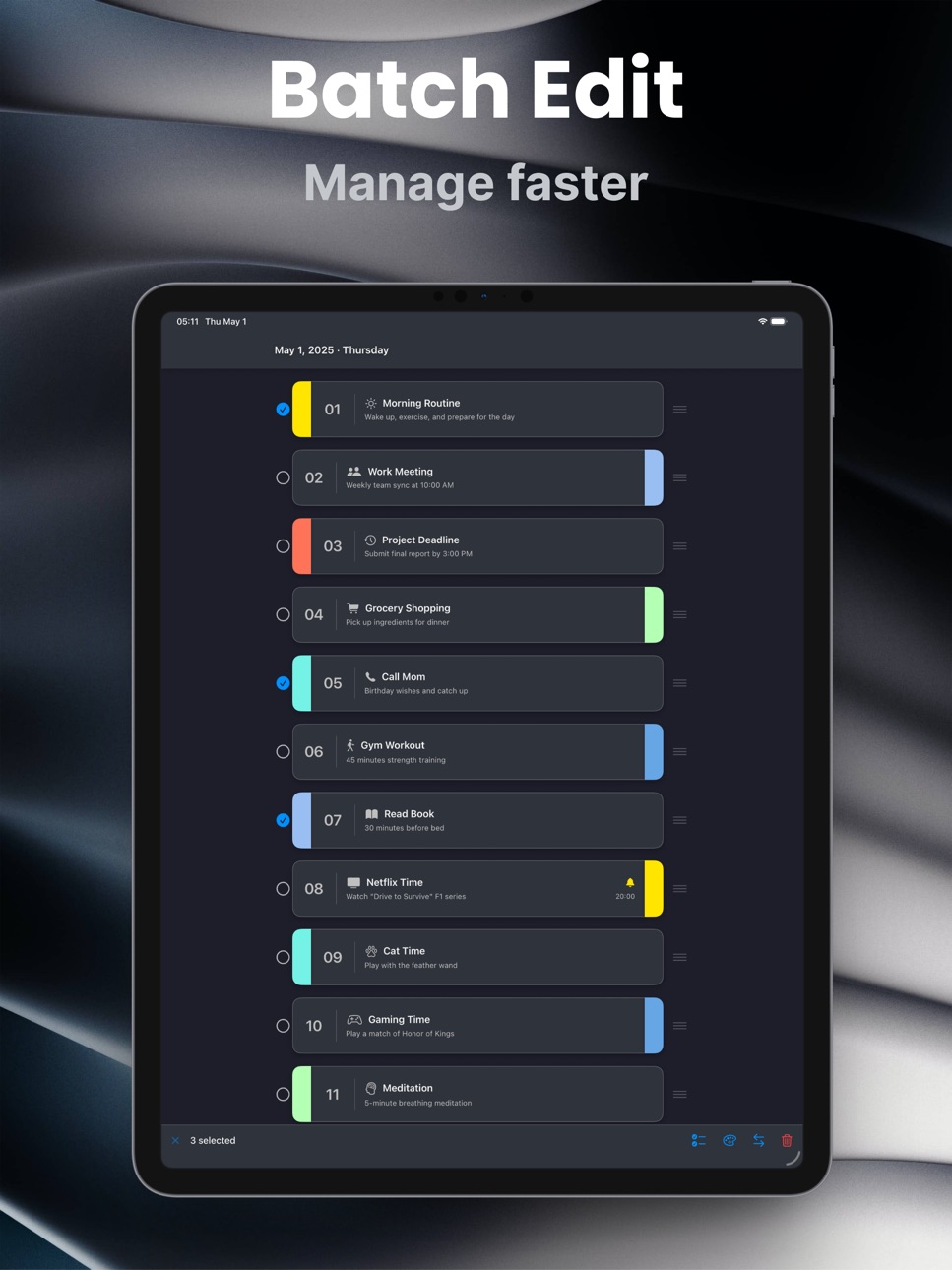
# Powerful Edit Mode
• Drag & Reorder: Rearrange tasks by priority with automatic renumbering for perfect 1-2-3 order
• Batch Deletion: Select and delete multiple tasks at once
• Batch Color Editing (Pro): Instantly unify visual style by applying colors to multiple tasks at once—choose from 6 vibrant presets or create your own custom color
• Batch Position Editing (Pro): Perfect your layout with one tap—align tags to left or right, or create rhythmic alternating patterns across selected tasks
• Always Organized: Tasks stay visually clean and numbered sequentially
# Smart Daily Planning
• Create tasks with customizable icons and color tags
• Mark completion with a simple swipe
• Set reminders to stay on top of important deadlines
• Navigate between days with the intuitive calendar view
# Thoughtful Features
• Beautiful light and dark themes
• Customizable daily task limits
• Haptic feedback for a satisfying experience
• Support for 13 languages worldwide
# More Pro Features
Upgrade to Vividay Pro to unlock:
• Custom theme selection for personalized aesthetics
• Recurring reminders (daily, weekly, monthly)
• Extended color palette for task tags
• Custom tag positioning options
Vividay is designed for all ages with a privacy-first approach - your task data remains on your device.
Make Every Day a Vividay and transform your daily organization into a delightful experience!
Terms of Use: https://www.apple.com/legal/internet-services/itunes/dev/stdeula/
In-App Purchases US pricing
Vividay Pro Subscription
Monthly · Monthly$1.99
Yearly · Yearly$4.99
One-Time Purchases
Vividay Pro Lifetime$9.99
Capabilities
In-App Purchases
Accessibility
ipadiphonemacrealityDevicetvoswatch
Version history 20 versions
Build 885598070v1.192026-05-13 18:52:33
This update brings global search — find any task, instantly.
# Search Across All Your Tasks
Tap the search icon in the header to search across every task you've ever created. Results appear grouped by date, and matching keywords are highlighted directly in the task cards.
# Works With Your Filters
Already using a filter? Search within the filtered results to zero in on exactly what you need. Search and filters are fully independent — use either one, or combine both.
We hope you're enjoying Vividay. If you are, we'd love your support:
• Rate us on the App Store
• Share the app with friends and family
• Send us your feedback -- we're always listening
Build 884537356v1.182026-04-15 14:57:10
This update brings a more polished calendar experience.
# Dismiss the Calendar with One Tap
When the calendar is open, you can now tap anywhere on the task list below to close it — no need to hunt for the calendar button first.
# Improved Calendar Layout on iPad
The calendar card now matches the width of the task list on iPad, in both portrait and landscape orientations.
We hope you're enjoying Vividay. If you are, we'd love your support:
• Rate us on the App Store
• Share the app with friends and family
• Send us your feedback -- we're always listening
Build 883819370v1.172026-03-27 16:10:09
This update brings a smarter, cleaner calendar experience.
# Jump to Any Month Instantly
Tapping the month title in the calendar now opens an inline year and month picker — right inside the calendar card, no extra screen required. Scroll to any year and month, tap Done, and you're there. No more tapping the arrow dozens of times to reach a date months or years away.
# Cleaner Calendar Layout
The previous and next month arrows have moved into the weekday header row, sitting neatly beside the day labels. This keeps the top of the calendar uncluttered, and the arrows now align precisely with the date columns below them.
We hope you're enjoying Vividay. If you are, we'd love your support:
• Rate us on the App Store
• Share the app with friends and family
• Send us your feedback -- we're always listening
Build 883529874v1.162026-03-19 22:35:21
This update brings more reliable reminders, smarter task import, and a refined filter experience.
# Last Day of Month Reminder
Monthly reminders scheduled on the 29th, 30th, or 31st no longer silently fail in shorter months. A new "Last Day of Month" repeat option is also available, ensuring your reminder always fires on the final day of every month — no matter how long the month is.
# Smarter Import: Duplicate Detection
When importing tasks from the clipboard, Vividay now automatically detects duplicates. Items that already exist in your task list are highlighted in orange and deselected by default — so you stay in control of what gets added.
# Reminder Time Warning
If you set a reminder to a time that has already passed, a red inline warning now appears right below the date picker. You'll always know before saving whether the notification will actually fire.
Filter: All Days
A new "All Days" date range is now available in the Advanced Filter, letting you search and filter across your entire task history — not just a specific week or month.
Cleaner Filter UI
The filter panel has been refined with shorter, less crowded labels and a smarter display name that only shows the dimensions you've actually changed.
As always, thank you for your support. If you're enjoying Vividay, a kind review on the App Store means the world to us.
Build 882970854v1.152026-03-04 23:00:08
We made improvements and squashed bugs to enhance your Vividay experience.
Build 881948049v1.142026-01-30 14:27:22
What's New in Version 1.14
Fixed: Voice input now displays in your selected language instead of always showing English
Yours, Vividay
Build 881006904v1.132026-01-04 12:12:51
New year, new possibilities! Vividay 1.13 brings powerful new ways to manage your tasks, helping you start 2026 on a productive note.
• Batch Text Import - Paste your lists (shopping, to-dos, notes) from clipboard to create multiple tasks instantly. Supports numbered lists, Markdown, bullet points and more
• Powerful Edit Mode - Long-press to enter Edit mode and effortlessly drag to reorder, batch delete, or instantly adjust colours and positions
• Custom Import Icons - Personalise your imported tasks with distinctive icons
• Redesigned Reminders - Fresh card-style layout with clear colour tags and descriptions
• Refined Interface - Unified corner radius and spacing for a more polished look
Thank you for choosing Vividay to welcome 2026! Here's to planning brighter, more vivid days together in the new year.
Build 880797123v1.122025-12-19 04:19:57
This festive season, we're thrilled to bring you something special—Vividay has officially arrived on iPad!
• Adaptive iPad Layout - Your task list sits elegantly centred on the big screen, making planning a true pleasure
• Immersive Editing Experience - Full-screen modals let you focus on what matters most
• Thoughtfully Refined - Every card, every spacing—polished with care
This marks Vividay's first chapter on iPad, and it's only the beginning of what's to come.
Thank you for making Vividay part of your 2025. As this year draws to a close, we're grateful to have helped make your days a little more vivid. Here's to planning even brighter days together in 2026!
Build 880537775v1.112025-12-16 09:39:36
# Redesigned Settings
We've completely redesigned the Settings interface for a more professional and organized experience:
• Tabbed Interface: Settings are now organized into two clear tabs • General and Preference
• Better Organization: All settings are grouped logically for easier access
• Cleaner Design: Removed unnecessary UI elements for a more streamlined experience
## General Tab
• Subscription management
• Language settings
• Theme selection
• Support links
• Developer apps
## Preference Tab
• Tag customization (colors and width)
• Calendar preferences
• Task settings
• Reminder management
# Improvements
• Faster navigation with instant tab switching
• All settings now accessible without sub•navigation
• Consistent with modern iOS design patterns
• Enhanced visual hierarchy
Feel free to send us any comments or questions by tapping: Settings icon > General Tab > ABOUT & SUPPORT > Feedback
Build 880467126v1.102025-12-09 19:31:40
We made performance improvements and squashed bugs to enhance your Vividay experience.
Build 879956279v1.92025-11-21 19:47:23
Introducing Voice-Powered Task Management
Create and manage your tasks hands-free with powerful new voice features:
# Voice Input
Tap the microphone icon in task creation to speak your tasks. Real-time transcription with support for all 13 Vividay languages makes quick capture easier than ever.
# Siri Shortcuts
Manage tasks entirely through Siri:
• "Hey Siri, add a task in Vividay"
• "Hey Siri, show my tasks in Vividay"
• Create automations in the Shortcuts app
# Multilingual Support
Use voice features in your native language:
English, 简体中文, 繁體中文, 日本語, 한국어, Italiano, Français, Deutsch, Español, Português, Русский, العربية, Tiếng Việt
Build 879433045v1.82025-11-04 07:59:31
Improved performance, reliability, and overall experience.
Yours, Vividay
Build 879291161v1.72025-10-31 05:22:10
Squashed some bugs and improved the overall experience.
Yours, Vividay
Build 876290523v1.62025-07-11 16:15:28
We're continuing our mission to connect with users worldwide! Building on our previous multilingual foundation, we're excited to expand our language family even further.
** Enhanced Global Reach**
• **Portuguese** - Welcome to our growing Portuguese-speaking community
• **Russian** - Добро пожаловать! Native support for our Russian users
• **Arabic** - أهلاً وسهلاً! Right-to-left interface optimized for Arabic speakers
• **Vietnamese** - Chào mừng! Complete Vietnamese localization experience
Following our successful launch with Traditional Chinese, Japanese, Korean, Italian, German, French, and Spanish, we're proud to welcome even more languages to the Vividay family. Every new language brings us closer to our vision of creating truly inclusive digital experiences.
Discover how Vividay feels even more natural and intuitive in your native language!
Build 876027375v1.52025-07-01 17:08:28
# Expanded Language Support
We're excited to introduce comprehensive multilingual support in this update! Our app now speaks your language with support for:
• Traditional Chinese - Localized experience for Hong Kong, Macau, and Taiwan users
• Japanese - Native language support for our Japanese community
• Korean - Fully localized interface for Korean users
• Italian - Dedicated experience for Italian speakers
• German - Comprehensive German language support
• French - Complete French localization
• Spanish - Full Spanish language experience
No matter where you are in the world, you can now enjoy our app in your preferred language. Experience a more personalized and accessible interface today!
Build 874975004v1.42025-05-22 22:31:04
This update brings performance enhancements and bug fixes to make Vividay better for you.
By the way, App Store reviews are very helpful to us. If you think Vividay is worthy, would you mind taking a moment to write a nice review? We'd greatly appreciate it. Thanks for using Vividay! :)
Build 874732767v1.32025-05-14 05:02:00
- iCloud Sync for Premium Users: Enjoy seamless task synchronization across all your devices with adjustable sync intervals and detailed sync status information.
- Reminder Filtering: Easily filter tasks based on reminder status—view all tasks, only tasks with reminders, or only tasks without reminders.
- Inline Expandable Calendar: Access calendar functionality without leaving your task list through our new space-efficient inline design with smooth animations.
- Improved Storage Architecture: Experience better performance with our optimized storage system that maintains full data integrity and compatibility.
- Hourly Recurring Reminders: Set reminders that repeat every hour—perfect for breaks, medication schedules, or hydration alerts.
This is our BIGGEST update yet! We've completely reimagined how you interact with your tasks while adding powerful new features to help you stay organized.
Feel free to send us any comments or questions by tapping: Settings icon > ABOUT & SUPPORT > Feedback
Build 874539213v1.22025-05-06 12:16:54
- Added "OUR APPS" section in Settings where you can discover our other applications
- Performance improvements and bug fixes for a smoother experience
- Minor UI enhancements for better usability
Feel free to send us any comments or questions by tapping: Settings icon > ABOUT & SUPPORT > Feedback
Build 874442776v1.12025-05-01 13:50:14
This update brings new calendar features to make Vividay better for you.
What's New:
- Calendar Customization: Choose whether to display adjacent month days in your calendar view for a cleaner interface while still maintaining correct weekday alignment.
- Week Start Preference: Set which day your week starts on according to your regional or personal preferences.
- Enhanced Calendar Experience: Enjoy a more personalized calendar with improved stability and customization options.
Feel free to send us any comments or questions by tapping: Settings icon > ABOUT & SUPPORT > Feedback
Build 874020782v1.02025-04-29 01:40:50
Price history by region
Currency
Show
Columns
Search
Availability 1 of 1 storefronts
| Region | Language | Price | Ratings | Avg | Version |
|---|---|---|---|---|---|
| US | en-US | Free | 1 | 5.0 | 1.19 |
Change log 24 changes · US
✎
releaseNotes updated
This update brings global search — find any task, instantly.
# Search Across All Your Tasks
Tap the search icon in the header to search across every task you'v
✎
description updated
Make Every Day a Vividay
Vividay transforms daily task management into a colorful, intuitive experience that keeps you organized and focused on what matters mo
✎
subtitle updated
Daily Planner·To-Do·Color Tags
✎
name updated
Vividay
◆
Version 1.19 released
This update brings global search — find any task, instantly.
# Search Across All Your Tasks
Tap the search icon in the header to search across every task you've ever created. Results appear grouped by date, and matching keywords are highli
◆
Version 1.18 released
This update brings a more polished calendar experience.
# Dismiss the Calendar with One Tap
When the calendar is open, you can now tap anywhere on the task list below to close it — no need to hunt for the calendar button first.
# Improved
◆
Version 1.17 released
This update brings a smarter, cleaner calendar experience.
# Jump to Any Month Instantly
Tapping the month title in the calendar now opens an inline year and month picker — right inside the calendar card, no extra screen required. Scroll t
◆
Version 1.16 released
This update brings more reliable reminders, smarter task import, and a refined filter experience.
# Last Day of Month Reminder
Monthly reminders scheduled on the 29th, 30th, or 31st no longer silently fail in shorter months. A new "Last Da
◆
Version 1.15 released
We made improvements and squashed bugs to enhance your Vividay experience.
◆
Version 1.14 released
What's New in Version 1.14
Fixed: Voice input now displays in your selected language instead of always showing English
Yours, Vividay
◆
Version 1.13 released
New year, new possibilities! Vividay 1.13 brings powerful new ways to manage your tasks, helping you start 2026 on a productive note.
• Batch Text Import - Paste your lists (shopping, to-dos, notes) from clipboard to create multiple tasks
◆
Version 1.12 released
This festive season, we're thrilled to bring you something special—Vividay has officially arrived on iPad!
• Adaptive iPad Layout - Your task list sits elegantly centred on the big screen, making planning a true pleasure
• Immersive Editi
◆
Version 1.11 released
# Redesigned Settings
We've completely redesigned the Settings interface for a more professional and organized experience:
• Tabbed Interface: Settings are now organized into two clear tabs • General and Preference
• Better Organization:
◆
Version 1.10 released
We made performance improvements and squashed bugs to enhance your Vividay experience.
◆
Version 1.9 released
Introducing Voice-Powered Task Management
Create and manage your tasks hands-free with powerful new voice features:
# Voice Input
Tap the microphone icon in task creation to speak your tasks. Real-time transcription with support for all 1
◆
Version 1.8 released
Improved performance, reliability, and overall experience.
Yours, Vividay
◆
Version 1.7 released
Squashed some bugs and improved the overall experience.
Yours, Vividay
◆
Version 1.6 released
We're continuing our mission to connect with users worldwide! Building on our previous multilingual foundation, we're excited to expand our language family even further.
** Enhanced Global Reach**
• **Portuguese** - Welcome to our growin
◆
Version 1.5 released
# Expanded Language Support
We're excited to introduce comprehensive multilingual support in this update! Our app now speaks your language with support for:
• Traditional Chinese - Localized experience for Hong Kong, Macau, and Taiwan use
◆
Version 1.4 released
This update brings performance enhancements and bug fixes to make Vividay better for you.
By the way, App Store reviews are very helpful to us. If you think Vividay is worthy, would you mind taking a moment to write a nice review? We'd gre
◆
Version 1.3 released
- iCloud Sync for Premium Users: Enjoy seamless task synchronization across all your devices with adjustable sync intervals and detailed sync status information.
- Reminder Filtering: Easily filter tasks based on reminder status—view all ta
◆
Version 1.2 released
- Added "OUR APPS" section in Settings where you can discover our other applications
- Performance improvements and bug fixes for a smoother experience
- Minor UI enhancements for better usability
Feel free to send us any comments or quest
◆
Version 1.1 released
This update brings new calendar features to make Vividay better for you.
What's New:
- Calendar Customization: Choose whether to display adjacent month days in your calendar view for a cleaner interface while still maintaining correct week
◆
Version 1.0 released