Home › Business

 US
US
1 of 1 storefronts
Content in en-US
Content in en-US
Information
Apple ID6744131404
Bundle IDcom.scs71.cargonote
SellerSeller
Min iOS15.5
Min macOS12.0
Device familiesiphone, ipad, ipod
Released2025-04-25
Copyright© Symphony Creative Solutions Pte. Ltd.
Privacy policyLink ↗
Preview 2 platforms
iPhone 4 images

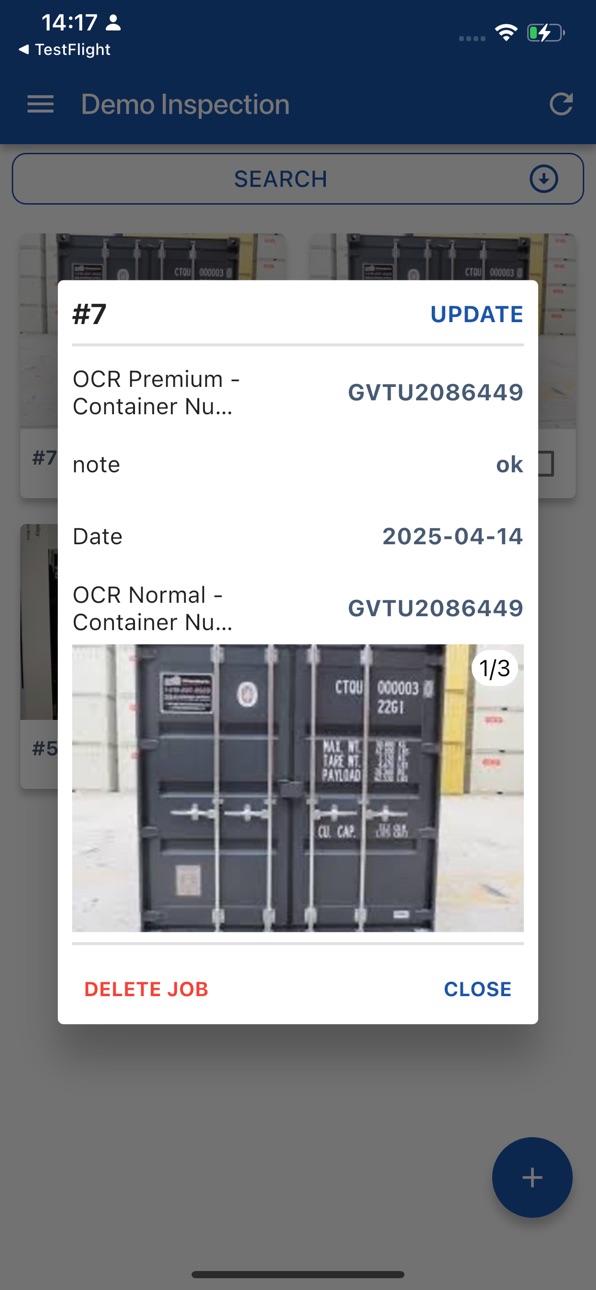
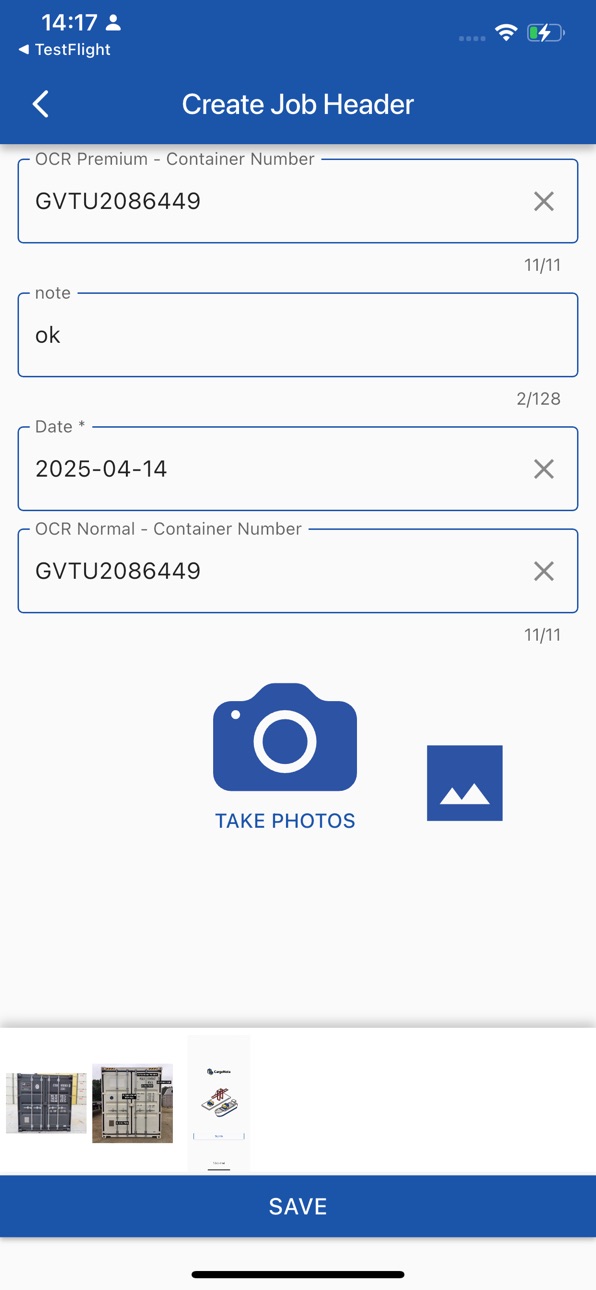

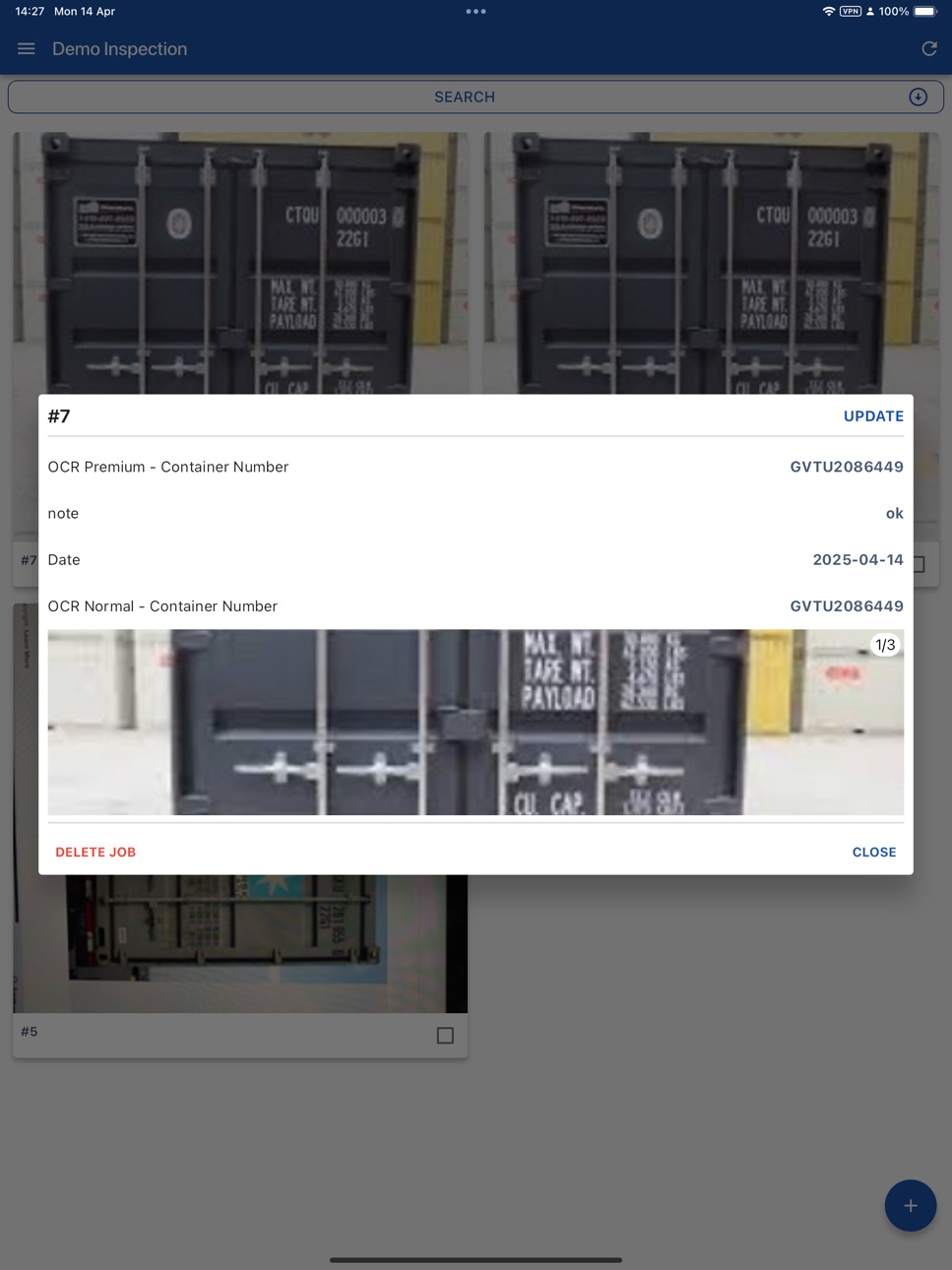
iPad 3 images


What’s New Version 1.28.1
QR scanning improved: values now fill starting from the field you tap, and multiple QR fields are supported in one step.
Description
CargoNote consists of the mobile application and website to send and receive images and their details to increase transparency of logistics and improve visibility of shipments.
CargoNote consists of the following features
- Image repository
- Tagging functionalities on photos
- OCR of information on images
- Text Recognition for images taken.
We are constantly evolving our products and look to bring on
- AR Measuring of cargo
- Image recognition of defects for cargo.
Accessibility
ipadiphonemacrealityDevicetvoswatch
Version history 25 versions
Build 887942596v1.28.12026-07-07 23:19:10
QR scanning improved: values now fill starting from the field you tap, and multiple QR fields are supported in one step.
Build 887138038v1.28.02026-06-23 01:02:53
New Features
Use AI-powered OCR to automatically scan and fill in Container Number, Booking Number, and Seal Number fields from a photo.
QR codes without delimiters can now be split into separate tags based on a configurable character count.
You can now add plain text title items to your tag list in Step/Tag Master settings.
Improvements
The camera now opens at a wider default zoom level, making it easier to capture full labels during OCR and photo scans.
Bug Fixes
Fixed several validation and display issues with OCR Container#, Booking#, and Seal# tags, including incorrect error messages and duplicate tag restrictions.
Fixed customized reports showing placeholder data in unused photo tag cells, and user IDs appearing instead of actual user names.
Build 886830112v1.27.02026-06-11 17:23:30
New Features
Share only the photos you want — select specific photos before generating a sharing link.
Save your preferred filters and view mode in the photo viewer (Mobile).
Improvements
Various UI improvements and helpful hints across the app.
Bug Fixes
Fixed several display issues in PDF reports and the photo viewer.
Fixed preferences not being saved correctly after re-login.
Fixed file import and export issues.
Build 886237067v1.26.02026-05-28 16:51:22
New Features
Background upload — uploads now continue while the app is in the background.
Push notifications for master data changes.
Support for multiple reference tags within a single set of tag headers / photo tags.
Improvements
More granular notification settings for non-Viewer users.
Jobs shared with Viewer users are now clearly indicated.
Improved CSV import validation, aligned with the mobile app.
Refined access to the user guide and certain group options based on user role.
General hardening of access controls, session handling, and request rate limiting.
Bug Fixes
Resolved several issues with external table updates and reference tagging.
Fixed notification settings and email delivery for job creation and updates.
Improved CSV import handling, date/time parsing, and record updates.
Improved container number recognition accuracy.
Various stability and data-display fixes.
Build 885811390v1.25.12026-05-18 19:20:17
Hotfix:
- Scan OCR by AI
- Skip step validation
Build 885689917v1.25.02026-05-15 16:00:55
New Features
Customized report function — users can now build their own report templates
Per-Photo Comment in Photo Box — users can attach a comment to each individual photo
Email notifications for viewer users — viewers now receive email alerts based on configured conditions
Build 884888031v1.24.12026-04-24 21:02:39
New Features:
- AI OCR: The system can now automatically read vehicle numbers from images
- User Guide: Added an in-app user guide accessible directly from CargoNote Web
Improvements:
- Users can now download a single photo directly from the photo viewer page
- Photo box titles now display correctly on Mobile
- Date/time search has been improved for more accurate and intuitive results
- Validation now supports a "soft warning" mode
Build 884845506v1.24.02026-04-23 12:03:54
New Features:
- AI OCR: The system can now automatically read vehicle numbers from images
- User Guide: Added an in-app user guide accessible directly from CargoNote Web
Improvements:
- Users can now download a single photo directly from the photo viewer page
- Photo box titles now display correctly on Mobile
- Date/time search has been improved for more accurate and intuitive results
- Validation now supports a "soft warning" mode
Build 884321162v1.23.02026-04-09 22:13:13
New Features
Added a new Viewer User Role for restricted access.
Introduced a read-only option for Tag Master on mobile devices.
Build 883581177v1.22.02026-03-20 22:38:00
New Features
Users can now save OCR photos directly to their device when the Save Photo option is enabled
Added a customized report function for improved reporting flexibility
Improvements
Individual photo link configuration can now be embedded directly in the current user interface
Extracting data from multiple job entries using single OCR now supports Container Number and Tare weight
User Master page now displays the "User Type" field after the User Name for better clarity
The default setting in Group Master page has been updated
Photo tag view has been updated in the Process Management section
When selecting a Photo ID in a request, the job creation date fields are now optional
Bug Fixes
Resolved an issue where orphaned export directories were accumulating unnecessarily
Fixed a problem preventing jobs from being updated correctly
Deleted jobs were being incorrectly returned in API responses - this has been resolved
Jobs created before February 4 could not be retrieved - now fixed
Build 883055994v1.21.02026-03-10 07:18:34
New Features
* Added ability to display local time in the system while keeping UTC in the backend
* Local time is now shown in automated emails
* Local time is now included in PDF and Excel reports
* Added option to embed individual photo links directly in the current UI
* Enabled saving photos used for Photo Tag OCR into the photo box
Improvements
* Improved mobile UI
* Updated Audit Trail page to support local time display
* Standardized API type naming
* Improved handling of instructions’ photos after creating new tags
Bug Fixes
* Fixed issue preventing preview of data with date/time tag type
* Resolved issue where signature photos could not be reviewed
* Corrected incorrect date/time display when users are in different time zones
* Fixed photo box layout issue when tapping the “Take Photo” button
* Resolved blank API Type field after creating a new API
* Fixed reporting display issue where value list decoration was not shown properly
* Resolved map view failing to load in Photo View
* Fixed broken photo uploading for S21 devices
* Resolved background worker incident causing service disruption
* Addressed Proxy/VPN connectivity issues for specific locations
Build 882407083v1.20.02026-02-16 12:11:05
New Features
- Added customized reports for better insights.
- Allow photo tags to be added before taking photos.
- Enable video uploads from the mobile app
- Migrated photo storage to a more reliable platform.
Improvements
- Improved tag configuration and organization.
- Switched dev tools to company-managed email accounts.
- Standardized webhook naming for clarity.
Bug Fixes
- Fixed an issue with incorrect photo marking on mobile.
- Fixed duplicate videos appearing on the website.
Build 882187111v1.19.12026-02-08 11:43:55
Improved Photo Upload
Build 881964172v1.19.02026-01-31 09:59:42
New features:
Make tag optionally displayed in mobile
Update external table logic
More security measures to make system highly secured
User can be assigned to a Department
Improvements:
Many UI-UX improvements for web and mobile.
Photo box UI-UX is change to tab-based UI
More streamlined photo uploading for mobile
Build 881521587v1.18.02026-01-21 13:19:49
New features:
AI-powered container number OCR
Better CSV import logic
New long-text tag type
Admin can bulk delete trashed jobs.
Improvements:
Better mobile UX for photo selection
Improve map UX for mobile app
Better company logo rendering in PDF report
Build 881157005v1.17.02026-01-06 08:46:04
New features:
Manual mode for camera to support dark environments
Event-based web hooks to integrate with external systems
Import / export geofencing table
OCR in square is supported
Improvements:
Refine external RESTful API endpoints
Improve UI/UX for mobile app
Improve system performance
Build 880971192v1.16.12025-12-29 03:38:05
Improved OCR scan accuracy and stability
Build 880801755v1.16.02025-12-19 08:42:22
Improvements:
Improve OCR effectiveness
Improve Recent Jobs screen loading time
Save photos faster
Build 880685877v1.15.32025-12-16 17:53:28
Fix a minor bug
Build 880552577v1.15.22025-12-12 06:06:24
improve scan ocr
Build 880472560v1.15.12025-12-09 23:01:00
Enhanced OCR Premium Accuracy
Improved recognition quality for complex characters and low-light images, resulting in more reliable and faster OCR performance.
Build 880340218v1.15.02025-12-04 21:13:08
Improvements:
Email sending faster
UI/UX improvements
Build 879935332v1.14.02025-11-20 22:17:30
New features:
- OCR with Multimodal AI models
- Make vertical container number reading faster, more stable
Improvements:
- Improve UI/UX on mobile
- Harden security vulnerabilities
- Improve system performance
Build 879631244v1.13.02025-11-11 10:11:25
New features:
Enable to sort jobs by ascending / descending
Improvements:
Improve speed for OCR from photo
Improve the system performance
Build 879142691v1.12.12025-10-23 02:02:25
New features:
AI-powered vertical container reading
Edit multiple jobs at same time
Add company label to XLS / PDF reports
Improvements:
UX for Camera screen
Refine XLS / PDF report format
No pricing data captured yet — comparisons appear once the app has paid storefronts or in-app purchases.
Availability 1 of 1 storefronts
| Region | Language | Price | Ratings | Avg | Version |
|---|---|---|---|---|---|
| US | en-US | Free | 0 | — | 1.28.1 |
Change log 28 changes · US
✎
releaseNotes updated
QR scanning improved: values now fill starting from the field you tap, and multiple QR fields are supported in one step.
✎
description updated
CargoNote consists of the mobile application and website to send and receive images and their details to increase transparency of logistics and improve visibili
✎
name updated
CargoNote
◆
Version 1.28.1 released
QR scanning improved: values now fill starting from the field you tap, and multiple QR fields are supported in one step.
◆
Version 1.28.0 released
New Features
Use AI-powered OCR to automatically scan and fill in Container Number, Booking Number, and Seal Number fields from a photo.
QR codes without delimiters can now be split into separate tags based on a configurable character coun
◆
Version 1.27.0 released
New Features
Share only the photos you want — select specific photos before generating a sharing link.
Save your preferred filters and view mode in the photo viewer (Mobile).
Improvements
Various UI improvements and helpful hints across th
◆
Version 1.26.0 released
New Features
Background upload — uploads now continue while the app is in the background.
Push notifications for master data changes.
Support for multiple reference tags within a single set of tag headers / photo tags.
Improvements
Mor
◆
Version 1.25.1 released
Hotfix:
- Scan OCR by AI
- Skip step validation
◆
Version 1.25.0 released
New Features
Customized report function — users can now build their own report templates
Per-Photo Comment in Photo Box — users can attach a comment to each individual photo
Email notifications for viewer users — viewers now receive emai
◆
Version 1.24.1 released
New Features:
- AI OCR: The system can now automatically read vehicle numbers from images
- User Guide: Added an in-app user guide accessible directly from CargoNote Web
Improvements:
- Users can now download a single photo directly from th
◆
Version 1.24.0 released
New Features:
- AI OCR: The system can now automatically read vehicle numbers from images
- User Guide: Added an in-app user guide accessible directly from CargoNote Web
Improvements:
- Users can now download a single photo directly from th
◆
Version 1.23.0 released
New Features
Added a new Viewer User Role for restricted access.
Introduced a read-only option for Tag Master on mobile devices.
◆
Version 1.22.0 released
New Features
Users can now save OCR photos directly to their device when the Save Photo option is enabled
Added a customized report function for improved reporting flexibility
Improvements
Individual photo link configuration can now be e
◆
Version 1.21.0 released
New Features
* Added ability to display local time in the system while keeping UTC in the backend
* Local time is now shown in automated emails
* Local time is now included in PDF and Excel reports
* Added option to embed individual photo l
◆
Version 1.20.0 released
New Features
- Added customized reports for better insights.
- Allow photo tags to be added before taking photos.
- Enable video uploads from the mobile app
- Migrated photo storage to a more reliable platform.
Improvements
- Improved tag c
◆
Version 1.19.1 released
Improved Photo Upload
◆
Version 1.19.0 released
New features:
Make tag optionally displayed in mobile
Update external table logic
More security measures to make system highly secured
User can be assigned to a Department
Improvements:
Many UI-UX improvements for web and mobile.
Pho
◆
Version 1.18.0 released
New features:
AI-powered container number OCR
Better CSV import logic
New long-text tag type
Admin can bulk delete trashed jobs.
Improvements:
Better mobile UX for photo selection
Improve map UX for mobile app
Better company logo re
◆
Version 1.17.0 released
New features:
Manual mode for camera to support dark environments
Event-based web hooks to integrate with external systems
Import / export geofencing table
OCR in square is supported
Improvements:
Refine external RESTful API endpoints
◆
Version 1.16.1 released
Improved OCR scan accuracy and stability
◆
Version 1.16.0 released
Improvements:
Improve OCR effectiveness
Improve Recent Jobs screen loading time
Save photos faster
◆
Version 1.15.3 released
Fix a minor bug
◆
Version 1.15.2 released
improve scan ocr
◆
Version 1.15.1 released
Enhanced OCR Premium Accuracy
Improved recognition quality for complex characters and low-light images, resulting in more reliable and faster OCR performance.
◆
Version 1.15.0 released
Improvements:
Email sending faster
UI/UX improvements
◆
Version 1.14.0 released
New features:
- OCR with Multimodal AI models
- Make vertical container number reading faster, more stable
Improvements:
- Improve UI/UX on mobile
- Harden security vulnerabilities
- Improve system performance
◆
Version 1.13.0 released
New features:
Enable to sort jobs by ascending / descending
Improvements:
Improve speed for OCR from photo
Improve the system performance
◆
Version 1.12.1 released
New features:
AI-powered vertical container reading
Edit multiple jobs at same time
Add company label to XLS / PDF reports
Improvements:
UX for Camera screen
Refine XLS / PDF report format