Home › Productivity

 US
US
1 of 1 storefronts
Content in en-US
Content in en-US
Information
Preview 2 platforms
iPhone 7 images





iPad 5 images


What’s New Version 15.3.0
- Bug fixes and improvements to performance and stability
Description
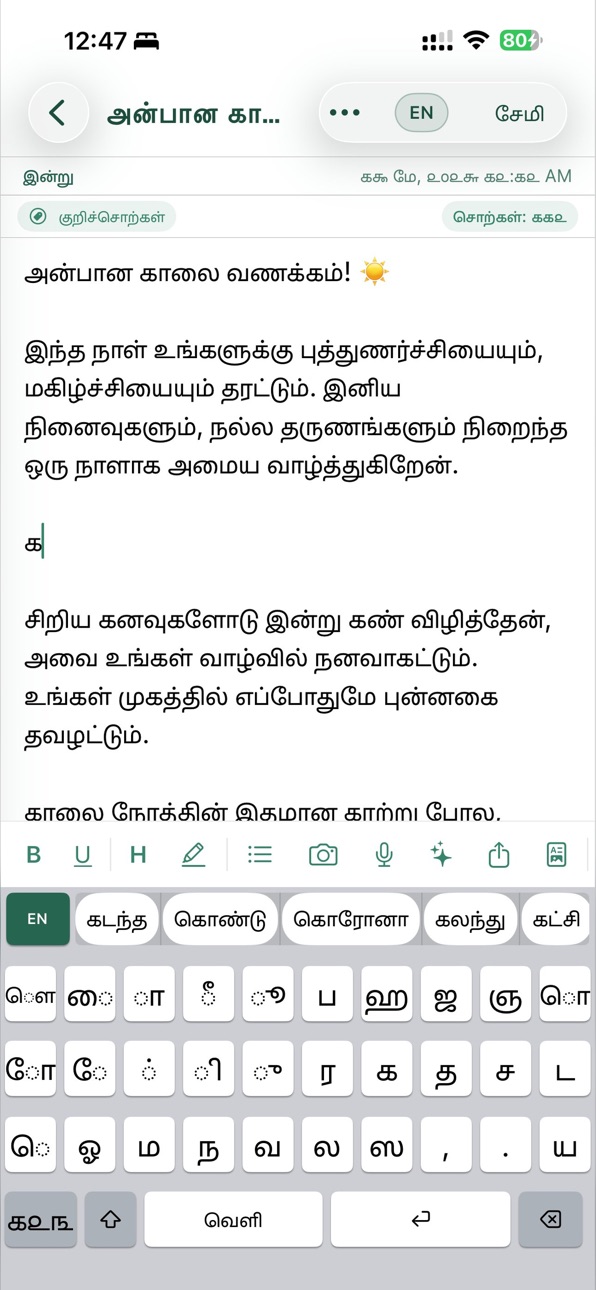
Type Tamil in any app and keep your notes organized in one place. Whether you are messaging friends, writing a diary, saving study notes, or drafting work ideas, this app gives you a fast Tamil keyboard and a complete note-taking workspace for iPhone and iPad.
TAMIL KEYBOARD FOR EVERY APP
Install the system keyboard and type Tamil in WhatsApp, Messages, Mail, Facebook, Safari, and more.
• Phonetic Tanglish typing: type English letters such as "vanakkam" to write Tamil naturally.
• Tamil layout support: switch between Tamil and English when you need it.
• Smart suggestions: predictive words help you write faster with fewer mistakes.
• Privacy-focused training: keyboard learning stays local to your device or shared keyboard storage.
AI NOTES AND WRITING TOOLS
Use built-in AI tools to improve writing and save time.
• Continue writing, summarize, simplify, make formal, and fix grammar.
• Translate Tamil writing to English when needed.
• Use ready-made prompts for greetings, letters, journals, and custom writing.
• Voice-to-text lets you dictate Tamil notes quickly.
• Scan text from images and documents with OCR.
POWERFUL NOTE TAKING
Create simple notes or rich Tamil documents with the tools you expect.
• Format text with bold, underline, highlights, lists, images, and photos.
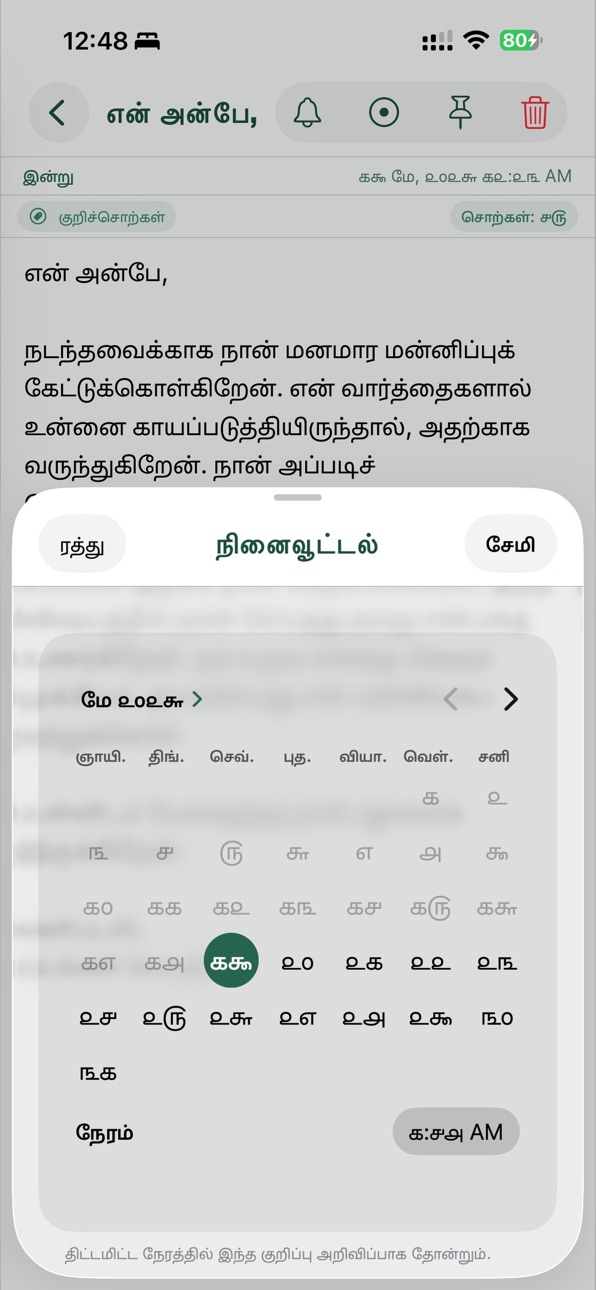
• Organize notes with folders, tags, pinned notes, and reminders.
• Search your notes, export to text or PDF, and keep important writing easy to find.
• Sync standard notes with iCloud across iPhone, iPad, and Mac.
PRIVATE SECRET FOLDER
Keep sensitive notes separate from your main library.
• Protect private notes with Face ID, Touch ID, or passcode.
• Secret Folder content stays on your device and does not sync to iCloud.
• Useful for personal journals, passwords, private ideas, and family notes.
Download today for Tamil typing, AI writing, voice input, OCR scanning, widgets, reminders, and secure notes in one app.
In-App Purchases US pricing
Pro Subscription
Tamil Notes Pro · Monthly$0.99
Tamil Notes Pro · Yearly$7.99
One-Time Purchases
Remove Ad$3.99
Capabilities
In-App Purchases
Accessibility
ipadiphonemacrealityDevicetvoswatch
Version history 25 versions
Build 886873331v15.3.02026-06-12 14:49:28
- Bug fixes and improvements to performance and stability
Build 886042737v15.2.02026-05-24 18:58:08
- Bug fixes and improvements to performance and stability
Build 885957466v15.1.02026-05-21 22:33:02
- Added Start with Al to help you create notes from prompts faster
- Improved Al rewrite tools with a new preview before applying changes
- You can now choose to replace text, replace the full note, or insert Al output at the cursor
- Added PDF export directly from the editor toolbar
- Added note sharing from the editor toolbar
- Improved reminder controls and reminder display in the note editor
- Fixed empty notes being saved by mistake
- Improved Arabic input experience in Al prompt screens
- Refined in-app keyboard behavior and removed unwanted accessory bars
- Fixed several Al prompt, editor, and PDF export issues
- Added Secret Folder for private notes with local-only storage
- Secret Folder now supports auto-lock and manual lock
- Secret note images are stored more securely
- Secret Folder notes are not synced to iCloud
- Added performance and usage analytics for major note actions
Build 885843544v15.0.12026-05-19 19:41:15
- Added Start with Al to help you create notes from prompts faster
- Improved Al rewrite tools with a new preview before applying changes
- You can now choose to replace text, replace the full note, or insert Al output at the cursor
- Added PDF export directly from the editor toolbar
- Added note sharing from the editor toolbar
- Improved reminder controls and reminder display in the note editor
- Fixed empty notes being saved by mistake
- Improved Arabic input experience in Al prompt screens
- Refined in-app keyboard behavior and removed unwanted accessory bars
- Fixed several Al prompt, editor, and PDF export issues
- Added Secret Folder for private notes with local-only storage
- Secret Folder now supports auto-lock and manual lock
- Secret note images are stored more securely
- Secret Folder notes are not synced to iCloud
- Added performance and usage analytics for major note actions
Build 824197742v15.0.02026-05-18 20:56:06
- Added Start with Al to help you create notes from prompts faster
- Improved Al rewrite tools with a new preview before applying changes
- You can now choose to replace text, replace the full note, or insert Al output at the cursor
- Added PDF export directly from the editor toolbar
- Added note sharing from the editor toolbar
- Improved reminder controls and reminder display in the note editor
- Fixed empty notes being saved by mistake
- Improved Arabic input experience in Al prompt screens
- Refined in-app keyboard behavior and removed unwanted accessory bars
- Fixed several Al prompt, editor, and PDF export issues
- Added Secret Folder for private notes with local-only storage
- Secret Folder now supports auto-lock and manual lock
- Secret note images are stored more securely
- Secret Folder notes are not synced to iCloud
- Added performance and usage analytics for major note actions
Build 821956175v9.12017-05-02 16:08:46
This update from Apple will improve the functionality of this app. No new features are included.
- usability updated and some bug fixed
Build 819424735v9.02016-10-27 21:22:30
- App starting slow in iOS 10.0 issue fixed
- Some other issue fixed
Build 817993201v8.12016-07-05 23:38:27
-- Some bug fixed and user experience updated
Build 817817644v8.02016-06-18 22:48:25
- Usability updated and some bug fixed
Build 817304618v7.22016-05-09 23:43:57
Some bug fixed and usability updated.
Build 815928558v7.12016-01-19 20:48:54
- In iPad the bottom button list are not showing unless user rotate the device first time bug fixed.
Build 815148333v7.02015-12-16 04:14:47
* This is a major update. Please backup your previous data by manual export before updating this version. In this version:
- iCloud implemented to sync notes seamlessly between your devices, and backup your notes
- Please use the same iCloud ID in your devices for data sync
- Please be careful if you delete note in one device, in other device it will automatically be deleted and it can not be restored.
- Sometimes iCloud synching takes time so be patient
- In case you delete the app and reinstall it will automatically restore the data from iCloud if any
Build 813895767v6.02015-10-30 02:51:34
- Gesture added in iPhone, to see next/previous note
- Integrated note search in Spotlight
- Updated for iOS 9
- Updated watchOS 2.0
- Usability updated
Build 813275233v5.42015-09-14 22:58:37
- Some critical bug fixed
Build 813112970v5.32015-08-24 23:29:40
- Confirmation dialog shown before deleting note within the notes view.
- Minor improvements
Build 812566278v5.12015-06-11 02:52:06
- Export All notes functionality added in Options page. Now you can export all notes by one click. The notes will be attached with the email sent from your device.
Build 812478586v5.02015-05-22 00:22:22
1. Apple Watch supported for quick access of your notes
2. Font size option provided
3. Some other fix
Build 812026592v4.3.12015-03-26 19:04:10
Minor Improvements
Build 811779883v4.32015-02-22 19:26:40
Auto save your notes. So if a phone calls come or you open other app the data saved automatically.
Build 776454399v4.22014-11-08 02:04:44
Application updated for iPhone 6 and iPhone 6 Plus.
Build 687132643v4.02014-08-28 17:15:23
Smart suggested word integrated based on word you writing. The word database will dynamically upgrade and suggest you nearest word, thus you can write much faster.
Build 616102680v2.52014-07-11 04:03:22
Keyboard bug fixed. Now you can select any part of the text and click backspace button to remove that part. Previously it was not working.
Build 593455788v2.2.42014-06-04 22:52:55
User experience updated
Build 584554033v2.2.32014-05-10 20:52:02
Some critical bug fixed.
Build 532812650v2.22014-04-08 20:44:51
Full page advertise [x] button bug fixed.
Price history by region
Currency
Show
Columns
Search
Availability 1 of 1 storefronts
| Region | Language | Price | Ratings | Avg | Version |
|---|---|---|---|---|---|
| US | en-US | Free | 4 | 4.5 | 15.3.0 |
Change log 29 changes · US
✎
releaseNotes updated
- Bug fixes and improvements to performance and stability
✎
description updated
Type Tamil in any app and keep your notes organized in one place. Whether you are messaging friends, writing a diary, saving study notes, or drafting work ideas
✎
subtitle updated
Voice to Text, Phonetic Type
✎
name updated
Tamil Keyboard & AI Notes
◆
Version 15.3.0 released
- Bug fixes and improvements to performance and stability
◆
Version 15.2.0 released
- Bug fixes and improvements to performance and stability
◆
Version 15.1.0 released
- Added Start with Al to help you create notes from prompts faster
- Improved Al rewrite tools with a new preview before applying changes
- You can now choose to replace text, replace the full note, or insert Al output at the cursor
- Added
◆
Version 15.0.1 released
- Added Start with Al to help you create notes from prompts faster
- Improved Al rewrite tools with a new preview before applying changes
- You can now choose to replace text, replace the full note, or insert Al output at the cursor
- Added
◆
Version 15.0.0 released
- Added Start with Al to help you create notes from prompts faster
- Improved Al rewrite tools with a new preview before applying changes
- You can now choose to replace text, replace the full note, or insert Al output at the cursor
- Added
◆
Version 9.1 released
This update from Apple will improve the functionality of this app. No new features are included.
- usability updated and some bug fixed
◆
Version 9.0 released
- App starting slow in iOS 10.0 issue fixed
- Some other issue fixed
◆
Version 8.1 released
-- Some bug fixed and user experience updated
◆
Version 8.0 released
- Usability updated and some bug fixed
◆
Version 7.2 released
Some bug fixed and usability updated.
◆
Version 7.1 released
- In iPad the bottom button list are not showing unless user rotate the device first time bug fixed.
◆
Version 7.0 released
* This is a major update. Please backup your previous data by manual export before updating this version. In this version:
- iCloud implemented to sync notes seamlessly between your devices, and backup your notes
- Please use the same iClou
◆
Version 6.0 released
- Gesture added in iPhone, to see next/previous note
- Integrated note search in Spotlight
- Updated for iOS 9
- Updated watchOS 2.0
- Usability updated
◆
Version 5.4 released
- Some critical bug fixed
◆
Version 5.3 released
- Confirmation dialog shown before deleting note within the notes view.
- Minor improvements
◆
Version 5.1 released
- Export All notes functionality added in Options page. Now you can export all notes by one click. The notes will be attached with the email sent from your device.
◆
Version 5.0 released
1. Apple Watch supported for quick access of your notes
2. Font size option provided
3. Some other fix
◆
Version 4.3.1 released
Minor Improvements
◆
Version 4.3 released
Auto save your notes. So if a phone calls come or you open other app the data saved automatically.
◆
Version 4.2 released
Application updated for iPhone 6 and iPhone 6 Plus.
◆
Version 4.0 released
Smart suggested word integrated based on word you writing. The word database will dynamically upgrade and suggest you nearest word, thus you can write much faster.
◆
Version 2.5 released
Keyboard bug fixed. Now you can select any part of the text and click backspace button to remove that part. Previously it was not working.
◆
Version 2.2.4 released
User experience updated
◆
Version 2.2.3 released
Some critical bug fixed.
◆
Version 2.2 released
Full page advertise [x] button bug fixed.