Home › Utilities

 US
US
1 of 1 storefronts
Content in en-US
Content in en-US
Information
Apple ID6743408614
Bundle IDcom.liangxiao.PDF-SNAP1
SellerSeller
Min iOS16.6
Min macOS13.5
Device familiesiphone
Released2025-03-18
Copyright© liangxiao
Privacy policyLink ↗
Preview 1 platform
iPhone 7 images




What’s New Version 1.5.3
Added a Scan-style PDF export option when combining images into PDF, with a more scanner-like output. Improved image-to-PDF export stability, file naming, and repeated export handling.
Description
Offline PDF Tools for iPhone · PDF Snap
PDF Snap is a lightweight PDF utility designed for iPhone. It helps you handle receipts, contracts, scanned documents, screenshots, study materials, and everyday office files directly on your device.
No internet is required for core PDF tasks. Convert images to PDF, merge files, compress PDFs, split pages, crop content, and slice a page with guide lines, all locally on your iPhone. Your files are not uploaded to a server, making PDF Snap a safer choice for personal and work documents.
Main Features
1. Image to PDF & File Merge
Select multiple photos or PDF files from Photos or Files, then merge them into one PDF.
Support common page sizes and orientations for receipts, screenshots, class notes, contracts, scanned pages, and attachments.
Add a title or text watermark to make files easier to organize, share, and archive.
2. Offline PDF Compression
Choose from clarity-first, balanced, or stronger compression options.
Preview the estimated file size before compressing, so you can balance readability and file size.
Useful before sending PDFs by email, chat apps, cloud drives, or upload forms.
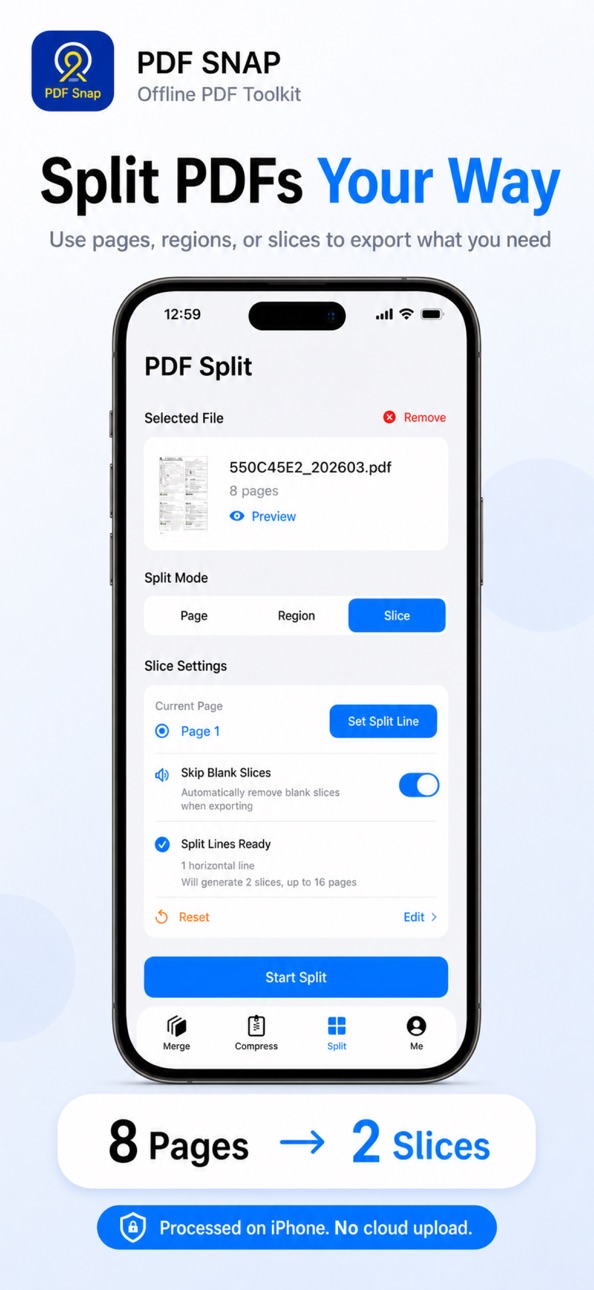
3. PDF Split, Crop & Line Slice
Split PDFs by page range and quickly extract the pages you need.
Crop pages freely to remove white margins, edges, or unwanted content.
New Line Slice: when one PDF page contains multiple receipts, forms, screenshots, or tables, drag split lines to turn it into separate PDF pages.
4. Preview, Save & Share
Preview the result after processing to check page order, clarity, and file size.
Save generated PDFs locally or share them to Mail, Messages, cloud drives, printers, and other apps.
Common Use Cases
- Turn multiple photos into one PDF
- Merge several PDFs into a single document
- Compress large PDFs before sending or uploading
- Extract selected pages from a long PDF
- Crop blank margins or irrelevant content from scanned files
- Split one page with multiple receipts or screenshots into separate pages
- Process private documents when you do not want to upload files online
Why Choose PDF Snap?
Fully offline: Core PDF processing happens locally on your device.
Privacy-friendly: Suitable for contracts, receipts, ID scans, and work documents.
Simple and focused: Common PDF tasks are available in one practical app.
Lightweight and useful: Built for frequent mobile PDF workflows, not a complex office suite.
More control: Preview and compare results before sharing or saving.
Download PDF Snap and make PDF merging, compression, splitting, and organization easier on your iPhone.
Accessibility
ipadiphonemacrealityDevicetvoswatch
Version history 9 versions
Build 886026803v1.5.32026-05-25 14:17:04
Added a Scan-style PDF export option when combining images into PDF, with a more scanner-like output. Improved image-to-PDF export stability, file naming, and repeated export handling.
Build 885464032v1.5.22026-05-10 06:23:20
Updated App Store preview video and screenshots, refined release packaging, and included minor reliability improvements.
Build 885271595v1.5.12026-05-05 16:24:46
- Added Line Slice: split one PDF page into multiple pages by dragging split lines, useful for receipts, forms, and screenshots.
- Improved PDF compression estimates and compression option wording.
- Fixed an issue where selected PDF files might not appear in some cases.
- Refined localized text and interface details.
Build 885244441v1.52026-05-04 21:33:08
1、Added a PDF splitting feature to support more PDF processing scenarios, such as splitting invoices, bank statements, etc.
2、UI optimizations.
Build 879044171v1.42025-10-20 14:38:58
1. Optimized the compression algorithm, added support for more PDF types, and achieved more precise compression.
2. Refined the top navigation bar presentation and ensured compatibility with iOS 26.
Build 877943352v1.32025-09-17 13:04:22
1.Compression algorithm optimized
2.Various user-experience improvements
Build 876484221v1.22025-07-21 06:38:50
• Bulk Merge – Combine multiple images or PDFs into one document
• Compression Engine Upgrade – Faster speed and higher compression ratio
• Free‑Crop – Trim any area to remove white edges
• Miscellaneous improvements & bug fixes
Build 873353364v1.12025-04-01 13:31:03
1. 解决了输入标题后无法收起键盘问题;
2. 新增了导入 PDF 后页面加载特效,提升体验;
3. PDF 合成新增文档方向选择,可选择横版/竖版导出;
4. 优化夜间模式等其他体验问题。
Build 873307570v1.02025-03-18 15:50:43
Price history by region
Currency
Show
Columns
Search
Availability 1 of 1 storefronts
| Region | Language | Price | Ratings | Avg | Version |
|---|---|---|---|---|---|
| US | en-US | USD 0.99 | 0 | — | 1.5.3 |
Change log 13 changes · US
✎
releaseNotes updated
Added a Scan-style PDF export option when combining images into PDF, with a more scanner-like output. Improved image-to-PDF export stability, file naming, and r
✎
description updated
Offline PDF Tools for iPhone · PDF Snap
PDF Snap is a lightweight PDF utility designed for iPhone. It helps you handle receipts, contracts, scanned documents,
✎
subtitle updated
convert photos to PDF
✎
name updated
PDF Snap–Compress PDF
◆
Version 1.5.3 released
Added a Scan-style PDF export option when combining images into PDF, with a more scanner-like output. Improved image-to-PDF export stability, file naming, and repeated export handling.
◆
Version 1.5.2 released
Updated App Store preview video and screenshots, refined release packaging, and included minor reliability improvements.
◆
Version 1.5.1 released
- Added Line Slice: split one PDF page into multiple pages by dragging split lines, useful for receipts, forms, and screenshots.
- Improved PDF compression estimates and compression option wording.
- Fixed an issue where selected PDF files
◆
Version 1.5 released
1、Added a PDF splitting feature to support more PDF processing scenarios, such as splitting invoices, bank statements, etc.
2、UI optimizations.
◆
Version 1.4 released
1. Optimized the compression algorithm, added support for more PDF types, and achieved more precise compression.
2. Refined the top navigation bar presentation and ensured compatibility with iOS 26.
◆
Version 1.3 released
1.Compression algorithm optimized
2.Various user-experience improvements
◆
Version 1.2 released
• Bulk Merge – Combine multiple images or PDFs into one document
• Compression Engine Upgrade – Faster speed and higher compression ratio
• Free‑Crop – Trim any area to remove white edges
• Miscellaneous improvements & bug fixes
◆
Version 1.1 released
1. 解决了输入标题后无法收起键盘问题;
2. 新增了导入 PDF 后页面加载特效,提升体验;
3. PDF 合成新增文档方向选择,可选择横版/竖版导出;
4. 优化夜间模式等其他体验问题。
◆
Version 1.0 released