Home › Navigation

Speed-Tracker
Speed Tracking & Trip Analysis
 US
US
 DEde-DEUSen-US
 GBen-GB
 ITit
ITit NLnl
NLnl TRen-GB
 CZen-GB
 FRfr-FR
 PLen-GB
 ESes-ES
 EEen-GB
 MXes-MX
 MYen-GB
 BRpt-BR
 HRen-GB
 INen-GB
 SGen-GB
 SKen-GB
 EGen-GB
 IDen-GB
 MDen-GB
 PTpt-PT
 SIen-GB
 THen-GB
 UYen-GB
 XKen-GB
 AEen-GB
 AFen-GB
 AGen-GB
 AIen-GB
 ALen-GB
 AMen-GB
 AOen-GB
 ARes-MX
 AZen-GB
 BAen-GB
 BBen-GB
 BHen-GB
 BJen-GB
 BMen-GB
 BNen-GB
 BOes-MX
 BTen-GB
 BYen-GB
 CLes-MX
 CNzh-Hans-CN
 COes-MX
 CRes-MX
 CYen-GB
 DZen-GB
 ECes-MX
 FMen-GB
 GEen-GB
 GHen-GB
 GTes-MX
 HKzh-Hant-HK
 IEen-GB
 ILen-GB
 IQen-GB
 ISen-GB
 JMen-GB
 JOen-GB
 JPja
JPja KEen-GB
 KNen-GB
 KRko
KRko KWen-GB
 KYen-GB
 LAen-GB
 LBen-GB
 LCen-GB
 LKen-GB
 MEen-GB
 MKen-GB
 MNen-GB
 MOzh-Hant-HK
 MRen-GB
 MSen-GB
 MTen-GB
 MUen-GB
 MVen-GB
 MWen-GB
 MZen-GB
 NAen-GB
 NGen-GB
 NIes-MX
 NPen-GB
 NRen-GB
 OMen-GB
 PAes-MX
 PEes-MX
 PHen-GB
 PKen-GB
 PWen-GB
 PYes-MX
 QAen-GB
 RSen-GB
 RWen-GB
 SAen-GB
 STen-GB
 SVes-MX
 TCen-GB
 TJen-GB
 TMen-GB
 TNen-GB
 TOen-GB
 TWzh-Hant-TW
 UZen-GB
 VCen-GB
 VEes-MX
 VGen-GB
 VNen-GB
 YEen-GB
 ZAen-GB
114 of 114 storefronts
Content in en-US
Content in en-US
Information
Apple ID6742644783
Bundle IDde.moonshotapps.Speed-Tracker
SellerSeller
Min iOS17.0
Min macOS14.0
Device familiesiphone, ipad
Released2025-03-02
Copyright© Moonshot Apps UG (haftungsbeschränkt)
Privacy policyLink ↗
Preview 2 platforms
iPhone 7 images


iPad 3 images


What’s New Version 2.2
*Live Activities: Track your current trip from the Lock Screen, Dynamic Island, CarPlay, and Apple Watch
*Custom Speed Ranges: Personalize the speed distribution chart with your own brackets
*Share Cards: Create beautifully designed share images and overlays from any trip
*Car Garage: Save your vehicles and link them to your trips
*New Statistics Tab: Redesigned and much faster, with highlights, ETA comparison, and new insights
*Send Feedback: Share feature requests and bug reports directly from Settings
*Performance Improvements: Enhanced reliability and bug fixes
Description
Enhance Your Driving Experience with Speed Tracker
Speed Tracker is the ultimate app for car enthusiasts and performance drivers who want to monitor and analyze their driving with precision. Whether you're on a road trip, testing your car's limits, or simply commuting, Speed Tracker provides the insights you need to optimize your driving experience. All core features work out of the box - no account or subscription required.
Key Features:
Real-Time Driving Metrics:
- Track your current speed, average speed, and maximum speed in real-time.
- Monitor your journey with precise GPS location updates, even when the app is running in the background.
Shortcuts & Automation:
- Set up CarPlay automations to automatically track trips when you connect or disconnect from your car.
- Control tracking with Siri voice commands and Apple Shortcuts.
In-Depth Trip Analysis:
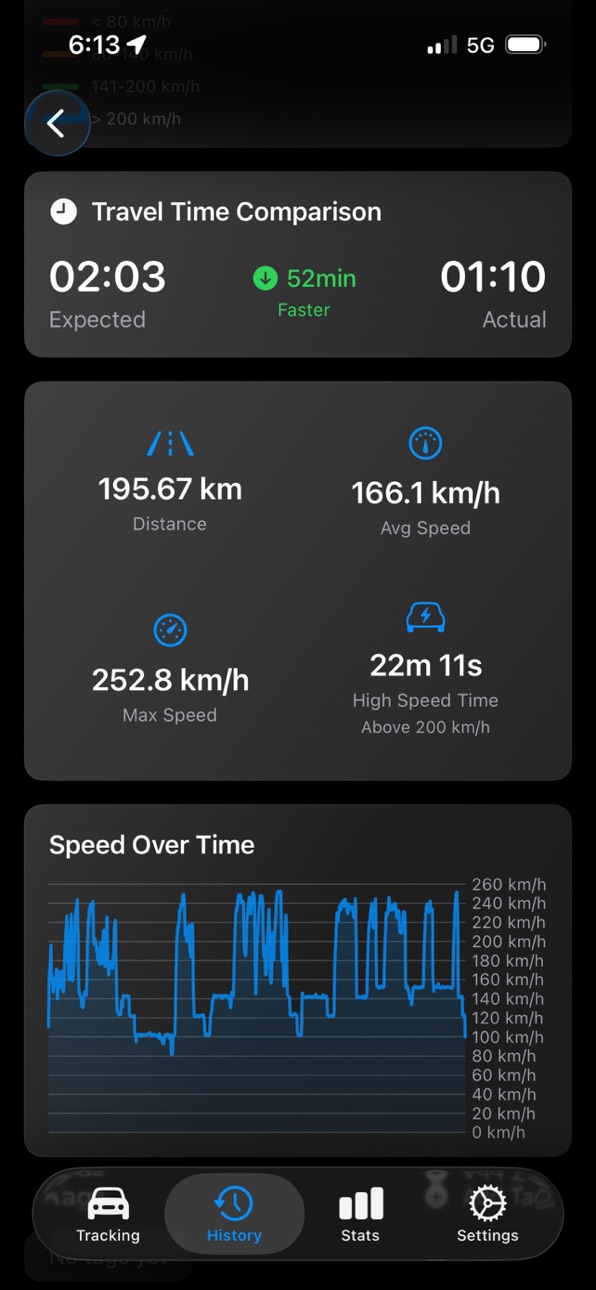
- Access detailed summaries of each trip, including start and end times, total distance, and duration.
- Analyze your route with comprehensive speed data and GPS coordinates.
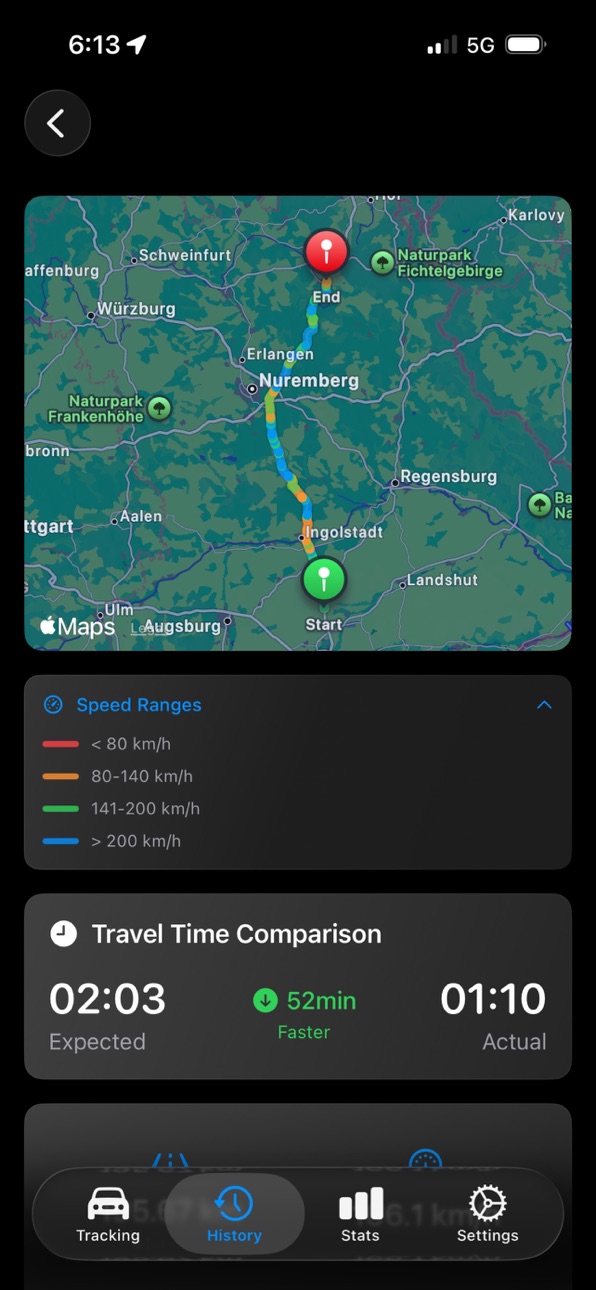
- Calculate estimated travel times and compare them with actual durations to gain insights into your travel efficiency and identify areas for improvement.
Interactive Map Visualizations:
- Visualize your routes on a dynamic map with speed-based coloring to identify high-speed segments.
- Easily center the map on your current location with a single tap.
- Explore different map styles and interact with your route in real-time.
Comprehensive Driving Statistics:
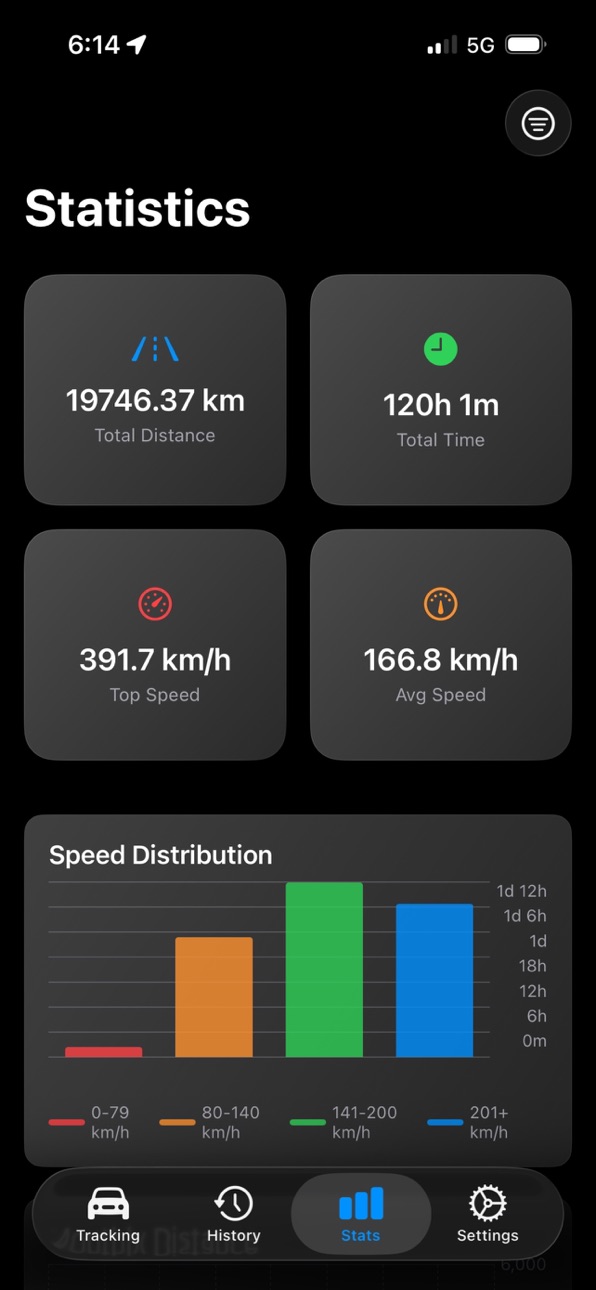
- View detailed statistics on total distance, duration, average speed, and top speed.
- Filter trips by date, distance, speed, and more to find exactly what you're looking for.
- Identify high-speed segments with customizable speed thresholds, perfect for performance analysis.
Trip History & Management:
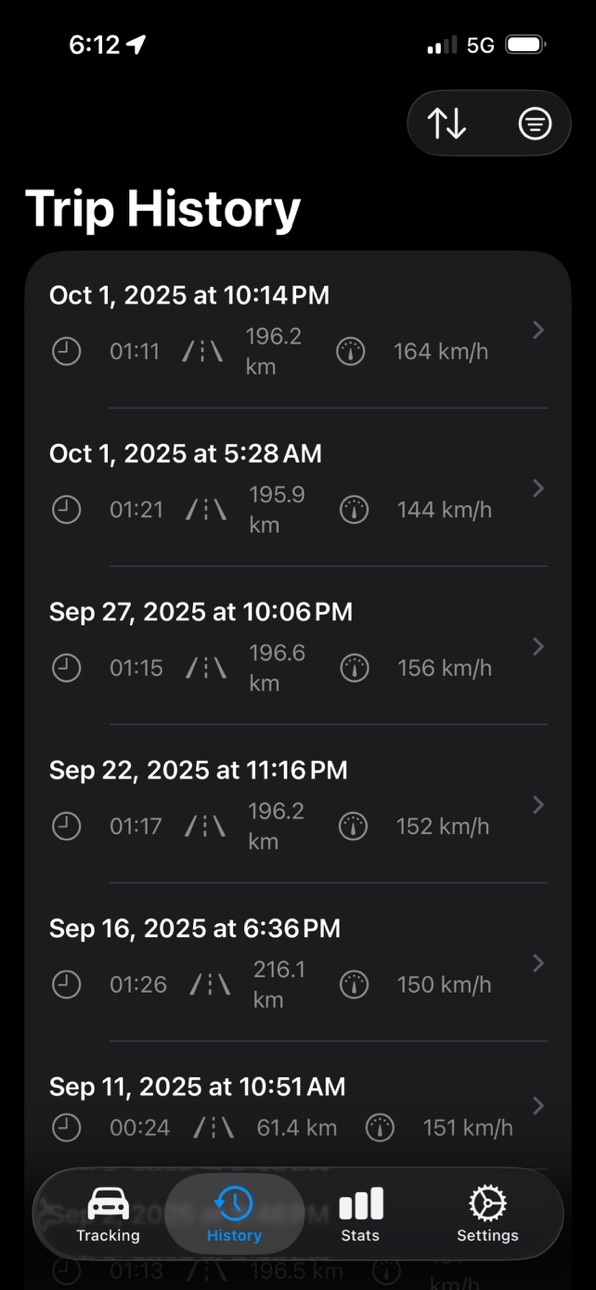
- Browse through your trip history with advanced sorting and filtering options.
- Tag trips for better organization and quick access.
- Sync and back up your trips with iCloud for seamless access across all your devices.
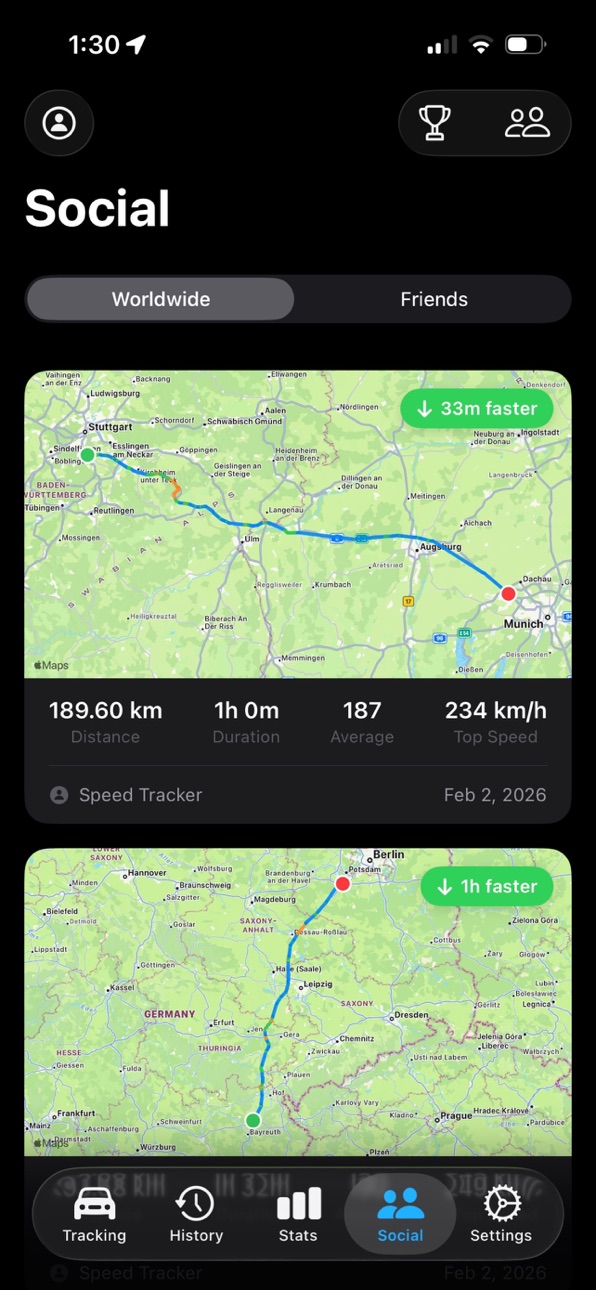
Speed Tracker Social (subscription required):
- Share your trips with friends or drivers worldwide and see how you compare.
- Build your driver profile with aggregated statistics and rankings across six metrics.
- Connect with friends, view their profiles, and explore their shared trips.
- Compare on global and country leaderboards in categories like total distance, peak speed, drive time, average speed, ETA comparison, and longest trip.
Social features require a monthly or yearly subscription. All core tracking, analysis, and statistics features remain fully available without a subscription.
Why Choose Speed Tracker?
Speed Tracker is specifically designed for car drivers who demand precision and detail in their driving data. Whether you're aiming to improve your driving performance, track your road trips, or simply keep a log of your daily commutes, Speed Tracker provides the tools you need to gain valuable insights and make informed decisions. With the ability to compare your actual travel time against estimated times, you can better understand your driving habits and optimize your routes. And with Speed Tracker Social, you can join a community of drivers, share your best trips, and see how others drive.
Download Speed Tracker today and take your driving experience to the next level!
—-
Privacy Policy: https://moonshotapps.de/privacy-policy-speed-tracker/
Terms of Use: https://moonshotapps.de/terms-of-use-speed-tracker/
In-App Purchases US pricing
Speed Tracker Social Subscription
Social Yearly · Yearly$9.99
Monthly · Monthly$3.99
Capabilities
In-App Purchases
Accessibility
ipadiphonemacrealityDevicetvoswatch
Version history 9 versions
Build 884767215v2.22026-04-22 20:35:18
*Live Activities: Track your current trip from the Lock Screen, Dynamic Island, CarPlay, and Apple Watch
*Custom Speed Ranges: Personalize the speed distribution chart with your own brackets
*Share Cards: Create beautifully designed share images and overlays from any trip
*Car Garage: Save your vehicles and link them to your trips
*New Statistics Tab: Redesigned and much faster, with highlights, ETA comparison, and new insights
*Send Feedback: Share feature requests and bug reports directly from Settings
*Performance Improvements: Enhanced reliability and bug fixes
Build 883903871v2.12026-04-06 18:35:48
*iCloud Support: Store your trips in the cloud and sync them across all your devices
*Performance Improvements: Enhanced reliability and bug fixes
Build 882055760v2.02026-02-24 02:15:48
*Social Features: Share trips worldwide, connect with friends, view driver profiles, and compare routes
*Performance Improvements: Enhanced reliability and bug fixes
Build 878858718v1.12025-11-25 23:01:25
*Shortcuts & CarPlay Automation: Full integration with Apple Shortcuts and Siri commands. Create automations to automatically track trips when CarPlay connects/disconnects
*Improved Performance: Enhanced tracking reliability and faster app responsiveness
Build 876908767v1.0.42025-10-07 09:05:18
*Liquid Glass Design: New appearance optimized for iOS 26
*Enhanced Trip History: Better support for longer trips with faster map loading times and smoother display
*Improved Tracking & Performance: More reliable tracking and better overall performance
Build 876038164v1.0.32025-07-06 17:55:42
*Improved Background Tracking: Enhanced reliability for background location updates
*Imperial & Metric Units: Support for both mph (Imperial) and km/h (Metric)
*Live Travel Time Comparison: View real-time travel time differences while tracking
*UI & Performance Enhancements: Smoother visuals and faster overall experience
Build 873080553v1.0.22025-03-10 19:31:13
Bug fixes to ensure trip tracking in background mode works as intended.
Build 873038517v1.0.12025-03-07 23:26:42
Minor bug fixes with auto-lock during trip tracking.
Build 872871468v1.02025-03-02 13:37:32
Price history by region
Currency
Show
Columns
Search
Availability 114 of 114 storefronts
| Region | Language | Price | Ratings | Avg | Version |
|---|---|---|---|---|---|
| DE | de-DE | EUR 3.99 | 104 | 3.6 | 2.2 |
| US | en-US | USD 3.99 | 17 | 3.9 | 2.2 |
| GB | en-GB | GBP 3.99 | 16 | 3.3 | 2.2 |
| IT | it | EUR 3.99 | 13 | 3.5 | 2.2 |
| NL | nl | EUR 3.99 | 13 | 3.4 | 2.2 |
| TR | en-GB | TRY 199.99 | 9 | 3.4 | 2.2 |
| CZ | en-GB | CZK 99 | 7 | 3.7 | 2.2 |
| FR | fr-FR | EUR 3.99 | 7 | 3.6 | 2.2 |
| PL | en-GB | PLN 19.99 | 7 | 4.4 | 2.2 |
| ES | es-ES | EUR 3.99 | 4 | 3.3 | 2.2 |
| EE | en-GB | EUR 3.99 | 3 | 5.0 | 2.2 |
| MX | es-MX | MXN 89 | 3 | 3.7 | 2.2 |
| MY | en-GB | MYR 19.9 | 3 | 3.7 | 2.2 |
| BR | pt-BR | BRL 24.9 | 2 | 4.5 | 2.2 |
| HR | en-GB | EUR 3.99 | 2 | 2.5 | 2.2 |
| IN | en-GB | INR 399 | 2 | 2.5 | 2.2 |
| SG | en-GB | SGD 5.98 | 2 | 3.5 | 2.2 |
| SK | en-GB | EUR 3.99 | 2 | 2.5 | 2.2 |
| EG | en-GB | EGP 199.99 | 1 | 4.0 | 2.2 |
| ID | en-GB | IDR 69000 | 1 | 5.0 | 2.2 |
| MD | en-GB | USD 4.99 | 1 | 1.0 | 2.2 |
| PT | pt-PT | EUR 3.99 | 1 | 3.0 | 2.2 |
| SI | en-GB | EUR 3.99 | 1 | 5.0 | 2.2 |
| TH | en-GB | THB 149 | 1 | 5.0 | 2.2 |
| UY | en-GB | USD 3.99 | 1 | 2.0 | 2.2 |
| XK | en-GB | EUR 3.99 | 1 | 5.0 | 2.2 |
| AE | en-GB | AED 14.99 | 0 | — | 2.2 |
| AF | en-GB | USD 3.99 | 0 | — | 2.2 |
| AG | en-GB | USD 3.99 | 0 | — | 2.2 |
| AI | en-GB | USD 3.99 | 0 | — | 2.2 |
| AL | en-GB | USD 4.99 | 0 | — | 2.2 |
| AM | en-GB | USD 4.99 | 0 | — | 2.2 |
| AO | en-GB | USD 3.99 | 0 | — | 2.2 |
| AR | es-MX | USD 3.99 | 0 | — | 2.2 |
| AZ | en-GB | USD 4.99 | 0 | — | 2.2 |
| BA | en-GB | EUR 3.99 | 0 | — | 2.2 |
| BB | en-GB | USD 4.99 | 0 | — | 2.2 |
| BH | en-GB | USD 3.99 | 0 | — | 2.2 |
| BJ | en-GB | USD 4.99 | 0 | — | 2.2 |
| BM | en-GB | USD 3.99 | 0 | — | 2.2 |
| BN | en-GB | USD 3.99 | 0 | — | 2.2 |
| BO | es-MX | USD 3.99 | 0 | — | 2.2 |
| BT | en-GB | USD 3.99 | 0 | — | 2.2 |
| BY | en-GB | USD 4.99 | 0 | — | 2.2 |
| CL | es-MX | CLP 4990 | 0 | — | 2.2 |
| CN | zh-Hans-CN | CNY 28 | 0 | — | 2.2 |
| CO | es-MX | COP 19900 | 0 | — | 2.2 |
| CR | es-MX | USD 3.99 | 0 | — | 2.2 |
| CY | en-GB | EUR 3.99 | 0 | — | 2.2 |
| DZ | en-GB | USD 3.99 | 0 | — | 2.2 |
| EC | es-MX | USD 3.99 | 0 | — | 2.2 |
| FM | en-GB | USD 3.99 | 0 | — | 2.2 |
| GE | en-GB | USD 4.99 | 0 | — | 2.2 |
| GH | en-GB | USD 4.99 | 0 | — | 2.2 |
| GT | es-MX | USD 3.99 | 0 | — | 2.2 |
| HK | zh-Hant-HK | HKD 32 | 0 | — | 2.2 |
| IE | en-GB | EUR 3.99 | 0 | — | 2.2 |
| IL | en-GB | ILS 14.9 | 0 | — | 2.2 |
| IQ | en-GB | USD 3.99 | 0 | — | 2.2 |
| IS | en-GB | USD 4.99 | 0 | — | 2.2 |
| JM | en-GB | USD 3.99 | 0 | — | 2.2 |
| JO | en-GB | USD 3.99 | 0 | — | 2.2 |
| JP | ja | JPY 600 | 0 | — | 2.2 |
| KE | en-GB | USD 4.99 | 0 | — | 2.2 |
| KN | en-GB | USD 3.99 | 0 | — | 2.2 |
| KR | ko | KRW 6600 | 0 | — | 2.2 |
| KW | en-GB | USD 3.99 | 0 | — | 2.2 |
| KY | en-GB | USD 3.99 | 0 | — | 2.2 |
| LA | en-GB | USD 3.99 | 0 | — | 2.2 |
| LB | en-GB | USD 3.99 | 0 | — | 2.2 |
| LC | en-GB | USD 3.99 | 0 | — | 2.2 |
| LK | en-GB | USD 3.99 | 0 | — | 2.2 |
| ME | en-GB | EUR 2.99 | 0 | — | 2.2 |
| MK | en-GB | USD 3.99 | 0 | — | 2.2 |
| MN | en-GB | USD 3.99 | 0 | — | 2.2 |
| MO | zh-Hant-HK | USD 3.99 | 0 | — | 2.2 |
| MR | en-GB | USD 3.99 | 0 | — | 2.2 |
| MS | en-GB | USD 3.99 | 0 | — | 2.2 |
| MT | en-GB | EUR 3.99 | 0 | — | 2.2 |
| MU | en-GB | USD 4.99 | 0 | — | 2.2 |
| MV | en-GB | USD 3.99 | 0 | — | 2.2 |
| MW | en-GB | USD 3.99 | 0 | — | 2.2 |
| MZ | en-GB | USD 3.99 | 0 | — | 2.2 |
| NA | en-GB | USD 3.99 | 0 | — | 2.2 |
| NG | en-GB | NGN 6900 | 0 | — | 2.2 |
| NI | es-MX | USD 3.99 | 0 | — | 2.2 |
| NP | en-GB | USD 4.99 | 0 | — | 2.2 |
| NR | en-GB | USD 3.99 | 0 | — | 2.2 |
| OM | en-GB | USD 3.99 | 0 | — | 2.2 |
| PA | es-MX | USD 3.99 | 0 | — | 2.2 |
| PE | es-MX | PEN 17.9 | 0 | — | 2.2 |
| PH | en-GB | PHP 249 | 0 | — | 2.2 |
| PK | en-GB | PKR 1100 | 0 | — | 2.2 |
| PW | en-GB | USD 3.99 | 0 | — | 2.2 |
| PY | es-MX | USD 3.99 | 0 | — | 2.2 |
| QA | en-GB | QAR 14.99 | 0 | — | 2.2 |
| RS | en-GB | EUR 3.99 | 0 | — | 2.2 |
| RW | en-GB | USD 3.99 | 0 | — | 2.2 |
| SA | en-GB | SAR 17.99 | 0 | — | 2.2 |
| ST | en-GB | USD 3.99 | 0 | — | 2.2 |
| SV | es-MX | USD 3.99 | 0 | — | 2.2 |
| TC | en-GB | USD 3.99 | 0 | — | 2.2 |
| TJ | en-GB | USD 3.99 | 0 | — | 2.2 |
| TM | en-GB | USD 3.99 | 0 | — | 2.2 |
| TN | en-GB | USD 3.99 | 0 | — | 2.2 |
| TO | en-GB | USD 3.99 | 0 | — | 2.2 |
| TW | zh-Hant-TW | TWD 120 | 0 | — | 2.2 |
| UZ | en-GB | USD 3.99 | 0 | — | 2.2 |
| VC | en-GB | USD 3.99 | 0 | — | 2.2 |
| VE | es-MX | USD 3.99 | 0 | — | 2.2 |
| VG | en-GB | USD 3.99 | 0 | — | 2.2 |
| VN | en-GB | VND 119000 | 0 | — | 2.2 |
| YE | en-GB | USD 3.99 | 0 | — | 2.2 |
| ZA | en-GB | ZAR 79.99 | 0 | — | 2.2 |
Change log 13 changes · US
✎
releaseNotes updated
*Live Activities: Track your current trip from the Lock Screen, Dynamic Island, CarPlay, and Apple Watch
*Custom Speed Ranges: Personalize the speed distributio
✎
description updated
Enhance Your Driving Experience with Speed Tracker
Speed Tracker is the ultimate app for car enthusiasts and performance drivers who want to monitor and analyze
✎
subtitle updated
Speed Tracking & Trip Analysis
✎
name updated
Speed-Tracker
◆
Version 2.2 released
*Live Activities: Track your current trip from the Lock Screen, Dynamic Island, CarPlay, and Apple Watch
*Custom Speed Ranges: Personalize the speed distribution chart with your own brackets
*Share Cards: Create beautifully designed share i
◆
Version 2.1 released
*iCloud Support: Store your trips in the cloud and sync them across all your devices
*Performance Improvements: Enhanced reliability and bug fixes
◆
Version 2.0 released
*Social Features: Share trips worldwide, connect with friends, view driver profiles, and compare routes
*Performance Improvements: Enhanced reliability and bug fixes
◆
Version 1.1 released
*Shortcuts & CarPlay Automation: Full integration with Apple Shortcuts and Siri commands. Create automations to automatically track trips when CarPlay connects/disconnects
*Improved Performance: Enhanced tracking reliability and faster app
◆
Version 1.0.4 released
*Liquid Glass Design: New appearance optimized for iOS 26
*Enhanced Trip History: Better support for longer trips with faster map loading times and smoother display
*Improved Tracking & Performance: More reliable tracking and better overall
◆
Version 1.0.3 released
*Improved Background Tracking: Enhanced reliability for background location updates
*Imperial & Metric Units: Support for both mph (Imperial) and km/h (Metric)
*Live Travel Time Comparison: View real-time travel time differences while track
◆
Version 1.0.2 released
Bug fixes to ensure trip tracking in background mode works as intended.
◆
Version 1.0.1 released
Minor bug fixes with auto-lock during trip tracking.
◆
Version 1.0 released