Home › Health & Fitness

 US
US
1 of 1 storefronts
Content in en-US
Content in en-US
Information
Preview 1 platform
iPhone 7 images
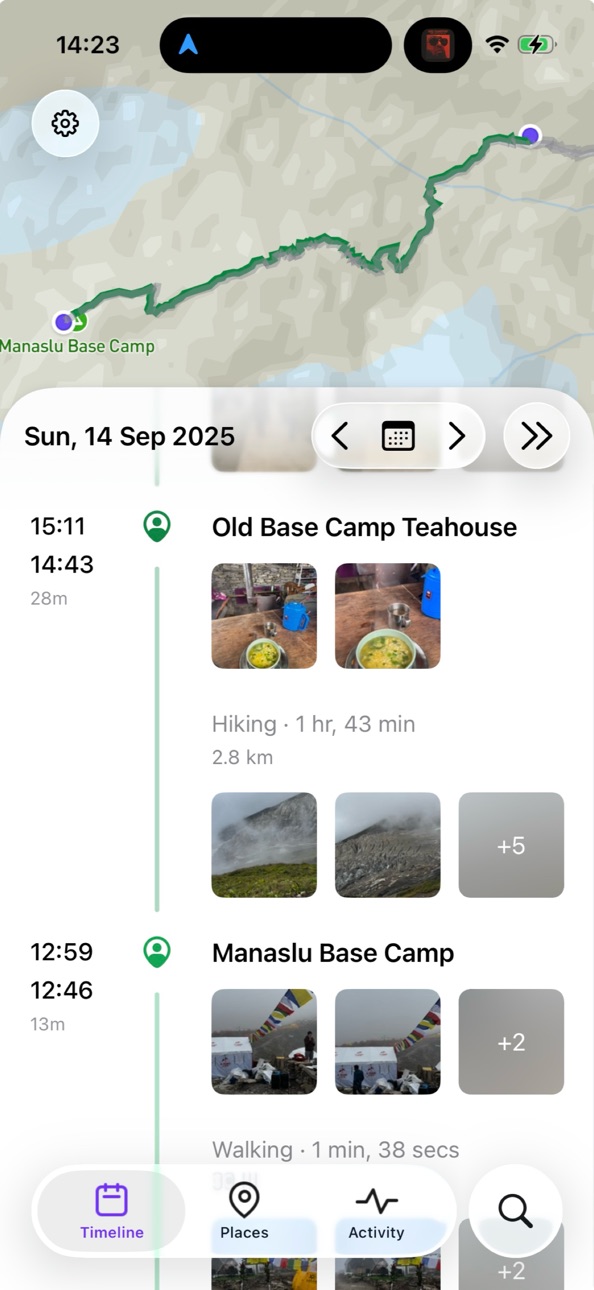


What’s New Version 1.5.0
• Import GPX files. Bring routes, workouts, and old exports into your timeline: open a GPX file from the Files app or a share sheet, or use the new Import GPX File option on the timeline view. You can adjust dates and timezones before importing, existing timeline data is safely set aside when an import overlaps it, and any import can be removed again later with everything restored exactly as it was. (BIG-204)
• Background recording without the persistent location indicator. Arc no longer keeps the location indicator lit while recording in the background. (BIG-617)
• Further improvements to recording on underground trains and metros, plus a fix for out-of-order location data that could distort recorded paths. (BIG-607)
• New Export Diagnostics option on the timeline view. If a day ever looks wrong, it packages everything we need to investigate into a single file you can send us. (BIG-626)
• Arc's documents folder is now visible in the Files app (On My iPhone, Arc Timeline 4).
Description
Arc Timeline automatically records where you go, how you get there, and how long you stay - all in the background, with no buttons to press.
A smart learning engine gets more accurate the more you use it, building a detailed, searchable timeline of your daily life. Your trips, your places, your history - recorded effortlessly.
WHAT ARC TIMELINE DOES
▸ Automatically detects and records your visits and trips
▸ Learns your places and recognises them by name
▸ Detects walking, running, cycling, driving, train, bus, airplane, and 20+ more activity types
▸ A learning engine that improves over time, personalised to you
▸ Search your entire history - find any place, any trip, any day
BUILT FOR QUALITY
▸ High quality GPS data with advanced Kalman filtering
▸ Reliable background recording with intelligent sleep mode
▸ Built for iOS 26 with Liquid Glass design
▸ Full dark mode support
YOUR DATA, YOUR DEVICE
▸ All data stored on your device
▸ Optional iCloud backup to your private iCloud account
▸ No accounts, no sign-ups, no data shared with third parties
▸ Export your data anytime in standard JSON format
HEALTH & ACTIVITY INSIGHTS
▸ Heart rate, calories burned, steps, and altitude for every trip and visit
▸ Import workouts from Apple Health
▸ Sync visits to your calendar
▸ Places tab with visit history, occupancy charts, and geographic reports
A free trial is included. An active subscription or lifetime purchase is required after the trial period.
Terms of Use (EULA): https://www.bigpaua.com/arcapp/terms
In-App Purchases US pricing
Subscriptions Subscription
Monthly Subscription · Monthly 7-day free trial$4.99
Yearly Subscription · Yearly 7-day free trial$44.99
One-Time Purchases
Lifetime Purchase$179.99
Capabilities
In-App Purchases
Accessibility
ipadiphonemacrealityDevicetvoswatch
Version history 12 versions
Build 888033390v1.5.02026-07-09 23:01:54
• Import GPX files. Bring routes, workouts, and old exports into your timeline: open a GPX file from the Files app or a share sheet, or use the new Import GPX File option on the timeline view. You can adjust dates and timezones before importing, existing timeline data is safely set aside when an import overlaps it, and any import can be removed again later with everything restored exactly as it was. (BIG-204)
• Background recording without the persistent location indicator. Arc no longer keeps the location indicator lit while recording in the background. (BIG-617)
• Further improvements to recording on underground trains and metros, plus a fix for out-of-order location data that could distort recorded paths. (BIG-607)
• New Export Diagnostics option on the timeline view. If a day ever looks wrong, it packages everything we need to investigate into a single file you can send us. (BIG-626)
• Arc's documents folder is now visible in the Files app (On My iPhone, Arc Timeline 4).
Build 887419247v1.4.02026-06-25 23:31:24
• See what you're up to at a glance with a new widget for your home screen and lock screen, showing your current activity and when it started. (BIG-140)
• Choose your map style in Settings, with separate styles for light and dark mode. (BIG-146)
• Add notes to timeline items more easily, and notes now save automatically when you leave the editor. (BIG-445, BIG-473)
• Fixed a crash that could occur when exporting your data.
Build 887217091v1.3.32026-06-20 22:41:15
• Fixed a UI freeze that could occur after returning to the app. (BIG-595)
• Improved the reliability of migrating your data from the original Arc Timeline app. (BIG-598, BIG-608, BIG-611)
Build 887017286v1.3.22026-06-16 23:57:36
• Fixed a case where backups on storage-constrained devices could restart from scratch instead of updating incrementally. (BIG-597)
• Fixed a rare case where recording could stop after an app update. (BIG-604)
• Added a safeguard that recovers background recording if it stalls. (BIG-596)
Build 886712521v1.3.12026-06-10 03:13:17
• Fixed an issue where a visit's start or end time, including manual corrections you'd made, could shift back after the timeline reprocessed. (BIG-408)
• Fixed false-positive duplicate-Lifetime purchase warnings for users with older one-time purchases, and added a way to dismiss the warning. (BIG-539, BIG-538)
• Fixed clipping and alignment issues in exported timeline images. (BIG-546)
Build 886567646v1.3.02026-06-06 01:45:19
• Ask about your timeline in plain language. The search field now understands natural-language questions, and a new chat view answers back in plain prose and handles follow-ups. It's opt-in, and an early foundation we'll keep building on.
• Search now includes your saved places, alongside visits, trips, and notes.
• Better recording underground. In metros, subways, and tunnels where the phone loses GPS, Arc now recognises the situation and does a better job of following your actual route instead of stalling at the station entrance.
Build 885502768v1.2.12026-05-11 22:14:04
• New Storage view in Settings — see how much space Arc Timeline 4 is using on device and in iCloud Drive, broken down by category (BIG-313)
• Cleaned up the system temp directory — iOS hasn't been reliably purging these on its end, so they were accumulating significant disk space. Affected users may recover meaningful free space on first launch
• Swedish locale now uses km for long distances instead of "mil" (Scandinavian mile) (BIG-472)
• Fixed the share button on the daily timeline staying visible when navigating into timeline sub-views
Build 885456749v1.2.02026-05-10 21:16:17
Export your daily timeline as an image — tap the new share button on the timeline view to save or share a PNG of your day
Build 885231113v1.1.02026-05-04 23:27:54
• Automatic Exports — Settings › Backup & Restore now offers daily and weekly automatic exports of your timeline data to iCloud Drive, in GPX or JSON format. Files appear at iCloud Drive › Arc Timeline › Exports › Daily/Weekly. Exports run when your phone is connected to power.
• Place search expanded to match country, city, and street address fields, in addition to place name
• Visits without an assigned place now show their street address when available, instead of "Unknown Place"
• URL scheme `arctimeline://` for launching the app from Shortcuts, automation, and other apps
Build 884961550v1.0.22026-04-27 22:20:26
• Fixed a rare crash
• Mapbox attribution now sits above the timeline sheet
Build 884831219v1.0.12026-04-23 23:53:14
• Improved GPS accuracy at frequently visited places with new learned Drift Profiles
• Added Google Maps link to place details for richer place info
• Fixed phantom timeline items appearing after brief app wake-ups
• Fixed false-positive "Duplicate Subscription" warnings
• Fixed onboarding occasionally re-presenting the data import page
• Fixed a crash in the calendar widget on the timeline toolbar
• Fixed a crash in visit sample pruning
• Various sleep mode and recording reliability improvements
Build 871820113v1.02026-04-17 01:20:42
Price history by region
Currency
Show
Columns
Search
Availability 1 of 1 storefronts
| Region | Language | Price | Ratings | Avg | Version |
|---|---|---|---|---|---|
| US | en-US | Free | 18 | 3.8 | 1.5.0 |
Change log 16 changes · US
✎
releaseNotes updated
• Import GPX files. Bring routes, workouts, and old exports into your timeline: open a GPX file from the Files app or a share sheet, or use the new Import GPX F
✎
description updated
Arc Timeline automatically records where you go, how you get there, and how long you stay - all in the background, with no buttons to press.
A smart learning e
✎
subtitle updated
Automatic Location History
✎
name updated
Arc Timeline 4
◆
Version 1.5.0 released
• Import GPX files. Bring routes, workouts, and old exports into your timeline: open a GPX file from the Files app or a share sheet, or use the new Import GPX File option on the timeline view. You can adjust dates and timezones before impor
◆
Version 1.4.0 released
• See what you're up to at a glance with a new widget for your home screen and lock screen, showing your current activity and when it started. (BIG-140)
• Choose your map style in Settings, with separate styles for light and dark mode. (BIG
◆
Version 1.3.3 released
• Fixed a UI freeze that could occur after returning to the app. (BIG-595)
• Improved the reliability of migrating your data from the original Arc Timeline app. (BIG-598, BIG-608, BIG-611)
◆
Version 1.3.2 released
• Fixed a case where backups on storage-constrained devices could restart from scratch instead of updating incrementally. (BIG-597)
• Fixed a rare case where recording could stop after an app update. (BIG-604)
• Added a safeguard that recov
◆
Version 1.3.1 released
• Fixed an issue where a visit's start or end time, including manual corrections you'd made, could shift back after the timeline reprocessed. (BIG-408)
• Fixed false-positive duplicate-Lifetime purchase warnings for users with older one-tim
◆
Version 1.3.0 released
• Ask about your timeline in plain language. The search field now understands natural-language questions, and a new chat view answers back in plain prose and handles follow-ups. It's opt-in, and an early foundation we'll keep building on.
•
◆
Version 1.2.1 released
• New Storage view in Settings — see how much space Arc Timeline 4 is using on device and in iCloud Drive, broken down by category (BIG-313)
• Cleaned up the system temp directory — iOS hasn't been reliably purging these on its end, so they
◆
Version 1.2.0 released
Export your daily timeline as an image — tap the new share button on the timeline view to save or share a PNG of your day
◆
Version 1.1.0 released
• Automatic Exports — Settings › Backup & Restore now offers daily and weekly automatic exports of your timeline data to iCloud Drive, in GPX or JSON format. Files appear at iCloud Drive › Arc Timeline › Exports › Daily/Weekly. Exports run
◆
Version 1.0.2 released
• Fixed a rare crash
• Mapbox attribution now sits above the timeline sheet
◆
Version 1.0.1 released
• Improved GPS accuracy at frequently visited places with new learned Drift Profiles
• Added Google Maps link to place details for richer place info
• Fixed phantom timeline items appearing after brief app wake-ups
• Fixed false-positive "D
◆
Version 1.0 released