Home › Business

 US
US
1 of 1 storefronts
Content in en-US
Content in en-US
Information
Apple ID6740662679
Bundle IDcom.shieldapps.printer
SellerSeller
Min iOS14.0
Device familiesmac, iphone, ipad, ipod
Released2025-03-20
Copyright© Shield Apps
Privacy policyLink ↗
Preview 3 platforms
iPhone 8 images



iPad 6 images


Mac 8 images






What’s New Version 1.7.7
In this update, we’ve improved the display of the batch PDF OCR page and fixed several bugs to deliver a smoother and more reliable experience.
If you have any questions or feedback, feel free to contact us at shieldapps.feedback@gmail.com — your input helps us make the app even better.
Description
Smart Printer App for Mac: Your All-in-One Printing Solution
Print Anything, Anytime - Effortlessly handle photos, PDFs, notes, and web pages with AirPrint compatibility. Perfect for home and office use.
Key Features:
• Electronic Signatures & Stamps
- Handwritten signing: Draw your signature directly
- Professional stamps: Use built-in seals like "Approved" or "Confidential"
- Text & image stamps: Add dates, labels or custom graphics
• Photo Printing Perfection
- Multiple layouts: 2-up, 4-up, 9-up grid printing
- Built-in editor: Crop, rotate & enhance images
- Flexible sources: Import from Photos app or Files
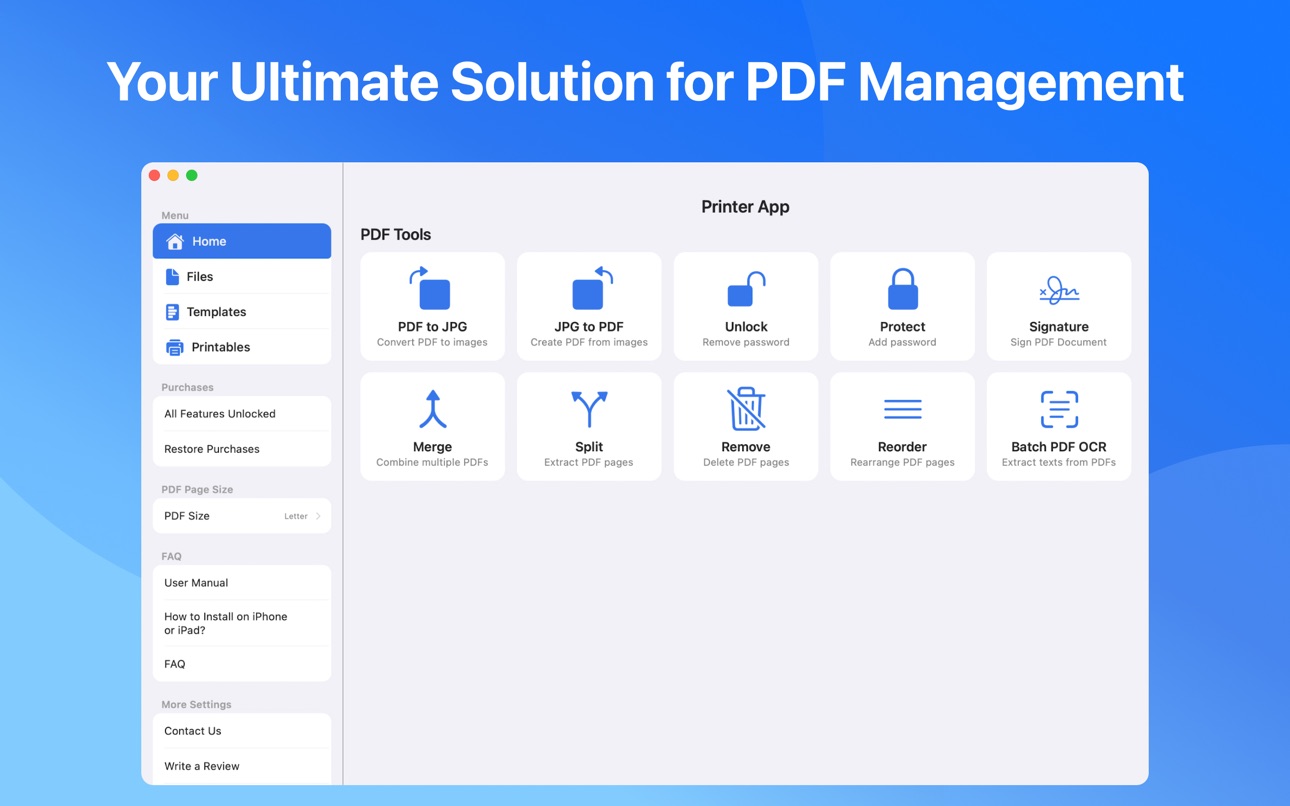
• Professional PDF Tools
- Batch print multiple PDFs
- Merge/split/remove/reorder pages
- Password protection & unlocking
- Convert PDF↔JPG formats
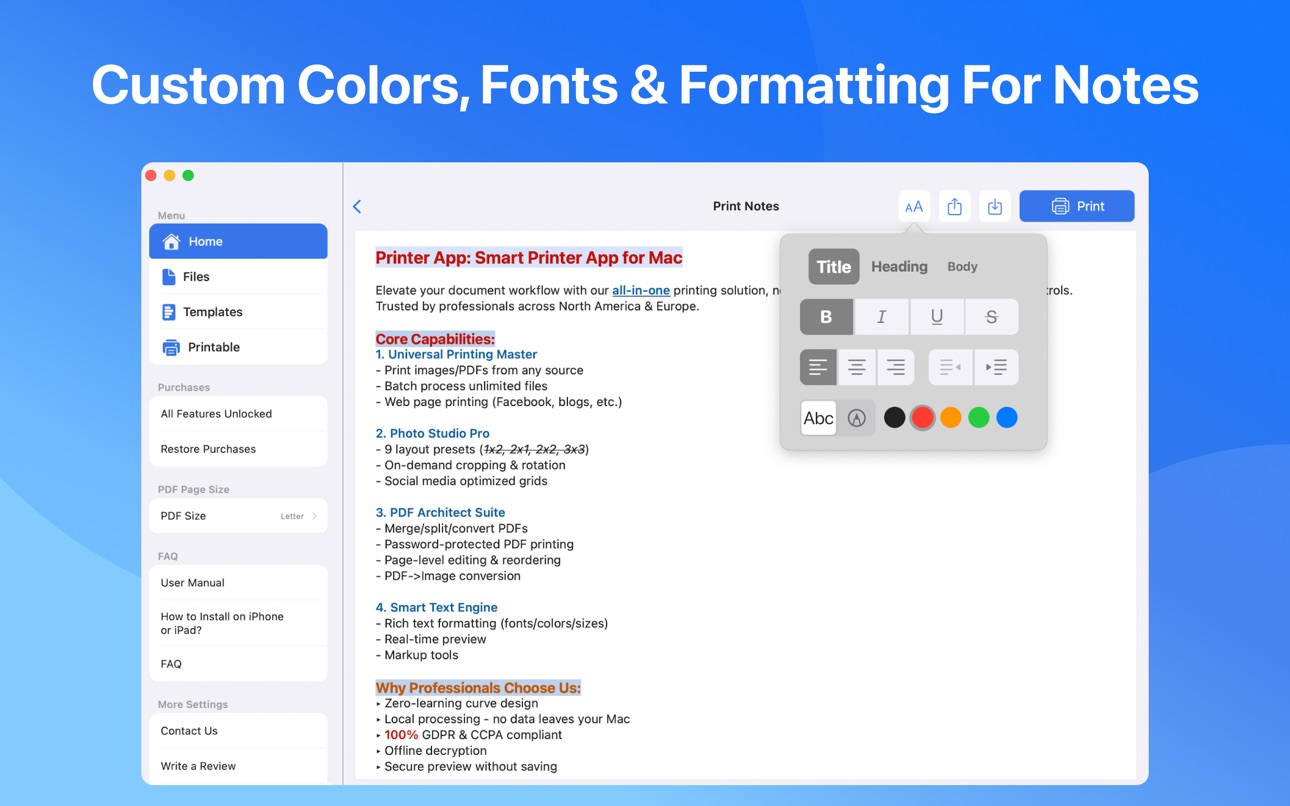
• Smart Note Printing
- Customizable text formatting
- Choose fonts/colors/sizes
- Save & edit draft notes
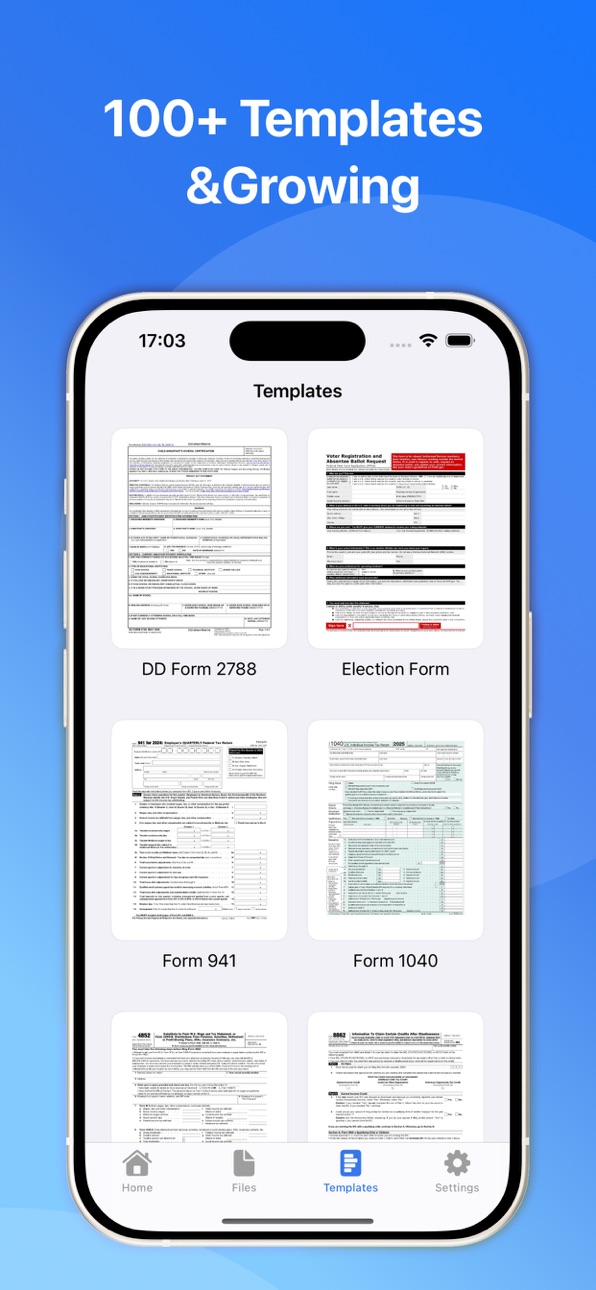
• 100+ Global Templates (and growing)
- United States: Form 1040, I-9 Employment, Passport Renewal
- United Kingdom: Self-Assessment Tax, Power of Attorney
- Canada: Citizenship Application, T4 Tax Slip
- Australia: Medicare Claims, TFN Declaration
- Business: Employment Contracts, NDAs
- Real Estate: Lease Agreements, Mortgage Applications
- Health: Medical History Forms, Vaccination Records
Why Choose Us:
- Pay once, unlock all features on iPhone, iPad, and Mac
- AirPrint compatible with 10,000+ printers
- 100% Local Processing for enhanced privacy
- Multi-country document support
- Regular template updates
Download now and transform your Mac into a powerful printing hub. Handle all your document needs in one secure app - from quick photo prints to complex PDF tasks.
Privacy Policy: https://www.notion.so/1a32cb8376c680a5a113db1b7a9c5181
Terms of Use: https://www.notion.so/1a32cb8376c6809e9150efc0a48f52bd
Capabilities
In-App Purchases
Accessibility
ipadiphonemacrealityDevicetvoswatch
Version history 9 versions
Build 879989645v1.7.72025-11-24 13:49:40
In this update, we’ve improved the display of the batch PDF OCR page and fixed several bugs to deliver a smoother and more reliable experience.
If you have any questions or feedback, feel free to contact us at shieldapps.feedback@gmail.com — your input helps us make the app even better.
Build 879539125v1.7.62025-11-09 13:46:29
In this update, we’ve added support for the Japanese language, making the app more accessible to users in Japan.
We’ve also fixed several bugs and optimized performance to deliver a smoother and more reliable experience.
If you have any questions or feedback, feel free to contact us at shieldapps.feedback@gmail.com — your input helps us make the app even better.
Build 877991908v1.7.12025-09-11 22:52:32
In this update, you can now choose from multiple PDF page sizes (A3, A4, Letter, Legal, and more).
We’ve also added new printable templates including Calendar and To-Do List, along with improved AirPrint support for a smoother printing experience.
For any questions or feedback, feel free to contact us at shieldapps.feedback@gmail.com. Your feedback helps us improve.
Build 875560439v1.6.22025-06-17 16:50:00
In this update, we’ve introduced document scanning support and resolved several issues for a smoother experience.
For any questions or feedback, feel free to contact us at shieldapps.feedback@gmail.com. Your feedback helps us improve.
Build 873780866v1.62025-04-19 07:34:30
What's New in Version:
- PDF Viewing Enhancement: Preview PDFs with support for zooming in and out, allowing you to freely view your documents.
- Electronic Signature Optimization: Streamlined the process for digital signatures.
- Bug Fixes: Addressed other issues to improve overall app stability.
For any questions or feedback, feel free to contact us at shieldapps.feedback@gmail.com. Your feedback helps us improve.
Build 873534092v1.42025-03-30 17:58:03
What’s New in Version:
- Faster Printing: Improved speed and efficiency when printing images.
- Dark Mode: Now supports Dark Mode for a better viewing experience.
- New Languages: Added German and French localization.
As always, we’re committed to improving your experience. If you have any questions or feedback, feel free to reach out at shieldapps.feedback@gmail.com!
Build 873439994v1.32025-03-24 20:23:04
What’s New in Version:
- Print from Dropbox: Easily access and print documents directly from your Dropbox account.
- New Split Tool: Introducing the Split tool to effortlessly divide your PDF files into separate sections.
- Enhanced 9-Grid Photo Printing: Enjoy improved control with the ability to reorder and delete photos in our 9-grid layout.
As always, we’re dedicated to improving your experience. If you have any questions or feedback, don't hesitate to reach out at shieldapps.feedback@gmail.com - we value every piece of feedback!
Build 873296643v1.22025-03-20 02:35:56
In this update, we've squashed some bugs and fine-tuned performance for a smoother experience.
For any questions or feedback, feel free to contact us at shieldapps.feedback@gmail.com. Your feedback helps us improve.
Build 871815883v1.02025-03-16 16:46:01
No pricing data captured yet — comparisons appear once the app has paid storefronts or in-app purchases.
Availability 1 of 1 storefronts
| Region | Language | Price | Ratings | Avg | Version |
|---|---|---|---|---|---|
| US | en-US | Free | 0 | — | 1.7.7 |
Change log 13 changes · US
✎
releaseNotes updated
In this update, we’ve improved the display of the batch PDF OCR page and fixed several bugs to deliver a smoother and more reliable experience.
If you have any
✎
description updated
Smart Printer App for Mac: Your All-in-One Printing Solution
Print Anything, Anytime - Effortlessly handle photos, PDFs, notes, and web pages with AirPrint com
✎
subtitle updated
For HP, Epson, Brother, Canon
✎
name updated
Smart Printer App: eSign PDF
◆
Version 1.7.7 released
In this update, we’ve improved the display of the batch PDF OCR page and fixed several bugs to deliver a smoother and more reliable experience.
If you have any questions or feedback, feel free to contact us at shieldapps.feedback@gmail.com
◆
Version 1.7.6 released
In this update, we’ve added support for the Japanese language, making the app more accessible to users in Japan.
We’ve also fixed several bugs and optimized performance to deliver a smoother and more reliable experience.
If you have any q
◆
Version 1.7.1 released
In this update, you can now choose from multiple PDF page sizes (A3, A4, Letter, Legal, and more).
We’ve also added new printable templates including Calendar and To-Do List, along with improved AirPrint support for a smoother printing expe
◆
Version 1.6.2 released
In this update, we’ve introduced document scanning support and resolved several issues for a smoother experience.
For any questions or feedback, feel free to contact us at shieldapps.feedback@gmail.com. Your feedback helps us improve.
◆
Version 1.6 released
What's New in Version:
- PDF Viewing Enhancement: Preview PDFs with support for zooming in and out, allowing you to freely view your documents.
- Electronic Signature Optimization: Streamlined the process for digital signatures.
- Bug Fixe
◆
Version 1.4 released
What’s New in Version:
- Faster Printing: Improved speed and efficiency when printing images.
- Dark Mode: Now supports Dark Mode for a better viewing experience.
- New Languages: Added German and French localization.
As always, we’re com
◆
Version 1.3 released
What’s New in Version:
- Print from Dropbox: Easily access and print documents directly from your Dropbox account.
- New Split Tool: Introducing the Split tool to effortlessly divide your PDF files into separate sections.
- Enhanced 9-Grid
◆
Version 1.2 released
In this update, we've squashed some bugs and fine-tuned performance for a smoother experience.
For any questions or feedback, feel free to contact us at shieldapps.feedback@gmail.com. Your feedback helps us improve.
◆
Version 1.0 released