Home › Productivity

 US
US
1 of 1 storefronts
Content in en-US
Content in en-US
Information
Preview 2 platforms
iPhone 5 images


iPad 5 images




What’s New Version 2.1.0
Thank you for using DocMatic! This app update includes:
What's New:
- Optimized for iOS 26.
- Profile images: add your own photo or design a profile image with Image Playground.
- Redesigned document view UI for a more polished and intuitive experience.
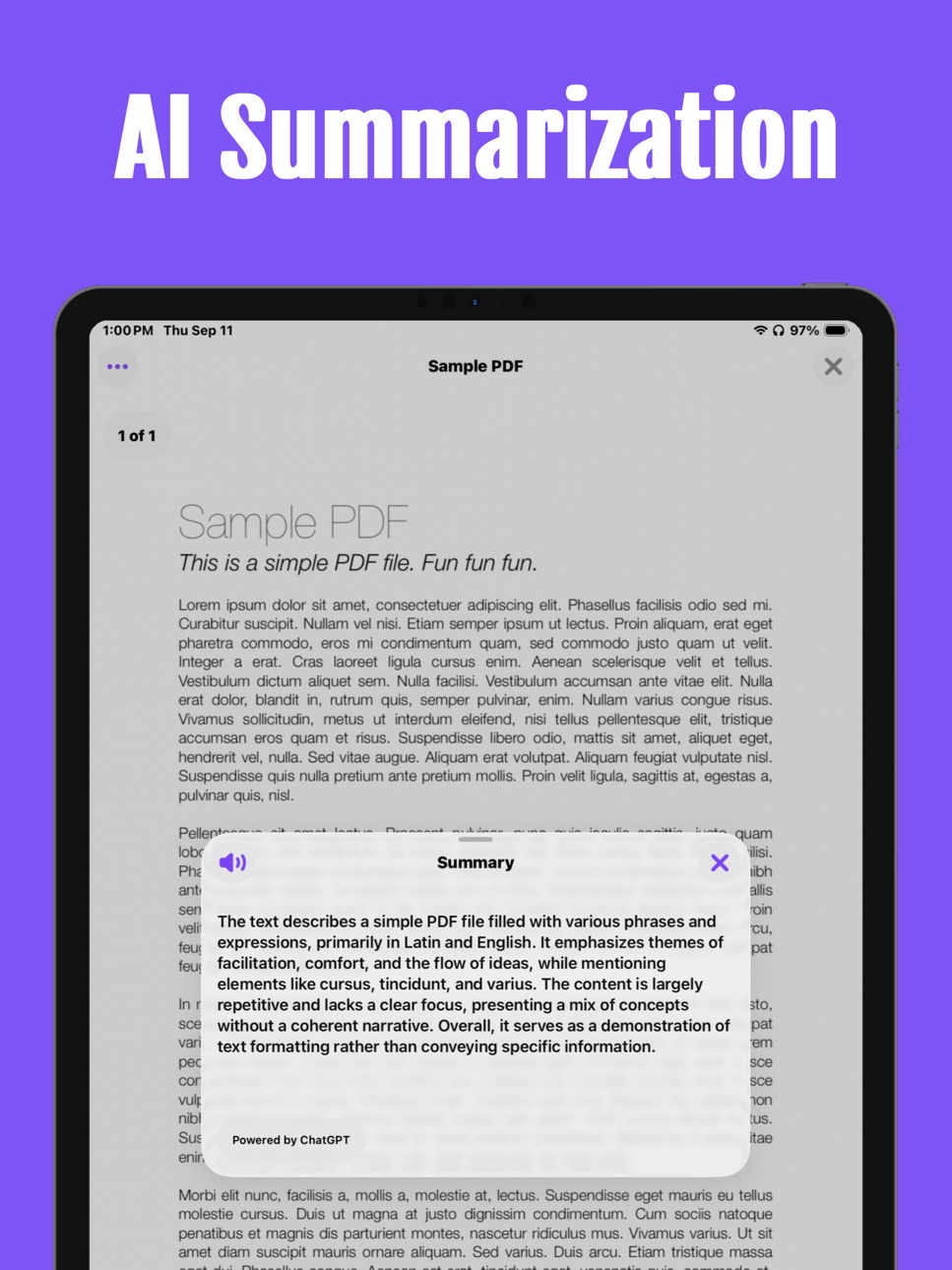
- AI Summarized information about your document.
Bug Fixes:
- Minor fixes and stability improvements.
We’re always working to make DocMatic better—thank you for being part of the journey!
Have questions or feedback? Reach out to us anytime at support@docmatic.app
Description
DocMatic: The Smarter Way to Scan Documents
Turn your iPhone or iPad into a powerful document scanner with DocMatic. Whether you’re scanning receipts, forms, notes, or full reports, DocMatic makes it fast, secure, and intuitive.
Key Features:
- Fast & Easy Scanning:
Capture high-quality scans effortlessly—no extra equipment needed.
- Multi-Page PDFs:
Scan multiple pages and combine them into a single, clean PDF.
- Biometric Security:
Use Face ID or Touch ID to lock sensitive scans for added privacy.
- Import from Anywhere You Work:
Bring in existing PDFs from the Files app, import from a website URL, or use drag & drop for even faster workflow.
- Document Preview & Editing:
Crop, rotate, and enhance scans before saving or sharing—right from the preview.
- Seamless Sharing:
Export documents as PDFs and share via email, messages, AirDrop, or save directly to the Files app.
Note: DocMatic requires access to your device's camera for functionality.
Capabilities
In-App Purchases
Accessibility
ipadiphonemacrealityDevicetvoswatch
Version history 7 versions
Build 877914454v2.1.02025-09-14 17:43:02
Thank you for using DocMatic! This app update includes:
What's New:
- Optimized for iOS 26.
- Profile images: add your own photo or design a profile image with Image Playground.
- Redesigned document view UI for a more polished and intuitive experience.
- AI Summarized information about your document.
Bug Fixes:
- Minor fixes and stability improvements.
We’re always working to make DocMatic better—thank you for being part of the journey!
Have questions or feedback? Reach out to us anytime at support@docmatic.app
Build 875982596v2.0.02025-07-18 14:53:23
Thank you for using the DocMatic app! We’ve made several enhancements to deliver a faster, smoother, and more personalized experience.
What's New:
- Completely redesigned Ul for a cleaner, smoother experience.
- Optional profile login to personalize your experience.
- New Lock & Home Screen widgets for quick access.
- Automatic PDF backup to the Files app.
- Drag & Drop support for even easier document handling.
- Direct file imports into DocMatic from anywhere.
Bug Fixes:
- Improved performance and overall stability.
- Various under-the-hood fixes for a smoother experience.
We’re always working to make DocMatic better—thank you for being part of the journey!
Have questions or feedback? Reach out to us anytime at support@docmatic.app
Build 875058549v1.1.22025-06-01 12:40:45
Thank you for using DocMatic!
This update includes:
- Bug fixes and performance enhancements.
Enjoying DocMatic? We’d love to hear your thoughts—please consider leaving a review!
We’re committed to continuous improvement and regularly releasing updates to enhance your experience. If you have any questions or encounter any issues, feel free to reach out to us at feedback@paulrodenjr.org.
Build 874931345v1.1.12025-05-21 14:14:43
Bug fixes and performance improvements.
Build 874676791v1.1.02025-05-12 15:53:56
This update brings a fresh wave of enhancements, including 12 stunning new app icons, full iPad support, a sleek redesign of the settings view, intuitive "long-press gestures" for document thumbnails and a round of minor bug fixes to keep everything running smoothly.
Build 873462116v1.0.12025-03-24 19:27:26
This update includes stability improvements and bug fixes.
Build 871793047v1.0.02025-02-27 21:14:53
No pricing data captured yet — comparisons appear once the app has paid storefronts or in-app purchases.
Availability 1 of 1 storefronts
| Region | Language | Price | Ratings | Avg | Version |
|---|---|---|---|---|---|
| US | en-US | Free | 2 | 5.0 | 2.1.0 |
Change log 11 changes · US
✎
releaseNotes updated
Thank you for using DocMatic! This app update includes:
What's New:
- Optimized for iOS 26.
- Profile images: add your own photo or design a profile image with
✎
description updated
DocMatic: The Smarter Way to Scan Documents
Turn your iPhone or iPad into a powerful document scanner with DocMatic. Whether you’re scanning receipts, forms, no
✎
subtitle updated
Scan. Save. Done.
✎
name updated
DocMatic: Document Scanner
◆
Version 2.1.0 released
Thank you for using DocMatic! This app update includes:
What's New:
- Optimized for iOS 26.
- Profile images: add your own photo or design a profile image with Image Playground.
- Redesigned document view UI for a more polished and intuiti
◆
Version 2.0.0 released
Thank you for using the DocMatic app! We’ve made several enhancements to deliver a faster, smoother, and more personalized experience.
What's New:
- Completely redesigned Ul for a cleaner, smoother experience.
- Optional profile login to p
◆
Version 1.1.2 released
Thank you for using DocMatic!
This update includes:
- Bug fixes and performance enhancements.
Enjoying DocMatic? We’d love to hear your thoughts—please consider leaving a review!
We’re committed to continuous improvement and regularly re
◆
Version 1.1.1 released
Bug fixes and performance improvements.
◆
Version 1.1.0 released
This update brings a fresh wave of enhancements, including 12 stunning new app icons, full iPad support, a sleek redesign of the settings view, intuitive "long-press gestures" for document thumbnails and a round of minor bug fixes to keep e
◆
Version 1.0.1 released
This update includes stability improvements and bug fixes.
◆
Version 1.0.0 released