Home › Finance

Receipt Organizer・ReceiptGenie
Smart Receipts・Expense Tracker
 US
US
1 of 1 storefronts
Content in en-US
Content in en-US
Information
Preview 1 platform
iPhone 4 images



What’s New Version 2.6.3
Restored receipt selection actions after the tab bar update.
- The selection action bar is back when choosing receipts.
- The bottom navigation and import button now stay out of the way while selecting.
- Deselect All cleanly returns the receipt list to its normal appearance.
This release also includes small UI polish and stability fixes.
Description
Effortless Expense Tracking Starts Here: ReceiptGenie Transforms Your Receipts into Financial Clarity
Tired of shoeboxes overflowing with receipts and the headache of manual expense reports? ReceiptGenie is the ultimate expense tracker app for iOS that makes managing your spending simple and secure. With just a tap, scan your receipts, and watch as our powerful AI technology automatically organizes your expenses, helping you stay on budget and in control of your finances.
SCAN, TRACK, AND ORGANIZE WITH EASE
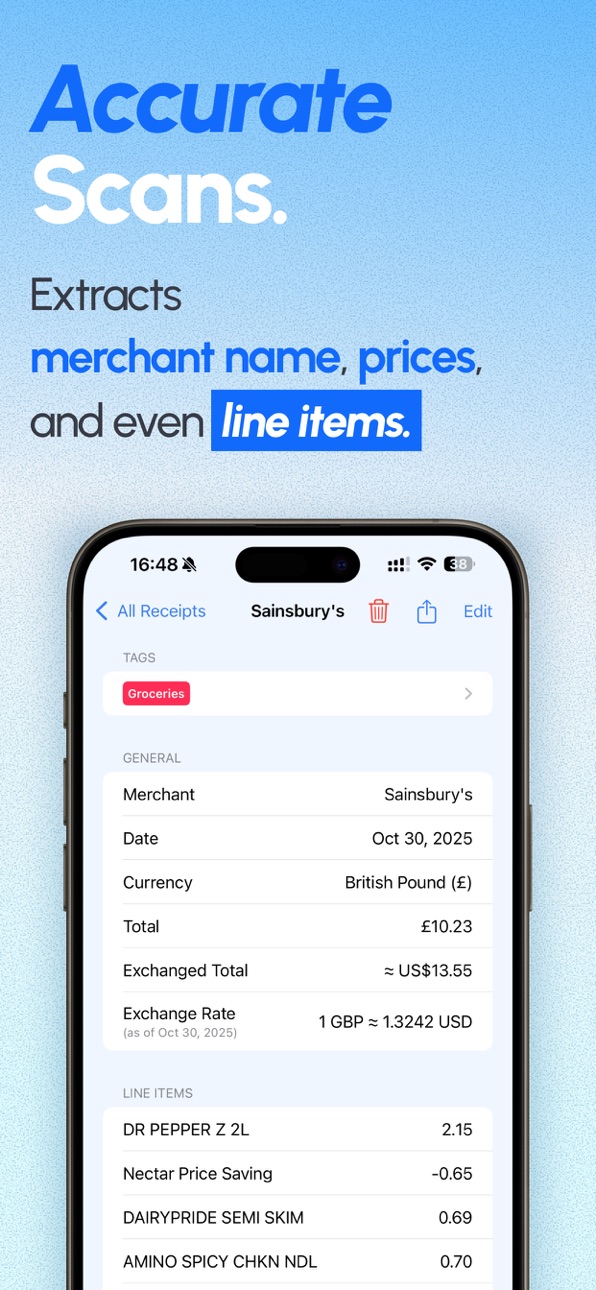
ReceiptGenie’s intelligent receipt scanner accurately captures merchant names, totals, taxes, and even individual line items from your receipts. Our advanced OCR technology supports a wide range of languages, including English, Chinese, Japanese, Korean, Thai, French, German, Spanish, and more, making it the perfect companion for daily purchases and international business travel.
YOUR PERSONALIZED BUDGET AND SPENDING TRACKER
Gain valuable insights into your spending habits by categorizing your purchases with customizable tags. Whether you're tracking daily expenses, managing a household budget, or keeping tabs on business-related bills, ReceiptGenie provides a clear overview of where your money is going. This powerful receipt keeper helps you identify areas to save and make informed financial decisions.
GENERATE REPORTS IN SECONDS
Need to submit an expense report or review your spending for the month? ReceiptGenie allows you to generate detailed CSV reports for any date range. These reports are easily exportable and compatible with Excel and Numbers, streamlining your accounting and tax preparation.
PRIVACY BY DESIGN: YOUR DATA STAYS WITH YOU
Your financial privacy is our top priority. All of your receipt and expense data is stored securely and locally on your iPhone. With no cloud storage, you have complete control over your sensitive information, which can be directly accessed in your Files app.
THE PERFECT TOOL FOR:
- Effortless Expense Tracking: A simple yet powerful solution for tracking all your purchases.
- Smart Receipt Keeping: Your digital archive of receipts, always organized and accessible.
- Simplified Budget Planning: Understand your spending to better manage your budget.
- Streamlined Business Accounting: Easily capture and report business expenses.
- Everyday Purchase Organization: Keep a neat and tidy record of all your spending.
Whether you need a reliable receipt tracker, a comprehensive expense organizer, or a smarter way to manage your spending, ReceiptGenie is the all-in-one solution you've been looking for. Download ReceiptGenie today and take the first step towards stress-free expense management!
Terms of Service: https://www.apple.com/legal/internet-services/itunes/dev/stdeula
Privacy Policy: https://receipt-genie.com/en/privacy
Capabilities
In-App Purchases
Accessibility
ipadiphonemacrealityDevicetvoswatch
Version history 25 versions
Build 888009171v2.6.32026-07-08 17:31:16
Restored receipt selection actions after the tab bar update.
- The selection action bar is back when choosing receipts.
- The bottom navigation and import button now stay out of the way while selecting.
- Deselect All cleanly returns the receipt list to its normal appearance.
This release also includes small UI polish and stability fixes.
Build 887955648v2.6.22026-07-07 17:19:19
Improves performance and stability when browsing large receipt collections.
This update fixes an issue that could cause the app to become unresponsive while quickly scrolling through receipt lists with hundreds of receipts.
Build 887825800v2.6.12026-07-05 00:43:16
This update focuses on a cleaner, more consistent look throughout the app:
- Refreshed tab bar and import button
- A more consistent design across receipts and reports
- Easier receipt filtering
- Various improvements and fixes
Build 887555811v2.6.02026-06-28 22:50:51
Thanks for using ReceiptGenie! Version 2.6.0 introduces new AI-powered receipt tools to help you clean up, understand, and organize scans faster.
- Auto-tag receipts and line items with suggestions based on your existing tags.
- Translate receipt details and line-item names while keeping the original text available for context.
- Give scan feedback and re-process a receipt when something looks wrong, with optional notes about what needs fixing.
- Enjoy improved receipt detail polish, clearer tag selection, better line-item tag alignment.
Build 887228088v2.5.22026-06-20 19:02:11
Thanks for using ReceiptGenie! This update refreshes key receipt workflows and makes it easier to review, filter, and organize your spending.
• Redesigned Edit Receipt screen with cleaner details, notes, tags, and line-item editing.
• Redesigned Statistics and Reports with clearer spending trends, breakdowns, receipt lists, report cards, and a smoother Add to Report flow.
• Added a new Filter and Sort drawer for Receipts, including date range filters by uploaded date or transaction date.
• Improved tag selection with a clearer bottom-sheet drawer and in-place tag creation.
• Refined the receipt import drawer for camera scans, photo/PDF imports, and manual entry.
• Fixed date picker layout issues, improved dark-mode readability, and updated translations across supported languages.
Build 886615042v2.5.12026-06-06 21:53:44
Fixed a report PDF export issue that could cause duplicated or mismatched individual receipt pages when multiple receipts shared the same merchant and date. Report PDFs now keep each receipt paired with the correct page.
Build 886577461v2.5.02026-06-05 21:25:17
ReceiptGenie 2.5.0 brings a refreshed receipt experience:
- Redesigned receipt list and detail screens with a cleaner, paper-inspired look
- A new search and filter panel to help you find receipts faster
- Filter by receipt tags, untagged receipts, line item tags, and receipt total ranges
- Sort and group receipts by upload date or transaction date
- Improved currency display for international receipts, line items, and PDF exports
- More reliable exchange-rate updates and converted totals
- Consistent tag chips across the app and PDF exports
- PDF export reliability improvements, localization polish, and bug fixes
Build 884427494v2.4.72026-04-16 00:17:13
This update focuses on stability and reliability:
- More reliable subscription status on launch
- Fixed currency conversion fetching
- Smoother onboarding flow
- Minor bug fixes and internal improvements
Build 883310269v2.4.62026-03-12 23:45:04
- Added the ability to filter any untagged receipts.
- Fixed a critical issue where the receipt images will disappear after updating the app.
Build 883178862v2.4.52026-03-09 20:42:42
This is a stability update that resolves crashes in the app.
Build 883049394v2.4.42026-03-05 21:21:55
- Added receipt tag display in the summary section of the report PDF export.
- Improved receipt processing speed.
Build 882861888v2.4.32026-02-27 20:04:42
- Further improved the upload processing stability. It is less likely to have errors when uploading 15+ receipts in one go.
- Fixed a glitch with receipt images not showing after processing.
- Fixed a glitch with processed receipts not disappearing from the uploading list after saving.
Build 882788429v2.4.22026-02-25 21:35:35
- Improved the stability for processing receipt uploads. it is now less likely to break when uploading large amounts of receipts at once.
- Fixed the glitches on the receipts list view when scrolling too fast.
Build 882745292v2.4.12026-02-24 23:10:01
We have put in a lot of effort this month to enable the long awaited cloud sync feature! The receipts and reports will now be synchronized onto iCloud when your device has iCloud enabled. The data will be synchronized across all your devices.
We have also optimized the add to report experience slightly so it is hopefully less confusing for users.
Build 882338662v2.4.02026-02-12 21:22:03
We have improved the stability and performance of the app, along with the following updates:
- You can now filter receipts by tags when search bar is activated.
- You can now one-tap select all receipts shown on either Receipts Tab or Statistics Tab, so you can add them to a report or delete them all at once.
- You can now see which report(s) a receipt is added to in the receipts detail view, and quickly add a single receipt into a report.
- You can update the total of the receipt from the total of the line items in edit receipt view.
- The charts are improved, with the ability to see a breakdown of line item tags.
- Fixed an issue where "hide receipts already in reports" option is not working.
- Fixed some UI issues that happen on iOS 26.
- Added accessibility labels in the receipt detail view.
Build 881837306v2.3.122026-01-26 06:29:28
- Added a new report export type as Excel (XLSX) spreadsheet.
Build 881691778v2.3.112026-01-21 14:33:59
- Fixed an issue where the ring chart in the statistics view is not using the tags' configured colors.
Build 881571328v2.3.102026-01-19 06:07:58
- Fixed Report PDF page content bleeding out when there are more than 15-20 receipts in the report.
Build 881477054v2.3.92026-01-15 00:30:37
- Added a confirmation popup when uploading receipts via Apple Shortcuts.
Build 881265415v2.3.82026-01-07 07:31:47
- Added new language support for Czech, Danish, Dutch, Finnish, Norwegian, Polish, Swedish, French (Canada), Portuguese (Portugal), Italian, Thai, and Turkish.
Build 881126408v2.3.72026-01-02 04:02:32
- Added a Settings screen to show our Shortcuts integrations and add them into Apple Shortcuts.
- Fixed an issue with our upload file shortcut where it would overwrite images when triggered in quick succession.
- Fixed an issue where certain receipts added to reports were not hidden when the "hide receipts in reports" option was checked.
Build 880977985v2.3.62025-12-24 23:24:53
- Added an option to hide watermarks in the exported PDFs for subscribed users.
Build 880910804v2.3.52025-12-23 03:16:35
- Added the ability to hide receipts that are already in reports from the receipts tab.
Build 880804899v2.3.42025-12-18 17:46:42
- Added a new shortcut to accept an image or file and upload as a receipt. You can now build a shortcut to capture screenshots and upload directly into the app for processing.
Build 880675661v2.3.32025-12-15 17:59:38
- Added Shortcuts support. You can now configure to scan receipts by holding down the Action Button via Apple Shortcuts!
- We added the ability to retry uploads when the processing fail.
No pricing data captured yet — comparisons appear once the app has paid storefronts or in-app purchases.
Availability 1 of 1 storefronts
| Region | Language | Price | Ratings | Avg | Version |
|---|---|---|---|---|---|
| US | en-US | Free | 65 | 4.5 | 2.6.3 |
Change log 29 changes · US
✎
releaseNotes updated
Restored receipt selection actions after the tab bar update.
- The selection action bar is back when choosing receipts.
- The bottom navigation and import butt
✎
description updated
Effortless Expense Tracking Starts Here: ReceiptGenie Transforms Your Receipts into Financial Clarity
Tired of shoeboxes overflowing with receipts and the head
✎
subtitle updated
Smart Receipts・Expense Tracker
✎
name updated
Receipt Organizer・ReceiptGenie
◆
Version 2.6.3 released
Restored receipt selection actions after the tab bar update.
- The selection action bar is back when choosing receipts.
- The bottom navigation and import button now stay out of the way while selecting.
- Deselect All cleanly returns the r
◆
Version 2.6.2 released
Improves performance and stability when browsing large receipt collections.
This update fixes an issue that could cause the app to become unresponsive while quickly scrolling through receipt lists with hundreds of receipts.
◆
Version 2.6.1 released
This update focuses on a cleaner, more consistent look throughout the app:
- Refreshed tab bar and import button
- A more consistent design across receipts and reports
- Easier receipt filtering
- Various improvements and fixes
◆
Version 2.6.0 released
Thanks for using ReceiptGenie! Version 2.6.0 introduces new AI-powered receipt tools to help you clean up, understand, and organize scans faster.
- Auto-tag receipts and line items with suggestions based on your existing tags.
- Translate
◆
Version 2.5.2 released
Thanks for using ReceiptGenie! This update refreshes key receipt workflows and makes it easier to review, filter, and organize your spending.
• Redesigned Edit Receipt screen with cleaner details, notes, tags, and line-item editing.
• Rede
◆
Version 2.5.1 released
Fixed a report PDF export issue that could cause duplicated or mismatched individual receipt pages when multiple receipts shared the same merchant and date. Report PDFs now keep each receipt paired with the correct page.
◆
Version 2.5.0 released
ReceiptGenie 2.5.0 brings a refreshed receipt experience:
- Redesigned receipt list and detail screens with a cleaner, paper-inspired look
- A new search and filter panel to help you find receipts faster
- Filter by receipt tags, untagged
◆
Version 2.4.7 released
This update focuses on stability and reliability:
- More reliable subscription status on launch
- Fixed currency conversion fetching
- Smoother onboarding flow
- Minor bug fixes and internal improvements
◆
Version 2.4.6 released
- Added the ability to filter any untagged receipts.
- Fixed a critical issue where the receipt images will disappear after updating the app.
◆
Version 2.4.5 released
This is a stability update that resolves crashes in the app.
◆
Version 2.4.4 released
- Added receipt tag display in the summary section of the report PDF export.
- Improved receipt processing speed.
◆
Version 2.4.3 released
- Further improved the upload processing stability. It is less likely to have errors when uploading 15+ receipts in one go.
- Fixed a glitch with receipt images not showing after processing.
- Fixed a glitch with processed receipts not disa
◆
Version 2.4.2 released
- Improved the stability for processing receipt uploads. it is now less likely to break when uploading large amounts of receipts at once.
- Fixed the glitches on the receipts list view when scrolling too fast.
◆
Version 2.4.1 released
We have put in a lot of effort this month to enable the long awaited cloud sync feature! The receipts and reports will now be synchronized onto iCloud when your device has iCloud enabled. The data will be synchronized across all your device
◆
Version 2.4.0 released
We have improved the stability and performance of the app, along with the following updates:
- You can now filter receipts by tags when search bar is activated.
- You can now one-tap select all receipts shown on either Receipts Tab or Stat
◆
Version 2.3.12 released
- Added a new report export type as Excel (XLSX) spreadsheet.
◆
Version 2.3.11 released
- Fixed an issue where the ring chart in the statistics view is not using the tags' configured colors.
◆
Version 2.3.10 released
- Fixed Report PDF page content bleeding out when there are more than 15-20 receipts in the report.
◆
Version 2.3.9 released
- Added a confirmation popup when uploading receipts via Apple Shortcuts.
◆
Version 2.3.8 released
- Added new language support for Czech, Danish, Dutch, Finnish, Norwegian, Polish, Swedish, French (Canada), Portuguese (Portugal), Italian, Thai, and Turkish.
◆
Version 2.3.7 released
- Added a Settings screen to show our Shortcuts integrations and add them into Apple Shortcuts.
- Fixed an issue with our upload file shortcut where it would overwrite images when triggered in quick succession.
- Fixed an issue where certai
◆
Version 2.3.6 released
- Added an option to hide watermarks in the exported PDFs for subscribed users.
◆
Version 2.3.5 released
- Added the ability to hide receipts that are already in reports from the receipts tab.
◆
Version 2.3.4 released
- Added a new shortcut to accept an image or file and upload as a receipt. You can now build a shortcut to capture screenshots and upload directly into the app for processing.
◆
Version 2.3.3 released
- Added Shortcuts support. You can now configure to scan receipts by holding down the Action Button via Apple Shortcuts!
- We added the ability to retry uploads when the processing fail.