Home › Sports

 US
US
1 of 1 storefronts
Content in en-US
Content in en-US
Information
Preview 2 platforms
iPhone 6 images


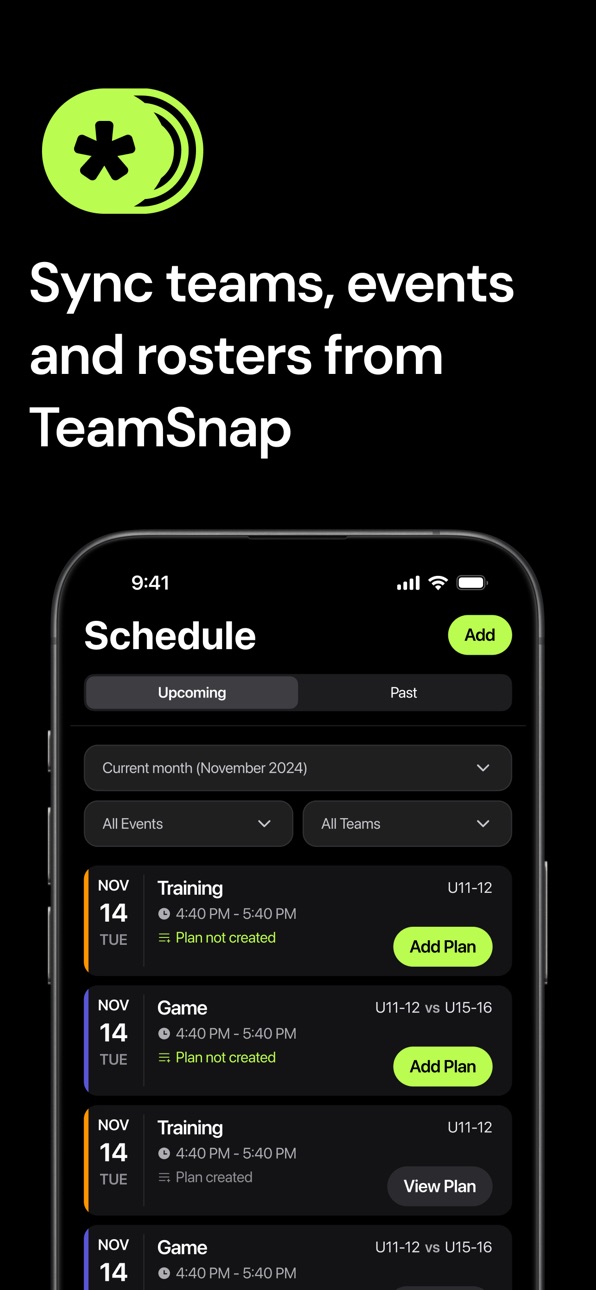


iPad 1 image

What’s New Version 1.8.0
- Added Benchmarks. Now coaches can create benchmarks for teams, which contain teams and athlete stats.
- Improved Athlete onboarding
- Improved navigation for coaches
- Redesigned Drills and Cards
- Performance improvements
Description
PlayerUp helps coaches and teams better develop athletes. Built for sports teams of all levels, PlayerUp makes it easy to deliver feedback, track progress, plan for sessions, and keep everyone aligned throughout the season.
FOR COACHES:
- Give 1:1 or team-wide feedback tied to practices and games
- Rate player performance and track growth over time
- Prompt Players to self-evaluate after sessions
- Communicate game plans, announcements, and updates in one place
- Sync rosters and events automatically with TeamSnap and other scheduling tools
FOR PLAYERS:
- Receive direct feedback from coaches and respond in-app
- See your progress across technical, tactical, physical, and mental areas
- Evaluate your performance post-sessions
- Set personal goals and track achievements over the season
WHY PLAYERUP?
Too often, important feedback gets lost or forgotten after practice. PlayerUp ensures that every message, rating, and plan is captured and accessible — so coaches can coach better, and players can improve faster.
Perfect for:
Soccer, volleyball, basketball, baseball, and more
Competitive teams, recreational clubs, and individual player development
Coaches who want structured communication and players who want to grow
Take your team’s development to the next level with PlayerUp.
---
**Privacy Policy:** https://playerup.co/privacy
**Terms of Use:** https://www.apple.com/legal/internet-services/itunes/dev/stdeula/
In-App Purchases US pricing
PlayerUp Subscriptions Subscription
Team · Yearly 1-month free trial$49.99
Capabilities
In-App Purchases
Accessibility
ipadiphonemacrealityDevicetvoswatch
Version history 25 versions
Build 887187875v1.8.02026-06-19 23:41:09
- Added Benchmarks. Now coaches can create benchmarks for teams, which contain teams and athlete stats.
- Improved Athlete onboarding
- Improved navigation for coaches
- Redesigned Drills and Cards
- Performance improvements
Build 886854081v1.7.12026-06-12 16:14:22
What's new in this version:
- A refreshed Goals experience with clearer progress tracking, daily check-ins, and full-screen goal details.
- Players can now add, edit, delete, and track micro goals more easily.
- Improved goal progress calculations, check-in behavior, and goal syncing reliability.
- Visual polish across navigation, onboarding, sign-in, session plans, and shared app components.
Build 886300006v1.7.02026-06-06 16:20:49
- Added Goals for players: create a big goal and break it down into trackable micro goals.
- Get AI-powered suggestions to help choose goals and next steps.
- Set cadence and due dates, then track daily progress from the new Goals tab.
- Includes supporting fixes and reliability improvements for the Goals experience.
Build 885694736v1.6.52026-05-27 14:19:06
- New drills page
- Session from drills
Build 885447096v1.6.42026-05-10 18:48:45
- Drill new Design
- Game plan new Design
Build 885170655v1.6.32026-05-04 18:23:01
- Fixes on the smart link system for invites.
- Improvements around group messages.
Build 884761624v1.6.22026-04-23 23:27:36
- Refreshed the app UI across key areas, including onboarding, feedback, messaging, and schedule-related screens, for a cleaner and more consistent experience.
- Polished onboarding flows for coaches and players to make setup and early app navigation smoother.
- Improved event and account management, including fixes for deleting events and editing contact information.
- Added iOS stability improvements and general bug fixes.
Build 884253816v1.6.12026-04-17 23:23:33
- Improved session plans with interactive drills and diagrams, smoother creation/editing flows, better draft recovery, and a more reliable drill library.
- Added PDF and image previews for session plans and drills, plus improved drill detail viewing.
- Expanded player access to session plans and refined visibility and feedback behavior.
- Updated team workflows with better invite/join flows, roster pagination, and team management improvements.
- Refined onboarding and sign-up for more reliable account setup.
- Improved messaging and media handling with unread indicators, richer previews, and fixes for photo and video display.
- Fixed multiple scheduling, event, and general stability issues across the app.
Build 883564545v1.6.02026-04-04 00:18:07
- Introducing Session Plans. Coaches can now create, upload, and share rich session plans with drill details, diagrams, and PDF/image previews, and players can access shared plans right in the app.
- We also improved onboarding and team joining.
- This update includes fixes for schedule and event reliability, plus polish across messaging, feedback, roster loading, and app stability.
Build 883476566v1.5.42026-03-18 23:06:56
• Fixed issues in the new sign-up and onboarding flow.
• Resolved profile photo upload and display problems.
• Fixed a bug where the player feedback CTA could open a blank screen.
• Added additional stability improvements across the app.
Build 883054218v1.5.32026-03-14 17:02:49
• Messaging is clearer with unread indicators, automatic jump-to-unread, and richer audio/file previews.
• Team management is faster with improved roster loading, better staff selection tools, and team name editing.
• Added rating visibility controls, updated in-app banners and toasts, and a round of bug fixes and performance improvements throughout the app.
• Signing up and joining a team is now easier with a redesigned onboarding flow and improved invitation experience.
Build 882864156v1.5.22026-02-27 22:45:23
- Added support for editing team names.
- Fixed team removal/display issues so team lists and overview screens are more accurate.
- Fixed game/opponent naming issues in upcoming game views.
- Disabled autocorrect in text fields to improve form input accuracy.
- Minor bug fixes.
Build 882649195v1.5.12026-02-21 17:52:08
- Bug fixes
Build 882315013v1.5.02026-02-19 01:24:27
- New messaging feature! Coaches and players can now chat in our internal messaging system. Messages are organized by thread.
- Fixed video feedback display issues and improved photo-permission edge case handling.
- Resolved logout, team creation, and loading issues for a smoother overall experience.
- General UI polish and stability improvements across schedule and core app flows.
Build 881783002v1.4.52026-02-07 08:38:30
- Major Session Plans upgrade: create from templates or upload from camera/gallery, with preview and review before publishing.
- Upload flow improvements: minimize while uploading/processing, better progress/loading states, and more reliable thumbnail handling.
- Session Plans reliability fixes: resolved issues with reopening plans, template scope/title behavior, and related edge cases.
- Messaging improvements: added audio and video messages, local draft saving, and cleaner thread/message composer behavior.
- UX polish across the app: onboarding/add-player flow improvements, sign-in/sign-up validation updates, and general UI consistency updates.
- Stability and performance fixes: improved schedule/event data loading, plus paywall, keyboard/input, and permission-handling fixes.
Build 881758204v1.4.42026-01-23 00:59:35
- Fixed paywall navigation from onboarding
- Fixed dismissible paywall issue
Build 881543778v1.4.32026-01-19 06:21:01
Bug Fixes:
- Fixed players not being tappable when adding in game plan
New Features:
- New subscription screen with Apple offer code redemption support
- Secret discount paywall screen
- Improved loading indicators throughout onboarding and subscription screens
UI Improvements:
- Replaced loading spinners with custom loading animations in invite roster screen
- Streamlined onboarding flow
Build 880914754v1.4.22025-12-27 01:17:19
- Fixed video recorder issues
- Updated video player with improvements
- Fixed loading spinners with better overlay handling to prevent user interaction during loading
- Performance improvements and bug fixes
Build 880806096v1.4.12025-12-20 21:39:20
- Fixed photo upload and editing across multiple pages
- Added additional age group options during onboarding
- Cosmetic improvements in onboarding
- Enhanced login button design
- Fixed organization rating design and settings
- Fixed paywall display in debug mode
- Improved deletion workflows with better loading states and access controls
- Various bug fixes and performance improvements
Build 880518068v1.4.02025-12-11 19:25:23
- Redesigned player profile with modern, cleaner interface
- Improved event creation with enhanced UI and better user guidance
- Added searchable team filter dropdown for easier team selection
- Enhanced date and time handling across the app
- Updated player feedback display with improved colors and layout
- Fixed TeamSnap editing and sync reliability
- Various UI improvements and bug fixes
Build 880350543v1.3.02025-12-04 22:59:22
- Enhanced TeamSnap synchronization for faster and more reliable team data updates
- Improved player profile and self-evaluation interface
- Fixed loading indicators throughout the app
- Fixed time sheet date-time functionality
- Performance improvements and bug fixes
Build 880250477v1.2.22025-12-02 17:25:41
- Video playback: fixed full-screen mode and restored reliable note loading.
- Scheduling: corrected date/time selection (including end times) to save the right schedule.
- Video linking: updating sessions now keeps the correct video ID attached.
- Feedback/analytics: ratings, feedback editing, and radar chart visuals render consistently.
Build 880054946v1.2.12025-11-25 19:03:53
- Fixed ratings display and editing
- Improved feedback editing functionality
- Enhanced radar chart visualization
Build 879968054v1.2.02025-11-21 23:30:45
- New player profile page with improved design
- Enhanced coach onboarding experience
- Improved chart displays and radar chart visualization
- Better loading states and fullscreen loading indicators
- Fixed session views and recent sessions display
- Improved invitation flow
- Various bug fixes and performance improvements
Build 879643719v1.1.02025-11-12 23:25:56
- Video messages for feedback
- Refreshed typography throughout the app for improved readability and a more polished look
- Updated text styles across all screens for better consistency
- Bug fixes and performance enhancements
Price history by region
Currency
Show
Columns
Search
Availability 1 of 1 storefronts
| Region | Language | Price | Ratings | Avg | Version |
|---|---|---|---|---|---|
| US | en-US | Free | 0 | — | 1.8.0 |
Change log 29 changes · US
✎
releaseNotes updated
- Added Benchmarks. Now coaches can create benchmarks for teams, which contain teams and athlete stats.
- Improved Athlete onboarding
- Improved navigation for
✎
description updated
PlayerUp helps coaches and teams better develop athletes. Built for sports teams of all levels, PlayerUp makes it easy to deliver feedback, track progress, plan
✎
subtitle updated
Level up athlete development
✎
name updated
PlayerUp
◆
Version 1.8.0 released
- Added Benchmarks. Now coaches can create benchmarks for teams, which contain teams and athlete stats.
- Improved Athlete onboarding
- Improved navigation for coaches
- Redesigned Drills and Cards
- Performance improvements
◆
Version 1.7.1 released
What's new in this version:
- A refreshed Goals experience with clearer progress tracking, daily check-ins, and full-screen goal details.
- Players can now add, edit, delete, and track micro goals more easily.
- Improved goal progress calcu
◆
Version 1.7.0 released
- Added Goals for players: create a big goal and break it down into trackable micro goals.
- Get AI-powered suggestions to help choose goals and next steps.
- Set cadence and due dates, then track daily progress from the new Goals tab.
- In
◆
Version 1.6.5 released
- New drills page
- Session from drills
◆
Version 1.6.4 released
- Drill new Design
- Game plan new Design
◆
Version 1.6.3 released
- Fixes on the smart link system for invites.
- Improvements around group messages.
◆
Version 1.6.2 released
- Refreshed the app UI across key areas, including onboarding, feedback, messaging, and schedule-related screens, for a cleaner and more consistent experience.
- Polished onboarding flows for coaches and players to make setup and early app
◆
Version 1.6.1 released
- Improved session plans with interactive drills and diagrams, smoother creation/editing flows, better draft recovery, and a more reliable drill library.
- Added PDF and image previews for session plans and drills, plus improved drill detai
◆
Version 1.6.0 released
- Introducing Session Plans. Coaches can now create, upload, and share rich session plans with drill details, diagrams, and PDF/image previews, and players can access shared plans right in the app.
- We also improved onboarding and team joi
◆
Version 1.5.4 released
• Fixed issues in the new sign-up and onboarding flow.
• Resolved profile photo upload and display problems.
• Fixed a bug where the player feedback CTA could open a blank screen.
• Added additional stability improvements across the app.
◆
Version 1.5.3 released
• Messaging is clearer with unread indicators, automatic jump-to-unread, and richer audio/file previews.
• Team management is faster with improved roster loading, better staff selection tools, and team name editing.
• Added rating visibilit
◆
Version 1.5.2 released
- Added support for editing team names.
- Fixed team removal/display issues so team lists and overview screens are more accurate.
- Fixed game/opponent naming issues in upcoming game views.
- Disabled autocorrect in text fields to improve f
◆
Version 1.5.1 released
- Bug fixes
◆
Version 1.5.0 released
- New messaging feature! Coaches and players can now chat in our internal messaging system. Messages are organized by thread.
- Fixed video feedback display issues and improved photo-permission edge case handling.
- Resolved logout, team c
◆
Version 1.4.5 released
- Major Session Plans upgrade: create from templates or upload from camera/gallery, with preview and review before publishing.
- Upload flow improvements: minimize while uploading/processing, better progress/loading states, and more reliabl
◆
Version 1.4.4 released
- Fixed paywall navigation from onboarding
- Fixed dismissible paywall issue
◆
Version 1.4.3 released
Bug Fixes:
- Fixed players not being tappable when adding in game plan
New Features:
- New subscription screen with Apple offer code redemption support
- Secret discount paywall screen
- Improved loading indicators throughout onboarding an
◆
Version 1.4.2 released
- Fixed video recorder issues
- Updated video player with improvements
- Fixed loading spinners with better overlay handling to prevent user interaction during loading
- Performance improvements and bug fixes
◆
Version 1.4.1 released
- Fixed photo upload and editing across multiple pages
- Added additional age group options during onboarding
- Cosmetic improvements in onboarding
- Enhanced login button design
- Fixed organization rating design and settings
- Fixed paywa
◆
Version 1.4.0 released
- Redesigned player profile with modern, cleaner interface
- Improved event creation with enhanced UI and better user guidance
- Added searchable team filter dropdown for easier team selection
- Enhanced date and time handling across the ap
◆
Version 1.3.0 released
- Enhanced TeamSnap synchronization for faster and more reliable team data updates
- Improved player profile and self-evaluation interface
- Fixed loading indicators throughout the app
- Fixed time sheet date-time functionality
- Performan
◆
Version 1.2.2 released
- Video playback: fixed full-screen mode and restored reliable note loading.
- Scheduling: corrected date/time selection (including end times) to save the right schedule.
- Video linking: updating sessions now keeps the correct video ID att
◆
Version 1.2.1 released
- Fixed ratings display and editing
- Improved feedback editing functionality
- Enhanced radar chart visualization
◆
Version 1.2.0 released
- New player profile page with improved design
- Enhanced coach onboarding experience
- Improved chart displays and radar chart visualization
- Better loading states and fullscreen loading indicators
- Fixed session views and recent session
◆
Version 1.1.0 released
- Video messages for feedback
- Refreshed typography throughout the app for improved readability and a more polished look
- Updated text styles across all screens for better consistency
- Bug fixes and performance enhancements