Home › Finance

 US
US
1 of 1 storefronts
Content in en-US
Content in en-US
Information
Preview 2 platforms
iPhone 4 images


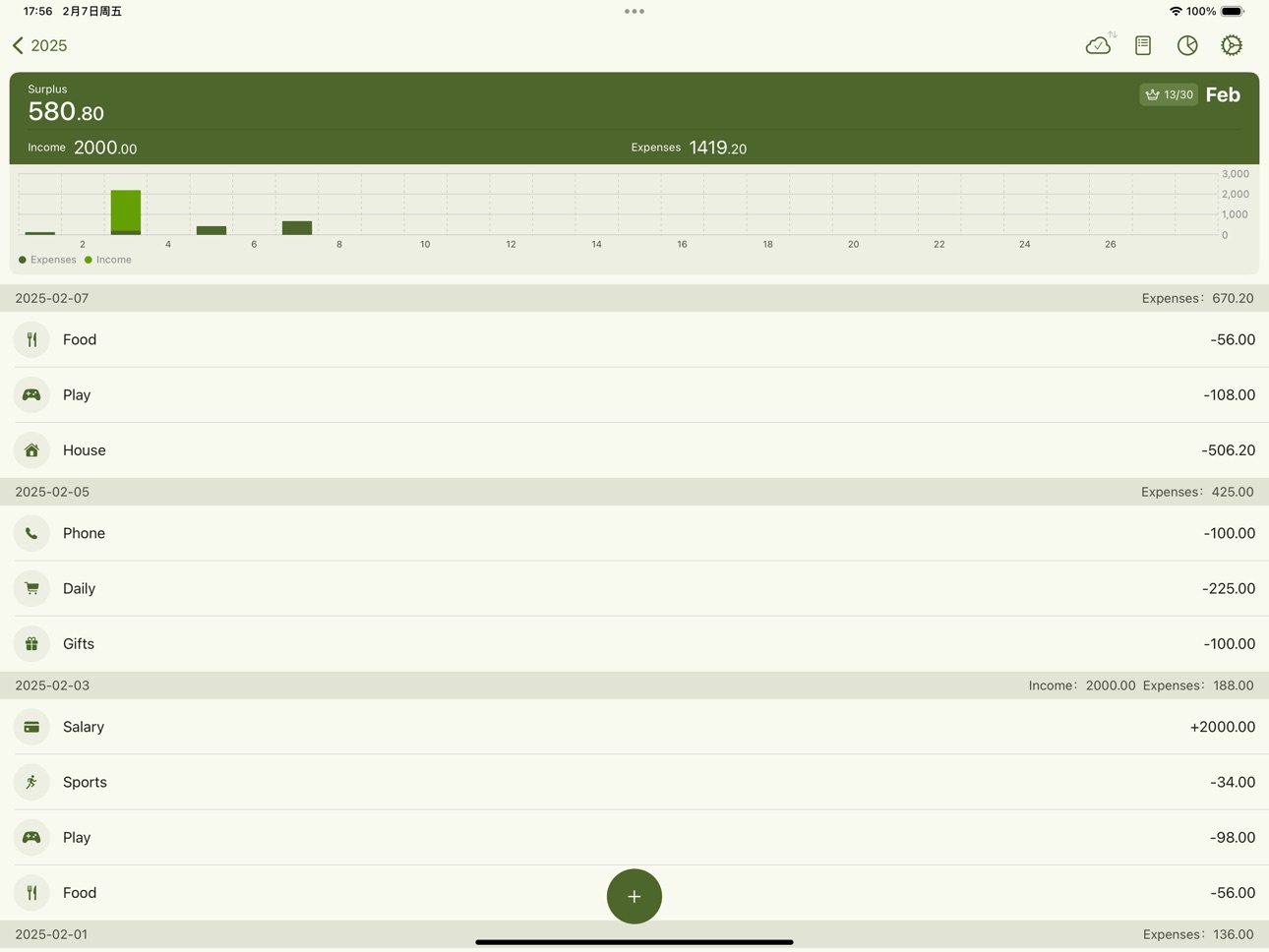
iPad 4 images



What’s New Version 2.4
New Features
- Budget Subcategories: Budget settings now support configuration for subcategories. Budget details can also display budget information for subcategories, enabling more granular budget management.
- Week Start Day Setting: A new week start day setting allows you to customize the week start day for both calendar and charts to match your preference.
- Shortcut Asset Selection Improvements: Shortcut-based entries now support not selecting an asset item for more flexible logging options.
Improvements & Fixes
- Fixed several known issues and further improved overall stability and usability.
Description
Simple & Intuitive Expense Tracking
Proton Ledger is a streamlined and easy-to-use expense tracking tool that helps you quickly record your daily income and expenses. Whether it's daily spending, salary income, or investment returns, you can log transactions in just a few seconds. Say goodbye to complicated bookkeeping and make tracking your finances a habit.
Seamless iCloud Sync for Secure Data Storage
Your financial records are automatically synced to iCloud, ensuring seamless access across multiple devices. Even if you switch devices, your data remains intact—no need for manual backups.
Powerful Charts for Financial Insights
With line charts, bar charts, and pie charts, Proton Ledger provides a clear and intuitive way to visualize your spending trends and category breakdowns, helping you optimize your financial planning.
No Registration, Privacy First
We respect your privacy. Proton Ledger does not require registration or login. Your data is stored securely on your device and in iCloud—we do not access, store, or share any personal information.
Key Features
- Quick Expense Logging: Easily record income and expenses with categories and notes
- Financial Visualization: Track your financial trends with line, bar, and pie charts
- iCloud Sync: Automatically sync data across devices without extra setup
- Offline Support: No internet connection needed—track expenses anytime, anywhere
- Ad-Free, Distraction-Free: A clean and focused bookkeeping experience
Proton Ledger makes expense tracking simple and efficient—try it today!
User Terms and Privacy Policy:
https://hafq2tubbe0.feishu.cn/wiki/PtxewYe4HixSDzknbi0ccZr4nqh
Contact Us:
holiday.fan.app@gmail.com
In-App Purchases US pricing
One-Time Purchases
Water$0.59
Cola$0.99
Coffee$1.99
Lifetime Membership$4.99
Capabilities
In-App Purchases
Accessibility
ipadiphonemacrealityDevicetvoswatch
Version history 15 versions
Build 886523726v2.42026-06-17 02:18:39
New Features
- Budget Subcategories: Budget settings now support configuration for subcategories. Budget details can also display budget information for subcategories, enabling more granular budget management.
- Week Start Day Setting: A new week start day setting allows you to customize the week start day for both calendar and charts to match your preference.
- Shortcut Asset Selection Improvements: Shortcut-based entries now support not selecting an asset item for more flexible logging options.
Improvements & Fixes
- Fixed several known issues and further improved overall stability and usability.
Build 886419473v2.32026-06-04 03:57:38
New Features
- Custom Background Images: You can now upload custom background images, which pair perfectly with the liquid glass effect to create your personalized interface style.
- Budget Detail View: Budget overview now supports viewing detailed information, making budget management more intuitive and convenient.
Improvements & Fixes
- Fixed several known issues and further improved overall stability and usability.
Build 884463018v2.22026-05-11 08:00:51
New Features
- Category Icon Upgrade: You can now switch category icons to colorful Emoji styles, and also add custom icons to personalize your bookkeeping experience.
Improvements & Fixes
- Shortcuts Logging Optimization: Improved the subcategory selection flow, added automatic note replacement rules, and refined the note selection experience for faster logging.
- Home Card Improvements: Fixed an issue where monthly data could display incorrectly in period statistics. Expense and income data can now be filtered based on the selected chart mode.
- Fixed several known issues and further improved overall stability and usability.
Build 884045883v2.12026-04-06 14:09:21
Fixed various known issues to improve overall stability.
Build 883741879v2.02026-03-31 23:42:12
This update focuses on refining existing features and extending compatibility to iOS 14.
Improvements & Fixes
- Compatibility: Minimum supported version lowered to iOS 14.
- Shortcut Bookkeeping: Improved date recognition; added subcategory selection support.
- Home Balance Display: Added four balance modes — monthly, yearly, total balance, and total assets. Double-tap the balance area to switch.
- Asset Snapshots: Optimized asset item structure and usage logic for clearer management.
- Subcategory Charts: Improved subcategory display hierarchy in charts.
- Fixed various known issues to improve overall stability.
Build 883009553v1.92026-03-15 00:49:31
This release focuses on multi-ledger support, improved categorization, and better charting and entry workflows — making bookkeeping more flexible, clear, and reliable.
What's New
- Ledger Management: Add and switch between multiple ledgers to support personal, family, or project-based accounting scenarios.
- Subcategories: Support for second-level categories, combined with notes and filters to present a clearer transaction structure.
- Category Tags: Group categories into tag sets for easier aggregation and comparison; charts become more intuitive for similar items.
Improvements & Fixes
- Charts: Pie charts now allow selecting/deselecting segments to inspect proportions and differences more flexibly.
- Quick-entry Commands: Improved date recognition and added manual date selection for faster, more accurate entries.
- Common Notes: Optimized display of frequently used notes under categories — up to 10 items shown to reduce clutter.
- Fixed various known issues and user-reported bugs, improving overall stability and user experience.
Build 881135183v1.82026-02-08 00:40:13
What’s New
- Search: Quickly find records and edit them directly from the results page for a more efficient workflow.
- Group Reconciliation: Create shared ledgers with nearby users, ideal for family budgeting or splitting expenses in AA mode.
- Savings Plan: Set savings goals with progress tracking to stay on pace with your financial targets.
- Recurring Entries: Automatically record fixed recurring transactions, reducing repetitive input for long-term bills.
Improvements & Fixes
- Adapted to the system “Button Shapes” setting to prevent UI layout issues in certain cases.
- Simplified the Asset Snapshot logic for clearer structure and easier understanding.
- Improved performance of the starry background animation to reduce lag and frame drops.
- Custom colors are now available for income and expense categories for clearer visual distinction.
- Fixed various known issues and user-reported bugs to improve overall stability and user experience.
Build 880295803v1.72026-01-01 00:38:42
What's new
- Data export: Export your accounting data to CSV or PDF format for easy backup, import, or sharing.
- Asset snapshots improved: Enhanced asset snapshot functionality with default asset item support and transfer features, making accounting and asset management more aligned with real-world usage.
- Background settings: Customize backgrounds and animation settings for a more personalized and immersive interface.
Improvements & fixes
- Fixed the issue where the widget displayed incorrect period months after customizing the cycle start date.
- Home card: Tapping the current month balance area now toggles to show the total balance for more convenient interaction.
- Shortcuts: Moved "Skip note" and "Custom note" options to the top for more intuitive operation.
- Improved bill import logic to fix the issue where some imported records were incorrectly identified as transactions on the import date.
- Fixed various known issues and user-reported bugs to improve overall stability and user experience.
Build 879889989v1.62025-11-30 01:36:07
What's new
- Home screen widget: Add a "This Month" widget for quick access to the current month's finances.
- Calculator keyboard: Built-in calculator on the input keyboard for quick on-the-spot calculations.
- Asset snapshots improved: Link asset accounts when recording entries; asset items now update dynamically for more flexible management.
- Shortcuts improvements: Add toggles for notes and asset-item steps in Shortcuts to support more flexible automation.
Improvements & fixes
- Minimum supported iOS updated to iOS 16.1 — fixes the issue on iOS 16 where the keyboard could not be switched when entering notes via Shortcuts.
- Improved entry time input and display — now shows time down to the minute.
- Improved text rendering — fixed several cases of truncated or incomplete text.
- Various bug fixes and stability improvements.
Build 879162978v1.52025-11-16 00:53:21
1. WeChat/Alipay import: Auto-parse and smart categorization—no manual entry.
2. Asset Snapshot: One-tap snapshots to view allocation and net worth.
3. Accounting cycles & Budgets: Custom cycles, budgets and overspend alerts.
4. UX improvements: UI, performance and stability enhancements; bug fixes.
Build 879031365v1.42025-10-22 09:54:44
Enhanced Shortcuts with custom notes support.
Added theme customization for a more personalized look.
Build 878862932v1.32025-10-14 08:41:04
Shortcuts are now available! Enjoy a more convenient and seamless experience.
Build 878537095v1.22025-10-06 07:21:09
UI enhancements and full iOS 26 compatibility for a smoother experience.
Build 873337288v1.12025-03-18 23:38:38
Bug fixes and performance improvements.
Build 870643504v1.02025-02-08 00:30:30
Price history by region
Currency
Show
Columns
Search
Availability 1 of 1 storefronts
| Region | Language | Price | Ratings | Avg | Version |
|---|---|---|---|---|---|
| US | en-US | Free | 2 | 5.0 | 2.4 |
Change log 19 changes · US
✎
releaseNotes updated
New Features
- Budget Subcategories: Budget settings now support configuration for subcategories. Budget details can also display budget information for subcate
✎
description updated
Simple & Intuitive Expense Tracking
Proton Ledger is a streamlined and easy-to-use expense tracking tool that helps you quickly record your daily income and ex
✎
subtitle updated
Expense Tracker & Secure Sync
✎
name updated
ProtonLedger - Money Manager
◆
Version 2.4 released
New Features
- Budget Subcategories: Budget settings now support configuration for subcategories. Budget details can also display budget information for subcategories, enabling more granular budget management.
- Week Start Day Setting: A ne
◆
Version 2.3 released
New Features
- Custom Background Images: You can now upload custom background images, which pair perfectly with the liquid glass effect to create your personalized interface style.
- Budget Detail View: Budget overview now supports viewing
◆
Version 2.2 released
New Features
- Category Icon Upgrade: You can now switch category icons to colorful Emoji styles, and also add custom icons to personalize your bookkeeping experience.
Improvements & Fixes
- Shortcuts Logging Optimization: Improved the sub
◆
Version 2.1 released
Fixed various known issues to improve overall stability.
◆
Version 2.0 released
This update focuses on refining existing features and extending compatibility to iOS 14.
Improvements & Fixes
- Compatibility: Minimum supported version lowered to iOS 14.
- Shortcut Bookkeeping: Improved date recognition; added subcategor
◆
Version 1.9 released
This release focuses on multi-ledger support, improved categorization, and better charting and entry workflows — making bookkeeping more flexible, clear, and reliable.
What's New
- Ledger Management: Add and switch between multiple ledgers
◆
Version 1.8 released
What’s New
- Search: Quickly find records and edit them directly from the results page for a more efficient workflow.
- Group Reconciliation: Create shared ledgers with nearby users, ideal for family budgeting or splitting expenses in AA mo
◆
Version 1.7 released
What's new
- Data export: Export your accounting data to CSV or PDF format for easy backup, import, or sharing.
- Asset snapshots improved: Enhanced asset snapshot functionality with default asset item support and transfer features, making
◆
Version 1.6 released
What's new
- Home screen widget: Add a "This Month" widget for quick access to the current month's finances.
- Calculator keyboard: Built-in calculator on the input keyboard for quick on-the-spot calculations.
- Asset snapshots improved: Li
◆
Version 1.5 released
1. WeChat/Alipay import: Auto-parse and smart categorization—no manual entry.
2. Asset Snapshot: One-tap snapshots to view allocation and net worth.
3. Accounting cycles & Budgets: Custom cycles, budgets and overspend alerts.
4. UX improvem
◆
Version 1.4 released
Enhanced Shortcuts with custom notes support.
Added theme customization for a more personalized look.
◆
Version 1.3 released
Shortcuts are now available! Enjoy a more convenient and seamless experience.
◆
Version 1.2 released
UI enhancements and full iOS 26 compatibility for a smoother experience.
◆
Version 1.1 released
Bug fixes and performance improvements.
◆
Version 1.0 released