Home › Productivity

 US
US
1 of 1 storefronts
Content in en-US
Content in en-US
Information
Preview 2 platforms
iPhone 10 images




iPad 10 images



What’s New Version 2.1.2
FEATURES
- AI Keyboard
A new system-wide keyboard brings Privacy AI into any app where you type. Turn it on once, then in Mail, Messages, Notes, or anywhere else, tap the mic to dictate by voice, or tap Process to rewrite, polish, translate, or reshape what you have written, replaced in place with one-tap Undo. Build your own pipelines (ordered steps such as Polish then Translate) or start from ready-made presets like Proofread, Email, and Summary. Everything runs through the app on your device, so your text stays private and never leaves your phone.
- Image Prompt Wizard
Building a good image prompt is now much easier. Tap Prompt Wizard on the image generation screen to browse a curated library of prompt templates by their sample picture, pick one, and fill in its options. You can also type a single subject and have AI fill in every field for you in one tap, then preview the finished prompt before you generate. Each template credits its original author.
IMPROVEMENTS
- Local Engine Update (llama.cpp b9754)
The on-device inference engine was updated to the latest build for faster and steadier local models. Multimodal models process attached images more quickly, large models now show real progress while they load, and more models support speculative decoding for quicker replies. Updated graphics and audio components improve performance and stability across the board.
- MLX Engine Update (mlx-swift)
The Apple MLX inference engine was refreshed for lower memory use and better stability. Vision models now read long prompts in smaller pieces, sharply cutting peak memory so large image chats run more reliably on device. Speculative decoding automatically steps aside when memory is tight, so it never slows you down. This update also adds the Gemma 4 12B Unified and Nemotron text-diffusion models and fixes loading of Qwen3.5, Qwen3-Next, and nomic-embed models.
Description
NEW: AI Keyboard
Bring Privacy AI into any app where you type. Tap the mic to dictate by voice, or tap Process to rewrite, polish, translate, or reshape your text right where you wrote it, with one-tap Undo. Build your own pipelines (Polish then Translate) or start from presets like Proofread, Email, and Summary. Everything runs through the app on your device, so your text never leaves your phone.
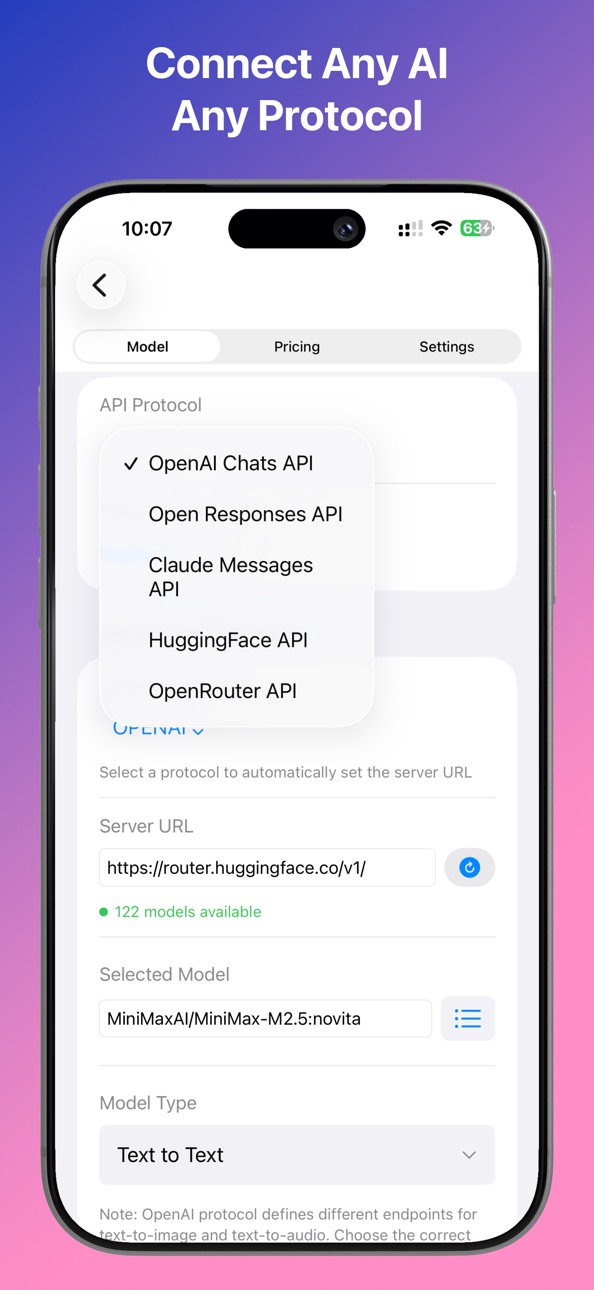
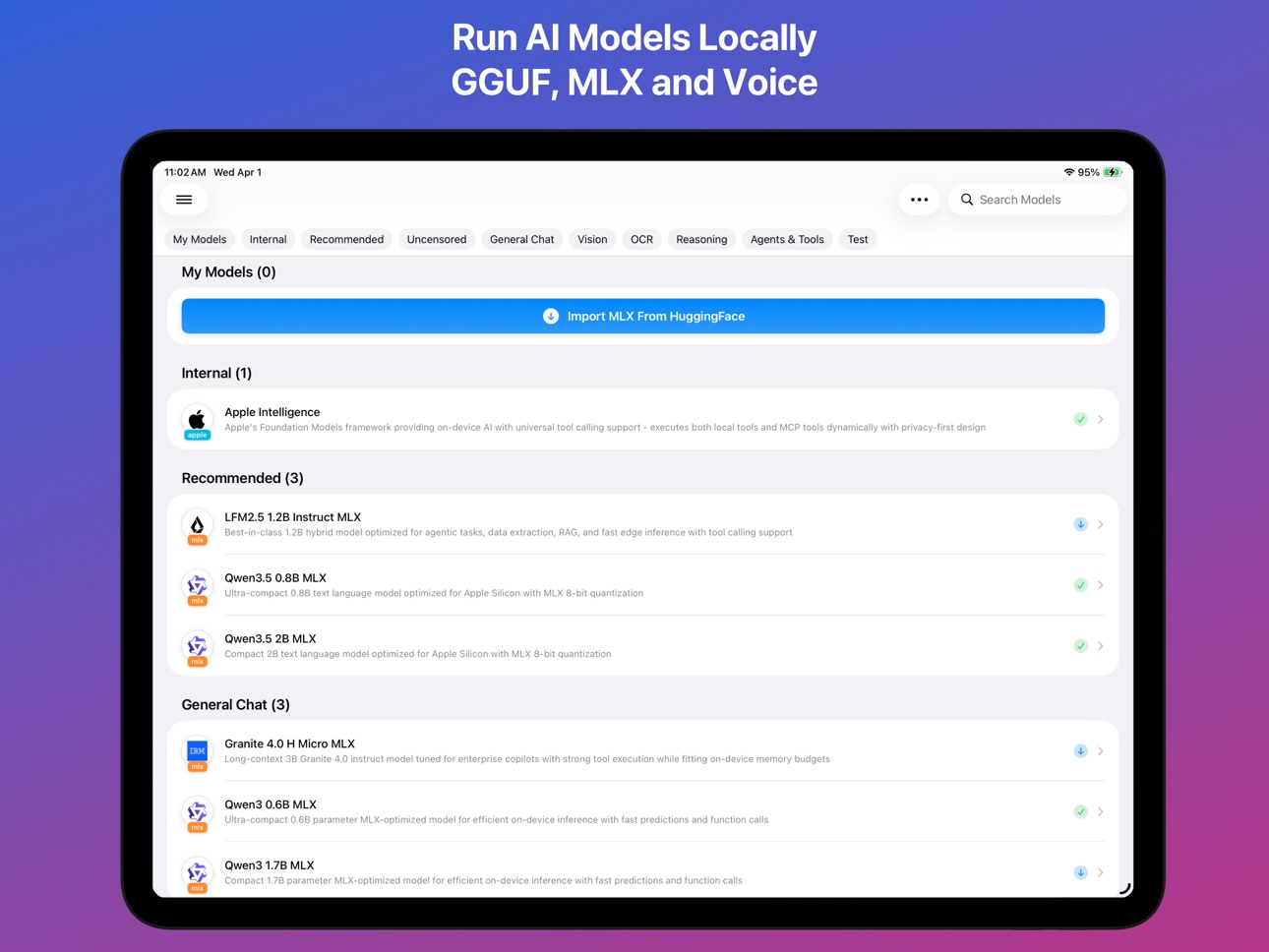
Privacy AI is a general-purpose AI assistant for iPhone, iPad, and Mac. Run local models fully offline, or connect to the cloud providers you already use, keeping conversations on your device.
Run Models Locally or in the Cloud
- On-device GGUF and MLX models, including vision and tool-calling
- Connect to OpenAI, Claude, Gemini, DeepSeek, or any OpenAI-compatible server
- Apple on-device Foundation Model (iOS 26+)
- Switch between local and remote models mid-conversation, keeping context
- Device RAM monitor for loaded models
Smart Chat
- Set model tiers once (fast, capable, reasoning, local), then just type
- Routes each message by complexity, privacy, and content type, with a badge
- Sensitive messages stay on a local model, set spending budgets, override anytime
Assistants and Tools
- Custom assistants with instructions, an avatar, and a reference knowledge base
- LLM Council: query several models in parallel and synthesize one answer
- 50+ built-in tools: web search, news, calendar, code execution, and more
- Full MCP support with an integrated marketplace
- Siri, Shortcuts, and Share Extension
Writing
- Long-form writing assistant that drafts outlines and chapters from one premise
- Quality reports highlight issues for revision, export to EPUB
Voice
- On-device text-to-speech (Kokoro-82M, Fish Speech S2 Pro)
- OpenAI text-to-speech (gpt-4o-tts, gpt-4o-mini-tts)
- Real-time voice conversation and live transcription
Files and Content
- Convert PDFs, Office files, EPUB, video, and audio to Markdown
- OCR, photo EXIF metadata, Mermaid diagrams, LaTeX
- Export to Markdown, PDF, HTML, EPUB, or JSON
- Media Studio: generate images from text prompts with your choice of provider
Accessibility
- Sound and haptic feedback for AI events
- Full VoiceOver coverage
- Verbose Announcements read responses aloud on demand
Free to Use. No Ads.
Local model features are free, including the AI keyboard, writing assistant, custom assistants, 50+ tools, document reader, voice transcription, image generation, and iCloud sync. Cloud API models and the MCP marketplace need a subscription.
Privacy by Design
Privacy AI runs on-device. No backend servers. No accounts. No data collection. Your conversations never leave your device, and every API request is visible in the Protocol Inspector.
Your models. Your device. Your data.
Medical Disclaimer
Privacy AI is a general-purpose AI assistant and is not a doctor. It is not a substitute for professional medical advice, diagnosis, or treatment. Any health-related content is provided for informational and educational purposes only. In addition to using this app, always check with a doctor or other qualified healthcare professional before making any medical decisions. Never disregard or delay professional medical advice because of something you read or generated in this app. In case of a medical emergency, call your local emergency number immediately.
Terms of Use: https://privacyai.acmeup.com/docs/policy/tos.html
Privacy Policy: https://privacyai.acmeup.com/docs/policy/privacy.html
In-App Purchases US pricing
Subscribe to access Privacy AI Subscription
Yearly Pro Plan · Yearly$99.99
Monthly Pro Plan · Monthly$9.99
Weekly Pro Plan · 7 days$3.99
Capabilities
In-App Purchases
Accessibility
ipadiphonemacrealityDevicetvoswatch
Version history 25 versions
Build 887312449v2.1.22026-06-29 20:50:50
FEATURES
- AI Keyboard
A new system-wide keyboard brings Privacy AI into any app where you type. Turn it on once, then in Mail, Messages, Notes, or anywhere else, tap the mic to dictate by voice, or tap Process to rewrite, polish, translate, or reshape what you have written, replaced in place with one-tap Undo. Build your own pipelines (ordered steps such as Polish then Translate) or start from ready-made presets like Proofread, Email, and Summary. Everything runs through the app on your device, so your text stays private and never leaves your phone.
- Image Prompt Wizard
Building a good image prompt is now much easier. Tap Prompt Wizard on the image generation screen to browse a curated library of prompt templates by their sample picture, pick one, and fill in its options. You can also type a single subject and have AI fill in every field for you in one tap, then preview the finished prompt before you generate. Each template credits its original author.
IMPROVEMENTS
- Local Engine Update (llama.cpp b9754)
The on-device inference engine was updated to the latest build for faster and steadier local models. Multimodal models process attached images more quickly, large models now show real progress while they load, and more models support speculative decoding for quicker replies. Updated graphics and audio components improve performance and stability across the board.
- MLX Engine Update (mlx-swift)
The Apple MLX inference engine was refreshed for lower memory use and better stability. Vision models now read long prompts in smaller pieces, sharply cutting peak memory so large image chats run more reliably on device. Speculative decoding automatically steps aside when memory is tight, so it never slows you down. This update also adds the Gemma 4 12B Unified and Nemotron text-diffusion models and fixes loading of Qwen3.5, Qwen3-Next, and nomic-embed models.
Build 887063335v2.1.12026-06-19 06:58:59
FEATURES
- Smart Chat Automatic Model Routing
Smart Chat picks the best AI model for every message automatically, so you never have to choose. Set up your model tiers once (a fast model for simple questions, a capable model for complex work, a reasoning model for hard problems, and a local model for anything private), then just type. Smart Chat reads each message for complexity, privacy sensitivity, and content type and routes it, with a badge on each reply showing which model answered and why. Personal or sensitive messages stay on a local on-device model, you can set per-setup spending budgets, and you can override any single choice.
- Video Input For Local Vision Models
Attach a video to a chat with a local vision model (such as Qwen-VL or Gemma) and it describes what happens across the clip. The app samples evenly spaced frames and feeds them to the on-device model, so it sees motion and multiple moments rather than a single still. This matches cloud models, fully on device and private.
IMPROVEMENTS
- Faster Sharing To Chat
Sharing a file such as a video now opens the chat right away and prepares the file inside it, with a progress overlay, before sending automatically. No more waiting on a loading screen. If the file cannot be processed, the chat still opens and explains what went wrong. Works in regular chats and Smart Chats.
- Resume Interrupted Model Downloads
Large model downloads now pick up where they left off instead of restarting from zero. If your connection drops, you cancel and restart, or you leave the app and return, the download continues from where it reached, saving time and data on multi-gigabyte files. Applies to all model types.
- Resend Keeps Both Replies
Resending now keeps the original AI reply and adds the new one as a variant instead of replacing it. An inline picker (such as 2 of 3) appears on the latest reply so you can flip between versions and pick one. Switching a variant also updates what the assistant carries forward. Works in main chat and Smart Chats.
- Local Engine Update (llama.cpp b9663)
The on-device inference engine was updated to the latest build, adding video understanding for multimodal models, faster image processing when several pictures are attached, new model architectures, and audio and graphics fixes.
- MLX Engine Update (Gemma 4 and Vision)
The Apple Silicon MLX engine was updated for faster, steadier on-device models. Gemma 4 gains optional speculative decoding for quicker replies, and its image understanding uses less memory so long prompts with pictures no longer fail on iPhone and iPad. Qwen vision uses less memory too, and Gemma 4, Falcon H1, and LFM2 are more accurate.
BUG FIXES
- MiniMax-M3 Image and Video Input
Fixed multimodal input for MiniMax-M3. Images no longer fail with an "invalid image detail" error, and attached videos are now sent in a format the model recognizes, so it describes the video instead of ignoring it. Videos over 50 MB show a note suggesting the convert-to-text option.
Build 886571156v2.0.282026-06-12 04:36:21
FEATURES
- Sign in with ChatGPT
Use your ChatGPT Plus or Pro subscription instead of an OpenAI API key to route Codex models. xAI Grok OAuth also ships.
- Live Performance Stats In Chats
While streaming, a line shows elapsed time, decode speed, and context usage; an expandable row adds time to first token and token counts.
- Exa Web Search Provider
Exa joins Tavily, Serper, Brave, and LangSearch: neural search returning full page text, 1,000 free searches per month.
- User Profile From Your Memories
Each memory sector's Profile button asks an AI model to summarize its long-term memories into a short paragraph that prefixes every chat there.
- One-Tap Memory Consolidation
A Consolidate button finds near-duplicate long-term memories and merges each cluster into one entry.
- Memory Maintenance In One Tap
Profile and Consolidate first categorize Uncategorized memories and promote short-term notes to long-term.
- Memory Audit History
A new Audit History view lists every add, update, and delete with keyword search.
- On-Device Model Benchmark
A Benchmark button runs a llama-bench style test reporting speed and peak memory, then suggests optimal context, batch, and thread settings.
IMPROVEMENTS
- Text Selection In Fullscreen Chat
Selecting text in the fullscreen chat input no longer slides the main menu open, so editing on iPad stays precise.
- Choose Transcription Language
When converting video or audio to text, pick the spoken language for every speech engine, or leave it on Auto.
- Smoother Transcription Progress
Audio-to-text progress now advances steadily instead of jumping backward.
- Smarter Duplicate Detection
Multiple memories from one turn are evaluated in a single AI call, and near-identical entries are skipped.
- Memory Search Knows Profile From Facts
The cached user profile is sent separately from matching memory rows for a cleaner prompt.
- llama.cpp Engine b9553
Updated from b9279 to b9553 (269 changes), adding DeepSeek-OCR 2, Granite 4 Vision, Gemma 4 vision and audio, and DeepSeek V3.2 sparse attention.
- MLX-Swift LM Engine tag-20260607
Faster, more accurate on-device vision: corrected Qwen2.5-VL attention, SmolVLM2 up to 9x faster, plus audio input and more reliable tool calling.
- Sharper Camera Focus for Documents
View Assistant locks focus more reliably on close-up subjects, and you can tap the live preview to focus.
BUG FIXES
- Soul Greeting Now Appears From the Model View
Starting a chat with a Soul from model settings now shows its configured first message.
- Attaching a Video to Chat
Fixed Video Processing Error: file doesn't exist when attaching a video.
- Empty Transcript From iOS Speech
Fixed the iOS speech recognizer returning nothing on a clear recording.
- Convert to Text Could Hang
Fixed the iOS Speech Analyzer getting stuck at Analyzing audio; it now falls back to the system recognizer.
- Legacy Memories Now Reachable
Memories with an Uncategorized chip were invisible to Consolidate and Profile; all maintenance flows now pick them up.
- Memory AI Calls No Longer Stall On First Event
Fixed Profile, Consolidate, and Categorize calls returning empty when the first AI event was misread as the end.
- Memory List Refreshes After Maintenance
After Profile or Consolidate, Uncategorized chips on just-categorized rows disappear immediately.
- VoiceOver Input Stays Reachable After Sending
Fixed the chat input collapsing after sending; with VoiceOver it stays visible and focusable.
Build 885725095v2.0.252026-06-05 10:15:05
FEATURES
- Video Understanding From Any Link
Paste a link and the assistant pulls page text, title, and captions. Missing captions trigger on-device transcription. Social links merge post text with attached-video captions, and links with long tracking parameters no longer truncate. Works with most major video and social platforms.
- Real-Time Flight Search
New search_flight tool returns status, delays, gates, and baggage with fallback across FlightAware, AirLabs, AviationStack, AeroDataBox.
IMPROVEMENTS
- Faster first reply in a new chat (skips the relevance scorer).
- Keyboard opens automatically in empty chats.
- Input bar no longer collapses while a draft is in the field.
- Quick Ask, LLM Council, Siri, sub-agents no longer disturb an open OpenAI Responses chat.
- llama.cpp b9279: HunyuanOCR/HunyuanVL unified, DeepSeek-OCR resize fix, faster Metal, NvFP4 LM head, sliding-window crash fix.
- MLX-Swift tag-20260522: Gemma 4 ~24 percent faster, three Gemma 4 crashes fixed, Idefics3 prefill in one pass, Qwen3.5/Qwen3VL/GlmOcr M-RoPE stable.
- GGUF tool calling: Gemma 4, Qwen, LFM2 reliably invoke tools via OpenAI function-calling schema.
- Faster first reply from local GGUF: Metal kernels pre-compile at load.
- Novel Writer on small local models: outline parser recovers from missing tags, character names stay stable, stray markers no longer leak in.
- Banner on small local models showing context size and output cap.
- Reasoning models (GLM-5.1, DeepSeek, OpenAI o-series) now get budget for hidden reasoning plus full structured output.
- Chapter correction pass extends chapters under 70 percent or condenses over 130 percent.
- Token Usage charts now count thinking tokens for reasoning models.
- Duplicate bottom chat action bar removed; all actions in the top-right menu.
BUG FIXES
- Web search falls through Tavily, Brave, LangSearch when first returns nothing.
- macOS screens stuck in light-mode colors now follow Dark Mode immediately.
- Clear Chat on OpenAI Responses drops the server reference and wipes the per-chat workspace.
- Fixed Gemma4-E2B/E4B crash on 32 KB Metal threadgroup devices (incl. iPhone 16 Pro Max).
- Fixed GGUF metadata read crash on external drives or iCloud I/O errors.
- Fixed MLX long-prompt crash on iOS; prompts fed in 512-token chunks on iOS/Mac Catalyst.
- Fixed MLX vision models ignoring an image after a text-only reply.
- Fixed duplicate "Recovered From..." entries on cold launch.
- Custom assistant generation uses a fresh random seed (no more identical results).
- Verbose VoiceOver reads the full response instead of only "Response complete".
- Collapsed thinking preview no longer reads stray letters under VoiceOver.
- Bullet markers decorative; VoiceOver reads item text directly.
- LaTeX/math blocks expose a "Math expression" label for VoiceOver.
Build 885530141v2.0.172026-05-12 19:45:33
FEATURES
- Quick Text Home-Screen Shortcut: Long-press app icon for a fullscreen AI editor; Translate, Polish, Expand, Concise in one tap.
- Civitai Image Generation in Media Studio: SDXL, Flux, and Pony checkpoints with img2img, inpaint, and LoRA support.
- Advanced Local Model Tuning: KV quantization, batch size, RoPE, and YaRN controls in GGUF model settings.
- Chapter Illustrations and Cover Generation: Auto-generates character sheets, chapter art, and covers; embedded in EPUB.
- AI Character Generation: Up to 10 AI-built characters from synopsis; add or remove individually.
- Character Concept Sheets On Demand: Generate a portrait for any character from its row menu.
- Mini-App REST Endpoints: LLM Council and Novel Writer as REST APIs with SSE streaming.
IMPROVEMENTS
- Smarter Tool Call Deduplication: Duplicate tool calls return a cached result, stopping loops.
- Onboarding Shown Only Once: Welcome screen appears exactly once on first install.
- Quick Ask Full Chat Interface: Full streaming view with bubbles and in-toolbar model switcher.
- Image Preview Pinch to Zoom: Image attachments open with pinch-to-zoom, pan, and rotation.
- AI Toolbar in Fullscreen Text Editor: One-tap transforms with side-by-side review panel.
- Tappable Links in Tool Errors: Tool errors include deep links to tool settings or iOS permissions.
- llama.cpp b9090: ggml v0.11.0, KleidiAI v1.24.0; MiMo v2.5, MiniCPM-V 4.6, Sarvam MoE, Granite 4.0.
- MLX-Swift LM Engine tag-20260509: Fixes Qwen3.5 VL crash; tests expanded to 18 families.
- Character Relationship Web: Role/sentiment nodes with chapter-by-chapter relationship timeline.
- Mood Arc and Thread Timeline: Mood strip and thread timeline with plant/reinforce/payoff markers.
- Clearer New Project Status: Novel Writer projects show "Ready" instead of "Configuring".
- mlx-audio-swift tag-20260509: MOSS-TTS (Qwen3), Silero VAD v5/v6; fixes Qwen3-ASR loops.
- FluidAudio tag-20260509: Kokoro ANE adds Mandarin G2P; fixes Metal crash and diarization tail.
BUG FIXES
- Media Studio About View: Fixed wrong about screen in Media Studio.
- Chat Input Menu on iPad: Fixed menus hidden behind keyboard.
- Mistral Tool Call Compatibility: Fixed 422 error on Mistral tool calls.
- Lock Screen Activity Leak: Fixed stuck Live Activity after force-quit.
- Repeated iCloud Data Found Prompt: Fixed false prompt for empty iCloud directories.
- Image Editor Crash on Close: Fixed crash closing image editor mid-drawing.
- Remote Model Title Display: Fixed provider-only titles for manually entered models.
- Stability AI Endpoint Routing: Fixed 400 error for stable-image-core/ultra.
- Stability SD3/SD3.5 Model Names: Fixed 404 from wrong API names (catalog vs v2beta).
- HuggingFace GGUF Download Import: Fixed "Invalid Model File" (local path vs remote URL).
- Duplicate Chapter Title Prefix: Fixed doubled titles like "Chapter 1: Chapter 1: ...".
- FluidAudio Startup Crash: Fixed main-thread crash scanning FluidAudio models at launch.
Build 885253030v2.0.142026-05-05 13:12:32
FEATURES
- Background AI Generation
Remote AI models keep generating when you switch apps or lock your screen. A Live Activity tracks progress and notifies you on completion.
- Notification Preferences
Toggle completion alerts for AI responses, mini-app tasks, and model downloads in Settings > Notifications.
- iCloud Leftover Data Cleanup
When iCloud Drive is off, "Manage iCloud Leftovers" removes leftover app data from a previous install.
- Completion Notifications
Sent when a council session, novel chapter, or health report finishes.
- MOSS-TTS-Nano-100M Voice Synthesis
Compact bilingual Chinese/English on-device TTS with voice cloning from a short audio sample.
- Unified Voice Selection in TTS Preview
TTS test panel now has Preset, Cloned, and Design tabs for all local TTS models.
- PocketTTS Voice Cloning
Voice cloning for all six language packs via the Cloned tab in the TTS test panel.
- Image Generation
Media Studio generates AI images: pick a provider, describe your prompt, and generate.
IMPROVEMENTS
- Mini-App Background Generation
Council, Health, and Novel Writer keep running with a Live Activity and Cancel on the Lock Screen.
- Clearer iCloud Migration Instructions
Sync buttons replaced with step-by-step migration instructions in Storage Settings.
- Storage Deletion Category Breakdown
Deletion confirmation lists each category with file count and size.
- Live Stage 0 Role Assignment
Council's role-assignment step streams in real time with a thinking disclosure for reasoning models.
- Full Language Support
Council, Novel Writer, and Health prompts now display in your app language.
- Three New Game Theory Scenarios
Three new scenarios added: Ultimatum Game, Trust Game, and Public Goods Game.
- Multilingual Novel Import
Chapter heading detection now covers all 11 supported app languages.
- Per-Section Report Regeneration
Each Health analysis section can be re-run independently.
- Local AI Engine Update (b9008)
Faster IQ-series kernels on Apple Silicon, Nemotron Nano 3 Omni GGUF, Qwen3/LLaMA fix.
- MLX Audio Engine Update (20260502)
MOSS-TTS-Nano added; faster TTS/ASR stop; quicker Qwen3-ASR streaming cancellation.
- FluidAudio Engine Update (20260502)
Cohere Transcribe chunks audio over 35 s; PocketTTS adds 9 language packs; Parakeet TDT v3 uses int4.
BUG FIXES
- SVG Image Crash in Markdown
Fixed a crash when opening SVG images in a markdown chat file.
- Share Sheet Chat List Refresh
Chats created via the iOS Share Sheet now appear in the list immediately.
- Back Button Hidden in Stage Manager
Fixed the chat back button obscured by Stage Manager controls on iPad.
- Local Tool Parameter Parsing
Fixed tools silently failing when parameter names arrived in camelCase.
- Fresh Install Showed Incorrect iCloud Status
Fixed "Syncing data from iCloud" on launch and false checkmarks when iCloud Drive was disabled.
- Backup Import Preserved the Wrong iCloud Setting
Fixed the importer enabling iCloud Drive when restoring from an iCloud-on backup.
Build 885286440v2.0.152026-05-05 21:31:15
BUG FIXES
- Fatal Launch Crash on CoreData Migration Failure
Fixed a fatal launch crash that could terminate the app immediately at startup on devices where the local database had been opened with iCloud Drive previously enabled and later disabled. The persistent store would be forced into read-only mode, automatic schema migration would fail, and any subsequent save would crash. The app now always enables persistent history tracking, retries store loading with iCloud disabled if the first attempt fails, and guards every database write so a missing store can never trigger an uncatchable exception. Affected users on 2.0.14 will recover automatically on the next launch with this build.
Build 884779622v2.0.122026-04-29 10:38:34
FEATURES
- Share to Privacy AI: Share text, links, images, PDFs, EPUBs, Office docs, audio, or video from any app via the iOS Share Sheet.
- Python Code Execution: AI writes and runs Python 3.14 on-device with numpy, Pillow, httpx, openpyxl, and cryptography.
- GitHub Search: Search repos, code, issues, and users; fetch README and release notes. Anonymous (60 req/hr) or with a PAT (5,000 req/hr, full code search).
- Noise Reduction: DeepFilterNet on MLX filters background noise before on-device ASR for cleaner transcripts.
- Qwen3 TTS Voice Cloning: Reference speaker encoded once and reused across the full response.
IMPROVEMENTS
- Chat Input Bar: Unified card layout, pill send button, single expandable menu for attachments and settings.
- Context Compaction: Older turns summarized automatically when chats grow long; tap Compact at any time.
- iCloud Drive Sync: Disabling saves preferences locally; re-enabling resumes cloud sync.
- Model Picker: Rows show context window, token limits, and tool-call support.
- Icon Button Reliability: Buttons respond across their full frame; fixes tap-but-no-action on iOS 26.
- Novel Plot Consistency: STATE.md append-only with AI compaction; FACT.md and summaries use hybrid tail/relevance selection; full outline in every chapter prompt.
- Persistent Review Model: Novel Review model choice saved across sessions.
- Per-Device Writer Model: Writer model saved per device, not synced via iCloud.
- MLX Audio Upgrade: DeepFilterNet V1/V2/V3 (100x real-time); Parakeet batch TDT decoder with bfloat16.
- FluidAudio Upgrade (tag-20260425): Diarizer separates speakers (97% F1); iOS 26.4 heap crash fixed; no Cyrillic in English; Kokoro expands abbreviations; Cohere Transcribe added (14 languages, Apple Neural Engine).
- LLaMA Upgrade (b8933): Metal matrix-multiply optimized; Reka Edge 2603 vision support; M-RoPE fix; CVE-2026-21869 patched.
- Health Reports: 9 new templates, 20+ new data types, per-section data scoping.
BUG FIXES
- EPUB Extraction: Multi-file TOC chapters now extract all linked content, not just the first file.
- Last Message Reappears: History saved correctly when the message list is empty.
- Deleted Message Stays Visible: Chat view updates immediately after a message is removed.
- iCloud on Fresh Install: iCloud folders created only after you explicitly enable iCloud Drive in Settings.
- Spurious iCloud Messages: CloudKit monitoring and sync gated on iCloud Drive preference.
- Model Not Found with iCloud Off: File search checks both local and iCloud paths; paths with spaces or special characters resolve correctly. MLX path resolver also fixed.
- Writer Accessibility: VoiceOver expand toggle fixed; Actions rotor added. Non-CJK default chapter target raised from 6,000 to 10,000 chars.
- Chapter Outline Jank: Expanded rows stay full-width while editing title or summary fields.
- Diarizer Model Picker: Shows only models compatible with the active engine (MLX, FluidAudio, or batch).
Build 884586964v2.0.102026-04-21 21:33:21
FEATURES
- Text to Video Generation: New chat mode; configure aspect ratio, resolution (up to 4K), and duration; generates via OpenRouter; first-frame thumbnail shown inline.
- OpenRouter Video Generation: Additional OpenRouter video models with aspect ratio, resolution, duration, audio, and seed options.
- Live Activities for Downloads: Lock Screen and Dynamic Island progress for GGUF, MLX, and CoreML downloads; includes Cancel button.
- Local Audio VAD and Diarization: Supports VAD and speaker diarizer models for live transcription.
- Multiple Custom Scenarios: Save named View Assistant scenarios with prompt and vision settings; existing prompts auto-migrate.
- Health Analysis: New mini-app generates AI-powered reports from Apple Health data; benchmarked against ACC/AHA, ADA, NSF norms; includes a workout readiness score and follow-up chat.
IMPROVEMENTS
- Fullscreen Text Editor: Expand button opens a near-fullscreen view from any text editor.
- Smoother Chat Navigation: Faster open; background monitoring no longer triggers reloads.
- Background Download Completion: MLX and CoreML managers handle background URL session events.
- CSV Table Header Alignment: Uniform height when column names wrap.
- MLX Inference Upgraded (tag-20260419): Gemma 4 text-only; fixes Gemma 4 VLM prompts, Qwen3 tool calls, Mamba/hybrid KV cache, BERT crash on long inputs.
- MLX Audio Upgraded (tag-20260419): Fixes Kokoro TTS phonemization; caches Qwen3-TTS embeddings; fixes Cohere int8/int4 loading; Qwen3 ASR context decoding.
- LLaMA Engine Upgraded (b8763-b8843): Qwen3 audio; fixes crash on tiny images and Metal Flash Attention; M-RoPE decoder for vision.
- FluidAudio ASR Upgraded (tag-20260419): Unified TDT for Japanese; fixes dropped short words; minimum audio down to 300ms.
- Feedback Auto-Save: Alerts when no email; saves draft as you type; restores on return.
- Smarter Memory Recall: Recency ranking, diversity reranking, and progressive compression on all devices.
- Small-Context Model Support: Writer handles truncation silently and auto-recovers.
- Smooth Chapter Endings: Detects mid-sentence ends and smooths to a natural boundary.
- Novel Writer Error Reporting: Pipeline errors shown as alerts.
- Detailed Analysis Scene: New View Assistant scene with per-person physical details and strict OCR.
BUG FIXES
- Crash with Negative Seed: Fixed crash with a negative model seed value.
- Crash Checking Speech Models: Fixed startup crash checking Whisper availability.
- Tool Calls on Ternary-Bonsai MLX: Fixed dropped tool calls caused by empty-string vocabulary token for the opening tag.
- Gemma 4 Quantized KV Cache Crash: Fixed by routing to updateQuantized() with dequantize.
- MLX Memory Not Released: Metal buffer pool released on unload or backgrounding; fixes "Not enough free memory" errors.
- Novel Writer Chapter Blank: Fixed blank display after loading; prevents reload on sheet dismiss.
- Novel Writer About View: Fixed wrong content; now shows Novel Writer info.
Build 884546246v2.0.92026-04-16 11:14:28
Urgent update for macOS: this release fixes a crash that prevented Privacy AI from launching on macOS (iPad app on Mac).
BUG FIXES
- macOS First Launch Crash on Initial Settings Screen
Fixed a crash that occurred immediately on first launch for users running Privacy AI on macOS (iPad app on Mac). The initial privacy settings screen failed to load. The app now launches and displays the first-run setup screen correctly.
FEATURES
- Food Search with Full Nutrient Profiles
A new search_food tool queries the USDA FoodData Central database and returns complete nutrient data inline for every result, including macros, vitamins, minerals, and fiber. No follow-up request is needed to see the full breakdown. You can request up to 25 results per search. The tool works out of the box using a DEMO_KEY; if you need higher rate limits, you can enter your own FoodData Central API key in the tool settings.
- Exercise Search by Name, Muscle, or Category
A new search_exercise tool searches the wger.de open exercise database. You can find exercises by name, target muscle group, or category. When your query matches a known muscle or category, the tool runs parallel lookups to return richer results including exercise descriptions, targeted muscles, and required equipment. No API key is required.
IMPROVEMENTS
- Health Analysis Improved
The get_health_data tool now covers 27 additional data types across six new categories.
Build 884301169v2.0.72026-04-15 12:47:29
FEATURES
- Initial Settings: analytics, iCloud sync, passcode choices on first launch.
- Reddit Search: posts/comments by keyword, subreddit, sort, and time range.
- Novel Writer Review: AI evaluates novel across 10 literary dimensions.
- Gemma 4 On-Device: gemma-4-e2b-it-4bit via MLX on Apple Silicon.
- Docs.OCR Model: on-device document OCR via llama.cpp.
- Metal Toggle: enable/disable Metal GPU for GGUF models from Basic settings.
- Context Overflow Policy: Rolling Window, Compact, Truncate Middle, Stop at Limit.
- Backup and Restore: .zip or encrypted .pabackup; selective restore.
IMPROVEMENTS
- Novel Writer: synopsis for all types; editable writing rules; edit settings; chapter context menu.
- View Assistant Scenarios: 6 built-in; Full Scene Analysis; inline prompt on iPhone.
- View Assistant Accessibility: audio ping, voice dictation interrupt (iOS), Magic Tap.
- View Assistant Quality: matches device language, strips markdown, no preambles, UI polish.
- mlx-audio-swift 20260412: Kokoro iOS crash; Qwen3 TTS 0.6B (7 speakers/10 langs); Cohere Transcribe.
- FluidAudio: 2.2-2.8x faster batch transcription; Nemotron 80/160ms streaming ASR.
- llama.cpp b8763: Dots.OCR, Gemma 4 Audio, Step3-VL-10B; Q1_0 Metal complete; MERaLiON-2.
- MLX Swift 20260412: speculative decoding, parallel tool calls, Swift 6 fix.
- TurboQuant: flash attention KV quantization (Q8_0) to reduce memory.
- Protocol Inspector: all llama.cpp/MLX logs; zero overhead when disabled.
- AI Memory Dedup: two-phase AI-evaluated detection; in-place fact updates.
- Backup: import confirmation dialog; atomic imports that roll back on failure.
- Edit Council In Place: edit all settings from the chat view.
- HuggingFace Import: numbered steps, MMPROJ support, confirmation dialogs.
- Device RAM View: GPU Memory, CPU, thermal; Resource Monitor toggle here.
- Inference HUD: compact layout, minimize to thermometer icon, thermal color.
- VoiceOver: debug log icons marked as decorative.
BUG FIXES
- Statistics: cost breakdown totals now correct.
- Three crashes fixed: keyboard sheet conflict, background thread UI, LazyVStack.
- Novel Writer: XML tag remnants removed from chapter titles and EPUB.
- View Assistant: camera session fully resets on restart.
- TTS language picker shows full locale names (no more duplicates).
- TTS voice picker resets on model switch.
- Memory dedup race condition fixed.
- Memory import count reflects only saved operations.
- Backup import is atomic; failed imports roll back cleanly.
- Backup password encryption strengthened.
- Date settings now survive backup round-trips.
- Backup password mismatch error readable by VoiceOver.
- Council sessions reload full message history on return.
- Chat messages no longer vanish during tool call replies.
- Chat: blank-screen bug and scroll overshoot fixed.
- Navigation menu: VoiceOver background isolation fixed.
- Navigation menu: observer leak fixed.
- Navigation menu: first-render animation crash fixed.
Build 884055999v2.0.32026-04-09 00:26:32
FEATURES:
- Device RAM Management: New side menu page shows live RAM stats, loaded model list by type, memory tips, and an "Unload All" button with haptic and toast feedback.
- Real-Time Streaming ASR: FluidAudio and MLX Audio engines now show a live transcript panel with partial hypotheses during recording; non-streaming engines (WhisperKit) are unchanged.
- Gemma 4 Support: Local inference supports Gemma 4 and Gemma 4V (vision) with full tool-calling on E2B/E4B models.
- Bonsai-8B 1-Bit Quantization: PrismML Q1_0 1-bit quantized models run on-device with full Metal acceleration.
IMPROVEMENTS:
- Navigation bar titles added to MLX Audio and FluidAudio model list views.
- EXIF metadata (camera, date, lens, GPS) from attached photos is now sent to the AI.
- iPad chat query editor stays open while scrolling; keyboard no longer dismisses on scroll.
- Tool sheet shows a "Manual | Auto" toggle with an explanation card in Auto mode.
- Small context models (4K-8K) get compact tool lists; large context models (64K+) get richer descriptions.
- Local model default context scales with file size: under 1GB = 20k tokens, 1-2GB = 14k, larger = 8k.
- Swipe-to-open-menu gesture active in list views, disabled in settings with sliders.
- FluidAudio upgraded to tag-20260406: Japanese and Mandarin ASR models, PocketTTS session prefill, crash fixes.
- MLX Audio Swift upgraded to tag-20260403 with MLXFast for Metal GPU acceleration across all STT models.
- Embedder no longer loads on every chat start; loads only when past messages or documents exist.
- MLX model loading is 10-15x faster with a streamlined tokenizer.
- llama.cpp b8690: Q10 quantization, HunyuanOCR, Granite 4.0 chat template, Gemma 4 and KV cache fixes.
BUG FIXES:
- Voice picker now shown for all TTS models (FluidAudio and MLX Audio) that offer multiple voices.
- ASR falls back to the per-engine language setting when no language is explicitly provided.
- ASR test view now shows error messages in red instead of dismissing silently.
- "Set as Default ASR" now shows a confirmation alert and updates state immediately after confirmation.
- Switching ASR engines now correctly clears the previous model's default flag.
- Language picker added to the ASR test widget embedded in model detail previews.
- Spoken numbers, currencies, and percentages now transcribed as formatted text ("$200", "50%", "3rd").
- MLX Audio TTS models now store voice preferences independently per model.
- TTS and ASR re-verified after storage clear; app falls back to system engine when files are missing.
- Stopped generation no longer leaks tokens into the next query; in-flight network requests cancelled on stop.
- MLX vision models no longer crash with repetition, presence, or frequency penalty settings.
- Council chat history now loads correctly after app restart.
- Writer chapter text selection no longer crashes when the copy/paste menu appears.
- iPad Council Chat input bar now rises above the keyboard when tapped.
Build 883729150v2.0.12026-04-02 10:26:55
FEATURES
- View Assistant
New mini app in the Apps menu. Uses your device camera and a vision AI model to describe surroundings in real time, reading responses aloud via TTS. Configurable capture interval (1-10s), prompt, and resolution (512x512 to 1024x1024). Designed for blind and low-vision users with full VoiceOver support.
- HuggingFace Inference Provider Selection
Choose which inference provider powers HuggingFace API calls: hf-inference, nebius, groq, fal-ai, and more. Open API Keys settings, select HuggingFace, and pick a provider. Applies to chat, image, and video generation. Model list filters to show only supported models.
- HuggingFace Model Search
Search by keyword when importing a HuggingFace model instead of typing the full repo ID. Results are filtered by model type (MLX or GGUF). Import sheets now open full-screen.
- Expanded LaTeX Math Support
Approximately 125 additional LaTeX commands: 100+ symbols (negated relations, binary operators, Hebrew letters, arrows), Dirac notation (bra, ket, braket), delimiter sizing (big, bigg, Bigg), boldsymbol, and operatorname. Unsupported expressions render as readable monospaced text.
IMPROVEMENTS
- Unlimited Conversations with Apple Intelligence
Long Apple Intelligence conversations no longer end when context fills up. The app summarizes history and continues seamlessly in a fresh context.
- Instant Startup When Offline
Detects offline state immediately and loads cached config, eliminating a 6-second or longer hang at launch.
- Smoother Streaming Markdown Rendering
Chat list rebuilt on a stable foundation. AI responses with tables and rich formatting stream in without scroll jumps or layout resets.
- AI Gateway Screen Saver
Tap "Screen Saver" in Server Status to show a dim overlay with drifting stats. Keeps the screen on during long server sessions.
- Storage Settings as Standalone Page
Storage settings moved to its own dedicated page in Settings, previously embedded in System Settings.
- Novel Writer: Clearer Project Start Options
New project now shows three labeled choices at the top: Choose a Template, Import a Novel, Create an Empty Novel.
- Novel Writer: Smarter Outline Review
AI evaluator now provides concrete fix suggestions alongside each issue. Evaluator and refiner see previous review rounds to avoid repeating failures. Pass threshold lowered from 8.5 to 7.5.
- MLX Audio TTS: Language Picker and Generation Parameters
New language selector (Auto-detect or specific language). Four new parameters exposed: Top P, Repetition Penalty, Repetition Context, Streaming Interval.
- Local Inference Engine Upgrade (llama.cpp b8461 to b8565)
110 upstream commits. Adds DeepSeekOCR vision encoder support. Reasoning API passes reasoning_content across turns for DeepSeek-R1 and QwQ. Metal GPU matmul2d fix and load-failure segfault fixed.
BUG FIXES
- Soul with local llama.cpp/MLX models no longer causes a Jinja template error.
- Models moved between local and iCloud storage no longer disappear from the list after refresh.
- Model deletion now removes files from both local and iCloud storage.
- Tool settings sync batched to a single DB write at startup, reducing main-thread I/O.
- Fixed crash when model list updates during a background file availability check.
- Fixed crash when chat scrolls to a new message during a pending layout update.
- VoiceOver: side menu hides background content when open; Writer posts status announcements throughout the writing workflow; progress indicators report percentage; disclosure groups announce expanded/collapsed state.
- Voice chat no longer crashes when starting recognition while already active.
- Health data tool: steps, distance, and flights now summed (not averaged) per time bucket; sleep total duration double-counting fixed.
- EPUB export: fixed stray text fragments between words caused by an attribute-cleaning regex applied to all HTML instead of only tag attributes.
Build 883436661v1.9.12026-03-25 01:18:17
Features
- Novel Writer
Complete AI fiction studio for long-form novels across 20 genres. The AI builds an outline then writes each chapter with genre-tuned style and consistent voice. A Consistency Database tracks characters, world rules, and events to prevent contradictions. Enhanced Writing Rules (20+) cover show-don't-tell, dialogue subtext, and genre-specific guidance. Quality Report flags AI writing tells. Works on a 9B on-device model. Export as EPUB.
- Soul: Character Roleplay Studio
Turn any model into a fully realized character. A soul defines name, personality, scenario, and background, injected into every chat. Import or export TavernAI character cards (PNG). Supports custom avatar, opening message with alternate greetings, post-history instructions, tags, and a Lorebook (keyword-triggered lore, constant entries, probability, injection positions). Runtime macros resolve dynamically. Status bar shows the character's name with a sparkle animation.
- Markdown Rendering
Rewritten with accurate LaTeX math rendering and text selection anywhere in markdown, including code blocks.
Improvements
- Move Local Models Between Device and iCloud Storage
Move GGUF and MLX models in both directions: free iCloud quota or sync across devices.
- Presence Penalty for Local Models
Available for local GGUF and MLX models in Generation Parameters.
- Parse Special Tokens Setting for Local Models
"Parse Special Tokens" toggle (on by default) controls whether special tokens in GGUF model output are treated as control signals.
- Weekly Pro Subscription Plan
Weekly Pro plan now available alongside monthly and yearly.
- Screen Stays On During AI Tasks
Screen stays on during generation and TTS playback to prevent iOS from reclaiming local model memory.
- Local Inference Engine Upgrade (llama.cpp b8355 to b8461)
99 commits: Mistral Small 4 support, vision pipeline improvements, prompt corruption and Jinja fixes. ggml 0.9.8.
- MLX Inference Engine Upgrade (tag-20260315 to tag-20260321)
Fixed tool calling for XML function format models (e.g. Qwen3.5-2B). LFM2 parser handles arguments with parentheses.
- MLX Audio TTS Engine Upgrade (tag-20260315 to tag-20260321)
Two new voice models: Fish Speech S2 Pro (Fish Audio) with VQGAN tokenizer and FishS1DAC codec.
- Sound Effects and Haptic Feedback for AI Events
Sound effects for generation, errors, and clipboard. Haptic feedback on macOS via Force Touch. Disableable in Settings. By Enes Deniz.
- VoiceOver: Full-App Accessibility Labels
Labels added across every screen: chat actions, TTS controls, nav menu, Prompts, Settings, Reader, Audio/ASR, Tools, MCP, Memory, Novel Writer, Soul, Council, and more.
- VoiceOver: Navigation Structure and Announcements
Section headers and message senders carry the heading trait for rotor navigation. Decorative elements hidden. Loading and download progress announced.
- VoiceOver: Verbose Announcements
Opt-in toggle in Settings > Accessibility announces generation start and reads the response aloud. Off by default.
Bug Fixes
- Apple Intelligence Hidden on Unsupported Devices
Now hidden on unsupported devices (e.g. iPhone SE 2022).
- VoiceOver: Interaction and Focus Fixes
Fixed: focus stuck on storage directory entries; menu not dismissible (Z-scrub added); drag handles announced as interactive; expandable sections not reporting state; chat input bar buttons unlabeled.
- Council Folder Hidden from Chat Folder List
Council folder no longer appears in the chat folder list.
- MLX Audio TTS Stability Fixes
Fixed a crash under memory pressure and a race condition on new TTS requests.
- Calendar and Reminder Tool Stability
Fixed startup crash. Now initialize lazily and detect permission revocation without restart.
Build 883030318v1.8.62026-03-16 18:39:51
Features
- API Rate and Credit Monitoring
Tap the gauge icon after any AI response to check API rate limits and credits. OpenRouter shows credit balance and dollar amounts; other providers show rate-limit data from response headers.
- Game Theory Mode in LLM Council
A new Game Theory mode has council members negotiate across multiple rounds before the chairman evaluates outcomes.
- Mermaid Diagram Rendering
Mermaid code blocks now render as native charts (flowcharts, sequence diagrams, Gantt, and more) with a toggle between the chart and raw source.
- search_news New Providers
search_news now supports four free news providers: NewsData.io, News API, GNews, and Currents.
- App Store Connect Management
manage_appstore_connect lets you manage App Store Connect through AI chat: apps, reviews, TestFlight, in-app purchases, and sales reports.
- omlx Self-Hosted MLX Inference
omlx is now a built-in provider for a self-hosted MLX server at localhost:8000/v1.
- GZip File Support
Privacy AI opens .gz files directly, decompressing them automatically.
Improvements
- Paper Search Covers Medical Research
search_paper now searches PubMed alongside arXiv, and the year filter is fixed.
- More Relevant arXiv Results
Multi-word searches now require all terms, so "melatonin safety" returns specifically relevant papers.
- Fullscreen Camera on iPad
Take Photo now opens fullscreen on both iPhone and iPad, replacing the partial sheet that clipped the preview.
- llama.cpp Engine Upgrade (b8355)
Upgraded from b8185. New PEG-based autoparser improves tool calling reliability. Checkpointing fixed for Qwen3VL, Llama4, and Qwen2VL. NVFP4 quantization added.
- MLX Audio Engine Upgrade (20260315)
Parakeet V2 ASR improved; Qwen3 TTS faster. Adds SenseVoice, FireRed ASR 2, IBM Granite Speech 4, Echo TTS, and three new audio codecs.
- MLX Swift Engine Upgrade (20260315)
Qwen3.5 Vision and MoE Vision now supported. Tool call XML parsing fixed. RoPE improved across 25+ model families. GLM-OCR added.
- Larger Models on High-RAM Devices
Privacy AI requests the increased-memory-limit entitlement on iPad Pro, enabling larger models and bigger context windows.
- LM Studio Reasoning Compatibility
The Responses API now maps LM Studio's reasoning_text events correctly so reasoning models like Qwen3.5 work as expected.
- Statistics Charts Improved
Model Usage and Cost charts are now horizontal bar charts with exact value labels. Daily Usage is now a line chart showing Total Cost.
- Configurable Message Streaming
Chat Theme Settings offers Typewriter, Chunked, or Immediate display with refresh rate 5-60 FPS.
- LLM Council Enhancements
Queries fetch pasted URLs for context, long queries collapse after 100 characters, and interrupted sessions resume from the last completed stage with history maintained.
- Streaming Response Performance
Markdown parsing now handles only new characters per update, reducing CPU usage and jank in long replies.
- Dark Mode App Icon
The app icon switches to a dark variant on iOS 18 with Dark or Automatic icon theme.
- SVG Image Sharing
SVG files shared to Privacy AI are now converted to PNG for AI vision analysis instead of being dropped.
Bug Fixes
- Qwen3.5 Tool Calling Fixed
Qwen3.5 GGUF and MLX models (0.8B, 2B, 4B) can now call tools correctly.
- Long Audio File Transcription
MLX Audio (Qwen3-ASR-0.6B) now processes long audio files without errors across all common formats.
- File Sharing via Action Extension
Binary files (ZIP, PDF, etc.) shared via the Action Extension are now correctly received and attached to chat.
- Search Fallback in Auto Mode
search_web Auto mode now correctly falls through to the next engine when a provider returns zero results.
- Share Sheet Blank on First Tap
Fixed the share sheet appearing blank on first open from code, TTS audio, chat, and certificate export.
- Appearance Theme
Fixed an iOS issue where switching to Light or Dark mode left no way to return to the system appearance. Auto is now available.
Build 882801198v1.8.12026-03-04 18:29:32
Features
- MLX Audio Engine
On-device audio engine with TTS, STT, VAD, and speech-to-speech models, including Qwen3 TTS 0.6B and Qwen3 ASR 0.6B. Download from the new MLX Audio Models section under Local Models.
- Live Transcription & Real Time Translation
Continuous streaming transcription with local MLX STT and VAD models. Enable real-time translation as audio or video plays. Fully on-device, no cloud needed.
- Internal Model Upgraded to Qwen3-0.8B
The built-in model for internal tasks is now Qwen3-0.8B. New Qwen3.5 models (0.8B, 2B, 4B) are available in both GGUF (text + vision) and MLX (text only) formats.
- Cost Report Export
Export usage statistics as a Markdown report from the Cost Estimator. Share it to another app or copy to clipboard, with a clear Remote/Local breakdown.
- AI Gateway Vision Support
The local AI Gateway now accepts image inputs via remote URLs or base64 data URIs in the standard OpenAI format. Works with vision models like PaddleOCR-VL-1.5 and GLM-4.6V.
Improvements
- Cost Report Charts Redesigned
Charts replaced with horizontal bar charts showing exact data labels. Capped at top 20 entries. iPad layout reorganized.
- Flexible Health Data Aggregation
The get_health_data tool accepts an optional aggregation parameter (raw, per-minute, hourly, daily, monthly, quarterly, yearly). Default behavior unchanged.
- Subtitle to Article Shared Action
Share SRT or VTT subtitle files to convert them into clean articles with corrected transcription and organized sections.
- llama.cpp Engine Upgrade (b8145 to b8185)
Latest upstream performance and compatibility improvements for local inference.
- MLX-Swift Engine Upgrade (20260224 to 20260302)
Adds Qwen3.5 and Qwen3.5 MoE support. Prompt cache save/load works correctly. LFM2 RoPE config fix. Wired memory kept stable during streaming on iOS 18+.
- MLX Audio Engine Upgrade (20260224 to 20260302)
Reduced memory allocations in audio resampling. Downloads detect zero-byte files from interrupted transfers and report clear errors.
- New Qwen3.5 Models (2B and 4B)
Available in GGUF and MLX model lists with strong multilingual performance and improved reasoning.
- Status Bar Visible on iOS
The iOS status bar now shows time, battery, and signal indicators.
- Voice Preview in MLX Audio Model Details
Audition any downloaded TTS model's voice directly from its detail page without changing your global TTS settings.
- Set as Default ASR from Model Detail
Downloaded STT models show a "Set as Default ASR" button in their detail view.
- Live Waveform in ASR and MLX STT Views
Recording indicator displays animated amplitude bars driven by real microphone input level.
- Whisper Language Preference Persisted
Selected language saved to iCloud and applied automatically on subsequent sessions.
- Faster Processing Pipeline
Large file content is trimmed in a single pass instead of split across multiple rounds, reducing overhead.
Bug Fixes
- System Prompt Applied Across All AI Models
Fixed a gap where chats without an explicit system prompt bypassed the model's configured default. A unified priority chain now resolves the correct prompt for all model types.
- Local LLM Crash on Certain Vision Models
Fixed a crash with Qwen2-VL and Qwen2.5-VL by detecting incompatible memory layouts and using a safe full-context reset.
- Local LLM Premature Context Resets
Fixed position tracking that overestimated context usage, causing unnecessary resets mid-conversation.
- LLM Council Token Tracking
Token usage from Council sessions is now recorded in the Cost Estimator.
- File Attachment Preview
Fixed in-chat document preview showing raw text instead of rendered markdown.
- Download Progress Restored on Re-entry
Progress bar now correctly reattaches when returning to a model detail view during an active download.
- LLM Council Thinking Model Tool Calls
Models like deepseek-reasoner and Gemini-3-Pro now work as Council members with tool calling enabled.
Build 882765082v1.7.52026-02-25 19:18:09
Features
- LLM Council
Inspired by Andrej Karpathy's llm-council, Privacy AI now supports LLM Council natively. Create a council of AI models (GLM, Minimax, Kimi, local models) that all respond to the same question simultaneously. No external orchestration needed. Use for multi-perspective research, debate, critical thinking, and business strategy analysis.
- GLM-5 Auto Tool Selector Support
GLM-5 models from Zhipu AI require a strict tool call whitelist. The auto-tool selector now correctly meets GLM-5 requirements, enabling automatic tool invocation just like other supported models.
- PaddleOCR-VL Vision Model
PaddleOCR-VL-1.5 is now in the recommended vision model list. Purpose-built for OCR — accurately extracts text from images, scanned documents, receipts, and complex layouts. Runs entirely on-device.
Improvements
- Delete Calendar Events with AI
The manage_calendar tool now supports deleting calendar events. Ask AI to remove an event by title; provide a date to narrow the search when multiple events share the same name.
- AI Gateway Model Search Filter
The AI Gateway model list now includes a search field to filter by model ID instantly.
- Copy Model ID from AI Gateway List
Long-press any model row in the AI Gateway list and select Copy Model ID to copy it to the clipboard.
- Clearer AI Agent Tool Name
The sub-agent spawning tool is renamed from manage_task to run_agent, eliminating confusion with task lists and calendar management. Existing workflows are unaffected.
- Clearer AI Task Planning Tool Name
The workflow tracking tool is renamed from manage_todo to manage_plan, better reflecting its purpose of coordinating structured multi-step plans. Existing workflows are unaffected.
- Collapsible Folders Section in Chat Sidebar
The Folders section in the chat list sidebar can now be collapsed and expanded, like the Pinned and Recent sections.
- Auto Tool Selector Now Works with Local Models
The tool list for local models is optimized to ~8,000 tokens, freeing enough context for on-device models to use the auto tool selector.
- llama.cpp Engine Upgrade (b8089 to b8145)
Upgraded to b8145 with support for PaddleOCR-VL, GLM-OCR, Kanana-2, JAIS-2, and Full Modern BERT. ARM64 q5_K inference is faster, multimodal flash attention is now configurable, and GGUF integer overflow protection is added.
- MLX-Swift Engine Upgrade (20260218 to 20260224)
Upgraded to tag20260224. mlx-swift moves from 0.30.3 to 0.30.6 with stability improvements, a LoRA adapter initialization bug is fixed, and strict Swift concurrency is enforced in MLXEmbedders.
Bug Fixes
- Decimal Input in Local Model Settings
Fixed: typing a decimal point in temperature, top-p, and repeat penalty fields was immediately erased. These fields now correctly accept decimal input.
- AI Gateway Large Request and Stale Settings
Fixed two issues: large prompts (4,000+ tokens) caused HTTP 400 errors from incomplete request buffering; stale cached model configs ignored context/token setting changes. Both are now resolved.
- Voice Selection Not Taking Effect
Fixed a key mismatch in TTS settings save/read paths. Changing voice, speaker, sample rate, chunk size, or speed now correctly applies to speech output.
- Thread Count Setting Not Affecting TTS
Fixed multiple issues: thread count was never passed to the TTS engine at startup, the engine only initialized once so later changes had no effect, and UI changes weren't saved. The engine now reinitializes with the correct thread count on every change.
Build 882383499v1.7.42026-02-20 21:15:41
Features
- Edit File Tool
Make precise string replacements in workspace files. AI specifies exact text to find and replace, using surrounding context to ensure uniqueness.
- Run Shell Tool
Execute shell commands in the workspace directory. On iOS, ~150 commands available including ls, grep, sed, awk, find, tar, curl with full pipe and redirect support. On macOS, full native zsh with all system commands. Sandboxed to the chat directory.
- grep_file Tool
Professional regex text search in workspace files. Streams line-by-line to handle files up to 10MB. Features: invert match (-v), count-only mode (-c), before/after context (-B/-A), glob patterns for multiple files.
- Automatic MLX Model Type Detection
Automatically detects whether a downloaded MLX model is an LLM or VLM. No manual configuration needed - download from HuggingFace and the app identifies and loads the correct type.
- Tool Selection for Chat with Document
A new Select Tools section on the Reader's "Chat with Document" setup screen lets you enable any local or MCP tools the AI can use during the session.
Improvements
- Thinking View Auto-Scroll: Disabled during streaming when the reasoning view is expanded, so you can read earlier steps without the view jumping to the bottom.
- Copy As Plain Text: New context menu option on assistant messages strips markdown formatting (bold, italic, headers, code fences) while preserving line breaks and list markers.
- HuggingFace Repository ID Clear Button: Tap X to instantly clear the repo ID field when importing MLX or GGUF models.
- MLX-Swift Engine Upgrade (tag-20260203 to tag-20260218): Model weights and KV caches pinned in GPU-wired memory, reducing generation pauses on iOS. New model support: MiniMax, MiMo v2 Flash, LFM2.5-VL. Adds native function-calling and token streaming API.
- llama.cpp Engine Upgrade (b7988 to b8089): New model support: Tiny Aya, Nemotron Nano 12B v2 VL (vision), Kimi Linear hybrid. Metal concurrency improvements for stable inference on iOS and macOS.
- Enhanced Tool Descriptions: More accurate descriptions and parameter aliases (e.g., "query" also accepts "search", "search_query", "keyword") across all local tools.
- Enhanced Tool Call Compatibility: Improved GLM-5 compatibility. Parameter alias system accepts alternative names for more resilient tool calls.
- Cloudflare Agent Support: Added 'text/markdown' to all URL readers for full Cloudflare 'Markdown for Agents' specification support.
- Multiple Thinking Blocks Merged: Multiple thinking blocks now merged into one unified view. Missing opening tags handled correctly so all reasoning content is captured.
- Reliable Tool Calls on Small Models: Tool call parser now recovers when small thinking models (e.g., 3B Nanbeige) omit closing tags, ensuring tool calls are correctly parsed and executed.
Bug Fixes
- Memory View Restoration: Fixed missing memories not appearing in the Memory view.
- AI Gateway Streaming Order: Fixed scrambled text chunks from concurrent Task race conditions in chunk delivery.
- File Upload Filename: Fixed .md suffix incorrectly appended to text file uploads.
- Startup Crash (Pre-1.7.0): Fixed crash when loading saved chat configs from versions before 1.7.0. Older configs load with sensible defaults.
- Tool Call Limit Cloning: maxToolCall setting now preserved when cloning, forking, or branching chats.
- OpenRouter Gemini Thinking Text: Fixed truncated responses when thinkingText is present. Bidirectional prefix checking properly separates thinking and response content.
- Model Context Setting: Fixed context value above 4096 reverting after confirming the "High Context Warning" alert.
- Year-Month Chat Deletion: Fixed group deletion removing chats across all folders. Scoped to current folder only.
- Discord Community Link: Updated to a permanent invite link (previous temporary link had expired).
- Reader Document Context: Large documents now handled via workspace summary to stay within model context limits.
Build 882159117v1.7.32026-02-11 18:11:53
Features
- AI Gateway: Protocol Inspector and Token Statistics
Protocol Inspector provides detailed API call logs with formatting and search. Token Usage Statistics tracks input/output/total token counts per model. Usage history persists across sessions for monitoring patterns and API costs across OpenAI, Claude, HuggingFace, and other providers.
- Separate Vision Projection File Downloads for GGUF Models
GGUF vision models support separate mmproj file downloads. Configure vision projection files from model detail view after downloading models like Qwen3-VL, Ministral-3, or LLaVA. Download from custom URL or import from local storage with background support and progress tracking. Files auto-integrate into manifest and appear in Model Files list.
- Youtu-VL Vision Model Support
Supports Youtu-VL-4B-Instruct GGUF vision model built on DeepSeek2 with Multi-head Latent Attention (MLA) for high-accuracy image analysis. Requires Metal GPU on A-series chips (iPhone 16 Pro+ recommended).
Improvements
- Fetch URL Tool: Workspace File Support
fetch_url tool reads workspace files via relative paths, enabling AI workflows with persistent artifacts (reports, analyses, TODO lists) created via use_workspace and retrieved via fetch_url.
- Stock Search Tool Simplified
search_stock simplified with two-mode design. Detail Mode (no fromDate) provides 7-day analysis with all sectors: quote, profile, news, historical, financials, technical, sentiment. History Mode enables custom date ranges focused on core metrics. Removed confusing 'sectors' parameter.
- Stock Search Tool: Index Support
search_stock supports market indices (DXY, VIX, SPX) with helpful error messages suggesting ^ prefix for indices.
- Cryptocurrency Tool: Date Ranges and Historical Data
search_crypto supports custom date ranges, returning ALL historical data points for comprehensive analysis. Statistics and technical indicators calculated on full dataset.
- Adaptive iPad Sidebar Width
Fixed narrow iPad sidebar with intelligent width calculation (30% of screen, 240-400pt range). iPad mini gets 54pt wider sidebar (+29% from 186pt to 240pt). Improves usability in split view mode across all iPad models.
- Automatic Model List Refresh
Model picker auto-refreshes and sorts when opened, eliminating manual refresh for correct order.
- Direct Image Pasting
Paste images directly into chat input via system paste button or Cmd+V (iOS/macOS).
- llama.cpp Engine Upgrade (b7921 to b7988)
llama.cpp upgraded to b7988 with Qwen3.5 series support (dense and MoE variants), LFM2-VL tiling for high-res images, Metal backend optimizations for faster inference on Apple Silicon, plus memory leak and race condition fixes.
- Smarter Memory Search with Hashtag Tags
Memory search uses hashtag tags to improve recall. AI auto-appends 5-10 English hashtags capturing key concepts (e.g., "User prefers Python. #python #programming #preference"). Two-pass algorithm combines semantic matching with keyword/tag matching, bridging terminology gaps. Backward compatible with untagged memories.
Bug Fixes
- Vision Model Image Processing
Fixed GGUF vision models (LFM2.5-VL-1.6B, Youtu-VL) failing to process images ("no image provided" errors). Vision models now correctly handle images, validated on iOS devices with GPU.
- Markdown File Preview
Fixed markdown file preview after importing and converting. Files now display correctly in attachment previewer.
Build 881928735v1.7.22026-02-04 11:37:39
Features
- Database Query Tool
Privacy AI now supports direct database connections with the new search_database tool. Connect to MySQL and PostgreSQL databases to query data, inspect schemas, and analyze information without leaving the app. Features include connection testing, table listing, schema inspection, and read-only SELECT query execution with built-in SQL injection protection. The tool supports complex queries including JOINs, CTEs, and aggregations, with SSL/TLS support for secure connections. Multiple database connections can be saved and managed for quick access.
- Tool 'run_javascript' Supports File
The run_javascript tool now supports executing JavaScript code from workspace files. AI can save large or reusable scripts to the workspace once and execute them multiple times, achieving huge token savings for scripts over 500 lines.
- Join Our Discord Community
Connect with the Privacy AI community on Discord! We've added a new feedback method that lets you join our Discord server to chat with us, send feedback, get help, and connect with other users. Find the Discord option in Settings -> Feedback, or visit the #general channel directly to start engaging with the community.
Improvements
- iPad Sidebar Toggle Button
The sidebar toggle button now displays the correct chevron direction: backward-facing when the sidebar is visible, forward-facing when hidden.
Bug Fixes
- Attachment Preview Loading
Fixed attachment preview failing to load content from per-chat storage. Text files, CSV tables, and other attachments now display correctly in the preview. The file resolution system has been enhanced to properly handle chat-specific storage locations.
- Duplicate Cache Files
Fixed an issue where refreshing a query with attachment file in a chat will generate duplicate attachment files. URLs now generate deterministic hash-based filenames, reducing storage usage and enabling faster content reuse while maintaining proper isolation for user uploads and AI-generated content.
- Passcode Protection Setup
Resolved an issue where enabling passcode protection would fail when the Face ID prompt caused the app to background. The app would lock itself during setup verification, causing the system to cancel the authentication request and revert to disabled state.
- Grace Period Picker UI Reactivity
Fixed the "Lock After" picker not updating the UI when the user changed values. The underlying value was being saved correctly, but the UI remained stuck on the old value.
- YouTube Transcript Fetching
Fixed YouTube transcript fetching that was broken due to POT token requirement.
- Workspace Cache File Path
Fixed an issue where URL content cache files were being saved to the global cache directory instead of chat-specific workspace paths. Cache files now properly save to per-chat workspace directories, ensuring better organization and isolation of URL content attachments across different conversations.
- Financial API Tools Ready Status
Fixed financial API tools (search_stock, search_crypto, search_exchange_rate) not showing toggle buttons immediately after configuring API keys in settings. Tools now automatically refresh their ready status when API configuration succeeds, eliminating the need to restart the app.
Build 881908069v1.7.12026-01-28 11:58:54
Features
- Chat Folder Organization
Organize chats into folders up to 3 levels deep by topic, project, or purpose. Navigate with visual breadcrumbs, move chats between folders with an intuitive picker, and create chats directly inside specific folders.
- Clipboard Operations Tool
'use_clipboard' tool enables AI to read/write your system clipboard on iOS and macOS. Read text, URLs, or detect images; write content; check content type; or clear clipboard. Supports mode aliases (paste/read, copy/write) for natural interactions.
- Cryptocurrency Data Tool
'get_crypto' provides real-time prices for 2000+ cryptocurrencies, 10-day historical OHLCV data, 11 statistical metrics (volatility, max drawdown), and technical indicators (SMA, EMA, RSI, trend). Multi-API fallback with rate limiting.
- Foreign Exchange Tool
'get_exchange_rate' tool offers real-time rates for 150+ currency pairs, 10-day historical data, 11 statistical metrics, and correlation analysis for non-USD pairs (e.g., EUR/JPY shows correlation against USD). Multi-API fallback ensures reliability.
- Data Analysis Tools
'analyze_data', 'correlate_data', and 'regress_data' tools with auto file separator detection. Currency-aware parsing handles symbols ($, ¥, €, £), thousand separators, and accounting negatives. Advanced statistics: Shannon entropy, Gini impurity, mode percentage.
- Passcode Protection
Protect the app with Face ID, Touch ID, Optic ID, or device passcode. Enable in Settings → System → Security & Privacy. Required at launch and when returning from background.
- SVG Image Support
Render SVG images directly in chat messages. SVG files from workspace or URLs are auto-detected and rendered with SVGKit, providing crisp, scalable graphics on iOS and macOS.
- Chart Generation Tool
'create_chart' tool enables AI to generate visual charts and data visualizations during conversations to illustrate trends, compare values, or visualize concepts.
Improvements
- JavaScript Workspace Integration
run_javascript tool supports Node.js 'fs' module for workspace file operations (readFileSync, writeFileSync, appendFileSync, unlinkSync, existsSync, readdirSync). Files persist across sessions. Includes CSV/JSON workflow documentation with 10 examples.
- Add Chat Dialog UI
Cleaner layout with OK/Cancel buttons at bottom. "Remote API" and "Local Models" moved to secondary "+" menu for cleaner interface.
- Enhanced Stock Search
Integrates 6 financial API providers with automatic fallback. Covers 8 data sectors: quotes, profiles, news, technicals, financials, history, sentiment, symbol lookup. Auto company-to-ticker conversion. 95% iCloud storage reduction.
- Reorganized Settings
Hierarchical structure with 4 sections: System, Siri, TTS, and Proxy. Navigate directly to relevant settings.
- Share Extension Folders
Choose destination folder when sharing from Safari or other apps. Appears as step 2 in share flow, remembers last selection, auto-navigates to folder after creation.
- Efficient Attachments
File attachments show as list instead of loading into context. AI reads on-demand via workspace tools (read, grep, head, tail, range), reducing token usage for large files.
- llama.cpp Upgrade (b7845)
Metal backend stability fixes for legacy devices. Optimized ARM64 NEON for Q5_K/Q6_K quantized models. Enhanced Flash Attention with tiled processing. New models: Gemma3N, Devstral-2/Ministral3, TranslateGemma. Improved GGUF validation and memory management.
Bug Fixes
- File Picker Crash
Fixed crash during file picker usage under memory pressure. Content types now cached at initialization instead of checking on every refresh.
- Local Model GPU Handling
Fixed crash when iOS revokes GPU permissions due to memory pressure or background. Shows clear error message instead of crashing.
Build 881509785v1.6.52026-01-22 23:00:07
Features
- Open Responses Support
Privacy AI now supports the Open Responses API (https://www.openresponses.org/), providing enhanced conversation chaining with reliable multi-turn interactions and superior context management across extended dialogues.
- Multiple Search Engines
The web search tool now integrates five professional engines: Serper, Brave Search, LangSearch, Tavily, and Local Search. Configure priority using drag-and-drop ordering in Tool Settings. In Auto mode, Privacy AI sequentially attempts engines until one returns results, guaranteeing reliability even during partial outages. Each engine can be individually enabled/disabled, and API keys are managed with one-click “Save and Test” validation. Local Search serves as the permanent fallback.
Improvements
- Auto-Save During Streaming
Chat messages are now automatically saved every second during AI response streaming. This protects long conversations from data loss while maintaining performance. In case of a crash, at most one second of generated content is lost.
- llama.cpp Engine Upgrade (b7783)
Upgraded to b7783 with optimized Metal Flash Attention for multi-latent attention (MLA) architectures, delivering faster inference on Apple Silicon. KV-cache mask construction and memory allocation bugs have been fixed, eliminating related crashes. Added adaptive-p sampler with exponential moving average for dynamic control, improved audio speech recognition for multimodal models, and broader Metal backend support—resulting in noticeably faster, more stable, and more capable local inference.
- Enhanced HTML Code Block Conversion
HTML-to-Markdown conversion now properly handles modern syntax highlighted code blocks generated by Prism.js, Highlight.js, and similar libraries. Nested HTML elements (divs, spans) and style attributes are stripped while preserving exact code text, language identifiers, and line structure.
- Comprehensive Tool System Optimization
All local tools have been standardized with consistent verb-noun naming (e.g., get_weather, search_book, calculate_expression, run_javascript) and enriched with structured YAML documentation headers containing clear descriptions and usage examples. These changes improve AI model comprehension and reduce incorrect tool invocations.
- Expandable Text Editors
Editors for prompt format, system prompt, and reverse prompt in local model settings now feature expand/collapse toggles, allowing quick compact edits or full-screen views for long prompts.
Bug Fixes
- Startup Crashes Resolved
Fixed critical initialization deadlock in the token record manager and other launch issues, ensuring reliable app startup.
- Whisper Model Loading Crash Fixed
Eliminated crash during startup when loading voice recognition model configurations.
- Token Usage Statistics Crash Fixed
Resolved rare crash on launch when loading token usage statistics.
- Local GGUF Model Stability
Fixed occasional crashes during text generation caused by unsynchronized GPU operations; tasks now complete before continuation.
- MLX Model Crash Prevention
MLX text generation now gracefully handles GPU errors instead of crashing.
- MLX Background Transition Crash Fixed
Generation automatically cancels when entering background, preventing Metal command buffer failures and preserving generated text.
- Tool Name Display
Parameter-free tool calls (e.g., get_my_location) now correctly display the tool name in the conversation UI.
- Auto-Save After Message Deletion
Deleting individual messages or clearing entire chats now triggers immediate auto-save to maintain history synchronization.
- Rating Prompt Throttle
Fixed an issue where users who clicked "Love it" or "Could be better" on the rating prompt were frequently prompted again. This particularly affected users on multiple devices or after app reinstalls.
Build 881475642v1.6.42026-01-15 00:38:43
Features
- MLX Tool Call Parsing
MLX models now support external parser injection for non-JSON tool formats like Qwen, Ministral, LiquidAI, and custom schemas. This achieves full parity with GGUF models, allowing identical structured workflows across engines without limitations.
- Official Support for LFM2.5-1.2B-Instruct-MLX
Native integration for LiquidAI’s 1.2B parameter LFM2.5-1.2B-Instruct in MLX format. Loads swiftly on recent iPhone or iPad, offers robust reasoning, and enables complete tool calling. It is one of the biggest context local models for reliable multi-step tool execution.
- Multiple File Importing
File picker supports selecting multiple documents simultaneously. Processes each in order with a progress bar and individual status updates. Ideal for handling batches of reports, contracts, or papers without repetitive imports.
- Google Books Text Extraction
Share or paste Google Books URLs with scanned pages; Privacy AI uses on-device OCR to pull text from all images. Delivers markdown output with preserved page numbers and fully offline.
Improvements
- Memory Search Quality (CoreML e5-small)
Upgraded to CoreML embeddings from NLEmbedding. Boosts relevance on conceptual queries from ~0.59 to 0.839 scores. Falls back to lightweight model on low-RAM or non-CoreML devices.
- Hybrid Memory Scoring
Blends semantic similarity and keyword matching. Fixes prior keyword bias; now book titles, personal details (age, family, location), and phrases rank accurately. Makes retrieval feel natural and precise.
- Faster Web Search Tool
“Results Retrieved” setting (0–5, default 0) replaces “Search Efficiency” setting. It lets models to select URLs via fetch_url tool, cutting token waste. Set 1–5 for auto-loading top N results. Located in Tool Settings > Extract Data.
- AI Gateway Console Enhancements
Displays request/response sizes in B/KB/MB units. Logs HTTP errors (status ≥400) with codes and bodies for streamlined API debugging.
- MLX-Swift Engine Upgrade (v20260111)
Parallelizes weight, tokenizer, and config loading for 30–50% faster iOS initialization. Resolves crashes on 4-bit Mistral3 and Gemma3n (“unable to set lm_head”).
- llama.cpp Engine Upgrade (b7610 to b7703)
Introduces Direct I/O, Flash Attention optimizations against fragmentation, GPU top-K sampling, and better thread sizing. Supports Gemma3n with MobileNetV5 vision for on-device multimodal, plus Qwen3 Next, DeepSeek V3, PhiMoE, Cohere2, QRWKV6, Falcon3.
- Direct I/O Option for Local GGUF Models
Per-model “Use Direct I/O” toggle in settings. Skips page cache on load to cut RAM usage peaks, enabling larger models on 8GB or less devices.
- Enhanced X/Twitter Long-Form Article Formatting
Preserves formatting in saved X articles: markdown links, bullet/numbered lists, header levels, and code fences with tags. Creates analysis-ready, readable docs from plain text.
Bug Fixes
- Multiple Photo Import with Extract Text
Processes all selected photos correctly when “Extract Text” is on, not just the final one.
- Model Tag Field Persistence
Custom tags (thinkStartTag, thinkEndTag, toolcallStartTag, toolcallEndTag) now save to Core Data and persist through restarts/reloads.
- Vision Model CLIP File Loading
Handles CLIP components in subdirectories without path errors for GGUF vision models.
- Local Gateway Model Routing
Ensures GGUF, MLX, and Apple Intelligence models route properly via AI Gateway for OpenAI-compatible endpoint usage.
Build 881069495v1.6.22026-01-06 00:14:44
Features
- AI Gateway
Privacy AI now runs as a local OpenAI-compatible API server. All your configured models: local GGUF, MLX, Apple on-device, or remote—are exposed through standard endpoints (/v1/chat/completions, /v1/models, /health). Any external app that supports the OpenAI API can connect and use them. Supports HTTP and HTTPS (self-signed certificates), SSE streaming, and QR code sharing for quick device pairing. Your API keys stay private on-device. Enable it under Models & Services.
- Tool Result Token Limit
New per-model setting caps the tokens each individual tool result can consume. Prevents any single result from dominating large context windows (80K-256K+). Default is context size / 6 (clamped between 1000 and 24000 tokens) and auto-adjusts when you change context length. Keeps conversation history and reasoning balanced.
- Ministral-3-3B-Reasoning Support
Full local support for Ministral-3-3B-Reasoning-2512: a compact 3.4B-parameter model with 256K context, optimized for edge devices. A new chain-of-responsibility parser automatically handles diverse tool-call formats, including Ministral's unique style. Enables strong multi-step reasoning, mathematics, and science tasks entirely on-device.
Improvements
- Enhanced Thinking Display
Reasoning view now auto-scrolls to follow streaming content, with a subtle pause/resume toggle. Long thoughts (50K+ characters) render smoothly via virtualized text chunks instead of single blocks. No more freezes during complex reasoning.
- Clearer Max Tool Calls Messaging
When the tool-call limit is reached, a plain message explains the issue and offers two fixes: raise the limit in Chat Config or tap Rethink to continue. Eliminates confusing raw tool syntax from models that ignore stop commands.
- Streamlined Auto Tool Workflow
Simplified discovery and calling: tools are described once, then invoked directly by name. Reduces latency and complexity in multi-tool flows.
- Better Tool Call Error Handling
Tool results are now transient. Duplicate calls return short acknowledgments to save tokens. Failed calls are not cached and are skipped during Rethink. Makes multi-step workflows more reliable and token-efficient.
- llama.cpp Engine Upgrade (b7549 to b7610)
Adds support for new multimodal models (Youtu-VL, IQuestCoder, Modern-BERT). iOS-specific Metal optimizations and fixes for large-tensor stability improve performance and reliability on high-context models.
- Clearer Local Model Error Messages
Load failures now show specific, actionable explanations (e.g., unsupported architecture, insufficient memory, invalid GGUF) instead of generic errors.
- Custom Thinking Tags for Local Models
Local models can now use custom start/end tags for reasoning blocks, configured per model.
- Anna's Archive Support
New plugin extracts search results and book details from annas-archive.org into clean Markdown, including metadata tables (author, publisher, format, size, language, year) and download links.
- Polymarket Tool Upgrade
Rewritten to use the official Gamma API. Supports natural-language queries and returns 50+ fields per market (odds, volume, liquidity, price history, event URLs).
- Higher Default Max Tool Calls
Increased from 6 to 9 per response, allowing deeper single-turn reasoning without manual adjustment.
Bug Fixes
- Rethink for Reasoning Models
Fixed HTTP 400 errors during Rethink on models like deepseek-reasoner, gemini-3-pro, minimax-m2, and kimi-k2-thinking by adding proper fallbacks for missing reasoning content.
- Duplicate Reasoning Content
Eliminated double-sending of reasoning blocks to modern models. Reduces reasoning token usage by 50-100% while staying compatible with older formats.
- Custom API Endpoint Handling
Fixed empty endpoint values when using non-default keys. Now correctly falls back to the first available endpoint for custom/self-hosted configurations.
Build 881231837v1.6.32026-01-06 22:37:11
Fatal Bug Fixes
- Memory Search Crash
Fixed a critical memory crash that occurred when using the memory feature. It was caused by loading an external model for semantic search.
Improvements
- Enhanced Share Actions
Privacy AI's share extension now includes 13 comprehensive quick actions that cover content understanding, writing productivity, and research workflows. New actions include Key Takeaways (extract main points), Explain Simply (ELI5-style explanations), Proofread & Polish (grammar and style improvements), Extract Action Items (identify tasks and deadlines), Create Outline (structured hierarchy), Expand & Elaborate (detailed development), and Research Deep Dive (comprehensive analysis with citations). All 13 actions are organized by frequency of use for faster access.
Price history by region
Currency
Show
Columns
Search
Availability 1 of 1 storefronts
| Region | Language | Price | Ratings | Avg | Version |
|---|---|---|---|---|---|
| US | en-US | Free | 16 | 4.8 | 2.1.2 |
Change log 29 changes · US
✎
releaseNotes updated
FEATURES
- AI Keyboard
A new system-wide keyboard brings Privacy AI into any app where you type. Turn it on once, then in Mail, Messages, Notes, or anywhere els
✎
description updated
NEW: AI Keyboard
Bring Privacy AI into any app where you type. Tap the mic to dictate by voice, or tap Process to rewrite, polish, translate, or reshape your te
✎
subtitle updated
Hub for local and remote AI
✎
name updated
Privacy AI: Powerful chatbot
◆
Version 2.1.2 released
FEATURES
- AI Keyboard
A new system-wide keyboard brings Privacy AI into any app where you type. Turn it on once, then in Mail, Messages, Notes, or anywhere else, tap the mic to dictate by voice, or tap Process to rewrite, polish, translate
◆
Version 2.1.1 released
FEATURES
- Smart Chat Automatic Model Routing
Smart Chat picks the best AI model for every message automatically, so you never have to choose. Set up your model tiers once (a fast model for simple questions, a capable model for complex work
◆
Version 2.0.28 released
FEATURES
- Sign in with ChatGPT
Use your ChatGPT Plus or Pro subscription instead of an OpenAI API key to route Codex models. xAI Grok OAuth also ships.
- Live Performance Stats In Chats
While streaming, a line shows elapsed time, decode sp
◆
Version 2.0.25 released
FEATURES
- Video Understanding From Any Link
Paste a link and the assistant pulls page text, title, and captions. Missing captions trigger on-device transcription. Social links merge post text with attached-video captions, and links with lo
◆
Version 2.0.17 released
FEATURES
- Quick Text Home-Screen Shortcut: Long-press app icon for a fullscreen AI editor; Translate, Polish, Expand, Concise in one tap.
- Civitai Image Generation in Media Studio: SDXL, Flux, and Pony checkpoints with img2img, inpaint, a
◆
Version 2.0.15 released
BUG FIXES
- Fatal Launch Crash on CoreData Migration Failure
Fixed a fatal launch crash that could terminate the app immediately at startup on devices where the local database had been opened with iCloud Drive previously enabled and later d
◆
Version 2.0.14 released
FEATURES
- Background AI Generation
Remote AI models keep generating when you switch apps or lock your screen. A Live Activity tracks progress and notifies you on completion.
- Notification Preferences
Toggle completion alerts for AI respon
◆
Version 2.0.12 released
FEATURES
- Share to Privacy AI: Share text, links, images, PDFs, EPUBs, Office docs, audio, or video from any app via the iOS Share Sheet.
- Python Code Execution: AI writes and runs Python 3.14 on-device with numpy, Pillow, httpx, openpyxl
◆
Version 2.0.10 released
FEATURES
- Text to Video Generation: New chat mode; configure aspect ratio, resolution (up to 4K), and duration; generates via OpenRouter; first-frame thumbnail shown inline.
- OpenRouter Video Generation: Additional OpenRouter video models
◆
Version 2.0.9 released
Urgent update for macOS: this release fixes a crash that prevented Privacy AI from launching on macOS (iPad app on Mac).
BUG FIXES
- macOS First Launch Crash on Initial Settings Screen
Fixed a crash that occurred immediately on first laun
◆
Version 2.0.7 released
FEATURES
- Initial Settings: analytics, iCloud sync, passcode choices on first launch.
- Reddit Search: posts/comments by keyword, subreddit, sort, and time range.
- Novel Writer Review: AI evaluates novel across 10 literary dimensions.
- G
◆
Version 2.0.3 released
FEATURES:
- Device RAM Management: New side menu page shows live RAM stats, loaded model list by type, memory tips, and an "Unload All" button with haptic and toast feedback.
- Real-Time Streaming ASR: FluidAudio and MLX Audio engines now s
◆
Version 2.0.1 released
FEATURES
- View Assistant
New mini app in the Apps menu. Uses your device camera and a vision AI model to describe surroundings in real time, reading responses aloud via TTS. Configurable capture interval (1-10s), prompt, and resolution (51
◆
Version 1.9.1 released
Features
- Novel Writer
Complete AI fiction studio for long-form novels across 20 genres. The AI builds an outline then writes each chapter with genre-tuned style and consistent voice. A Consistency Database tracks characters, world rules,
◆
Version 1.8.6 released
Features
- API Rate and Credit Monitoring
Tap the gauge icon after any AI response to check API rate limits and credits. OpenRouter shows credit balance and dollar amounts; other providers show rate-limit data from response headers.
- Game
◆
Version 1.8.1 released
Features
- MLX Audio Engine
On-device audio engine with TTS, STT, VAD, and speech-to-speech models, including Qwen3 TTS 0.6B and Qwen3 ASR 0.6B. Download from the new MLX Audio Models section under Local Models.
- Live Transcription & Rea
◆
Version 1.7.5 released
Features
- LLM Council
Inspired by Andrej Karpathy's llm-council, Privacy AI now supports LLM Council natively. Create a council of AI models (GLM, Minimax, Kimi, local models) that all respond to the same question simultaneously. No exter
◆
Version 1.7.4 released
Features
- Edit File Tool
Make precise string replacements in workspace files. AI specifies exact text to find and replace, using surrounding context to ensure uniqueness.
- Run Shell Tool
Execute shell commands in the workspace directory
◆
Version 1.7.3 released
Features
- AI Gateway: Protocol Inspector and Token Statistics
Protocol Inspector provides detailed API call logs with formatting and search. Token Usage Statistics tracks input/output/total token counts per model. Usage history persists a
◆
Version 1.7.2 released
Features
- Database Query Tool
Privacy AI now supports direct database connections with the new search_database tool. Connect to MySQL and PostgreSQL databases to query data, inspect schemas, and analyze information without leaving the app
◆
Version 1.7.1 released
Features
- Chat Folder Organization
Organize chats into folders up to 3 levels deep by topic, project, or purpose. Navigate with visual breadcrumbs, move chats between folders with an intuitive picker, and create chats directly inside spe
◆
Version 1.6.5 released
Features
- Open Responses Support
Privacy AI now supports the Open Responses API (https://www.openresponses.org/), providing enhanced conversation chaining with reliable multi-turn interactions and superior context management across exten
◆
Version 1.6.4 released
Features
- MLX Tool Call Parsing
MLX models now support external parser injection for non-JSON tool formats like Qwen, Ministral, LiquidAI, and custom schemas. This achieves full parity with GGUF models, allowing identical structured workfl
◆
Version 1.6.3 released
Fatal Bug Fixes
- Memory Search Crash
Fixed a critical memory crash that occurred when using the memory feature. It was caused by loading an external model for semantic search.
Improvements
- Enhanced Share Actions
Privacy AI's share
◆
Version 1.6.2 released
Features
- AI Gateway
Privacy AI now runs as a local OpenAI-compatible API server. All your configured models: local GGUF, MLX, Apple on-device, or remote—are exposed through standard endpoints (/v1/chat/completions, /v1/models, /health).