Home › Utilities

FreightSizer: 3D Dimensions AI
3D Freight Dimensioner
 US
US
1 of 1 storefronts
Content in en-US
Content in en-US
Information
Preview 2 platforms
iPhone 3 images


iPad 3 images


What’s New Version 1.6.7
We’re excited to share the latest FreightSizer update - built to make your day-to-day measuring and LTL freight classification workflow even smoother.
Better User Experience
We’ve refined the interface and scanning flow so you can capture dimensions, review results, and export data with fewer taps.
Improved Stability & Performance
We’ve fixed bugs and optimized performance to keep your scans, density calculations, and LTL freight class results fast and reliable.
Thanks for using FreightSizer. Our goal stays the same: helping you measure shipments, calculate density, and determine LTL freight class with confidence — quickly and cost-effectively.
Description
FreightSizer supports the updated NMFC LTL classification standards (effective July 19, 2025).
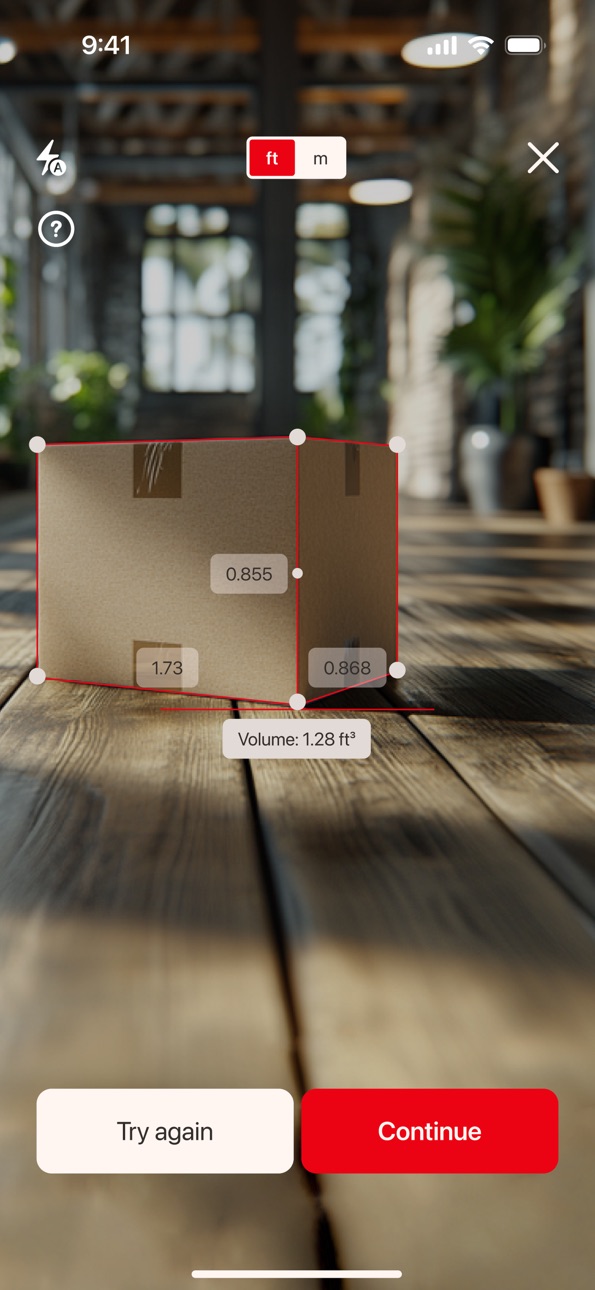
Say goodbye to running around warehouses with a measuring tape and investing in expensive scanning equipment - FreightSizer transforms your device into a powerful, easy-to-use 3D freight dimensioner.
FreightSizer makes it simple to measure dimensions, calculate density, and determine freight class in seconds, aligned with NMFTA guidelines. Perfect for logistics, warehousing, and shipping professionals - fast, accurate, and cost-effective.
Why FreightSizer?
- Fast and Accurate: Obtain precise measurements instantly with your smartphone.
- No Extra Equipment: Forget costly scanners - our app handles everything.
- User-Friendly: Easily scan and export data in just a few taps.
Avoid reclassification fees and administrative overhead.
What you get with FreightSizer:
• Unlimited freight or parcel scans.
• Unlimited secure cloud storage for every measurement.
• Measurements: use your phone to capture and measure dimensions of any shipment.
• LTL Freight Class Calculation: automates density and NMFTA classification.
• Data Export: save and share measurements with an XLSX export feature.
• Historical log + analytics dashboard (trend & volume charts).
• Sync & restore data on all of your iOS devices.
Now completely free to download and use - no subscriptions required.
Need help or have questions? Reach out to us at contact@freightsizer.ai.
Terms of Use: https://freightsizer.ai/FS_files/tou.pdf
Privacy Policy: https://freightsizer.ai/FS_files/privacy.pdf
In-App Purchases US pricing
Access Subscription
Monthly subscription · Monthly 3-day free trial$80.00
Annual Subscription · Yearly 3-day free trial$900.00
Weekly subscription · 7 days$20.00
Capabilities
In-App Purchases
Accessibility
ipadiphonemacrealityDevicetvoswatch
Version history 14 versions
Build 882418282v1.6.72026-02-13 17:31:10
We’re excited to share the latest FreightSizer update - built to make your day-to-day measuring and LTL freight classification workflow even smoother.
Better User Experience
We’ve refined the interface and scanning flow so you can capture dimensions, review results, and export data with fewer taps.
Improved Stability & Performance
We’ve fixed bugs and optimized performance to keep your scans, density calculations, and LTL freight class results fast and reliable.
Thanks for using FreightSizer. Our goal stays the same: helping you measure shipments, calculate density, and determine LTL freight class with confidence — quickly and cost-effectively.
Build 881673105v1.6.62026-01-23 12:01:34
We're excited to share a major update to FreightSizer - it's now completely free to download and use!
Unlimited Access
Run unlimited scans with unlimited secure cloud storage, so you can measure shipments, calculate density, and determine LTL freight class anytime you need.
Better User Experience
We've refined the interface and key workflows to help you scan faster, review results more easily, and export in fewer taps.
Improved Stability & Performance
Bug fixes and performance tuning make measuring and density calculations more reliable across every session.
Thank you for using FreightSizer. We're here to help you measure dimensions, calculate density, and determine LTL freight class with confidence.
Build 877813031v1.6.42025-09-19 13:18:58
We're excited to share the latest updates for FreightSizer: 3D Measuring App!
Enhanced Experience
We’ve refined navigation and usability across all devices, making the app more intuitive, efficient, and seamless no matter where you use it.
Greater Stability
Multiple fixes have been implemented to ensure smoother performance and a more reliable scanning experience.
Thank you for choosing FreightSizer. We remain committed to making freight measurement smarter, simpler, and more effective for you every step of the way.
Build 877487776v1.6.22025-09-02 05:35:57
We're excited to share the latest updates for FreightSizer: 3D Measuring App!
New Feature
You can now export a screenshot of the scanned item with a virtual box displaying its dimensions.
User Experience
Navigation and interface have been improved across all devices, making the app easier to use.
Stability
Bugs have been fixed to improve performance and ensure a more reliable scanning process.
Thank you for using FreightSizer. We continue working to make freight measurement simpler and more effective.
Build 876727036v1.6.12025-07-27 12:20:22
We're excited to share the latest updates for FreightSizer: 3D Measuring App!
Improved User Experience
Navigation and usability have been enhanced across all devices, making the app more intuitive and efficient, wherever you are.
Better Stability
We’ve resolved multiple bugs to boost performance and ensure a more reliable scanning experience.
Thank you for choosing FreightSizer. We're committed to making freight measurement smarter, simpler, and more effective every step of the way.
Build 875761751v1.6.02025-07-23 10:26:53
We're excited to share the latest updates for FreightSizer: 3D Measuring App!
Fresh New Design
We’ve updated the app’s look and feel to be cleaner, more modern, and more user-friendly for daily use.
Better User Experience
Navigation and usability have been improved across all devices, making the app more intuitive and seamless to use - wherever you are.
Bug Fixes
We’ve resolved various issues to improve stability and ensure a more reliable scanning experience.
Thank you for choosing FreightSizer. We’re committed to making freight measurement smarter, simpler, and more efficient every step of the way.
Build 875559684v1.5.42025-06-18 17:07:23
We're excited to share the latest updates for FreightSizer: 3D Measuring App!
Improved Design
We’ve refreshed the overall look and feel of the app - the interface is now cleaner, more modern, and easier to use in daily operations.
Optimized User Experience
We’ve improved navigation and usability across all devices, making the app more intuitive and seamless no matter where you use it.
Bug Fixes
Various issues have been resolved to improve stability and ensure a more reliable scanning process.
Thank you for using FreightSizer. We're committed to making freight measurement smarter and more efficient.
Build 874661365v1.5.22025-06-04 14:52:54
Updates for FreightSizer: 3D Measuring App
Expanded Export Options
You can now export measurement results for each unit and each BOL/PRO individually. The export respects the selected measurement type (inch, meter, or foot), and includes a photo of every scanned unit for clear documentation and reference.
Improved iPad Experience
We’ve refined the user interface and design specifically for iPad, ensuring smoother navigation and a more intuitive layout.
Bug Fixes
We’ve resolved various issues to improve stability and ensure a more reliable scanning experience.
Thank you for using FreightSizer. We’re always working to make freight measurement smarter and more efficient.
Build 873293132v1.5.12025-05-06 21:04:12
We’re thrilled to introduce a major update to FreightSizer: 3D Measuring App!
iPad Support
FreightSizer is now fully compatible with iPad - enjoy scanning on a larger screen with the same precision and speed.
Email Registration Added
Now you can sign up and log in using your email for a more convenient and secure experience.
Measurements in Inches
You asked, we listened - measurements are now available in inches.
Unit Photos
Easily review photos directly in each unit card. Tap to expand, and all images are stored locally for fast access.
Archive Export
Export grouped data into organized folders, complete with unit images and a single CSV file containing all measurement data.
Improved Scan Performance
Optimizations under the hood make scanning faster and more stable than ever.
Refined User Experience
A smoother interface and streamlined interactions ensure a more intuitive workflow.
Bug Fixes
We’ve squashed some bugs to keep everything running seamlessly.
Thanks for using FreightSizer - and stay tuned, we’re just getting started!
Build 872974355v1.3.22025-03-17 08:43:12
We are excited to announce the latest updates for FreightSizer: 3D Measuring App!
Improved Measurement Accuracy
Our enhanced scanning technology ensures even more precise freight dimensions and density calculations.
Faster Scanning Speed
Capture and process measurements in seconds, making your workflow smoother and more efficient.
Upgraded Data Export
Easily save and share your measurements with improved XLSX export functionality.
Optimized User Experience
A refined interface and smoother navigation make measuring shipments easier than ever.
Thank you for choosing FreightSizer! We’re committed to making freight measurement faster and more reliable. Stay tuned for even more exciting updates!
Build 872116965v1.3.12025-01-30 09:33:00
- Bug fixes
- Log out
- Feedback Form
Build 871736174v1.32025-01-16 07:23:04
Improved scanning functionality and added a video tutorial
Build 871026045v1.12024-12-13 06:42:47
We’re excited to bring you the latest updates designed to make your freight measurement experience even better. Whether you’re managing shipments, calculating dimensions, or ensuring accuracy in freight classification, we’ve got you covered with these improvements:
Enhanced 3D Scanning: Improved accuracy and faster processing for seamless dimension capturing.
Refined Interface: An updated, intuitive design ensures effortless navigation and usability.
Bug Fixes and Performance Upgrades: We've resolved issues and optimized the app for a smoother experience.
FreightSizer is here to simplify your operations, reduce costs, and save time. Update now to experience these improvements and take your freight measurement process to the next level.
Stay tuned—exciting features are on the way!
Build 870403690v1.02024-11-26 21:30:09
Price history by region
Currency
Show
Columns
Search
Availability 1 of 1 storefronts
| Region | Language | Price | Ratings | Avg | Version |
|---|---|---|---|---|---|
| US | en-US | Free | 1 | 5.0 | 1.6.7 |
Change log 18 changes · US
✎
releaseNotes updated
We’re excited to share the latest FreightSizer update - built to make your day-to-day measuring and LTL freight classification workflow even smoother.
Better U
✎
description updated
FreightSizer supports the updated NMFC LTL classification standards (effective July 19, 2025).
Say goodbye to running around warehouses with a measuring tape a
✎
subtitle updated
3D Freight Dimensioner
✎
name updated
FreightSizer: 3D Dimensions AI
◆
Version 1.6.7 released
We’re excited to share the latest FreightSizer update - built to make your day-to-day measuring and LTL freight classification workflow even smoother.
Better User Experience
We’ve refined the interface and scanning flow so you can capture
◆
Version 1.6.6 released
We're excited to share a major update to FreightSizer - it's now completely free to download and use!
Unlimited Access
Run unlimited scans with unlimited secure cloud storage, so you can measure shipments, calculate density, and determine
◆
Version 1.6.4 released
We're excited to share the latest updates for FreightSizer: 3D Measuring App!
Enhanced Experience
We’ve refined navigation and usability across all devices, making the app more intuitive, efficient, and seamless no matter where you use
◆
Version 1.6.2 released
We're excited to share the latest updates for FreightSizer: 3D Measuring App!
New Feature
You can now export a screenshot of the scanned item with a virtual box displaying its dimensions.
User Experience
Navigation and interface hav
◆
Version 1.6.1 released
We're excited to share the latest updates for FreightSizer: 3D Measuring App!
Improved User Experience
Navigation and usability have been enhanced across all devices, making the app more intuitive and efficient, wherever you are.
Bet
◆
Version 1.6.0 released
We're excited to share the latest updates for FreightSizer: 3D Measuring App!
Fresh New Design
We’ve updated the app’s look and feel to be cleaner, more modern, and more user-friendly for daily use.
Better User Experience
Navigatio
◆
Version 1.5.4 released
We're excited to share the latest updates for FreightSizer: 3D Measuring App!
Improved Design
We’ve refreshed the overall look and feel of the app - the interface is now cleaner, more modern, and easier to use in daily operations.
Op
◆
Version 1.5.2 released
Updates for FreightSizer: 3D Measuring App
Expanded Export Options
You can now export measurement results for each unit and each BOL/PRO individually. The export respects the selected measurement type (inch, meter, or foot), and include
◆
Version 1.5.1 released
We’re thrilled to introduce a major update to FreightSizer: 3D Measuring App!
iPad Support
FreightSizer is now fully compatible with iPad - enjoy scanning on a larger screen with the same precision and speed.
Email Registration Added
◆
Version 1.3.2 released
We are excited to announce the latest updates for FreightSizer: 3D Measuring App!
Improved Measurement Accuracy
Our enhanced scanning technology ensures even more precise freight dimensions and density calculations.
Faster Scanning S
◆
Version 1.3.1 released
- Bug fixes
- Log out
- Feedback Form
◆
Version 1.3 released
Improved scanning functionality and added a video tutorial
◆
Version 1.1 released
We’re excited to bring you the latest updates designed to make your freight measurement experience even better. Whether you’re managing shipments, calculating dimensions, or ensuring accuracy in freight classification, we’ve got you covered
◆
Version 1.0 released