Home › Business

Document Scanner, Scan to PDF
Paper, File, Text Scanning App
 US
US
1 of 1 storefronts
Content in en-US
Content in en-US
Information
Apple ID6737809338
Bundle IDnet.scannerapp.production
SellerSeller
Min iOS17.0
Min macOS14.0
Device familiesiphone
Released2024-12-08
Copyright© Scanner 2024
Privacy policyLink ↗
Preview 1 platform
iPhone 8 images



What’s New Version 1.30.1
Improved document export: JPEG and PDF files are now significantly smaller, and sending them via email is no longer an issue.
Description
Scanning documents has never been easier! Turn your smartphone into a portable scanner and manage your documents effortlessly.
Need to scan and share a document quickly? With the Scanner app, you can digitize documents in just a few taps and keep your paperwork organized.
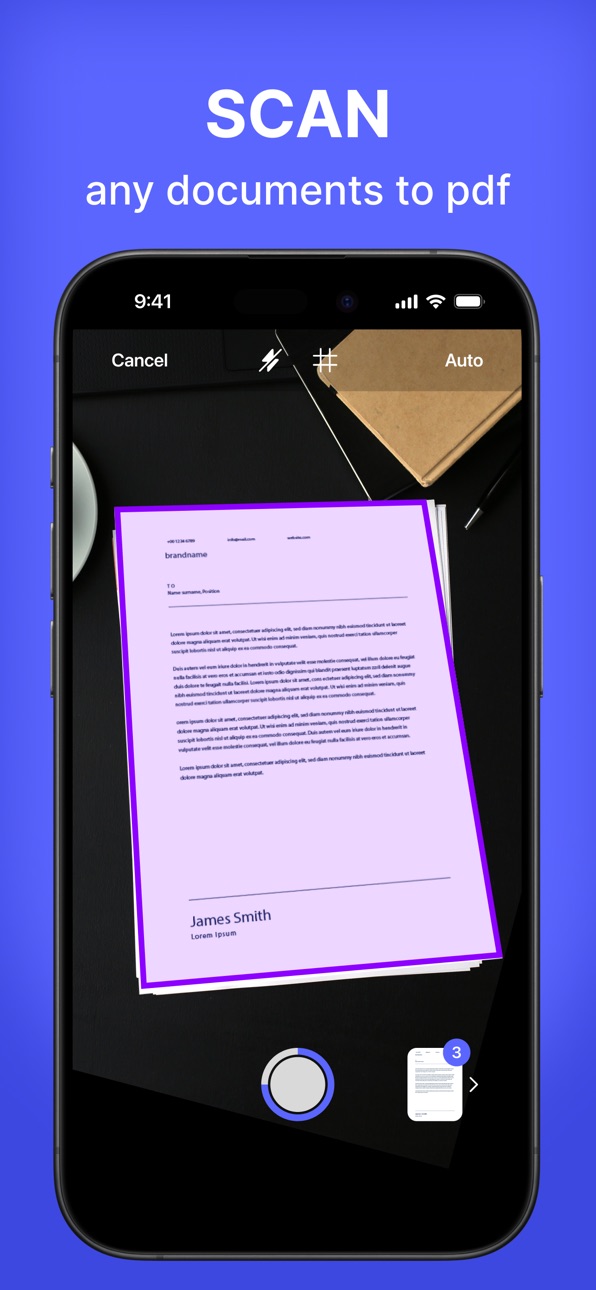
SCAN INSTANTLY
Start by tapping the "Scan Document" button. Take a new photo, choose one from your photo gallery, or select a file directly from your device. Scanner adapts to your needs with flexibility for any type of document.
EASILY ADD SIGNATURES
Create and save digital signatures for future use.
Choose the color of your signature and adjust its size to fit perfectly in the document. Add your signature to any page with precise placement.
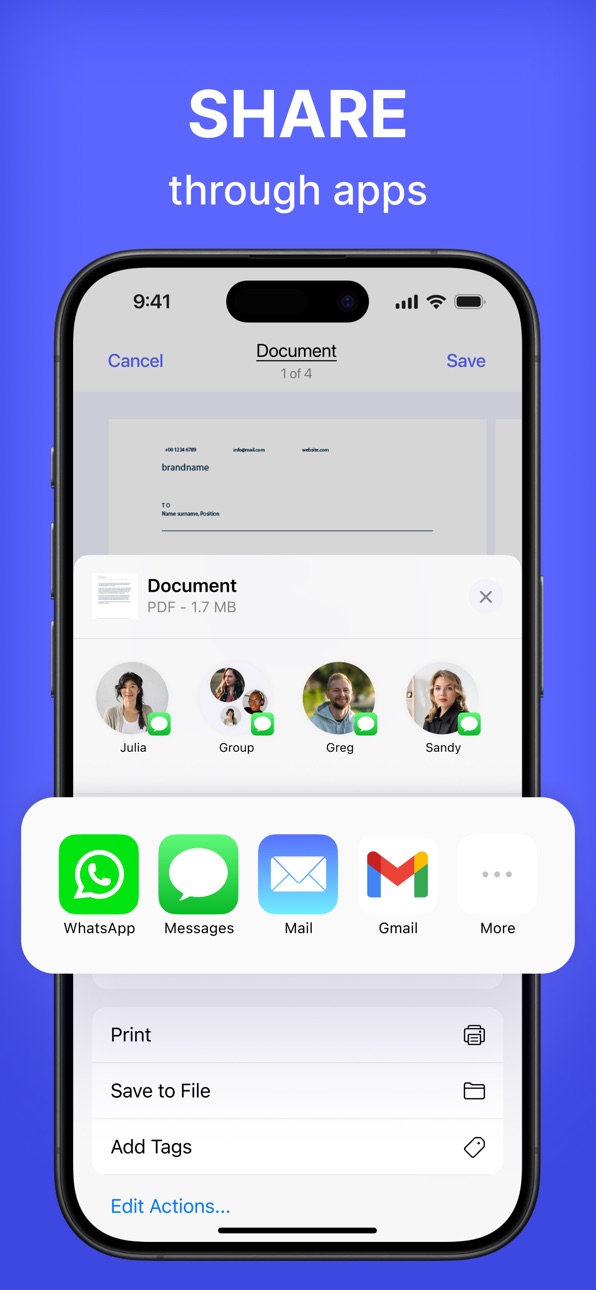
EXPORT AND SHARE
Export documents in JPG or PDF format and share them effortlessly. Use the built-in sharing menu to quickly send files via email, messengers, cloud storage, and more.
ENHANCE YOUR SCANS
Cropping and adjustments: Manually select and adjust the document's edges for perfect borders.
Retake or save: Not satisfied with the result? Retake or save the scan for later.
ORGANIZE YOUR DOCUMENTS
Easily view all pages of a scanned document and switch between them. Rename documents, add pages, rotate, or crop as needed. Delete unnecessary pages or entire documents with a single tap.
Terms of Service: https://calledandrey.github.io/scannerapp/terms.html
Privacy Policy: https://calledandrey.github.io/scannerapp/privacy.html
Got questions or suggestions? Email us at scannerappnet@gmail.com.
We’d love to hear your feedback!
In-App Purchases US pricing
Premium Subscription
Scanner Premium · 7 days 3-day free trial$5.99
Scanner Premium · Monthly$9.99
Scanner Premium · Yearly$39.99
Capabilities
In-App Purchases
Accessibility
ipadiphonemacrealityDevicetvoswatch
Version history 21 versions
Build 881534756v1.30.12026-01-15 22:21:24
Improved document export: JPEG and PDF files are now significantly smaller, and sending them via email is no longer an issue.
Build 880282963v1.30.02025-12-18 23:01:27
bug fixes for iOS 26
Build 878630287v1.25.82025-10-03 22:52:23
bug fixes
Build 877814717v1.25.72025-09-04 05:30:30
bug fixes and improved application stability
Build 877643583v1.25.62025-08-28 19:38:54
- Bug fixes
- Improved application stability
Build 876681969v1.2.52025-07-25 07:40:57
– Improved interface design for a smoother experience
– Fixed bugs and enhanced overall stability
Build 874055458v1.2.42025-04-25 02:17:08
bug fixes
Build 873430497v1.2.32025-04-03 15:58:53
minor bug fixes
Build 873179124v1.2.22025-03-12 21:23:00
minor bug fixes
Build 872385125v1.2.12025-02-21 20:19:26
Minor bug fixes
Build 871971013v1.2.02025-01-31 13:53:31
The app is now faster and more stable! We’ve fixed a few bugs you reported.
Build 871797906v1.1.12025-01-22 00:48:26
Minor bug fixes
Build 871669884v1.1.02025-01-14 12:48:22
1. Enhanced PDF Import Functionality: You can now import files in various formats - including doc, txt, jpg, png, ppt, pptx - directly into PDFs.
2. Crash Fixes: Addressed rare crashes to ensure a smoother and more reliable app experience.
Update now to enjoy these improvements!
Build 871299399v1.0.72024-12-29 07:36:57
Added new interface languages - Arabic, French, German, Korean, Japanese
Build 871169082v1.0.62024-12-16 21:52:52
Fixed a bug with editing a document on iOS 17
Build 871028684v1.0.52024-12-12 17:16:04
Improved stability of the application
Build 870955920v1.0.42024-12-07 21:36:17
minor bug fixes
Build 870787724v1.0.32024-12-04 21:25:39
bug fixes
Build 870703269v1.0.22024-11-27 16:16:15
Bug fixes
Build 870672265v1.0.12024-11-26 12:43:11
Minor bug fixes
Build 870215884v1.0.02024-11-23 01:23:38
Price history by region
Currency
Show
Columns
Search
Availability 1 of 1 storefronts
| Region | Language | Price | Ratings | Avg | Version |
|---|---|---|---|---|---|
| US | en-US | Free | 92 | 4.8 | 1.30.1 |
Change log 25 changes · US
✎
releaseNotes updated
Improved document export: JPEG and PDF files are now significantly smaller, and sending them via email is no longer an issue.
✎
description updated
Scanning documents has never been easier! Turn your smartphone into a portable scanner and manage your documents effortlessly.
Need to scan and share a documen
✎
subtitle updated
Paper, File, Text Scanning App
✎
name updated
Document Scanner, Scan to PDF
◆
Version 1.30.1 released
Improved document export: JPEG and PDF files are now significantly smaller, and sending them via email is no longer an issue.
◆
Version 1.30.0 released
bug fixes for iOS 26
◆
Version 1.25.8 released
bug fixes
◆
Version 1.25.7 released
bug fixes and improved application stability
◆
Version 1.25.6 released
- Bug fixes
- Improved application stability
◆
Version 1.2.5 released
– Improved interface design for a smoother experience
– Fixed bugs and enhanced overall stability
◆
Version 1.2.4 released
bug fixes
◆
Version 1.2.3 released
minor bug fixes
◆
Version 1.2.2 released
minor bug fixes
◆
Version 1.2.1 released
Minor bug fixes
◆
Version 1.2.0 released
The app is now faster and more stable! We’ve fixed a few bugs you reported.
◆
Version 1.1.1 released
Minor bug fixes
◆
Version 1.1.0 released
1. Enhanced PDF Import Functionality: You can now import files in various formats - including doc, txt, jpg, png, ppt, pptx - directly into PDFs.
2. Crash Fixes: Addressed rare crashes to ensure a smoother and more reliable app experience.
◆
Version 1.0.7 released
Added new interface languages - Arabic, French, German, Korean, Japanese
◆
Version 1.0.6 released
Fixed a bug with editing a document on iOS 17
◆
Version 1.0.5 released
Improved stability of the application
◆
Version 1.0.4 released
minor bug fixes
◆
Version 1.0.3 released
bug fixes
◆
Version 1.0.2 released
Bug fixes
◆
Version 1.0.1 released
Minor bug fixes
◆
Version 1.0.0 released