Home › Utilities

 US
US
1 of 1 storefronts
Content in en-US
Content in en-US
Information
Apple ID6737728257
Bundle IDcom.hanmingjie.OCR-Subtitle
SellerSeller
Min iOS17.6
Device familiesmac, iphone, ipad
Released2025-02-20
Copyright© MingJie Han
Privacy policyLink ↗
Preview 3 platforms
iPhone 8 images




iPad 7 images





Mac 9 images





What’s New Version 3.0
【Major Upgrade: Moving Towards the Era of AI-Powered Automation】
Intelligent Auto-Detection Workflow (With Manual Precision)
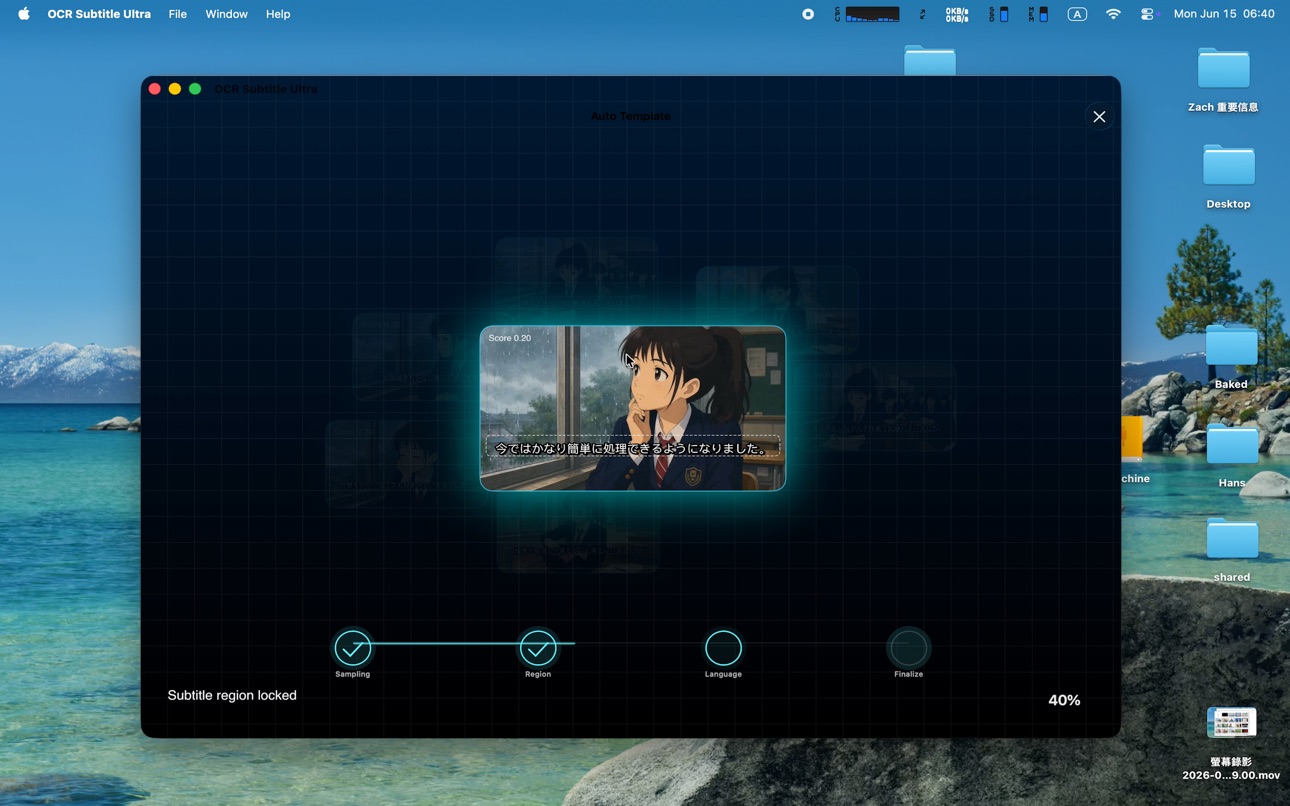
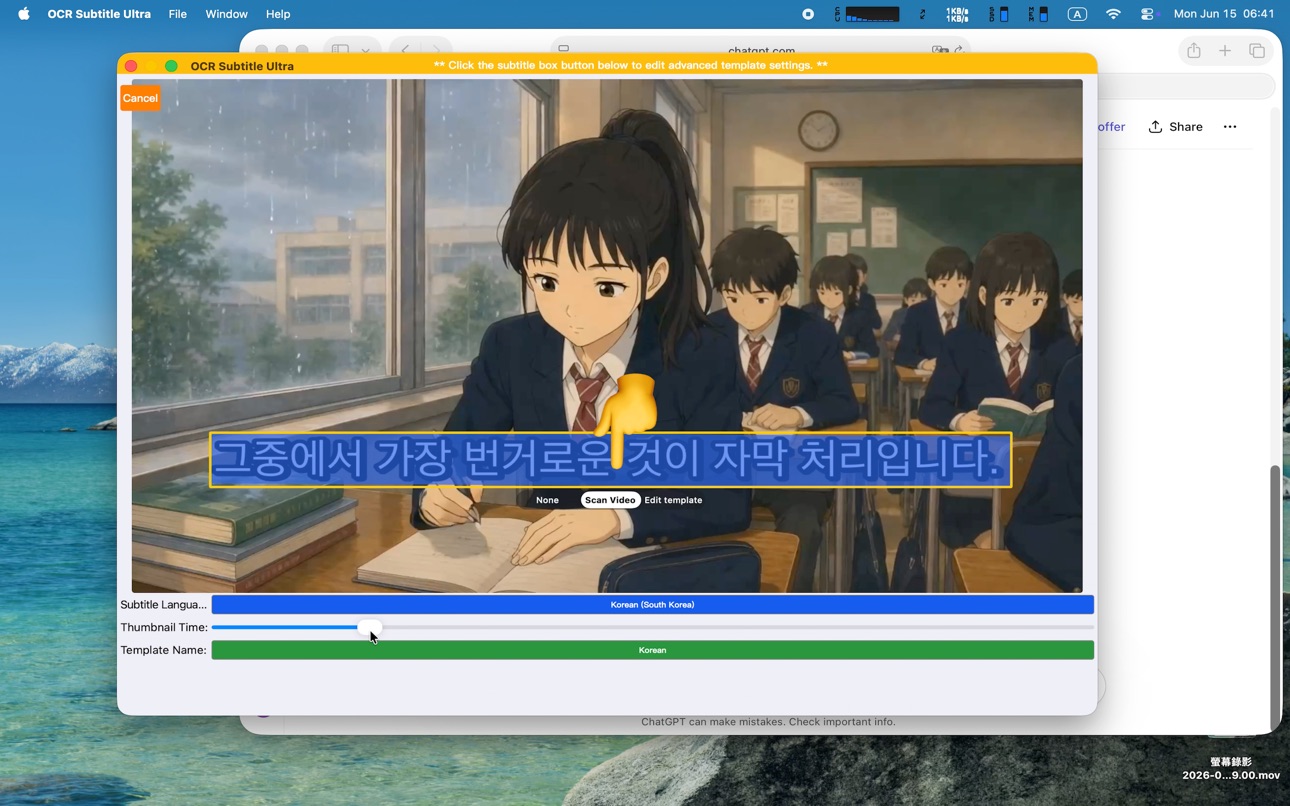
Upon import, the system now automatically detects the subtitle region (ROI), locks text boxes, and identifies languages for an instant, zero-configuration scanning experience. Professional control is never compromised: switch to manual mode at any time to custom-adjust scanning areas for complex layouts.
Seamless AI Subtitle Translation Workflow
Smartly bundles extracted subtitles with tailored translation prompts. Use the iOS Share Sheet to send text straight to preferred AI assistants (such as ChatGPT or Claude), or leverage the automatic clipboard formatting on macOS for a frictionless paste-and-go multi-language workflow.
AI Video Copilot (Instant Video Q&A)
Productivity does not end with SRT generation! Utilize built-in high-frequency prompt templates to instantly bundle transcripts with your queries, letting AI handle advanced tasks like Fact-Checking, Instant Summaries, Copywriting/Titles, and Thumbnail Visual Inspiration.
Built-in Standard Format Video Playback
Solves the pain point of figuring out how to view generated SRT files. The newly integrated preview player natively supports standard compatible formats (MP4, MOV, M4V), overlaying your subtitle track right inside the app. (Note: Advanced formats like AV1 are fully supported for OCR scanning and extraction, but localized video playback may be restricted by system framework limitations.)
【Hardcore Privacy & Sandbox Security】
Strict Zero-Storage & Zero-Copy: Operating fully within the Apple Sandbox framework, the app processes video files entirely on-the-fly in memory. It never stores, duplicates, or caches your video files.
Temporary Access Lifecycle Management: The application requests transient access tokens via system-secured URLs. Once the security session expires, file resources are automatically and completely released.
【Core Algorithm & Performance Enhancements】
5. Refined Auto-Detection Optimization: Addressed edge cases from previous versions where non-standard aspect ratios or highly complex backgrounds caused template extraction variances.
6. Re-Engineered 4K & Long Video Stability: Advanced memory management optimizations systematically prevent crashes and memory leaks, ensuring seamless processing for long-duration and Ultra-HD footage.
Description
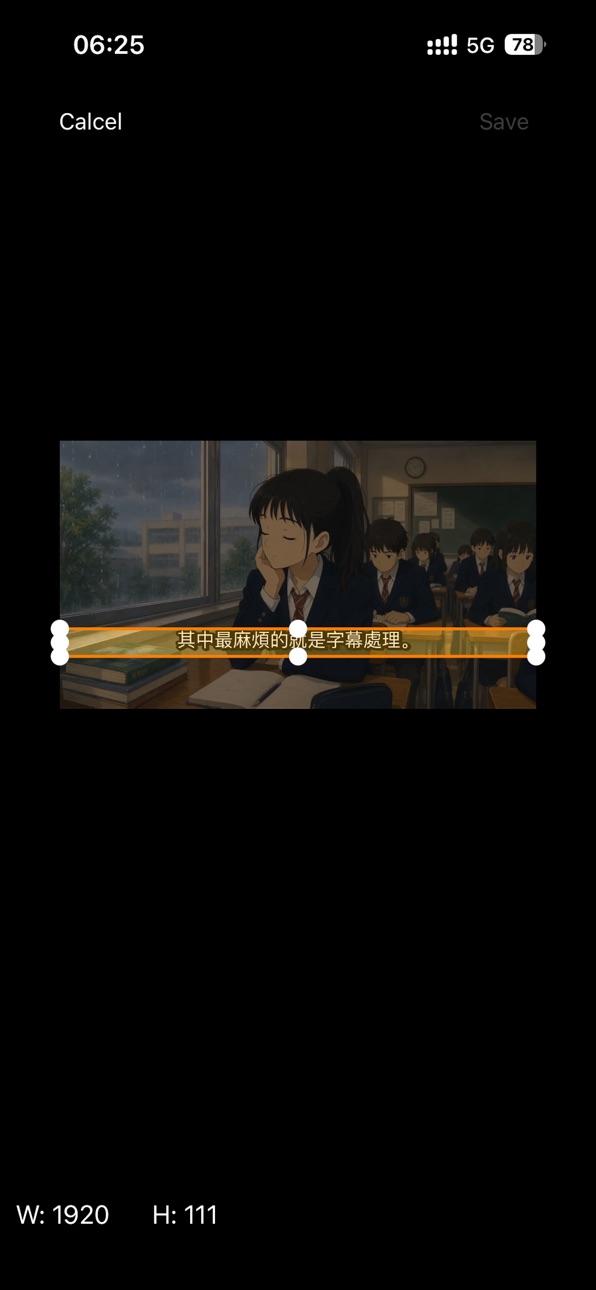
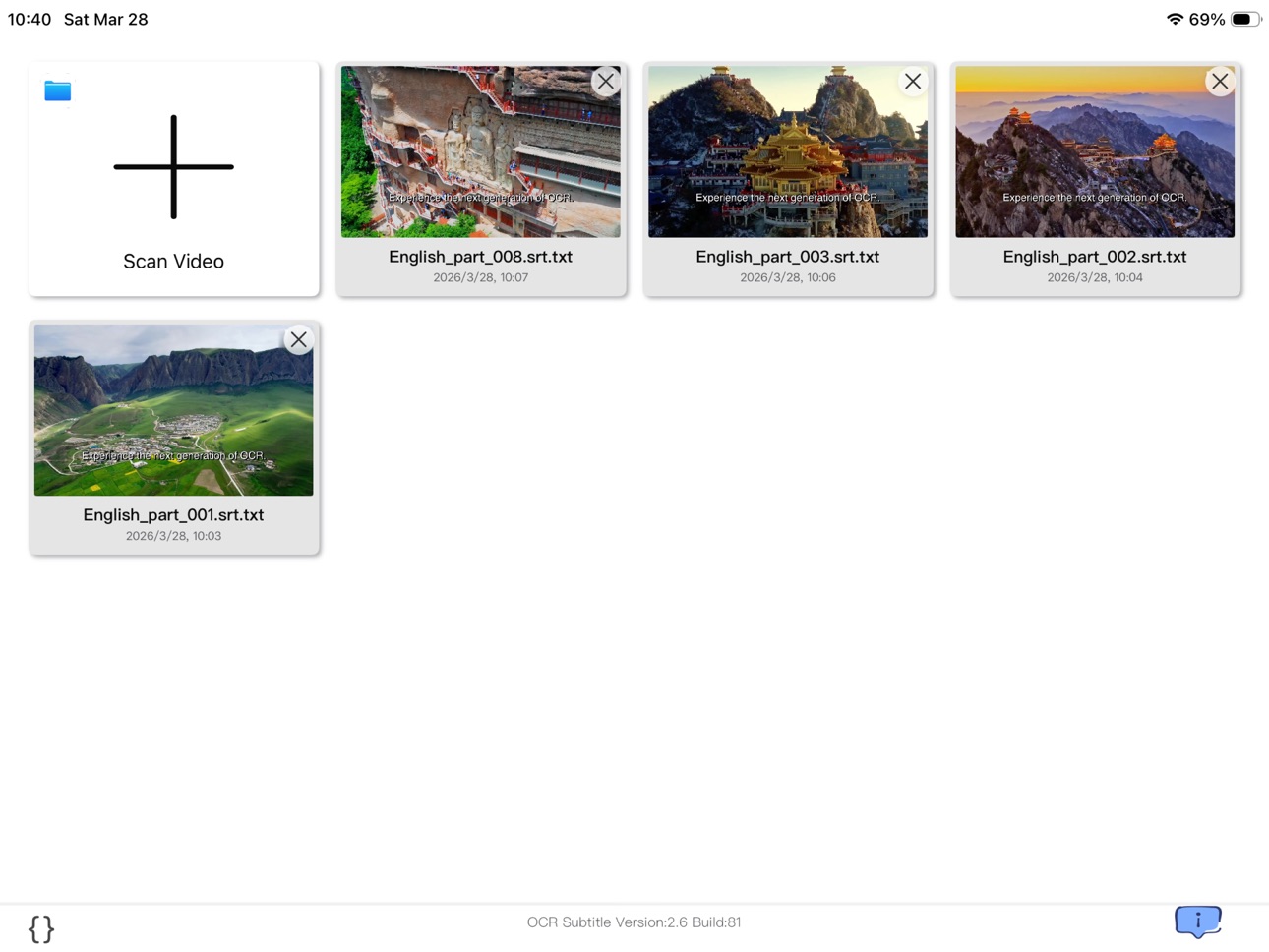
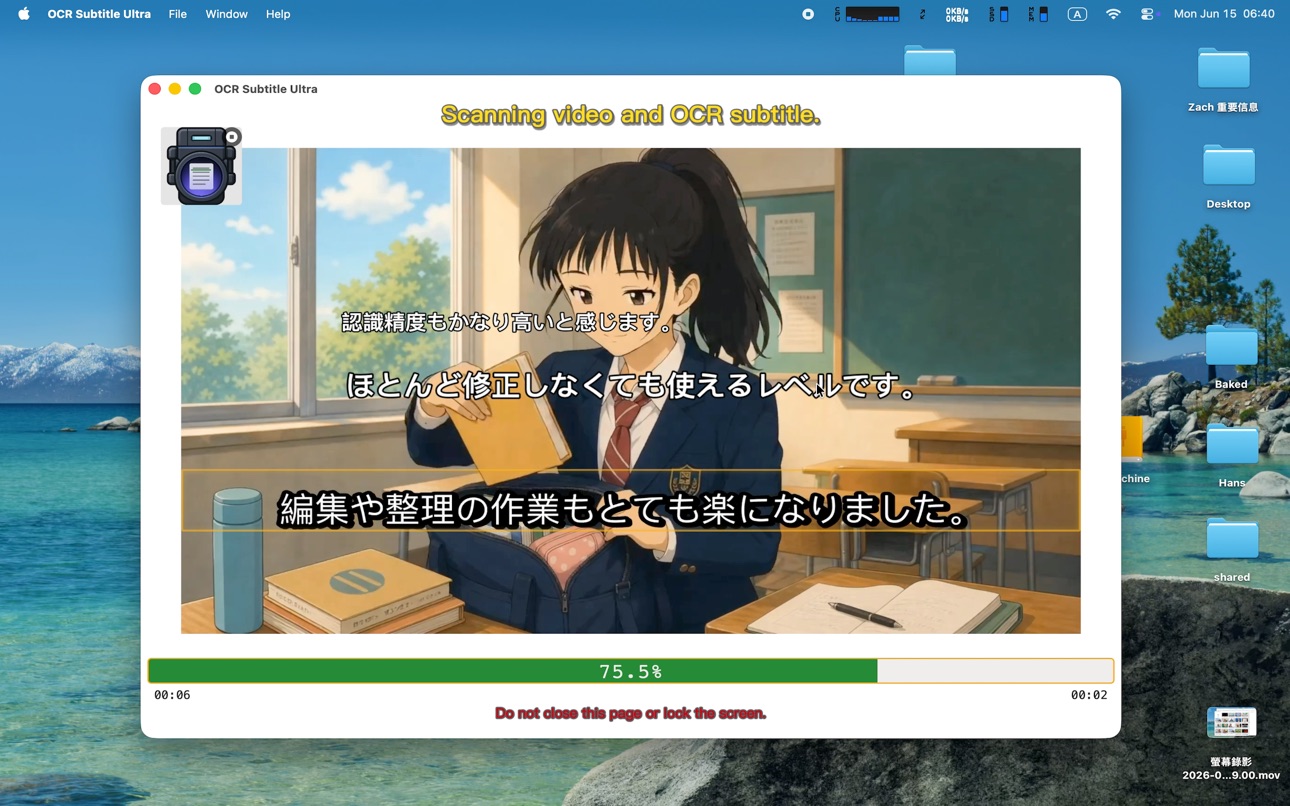
OCR Subtitle Ultra is a practical utility designed to extract hard-coded subtitles from videos using Optical Character Recognition (OCR). It automatically converts on-screen text into standard SRT files, saving hours of manual transcription for editors, educators, and content creators.
Driven by an optimized layout-parsing architecture and a high-performance multimedia backend, version 3.0 marks a massive leap forward—introducing intelligent auto-detection workflows while retaining full manual precision controls for professional creators.
(Note: Recognition accuracy is subject to video resolution, font styles, and background contrast.)
【What is New in v3.0: Automation & AI Workflows】
Intelligent Auto-Detection with Manual Controls
Version 3.0 features a smarter layout engine that automatically detects the subtitle region (ROI), locks text bounding boxes, and auto-identifies the video's spoken language upon import for a zero-configuration experience. Professional control is never compromised: users can seamlessly switch to manual mode to custom-adjust the scanning area or specify languages for highly complex, non-standard video layouts.
Seamless AI Subtitle Translation Workflow
Unlock global localization instantly. The app intelligently packages your extracted SRT text with tailored translation prompts. On iOS, leverage the native Share Sheet to route text directly to your preferred AI assistants (such as ChatGPT or Claude). On macOS, the app neatly formats text into your system clipboard for a frictionless paste-and-go experience into any desktop AI or web assistant.
AI Video Copilot (Instant Video Q&A)
Productivity shouldn't end with an SRT file. With our built-in high-frequency AI prompt templates, you can instantly bundle your transcript and send it to an AI to perform advanced tasks:
Fact-Checking: Verify claims or detect clickbait within the video content.
Instant Summary: Condense long-duration footage into structured bullet points.
Copywriting & Titles: Generate high-CTR titles, video descriptions, and marketing hooks.
Thumbnail Inspiration: Brainstorm detailed visual prompts to design compelling video cover art.
Integrated Standard Format Video Previewer
Never worry about how to play or mount your newly generated SRT files. Version 3.0 features an integrated video preview player. It seamlessly supports system-compatible standard formats (such as MP4, MOV, M4V), allowing you to play your media with the newly created subtitle track overlaid right inside the app for an instant preview experience.
【Core Performance & Privacy Security】
Strict "Zero-Storage, Zero-Copy" Architecture: Your data security is our highest priority. Operating strictly within the Apple Sandbox framework, the application processes video files entirely on-the-fly. It never duplicates, caches, or permanently stores your video files in local containers or remote servers.
Temporary Access Lifecycle Management: The application securely requests transient, read-only media access via system-secured tokens (Security-Scoped URLs) in memory. Once the security token expires, the resource is automatically revoked. Your media remains entirely under your own control.
Robust Codec Support: Built on a rigorously compliant multimedia backend, the app delivers ultra-stable decoding for modern codecs including H.265 (HEVC), AV1, VP9, and more. Advanced memory management prevents crashes, ensuring flawless processing for 4K Ultra-HD footage and long films.
Universal Workflow Integration: Exported standard SRT files are fully editable and 100% compatible with YouTube, VLC, Final Cut Pro, Adobe Premiere, DaVinci Resolve, and major editing platforms.
【Support & Feedback】
I am deeply committed to continuously refining OCR Subtitle Ultra based on real-world production environments and user feedback. If you encounter specific video encoding edge cases or have feature suggestions, please contact me directly:
Email: hanmingjie@gmail.com
Web: www.hanmingjie.com
Accessibility
ipadiphonemacrealityDevicetvoswatch
Version history 19 versions
Build 887019338v3.02026-06-16 18:39:00
【Major Upgrade: Moving Towards the Era of AI-Powered Automation】
Intelligent Auto-Detection Workflow (With Manual Precision)
Upon import, the system now automatically detects the subtitle region (ROI), locks text boxes, and identifies languages for an instant, zero-configuration scanning experience. Professional control is never compromised: switch to manual mode at any time to custom-adjust scanning areas for complex layouts.
Seamless AI Subtitle Translation Workflow
Smartly bundles extracted subtitles with tailored translation prompts. Use the iOS Share Sheet to send text straight to preferred AI assistants (such as ChatGPT or Claude), or leverage the automatic clipboard formatting on macOS for a frictionless paste-and-go multi-language workflow.
AI Video Copilot (Instant Video Q&A)
Productivity does not end with SRT generation! Utilize built-in high-frequency prompt templates to instantly bundle transcripts with your queries, letting AI handle advanced tasks like Fact-Checking, Instant Summaries, Copywriting/Titles, and Thumbnail Visual Inspiration.
Built-in Standard Format Video Playback
Solves the pain point of figuring out how to view generated SRT files. The newly integrated preview player natively supports standard compatible formats (MP4, MOV, M4V), overlaying your subtitle track right inside the app. (Note: Advanced formats like AV1 are fully supported for OCR scanning and extraction, but localized video playback may be restricted by system framework limitations.)
【Hardcore Privacy & Sandbox Security】
Strict Zero-Storage & Zero-Copy: Operating fully within the Apple Sandbox framework, the app processes video files entirely on-the-fly in memory. It never stores, duplicates, or caches your video files.
Temporary Access Lifecycle Management: The application requests transient access tokens via system-secured URLs. Once the security session expires, file resources are automatically and completely released.
【Core Algorithm & Performance Enhancements】
5. Refined Auto-Detection Optimization: Addressed edge cases from previous versions where non-standard aspect ratios or highly complex backgrounds caused template extraction variances.
6. Re-Engineered 4K & Long Video Stability: Advanced memory management optimizations systematically prevent crashes and memory leaks, ensuring seamless processing for long-duration and Ultra-HD footage.
Build 886607205v2.92026-06-08 17:42:03
Seamless AI Subtitle Translation Workflow
Unlock 60+ Languages Instantly: Optimized prompts tailored for natural, context-aware translations. Use the iOS Share Sheet to send your text straight to AI apps, or leverage the smart clipboard on macOS for a frictionless desktop experience.
AI Video Copilot (Instant Video Q&A)
Your workflow shouldn't end with just extracting an SRT file. Version 2.9 introduces preset "AI Insight Prompts" that perfectly bundle your subtitles with actionable questions. With a single tap, send them to your favorite AI to handle heavy lifting like 【Fact-Checking】, 【Instant Summary】, 【Title Generation】, and 【Thumbnail Inspiration】.
Built-in Standard Format Video Playback
Preview Instantly: Many users struggle with how to open and play their newly translated SRT subtitles. Version 2.9 adds an integrated player supporting standard system-compatible formats (such as MP4, MOV, M4V). You can now play your video and overlay the extracted/translated subtitles directly inside the app—delivering a smooth "Extract, Translate, and Preview" experience.
【Privacy & Sandbox Security】
Zero Storage, Zero Copies: We deeply respect your data privacy. Strictly operating within the Apple Sandbox framework, the app never stores, duplicates, or caches your video files.
Temporary Access Lifecycle Management: The app requests only transient read-only permissions via system-secured tokens (Security-Scoped URLs) in memory. Once this temporary security token expires, the file is securely released. If you need to access it again, the app will safely prompt you to reconnect/re-import the file. Your media remains 100% under your control.
【Algorithm Fixes & Performance Enhancements】
4. Refined Auto-Detection Optimization (Bug Fixes)
We addressed edge cases from the previous version where certain videos with unusual aspect ratios or complex backgrounds caused hiccups in our automatic template extraction (subtitle positioning and language auto-detection). The "Zero-Configuration" pipeline is now rock-solid.
Build 886045962v2.82026-05-25 18:09:00
In this major milestone update, we are introducing a revolutionary feature that completely redefines and simplifies your subtitle extraction workflow. Say goodbye to manual bounding boxes and guessing video languages—the app now handles everything intelligently for you.
【Key New Features】
Auto Subtitle Detection: Driven by an advanced layout-parsing algorithm, the app now automatically locates and locks onto the exact position of subtitles in your video.
Smart Language Auto-Detection: No more manual language selection! The app instantly analyzes and detects the subtitle language with industry-leading accuracy for the vast majority of standard videos.
Zero-Configuration, Peak Efficiency: We have completely removed the tedious pre-scanning setup. Just import your video and let the automation work its magic. Your productivity is about to soar.
【Seamless Import Workflows for iOS】
Context Menu: Long-press any video file inside the Files app, select "Open With..." and choose OCR Subtitle.
Drag & Drop: Simply drag a video file from the Files app and drop it right onto the "+" target area within OCR Subtitle.
In-App Picker: Tap the "+" button inside the app to flexibly choose videos from either your Files directory or your Photos library.
【Seamless Import Workflows for macOS】
Finder Open With: Right-click a video file in Finder, navigate to "Open With..." and select OCR Subtitle.
Instant Drag & Drop: Drag a video file straight from Finder and drop it onto the "+" icon in the app window to kick off scanning instantly.
Native Finder Selector: Click the "+" button inside the app to quickly browse and select your target files via the standard Finder sheet.
Build 885641741v2.72026-05-14 20:58:20
Special thanks to **at9**39@gmail.com** for the valuable feedback!
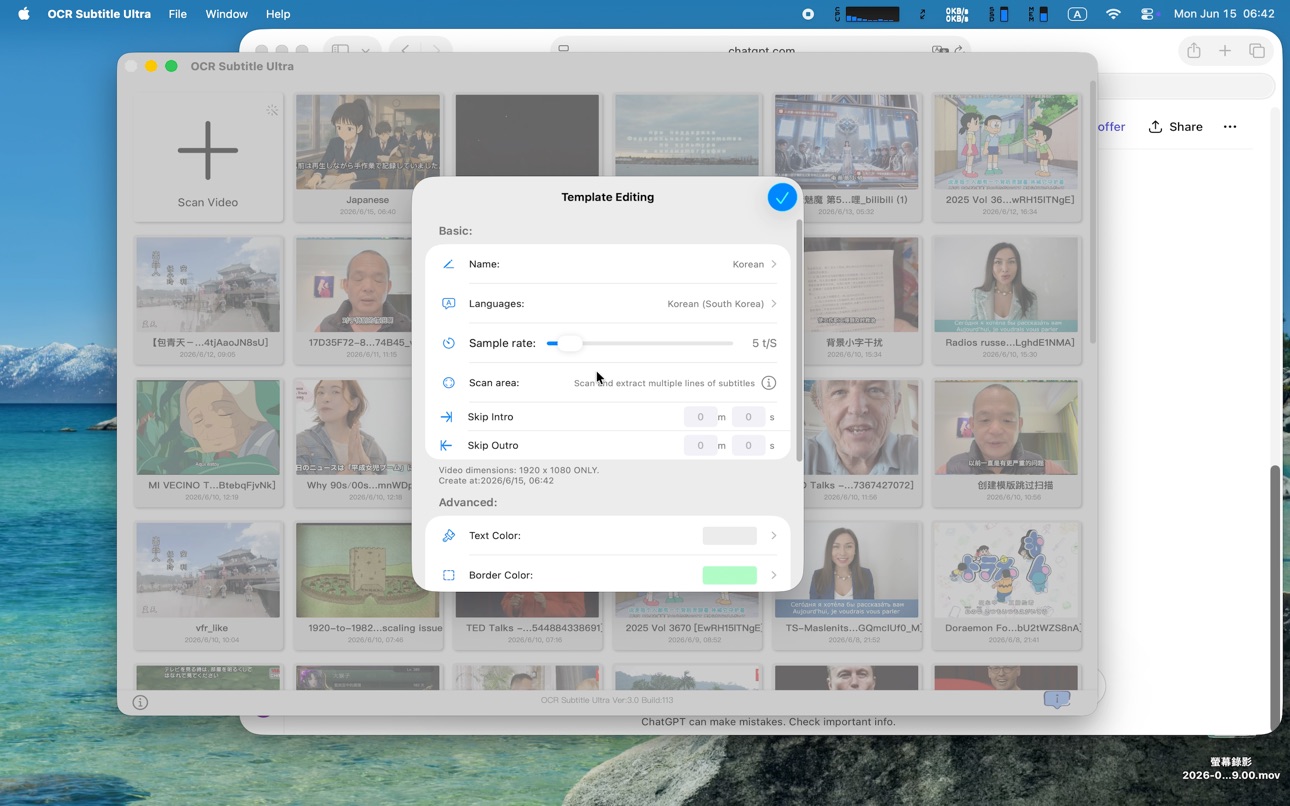
New "Skip Intro & Skip Outro" Template Settings: Designed specifically for extracting subtitles from series. Automatically skip intros and outros to save time during batch processing.
Enhanced Template Creation UI: Added "Close," "Scan Video," and "Advanced Template Settings" options to the creation interface.
Streamlined Workflow: The default action is now set to "Scan Video," allowing you to start the recognition process instantly after setup.
Build 883570699v2.62026-03-30 01:34:44
Special thanks to bel***@gmail.com for the valuable feedback.
OCR Subtitle Ultra v2.6 Update:
Performance & Stability Boost
Re-engineered memory management specifically optimized for 4K Ultra-HD and long-duration videos. Processing high-resolution footage is now significantly more stable, minimizing crash risks during export.
New Decoding Engine
Upgraded FFmpeg backend now natively supports H.265 (HEVC), AV1, and various professional video formats with improved decoding efficiency.
Enhanced Smart ROI (Region of Interest)
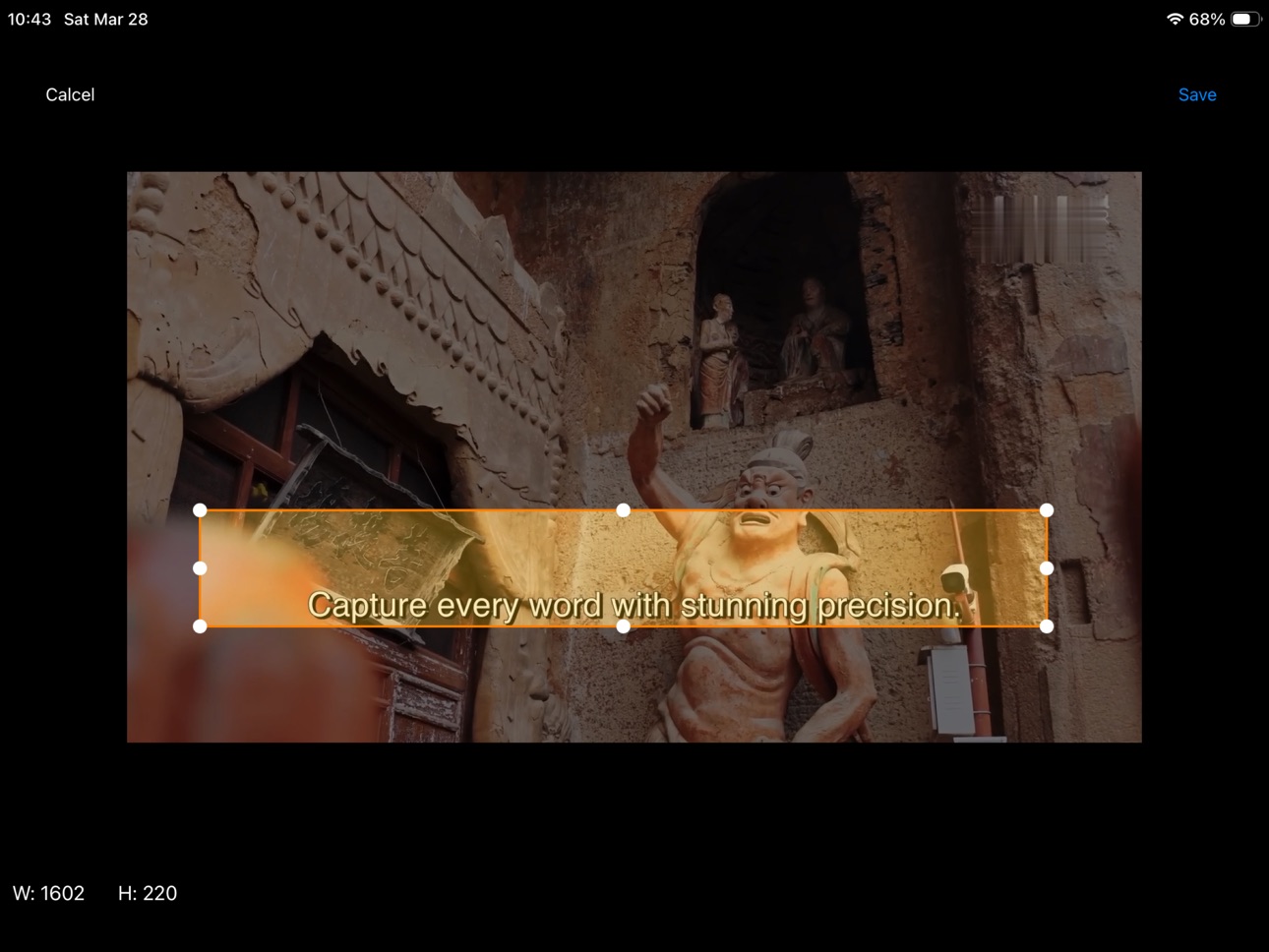
Supports more precise custom scanning areas with real-time zoom preview. This ensures the OCR engine focuses accurately on subtitles, reducing interference from backgrounds or logos.
Professional Workflow Optimization
Improved SRT timeline merging algorithm. Exported subtitle files are now fully compatible with major editing platforms like Final Cut Pro and Adobe Premiere.
Brand New Visual Identity
Updated with a fresh app icon. Featuring a dark-themed design with brushed metal elements, the new look aligns with the professional "Ultra" positioning and fits perfectly with Dark Mode.
For support or feedback, please contact: hanmingjie@gmail.com
Build 883542197v2.52026-03-19 18:57:07
【Core Engine: A Massive Leap in Performance】
New FFmpeg Integration: Deeply integrated the industry-leading multimedia framework, bringing a quantum leap in video format compatibility.
Enhanced 4K Decoding Suite:
New AV1 Support: Built-in high-performance dav1d decoder for seamless playback of next-generation video formats.
VP9 & WebM Support: Full optimization for WebM containers and VP9-encoded videos from major streaming platforms.
Refined H.265 (HEVC) Experience: Specialized tuning for high-bitrate 4K H.265 videos, ensuring a buttery-smooth viewing experience.
【Evolution: Better Workflow & Localization】
Improved Template Selection Interface: A completely redesigned UI for previewing and switching templates. Finding and applying the right recognition preset is now faster and more intuitive.
Traditional Chinese Support: Full localization for Traditional Chinese (zh-Hant). From menu settings to recognition results, providing a native and seamless experience for users worldwide.
【Efficiency: Optimized for Long Videos】
Advanced Memory Management: Redesigned memory scheduling for OCR tasks. Memory footprint is reduced by over 30% when processing long-form videos (2+ hours), keeping your system light and responsive.
Boosted Recognition Speed: Optimized frame parsing and OCR queuing logic, significantly shortening the wait time for long-video processing.
Build 883246814v2.42026-03-14 14:21:33
Thanks again to yuj***@gmail.com for the helpful feedback.
Improvement: Greatly improved English subtitle recognition accuracy. In our internal tests, about 92% of subtitle sentences are extracted correctly, with most remaining errors occurring at sentence boundaries.
Build 883084781v2.32026-03-06 17:25:23
Special thanks to the user yuj***@gmail.com for the patient feedback and repeated communication, which helped me finally identify the root cause of the issue.
Fix:
When scanning large video subtitles, the system entering sleep mode could lead to unpredictable results.
This update adds a control mechanism to temporarily prevent the device from sleeping during the subtitle scanning and extraction process, ensuring the task completes reliably.
If you encounter any issues while using the app, please feel free to use the in-app feedback feature and leave your email so I can follow up if needed.
Build 882329625v2.22026-02-15 19:47:41
Thanks to aaa***@yahoo.com.hk for the feedback! This version includes the following updates:
• Set the exact area for subtitle extraction: define X and Y coordinates to scan only the selected region.
• Choose the source on iOS: open videos from Photos or Files.
Build 878297169v2.12026-02-09 18:11:02
Thank you for the feedback from at****039@gmail.com, this update introduces Multi-Frame OCR Consensus.
By aggregating OCR results across consecutive video frames and enforcing temporal consistency, the algorithm significantly reduces recognition errors caused by background changes, motion, and fade-in subtitles. Subtitle stability and accuracy have been improved for Chinese, English, and Vietnamese content.
Build 875310759v2.02025-06-05 08:17:25
Thank you for your feedback! New in this release:
* Fixed the crash issue when scanning resolution exceeds 1920.
* Fixed some program errors and improved program compatibility.
Build 874945428v1.82025-05-22 02:23:54
Thank you for your feedback! New in this release:
Improvements Improved program stability.
Fixed some program bugs.
Build 874976097v1.92025-05-22 16:21:11
Thank you for your feedback! New in this release:
Supports extracting videos with multiple lines of subtitles.
Fixed some program bugs.
Build 874726032v1.72025-05-16 01:56:56
Thank you for your feedback! New in this release:
Improvements Improved program stability.
Fixed some program bugs.
Build 874186580v1.62025-04-28 20:48:52
Thank you for your feedback! New in this release:
* Added feedback module
* Fixed collector for subtitle text, the trash can is ridiculous
Build 873629670v1.52025-03-30 01:42:44
Thank you for your feedback! New in this release:
* Improved image similarity calculation to reduce title duplication errors.
* Added subtitle centering check function.
* Improved settings interface.
* We've also fixed bugs and added various other enhancements.
Build 873565176v1.42025-03-27 10:28:08
Thank you for your feedback! New in this release:
* Now you can extract the video subtitles that need to be rotated.
* We've also fixed bugs and added various other enhancements.
Build 873454515v1.32025-03-23 10:56:01
Thank you for your feedback! New in this release:
* Now you can set whether to enable the subtitle centering check.
* We've also fixed bugs and added various other enhancements.
Build 870155540v1.22025-02-20 13:40:03
Price history by region
Currency
Show
Columns
Search
Availability 1 of 1 storefronts
| Region | Language | Price | Ratings | Avg | Version |
|---|---|---|---|---|---|
| US | en-US | USD 9.99 | 0 | — | 3.0 |
Change log 23 changes · US
✎
releaseNotes updated
【Major Upgrade: Moving Towards the Era of AI-Powered Automation】
Intelligent Auto-Detection Workflow (With Manual Precision)
Upon import, the system now automat
✎
description updated
OCR Subtitle Ultra is a practical utility designed to extract hard-coded subtitles from videos using Optical Character Recognition (OCR). It automatically conve
✎
subtitle updated
Any Subtitle, Readable.
✎
name updated
OCR Subtitle Ultra
◆
Version 3.0 released
【Major Upgrade: Moving Towards the Era of AI-Powered Automation】
Intelligent Auto-Detection Workflow (With Manual Precision)
Upon import, the system now automatically detects the subtitle region (ROI), locks text boxes, and identifies langu
◆
Version 2.9 released
Seamless AI Subtitle Translation Workflow
Unlock 60+ Languages Instantly: Optimized prompts tailored for natural, context-aware translations. Use the iOS Share Sheet to send your text straight to AI apps, or leverage the smart clipboard on
◆
Version 2.8 released
In this major milestone update, we are introducing a revolutionary feature that completely redefines and simplifies your subtitle extraction workflow. Say goodbye to manual bounding boxes and guessing video languages—the app now handles eve
◆
Version 2.7 released
Special thanks to **at9**39@gmail.com** for the valuable feedback!
New "Skip Intro & Skip Outro" Template Settings: Designed specifically for extracting subtitles from series. Automatically skip intros and outros to save time during batch p
◆
Version 2.6 released
Special thanks to bel***@gmail.com for the valuable feedback.
OCR Subtitle Ultra v2.6 Update:
Performance & Stability Boost
Re-engineered memory management specifically optimized for 4K Ultra-HD and long-duration videos. Processing high-r
◆
Version 2.5 released
【Core Engine: A Massive Leap in Performance】
New FFmpeg Integration: Deeply integrated the industry-leading multimedia framework, bringing a quantum leap in video format compatibility.
Enhanced 4K Decoding Suite:
New AV1 Support: Built-in
◆
Version 2.4 released
Thanks again to yuj***@gmail.com for the helpful feedback.
Improvement: Greatly improved English subtitle recognition accuracy. In our internal tests, about 92% of subtitle sentences are extracted correctly, with most remaining errors occur
◆
Version 2.3 released
Special thanks to the user yuj***@gmail.com for the patient feedback and repeated communication, which helped me finally identify the root cause of the issue.
Fix:
When scanning large video subtitles, the system entering sleep mode could
◆
Version 2.2 released
Thanks to aaa***@yahoo.com.hk for the feedback! This version includes the following updates:
• Set the exact area for subtitle extraction: define X and Y coordinates to scan only the selected region.
• Choose the source on iOS: open video
◆
Version 2.1 released
Thank you for the feedback from at****039@gmail.com, this update introduces Multi-Frame OCR Consensus.
By aggregating OCR results across consecutive video frames and enforcing temporal consistency, the algorithm significantly reduces recogn
◆
Version 2.0 released
Thank you for your feedback! New in this release:
* Fixed the crash issue when scanning resolution exceeds 1920.
* Fixed some program errors and improved program compatibility.
◆
Version 1.9 released
Thank you for your feedback! New in this release:
Supports extracting videos with multiple lines of subtitles.
Fixed some program bugs.
◆
Version 1.8 released
Thank you for your feedback! New in this release:
Improvements Improved program stability.
Fixed some program bugs.
◆
Version 1.7 released
Thank you for your feedback! New in this release:
Improvements Improved program stability.
Fixed some program bugs.
◆
Version 1.6 released
Thank you for your feedback! New in this release:
* Added feedback module
* Fixed collector for subtitle text, the trash can is ridiculous
◆
Version 1.5 released
Thank you for your feedback! New in this release:
* Improved image similarity calculation to reduce title duplication errors.
* Added subtitle centering check function.
* Improved settings interface.
* We've also fixed bugs and added va
◆
Version 1.4 released
Thank you for your feedback! New in this release:
* Now you can extract the video subtitles that need to be rotated.
* We've also fixed bugs and added various other enhancements.
◆
Version 1.3 released
Thank you for your feedback! New in this release:
* Now you can set whether to enable the subtitle centering check.
* We've also fixed bugs and added various other enhancements.
◆
Version 1.2 released