Home › Productivity

 US
US
1 of 1 storefronts
Content in en-US
Content in en-US
Information
Preview 3 platforms
iPhone 4 images



iPad 6 images




Mac 7 images


What’s New Version 2.1.1
Improved item actions, quick sharing, and capture reliability. Copy, Share, and Delete are now grouped for faster access.
Description
Save anything worth remembering.
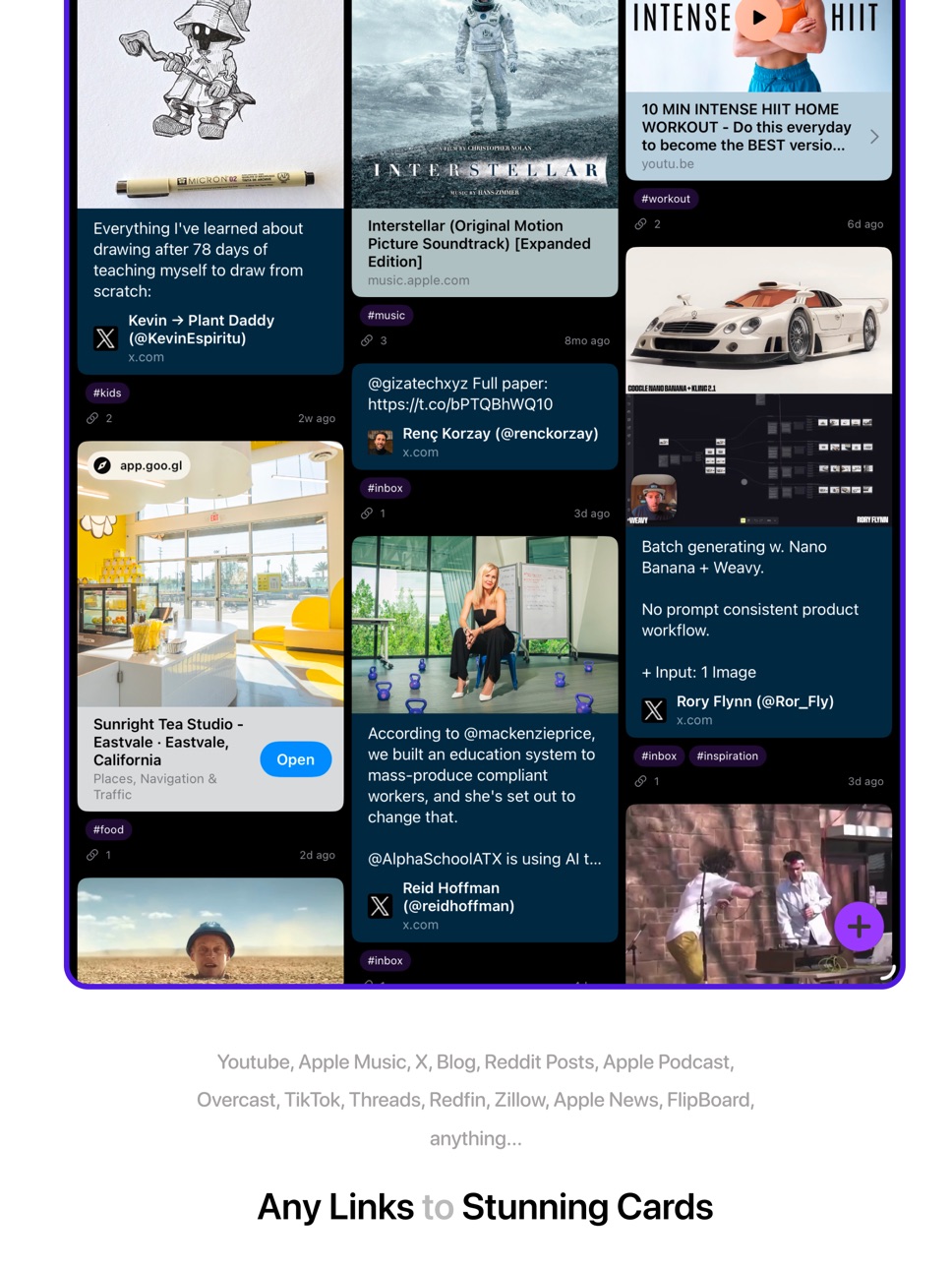
DoubleMemory is a private bookmark, read-later, note, and image library for people who collect ideas all day and need to find them again fast. Save links, articles, text snippets, PDFs, tweets, screenshots, photos, recipes, research, travel ideas, code snippets, and random sparks without building a filing system first.
What you can do
• Save from the iOS Share Sheet in any app
• Add image items from screenshots and photos
• Capture links, text, notes, and PDFs into one searchable place
• Browse a visual waterfall grid or focused feed
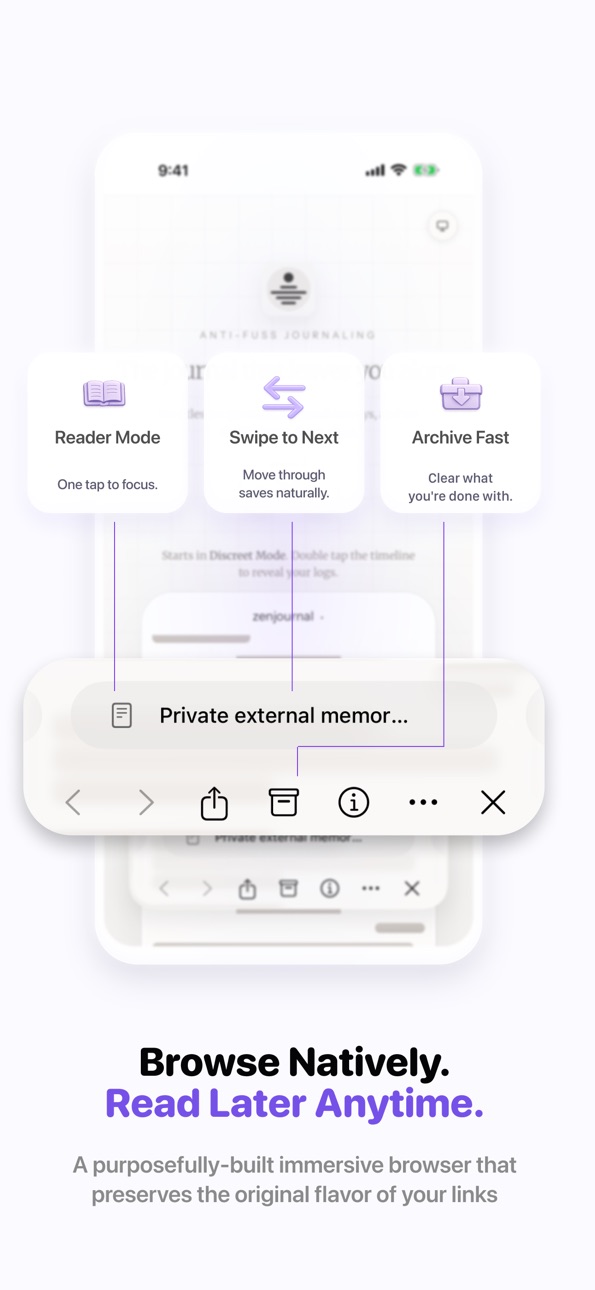
• Open saved articles in a clean reader view
• Search titles, URLs, notes, tags, and full text as you type
• Save searches and tags for one-tap collections
• Sync privately across iPhone, iPad, and Mac with iCloud
Why it is different
DoubleMemory feels less like a folder and more like a photographic memory for your digital life. It is built for quick capture, visual recall, and fast search, so the ideas you save do not disappear into a bookmark graveyard.
Perfect for
• Reading lists and research threads
• Design, product, and travel inspiration
• Screenshots, images, recipes, and gift ideas
• Quotes, prompts, code snippets, and references
• Anything you want to remember later
No account required. Your library syncs with iCloud, and your saved memories stay yours.
Terms of Service: http://doublememory.com/posts/terms-of-service
Privacy Policy: http://doublememory.com/posts/privacy-policy
Support: hi@doublememory.com
In-App Purchases US pricing
DoubleMemory Pro Subscription
Annual · Yearly 1-month free trial$17.99
Quarterly · 3 months 14-day free trial$7.99
Monthly · Monthly 14-day free trial$3.99
One-Time Purchases
Kindred$59.99
Capabilities
In-App Purchases
Accessibility
ipadiphonemacrealityDevicetvoswatch
Version history 17 versions
Build 886929047v2.1.12026-06-14 05:48:17
Improved item actions, quick sharing, and capture reliability. Copy, Share, and Delete are now grouped for faster access.
Build 886271365v2.1.02026-06-01 23:34:36
• Added image items for saving screenshots, photos, and visual references alongside links and text.
• Improved quick add menu
• Improved stability and reliability across saving, syncing, and everyday browsing.
Build 882131022v2.0.42026-02-13 20:41:31
• Auto Tags: Smart tags now generate automatically after metadata loads, helping your new saves organize themselves.
• Minimum Mode: A focused, masonry layout that handles text and links beautifully. Toggle it with the new sparkles icon.
• Visual Refinements: Tag pills have a neutral style to let your content take center stage. We’ve also added smooth animations when switching layout modes.
• Even Faster Grid: We’ve optimized the grid engine again for instant rendering and smoother scrolling on Mac and iOS.
• Saved Search Polish: Reordering saved searches now shows a clear placeholder for better precision.
• Stability: Fixed bugs with item dragging and data syncing.
• Localized for multiple countries with Purchasing Power Parity
Build 882068374v2.0.32026-02-02 20:03:28
• Auto Tags: Smart tags now generate automatically after metadata loads, helping your new saves organize themselves.
• Minimum Mode: A focused, masonry layout that handles text and links beautifully. Toggle it with the new sparkles icon.
• Visual Refinements: Tag pills have a neutral style to let your content take center stage. We’ve also added smooth animations when switching layout modes.
• Even Faster Grid: We’ve optimized the grid engine again for instant rendering and smoother scrolling on Mac and iOS.
• Saved Search Polish: Reordering saved searches now shows a clear placeholder for better precision.
• Stability: Fixed bugs with item dragging and data syncing.
Build 881875816v2.0.22026-01-27 06:43:07
Auto Tags launch: smart tags now generate automatically after metadata loads, with better availability checks and duplicate prevention.
Rewrote the grid for speed: faster scrolling, pagination, prefetching, and layout updates across iPhone, iPad, and Mac.
Saved searches get a big upgrade: drag to reorder with clear placeholder feedback, plus quicker access to tag actions like Clear All Tags.
Search and stability improvements: migrated Spotlight search to CSUserQuery, reduced reloads, and fixed SwiftData crashes and launch watchdog issues.
Build 881328110v2.0.02026-01-26 06:36:54
DoubleMemory 2.0 is here!
• Auto Tags: Your saved items are now automatically tagged based on their content, making organization effortless.
• Performance Improvements: Faster search and smoother interactions.
• Bug Fixes: Squashed some pesky bugs for a more reliable experience.
Build 879948560v1.4.62025-11-20 23:03:37
Added convert text with link to a link item and resolve final link url (for these short links), only available on iOS
Updated iOS logo to be liquid glass ready
Build 879043607v1.4.52025-10-21 03:14:54
On both iOS and Mac:
Better search matching. Now searching “automation” will not only match items with “automation” in description, content, but also items tagged with “#automation”
Mac-exclusive updates:
Batch select to tag. Batch select to drag and drop to other apps. Batch select to archive/unarchive/delete.
Import from Safari reading list or bookmarks
Also available since last version:
Safari reading list import via the Settings on Mac
More Double Capture settings, so you have better control on which apps to ignore and the spacing time between two consecutive copies (so it doesn't over trigger by other apps that automatically writes clipboard).
Build 878905822v1.4.42025-10-15 00:16:02
On both iOS and Mac:
Better search matching. Now searching “automation” will not only match items with “automation” in description, content, but also items tagged with “#automation”
Mac-exclusive updates:
Batch select to tag. Batch select to drag and drop to other apps. Batch select to archive/unarchive/delete.
Import from Safari reading list or bookmarks
Also available since last version:
Safari reading list import via the Settings on Mac
More Double Capture settings, so you have better control on which apps to ignore and the spacing time between two consecutive copies (so it doesn't over trigger by other apps that automatically writes clipboard).
Build 878748761v1.4.32025-10-09 11:00:28
On both iOS and Mac:
- Better search matching. Now searching “automation” will not only matching items with “automation” in description, content, but also matching items tagged with “#automation”
Mac-exclusive updates:
- Batch select to tag. Batch select to drag and drop to other apps. Batch select to archive/unarchive/delete.
- Import from Safari reading list or bookmarks
Build 878218067v1.4.12025-09-28 03:07:39
New capture controls: fine-tune how clips are captured, including a spacing threshold to ignore auto “double copy” (Excel/Word/Arc), plus an Ignored Apps list.
iOS pill docking: drag to dock the floating pill at the top or bottom; it smartly animates to avoid covering content.
Saved Search (Mac): redesigned popover—drag from it to tag items without blocking content.
Sort direction picker: choose ascending/descending right inside Sort By (Mac & iOS).
Dock icon behavior (Mac): hiding no longer closes search or changes window level; clicking the dock icon now only shows the window (prevents Stage Manager flicker).
Spotlight-style dismiss (Mac): new option to auto-hide the window on focus loss when the dock icon is hidden.
Glassified Search (Mac): refreshed, “liquid glass” look.
iOS/iPad: new search cloud view.
Fix: long-press on saved-search pill works again on iOS 26 for quick delete.
Build 878136894v1.4.02025-09-16 15:17:45
Liquid Glass design, redesigned item swiper / bottom bar in detail view.
Build 877976303v1.3.12025-09-10 05:52:49
- Added more hints and tips for saved search to educate users
- Significantly faster and more reliable reader mode rendering
- Slightly more polished new memory view
- More consistent styles on pills
- Optional hashtags and notes on shortcuts
- Drag-n-drop on iOS
- Significantly faster and more stable saved search and search field, no longer crash on rapid taps or types
- Saved Search!
Build 877169874v1.3.02025-09-04 20:13:53
Added Saved Search, a whole new way to organize your memories.
Build 875839588v1.1.132025-06-24 17:19:17
I don't remember about ios for this version, it's just as awesome as before, if not awesomer, but you should really upgrade the Mac version. Did you know we have a dedicated Mac app? In fact we started as a Mac only app.
Build 875450274v1.1.122025-06-11 16:09:20
App Intents / Shortcuts Support!
Better tips for Reader Mode.
Fixed bug when share extension didn't work for Apple News and Flipboard.
Build 874193626v1.1.92025-04-25 16:17:00
Price history by region
Currency
Show
Columns
Search
Availability 1 of 1 storefronts
| Region | Language | Price | Ratings | Avg | Version |
|---|---|---|---|---|---|
| US | en-US | Free | 11 | 4.3 | 2.1.1 |
Change log 21 changes · US
✎
releaseNotes updated
Improved item actions, quick sharing, and capture reliability. Copy, Share, and Delete are now grouped for faster access.
✎
description updated
Save anything worth remembering.
DoubleMemory is a private bookmark, read-later, note, and image library for people who collect ideas all day and need to find
✎
subtitle updated
Save links, images & notes
✎
name updated
Bookmark App: DoubleMemory
◆
Version 2.1.1 released
Improved item actions, quick sharing, and capture reliability. Copy, Share, and Delete are now grouped for faster access.
◆
Version 2.1.0 released
• Added image items for saving screenshots, photos, and visual references alongside links and text.
• Improved quick add menu
• Improved stability and reliability across saving, syncing, and everyday browsing.
◆
Version 2.0.4 released
• Auto Tags: Smart tags now generate automatically after metadata loads, helping your new saves organize themselves.
• Minimum Mode: A focused, masonry layout that handles text and links beautifully. Toggle it with the new sparkles icon.
•
◆
Version 2.0.3 released
• Auto Tags: Smart tags now generate automatically after metadata loads, helping your new saves organize themselves.
• Minimum Mode: A focused, masonry layout that handles text and links beautifully. Toggle it with the new sparkles icon.
•
◆
Version 2.0.2 released
Auto Tags launch: smart tags now generate automatically after metadata loads, with better availability checks and duplicate prevention.
Rewrote the grid for speed: faster scrolling, pagination, prefetching, and layout updates across iPhone
◆
Version 2.0.0 released
DoubleMemory 2.0 is here!
• Auto Tags: Your saved items are now automatically tagged based on their content, making organization effortless.
• Performance Improvements: Faster search and smoother interactions.
• Bug Fixes: Squashed some pes
◆
Version 1.4.6 released
Added convert text with link to a link item and resolve final link url (for these short links), only available on iOS
Updated iOS logo to be liquid glass ready
◆
Version 1.4.5 released
On both iOS and Mac:
Better search matching. Now searching “automation” will not only match items with “automation” in description, content, but also items tagged with “#automation”
Mac-exclusive updates:
Batch select to tag. Batch selec
◆
Version 1.4.4 released
On both iOS and Mac:
Better search matching. Now searching “automation” will not only match items with “automation” in description, content, but also items tagged with “#automation”
Mac-exclusive updates:
Batch select to tag. Batch select
◆
Version 1.4.3 released
On both iOS and Mac:
- Better search matching. Now searching “automation” will not only matching items with “automation” in description, content, but also matching items tagged with “#automation”
Mac-exclusive updates:
- Batch select to t
◆
Version 1.4.1 released
New capture controls: fine-tune how clips are captured, including a spacing threshold to ignore auto “double copy” (Excel/Word/Arc), plus an Ignored Apps list.
iOS pill docking: drag to dock the floating pill at the top or bottom; it smart
◆
Version 1.4.0 released
Liquid Glass design, redesigned item swiper / bottom bar in detail view.
◆
Version 1.3.1 released
- Added more hints and tips for saved search to educate users
- Significantly faster and more reliable reader mode rendering
- Slightly more polished new memory view
- More consistent styles on pills
- Optional hashtags and notes on shortcu
◆
Version 1.3.0 released
Added Saved Search, a whole new way to organize your memories.
◆
Version 1.1.13 released
I don't remember about ios for this version, it's just as awesome as before, if not awesomer, but you should really upgrade the Mac version. Did you know we have a dedicated Mac app? In fact we started as a Mac only app.
◆
Version 1.1.12 released
App Intents / Shortcuts Support!
Better tips for Reader Mode.
Fixed bug when share extension didn't work for Apple News and Flipboard.
◆
Version 1.1.9 released