Home › Navigation

 US
US
1 of 1 storefronts
Content in en-US
Content in en-US
Information
Apple ID6736919208
Bundle IDcom.rainbowfox.metasnap
SellerSeller
Min iOS15.6
Min macOS12.5
Device familiesiphone, ipad, ipod
Released2024-10-31
Copyright© Joshua Eafanti
Privacy policyLink ↗
Preview 2 platforms
iPhone 3 images


iPad 3 images


What’s New Version 1.2.1
MetaSnap v1.2.1 – Version Update
- Improved metadata handling to preserve more original photo information
- Fixed several settings screen UI issues
- Improved note entry experience by clearing placeholder text when editing
- General stability improvements
MetaSnap v1.2 – Version Update
Main Feature
- Add Notes: Attach notes directly to your photos for extra context during field inspections or documentation. Notes are embedded in the image, making it easy to track details, inspection notes, and site identification.
Additional Features
- Users can now choose to show GPS and altitude accuracy.
- Users can now choose to show measurements in Imperial or Metric units.
- Support email was added to the settings menu to enable easy support requests.
Security Enhancements
- Strengthened device integrity checks to ensure the app only runs on trusted devices, helping keep the app safe and secure.
Stability and Bug Fixes
- Major improvements to camera and label handling across all orientations for consistent performance.
- Fixed issues with metadata, date labels, and note textbox positioning to ensure photos capture all details correctly.
- General UI refinements and reliability enhancements to prevent crashes and improve overall app stability.
Description
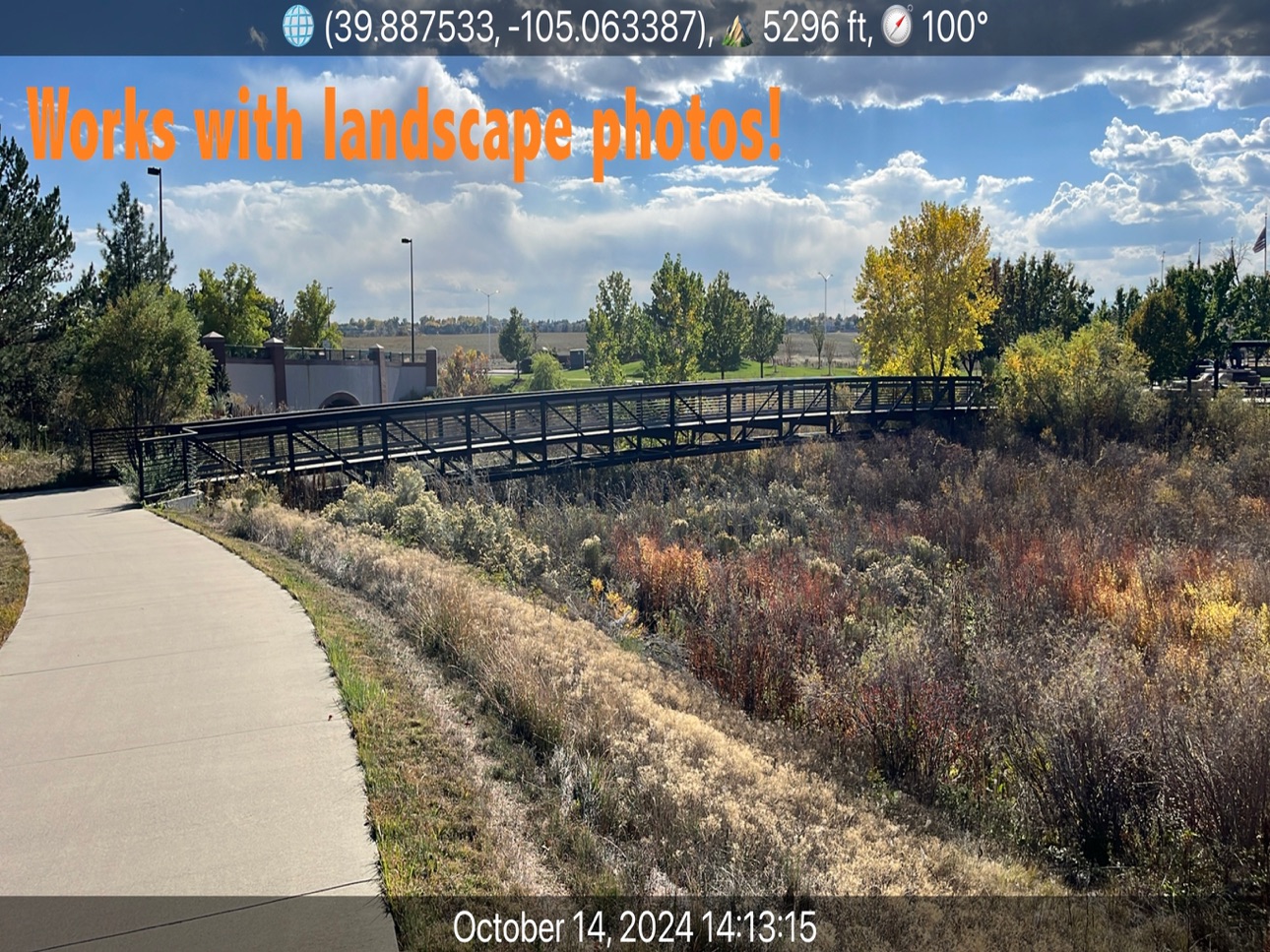
Metasnap was developed by a FEMA employee with extensive experience in damage assessment and inspection. MetaSnap was created out of frustration when crucial projects were delayed because the time and location of photos couldn't be verified. MetaSnap solves this problem by automatically stamping all the GPS coordinates, altitude, compass direction, and precise time details directly onto your photos, making field inspections a breeze!
While other photo apps are available, MetaSnap stands out because it's completely free—no ads, watermarks, or in-app purchases. Whether you're documenting a field inspection or want to remember exactly where and when a photo was taken, MetaSnap has you covered.
Key features:
- GPS Data: Includes latitude and longitude in decimal format, altitude in feet, and compass direction in degrees.
- Time Stamp: Displays the exact date and time (in military time) at the bottom of the image.
- Customizable Flash: Adjust the flash settings to suit your environment.
- Fully supports portrait and landscape photos: Ensure your images capture all the details in every orientation.
- Add Notes: Attach a note to any image to provide additional context.
Designed for simplicity but packed with everything you need, MetaSnap is perfect for anyone who values clarity and precision in their photos. While the app is built for inspections, it’s versatile enough for everyday use.
Accessibility
ipadiphonemacrealityDevicetvoswatch
Version history 5 versions
Build 885985717v1.2.12026-05-22 02:52:41
MetaSnap v1.2.1 – Version Update
- Improved metadata handling to preserve more original photo information
- Fixed several settings screen UI issues
- Improved note entry experience by clearing placeholder text when editing
- General stability improvements
MetaSnap v1.2 – Version Update
Main Feature
- Add Notes: Attach notes directly to your photos for extra context during field inspections or documentation. Notes are embedded in the image, making it easy to track details, inspection notes, and site identification.
Additional Features
- Users can now choose to show GPS and altitude accuracy.
- Users can now choose to show measurements in Imperial or Metric units.
- Support email was added to the settings menu to enable easy support requests.
Security Enhancements
- Strengthened device integrity checks to ensure the app only runs on trusted devices, helping keep the app safe and secure.
Stability and Bug Fixes
- Major improvements to camera and label handling across all orientations for consistent performance.
- Fixed issues with metadata, date labels, and note textbox positioning to ensure photos capture all details correctly.
- General UI refinements and reliability enhancements to prevent crashes and improve overall app stability.
Build 882645358v1.22026-02-21 03:17:15
MetaSnap v1.2 – Version Update
Main Feature
- Add Notes: Attach notes directly to your photos for extra context during field inspections or documentation. Notes are embedded in the image, making it easy to track details, inspection notes, and site identification.
Additional Features
- Users can now choose to show GPS and altitude accuracy.
- Users can now choose to show measurements in Imperial or Metric units.
- Support email was added to the settings menu to enable easy support requests.
Security Enhancements
- Strengthened device integrity checks to ensure the app only runs on trusted devices, helping keep the app safe and secure.
Stability and Bug Fixes
- Major improvements to camera and label handling across all orientations for consistent performance.
- Fixed issues with metadata, date labels, and note textbox positioning to ensure photos capture all details correctly.
- General UI refinements and reliability enhancements to prevent crashes and improve overall app stability.
Build 876452250v1.1.12025-07-18 23:06:21
Version 1.1.1 Updates:
- Minor bug fix that made the label text show up as black instead of white.
Version 1.1 Updates:
- Significantly improved UI performance for a smoother and more responsive experience
- Fixed an issue where heading values were incorrect in landscape orientation
- Enhanced heading accuracy: the heading display now turns green when reliable and red when affected by device orientation
- Introduced a new Settings panel, allowing users to:
• Choose between camera aspect ratios
• Toggle location and timestamp metadata overlays
• Select between True North and Magnetic North for heading
• Customize GPS coordinate precision with adjustable decimal places
- Miscellaneous bug fixes and performance improvements throughout the app
Build 876114288v1.12025-07-03 21:42:10
Version 1.1 Updates:
- Significantly improved UI performance for a smoother and more responsive experience
- Fixed an issue where heading values were incorrect in landscape orientation
- Enhanced heading accuracy: the heading display now turns green when reliable and red when affected by device orientation
- Introduced a new Settings panel, allowing users to:
• Choose between camera aspect ratios
• Toggle location and timestamp metadata overlays
• Select between True North and Magnetic North for heading
• Customize GPS coordinate precision with adjustable decimal places
- Miscellaneous bug fixes and performance improvements throughout the app
Build 869713860v1.02024-10-31 10:01:55
No pricing data captured yet — comparisons appear once the app has paid storefronts or in-app purchases.
Availability 1 of 1 storefronts
| Region | Language | Price | Ratings | Avg | Version |
|---|---|---|---|---|---|
| US | en-US | Free | 0 | — | 1.2.1 |
Change log 9 changes · US
✎
releaseNotes updated
MetaSnap v1.2.1 – Version Update
- Improved metadata handling to preserve more original photo information
- Fixed several settings screen UI issues
- Improved n
✎
description updated
Metasnap was developed by a FEMA employee with extensive experience in damage assessment and inspection. MetaSnap was created out of frustration when crucial pr
✎
subtitle updated
Photos with GPS & Timestamp
✎
name updated
Metasnap
◆
Version 1.2.1 released
MetaSnap v1.2.1 – Version Update
- Improved metadata handling to preserve more original photo information
- Fixed several settings screen UI issues
- Improved note entry experience by clearing placeholder text when editing
- General stabili
◆
Version 1.2 released
MetaSnap v1.2 – Version Update
Main Feature
- Add Notes: Attach notes directly to your photos for extra context during field inspections or documentation. Notes are embedded in the image, making it easy to track details, inspection notes,
◆
Version 1.1.1 released
Version 1.1.1 Updates:
- Minor bug fix that made the label text show up as black instead of white.
Version 1.1 Updates:
- Significantly improved UI performance for a smoother and more responsive experience
- Fixed an issue where heading va
◆
Version 1.1 released
Version 1.1 Updates:
- Significantly improved UI performance for a smoother and more responsive experience
- Fixed an issue where heading values were incorrect in landscape orientation
- Enhanced heading accuracy: the heading display now tu
◆
Version 1.0 released