Home › Productivity

Information
Preview 3 platforms
iPhone 6 images


iPad 5 images



Apple Vision Pro 4 images


What’s New Version 3.0.0
3.0.0 is a major update focused on private, on-device AI and stronger local-model workflows.
• Run supported GGUF models directly on your iPhone or iPad with new Local Model connections
• Browse curated and Hugging Face local models, including supported vision models with projector downloads
• Use private on-device Memory to save and recall helpful context from chats and documents
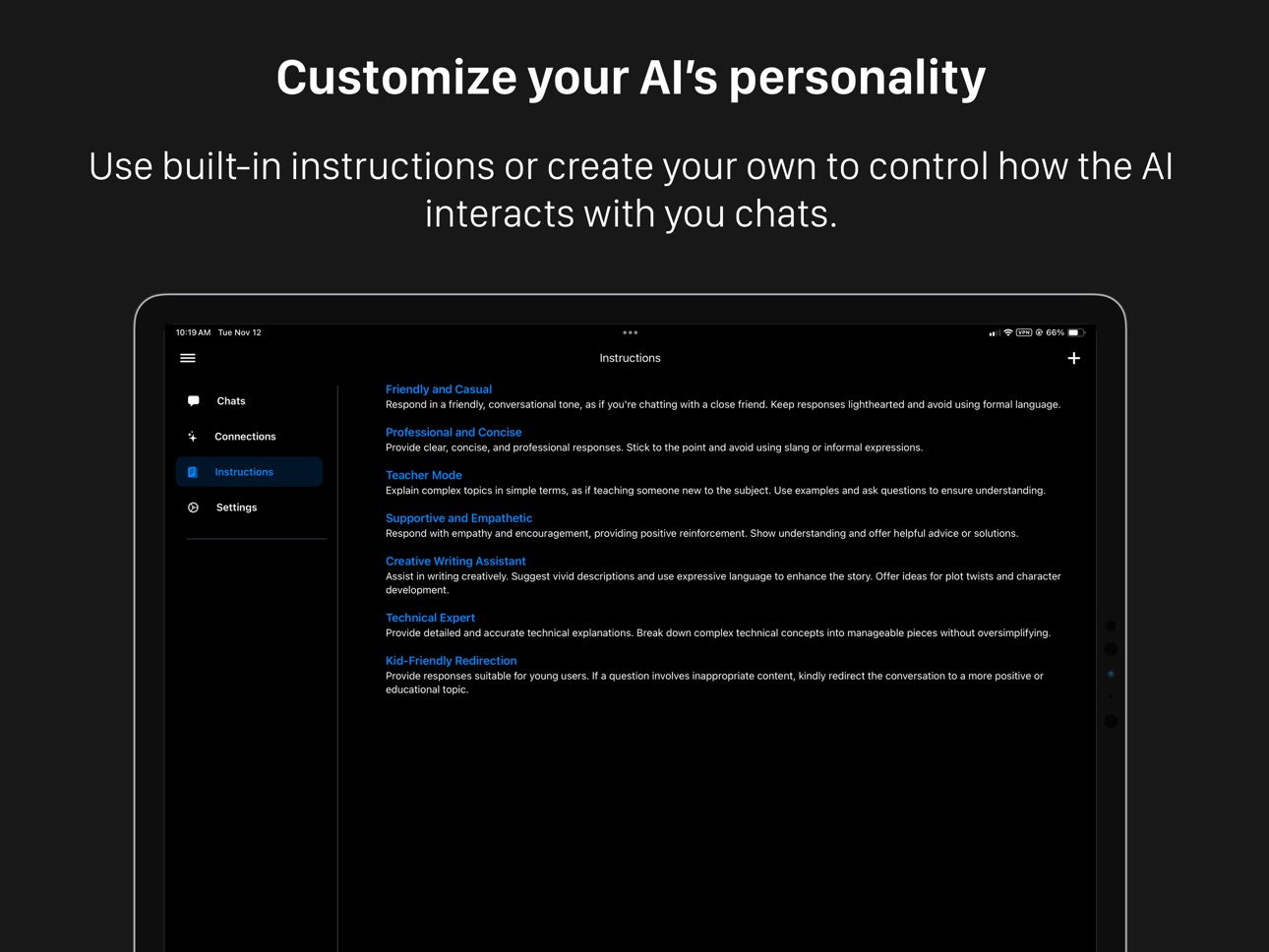
• Choose per-connection defaults for Memory and instructions when starting new chats
• Start private chats that never read from or save to Memory
• Improved LM Studio v1 support, including reasoning/context settings, model loading controls, image requests, MCP tools, and reconnect behavior
• Regenerate failed responses without duplicate messages
• Added offline LaTeX rendering, better Mermaid spacing, expanded About details, and many release-readiness fixes
Description
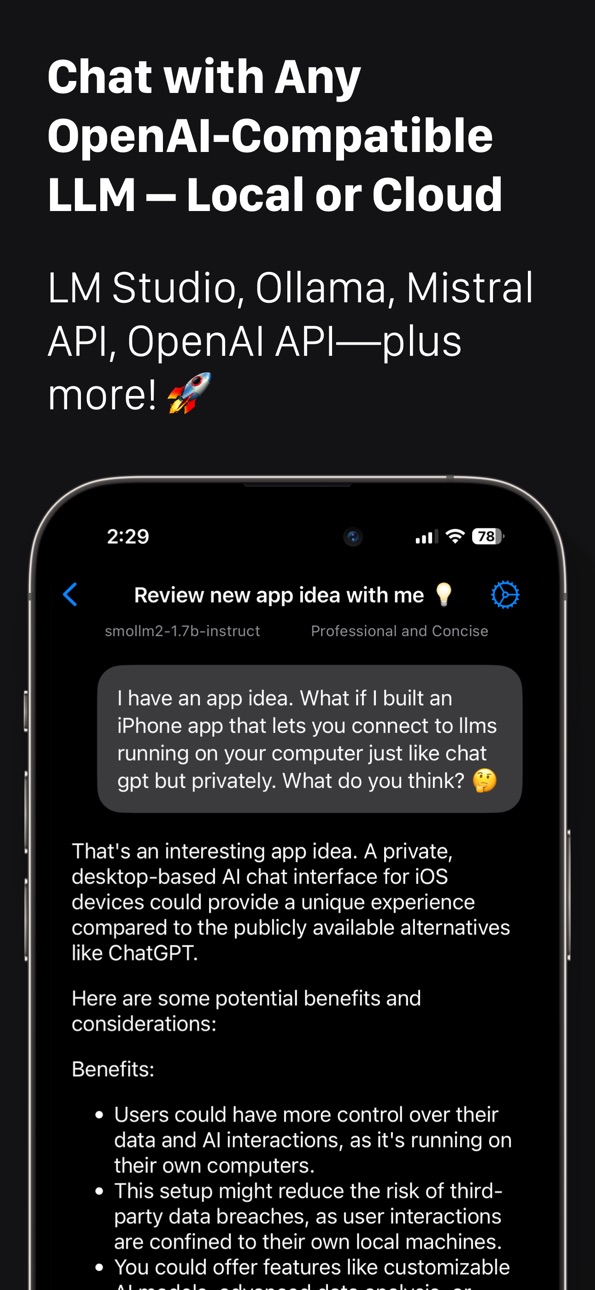
Chat smarter with 3sparks Chat – your personal LLM client for local and cloud models.
Connect to your favorite AI models, whether they’re running on your own machine or through cloud services:
• Local models like LM Studio, Ollama, AnythingLLM, OpenWebUI (Mac, PC, or Linux)
• Cloud-based APIs like OpenAI, Mistral, Gemini and others
Now with powerful new tools:
• Image & file support – Upload images (for vision-capable models) or text files (supported by all models) to enhance your chats.
• Web content reader – Fetch and include webpage content in your chats using Jina Reader
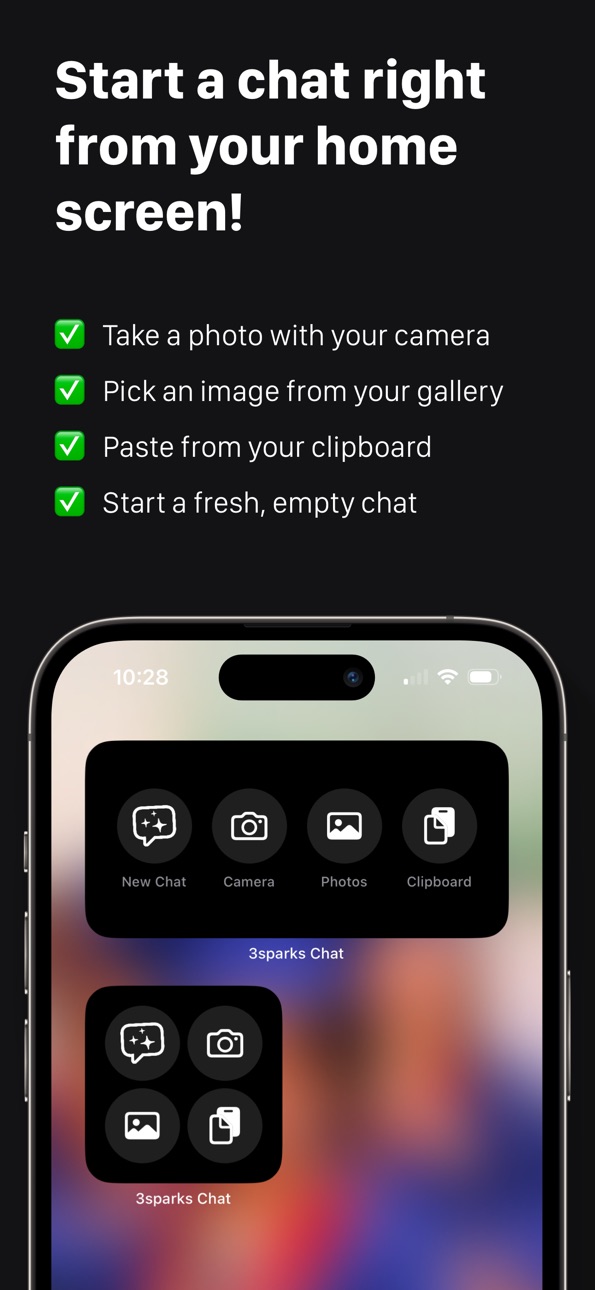
• Home screen widget – Start a new chat instantly by snapping a photo, uploading an image, pasting clipboard text, or starting blank
• Share extension – Send text or links from any app into 3S Chat with a tap
Plus, the built-in AI Keyboard Extension lets you rephrase and fine-tune your writing in any app like iMessage, WhatsApp, and email:
• Customizable prompts for instant rewriting
• Personalized tone and style settings
• No forced cloud storage – your data, your choice
3S Chat is optimized for iOS, iPadOS and VisionOS, so you can enjoy a seamless experience across your iPhone, iPad, and Apple Vision Pro.
Accessibility
ipadiphonemacrealityDevicetvoswatch
Version history 25 versions
Build 887463520v3.0.02026-07-01 22:07:54
3.0.0 is a major update focused on private, on-device AI and stronger local-model workflows.
• Run supported GGUF models directly on your iPhone or iPad with new Local Model connections
• Browse curated and Hugging Face local models, including supported vision models with projector downloads
• Use private on-device Memory to save and recall helpful context from chats and documents
• Choose per-connection defaults for Memory and instructions when starting new chats
• Start private chats that never read from or save to Memory
• Improved LM Studio v1 support, including reasoning/context settings, model loading controls, image requests, MCP tools, and reconnect behavior
• Regenerate failed responses without duplicate messages
• Added offline LaTeX rendering, better Mermaid spacing, expanded About details, and many release-readiness fixes
Build 885644973v2.8.42026-05-14 19:27:00
-Bug fixes
Build 884777417v2.8.32026-04-22 02:21:04
- Improved connection check
- Bug fixes
Build 884191581v2.8.22026-04-06 22:18:53
Improves how the app handles missing model from your LLM server
Build 883774148v2.8.12026-03-26 17:14:17
- Bug fixes
Build 883040849v2.7.22026-03-14 22:18:19
- LM Studio API v1 support with new models tab
- iCloud sync support to sync chats, connections and settings across your devices.
- Added ability to share your current location in a chat
- Added filtering
- Added ability to archive chats
- Improved chat search with better indexing
- Tailscale connection bug fix
- OpenClaw support (Chat with your OpenClaw server via its open Ai compatible channel)
- Gemini image generation support
Build 883003027v2.7.12026-03-04 17:22:03
- LM Studio API v1 support with new models tab
- iCloud sync support to sync chats, connections and settings across your devices.
- OpenClaw support (Chat with your OpenClaw server via its open Ai compatible channel)
- Gemini image generation support
- Fixes a bug with connecting over Tailscale
Build 882756716v2.72026-02-26 03:16:18
- LM Studio API v1 support with new models tab
- iCloud sync support to sync chats, connections and settings across your devices.
- OpenClaw support (Chat with your OpenClaw server via its open Ai compatible channel)
- Gemini image generation support
Build 881871842v2.6.72026-01-27 11:23:57
Bug fixes and performance improvements.
Build 880058459v2.6.62025-11-25 19:23:29
NEW FEATURES
Searchable Instruction Picker
Quickly find and select instructions from the chat header with a new searchable picker. Filter by name or content, and add new instructions without leaving the chat.
Connection Health Checks
Proactive LLM connectivity checks now detect unreachable servers before you send a message, showing clear status notices so you know immediately if there's a problem.
IMPROVEMENTS
Refined System Messages
System message handling has been refactored for more consistent behavior when switching instructions mid-chat.
Better Network Detection
Enhanced error handler now recognizes more network failure patterns including offline states, DNS failures, and connection losses.
BUG FIXES
- Fixed error notice colors to use proper system colors for better dark mode support
- Fixed the widget's photo button not opening the photo picker when launching a new chat
Build 878806257v2.6.52025-11-19 12:05:25
New Features:
• Visual Polish: Refreshed app UI, softer widget buttons, clearer error banners, and subtle glass effects keep the app and widgets looking consistent across platforms.
Improvements:
• Improved Search & Performance: Chat search now looks inside every message, with improved app performance and enhanced search abilities.
• Token Management: Token counting with per-connection presets, custom limits, and inline warnings so you know before a request would overflow a context window. The token meter respects your preferences—long-press to hide it, toggle it in Settings, and enjoy better spacing as the keyboard shows or hides.
Build 877507028v2.6.42025-08-24 14:02:59
Improved chat reliability with smarter background task handling.
Streamlined image sharing with direct photo picker and clipboard paste support.
Widgets now support starting new chats with images from your clipboard.
Build 877107392v2.6.32025-08-09 21:02:14
- Adds support for for OpenAI OSS models using the Harmony rendering format to the keyboard extension
- Improves LaTeX rendering support
Build 877078990v2.6.22025-08-08 20:49:22
Full support for OpenAI OSS models using the Harmony rendering format
New API profile for OpenAI OSS models with adjustable analysis level in chat settings
LaTeX math formula rendering for easier reading
Improved model compatibility with advanced configuration options
Build 877012369v2.6.12025-08-06 21:46:13
We've expanded our app's capabilities with support for OpenAI's newest open-source models, which now include a groundbreaking analysis block.
openai/gpt-oss-20b
openai/gpt-oss-120b
Build 876535696v2.62025-07-20 13:41:09
Easily interact with your PDF files like never before. With our latest update, you can directly add PDFs to your conversations, allowing for seamless communication with your language model about the content. Get quick summaries, ask detailed questions, or tackle complex topics—all tailored to your specific documents. Enhance your workflow and understanding effortlessly.
Build 875784955v2.5.12025-06-22 12:31:54
- Improve settings updates in keyboard extension.
- Adds support to fetch models from Anthropic
Build 875241376v2.52025-06-09 22:45:53
Big update! This version brings major improvements to 3Sparks Chat:
• New Tools Menu – Chat with images you upload or take with your camera (for models that support vision), upload text files, or fetch web content using Jina Reader.
• iOS Widget – Quickly start a new chat from your home screen by snapping a photo, uploading an image, pasting from your clipboard, or starting fresh.
• Share Extension – Share text or links from other apps straight into 3Sparks Chat to begin a conversation.
• Smarter chat storage – Your messages are saved more reliably and automatically kept up to date.
• Better chat cleanup – Easily delete chats right from the ChatView.
• Enhanced sidebar – Smoother navigation and better performance.
• Faster chat loading and improved handling of long AI responses.
• Improved formatting – Cleaner display for tables and messages.
Thanks for using 3Sparks Chat – we’re just getting started!
Build 874494496v2.2.22025-05-05 23:36:42
Refined sidebar animations and interactions across the app.
Build 873986029v2.22025-04-14 11:26:49
What’s New in This Update
• Added support for Google Gemini, OpenWebUI, and AnythingLLM—bring your own server and connect to a wider range of models.
• Improved connection settings now support custom route prefixes, unlocking compatibility with even more LLM providers.
• Adjust text size in chat to fit your reading style.
• General bug fixes and performance improvements for a smoother experience.
Build 873738558v2.1.92025-04-03 01:18:41
Added ability to resize chat messages text sizes
Build 873453445v2.1.82025-03-23 20:56:36
This update brings small enhancements behind the scenes.
Build 873406230v2.1.72025-03-22 00:30:30
Adds settings to enable/disable sounds and haptics for the keyboard extension.
Build 873316709v2.1.62025-03-18 11:41:33
- Added support for Reasoning Content from thinking models
- Improve scrolling performance while streaming
- Improved connection settings for keyboard extension
- Improved haptic feedback during streaming messages
Build 873197942v2.1.52025-03-13 10:01:58
Fixes an issue with saving and updating http connections
Price history by region
Currency
Show
Columns
Search
Availability 23 of 23 storefronts
| Region | Language | Price | Ratings | Avg | Version |
|---|---|---|---|---|---|
 US US | en-US | USD 5.99 | 28 | 4.2 | 3.0.0 |
 RU RU | ru | RUB 499 | 5 | 4.4 | 3.0.0 |
 NZ NZ | en-AU | NZD 9.99 | 1 | 5.0 | 3.0.0 |
 AI AI | en-GB | USD 5.99 | 0 | — | 3.0.0 |
 AM AM | en-GB | USD 6.99 | 0 | — | 3.0.0 |
 AR AR | es-MX | USD 5.99 | 0 | — | 3.0.0 |
 BT BT | en-GB | USD 5.99 | 0 | — | 3.0.0 |
 BW BW | en-GB | USD 5.99 | 0 | — | 3.0.0 |
 CL CL | es-MX | CLP 6990 | 0 | — | 3.0.0 |
 CV CV | en-GB | USD 5.99 | 0 | — | 3.0.0 |
 EE EE | en-GB | EUR 6.99 | 0 | — | 3.0.0 |
 FJ FJ | en-GB | USD 5.99 | 0 | — | 3.0.0 |
 GR GR | en-GB | EUR 6.99 | 0 | — | 3.0.0 |
 HR HR | en-GB | EUR 6.99 | 0 | — | 3.0.0 |
 KY KY | en-GB | USD 5.99 | 0 | — | 3.0.0 |
 LT LT | en-GB | EUR 6.99 | 0 | — | 3.0.0 |
 LU LU | en-GB | EUR 6.99 | 0 | — | 3.0.0 |
 LV LV | en-GB | EUR 6.99 | 0 | — | 3.0.0 |
 MV MV | en-GB | USD 5.99 | 0 | — | 3.0.0 |
 MY MY | en-GB | MYR 29.9 | 0 | — | 3.0.0 |
 SI SI | en-GB | EUR 6.99 | 0 | — | 3.0.0 |
 UA UA | en-GB | USD 6.99 | 0 | — | 3.0.0 |
 VE VE | es-MX | USD 5.99 | 0 | — | 3.0.0 |
Change log 29 changes · US
✎
releaseNotes updated
3.0.0 is a major update focused on private, on-device AI and stronger local-model workflows.
• Run supported GGUF models directly on your iPhone or iPad with n
✎
description updated
Chat smarter with 3sparks Chat – your personal LLM client for local and cloud models.
Connect to your favorite AI models, whether they’re running on your own m
✎
subtitle updated
AI Chat Client and Keyboard
✎
name updated
3sparks Chat
◆
Version 3.0.0 released
3.0.0 is a major update focused on private, on-device AI and stronger local-model workflows.
• Run supported GGUF models directly on your iPhone or iPad with new Local Model connections
• Browse curated and Hugging Face local models, inclu
◆
Version 2.8.4 released
-Bug fixes
◆
Version 2.8.3 released
- Improved connection check
- Bug fixes
◆
Version 2.8.2 released
Improves how the app handles missing model from your LLM server
◆
Version 2.8.1 released
- Bug fixes
◆
Version 2.7.2 released
- LM Studio API v1 support with new models tab
- iCloud sync support to sync chats, connections and settings across your devices.
- Added ability to share your current location in a chat
- Added filtering
- Added ability to archive chats
-
◆
Version 2.7.1 released
- LM Studio API v1 support with new models tab
- iCloud sync support to sync chats, connections and settings across your devices.
- OpenClaw support (Chat with your OpenClaw server via its open Ai compatible channel)
- Gemini image generati
◆
Version 2.7 released
- LM Studio API v1 support with new models tab
- iCloud sync support to sync chats, connections and settings across your devices.
- OpenClaw support (Chat with your OpenClaw server via its open Ai compatible channel)
- Gemini image generati
◆
Version 2.6.7 released
Bug fixes and performance improvements.
◆
Version 2.6.6 released
NEW FEATURES
Searchable Instruction Picker
Quickly find and select instructions from the chat header with a new searchable picker. Filter by name or content, and add new instructions without leaving the chat.
Connection Health Check
◆
Version 2.6.5 released
New Features:
• Visual Polish: Refreshed app UI, softer widget buttons, clearer error banners, and subtle glass effects keep the app and widgets looking consistent across platforms.
Improvements:
• Improved Search & Performance: Chat sea
◆
Version 2.6.4 released
Improved chat reliability with smarter background task handling.
Streamlined image sharing with direct photo picker and clipboard paste support.
Widgets now support starting new chats with images from your clipboard.
◆
Version 2.6.3 released
- Adds support for for OpenAI OSS models using the Harmony rendering format to the keyboard extension
- Improves LaTeX rendering support
◆
Version 2.6.2 released
Full support for OpenAI OSS models using the Harmony rendering format
New API profile for OpenAI OSS models with adjustable analysis level in chat settings
LaTeX math formula rendering for easier reading
Improved model compatibility with ad
◆
Version 2.6.1 released
We've expanded our app's capabilities with support for OpenAI's newest open-source models, which now include a groundbreaking analysis block.
openai/gpt-oss-20b
openai/gpt-oss-120b
◆
Version 2.6 released
Easily interact with your PDF files like never before. With our latest update, you can directly add PDFs to your conversations, allowing for seamless communication with your language model about the content. Get quick summaries, ask detaile
◆
Version 2.5.1 released
- Improve settings updates in keyboard extension.
- Adds support to fetch models from Anthropic
◆
Version 2.5 released
Big update! This version brings major improvements to 3Sparks Chat:
• New Tools Menu – Chat with images you upload or take with your camera (for models that support vision), upload text files, or fetch web content using Jina Reader.
• iOS
◆
Version 2.2.2 released
Refined sidebar animations and interactions across the app.
◆
Version 2.2 released
What’s New in This Update
• Added support for Google Gemini, OpenWebUI, and AnythingLLM—bring your own server and connect to a wider range of models.
• Improved connection settings now support custom route prefixes, unlocking compatibilit
◆
Version 2.1.9 released
Added ability to resize chat messages text sizes
◆
Version 2.1.8 released
This update brings small enhancements behind the scenes.
◆
Version 2.1.7 released
Adds settings to enable/disable sounds and haptics for the keyboard extension.
◆
Version 2.1.6 released
- Added support for Reasoning Content from thinking models
- Improve scrolling performance while streaming
- Improved connection settings for keyboard extension
- Improved haptic feedback during streaming messages
◆
Version 2.1.5 released
Fixes an issue with saving and updating http connections