Home › Finance

 US
US
1 of 1 storefronts
Content in en-US
Content in en-US
Information
Apple ID6736770030
Bundle IDcom.onurardaoz.tradesBud
SellerSeller
Min iOS13.0
Min macOS11.0
Device familiesiphone, ipad, ipod
Released2024-11-18
Copyright© 2025 Onur Arda Öz
Privacy policyLink ↗
Preview 2 platforms
iPhone 6 images



iPad 6 images


What’s New Version 1.1.5
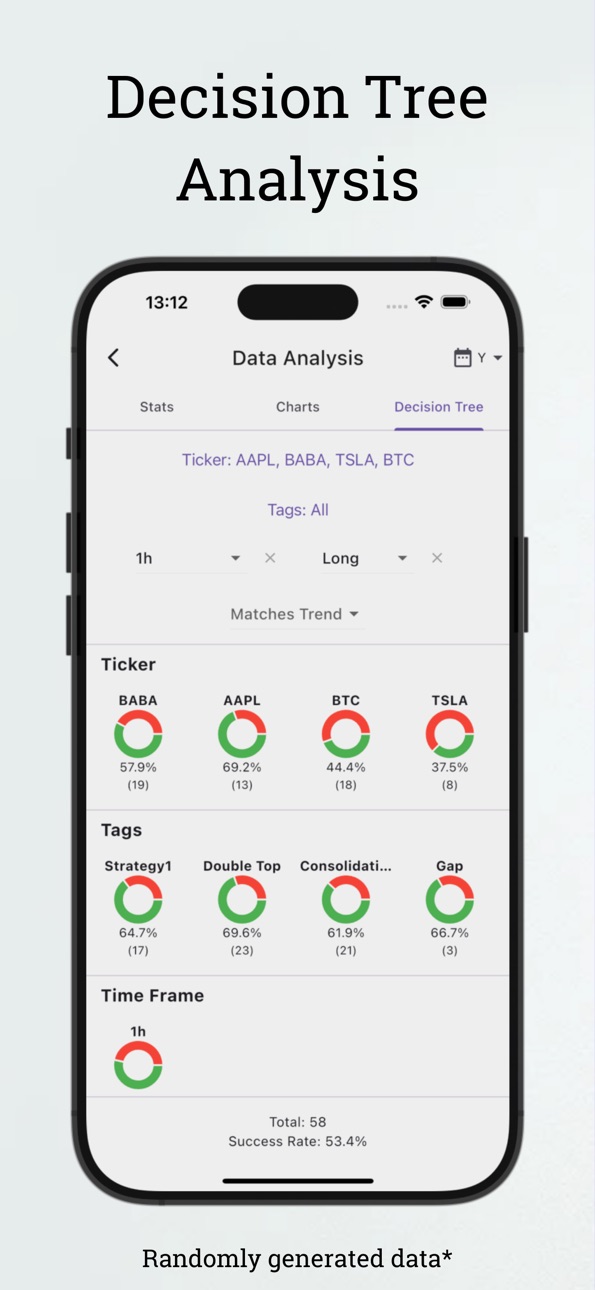
- Added Analysis by Factors
- Simple UI/UX fixes
Description
Improvement starts with measurement.
TradesBud is your ultimate trading companion, designed to help you log, track, and analyze your trades effectively. Whether you're trading stocks, crypto or futures TradesBud simplifies the process, enabling you to focus on improving your strategies and skills!
*Log Trades Effortlessly: Record all your trades with detailed entry, exit, and position data.
*Analyze Performance: Gain insights through weekly PnL charts, heat map, and success metrics.
*Tag Your Trades: Use custom tags like "Breakout", "DEFI" or "Tech" to classify and review strategies or categories.
*Stay Organized: Filter trades by tickers, timeframes, and tags with a simple decision-tree interface.
*100% Private: All your data stays on your device – no cloud, no tracking.
*Export and import trades. TradesBud supports Excel, JSON and CSV formats.
Measure your trades, analyze your performance, and grow your skills. Download TradesBud and start your journey toward trading mastery today.
Contact:
Email: tradesbudapp@gmail.com
Privacy Policy: tradesbud.onurardaoz.com/privacypolicy.html
Terms of Use: https://www.apple.com/legal/internet-services/itunes/dev/stdeula/
Capabilities
In-App Purchases
Accessibility
ipadiphonemacrealityDevicetvoswatch
Version history 12 versions
Build 876655371v1.1.52025-07-24 17:59:40
- Added Analysis by Factors
- Simple UI/UX fixes
Build 873714288v1.1.42025-04-03 18:49:08
- Fixed the problem with showing wrong sign on p&l calculation when closing open trades.
- Basic UI fixes.
Build 873181560v1.1.32025-03-12 17:58:10
- Landing pages were updated
- Minimal UI changes
Build 872918493v1.1.22025-03-06 01:12:01
- Added two new graphs.
- A minimal UI fix for an alignment.
Build 872540406v1.1.12025-02-17 08:08:12
- Heat map in the analysis section can now be converted to reflect PnL instead of total trades that day.
Build 872376169v1.1.02025-02-11 20:15:22
- Partial position closing is now available.
- Import and export trades in Excel, JSON, and CSV formats.
- Russian language added as the 11th supported language.
- Various UI improvements for a better experience.
Build 870983841v1.0.52024-12-08 14:13:51
- Added real-time backwards comparison to analyze the past success rate of similar trades.
- UI improvements for simpler use.
Build 870713276v1.0.42024-12-03 04:54:07
- Ui fixes (Columns and buttons)
- Fixed the issue of not being able to add new trades in certain situations.
Build 870702840v1.0.32024-11-26 20:08:45
- Users now can edit or clone trades.
- Keyboard disappears after a trade is successfully added.
Build 870591934v1.0.22024-11-24 19:51:54
- UI enhancement for bar graphs in analytics section.
- Fixed empty tag suggestion bug.
- Numeric keyboard did not have a done button, so now touching empty space in "Add Trade" screen unfocuses the keyboard for easy use.
- Fixed decimal point not showing while closing opened trades
Build 870533294v1.0.12024-11-21 13:26:08
- Fixed the issue with decimal point not showing up in keyboard when entering numerical values
- Removed the misplaced "]" in stats page
- Added more timeframes (5m, 30m, 2H)
- Fixed exchange name not showing in opened trades
Build 869628701v1.02024-11-18 21:49:26
No pricing data captured yet — comparisons appear once the app has paid storefronts or in-app purchases.
Availability 1 of 1 storefronts
| Region | Language | Price | Ratings | Avg | Version |
|---|---|---|---|---|---|
| US | en-US | Free | 5 | 4.4 | 1.1.5 |
Change log 16 changes · US
✎
releaseNotes updated
- Added Analysis by Factors
- Simple UI/UX fixes
✎
description updated
Improvement starts with measurement.
TradesBud is your ultimate trading companion, designed to help you log, track, and analyze your trades effectively. Whethe
✎
subtitle updated
Statistical Trade Analysis
✎
name updated
Trading Journal - TradesBud
◆
Version 1.1.5 released
- Added Analysis by Factors
- Simple UI/UX fixes
◆
Version 1.1.4 released
- Fixed the problem with showing wrong sign on p&l calculation when closing open trades.
- Basic UI fixes.
◆
Version 1.1.3 released
- Landing pages were updated
- Minimal UI changes
◆
Version 1.1.2 released
- Added two new graphs.
- A minimal UI fix for an alignment.
◆
Version 1.1.1 released
- Heat map in the analysis section can now be converted to reflect PnL instead of total trades that day.
◆
Version 1.1.0 released
- Partial position closing is now available.
- Import and export trades in Excel, JSON, and CSV formats.
- Russian language added as the 11th supported language.
- Various UI improvements for a better experience.
◆
Version 1.0.5 released
- Added real-time backwards comparison to analyze the past success rate of similar trades.
- UI improvements for simpler use.
◆
Version 1.0.4 released
- Ui fixes (Columns and buttons)
- Fixed the issue of not being able to add new trades in certain situations.
◆
Version 1.0.3 released
- Users now can edit or clone trades.
- Keyboard disappears after a trade is successfully added.
◆
Version 1.0.2 released
- UI enhancement for bar graphs in analytics section.
- Fixed empty tag suggestion bug.
- Numeric keyboard did not have a done button, so now touching empty space in "Add Trade" screen unfocuses the keyboard for easy use.
- Fixed decimal po
◆
Version 1.0.1 released
- Fixed the issue with decimal point not showing up in keyboard when entering numerical values
- Removed the misplaced "]" in stats page
- Added more timeframes (5m, 30m, 2H)
- Fixed exchange name not showing in opened trades
◆
Version 1.0 released