Home › Productivity

 US
US
1 of 1 storefronts
Content in en-US
Content in en-US
Information
Apple ID6736640230
Bundle IDcom.cspl.inpage
SellerSeller
Min iOS15.0
Min macOS12.0
Device familiesiphone, ipad, ipod
Released2024-10-15
Copyright©1994-2026 Concept Software Private Limited. All rights reserved.
Privacy policyLink ↗
Preview 2 platforms
iPhone 6 images



iPad 1 image

What’s New Version 1.1.3
What's New:
• Fixed editor auto-scrolling while editing long documents.
• Fixed cursor visibility when moving to the next line.
• Prevented saving files with an empty filename.
• Corrected the file extension displayed in the Save as PDF dialog.
• Improved the dictionary panel close button.
• Updated the Facebook login message.
• Improved the visibility of the audio player headphone control icon.
• Minor bug fixes and performance improvements.
Description
InPage Mobile App
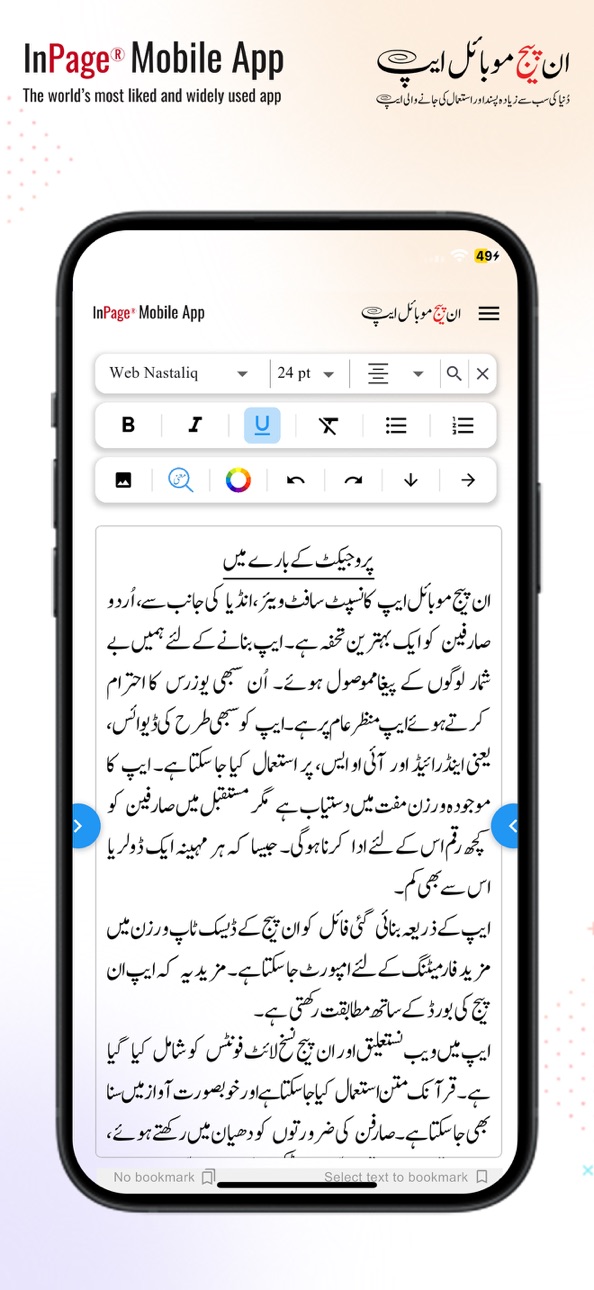
The mobile app has been developed by Concept Software Private Limited, India. Many excellent features have been included in this app for use, especially for the Urdu-speaking world.
Key Features:
• This InPage mobile app can be used to edit and create Nastaliq, Naskh, and Quranic text files in TXT format.
• The text file created through the app can be shared with any user on social media platforms in TXT or PDF format.
• Files created through the mobile app can be imported into the standard version of InPage desktop and formatted there.
• Built-in Aftab, Phonetic, and English InPage keyboards
• Standard InPage keyboards can be installed and used for typing in the InPage mobile app.
We urge you to download the app and have a great experience.
Accessibility
ipadiphonemacrealityDevicetvoswatch
Version history 9 versions
Build 887797406v1.1.32026-07-04 05:23:36
What's New:
• Fixed editor auto-scrolling while editing long documents.
• Fixed cursor visibility when moving to the next line.
• Prevented saving files with an empty filename.
• Corrected the file extension displayed in the Save as PDF dialog.
• Improved the dictionary panel close button.
• Updated the Facebook login message.
• Improved the visibility of the audio player headphone control icon.
• Minor bug fixes and performance improvements.
Build 887200850v1.1.22026-06-19 21:59:39
• Added Table support in the Editor.
• Improved PDF export with better image, table, color, and symbol rendering.
• Enhanced file download reliability across supported Android versions.
• Fixed copy/paste issues when using the custom keyboard.
• Improved editor usability and overall app stability.
• Bug fixes and performance improvements.
Build 885617324v1.1.12026-05-15 07:07:30
• Allow to use Bookmark
• Allow the use of Footnote
• Allow the use of the Table
• Resize and Alignment of Picture
• Quranic Ayaah, Read, Unread, Continue Reading
• Point size 14pt to 40 pt
• InPage Keyboards - Built-in InPage After and InPage Phonetic
Build 879446608v1.0.52025-11-04 15:26:58
- Added, Formatting Tools, Bold, Italic, Underline
- Added, Text, Redo and Undo, unlimited level
- Updated Color Selection UI
- Updated Meaning Selection UI
- Resolved, the App OTP Authentication issue
- User Interface Improvements, a more modern and clean interface
- Bug fixes and enhanced app performance and responsiveness
Build 878745545v1.0.42025-10-08 21:27:54
What's New in Version 1.0.4 :
- Allow to Save as PDF and Share a PDF
- Allow to install the Font as required
- Allow the use of multiple fonts in a single row
- Allow to use of text and background colour
- Allow deletion of files from the cloud storage
- Resolved keyboard flickering issue while selecting paragraphs in the editor
- Updated UI for a more modern and intuitive design
- Updated the Forthcoming features and What's New
- Bug fixes and enhanced app performance and responsiveness
Build 871562853v1.0.32025-01-06 18:15:20
- Cloud upload and download file.
- Save file directly to Cloud.
- Access file directly from Cloud.
- Word meaning of Urdu word.
- Word suggestions.
- Updated UI for a more modern and intuitive design.
- Enhanced app performance and responsiveness.
- Updated the FAQs for better understanding.
Build 870774263v1.0.22024-12-01 09:08:37
- Resolved file-saving issues for a smoother editing experience.
- Added helpful FAQs to assist users with common queries.
- Updated UI for a more modern and intuitive design.
- Improved compatibility between InPage Mobile and Desktop applications.
- Introduced a "Forthcoming Features" section to preview upcoming updates.
- Enhanced app performance and responsiveness.
- Updated the "What's New" section for easier version tracking.
Build 870723476v1.0.12024-11-27 16:11:18
- Resolved file-saving issues for a smoother editing experience.
- Added helpful FAQs to assist users with common queries.
- Updated UI for a more modern and intuitive design.
- Improved compatibility between InPage Mobile and Desktop applications.
- Introduced a "Forthcoming Features" section to preview upcoming updates.
- Enhanced app performance and responsiveness.
- Updated the "What's New" section for easier version tracking.
Build 869553064v1.0.02024-10-15 19:45:00
No pricing data captured yet — comparisons appear once the app has paid storefronts or in-app purchases.
Availability 1 of 1 storefronts
| Region | Language | Price | Ratings | Avg | Version |
|---|---|---|---|---|---|
| US | en-US | Free | 0 | — | 1.1.3 |
Change log 12 changes · US
✎
releaseNotes updated
What's New:
• Fixed editor auto-scrolling while editing long documents.
• Fixed cursor visibility when moving to the next line.
• Prevented saving files with an
✎
description updated
InPage Mobile App
The mobile app has been developed by Concept Software Private Limited, India. Many excellent features have been included in this app for use,
✎
name updated
InPage
◆
Version 1.1.3 released
What's New:
• Fixed editor auto-scrolling while editing long documents.
• Fixed cursor visibility when moving to the next line.
• Prevented saving files with an empty filename.
• Corrected the file extension displayed in the Save as PDF dia
◆
Version 1.1.2 released
• Added Table support in the Editor.
• Improved PDF export with better image, table, color, and symbol rendering.
• Enhanced file download reliability across supported Android versions.
• Fixed copy/paste issues when using the custom keyboa
◆
Version 1.1.1 released
• Allow to use Bookmark
• Allow the use of Footnote
• Allow the use of the Table
• Resize and Alignment of Picture
• Quranic Ayaah, Read, Unread, Continue Reading
• Point size 14pt to 40 pt
• InPage Keyboards - Built-in InPage After and InP
◆
Version 1.0.5 released
- Added, Formatting Tools, Bold, Italic, Underline
- Added, Text, Redo and Undo, unlimited level
- Updated Color Selection UI
- Updated Meaning Selection UI
- Resolved, the App OTP Authentication issue
- User Interface Improvements, a more
◆
Version 1.0.4 released
What's New in Version 1.0.4 :
- Allow to Save as PDF and Share a PDF
- Allow to install the Font as required
- Allow the use of multiple fonts in a single row
- Allow to use of text and background colour
- Allow deletion of files from the c
◆
Version 1.0.3 released
- Cloud upload and download file.
- Save file directly to Cloud.
- Access file directly from Cloud.
- Word meaning of Urdu word.
- Word suggestions.
- Updated UI for a more modern and intuitive design.
- Enhanced app performance and respons
◆
Version 1.0.2 released
- Resolved file-saving issues for a smoother editing experience.
- Added helpful FAQs to assist users with common queries.
- Updated UI for a more modern and intuitive design.
- Improved compatibility between InPage Mobile and Desktop appli
◆
Version 1.0.1 released
- Resolved file-saving issues for a smoother editing experience.
- Added helpful FAQs to assist users with common queries.
- Updated UI for a more modern and intuitive design.
- Improved compatibility between InPage Mobile and Desktop appli
◆
Version 1.0.0 released