Home › Productivity

 US
US
1 of 1 storefronts
Content in en-US
Content in en-US
Information
Apple ID6736619323
Bundle IDday.smarter.app
SellerSeller
Min iOS26.1
Min macOS26.1
Device familiesiphone
Released2025-11-25
Copyright© Dmitri Meshin, Igor Djugostran
Privacy policyLink ↗
Preview 1 platform
iPhone 6 images



What’s New Version 3.5.1
Improved app performance and stability.
Description
Planning with ADHD shouldn't feel like a battle against your own brain.
Smarter Day is built specifically for how ADHD minds actually work - not how productivity gurus think they should. No complex setups. No guilt-tripping overdue notifications. Just a clean, intuitive planner that makes your day visible and manageable.
◉ BUILT FOR ADHD BRAINS
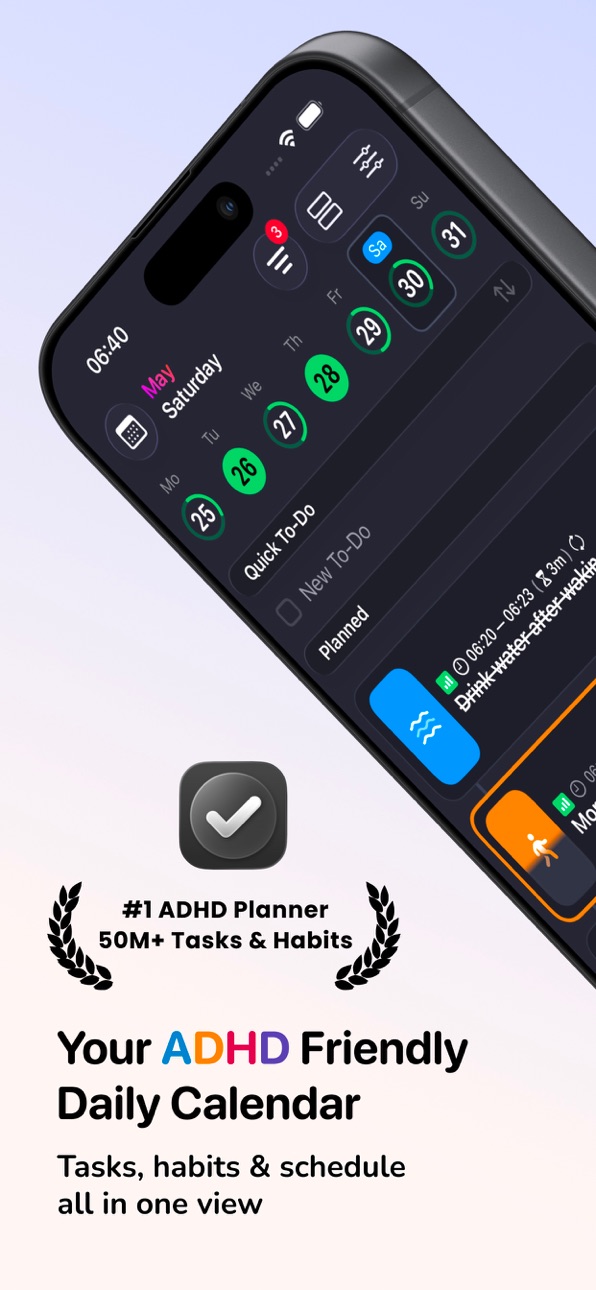
▶ Classical Calendar View - See your week at a glance, with all-day events and timed plans clearly separated. No more time blindness.
▶ Day Structure View - Your entire day visualized in one screen, with a quick todo section at the top for tasks that don't need a specific time and schedule.
▶ Brain Dump Inbox - Capture every thought the moment it hits. Sort it later. No friction, no forgetting.
▶ Habit Tracker - Build routines that actually stick. See your habits alongside your tasks and calendar in one unified view - no switching apps, no forgetting where you tracked what.
▶ Eisenhower Matrix - The only ADHD planner with built-in priority sorting. Instantly see what's urgent vs. important, so decision fatigue doesn't win.
▶ Past -> Yesterday -> Today -> Tomorrow -> Future - Navigate your timeline with one tap. No scrolling through blank weeks.
◉ ONE APP. NOT THREE.
Most people with ADHD end up with a habit tracker in one app, a calendar in another, and a to-do list somewhere else entirely. Then they spend mental energy just remembering which app holds what - which defeats the point.
Smarter Day brings everything into a single unified space. Tasks, habits, and calendar events live together and speak the same language. Turn a task into a habit when something becomes recurring. Turn an event into a task when it needs follow-up. Edit everything in one form, in one place, with zero friction.
Your planner should reduce cognitive load - not add to it.
◉ WHY SMARTER DAY IS DIFFERENT
Most planners are designed for neurotypical brains. They punish missed tasks, overwhelm you with options, and assume you'll just "remember to check."
Smarter Day works differently:
▶ Quick Todos at the top of your day - capture and complete without opening another view
▶ Habit tracker built in - no separate app, no context switching
▶ Tasks, habits and events are interchangeable - one tap to convert between them
▶ All-day events and timed events clearly separated - no visual clutter
▶ One-tap navigation - Today, Tomorrow, Yesterday, Future buttons mean you're always where you need to be
▶ Eisenhower Matrix built in - stop staring at your list wondering what matters
▶ Clean inbox - brain dump everything, organize when you're ready
▶ No red overdue labels - your planner works with you, not against you
▶ Sync your system calendars to Smarter Day to see all schedules in a unified space
◉ PERFECT FOR
▶ Adults newly diagnosed with ADHD
▶ Anyone struggling with time blindness
▶ People who've tried every planner and given up
▶ Students managing coursework and deadlines
▶ Professionals who need structure without rigidity
▶ Anyone who thinks "I just need to see my day differently"
Smarter Day - structure without overwhelm.
Terms of Service: https://smarter.day/terms-and-conditions
Privacy Policy: https://smarter.day/privacy-policy
In-App Purchases US pricing
Subscription Subscription
Pro Family (Monthly) · Monthly 3-day free trial$5.99
Pro Family (Yearly) · Yearly 7-day free trial$55.99
One-Time Purchases
Pro Family (Lifetime)$149.00
Capabilities
In-App Purchases
Accessibility
ipadiphonemacrealityDevicetvoswatch
Version history 21 versions
Build 887763134v3.5.12026-07-03 15:47:09
Improved app performance and stability.
Build 887664949v3.5.02026-07-01 19:27:40
Improved Habits
Habits are now easier to set up and track. Choose a goal, pick how you want to measure progress, and follow your routine throughout the day.
New Search
Find tasks, events, habits, and quick to-dos in one place. Jump to any day and see what’s shared with your contacts.
Build 886855561v3.0.32026-06-12 16:57:07
Wake Up and Sleep Time events: set time and duration in Settings, or turn them off.
Build 886651342v3.0.22026-06-08 17:10:46
Improved app performance and stability.
Build 886406003v3.0.12026-06-02 18:04:43
Improved app performance and stability.
Build 885875268v3.0.02026-05-21 21:42:04
• Attention Filter helps you focus Planner and Inbox on the tasks and habits that need action now.
• Advanced Repeats now support real-life schedules: monthly dates, specific days like the last day of the month, selected months, and rules like the last Friday.
• Time Zones make routines easier while traveling. Floating Timezone keeps a habit at the same local time wherever you are.
• Timeline Widgets bring your day to the Home Screen, with what’s active now, what’s next, all-day items, and weekly progress.
Build 885254967v2.2.72026-05-05 22:15:52
Smarter Day is now available in more languages: Arabic, Chinese (Hong Kong), Danish, Dutch, English (United Kingdom), Finnish, Indonesian, Italian, Korean, Norwegian Bokmål, Portuguese (Portugal), Swedish, Thai, and Turkish.
Build 885054994v2.2.62026-04-29 19:59:05
Improved app performance and stability.
Build 884699475v2.2.52026-04-20 19:16:03
Improved app performance and stability.
Build 884179301v2.2.02026-04-07 17:32:55
Added AI-powered icon suggestions to help you quickly find the right icon when creating
Build 883859599v2.1.82026-03-28 19:38:33
Interface and User Experience Improvements
Build 883813317v2.1.72026-03-27 16:15:32
Improved translations and app stability.
Build 883771076v2.1.52026-03-26 16:57:55
Improved app performance and stability.
Build 883273797v2.1.02026-03-17 17:42:07
What’s New
▶ iCloud Sync
Sync your folders, tasks, and key settings across devices. Changes save locally first and upload automatically when you're online.
▶ Quick To-Do
Add daily to-dos in seconds. Reorder them, move them to another day, turn them into scheduled tasks, or send them to Inbox.
▶ Daily Agenda
View all-day items, scheduled tasks, and quick to-dos together in one clean, scrollable agenda.
▶ Heatmap Stats
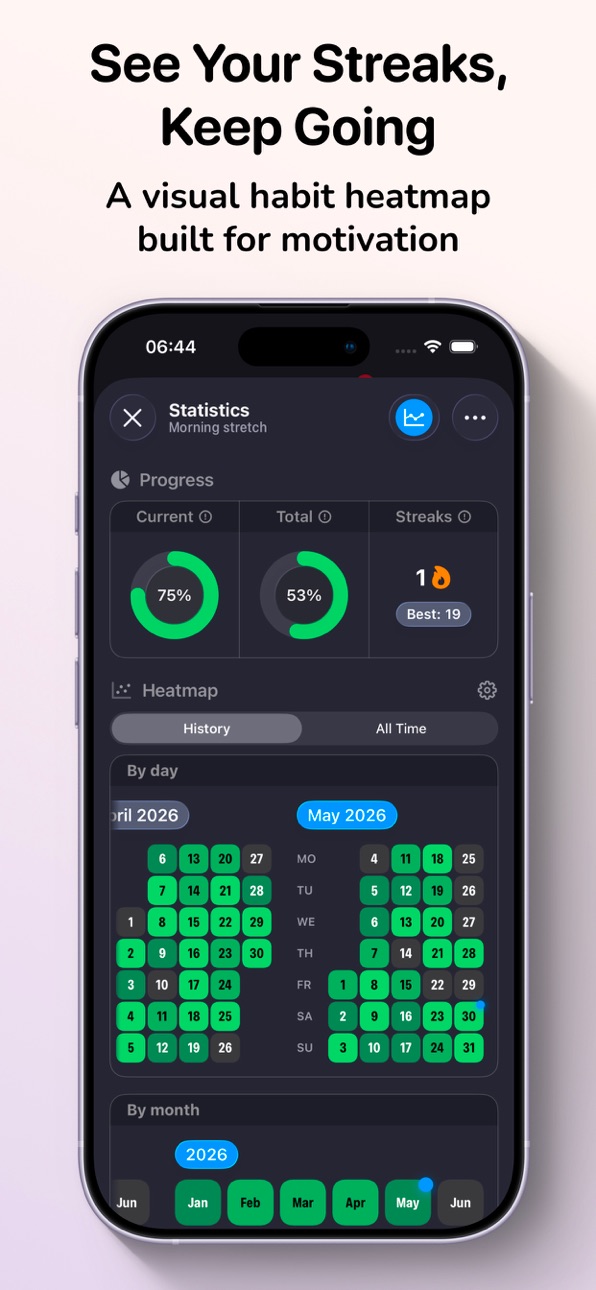
Track your activity with heatmaps across days, weeks, months, and years, and monitor your streaks over time.
Build 882278469v2.0.02026-02-13 02:21:06
SMARTER DAY: THE ULTIMATE DAILY PLANNER AND VISUAL CALENDAR
We have completely reimagined your daily planning experience. This update focuses on speed, flexibility, and deep integration with your lifestyle. Smarter Day is now more than just a to-do list; it is a comprehensive productivity system designed for high achievers, busy professionals, and anyone looking to master their time management. Our goal is to provide the most fluid and intuitive interface for organizing your life, tracking your goals, and achieving peak performance every single day.
WHAT IS NEW IN THIS VERSION
1. VISUAL TIMELINE AND DAILY CALENDAR
Experience a classic timeline view that lets you schedule tasks just like in your favorite calendar app. The new intuitive drag-and-drop interface allows you to visualize your day at a glance. By mapping your tasks onto a 24-hour axis, you can identify gaps in your schedule, prevent over-commitment, and ensure every minute of your day is optimized for success. This is the perfect tool for advanced time-blocking and maintaining a clear overview of your daily agenda and hourly routine.
2. PREMIUM DESIGN AND ENHANCED UX
A total visual overhaul. We have polished every pixel to provide a clean, modern interface that feels intuitive from the first touch. Our enhanced user experience (UX) is now smoother, faster, and more delightful to use. We have removed visual clutter to help you focus on your goals. The minimalist design philosophy ensures that the app stays out of your way while providing all the power you need to stay organized.
3. RAPID NAVIGATION AND CREATION
Efficiency is at the heart of this update. We know that the best productivity tool is the one you actually use, so we made entry as fast as possible.
- Quick-Action UI: Create tasks in seconds with our simplified task manager interface. Use natural language patterns to organize your life instantly.
- Smart Navigation: Reach any feature with fewer taps. The restructured menu helps you stay focused on what matters most, allowing you to jump between your daily timeline, inbox, and settings effortlessly.
4. DYNAMIC AND VARIABLE FIELDS
No more cluttered forms or unnecessary data entry. Smarter Day now features flexible task details.
- Contextual Planning: Add only the information you need in the moment—whether it is a quick note, a priority tag, a location, or a subtask.
- Adaptive Interface: Your to-do list adapts to you, not the other way around. If a task is simple, keep it simple. If it is a complex project, expand it with all the details required for execution.
5. FULL ECOSYSTEM INTEGRATION
Smarter Day now lives in harmony with the tools you already use every day.
- System Calendar Support: Sync seamlessly with your system Calendar. Manage your work-life balance by seeing all your professional appointments and personal tasks in one unified view.
- Alarms and Notifications: Never miss a deadline again. We have added support for system-level alarms alongside standard push notifications. Use alarms for critical "must-do" tasks that require your immediate attention, ensuring you stay accountable to your schedule.
WHY CHOOSE SMARTER DAY FOR YOUR PRODUCTIVITY?
- ADVANCED TIME BLOCKING: Use the visual timeline to dedicate specific blocks of time to your most important work, deep work sessions, and personal development.
- SMART REMINDERS AND ALERTS: Set location-based or time-based alerts to keep your day on track. The addition of system alarms ensures you never overlook a high-priority event.
- PRIORITY FOCUS: Highlight your top three tasks for the day to ensure you make progress on what truly matters.
- SEAMLESS CROSS-DEVICE SYNC: Your data is always available across all your devices, keeping you productive whether you are at your desk or on the go.
- HABIT FORMATION: Use our flexible scheduling to build long-term habits and track your consistency over time.
Build 881169213v1.1.02026-01-06 17:27:51
- Apple Calendar integration
Connect your Apple Calendar events directly in the app, with an option to automatically add reminders to events that don’t already have alerts.
- Task & Habit statistics
Get richer insights right in the details preview sheet: overall progress, trend charts, and a day-by-day history showing your progress for each day.
Build 880816649v1.0.42025-12-19 02:49:06
Improved stability
Build 880702042v1.0.32025-12-16 00:49:14
Improved stability
Build 880364194v1.0.22025-12-12 20:08:12
Improved stability
Build 880186387v1.0.12025-11-29 01:47:20
Improved stability
Build 869539740v1.02025-11-25 19:05:47
Price history by region
Currency
Show
Columns
Search
Availability 1 of 1 storefronts
| Region | Language | Price | Ratings | Avg | Version |
|---|---|---|---|---|---|
| US | en-US | Free | 11 | 5.0 | 3.5.1 |
Change log 25 changes · US
✎
releaseNotes updated
Improved app performance and stability.
✎
description updated
Planning with ADHD shouldn't feel like a battle against your own brain.
Smarter Day is built specifically for how ADHD minds actually work - not how productivi
✎
subtitle updated
ADHD Planner, Routine & Focus
✎
name updated
Smarter Day: Daily Structure
◆
Version 3.5.1 released
Improved app performance and stability.
◆
Version 3.5.0 released
Improved Habits
Habits are now easier to set up and track. Choose a goal, pick how you want to measure progress, and follow your routine throughout the day.
New Search
Find tasks, events, habits, and quick to-dos in one place. Jump to any
◆
Version 3.0.3 released
Wake Up and Sleep Time events: set time and duration in Settings, or turn them off.
◆
Version 3.0.2 released
Improved app performance and stability.
◆
Version 3.0.1 released
Improved app performance and stability.
◆
Version 3.0.0 released
• Attention Filter helps you focus Planner and Inbox on the tasks and habits that need action now.
• Advanced Repeats now support real-life schedules: monthly dates, specific days like the last day of the month, selected months, and rules l
◆
Version 2.2.7 released
Smarter Day is now available in more languages: Arabic, Chinese (Hong Kong), Danish, Dutch, English (United Kingdom), Finnish, Indonesian, Italian, Korean, Norwegian Bokmål, Portuguese (Portugal), Swedish, Thai, and Turkish.
◆
Version 2.2.6 released
Improved app performance and stability.
◆
Version 2.2.5 released
Improved app performance and stability.
◆
Version 2.2.0 released
Added AI-powered icon suggestions to help you quickly find the right icon when creating
◆
Version 2.1.8 released
Interface and User Experience Improvements
◆
Version 2.1.7 released
Improved translations and app stability.
◆
Version 2.1.5 released
Improved app performance and stability.
◆
Version 2.1.0 released
What’s New
▶ iCloud Sync
Sync your folders, tasks, and key settings across devices. Changes save locally first and upload automatically when you're online.
▶ Quick To-Do
Add daily to-dos in seconds. Reorder them, move them to another day,
◆
Version 2.0.0 released
SMARTER DAY: THE ULTIMATE DAILY PLANNER AND VISUAL CALENDAR
We have completely reimagined your daily planning experience. This update focuses on speed, flexibility, and deep integration with your lifestyle. Smarter Day is now more than jus
◆
Version 1.1.0 released
- Apple Calendar integration
Connect your Apple Calendar events directly in the app, with an option to automatically add reminders to events that don’t already have alerts.
- Task & Habit statistics
Get richer insights right in the det
◆
Version 1.0.4 released
Improved stability
◆
Version 1.0.3 released
Improved stability
◆
Version 1.0.2 released
Improved stability
◆
Version 1.0.1 released
Improved stability
◆
Version 1.0 released