Home › Productivity

 US
US
1 of 1 storefronts
Content in en-US
Content in en-US
Information
Apple ID6736371152
Bundle IDcom.mehmetkoksal.DayDoApp
SellerSeller
Min iOS16.0
Min macOS13.0
Device familiesiphone, ipad
Released2024-10-02
Copyright© Mehmet Koksal
Privacy policyLink ↗
Preview 2 platforms
iPhone 5 images




iPad 4 images


What’s New Version 1.0.2
MAJOR UPDATE - DayDo
We've completely reimagined DayDo with powerful new features to supercharge your productivity!
NEW FEATURES:
CUSTOM GROUPS
• Create unlimited custom groups with personalized colors
• Choose from 100+ icons to represent your groups
• Organize tasks exactly how you want
• Beautiful gradient themes for default groups
PRIORITY MANAGEMENT
• Assign High, Medium, or Low priority to tasks
• Visual priority indicators with color coding
• Smart filtering by priority level
• Focus on what matters most
STATISTICS DASHBOARD
• Track your productivity with visual statistics
• Animated completion percentage circle
• Priority breakdown with progress bars
• Group-based progress tracking
• Monitor weekly achievements
TASK ATTACHMENTS
• Add photos, documents, and audio files to tasks
• Keep all related information in one place
• Preview attachments directly in the app
• Support for multiple file types
RICH TASK DETAILS
• Add detailed notes and descriptions
• Expanded content area for task information
• Better task organization
IMPROVEMENTS:
• Enhanced group management interface
• Optimized color picker for better selection
• Improved icon picker with more space
• Multiple sorting options per group
• Drag & drop task reordering
• Smoother animations and haptic feedback
• Refined UI with modern design
• Better performance and stability
This is our biggest update yet! We hope you love the new DayDo. If you enjoy the app, please leave us a review!
Got feedback? We'd love to hear from you!
Description
DayDo - Smart Task Manager & Daily Planner
Transform your productivity with DayDo, the ultimate todo list and task manager designed to keep you organized and focused. Whether you're managing daily tasks, annual goals, or project workflows, DayDo provides powerful features to help you achieve more.
KEY FEATURES:
CUSTOM GROUPS & ORGANIZATION
• Create unlimited custom groups with personalized colors and icons
• Organize tasks into categories that match your workflow
• Default groups: DayDo List for daily tasks, Annual Targets for long-term goals
• Drag and drop to reorder groups and tasks
PRIORITY MANAGEMENT
• Assign priority levels: High, Medium, Low, or None
• Visual priority indicators with color coding
• Filter and sort tasks by priority
• Focus on what matters most
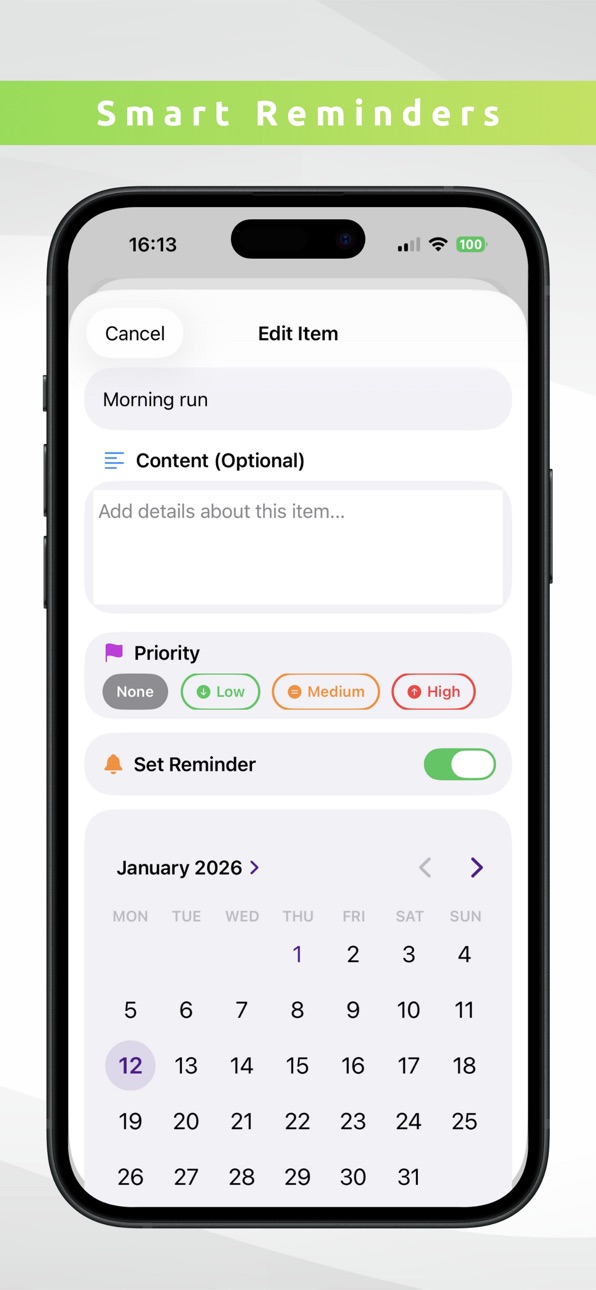
SMART REMINDERS
• Set custom reminders for important tasks
• Never miss a deadline or appointment
• Track active reminders in statistics
RICH TASK DETAILS
• Add detailed notes and descriptions to tasks
• Attach photos, documents, and audio files
• Keep all task-related information in one place
• View attachment previews and file sizes
POWERFUL SORTING OPTIONS
• Manual drag-and-drop ordering
• Sort by date created
• Sort by priority level
• Customize sorting per group
COMPREHENSIVE STATISTICS
• Visual completion percentage with animated progress circle
• Track tasks completed this week
• Priority breakdown with progress bars
• Group-based progress tracking
• Monitor active reminders and incomplete tasks
BEAUTIFUL & INTUITIVE DESIGN
• Clean, modern interface
• Gradient color themes for groups
• Smooth animations and haptic feedback
• Dark mode support
• Easy-to-use task management
PRIVACY FIRST
• All data stored locally on your device
• No account required
• No tracking or ads
• Your tasks stay private
PERFECT FOR:
• Daily task management and to-do lists
• Project planning and organization
• Goal tracking and habit building
• Work productivity and time management
• Personal task organization
• Student assignment tracking
• Shopping lists and checklists
WHY CHOOSE DAYDO?
DayDo combines simplicity with powerful features. Unlike cluttered task managers, DayDo focuses on what you need: an elegant way to organize tasks, set priorities, track progress, and achieve your goals. The custom group system with colorful icons makes organization visual and intuitive, while statistics help you stay motivated by showing your progress.
Whether you're a busy professional, student, or anyone looking to boost productivity, DayDo adapts to your needs. Create custom workflows with groups, prioritize tasks effectively, set reminders to stay on track, and attach files to keep everything organized.
Download DayDo today and experience the perfect balance of simplicity and functionality in a task manager. Start organizing your tasks, tracking your progress, and achieving your goals!
FEATURES SUMMARY:
• Unlimited custom groups with colors & icons
• Priority levels (High, Medium, Low)
• Smart reminders with notifications
• Task attachments (photos, documents, audio)
• Detailed notes and descriptions
• Multiple sorting options
• Comprehensive statistics dashboard
• Drag & drop task ordering
• Progress tracking
• Clean, modern design
• Local data storage
• No ads, no tracking
• Completely free
Stay organized. Stay productive. Stay focused with DayDo.
Accessibility
ipadiphonemacrealityDevicetvoswatch
Version history 2 versions
Build 881141641v1.0.22026-01-02 02:47:07
MAJOR UPDATE - DayDo
We've completely reimagined DayDo with powerful new features to supercharge your productivity!
NEW FEATURES:
CUSTOM GROUPS
• Create unlimited custom groups with personalized colors
• Choose from 100+ icons to represent your groups
• Organize tasks exactly how you want
• Beautiful gradient themes for default groups
PRIORITY MANAGEMENT
• Assign High, Medium, or Low priority to tasks
• Visual priority indicators with color coding
• Smart filtering by priority level
• Focus on what matters most
STATISTICS DASHBOARD
• Track your productivity with visual statistics
• Animated completion percentage circle
• Priority breakdown with progress bars
• Group-based progress tracking
• Monitor weekly achievements
TASK ATTACHMENTS
• Add photos, documents, and audio files to tasks
• Keep all related information in one place
• Preview attachments directly in the app
• Support for multiple file types
RICH TASK DETAILS
• Add detailed notes and descriptions
• Expanded content area for task information
• Better task organization
IMPROVEMENTS:
• Enhanced group management interface
• Optimized color picker for better selection
• Improved icon picker with more space
• Multiple sorting options per group
• Drag & drop task reordering
• Smoother animations and haptic feedback
• Refined UI with modern design
• Better performance and stability
This is our biggest update yet! We hope you love the new DayDo. If you enjoy the app, please leave us a review!
Got feedback? We'd love to hear from you!
Build 869414695v1.02024-10-03 04:57:44
No pricing data captured yet — comparisons appear once the app has paid storefronts or in-app purchases.
Availability 1 of 1 storefronts
| Region | Language | Price | Ratings | Avg | Version |
|---|---|---|---|---|---|
| US | en-US | Free | 0 | — | 1.0.2 |
Change log 6 changes · US
✎
releaseNotes updated
MAJOR UPDATE - DayDo
We've completely reimagined DayDo with powerful new features to supercharge your productivity!
NEW FEATURES:
CUSTOM GROUPS
• Cr
✎
description updated
DayDo - Smart Task Manager & Daily Planner
Transform your productivity with DayDo, the ultimate todo list and task manager designed to keep you organized and
✎
subtitle updated
Plan your day!
✎
name updated
Day Do - To Do List
◆
Version 1.0.2 released
MAJOR UPDATE - DayDo
We've completely reimagined DayDo with powerful new features to supercharge your productivity!
NEW FEATURES:
CUSTOM GROUPS
• Create unlimited custom groups with personalized colors
• Choose from 100+ icons
◆
Version 1.0 released