Home › Business

 US
US
1 of 1 storefronts
Content in en-US
Content in en-US
Information
Apple ID6714472509
Bundle IDcom.pdfscanner.io
SellerSeller
Min iOS13.0
Min macOS11.0
Device familiesiphone, ipad, ipod
Released2024-11-29
Copyright© JetApps 2025
Privacy policyLink ↗
Preview 2 platforms
iPhone 9 images




iPad 9 images


What’s New Version 1.0.54.70
This update fixes bugs and improves overall performance for a smoother experience.
Thanks for using the app
Description
Scaneum: PDF Document Scanner & OCR
Turn your iPhone into a fast, portable PDF scanner and document scanner with advanced OCR text recognition. Scan, sign, edit, and convert any document to PDF, JPEG, or Word — anytime, anywhere.
Whether you’re in the office, at home, or on the go, Scaneum helps you stay productive and organized.
Scan Anything, Anytime
• Scan contracts, receipts, invoices, ID cards, and forms in seconds.
• Capture notes, textbook pages, photos, and whiteboards with clarity.
• Digitize books, papers, and multi-page documents seamlessly.
• Convert images (JPEG, PNG) into PDFs or Word files instantly.
• Save space with compressed scans without losing quality.
Edit, Sign & Annotate
• Highlight important text or sections in your scans.
• Add notes, comments, or stamps directly on your documents.
• Sign PDFs or add your signature to forms and contracts.
• Fill out forms digitally and send them back instantly.
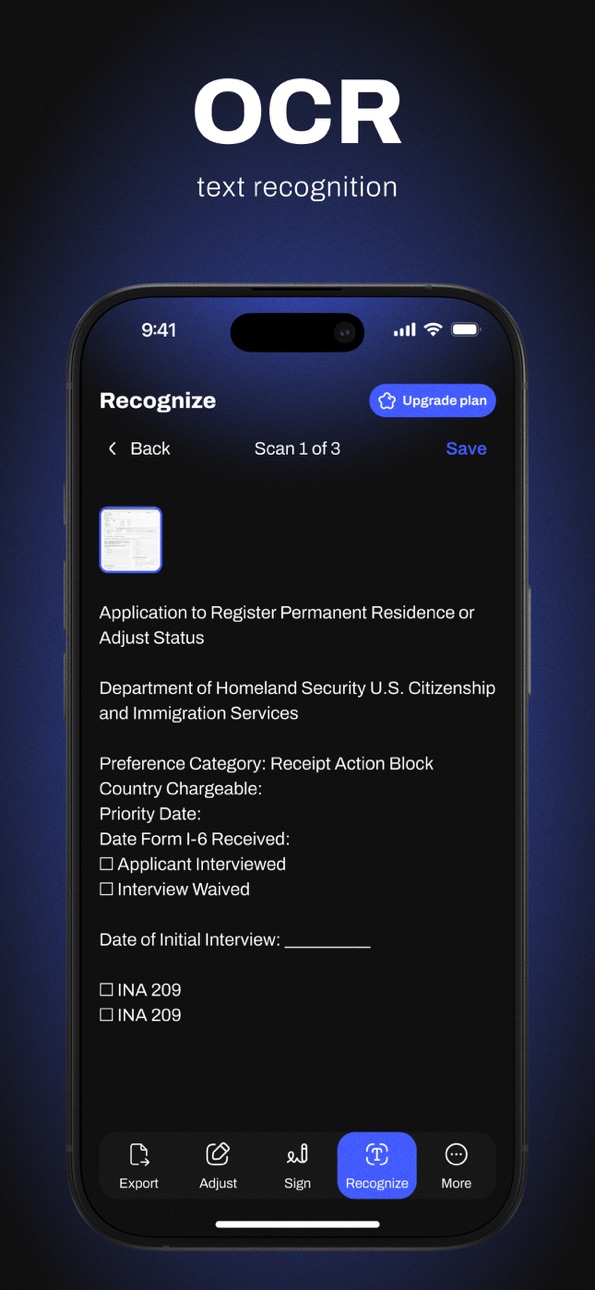
Powerful OCR Text Recognition
• Make any scanned document editable and searchable.
• Extract text from receipts, books, or papers for quick editing.
• Copy and share text directly from your scans.
Easy Export & Sharing
• Save to your device, email, or favorite cloud service (Google Drive, Dropbox, iCloud).
• Organize scans into folders for quick access.
• Share via messenger, AirDrop, or print wirelessly.
Multiple Scan Modes
• Choose between color, grayscale, or black & white.
• Automatic edge detection for perfectly aligned scans.
• Batch scanning for multi-page documents.
100% Offline & Secure
• All scans are stored securely on your iPhone.
• Work without internet — perfect for confidential documents.
Why Go Premium?
Unlock the full power of Scaneum:
• Unlimited scans, folders, and signature tools.
• Advanced OCR & document editing.
• PDF to Word and image conversions.
• Priority customer support.
Thousands of users trust Scaneum to boost their productivity every day.
Scan smarter, sign faster, and organize better — all from your pocket.
Download Scaneum now and turn your iPhone into the only PDF scanner you’ll ever need. Your pocket document scanner is just one tap away.
### More Ways to Use Scaneum
Whether you’re a student, professional, or freelancer, Scaneum is designed to handle every scanning need.
For business:
• Scan receipts for expense tracking and taxes.
• Archive invoices, contracts, and agreements in organized folders.
• Digitize business cards and quickly extract contact details with OCR.
For education:
• Scan and store lecture notes, textbook pages, and research papers.
• Convert handwritten notes into editable text for easy study.
• Share study materials instantly with classmates via email or cloud.
For personal use:
• Keep copies of IDs, passports, and insurance forms securely on your device.
• Scan and sign rental agreements, legal documents, or medical forms.
• Capture and save old photographs in high resolution.
Supported file formats:
• PDF, JPEG, PNG, Word, TXT — choose the format that works for you.
• Convert images to PDF or Word in one tap.
• Export to cloud services like Google Drive, Dropbox, iCloud, or share via email.
Why choose Scaneum?
• It’s fast, easy to use, and works completely offline.
• Free to download — start scanning immediately.
• Upgrade to unlock unlimited scans, folders, advanced OCR, and signature tools.
Stay organized and keep all your important documents in one place.
From receipts to books, from forms to photos — Scaneum is your all-in-one pocket scanner.
By using the app, you confirm that you acknowledge and accept our Privacy Policy and Terms of Use:
https://pdfscanner.monster/privacy-policy/
https://pdfscanner.monster/eula/
Capabilities
In-App Purchases
Accessibility
ipadiphonemacrealityDevicetvoswatch
Version history 25 versions
Build 878660889v1.0.54.702025-10-06 09:28:37
This update fixes bugs and improves overall performance for a smoother experience.
Thanks for using the app
Build 878463428v1.0.52.682025-09-29 14:16:40
This update fixes bugs and improves overall performance for a smoother experience.
Thanks for using the app
Build 878194406v1.0.46.622025-09-18 06:07:06
This update fixes bugs and improves overall performance for a smoother experience.
Thanks for using the app
Build 877571736v1.0.43.592025-08-26 16:30:39
This update fixes bugs and improves overall performance for a smoother experience.
Thanks for using the app
Build 877341141v1.0.41.572025-08-19 06:33:20
This update fixes bugs and improves overall performance for a smoother experience.
Thanks for using the app
Build 877283798v1.0.40.562025-08-15 17:50:41
This update fixes bugs and improves overall performance for a smoother experience.
Thanks for using the app
Build 877179103v1.0.39.532025-08-13 06:06:43
This update fixes bugs and improves overall performance for a smoother experience.
Thanks for using the app
Build 877099395v1.0.38.522025-08-11 06:01:23
This update fixes bugs and improves overall performance for a smoother experience.
Thanks for using the app!
Build 876617227v1.0.36.452025-07-23 08:09:29
In this release we've made some bug fixes and performance improvements.
Build 876409192v1.0.35.442025-07-16 06:03:16
bugs fix
Build 876323686v1.034.432025-07-11 16:38:12
Bugs fix
Build 876138467v1.0.33.422025-07-07 06:00:25
bugs fix
Build 876068634v1.0.32.412025-07-02 16:13:34
bugs fix
Build 875848576v1.0.31.392025-06-25 12:06:13
bugs fix
Build 875626631v1.0.30.382025-06-17 06:15:49
bugs fix
Build 875537706v1.0.29.362025-06-13 12:21:06
bugs fix
Build 875309030v1.0.26.302025-06-04 14:58:10
bugs fix
Build 875213145v1.0.292025-06-04 07:35:16
bugs fix
Build 875097373v1.0.252025-05-30 19:43:38
bugs fix
Build 875080033v1.0.242025-05-27 06:35:45
bugs fix
Build 873779603v1.0.232025-04-04 14:14:57
added analytics
Build 873761447v1.0.222025-04-03 18:19:55
added analytics
Build 873694831v1.0.212025-04-02 06:02:07
added analytics
Build 873493062v1.0.202025-03-25 07:09:01
Bug Fixes
Build 873402109v1.0.192025-03-21 07:04:22
Fixing analytics bugs
No pricing data captured yet — comparisons appear once the app has paid storefronts or in-app purchases.
Availability 1 of 1 storefronts
| Region | Language | Price | Ratings | Avg | Version |
|---|---|---|---|---|---|
| US | en-US | Free | 0 | — | 1.0.54.70 |
Change log 29 changes · US
✎
releaseNotes updated
This update fixes bugs and improves overall performance for a smoother experience.
Thanks for using the app
✎
description updated
Scaneum: PDF Document Scanner & OCR
Turn your iPhone into a fast, portable PDF scanner and document scanner with advanced OCR text recognition. Scan, sign, edi
✎
subtitle updated
Scan, Sign, OCR & Converter
✎
name updated
Scaneum: PDF Document Scanner
◆
Version 1.0.54.70 released
This update fixes bugs and improves overall performance for a smoother experience.
Thanks for using the app
◆
Version 1.0.52.68 released
This update fixes bugs and improves overall performance for a smoother experience.
Thanks for using the app
◆
Version 1.0.46.62 released
This update fixes bugs and improves overall performance for a smoother experience.
Thanks for using the app
◆
Version 1.0.43.59 released
This update fixes bugs and improves overall performance for a smoother experience.
Thanks for using the app
◆
Version 1.0.41.57 released
This update fixes bugs and improves overall performance for a smoother experience.
Thanks for using the app
◆
Version 1.0.40.56 released
This update fixes bugs and improves overall performance for a smoother experience.
Thanks for using the app
◆
Version 1.0.39.53 released
This update fixes bugs and improves overall performance for a smoother experience.
Thanks for using the app
◆
Version 1.0.38.52 released
This update fixes bugs and improves overall performance for a smoother experience.
Thanks for using the app!
◆
Version 1.0.36.45 released
In this release we've made some bug fixes and performance improvements.
◆
Version 1.0.35.44 released
bugs fix
◆
Version 1.034.43 released
Bugs fix
◆
Version 1.0.33.42 released
bugs fix
◆
Version 1.0.32.41 released
bugs fix
◆
Version 1.0.31.39 released
bugs fix
◆
Version 1.0.30.38 released
bugs fix
◆
Version 1.0.29.36 released
bugs fix
◆
Version 1.0.26.30 released
bugs fix
◆
Version 1.0.29 released
bugs fix
◆
Version 1.0.25 released
bugs fix
◆
Version 1.0.24 released
bugs fix
◆
Version 1.0.23 released
added analytics
◆
Version 1.0.22 released
added analytics
◆
Version 1.0.21 released
added analytics
◆
Version 1.0.20 released
Bug Fixes
◆
Version 1.0.19 released
Fixing analytics bugs