Home › Utilities

 US
US
1 of 1 storefronts
Content in en-US
Content in en-US
Information
Preview 2 platforms
iPhone 6 images




iPad 6 images


What’s New Version 1.8
This update refreshes FingerWag's setup flow and filtering guidance, improves review timing, and keeps the focus on private rule-based protection for scam, spam, and political texts.
Description
FingerWag is a private spam text blocker for iPhone that helps filter political texts, scam SMS, fundraising messages, delivery scams, toll scams, and other unwanted texts.
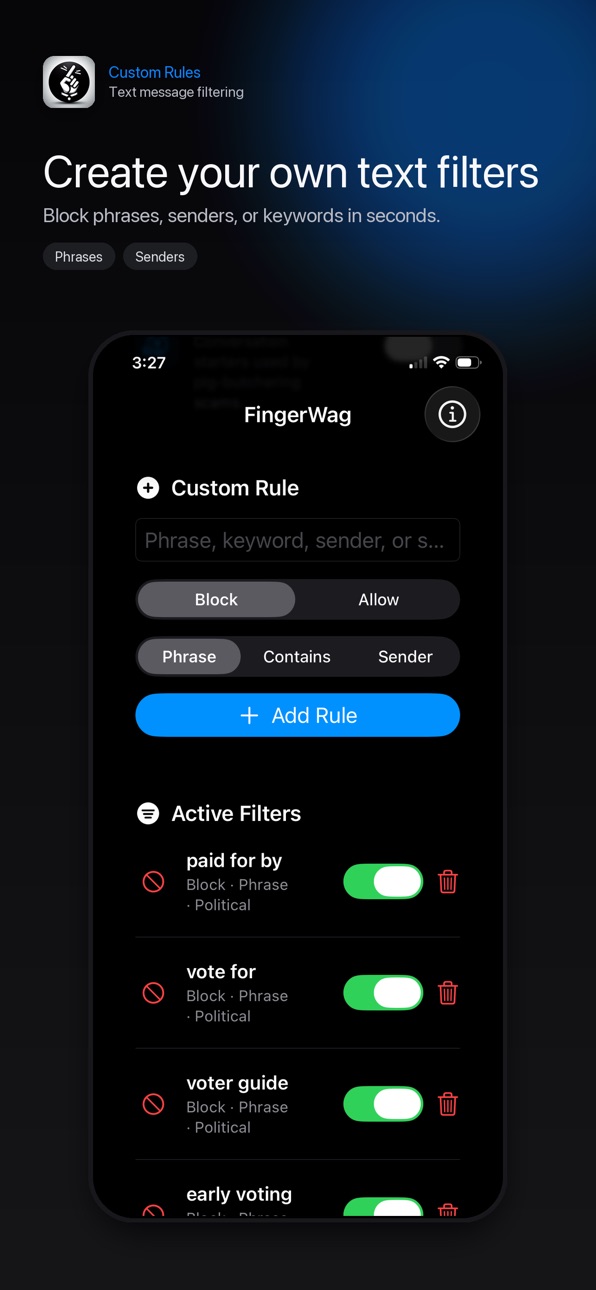
Use ready-made rule packs for common spam patterns like political texts, campaign outreach, fundraising requests, USPS and delivery scams, toll scams, wrong-number scams, and smishing attempts. You can also create custom rules for phrases, keywords, or senders you want to block or allow.
FingerWag works with Apple’s built-in Text Message Filtering system. Once enabled in Messages settings, FingerWag checks texts from unknown senders and sends matching messages to the Junk folder.
Why people use FingerWag:
• Block spam texts with rules you control
• Filter political text messages and campaign outreach
• Reduce fundraising and donation request texts
• Filter scam SMS, toll scams, and delivery scams
• Create custom filters for recurring phrases or senders
• Keep wanted messages with allow rules
• Filter on your iPhone without uploading message text
• No account required
FingerWag is designed for people who want a simple, private way to cut down on recurring spam text messages, scam texts, and unwanted political texts.
Important: FingerWag filters messages from unknown senders through Apple’s Messages filtering system. Existing conversations and contacts are not filtered by iOS message filter extensions.
To enable FingerWag after installing:
Open Settings, choose Apps, choose Messages, open Text Message Filtering, then select FingerWag.
Terms of Use (EULA):
https://www.apple.com/legal/internet-services/itunes/dev/stdeula/
In-App Purchases US pricing
FingerWag Pro Subscription
Yearly$9.99
Capabilities
In-App Purchases
Accessibility
ipadiphonemacrealityDevicetvoswatch
Version history 7 versions
Build 885967463v1.82026-05-21 21:15:43
This update refreshes FingerWag's setup flow and filtering guidance, improves review timing, and keeps the focus on private rule-based protection for scam, spam, and political texts.
Build 885648162v1.72026-05-14 18:16:24
This update makes FingerWag easier to use and more accurate. We added country-aware scam protection for the US, Canada, UK, Australia, Ireland, and New Zealand, simplified custom filter setup, improved plan and stats visibility, and reduced false positives across political, survey, toll, delivery, traffic, and scam-message filters.
Build 885187743v1.62026-05-03 16:55:28
- Added more spam and scam blocking rules.
- Improved political text filtering.
- Added protection for delivery, toll, traffic/DMV, fundraising, and wrong-
number scams.
- Reduced false positives for normal reminders, surveys, package updates, and
traffic alerts.
- Updated bundled rules for existing users.
Build 885093509v1.52026-05-01 07:11:21
FingerWag 1.5 adds a cleaner app experience, clearer setup guidance, and improved support for enabling text message filtering in newer iOS versions.
This update also includes privacy and App Store readiness improvements and an annual subscription.
Build 869567552v1.22024-10-08 23:36:24
Updated keywords, description, and subtitle.
Build 869272648v1.12024-09-26 10:04:13
1. Added popup alert to alert users about updating Messages settings to allow message filtering with FingerWag.
2. Updated to ignore case sensitivity with keywords.
Build 869213625v1.02024-09-24 14:57:17
Price history by region
Currency
Show
Columns
Search
Availability 1 of 1 storefronts
| Region | Language | Price | Ratings | Avg | Version |
|---|---|---|---|---|---|
| US | en-US | Free | 3 | 5.0 | 1.8 |
Change log 11 changes · US
✎
releaseNotes updated
This update refreshes FingerWag's setup flow and filtering guidance, improves review timing, and keeps the focus on private rule-based protection for scam, spam
✎
description updated
FingerWag is a private spam text blocker for iPhone that helps filter political texts, scam SMS, fundraising messages, delivery scams, toll scams, and other unw
✎
subtitle updated
Stop scam & spam texts
✎
name updated
FingerWag: Spam Text Blocker
◆
Version 1.8 released
This update refreshes FingerWag's setup flow and filtering guidance, improves review timing, and keeps the focus on private rule-based protection for scam, spam, and political texts.
◆
Version 1.7 released
This update makes FingerWag easier to use and more accurate. We added country-aware scam protection for the US, Canada, UK, Australia, Ireland, and New Zealand, simplified custom filter setup, improved plan and stats visibility, and reduced
◆
Version 1.6 released
- Added more spam and scam blocking rules.
- Improved political text filtering.
- Added protection for delivery, toll, traffic/DMV, fundraising, and wrong-
number scams.
- Reduced false positives for normal reminders, surveys, p
◆
Version 1.5 released
FingerWag 1.5 adds a cleaner app experience, clearer setup guidance, and improved support for enabling text message filtering in newer iOS versions.
This update also includes privacy and App Store readiness improvements and an annual subsc
◆
Version 1.2 released
Updated keywords, description, and subtitle.
◆
Version 1.1 released
1. Added popup alert to alert users about updating Messages settings to allow message filtering with FingerWag.
2. Updated to ignore case sensitivity with keywords.
◆
Version 1.0 released