Home › Graphics & Design

 US
US
1 of 1 storefronts
Content in en-US
Content in en-US
Information
Preview 2 platforms
iPhone 10 images


iPad 10 images




What’s New Version 1.3.2
v1.3.2
Fixed bug introduced in v1.3.1 preventing patch saving when in HDR mode.
v1.3.1
Various bug fixes and performance improvements.
v1.3.0
New monthly subscription option now available!
Chromatose v1.3.0 introduces several new creative tools including a live Camera Generator, Wave Effect, Crop Effect, and new Keying capabilities.
Also included are virtual MIDI routing, performance optimizations, and a variety of usability improvements throughout the app.
〉Camera Generator (New)
Capture a live video stream from your device's cameras. Supports zoom control and automatic orientation handling. Feed the live camera directly into your effects chain.
〉Wave Effect (New)
Apply FM/AM wave distortions to any input with full control over 3 waves. Parameters include: waveshape, frequency, amplitude, position, rotation, phase, and attenuation.
〉Crop Effect (New)
Crop the output using three shape modes: Rectangle, Quad, or Oval. Great for configuring projector output, basic projection mapping, or creative framing.
〉Virtual MIDI Input (New)
Other audio apps on the same device (e.g. sequencers) can route MIDI directly to Chromatose without any external hardware.
〉Device Preview (New)
When an external screen is connected, the local device screen now shows a live downscaled copy of the external output instead of only the HUD controls.
〉Patch Auto-Save (New)
Unsaved changes are automatically saved when the app goes into the background. Your work is restored when you return, so you never lose changes.
〉Keying Effect (Updated)
New `mode` selector to key by hue, or saturation in addition to luma. Enables precise color-based keying for isolating or removing specific colors from the image.
〉Performance View (Updated)
Macro knobs gain main powerful new features:
• Add custom names to macro knobs.
• Display all mapped parameters to see what each knob controls at a glance.
• Deep links directly to the mapped parameters in the Design View for quick navigation & editing.
• Delete all or individual mappings directly from the Performance View.
• Configure MIDI mappings directly from the Performance View.
〉Audio Playback (Updated)
Music from other apps can now play simultaneously while the audio engine is enabled. Chromatose no longer interrupts audio from other apps.
〉Photo Generator (Updated)
New built-in rectangle cropping parameters for trimming the source image before any tiling or spacing is applied.
〉Library (Updated)
• Remembers your last used query (search text, sort order, tag filters) when reopening.
• Infinite scrolling replaces full list loading for faster performance with large patch collections.
• Searching no longer hides the toolbar.
〉Modulation (Updated)
New 32x and 1/32 rate multipliers for extreme fast or slow modulation speeds.
〉Mixer Blending (Breaking Change)
Fixed a significant bug where blend modes and composite operators were applied incorrectly. All combinations now produce correct results with proper alpha handling and smooth edges. New Color Dodge blend mode added.
NOTE: Patches saved before this update may look different. You may need to re-adjust blend and composite settings on existing patches.
〉Factory Presets
All presets have been updated to include descriptive macro names using the new custom labeling feature.
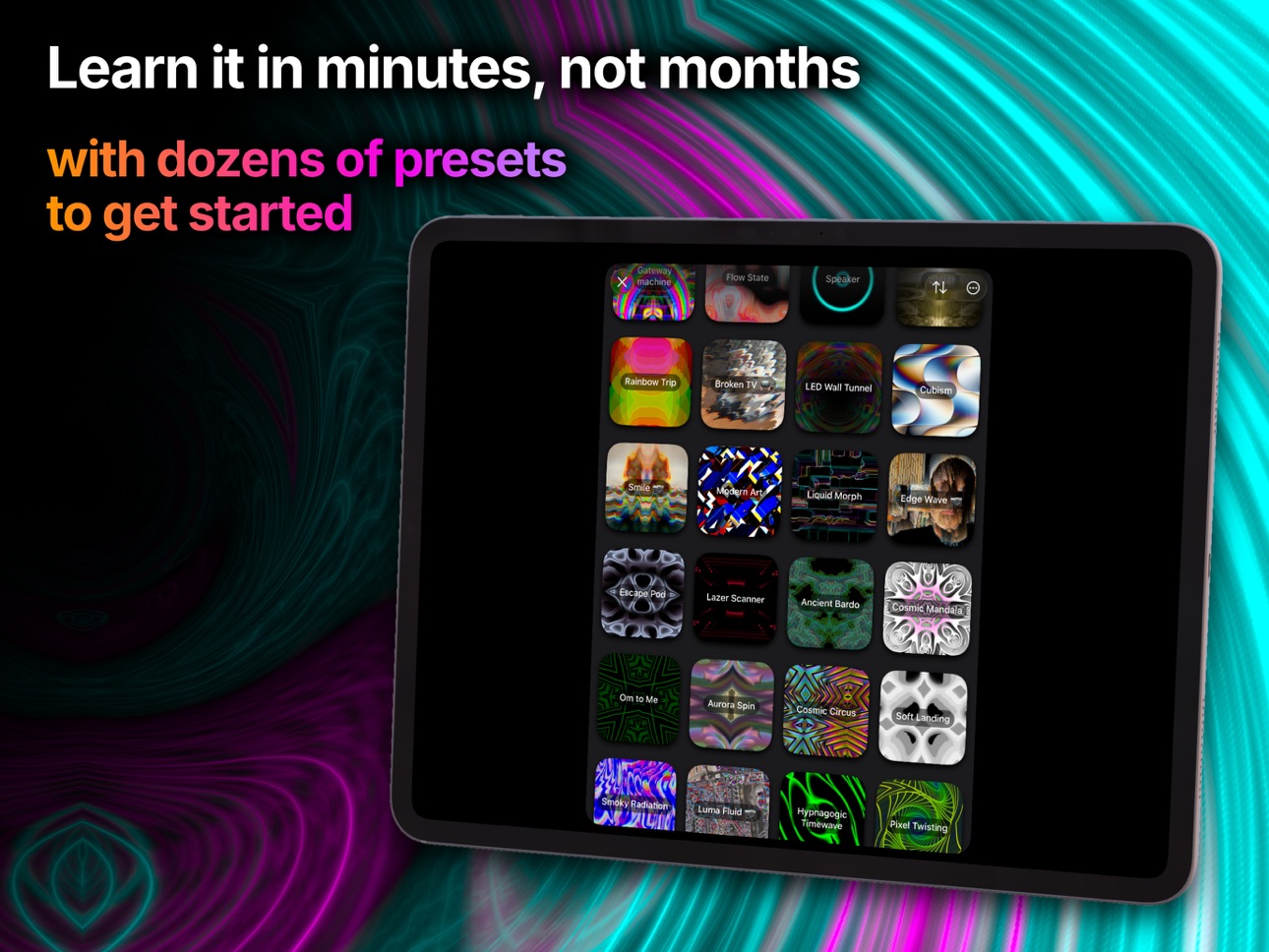
Chromatose now ships with a total of 32 hand-crafted presets patches.
9 New Factory Presets:
• Edge Wave
• Smile
• Luma Fluid
• Broken TV
• Cubism
• Flow State
• Drippy Wave
• Wiggly Bounce
• Modern Art
〉Stability, Performance, Bug Fixes
• Various performance improvements, bug fixes, and usability enhancements.
Description
Chromatose is a real-time, audio-reactive visual synth for iPhone and iPad — a modular video synthesizer and visualizer that turns your input and sound into a hypnotic, trippy light show.
Create original, generative visuals by hand. No coding, no AI prompts, no bulky hardware.
Connect a TV or projector via HDMI or AirPlay to turn any space into an immersive atmosphere — for live performance, meditation, party, or chilling.
Learn it in under an hour. Create fresh ideas for years.
〉Perfect for:
Live performers, VJs, DJs, music producers, installation artists, concert and stage designers, content creators, music video directors, generative artists, and creative explorers. Works for raves, clubs, afterhours, festivals, ambient galleries, meditation spaces, and live loop sessions.
〉What you can make:
A music visualizer for live sets. Audio-reactive video content for social media. Live camera filters. TV screensavers and projector backdrops for installations. Wallpapers, generative art pieces, meditation visuals — or anything else you can imagine.
〉Aesthetic range:
From psychedelic, trippy, and surreal to cyberpunk, vaporwave, synthwave, retrowave, futuristic, vintage, nostalgic, dreamcore, weirdcore, liminal, and glitch. Dial in the whole rainbow spectrum of hues, refractions, liquid ripples, electric strobing, cosmic aurora, spiral warps, organice cymatics, kaleidoscope mandalas, and pure abstract procedural geometry.
〉FREE Plan Includes:
• Access all generators & effects
• No signup required
• 100% ad-free
• Max output resolution: Full 1080p HD
• Saved patches: 2
• Record videos up to: 30 secs
〉Pro Plan Includes:
• Access to all features
• Saved patches: unlimited
• Max output resolution: 4K+
• Record videos up to: 15 mins
• Export Patches
〉Main Features:
• Modular, intuitive interface
• 4 simultaneous visual generators
• Chain unlimited visual effects, filters, and modulation layers
• Design View to build unique visuals from scratch
• Performance View with MIDI support for external control
• Metal-powered, iOS native graphics engine
• 8-bit or 16-bit color (SDR and HDR) with deep gradient fidelity
• Built specifically for iPhone and iPad
〉Modulation & Synthesis:
• Dedicated LFOs per parameter
• Multiple waveshapes
• Nested modulation, sidechain routing, feedback loops
• Envelope generators and signal followers
• Animated visual indicators
• Analog-style signal flow — reactive to every nuance
〉Connectivity:
• Connect to any screen with HDMI (via USB-C or Lightning adapter) or AirPlay
• MIDI Plug & Play with other Hardware and Software via: USB, Bluetooth, Network, Virtual MIDI (other apps on same device)
• MIDI mappable Macro Controls
• MIDI Clock Sync
• Wireless display and dual-screen output
〉Audio Reactivity:
• Visuals pulse and react to live audio in real time
• 3 shapeable audio signal sources
• BPM detection, beat-sync, and audio-to-visual translation
• Signal followers and envelopes
• Turn any sound into a visual trip
〉Sharing and Export:
• Import and export patches as files for sharing and remixing
• Record HD videos or screenshots optimized for social media
• Save directly to iOS Photos library
〉Patch Library:
• Intuitive browsing and organization
• Tag, search, sort and filter by mood, genre, or aesthetic
• Built-in presets included
Chromatose is a Berlin based independent, creator-built passion project — a modular video synthesizer and visual instrument in your pocket, aiming to democratize real-time generative visual creation.
Terms of Use: https://www.chromatose.app/en/terms/
In-App Purchases US pricing
Pro Subscription
Yearly$49.99
Monthly$5.99
Capabilities
In-App Purchases
Accessibility
ipadiphonemacrealityDevicetvoswatch
Version history 6 versions
Build 885151457v1.3.22026-05-01 19:24:24
v1.3.2
Fixed bug introduced in v1.3.1 preventing patch saving when in HDR mode.
v1.3.1
Various bug fixes and performance improvements.
v1.3.0
New monthly subscription option now available!
Chromatose v1.3.0 introduces several new creative tools including a live Camera Generator, Wave Effect, Crop Effect, and new Keying capabilities.
Also included are virtual MIDI routing, performance optimizations, and a variety of usability improvements throughout the app.
〉Camera Generator (New)
Capture a live video stream from your device's cameras. Supports zoom control and automatic orientation handling. Feed the live camera directly into your effects chain.
〉Wave Effect (New)
Apply FM/AM wave distortions to any input with full control over 3 waves. Parameters include: waveshape, frequency, amplitude, position, rotation, phase, and attenuation.
〉Crop Effect (New)
Crop the output using three shape modes: Rectangle, Quad, or Oval. Great for configuring projector output, basic projection mapping, or creative framing.
〉Virtual MIDI Input (New)
Other audio apps on the same device (e.g. sequencers) can route MIDI directly to Chromatose without any external hardware.
〉Device Preview (New)
When an external screen is connected, the local device screen now shows a live downscaled copy of the external output instead of only the HUD controls.
〉Patch Auto-Save (New)
Unsaved changes are automatically saved when the app goes into the background. Your work is restored when you return, so you never lose changes.
〉Keying Effect (Updated)
New `mode` selector to key by hue, or saturation in addition to luma. Enables precise color-based keying for isolating or removing specific colors from the image.
〉Performance View (Updated)
Macro knobs gain main powerful new features:
• Add custom names to macro knobs.
• Display all mapped parameters to see what each knob controls at a glance.
• Deep links directly to the mapped parameters in the Design View for quick navigation & editing.
• Delete all or individual mappings directly from the Performance View.
• Configure MIDI mappings directly from the Performance View.
〉Audio Playback (Updated)
Music from other apps can now play simultaneously while the audio engine is enabled. Chromatose no longer interrupts audio from other apps.
〉Photo Generator (Updated)
New built-in rectangle cropping parameters for trimming the source image before any tiling or spacing is applied.
〉Library (Updated)
• Remembers your last used query (search text, sort order, tag filters) when reopening.
• Infinite scrolling replaces full list loading for faster performance with large patch collections.
• Searching no longer hides the toolbar.
〉Modulation (Updated)
New 32x and 1/32 rate multipliers for extreme fast or slow modulation speeds.
〉Mixer Blending (Breaking Change)
Fixed a significant bug where blend modes and composite operators were applied incorrectly. All combinations now produce correct results with proper alpha handling and smooth edges. New Color Dodge blend mode added.
NOTE: Patches saved before this update may look different. You may need to re-adjust blend and composite settings on existing patches.
〉Factory Presets
All presets have been updated to include descriptive macro names using the new custom labeling feature.
Chromatose now ships with a total of 32 hand-crafted presets patches.
9 New Factory Presets:
• Edge Wave
• Smile
• Luma Fluid
• Broken TV
• Cubism
• Flow State
• Drippy Wave
• Wiggly Bounce
• Modern Art
〉Stability, Performance, Bug Fixes
• Various performance improvements, bug fixes, and usability enhancements.
Build 884638324v1.3.12026-04-29 14:44:31
v1.3.1
Various bug fixes and performance improvements.
v1.3.0
New monthly subscription option now available!
Chromatose v1.3.0 introduces several new creative tools including a live Camera Generator, Wave Effect, Crop Effect, and new Keying capabilities.
Also included are virtual MIDI routing, performance optimizations, and a variety of usability improvements throughout the app.
〉Camera Generator (New)
Capture a live video stream from your device's cameras. Supports zoom control and automatic orientation handling. Feed the live camera directly into your effects chain.
〉Wave Effect (New)
Apply FM/AM wave distortions to any input with full control over 3 waves. Parameters include: waveshape, frequency, amplitude, position, rotation, phase, and attenuation.
〉Crop Effect (New)
Crop the output using three shape modes: Rectangle, Quad, or Oval. Great for configuring projector output, basic projection mapping, or creative framing.
〉Virtual MIDI Input (New)
Other audio apps on the same device (e.g. sequencers) can route MIDI directly to Chromatose without any external hardware.
〉Device Preview (New)
When an external screen is connected, the local device screen now shows a live downscaled copy of the external output instead of only the HUD controls.
〉Patch Auto-Save (New)
Unsaved changes are automatically saved when the app goes into the background. Your work is restored when you return, so you never lose changes.
〉Keying Effect (Updated)
New `mode` selector to key by hue, or saturation in addition to luma. Enables precise color-based keying for isolating or removing specific colors from the image.
〉Performance View (Updated)
Macro knobs gain main powerful new features:
• Add custom names to macro knobs.
• Display all mapped parameters to see what each knob controls at a glance.
• Deep links directly to the mapped parameters in the Design View for quick navigation & editing.
• Delete all or individual mappings directly from the Performance View.
• Configure MIDI mappings directly from the Performance View.
〉Audio Playback (Updated)
Music from other apps can now play simultaneously while the audio engine is enabled. Chromatose no longer interrupts audio from other apps.
〉Photo Generator (Updated)
New built-in rectangle cropping parameters for trimming the source image before any tiling or spacing is applied.
〉Library (Updated)
• Remembers your last used query (search text, sort order, tag filters) when reopening.
• Infinite scrolling replaces full list loading for faster performance with large patch collections.
• Searching no longer hides the toolbar.
〉Modulation (Updated)
New 32x and 1/32 rate multipliers for extreme fast or slow modulation speeds.
〉Mixer Blending (Breaking Change)
Fixed a significant bug where blend modes and composite operators were applied incorrectly. All combinations now produce correct results with proper alpha handling and smooth edges. New Color Dodge blend mode added.
NOTE: Patches saved before this update may look different. You may need to re-adjust blend and composite settings on existing patches.
〉Factory Presets
All presets have been updated to include descriptive macro names using the new custom labeling feature.
Chromatose now ships with a total of 32 hand-crafted presets patches.
9 New Factory Presets:
• Edge Wave
• Smile
• Luma Fluid
• Broken TV
• Cubism
• Flow State
• Drippy Wave
• Wiggly Bounce
• Modern Art
〉Stability, Performance, Bug Fixes
• Various performance improvements, bug fixes, and usability enhancements.
Build 883255382v1.3.02026-03-31 12:01:41
New monthly subscription option now available!
Chromatose v1.3.0 introduces several new creative tools including a live Camera Generator, Wave Effect, Crop Effect, and new Keying capabilities.
Also included are virtual MIDI routing, performance optimizations, and a variety of usability improvements throughout the app.
〉Camera Generator (New)
Capture a live video stream from your device's cameras. Supports zoom control and automatic orientation handling. Feed the live camera directly into your effects chain.
〉Wave Effect (New)
Apply FM/AM wave distortions to any input with full control over 3 waves. Parameters include: waveshape, frequency, amplitude, position, rotation, phase, and attenuation.
〉Crop Effect (New)
Crop the output using three shape modes: Rectangle, Quad, or Oval. Great for configuring projector output, basic projection mapping, or creative framing.
〉Virtual MIDI Input (New)
Other audio apps on the same device (e.g. sequencers) can route MIDI directly to Chromatose without any external hardware.
〉Device Preview (New)
When an external screen is connected, the local device screen now shows a live downscaled copy of the external output instead of only the HUD controls.
〉Patch Auto-Save (New)
Unsaved changes are automatically saved when the app goes into the background. Your work is restored when you return, so you never lose changes.
〉Keying Effect (Updated)
New `mode` selector to key by hue, or saturation in addition to luma. Enables precise color-based keying for isolating or removing specific colors from the image.
〉Performance View (Updated)
Macro knobs gain main powerful new features:
• Add custom names to macro knobs.
• Display all mapped parameters to see what each knob controls at a glance.
• Deep links directly to the mapped parameters in the Design View for quick navigation & editing.
• Delete all or individual mappings directly from the Performance View.
• Configure MIDI mappings directly from the Performance View.
〉Audio Playback (Updated)
Music from other apps can now play simultaneously while the audio engine is enabled. Chromatose no longer interrupts audio from other apps.
〉Photo Generator (Updated)
New built-in rectangle cropping parameters for trimming the source image before any tiling or spacing is applied.
〉Library (Updated)
• Remembers your last used query (search text, sort order, tag filters) when reopening.
• Infinite scrolling replaces full list loading for faster performance with large patch collections.
• Searching no longer hides the toolbar.
〉Modulation (Updated)
New 32x and 1/32 rate multipliers for extreme fast or slow modulation speeds.
〉Mixer Blending (Breaking Change)
Fixed a significant bug where blend modes and composite operators were applied incorrectly. All combinations now produce correct results with proper alpha handling and smooth edges. New Color Dodge blend mode added.
NOTE: Patches saved before this update may look different. You may need to re-adjust blend and composite settings on existing patches.
〉Factory Presets
All presets have been updated to include descriptive macro names using the new custom labeling feature.
Chromatose now ships with a total of 32 hand-crafted presets patches.
9 New Factory Presets:
• Edge Wave
• Smile
• Luma Fluid
• Broken TV
• Cubism
• Flow State
• Drippy Wave
• Wiggly Bounce
• Modern Art
〉Stability, Performance, Bug Fixes
• Various performance improvements, bug fixes, and usability enhancements.
Build 880196253v1.2.02025-12-05 22:30:29
〉Tunnel Effect (New)
• Turn any input into a traversable 3D-like tunnel with various parameters.
〉Channels Effect (New)
• Separate the Red/Green/Blue channels of the image. Individually mix them, offset them, and change the angle of offset.
〉Feedback Effect (Updated)
• New `min luma` parameter - a brightness threshold to limit which pixels get included in the feedback loop.
• New `input` amount parameter. Controls the level of the current frame coming into the feedback effect (as opposed to the previous frame which is also sampled for feedback).
This decides how much (0-100%) of the current frame to include in the final mixed output. Adjusting this enables pulsing to get "post-fader" kind of results.
• New `layer pos` parameter. As before, and by default, the current frame was always layered above the previous frame.
This swaps the order which can create dramatically different results.
〉Reduce Effect (Updated)
Pixelation gets a complete overhaul with many new parameters:
• New `shape` parameter - morphs between square and circular pixel shapes.
• New `invert` parameter - inverts the pixel shape to create a cut-out effect.
• New `spacing` parameter - adds spacing between the pixel shapes.
• New `smooth` parameter - smooths out the pixel shape.
〉Photo Generator (Updated)
• New `spacing` parameter - adds space between the photo tiles. Great for removing the tiling to focus on a single image (like a logo) and other fun variations.
• New `sample` parameter - behaves the same as on the Feedback Effect, by controlling how the input image is sampled (Mirrored, Repeated, Clamped).
〉Responsive Layout
• Supports any screen size.
• Supports both Portrait and Landscape orientation.
• Supports iPadOS 26 multi-tasking and window resizing.
〉Fine Tuner Input Control
• Added smart stepper buttons to Fine Tuner control.
〉Main Mix
• New `level` parameter controls the final output level.
〉Audio Modulation
• New `slew` parameter, only available in follow mode, smooths transitions by this amount.
〉Factory Presets
Chromatose now ships with a total of 23 hand-crafted presets.
5 New Factory Presets:
• Cosmic Circus
• Jupiter
• LED Wall Tunnel
• Neon Dream
• Simple Color Shift
3 Preset Patches with updated macro controls:
• Ancient Bardo
• Copper Smoke
• Rainbow Worm
〉Push Notifications
• Stay updated by opting in to any 3 categories of push notifications (Important Updates, New Version Updates, Product News)
Build 877448701v1.1.02025-09-12 09:12:15
**New Pricing**
- Standard and Pro plans have been merged together for one low price.
- Removed watermark from Free version (but still restricts saving to 2 patches).
**Graphics Engine**
- HDR support for on-device rendering and HDR video export
(enable under Settings > Graphics Engine > Render Mode).
- New "Display Mirroring" option to mirror controls on external displays - great for demos and screen recordings.
**New Content**
- New Cymatics generator: simulates fluid movement on a flat metal plate vibrated by sound.
- Warp Effect: new "flip" parameter to complement "mirror".
- Displace Effect: new "SG" parameters for noise-based displacement, also increased channel displacement range.
- Transform Effect: "Crop X" and "Crop Y" parameters mirror the slices now to produce smoother results without visible seams.
- 9 new factory presets included - including "Gateway Machine" by @optictempo.
**Video Recording**
- Entire video recording system redesigned.
- Record in 16-bit SDR mode (HEVC 10-Bit Rec.2020).
- Record in 16-bit HDR mode (HEVC 10-Bit Rec.2020).
- New "Render Resolution" setting for recording videos in common resolutions.
- Fixed auto-timeout bug causing shorter recordings.
- Improved performance.
**iOS 26 Ready**
- Full iOS 26 support.
- New Liquid Glass interface option.
- Enhancements to UI elements for consistent look & feel.
- MenuBar Support for iPad.
- Various UI fixes to support iOS 26.
**Bug Fixes**
- Removed multi-window option on iPadOS (wasn’t working properly).
- Fixed default scale for Photo Generator.
**Other Improvements**
- Added confirmation dialog before deleting patches..
- Graphics Engine settings now show your device’s actual capabilities (resolution, max FPS, HDR support).
- Growth generator: removed 'speed' parameter
- Added Japanese language support.
- Minimum iOS version raised to 17.5
Build 867764471v1.0.12025-07-06 06:19:34
Price history by region
Currency
Show
Columns
Search
Availability 1 of 1 storefronts
| Region | Language | Price | Ratings | Avg | Version |
|---|---|---|---|---|---|
| US | en-US | Free | 16 | 4.9 | 1.3.2 |
Change log 10 changes · US
✎
releaseNotes updated
v1.3.2
Fixed bug introduced in v1.3.1 preventing patch saving when in HDR mode.
v1.3.1
Various bug fixes and performance improvements.
v1.3.0
New monthly subs
✎
description updated
Chromatose is a real-time, audio-reactive visual synth for iPhone and iPad — a modular video synthesizer and visualizer that turns your input and sound into a h
✎
subtitle updated
Modular Psychedelic Video Art
✎
name updated
Chromatose: Visual Synthesizer
◆
Version 1.3.2 released
v1.3.2
Fixed bug introduced in v1.3.1 preventing patch saving when in HDR mode.
v1.3.1
Various bug fixes and performance improvements.
v1.3.0
New monthly subscription option now available!
Chromatose v1.3.0 introduces several new creativ
◆
Version 1.3.1 released
v1.3.1
Various bug fixes and performance improvements.
v1.3.0
New monthly subscription option now available!
Chromatose v1.3.0 introduces several new creative tools including a live Camera Generator, Wave Effect, Crop Effect, and new Keyi
◆
Version 1.3.0 released
New monthly subscription option now available!
Chromatose v1.3.0 introduces several new creative tools including a live Camera Generator, Wave Effect, Crop Effect, and new Keying capabilities.
Also included are virtual MIDI routing, perfor
◆
Version 1.2.0 released
〉Tunnel Effect (New)
• Turn any input into a traversable 3D-like tunnel with various parameters.
〉Channels Effect (New)
• Separate the Red/Green/Blue channels of the image. Individually mix them, offset them, and change the angle of offs
◆
Version 1.1.0 released
**New Pricing**
- Standard and Pro plans have been merged together for one low price.
- Removed watermark from Free version (but still restricts saving to 2 patches).
**Graphics Engine**
- HDR support for on-device rendering and HDR vide
◆
Version 1.0.1 released