Home › Business

 US
US
 CAen-CAUSen-US
 AENot Available
 ALNot Available
 ATNot Available
 AUNot Available
 BANot Available
 BENot Available
 BYNot Available
 CHNot Available
 CYNot Available
 DENot Available
 DKNot Available
 EENot Available
 ESNot Available
 FINot Available
 FRNot Available
 GBNot Available
 IENot Available
 ILNot Available
 ITNot Available
 KWNot Available
 LTNot Available
 LUNot Available
 LVNot Available
 MDNot Available
 MENot Available
 MKNot Available
 MTNot Available
 NLNot Available
 NONot Available
 NZNot Available
 PTNot Available
 QANot Available
 RSNot Available
 RUNot Available
 SANot Available
 SENot Available
 SINot Available
 TRNot Available
 UANot Available
 XKNot Available
2 of 42 storefronts
Content in en-US
Content in en-US
Information
Preview 2 platforms
iPhone 6 images



iPad 6 images


What’s New Version 2.0.1
Restricted the work order field to a maximum of 15 characters
Transaction list on the Create screen set based on the web account configuration
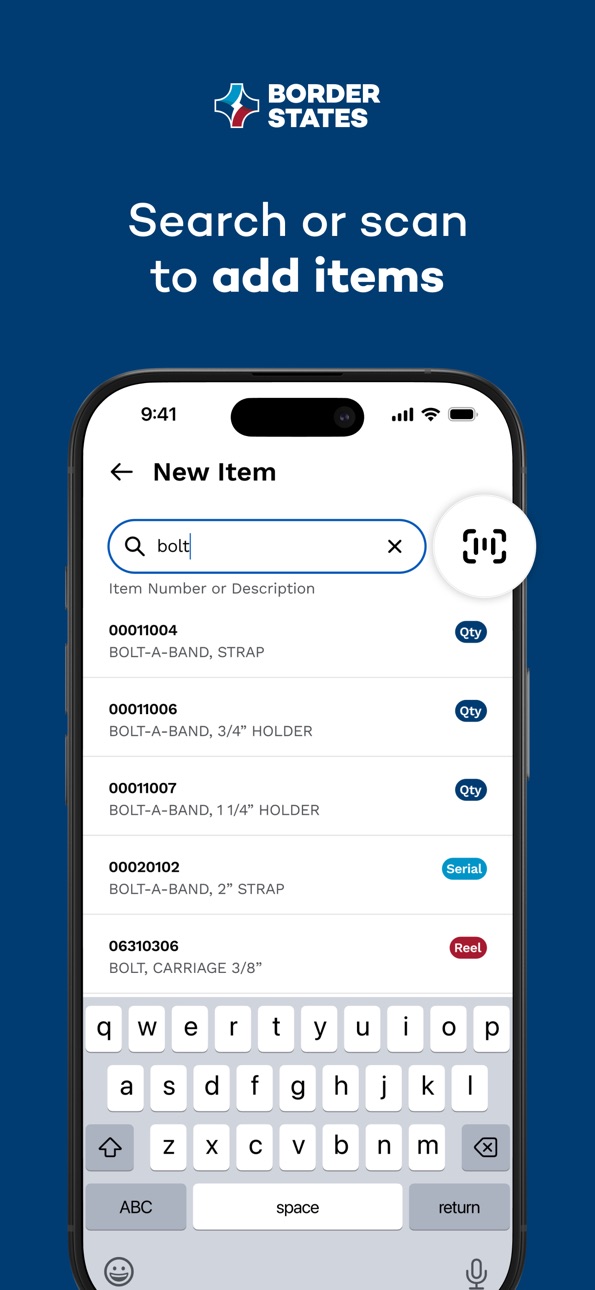
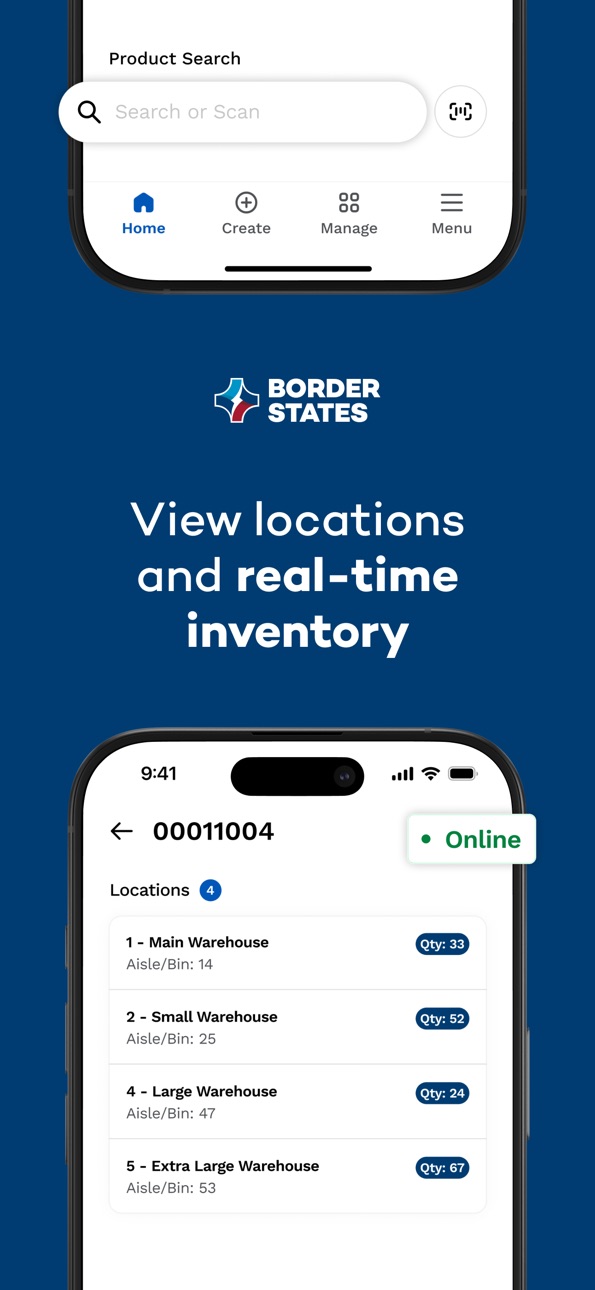
Product Search to lookup items and view inventory levels across your organization (available when enabled on your account)
Description
The Border States Utility Warehouse Solutions (UWS) app allows users to automate warehouse processes and eliminate manual procedures that can lead to data entry errors and concerns over lost paperwork. Connect UWS to your ERP system to easily collect and submit material transactions for improved inventory management.
Implementing new inventory solutions may seem like a daunting task, but we make the transition as smooth as possible. UWS brings mobile technology into the warehouse, making it easy to manage your inventory in the warehouse, in the yard or in the field.
UWS improves inventory accuracy and reduces time spent on inventory counts and year-end inventory write-offs.
Enable these transactions with mobile technology:
• Material charge-out
• Salvage
• Physical inventory
• Location transfer
• Material requisition
• Purchase order creation
• Material receiving
Plus, the UWS inventory lookup feature provides real-time stock access and allows you to see on-hand material in the warehouse.
For more information about automating your warehouse processes, contact us at barcoding@borderstates.com.
Accessibility
ipadiphonemacrealityDevicetvoswatch
Version history 8 versions
Build 885984201v2.0.12026-05-29 01:41:51
Restricted the work order field to a maximum of 15 characters
Transaction list on the Create screen set based on the web account configuration
Product Search to lookup items and view inventory levels across your organization (available when enabled on your account)
Build 883033830v1.5.02026-03-05 15:29:08
GL Activity is cleared upon changes to the GL Account selection
Build 882167840v1.4.02026-02-05 22:58:48
Minor text and support link updates
Build 879468566v1.3.32025-11-05 14:43:21
•Enablement of the following transactions:
-Material charge-out
-Salvage
-Physical inventory
-Location transfer
-Material requisition
-Purchase order creation
-Material receiving
•Scan or search for items to add to transactions
•Support for serial and reel tracking
•Transactions stored locally on device until submitted to your ERP system
•Review and edit transactions before submitting them to your ERP system
•Download data to your device to use when creating transactions
•Seven days of transaction history stored on device
•Support for online and offline modes
•Error handling to resolve issues during transaction submission
Build 878811701v1.3.22025-10-13 18:24:01
This is the full version of UWS.
Updated support for all transactions
Inventory Search across locations
Updated error handling on submission
Build 877385286v1.2.22025-08-20 15:27:18
- New functionality to allow you to see error messages when transactions are submitted
- Quickly make edits to transactions and resend them
- Improved performance when adding items to transactions
Build 876451345v1.1.02025-07-16 19:01:04
Updated barcoding behavior and various bugfixes.
Build 867560486v1.02025-07-04 03:54:57
No pricing data captured yet — comparisons appear once the app has paid storefronts or in-app purchases.
Availability 2 of 42 storefronts
| Region | Language | Price | Ratings | Avg | Version |
|---|---|---|---|---|---|
| CA | en-CA | Free | 0 | — | 2.0.1 |
| US | en-US | Free | 0 | — | 2.0.1 |
Not available in: AE, AL, AT, AU, BA, BE, BY, CH, CY, DE, DK, EE, ES, FI, FR, GB, IE, IL, IT, KW, LT, LU, LV, MD, ME, MK, MT, NL, NO, NZ, PT, QA, RS, RU, SA, SE, SI, TR, UA, XK
Change log 11 changes · US
✎
releaseNotes updated
Restricted the work order field to a maximum of 15 characters
Transaction list on the Create screen set based on the web account configuration
Product Searc
✎
description updated
The Border States Utility Warehouse Solutions (UWS) app allows users to automate warehouse processes and eliminate manual procedures that can lead to data entry
✎
name updated
Border States UWS
◆
Version 2.0.1 released
Restricted the work order field to a maximum of 15 characters
Transaction list on the Create screen set based on the web account configuration
Product Search to lookup items and view inventory levels across your organization (available
◆
Version 1.5.0 released
GL Activity is cleared upon changes to the GL Account selection
◆
Version 1.4.0 released
Minor text and support link updates
◆
Version 1.3.3 released
•Enablement of the following transactions:
-Material charge-out
-Salvage
-Physical inventory
-Location transfer
-Material requisition
-Purchase order creation
-Material receiving
•Scan or search for items to add to transaction
◆
Version 1.3.2 released
This is the full version of UWS.
Updated support for all transactions
Inventory Search across locations
Updated error handling on submission
◆
Version 1.2.2 released
- New functionality to allow you to see error messages when transactions are submitted
- Quickly make edits to transactions and resend them
- Improved performance when adding items to transactions
◆
Version 1.1.0 released
Updated barcoding behavior and various bugfixes.
◆
Version 1.0 released