Home › Music

 US
US
1 of 1 storefronts
Content in en-US
Content in en-US
Information
Preview 3 platforms
iPhone 4 images


iPad 1 image

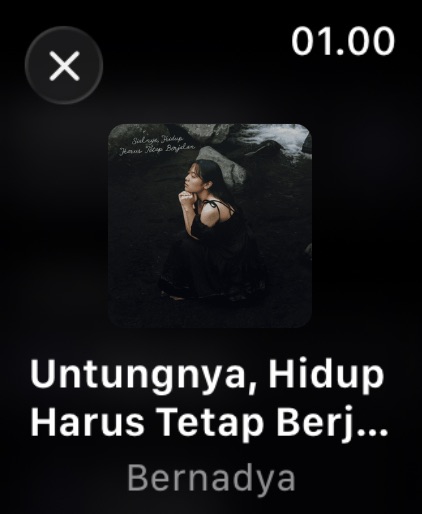
Apple Watch 3 images


What’s New Version 2.3
What's new:
- flo now runs natively on iPad
- flo now speaks German and Norwegian Bokmål
- You can now like (and access your liked) songs right from flo
- Transparent caching to save more bandwidth
- More features on CarPlay
And some new features, various QoL improvements, performance and bug fixes made possible by our open source contributors!
Description
While it is still in early development, it provides all the essential features for streaming music from your Navidrome Music Server. It also supports offline playback to save battery and bandwidth especially if you travel a lot like me!
WHY FLO FOR NAVIDROME CLIENT?
• Plays most audio formats (FLAC, AAC, ALAC, MP3, MP4 and more) without transcoding
• Gapless playback
• Mini player
• Track seeking
• Streams over 3G/4G/5G/WiFi
• Bluetooth Audio/AirPlay support
• Remembers your playlist from the last session
• Browse music collection
• Shuffle and repeat
• Album cover art
• Lock-screen integration
I will add more essential and 'nice-to-have' features as it progresses, as I use this app almost every day: every time I plug in AirPods!
LOVE FLO?
• Star us on GitHub: https://github.com/kepelet/flo
• Follow us on GitHub: https://github.com/kepelet
Requirements:
• Note that for SSL support you must have a valid certificate. Invalid certificates will cause connection errors.
• Important: flo is compatible with standalone Navidrome servers only. Installations behind Identity-aware Proxy (IAP) are not supported at this time
• Get Navidrome Music Server at: https://www.navidrome.org/
Accessibility
ipadiphonemacrealityDevicetvoswatch
Version history 12 versions
Build 884762384v2.32026-05-21 23:38:33
What's new:
- flo now runs natively on iPad
- flo now speaks German and Norwegian Bokmål
- You can now like (and access your liked) songs right from flo
- Transparent caching to save more bandwidth
- More features on CarPlay
And some new features, various QoL improvements, performance and bug fixes made possible by our open source contributors!
Build 883381104v2.22026-03-19 16:01:45
• flo is now on your car! tell us what you (or your car) think, we hope you enjoy your drive even more!
• Previously flo couldn't connect when Navidrome was behind an Identity-Aware Proxy. Now it can
• Fixed some bugs
• Performance improvements
• Some QoL improvements
Happy eid mubarak!
Build 882542356v2.12026-03-01 22:38:59
flo is now on your wrist! the WatchOS companion app lets you control playback directly from your Apple Watch~
Also:
• Artist Radio: start a radio station based on any artist
• Alternative App Icons: pick an icon that suits you
• Fixed crashes on smaller screens
Build 878347867v2.02026-02-16 21:27:49
This update brings major improvements to playback and overall app polish.
• Updated mini player design, including refined visuals for iOS 26+
• Added Web Radios support
• Added "sort by album artist" to improve library organization
• Improved performance for large playback queues
• Improved playback stability and reduced crashes in edge cases
• Improved layout behavior and readability on smaller screens
Learn more at dub.sh/flo20
Thank you for using flo!
Build 877908260v1.72025-09-08 19:51:17
What's new:
- Refined Tracks Queue UI: Polished UI to make playing what’s next even easier
Bug Fixes:
- Don’t sort by track number when viewing a playlist
- Sort album tracks by disc number and track number
QoL Improvements:
- Start playlist number from 1 instead of zero (index number thing)
- “Play by tracks” now adds all tracks to the queue (instead of all tracks that > selectedTrack)
Build 873275753v1.6.12025-03-16 18:55:03
While we have other fancy things on the table, these minor fixes are dedicated for the Navidrome's BFR release — congrats to the Navidrome team for the BFR release!
If your Navidrome server is not on version 0.55.x yet, you can still continue using flo (while the upgrade is highly recommended!)
And once again, thanks for choosing flo.
Build 872180623v1.62025-02-03 16:24:23
What's new
- Scrobbles: Track your listening history to Last.fm or ListenBrainz, just like Navidrome Web UI
- Offline playlist: Bring your favorite playlist offline!
- Download indicators: Track your downloads, never guessing ever again XD
- Redefined album screen: Love your screen real estate
Bug Fixes
- Downloaded album with no downloaded song is no longer displayed
- Login button is now disabled when you’re logging in
QoL Improvements
- flo will show “friendly message” when you try using http:// based server
- Navidrome’s default “album cover art placeholder” is used when loading the album cover or when accessing a playlist
- flo will try displaying “Album Artist” instead of the regular “Artist” and show the artist’s name in the song list. This is important for “Various Artists” or “Compilations” and notably, playlists
- If you’re downloading tracks, you’ll see a badge in the “Download” tab to tell you the number of undownloaded tracks
full release notes: https://dub.sh/flo16
Build 871471098v1.52025-01-02 12:49:58
What's new
Nothing new as promised, just enjoy the boredom!
Bug Fixes
- “Listening Activity” is no longer cleared when “Optimize local storage” is triggered, as it now has a dedicated action for this purpose
- Fixed minor UI-related spacing issues that appeared on actual devices but not in the simulator
- Downloads now use less CPU & Memory
- Downloads are automatically retry-able now
full release notes: https://dub.sh/flo15
Build 870747904v1.42024-11-28 07:36:32
What's New
- Basic listening history statistics
- Clear now playing queue via swipe
- Local storage usage display
- Searchable downloaded albums
- Login view redesign
- Floating player adjustments
- Experimental features:
- Transcoding support with max bitrate option
- Toggleable translucent background
- Save login info
Bug Fixes
- Fixed album cover loading logic (prioritizing local first)
- Fixed password redaction logic
- Fixed "Various Artists" display logic
- Fixed unknown genre/year display
- Various QoL improvements
full release notes: https://dub.sh/flo14
Build 870492056v1.32024-11-19 20:53:14
What's New:
- Redesigned player interface with a fresh look
- Browse (and search!) collections by Playlists, Artists, and Songs
- Added Debug Mode
Bug Fixes:
- Resolved an intermittent issue affecting album download completion
- "Various Artists" now shows the correct album artist
Full release notes here: https://dub.sh/flo13
Build 869324375v1.22024-09-28 16:25:31
What’s New:
- Localization (ID)
Bug Fixes:
- Fetch server information after login successful
- Minor "race condition" when downloading albums causing songs downloaded to the wrong album
- Song list now sorted by the track number
Build 867371218v1.02024-09-17 18:19:17
No pricing data captured yet — comparisons appear once the app has paid storefronts or in-app purchases.
Availability 1 of 1 storefronts
| Region | Language | Price | Ratings | Avg | Version |
|---|---|---|---|---|---|
| US | en-US | Free | 24 | 3.7 | 2.3 |
Change log 16 changes · US
✎
releaseNotes updated
What's new:
- flo now runs natively on iPad
- flo now speaks German and Norwegian Bokmål
- You can now like (and access your liked) songs right from flo
- Tran
✎
description updated
While it is still in early development, it provides all the essential features for streaming music from your Navidrome Music Server. It also supports offline pl
✎
subtitle updated
Take your music anywhere
✎
name updated
flo - Navidrome Client
◆
Version 2.3 released
What's new:
- flo now runs natively on iPad
- flo now speaks German and Norwegian Bokmål
- You can now like (and access your liked) songs right from flo
- Transparent caching to save more bandwidth
- More features on CarPlay
And some new
◆
Version 2.2 released
• flo is now on your car! tell us what you (or your car) think, we hope you enjoy your drive even more!
• Previously flo couldn't connect when Navidrome was behind an Identity-Aware Proxy. Now it can
• Fixed some bugs
• Performance improvem
◆
Version 2.1 released
flo is now on your wrist! the WatchOS companion app lets you control playback directly from your Apple Watch~
Also:
• Artist Radio: start a radio station based on any artist
• Alternative App Icons: pick an icon that suits you
• Fixed cra
◆
Version 2.0 released
This update brings major improvements to playback and overall app polish.
• Updated mini player design, including refined visuals for iOS 26+
• Added Web Radios support
• Added "sort by album artist" to improve library organization
• Impro
◆
Version 1.7 released
What's new:
- Refined Tracks Queue UI: Polished UI to make playing what’s next even easier
Bug Fixes:
- Don’t sort by track number when viewing a playlist
- Sort album tracks by disc number and track number
QoL Improvements:
- Start pl
◆
Version 1.6.1 released
While we have other fancy things on the table, these minor fixes are dedicated for the Navidrome's BFR release — congrats to the Navidrome team for the BFR release!
If your Navidrome server is not on version 0.55.x yet, you can still conti
◆
Version 1.6 released
What's new
- Scrobbles: Track your listening history to Last.fm or ListenBrainz, just like Navidrome Web UI
- Offline playlist: Bring your favorite playlist offline!
- Download indicators: Track your downloads, never guessing ever again XD
◆
Version 1.5 released
What's new
Nothing new as promised, just enjoy the boredom!
Bug Fixes
- “Listening Activity” is no longer cleared when “Optimize local storage” is triggered, as it now has a dedicated action for this purpose
- Fixed minor UI-related spac
◆
Version 1.4 released
What's New
- Basic listening history statistics
- Clear now playing queue via swipe
- Local storage usage display
- Searchable downloaded albums
- Login view redesign
- Floating player adjustments
- Experimental features:
- Transcodin
◆
Version 1.3 released
What's New:
- Redesigned player interface with a fresh look
- Browse (and search!) collections by Playlists, Artists, and Songs
- Added Debug Mode
Bug Fixes:
- Resolved an intermittent issue affecting album download completion
- "Various
◆
Version 1.2 released
What’s New:
- Localization (ID)
Bug Fixes:
- Fetch server information after login successful
- Minor "race condition" when downloading albums causing songs downloaded to the wrong album
- Song list now sorted by the track number
◆
Version 1.0 released