Home › Productivity

Folderly - Academic Organizer
Ultimate Academic Companion
 US
US
1 of 1 storefronts
Content in en-US
Content in en-US
Information
Preview 2 platforms
iPhone 10 images



iPad 10 images


What’s New Version 4.0.12
We've updated the app to make sure you get the best experience when you use Folderly!
New Features:
- Folderly online is here!
- Free cross platform offline-first sync between iOS and Android
- Added Cloud Files support
- Added Calendar to Android
Bugs Fixed:
- Schedule sync timezone
- Widget early display (Android)
- All-day event date shift
- Fixed crashes
- UI Improvements
Description
Features
ID Card
- Create your custom ID Card! Select from a variety of logos or upload your own to make it uniquely yours.
To-do List
- Stay organized and meet deadlines effortlessly with our intuitive to-do list feature. Prioritize tasks, set reminders, and track your progress, ensuring you stay on course and accomplish your goals with ease.
Subto-dos
- Break down tasks into smaller, manageable steps, ensuring better organization and progress tracking.
Course Folders
- Simplify your academic life by effortlessly organizing files for different courses through dedicated folders, ensuring a streamlined and efficient learning experience.
File Organization
- Effortlessly manage and access course-related files with our dedicated course files feature, providing a streamlined and organized repository for all your academic materials.
Study Sets
- Enhance your study experience by creating personalized study sets, allowing you to efficiently organize and review key information, making exam preparation a structured and effective process.
Bookmark Links
- Easily centralize and access relevant web resources with our course links feature, offering a convenient way to organize and navigate online materials seamlessly within the context of your coursework.
Class Schedule
- Stay on top of your academic commitments with our class schedule maker, ensuring a well-organized timetable that keeps you on track and maximizes productivity throughout your classes.
Calendar
- Visualize all your to-dos and events in a Calendar view.
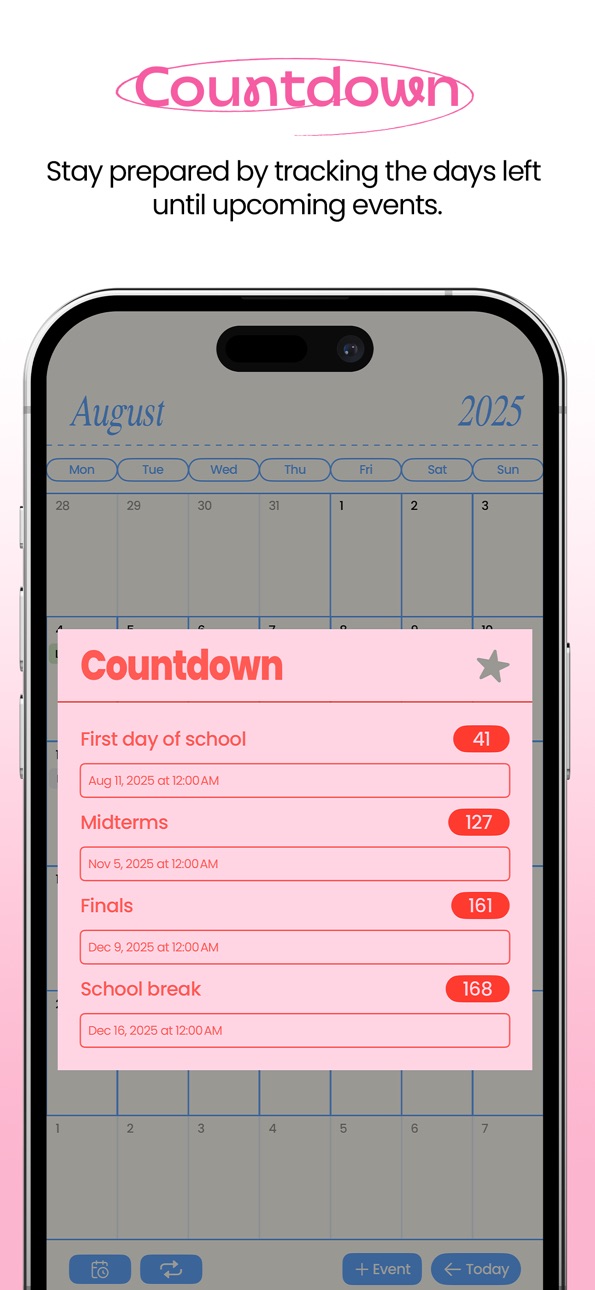
Countdown
- Stay prepared by tracking the days left until upcoming events.
Widgets
- Personalize your home screen with our widgets! Stay organized and on top of your schedule with our intuitive and easy-to-use schedule widget.
Terms: https://www.apple.com/legal/internet-services/itunes/dev/stdeula/
Privacy Policy: https://folderly.top/folderly-privacy-policy
In-App Purchases US pricing
Folderly Subscriptions Subscription
Folderly Plus (Yearly) · Yearly 3-day free trial$19.99
Folderly Plus (Yearly) · Yearly 3-day free trial$29.99
Folderly Plus (Monthly) · Monthly 3-day free trial$3.99
Folderly Plus (Monthly) · Monthly 3-day free trial$5.99
One-Time Purchases
Color Picker$2.99
Subto-dos$4.99
Calendar Sync$4.99
Folderly Plus$14.99
Upgrade: Plus to Family$14.99
Folderly Family$29.99
Capabilities
In-App Purchases
Accessibility
ipadiphonemacrealityDevicetvoswatch
Version history 25 versions
Build 883017852v4.0.122026-03-05 16:37:11
We've updated the app to make sure you get the best experience when you use Folderly!
New Features:
- Folderly online is here!
- Free cross platform offline-first sync between iOS and Android
- Added Cloud Files support
- Added Calendar to Android
Bugs Fixed:
- Schedule sync timezone
- Widget early display (Android)
- All-day event date shift
- Fixed crashes
- UI Improvements
Build 882286129v4.0.112026-02-10 01:47:52
We've updated the app to make sure you get the best experience when you use Folderly!
New Features:
- Folderly online is here!
- Free cross platform offline-first sync between iOS and Android
- Added Cloud Files support
- Added Calendar to Android
Bugs Fixed:
- To-dos in courses are now sorted by deadline
- Fixed iOS 17 widgets not showing
- Fixed incorrect time in android widget
- UI Improvements
Build 882187722v4.0.102026-02-06 06:58:25
We've updated the app to make sure you get the best experience when you use Folderly!
Bugs Fixed:
- To-dos in courses are now sorted by deadline
- Fixed iOS 17 widgets not showing
- Fixed incorrect time in android widget
- UI Improvements
Build 882103298v4.0.92026-02-03 07:06:11
We've updated the app to make sure you get the best experience when you use Folderly!
Bugs Fixed:
- Fixed id card logo not syncing
- Fixed sheets not reflecting on landscape mode
- UI Improvements
Build 882059039v4.0.82026-02-02 17:01:05
We've updated the app to make sure you get the best experience when you use Folderly!
Bugs Fixed:
- Fixed id card logo not syncing
- Fixed sheets not reflecting on landscape mode
- UI Improvements
Build 882034944v4.0.72026-01-31 16:07:17
We've updated the app to make sure you get the best experience when you use Folderly!
Bugs Fixed:
- Fixed subto-do widget not syncing with the app
- Fixed subto-dos randomly changing position
- Fixed text not being shown when adding/editing a flashcard,
- UI Improvements
Build 881972411v4.0.62026-01-29 19:36:37
We've updated the app to make sure you get the best experience when you use Folderly!
Bugs Fix:
- Fixed an issue where the iPod Schedule widget doesn't show the current class you're in
- Improved iPod UI
- Improved 'review study set' UI
- UI Enhancements
Build 881932188v4.0.52026-01-28 15:14:40
We've updated the app to make sure you get the best experience when you use Folderly!
Bugs Fix:
- iPod Schedule widget now works properly on clear/tinted mode on iOS 26+
- UI Enhancements
Build 881856347v4.0.42026-01-27 12:53:42
We've updated the app to make sure you get the best experience when you use Folderly!
New Feature:
- Folderly Online is here! Create an account to sync your data on different devices.
Build 881795880v4.0.22026-01-24 04:35:34
We've updated the app to make sure you get the best experience when you use Folderly!
New Feature:
- Folderly Online is here! Create an account to sync your data on different devices.
Build 881804438v4.0.32026-01-24 07:50:18
We've updated the app to make sure you get the best experience when you use Folderly!
Build 881539428v4.0.02026-01-20 14:53:03
We've updated the app to make sure you get the best experience when you use Folderly!
New Feature:
- Folderly online is here! Create an account to sync your data on different devices.
Build 881679184v4.0.12026-01-20 17:22:38
We've updated the app to make sure you get the best experience when you use Folderly!
Build 878708784v2.2.42025-10-08 19:39:48
We've updated the app to make sure you get the best experience when you use Folderly!
Bugs Fixed:
- Fixed an issue where schedules randomly get deleted after restarting the app.
- Widgets are now compatible with iOS 26's Liquid Glass.
- Minor UI Enhancements
Build 877969394v2.2.32025-09-10 00:33:23
We've updated the app to make sure you get the best experience when you use Folderly!
Bugs Fixed:
- Minor UI Enhancements
Build 877843013v2.2.22025-09-06 10:27:40
We've updated the app to make sure you get the best experience when you use Folderly!
New Features:
- Google calendar sync now available! Sync events from Folderly to Google Calendar and vice versa.
- You can now assign a past date to deadlines.
- You can now vote for features you want to see in future updates! Just tap the 'Request a feature' button in the Settings page.
Bugs Fixed:
- Fixed an issue where app will unexpectedly crash on devices on iOS 17
- Fixed an issue where schedules get duplicated
- Fixed ui glitch when one does not have any active schedules in the schedules page",
- Emoji picker now shows up on Mac
- Minor UI Enhancements
Build 877718170v2.2.12025-09-01 10:56:49
We've updated the app to make sure you get the best experience when you use Folderly!
New Features:
- Google calendar sync now available! Sync events from Folderly to Google Calendar and vice versa.
- You can now assign a past date to deadlines.
Bugs Fixed:
- Fixed an issue where app will unexpectedly crash
- Fixed an issue where schedules get duplicated
- Fixed ui glitch when one does not have any active schedules in the schedules page",
- Emoji picker now shows up on Mac
- Minor UI Enhancements
Build 877307398v2.2.02025-08-28 02:31:27
We've updated the app to make sure you get the best experience when you use Folderly!
New Features:
- Google calendar sync now available! Sync events from Folderly to Google Calendar and vice versa.
- You can now assign a past date to deadlines.
Bugs Fixed:
- Minor UI Enhancements
Build 877135340v2.1.32025-08-11 09:46:12
We've updated the app to make sure you get the best experience when you use Folderly!
Bugs Fixed:
- Minor UI Enhancements
Build 876982541v2.1.22025-08-06 21:14:52
We've updated the app to make sure you get the best experience when you use Folderly!
New Features:
- Enhanced emoji picker with search functionality
- The iPod found in the schedule page and home screen widget now has a modern look.
Bugs Fixed:
- Fixed an issue where users cannot add a course.
- Todo description in the subto-do widget is now visible.
- Widgets no longer crashes unexpectedly. Please remove and add your widgets again to ensure they'll work properly.
- Todos without a deadline are now shown at the bottom of the list instead of the top.
- To-dos found in the subto-do widget are now sorted properly according to deadline date.
- Performance improvement
- Minor UI Enhancements
Build 876847496v2.1.12025-08-05 02:59:56
We've updated the app to make sure you get the best experience when you use Folderly!
New Features:
- Enhanced emoji picker with search functionality
- The iPod found in the schedule page and home screen widget now has a modern look.
Bugs Fixed:
- Widgets no longer crashes unexpectedly. Please remove and add your widgets again to ensure they'll work properly.
- Todos without a deadline are now shown at the bottom of the list instead of the top.
- Performance improvement
- Minor UI Enhancements
Build 876054999v2.1.02025-07-04 05:12:06
We've updated the app to make sure you get the best experience when you use Folderly!
New Features:
- Calendar: You can now visualize all your to-dos inside the Calendar page
- Events: You can now add events and see them inside the Calendar page
- Apple Calendar Sync: Sync your events from Apple calendar to Folderly and events from Folderly to Apple calendar
- Calendar countdown: You'll be able to easily see the days left for upcoming events
Bugs Fixed:
- Fixed layout issue inside the course page when instructor name and schedule is too long
- Fixed an issue where tapping on a to-do won't show it's details
- Minor UI Enhancements
Build 873392465v2.0.12025-03-20 14:40:10
We've updated the app to make sure you get the best experience when you use Folderly!
Bugs Fixed:
- Editing a subto-do now reflects changes immediately.
- Custom logos for your ID Card now appear correctly on the home and lock screen widgets. To fix, please reupload your custom logo.
- The to-do lock screen widget no longer gets cut off when displaying at least three to-dos.
- The sheet for adding a link inside a course folder is no longer transparent on iPad devices.
- Minor UI Enhancements
Build 872774112v2.0.02025-03-13 15:44:43
We've updated the app to make sure you get the best experience when you use Folderly!
New Features:
- Folderly Store: Unlock premium features with Folderly+ or purchase exclusive add-ons in the Folderly Store!
- Custom Colors: Personalize your ID Card, folders, and schedules with the new color picker.
- Subto-dos: Break down tasks by adding subto-dos to existing to-dos for better organization.
- Subto-dos Widgets: View and manage to-dos with subto-dos in your home screen.
- Lock Screen Widgets: You can now display your ID logo, to-dos, and current schedule in your lock screen.
- To-do Descriptions: Add detailed descriptions to your to-dos to keep track of important details.
- Default To-do Icon: Set a default icon for your to-dos—if you don’t select one, it will automatically be applied.
- Enhanced To-do Management: Tap a to-do to view more details, edit, or delete it.
Bugs Fixed:
- Resolved course page UI if schedule assigned repeats everyday.
- Minor UI Enhancements.
Build 872101055v1.7.02025-01-31 11:57:41
We've updated the app to make sure you get the best experience when you use Folderly!
New Features:
- Missed to-dos now appear on the to-do list widget and are highlighted in red.
- Added a 'Swap terms and definitions' button, allowing you to swap terms and definitions while reviewing a study set.
- Added a 'Request notifications' button in settings, letting you manually request notifications.
- Tapping a widget now takes you directly to its corresponding screen in the app.
Bug Fixed:
- Deadlines now appear in the to-do list widget when using dark mode.
- Fixed an issue where notifications were not being received.
- Fixed an issue where you have to double tap to flip a flashcard in a study set.
- Minor UI Enhancements
Price history by region
Currency
Show
Columns
Search
Availability 1 of 1 storefronts
| Region | Language | Price | Ratings | Avg | Version |
|---|---|---|---|---|---|
| US | en-US | Free | 3.2k | 4.8 | 4.0.12 |
Change log 29 changes · US
✎
releaseNotes updated
We've updated the app to make sure you get the best experience when you use Folderly!
New Features:
- Folderly online is here!
- Free cross platform offline-fi
✎
description updated
Features
ID Card
- Create your custom ID Card! Select from a variety of logos or upload your own to make it uniquely yours.
To-do List
- Stay organized and m
✎
subtitle updated
Ultimate Academic Companion
✎
name updated
Folderly - Academic Organizer
◆
Version 4.0.12 released
We've updated the app to make sure you get the best experience when you use Folderly!
New Features:
- Folderly online is here!
- Free cross platform offline-first sync between iOS and Android
- Added Cloud Files support
- Added Calendar to
◆
Version 4.0.11 released
We've updated the app to make sure you get the best experience when you use Folderly!
New Features:
- Folderly online is here!
- Free cross platform offline-first sync between iOS and Android
- Added Cloud Files support
- Added Calendar to
◆
Version 4.0.10 released
We've updated the app to make sure you get the best experience when you use Folderly!
Bugs Fixed:
- To-dos in courses are now sorted by deadline
- Fixed iOS 17 widgets not showing
- Fixed incorrect time in android widget
- UI Improvements
◆
Version 4.0.9 released
We've updated the app to make sure you get the best experience when you use Folderly!
Bugs Fixed:
- Fixed id card logo not syncing
- Fixed sheets not reflecting on landscape mode
- UI Improvements
◆
Version 4.0.8 released
We've updated the app to make sure you get the best experience when you use Folderly!
Bugs Fixed:
- Fixed id card logo not syncing
- Fixed sheets not reflecting on landscape mode
- UI Improvements
◆
Version 4.0.7 released
We've updated the app to make sure you get the best experience when you use Folderly!
Bugs Fixed:
- Fixed subto-do widget not syncing with the app
- Fixed subto-dos randomly changing position
- Fixed text not being shown when adding/editi
◆
Version 4.0.6 released
We've updated the app to make sure you get the best experience when you use Folderly!
Bugs Fix:
- Fixed an issue where the iPod Schedule widget doesn't show the current class you're in
- Improved iPod UI
- Improved 'review study set' UI
-
◆
Version 4.0.5 released
We've updated the app to make sure you get the best experience when you use Folderly!
Bugs Fix:
- iPod Schedule widget now works properly on clear/tinted mode on iOS 26+
- UI Enhancements
◆
Version 4.0.4 released
We've updated the app to make sure you get the best experience when you use Folderly!
New Feature:
- Folderly Online is here! Create an account to sync your data on different devices.
◆
Version 4.0.3 released
We've updated the app to make sure you get the best experience when you use Folderly!
◆
Version 4.0.2 released
We've updated the app to make sure you get the best experience when you use Folderly!
New Feature:
- Folderly Online is here! Create an account to sync your data on different devices.
◆
Version 4.0.1 released
We've updated the app to make sure you get the best experience when you use Folderly!
◆
Version 4.0.0 released
We've updated the app to make sure you get the best experience when you use Folderly!
New Feature:
- Folderly online is here! Create an account to sync your data on different devices.
◆
Version 2.2.4 released
We've updated the app to make sure you get the best experience when you use Folderly!
Bugs Fixed:
- Fixed an issue where schedules randomly get deleted after restarting the app.
- Widgets are now compatible with iOS 26's Liquid Glass.
- Mi
◆
Version 2.2.3 released
We've updated the app to make sure you get the best experience when you use Folderly!
Bugs Fixed:
- Minor UI Enhancements
◆
Version 2.2.2 released
We've updated the app to make sure you get the best experience when you use Folderly!
New Features:
- Google calendar sync now available! Sync events from Folderly to Google Calendar and vice versa.
- You can now assign a past date to dead
◆
Version 2.2.1 released
We've updated the app to make sure you get the best experience when you use Folderly!
New Features:
- Google calendar sync now available! Sync events from Folderly to Google Calendar and vice versa.
- You can now assign a past date to dead
◆
Version 2.2.0 released
We've updated the app to make sure you get the best experience when you use Folderly!
New Features:
- Google calendar sync now available! Sync events from Folderly to Google Calendar and vice versa.
- You can now assign a past date to dead
◆
Version 2.1.3 released
We've updated the app to make sure you get the best experience when you use Folderly!
Bugs Fixed:
- Minor UI Enhancements
◆
Version 2.1.2 released
We've updated the app to make sure you get the best experience when you use Folderly!
New Features:
- Enhanced emoji picker with search functionality
- The iPod found in the schedule page and home screen widget now has a modern look.
Bugs
◆
Version 2.1.1 released
We've updated the app to make sure you get the best experience when you use Folderly!
New Features:
- Enhanced emoji picker with search functionality
- The iPod found in the schedule page and home screen widget now has a modern look.
Bugs
◆
Version 2.1.0 released
We've updated the app to make sure you get the best experience when you use Folderly!
New Features:
- Calendar: You can now visualize all your to-dos inside the Calendar page
- Events: You can now add events and see them inside the Calenda
◆
Version 2.0.1 released
We've updated the app to make sure you get the best experience when you use Folderly!
Bugs Fixed:
- Editing a subto-do now reflects changes immediately.
- Custom logos for your ID Card now appear correctly on the home and lock screen widge
◆
Version 2.0.0 released
We've updated the app to make sure you get the best experience when you use Folderly!
New Features:
- Folderly Store: Unlock premium features with Folderly+ or purchase exclusive add-ons in the Folderly Store!
- Custom Colors: Personalize
◆
Version 1.7.0 released
We've updated the app to make sure you get the best experience when you use Folderly!
New Features:
- Missed to-dos now appear on the to-do list widget and are highlighted in red.
- Added a 'Swap terms and definitions' button, allowing you