Home › Productivity

 US
US
1 of 1 storefronts
Content in en-US
Content in en-US
Information
Preview 4 platforms
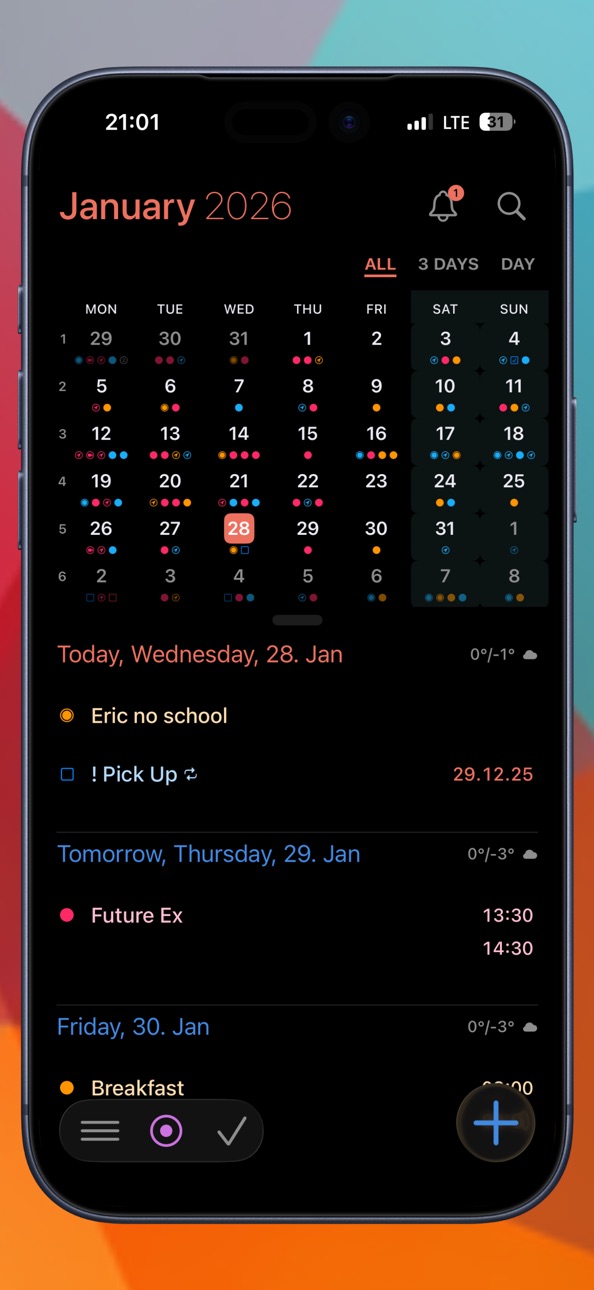
iPhone 10 images



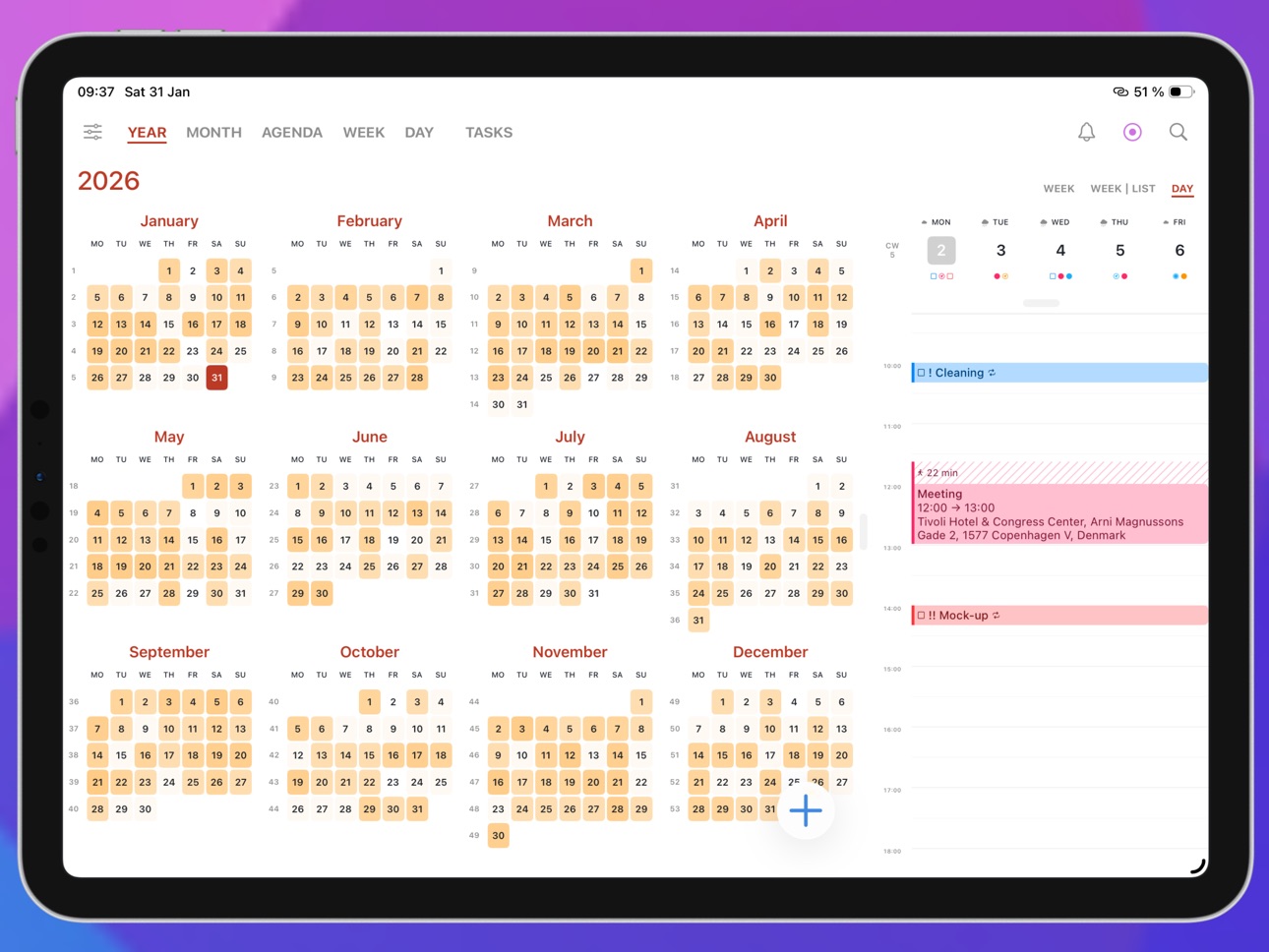
iPad 10 images




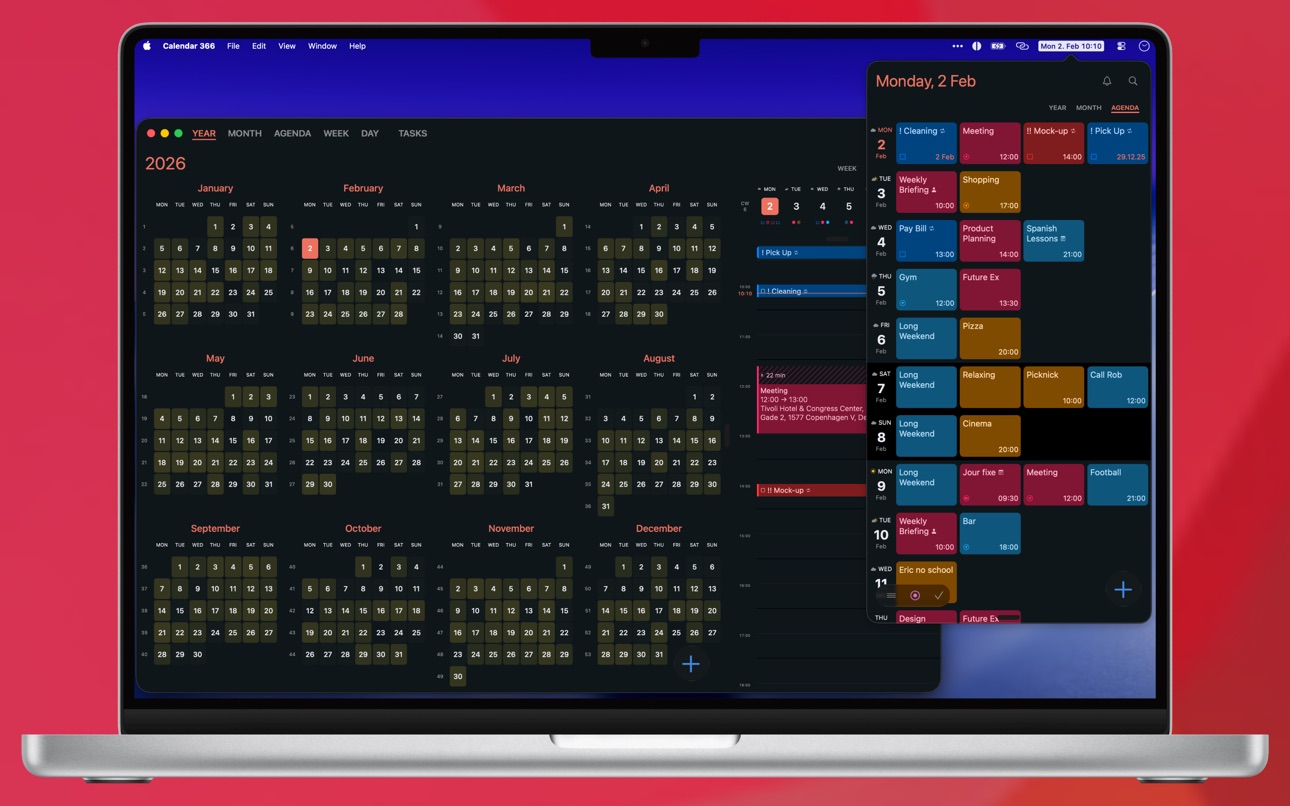
Mac 10 images




Apple Watch 8 images


What’s New Version 3.4.1
**New**
• Agenda: option to start with today
• Selectable heatmap color — choose from 6 color options in Settings → Appearance
• Overdue tasks in the Apple Watch Large complication
• Double tap to create a new event
**Improved**
• When all-day items are hidden, widgets and complications still show birthdays and anniversaries until their alert
• Optimized Microsoft syncing for more reliable synchronization
**Bug Fixes**
• Fixed an issue where "Hide today's past events" also hid tasks
• Fixed an issue where a strikethrough could randomly appear over symbols in list views
• Fixed an issue where data on the Apple Watch was not reliably refreshed
• Fixed an issue where the date was not shown correctly in the agenda view
• Minor bug fixes
Description
For all your plans!
Your events and tasks, everywhere. Fast and native on iPhone, iPad and Apple Watch. With an interface that feels just right.
Create events as fast as you think them. Just type "Meeting with Alex tomorrow 10am" – Calendar 366 takes care of the rest. Switch between views to plan your week, check the weather and keep your tasks in sight – even from your home screen with widgets. Choose from 3 themes and 9 color accents – light, dark or black, combined with your favorite accent.
:: EVENTS ::
• Create events in seconds with natural language
• Set the duration with a tap
• Time zones, reminders, recurrences, categories, attachments, attendees, notes and more
• Drag & drop to reschedule
• Quickly duplicate, copy, paste, edit and share events and tasks
:: TASKS ::
• Plan and organize your tasks right inside the calendar
• Reminders, location-based alerts, priorities, notes
• Filter by today, overdue, important or all
• Sort by title, due date or priority
:: VIEWS ::
• 13 different views with options (Year, Month, Agenda, Month | List, Week, Week | List, Day)
• Any view, any combination (iPad)
• Week view with 3 to 14 days
• Portrait and landscape in every view
• Quick switch by swipe and tap
• Customizable layouts
:: MEETINGS ::
• Create Zoom, Google Meet and Microsoft Teams meetings and invite attendees
• Join meetings directly from any view
• Supports Webex, Skype, FaceTime and many more
:: CALENDAR GROUPS ::
• Create groups from calendars and lists
• Quickly switch what's visible
• Default calendar and list per group
• Automatically synced across all your devices
:: ATTENDEES ::
• Invite people to your events and meetings
• See their status at a glance
• New invitations land right in your inbox
• Accept or decline with a tap
• Email attendees — all at once or individually
:: CATEGORIES ::
• Color-code your events and tasks
• Works with categories and labels
• Easy to distinguish, easy to find
:: NOTIFICATIONS & BADGE ::
• Choose which calendars notify you (per Calendar Set)
• Notification sound
• Customizable app icon badge — date, calendar week, events, tasks and overdue items
• Set to Events & Tasks, Events only, or Tasks only
• Location-based reminders
:: NAVIGATION & TRAVEL TIME ::
• Never miss the time to leave
• Automatic updates based on your location
• By car, by bike or on foot
• Open locations in your preferred maps app (Apple Maps, Google Maps, HERE WeGo, Waze, Organic Maps, OsmAnd, MAPS.ME, TomTom Go, Magic Earth, Sygic)
:: WIDGETS ::
• 20 home screen and desktop widgets in Small, Medium, Large and Extra Large
• 6 lock screen widgets
• Interactive – filter tasks, open events and more
• 10 watch complications
• 3 themes and weather
:: INTEGRATIONS ::
All your calendars and tasks in one place.
• System (Apple Calendar & Reminders)
• iCloud
• Google (Calendar & Tasks)
• Outlook
• Microsoft 365
• Todoist
• Zoom
• Fastmail
• CalDAV
• Calendar subscriptions
:: APPLE WATCH ::
• Month view, event list, task manager
• Create and delete events
• Complete tasks
• Open location directly in Maps
• Complications for your watch face
:: AUTOMATION & CONTROL ::
• Apple Shortcuts support
• Focus filters for calendar groups
• URL scheme for automation
• Keyboard shortcuts (iPad)
:: MORE ::
• Search across events, tasks, locations, notes, categories and time periods
• Weather in all views, widgets and the watch
• Weather preview – today by the hour plus the next 7 days
• Birthdays and anniversaries from your contacts
• No account required – no analytics, no tracking, no data sent to our servers
Terms of Use: https://www.apple.com/legal/internet-services/itunes/dev/stdeula/
In-App Purchases US pricing
Calendar 366 Pro Subscription
(Yearly) · Yearly 7-day free trial$19.99
Family (Yearly) · Yearly 7-day free trial$29.99
Family (Monthly) · Monthly$4.99
One-Time Purchases
Calendar 366 Pro (iOS)$19.99
Calendar 366 Pro Family (iOS)$29.99
Calendar 366 Pro$49.99
Calendar 366 Pro Family$69.99
Capabilities
In-App Purchases
Accessibility
ipadiphonemacrealityDevicetvoswatch
Version history 15 versions
Build 887953125v3.4.12026-07-08 05:02:59
**New**
• Agenda: option to start with today
• Selectable heatmap color — choose from 6 color options in Settings → Appearance
• Overdue tasks in the Apple Watch Large complication
• Double tap to create a new event
**Improved**
• When all-day items are hidden, widgets and complications still show birthdays and anniversaries until their alert
• Optimized Microsoft syncing for more reliable synchronization
**Bug Fixes**
• Fixed an issue where "Hide today's past events" also hid tasks
• Fixed an issue where a strikethrough could randomly appear over symbols in list views
• Fixed an issue where data on the Apple Watch was not reliably refreshed
• Fixed an issue where the date was not shown correctly in the agenda view
• Minor bug fixes
Build 887887324v3.42026-07-07 09:29:36
**New**
• Agenda: option to start with today
• Selectable heatmap color — choose from 6 color options in Settings → Appearance
• Overdue tasks in the Apple Watch Large complication
• Double tap to create a new event
**Improved**
• When all-day items are hidden, widgets and complications still show birthdays and anniversaries until their alert
• Optimized Microsoft syncing for more reliable synchronization
**Bug Fixes**
• Fixed an issue where "Hide today's past events" also hid tasks
• Fixed an issue where a strikethrough could randomly appear over symbols in list views
• Fixed an issue where data on the Apple Watch was not reliably refreshed
• Fixed an issue where the date was not shown correctly in the agenda view
• Minor bug fixes
Build 887554224v3.32026-07-01 13:11:13
**New**
• Notifications can now be set to "None", "Events & Tasks", "Events", or "Tasks"
• Custom default duration — enter any value
**Improved**
• Day view now shows all-day events and tasks side by side
• Improved Apple Watch Large complication
• "Hide all-day events" now keeps birthdays and anniversaries visible
• Slightly optimized heatmap color for better contrast
**Bug Fixes**
• Fixed an issue where the first event of a recurring series could not be detached
• Fixed an issue where overdue tasks were still shown with View → Tasks → None/Disabled
• Fixed an issue with overlapping events in week and day view
• Fixed an issue where moving an event from a system calendar to a native account calendar left a duplicate
• Minor bug fixes
Build 887296254v3.2.22026-06-23 08:26:30
**New**
• Extra Large Widgets
Month shows a full month at a glance.
Month | List shows the month alongside the events of any selected day.
• Weather overview
A tap on the weather symbol shows today's hourly forecast and the next 7 days.
• OsmAnd Maps is now available as a map option
• New option to hide today's past events in list views
**Improved**
• Improved natural language parsing
• Improved display in widgets
• Improved iPad portrait layout
**Bug Fixes**
• Fixed an issue where calendars could not be selected correctly when using multiple system accounts with identical calendars
• Fixed an issue with duplicating events
• Fixed an issue where invalid app settings in iCloud could in rare cases cause errors
• Fixed an issue where changing individual events in a series did not work correctly
• Fixed an issue in the agenda view where the date did not update after midnight
• Minor bug fixes
Build 887027637v3.2.12026-06-17 13:24:34
**New**
• Extra Large Widgets
Month shows a full month at a glance.
Month | List shows the month alongside the events of any selected day.
• Weather overview
A tap on the weather symbol shows today's hourly forecast and the next 7 days.
• OsmAnd Maps is now available as a map option
• New option to hide today's past events in list views
**Improved**
• Improved natural language parsing
**Bug Fixes**
• Fixed an issue where calendars could not be selected correctly when using multiple system accounts with identical calendars
• Fixed an issue with duplicating events
• Fixed an issue where invalid app settings in iCloud could in rare cases cause errors
• Fixed an issue where changing individual events in a series did not work correctly
• Minor bug fixes
Build 886921442v3.22026-06-15 13:43:27
**New**
• Extra Large Widgets
Month shows a full month at a glance.
Month | List shows the month alongside the events of any selected day.
• Weather overview
A tap on the weather symbol shows today's hourly forecast and the next 7 days.
**Improved**
• Improved natural language parsing
**Bug Fixes**
• Fixed an issue where calendars could not be selected correctly when using multiple system accounts with identical calendars
• Fixed an issue with duplicating events
• Fixed an issue where invalid app settings in iCloud could in rare cases cause errors
• Fixed an issue where changing individual events in a series did not work correctly
• Minor bug fixes
Build 886608364v3.1.12026-06-09 12:33:53
**New**
• Customizable app icon badge — show the date, calendar week, or counts for today's events, tasks, and overdue items
• New widgets for upcoming events and tasks (note: the large widget has moved to a new group — please remove and re-add it)
• Pull to jump to previous days in list view and vertical agenda view
• Copy & Paste for events and tasks
• Send email to all attendees
• URL scheme now supports switching between calendar sets
• Link detection for custom links (URL schemes, app links, and more)
**Improved**
• Birthday notifications for system calendars now also work when no time is set in the system
• Week view now scrolls to the first event or current time on open
• Improved readability of all-day events with dark calendar colors
• Various UI tweaks for better readability
• Search now also covers location, notes, and categories/tags
**Bug Fixes**
• Fixed an issue where all-day events ending today were not displayed correctly in the Up Next widget
• Fixed an issue where calendars could not be selected correctly when using multiple Exchange system accounts
• Fixed an issue where Travel Time in CalDAV events did not work without a start location
• Fixed an issue where horizontal scrolling after a pinch gesture in the week view did not work correctly
• Fixed an issue where task locations were not loaded correctly
• Fixed an issue where CalDAV task locations were not saved correctly
• Fixed an issue where widgets sometimes did not show any data
• Fixed an issue with floating time zones
Build 886282824v3.12026-06-01 19:48:44
**New**
• Customizable app icon badge — show the date, calendar week, or counts for today's events, tasks, and overdue items
• New widgets for upcoming events and tasks (note: the large widget has moved to a new group — please remove and re-add it)
• Copy & Paste for events and tasks
• Send email to all attendees
• URL scheme now supports switching between calendar sets
• Link detection for custom links (URL schemes, app links, and more)
**Improved**
• Search now also covers location, notes, and categories/tags
**Bug Fixes**
• Fixed an issue where Travel Time in CalDAV events did not work without a start location
• Fixed an issue where horizontal scrolling after a pinch gesture in the week view did not work correctly
• Fixed an issue where task locations were not loaded correctly
• Fixed an issue where CalDAV task locations were not saved correctly
• Fixed an issue where widgets sometimes did not show any data
• Fixed an issue where scrolling was not working correctly when editing long notes
Build 886020661v3.0.62026-05-25 08:39:44
This update brings small improvements, a few fixes, and under-the-hood optimizations — because details matter.
Build 885821990v3.0.52026-05-20 08:20:48
**New**
• Inbox can now be configured per Calendar Set to show events for all calendars or only for calendars in that set
• Emails are now opened in the default mail app
**Improved**
• Delivered notifications are now removed when completing a task in the app
**Bug Fixes**
• Fixed an issue where changing one event of a recurring series in system calendars did not work correctly
• Fixed an issue where the notification sound for tasks could not be reset to the system default
• Fixed an issue where updating an event sometimes created a duplicate
• Fixed an issue where widgets sometimes did not show events or tasks
• Fixed an issue where natural language input sometimes did not recognize the time correctly
• Minor bug fixes
Build 885639577v3.0.42026-05-14 21:22:04
**New**
• New Event / New Task via long press on the app icon
• Open invitations from system calendars are now shown in the inbox
• Attendees can now be added to system calendar events
• Event conflict alerts can now be disabled
• 1 Month Widget (Small, 1×1)
• All-day area now shows a "+X more" button like in month view
**Improved**
• Time labels in the left sidebar are now larger
**Bug Fixes**
• Multi-month events starting in the previous month were not shown in the current month
• Events appeared with strikethrough in the month-list view
• CalDAV server URLs with a path component were not supported
• Recurring all-day events were shown one day too early
• Opening locations in "TomTom Go" did not work
Build 885317870v3.0.32026-05-12 15:12:43
**New**
• Added an option to select minutes precisely when setting event times
• Added an option to set 0 minutes as event duration
**Improved**
• CalDAV now supports Digest Auth in addition to Basic Auth
• Tapping + now uses the selected date instead of today's date
**Bug Fixes**
• Custom notification sounds were not played correctly
• Task notifications were not triggered
• Localization issue in the week-list view
• Search only found future events in some cases
• Sygic navigation did not work correctly
• Contacts search in location field did not work
• URL field in reminders was not read back correctly
• Fastmail OAuth login failed
• Homescreen date widget showed the date twice
• Subscribed calendars: disabling a calendar also disabled it in other accounts
• Calendar colors could not be changed
• Error when adding a calendar (availability)
• Error importing large ICS files and uploading imported events
• Catalan was shown for users with English language and Canada region
• Custom alert times for all-day events were limited to 00:00
• Timezone was not set when changing an all-day event to a timed event
• Reminders were not shown when Reminders access was not granted
Build 885124130v3.0.22026-05-01 08:28:47
• Minor bug fixes
Build 885027126v3.0.12026-04-30 09:00:10
• Fixed an issue where calendar events would not appear when Reminders access was not granted
• Minor bug fixes
Build 866009751v3.02026-04-28 07:25:12
Price history by region
Currency
Show
Columns
Search
Availability 1 of 1 storefronts
| Region | Language | Price | Ratings | Avg | Version |
|---|---|---|---|---|---|
| US | en-US | Free | 29 | 3.2 | 3.4.1 |
Change log 19 changes · US
✎
releaseNotes updated
**New**
• Agenda: option to start with today
• Selectable heatmap color — choose from 6 color options in Settings → Appearance
• Overdue tasks in the Apple Watc
✎
description updated
For all your plans!
Your events and tasks, everywhere. Fast and native on iPhone, iPad and Apple Watch. With an interface that feels just right.
Create events
✎
subtitle updated
Schedule Reminders & To-Do
✎
name updated
Calendar 366 · Events & Tasks
◆
Version 3.4.1 released
**New**
• Agenda: option to start with today
• Selectable heatmap color — choose from 6 color options in Settings → Appearance
• Overdue tasks in the Apple Watch Large complication
• Double tap to create a new event
**Improved**
• When al
◆
Version 3.4 released
**New**
• Agenda: option to start with today
• Selectable heatmap color — choose from 6 color options in Settings → Appearance
• Overdue tasks in the Apple Watch Large complication
• Double tap to create a new event
**Improved**
• When al
◆
Version 3.3 released
**New**
• Notifications can now be set to "None", "Events & Tasks", "Events", or "Tasks"
• Custom default duration — enter any value
**Improved**
• Day view now shows all-day events and tasks side by side
• Improved Apple Watch Large comp
◆
Version 3.2.2 released
**New**
• Extra Large Widgets
Month shows a full month at a glance.
Month | List shows the month alongside the events of any selected day.
• Weather overview
A tap on the weather symbol shows today's hourly forecast and the next 7 days.
• O
◆
Version 3.2.1 released
**New**
• Extra Large Widgets
Month shows a full month at a glance.
Month | List shows the month alongside the events of any selected day.
• Weather overview
A tap on the weather symbol shows today's hourly forecast and the next 7 days.
• O
◆
Version 3.2 released
**New**
• Extra Large Widgets
Month shows a full month at a glance.
Month | List shows the month alongside the events of any selected day.
• Weather overview
A tap on the weather symbol shows today's hourly forecast and the next 7 days.
*
◆
Version 3.1.1 released
**New**
• Customizable app icon badge — show the date, calendar week, or counts for today's events, tasks, and overdue items
• New widgets for upcoming events and tasks (note: the large widget has moved to a new group — please remove and re
◆
Version 3.1 released
**New**
• Customizable app icon badge — show the date, calendar week, or counts for today's events, tasks, and overdue items
• New widgets for upcoming events and tasks (note: the large widget has moved to a new group — please remove and re
◆
Version 3.0.6 released
This update brings small improvements, a few fixes, and under-the-hood optimizations — because details matter.
◆
Version 3.0.5 released
**New**
• Inbox can now be configured per Calendar Set to show events for all calendars or only for calendars in that set
• Emails are now opened in the default mail app
**Improved**
• Delivered notifications are now removed when completi
◆
Version 3.0.4 released
**New**
• New Event / New Task via long press on the app icon
• Open invitations from system calendars are now shown in the inbox
• Attendees can now be added to system calendar events
• Event conflict alerts can now be disabled
• 1 Month W
◆
Version 3.0.3 released
**New**
• Added an option to select minutes precisely when setting event times
• Added an option to set 0 minutes as event duration
**Improved**
• CalDAV now supports Digest Auth in addition to Basic Auth
• Tapping + now uses the selected
◆
Version 3.0.2 released
• Minor bug fixes
◆
Version 3.0.1 released
• Fixed an issue where calendar events would not appear when Reminders access was not granted
• Minor bug fixes
◆
Version 3.0 released