Home › Productivity

 US
US
1 of 1 storefronts
Content in en-US
Content in en-US
Information
Preview 1 platform
iPhone 7 images

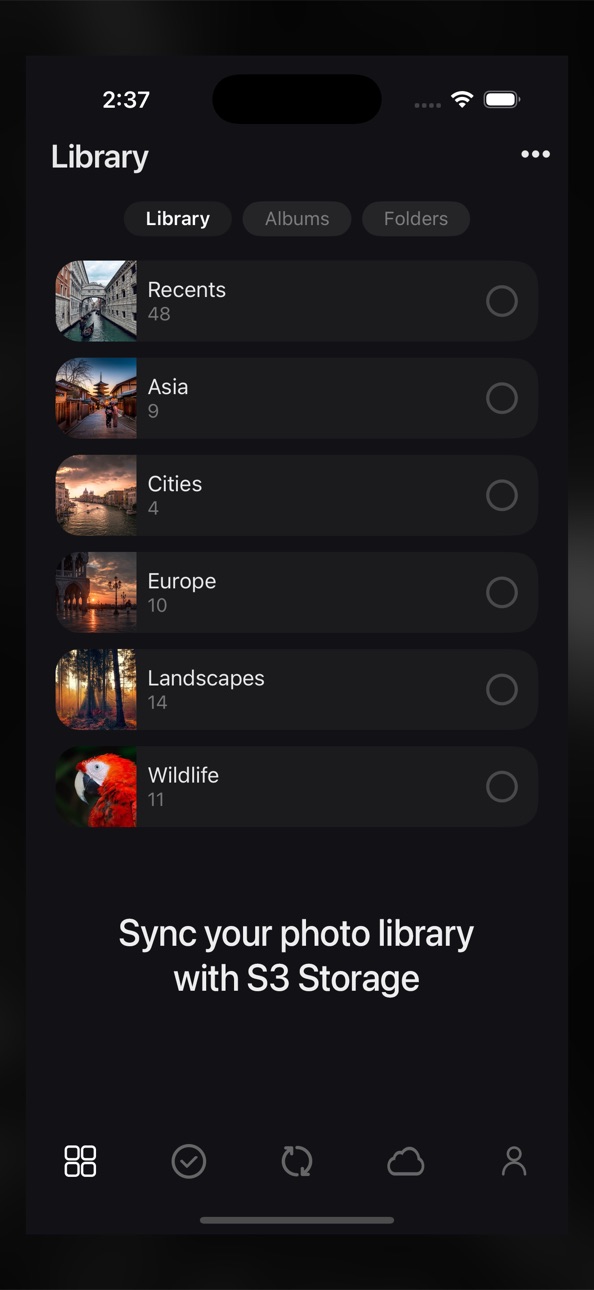


What’s New Version 1.7
We’ve made it easier to select and filter your photos and videos with new smart albums, alongside the existing Recents album.
The Recents album still includes all your photos and videos, while the new smart albums let you filter by Photos, Videos, Live Photos, RAW Images, Edited, Favorites, Screenshots, and Hidden items.
Description
Sync for S3 synchronizes your phone’s photo library, including the album and folder hierarchy, to your S3 storage.
For users who like to organize their photos into folders and albums, Sync will also
- Sync automatically creates folders and albums you may have created in your phone’s photo library on S3 storage.
- Uploads the video component for Live Photos.
- Uploads the edited versions of photos and videos.
- Mirror or backup your photo library.
- Synchronize your entire photo library or only certain folders and albums.
In summary, each time you run Sync, it will make sure any changes to your phone’s photo library are updated on your S3 storage, overwriting, renaming, uploading, and deleting items on your S3 storage if needed.
Sync will also NEVER delete any photos from your phone. Sync performs a ONE-WAY sync only, making your S3 storage match your phone’s photo library. Any changes made on your S3 storage will not be synced to your phone, rather, the changes on your S3 storage will simply be overwritten the next time you run a Sync.
Free Plan
The free plan is limited to syncing up to 3 top-level folders and albums and up to 200 photos.
Premium Plan
Our affordable premium plan removes all restrictions and unlocks access to all future features.
Subscription Pricing and Terms
- Annual or monthly subscription billing will start immediately after you subscribe and will auto-renew each year or month.
- Subscriptions will automatically renew unless canceled at least one day before the renewal date within 24 hours before the end of the current period. Payment will be charged to your Apple ID account at the confirmation of purchase. You can manage and cancel your subscription by going to your account settings in the App Store.
- Subscriptions are non-refundable, so please choose this option carefully.
- Please refer to the In-App Purchases section for pricing.
Terms of Use —
https://www.apple.com/legal/internet-services/itunes/dev/stdeula
Privacy Policy —
https://sync.photosplus.app/privacy.php
In-App Purchases US pricing
Subscription Subscription
Premium - Yearly · Yearly$19.99
Premium - Monthly · Monthly$2.99
Capabilities
In-App Purchases
Accessibility
ipadiphonemacrealityDevicetvoswatch
Version history 8 versions
Build 880645455v1.72025-12-15 03:35:06
We’ve made it easier to select and filter your photos and videos with new smart albums, alongside the existing Recents album.
The Recents album still includes all your photos and videos, while the new smart albums let you filter by Photos, Videos, Live Photos, RAW Images, Edited, Favorites, Screenshots, and Hidden items.
Build 873770867v1.62025-04-04 02:09:44
This version adds a Backup Mode option.
Backup Mode:
When enabled, new photos and videos will be copied to the cloud, overwriting files with the same name while ensuring that no other files are deleted.
Exact Mirror (Default Mode):
Keep backup mode disabled if you want an exact mirror of your local selections in the cloud, including deletions.
Build 873529763v1.52025-03-26 05:45:28
This release includes bug fixes and performance upgrades.
Build 873468223v1.42025-03-25 08:11:59
This release includes bug fixes and performance upgrades.
Build 869214076v1.32024-09-24 12:48:32
This release includes bug fixes and performance upgrades.
Build 867524717v1.22024-08-15 09:50:33
This release includes bug fixes and performance upgrades.
Build 866979037v1.12024-06-26 02:39:17
This version adds support for live photos. To upload the video component of your live photos, please enable the live photos option in the Settings section.
Build 865546172v1.02024-04-30 11:00:27
Price history by region
Currency
Show
Columns
Search
Availability 1 of 1 storefronts
| Region | Language | Price | Ratings | Avg | Version |
|---|---|---|---|---|---|
| US | en-US | Free | 1 | 1.0 | 1.7 |
Change log 12 changes · US
✎
releaseNotes updated
We’ve made it easier to select and filter your photos and videos with new smart albums, alongside the existing Recents album.
The Recents album still includes
✎
description updated
Sync for S3 synchronizes your phone’s photo library, including the album and folder hierarchy, to your S3 storage.
For users who like to organize their photos
✎
subtitle updated
Backup photos to S3 storage
✎
name updated
Sync with S3
◆
Version 1.7 released
We’ve made it easier to select and filter your photos and videos with new smart albums, alongside the existing Recents album.
The Recents album still includes all your photos and videos, while the new smart albums let you filter by Photos,
◆
Version 1.6 released
This version adds a Backup Mode option.
Backup Mode:
When enabled, new photos and videos will be copied to the cloud, overwriting files with the same name while ensuring that no other files are deleted.
Exact Mirror (Default Mode):
Keep b
◆
Version 1.5 released
This release includes bug fixes and performance upgrades.
◆
Version 1.4 released
This release includes bug fixes and performance upgrades.
◆
Version 1.3 released
This release includes bug fixes and performance upgrades.
◆
Version 1.2 released
This release includes bug fixes and performance upgrades.
◆
Version 1.1 released
This version adds support for live photos. To upload the video component of your live photos, please enable the live photos option in the Settings section.
◆
Version 1.0 released