Home › Entertainment

 US
US
1 of 1 storefronts
Content in en-US
Content in en-US
Information
Preview 3 platforms
iPhone 4 images


iPad 3 images


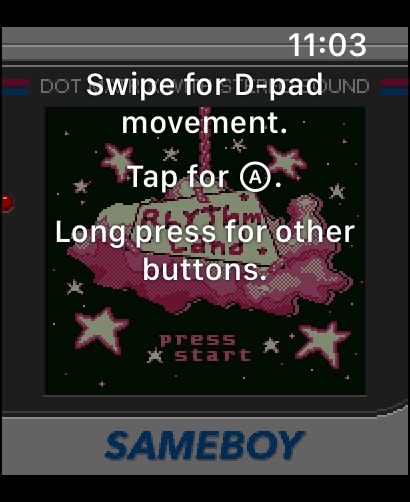
Apple Watch 3 images


What’s New Version 1.0.3
New features and fixes in this release:
- Support for more game controllers, including singular Joy-Cons
- Better handling of save conflicts using a dialog, making syncing saves across different machines and emulators easier
- It is now possible to adjust the maximum rumble strength
- Controller buttons can now be assigned to one of 4 hotkey commands
- Major improvements to noise emulation accuracy
- Fixed an issue where rewinding could reset the ROM under some circumstances
- Fixed a bug where the Game Boy Camera could not be emulated correctly on some iPhone models
- Various other bugs fixes and improvements
Complete change log: https://sameboy.github.io/changelog/
Description
SameBoy is a user friendly, powerful and open source Game Boy, Game Boy Color, and Super Game Boy emulator.
Features:
- World's most accurate Game Boy emulation core
- Save states, with gesture support for quick saving and loading
- Rumble support, even for games without a Rumble Pak
- Play on your Apple Watch
- A wide range of scaling filters
- Game Boy Camera emulation
- Motion controls emulation
- Fast forward, rewind, and slow motion
- Game Boy Printer emulation
- Use cheat codes
- Support for MFi, PlayStation, Switch, and Xbox controllers
- Interface themes
- No ads, no tracking
- A lot more!
Terms of Use: https://www.apple.com/legal/internet-services/itunes/dev/stdeula/
Privacy Policy: https://sameboy.github.io/privacy/
SameBoy is in no way affiliated with Nintendo. Game Boy is a trademark of Nintendo.
In-App Purchases US pricing
SameBoy Supporter Subscription
Supporter · Monthly$0.99
Supporter Plus · Monthly$2.99
Supporter Premium · Monthly$7.99
One-Time Purchases
Lifetime Theme Access$4.99
SameBoy for Apple Watch$4.99
Capabilities
In-App PurchasesGame controller
Accessibility
ipadiphonemacrealityDevicetvoswatch
Version history 8 versions
Build 882957787v1.0.32026-03-04 21:42:01
New features and fixes in this release:
- Support for more game controllers, including singular Joy-Cons
- Better handling of save conflicts using a dialog, making syncing saves across different machines and emulators easier
- It is now possible to adjust the maximum rumble strength
- Controller buttons can now be assigned to one of 4 hotkey commands
- Major improvements to noise emulation accuracy
- Fixed an issue where rewinding could reset the ROM under some circumstances
- Fixed a bug where the Game Boy Camera could not be emulated correctly on some iPhone models
- Various other bugs fixes and improvements
Complete change log: https://sameboy.github.io/changelog/
Build 876744502v1.0.22025-08-01 10:42:53
New features and fixes in this release:
- Rapid A and Rapid B buttons can now be configured on game controllers
- Improvements to Turbo Mode and its settings
- Major improvements to audio quality
- All GameShark cheats are now correctly imported
- Various UI improvements
- Various other improvements and bug fixes
Complete change log: https://sameboy.github.io/changelog/
Build 873783766v1.0.12025-04-04 21:29:51
Plenty of new features in this release:
- Joysticks on game controllers can now be used as faux analog inputs
- Improved audio quality
- Fixed compatibility issues with some iPad models
- Various improvements to stability and speed
- Minor accuracy improvements
Complete change log: https://sameboy.github.io/changelog/
Build 871043636v1.02024-12-11 18:59:24
Plenty of new features in this release:
- Play your ROMs on your Apple Watch
- Cheats support
- Game Boy Printer emulation
- Put your ROMs and saves on iCloud
- Create, import, and share palettes for use with monochrome Game Boy models
- Many other improvements and bug fixes
Complete change log: https://sameboy.github.io/changelog/
Build 869047645v0.16.72024-10-03 15:51:01
- It is now possible to cycle between different main cameras while emulating the Game Boy Camera
- ZIP archives can now be directly imported
- ROMs in the library can now be deleted using a context menu as well
- The Homebrew Hub was moved to a tab
- A new flat CRT filter is now available
- Retouched icons, including new dark and tinted icons
- Fixed a bug caused turbo/slow-motion/rewind modes to unexpectedly exit when using a game controller
- Fixed a potential crash involving haptics
Complete change log: https://sameboy.github.io/changelog/
Build 866686131v0.16.62024-06-14 10:06:43
- Integration with Homebrew Hub
- Improved D-pad controls – the center point of the D-pad is now a safe "rest" zone; dragging a touch outside of the D-pad no longer releases the button.
- The screen will no longer dim if emulation is running
- User-provided boot ROMs can now be used
- A button to open the ROM folder in Files in the Library
- Fixed temporary audio distortions affecting some devices
- Fixed a bug that caused haptics and rumble to temporarily stop working
- Fixed a bug where some newly imported ROMs could sometimes incorrectly prefer SGB over CGB
- Fixed potential crashes and freeze while emulating the Game Boy Camera
- Fixed a few potential crashes
Complete change log: https://sameboy.github.io/changelog/
Build 866173934v0.16.52024-05-24 10:11:12
- Newly imported ROMs now automatically select the most appropriate model
- Fixed a bug that prevented in-app ROM import on some devices
- Fixed a bug that prevented controllers input from working
- Fixed various visual bugs in the interface
- Various other bug fixes
Build 865186531v0.16.42024-05-21 08:24:57
Price history by region
Currency
Show
Columns
Search
Availability 1 of 1 storefronts
| Region | Language | Price | Ratings | Avg | Version |
|---|---|---|---|---|---|
| US | en-US | Free | 110 | 4.5 | 1.0.3 |
Change log 12 changes · US
✎
releaseNotes updated
New features and fixes in this release:
- Support for more game controllers, including singular Joy-Cons
- Better handling of save conflicts using a dialog, mak
✎
description updated
SameBoy is a user friendly, powerful and open source Game Boy, Game Boy Color, and Super Game Boy emulator.
Features:
- World's most accurate Game Boy emulatio
✎
subtitle updated
Friendly, Powerful GB Emulator
✎
name updated
SameBoy
◆
Version 1.0.3 released
New features and fixes in this release:
- Support for more game controllers, including singular Joy-Cons
- Better handling of save conflicts using a dialog, making syncing saves across different machines and emulators easier
- It is now pos
◆
Version 1.0.2 released
New features and fixes in this release:
- Rapid A and Rapid B buttons can now be configured on game controllers
- Improvements to Turbo Mode and its settings
- Major improvements to audio quality
- All GameShark cheats are now correctly imp
◆
Version 1.0.1 released
Plenty of new features in this release:
- Joysticks on game controllers can now be used as faux analog inputs
- Improved audio quality
- Fixed compatibility issues with some iPad models
- Various improvements to stability and speed
- Minor
◆
Version 1.0 released
Plenty of new features in this release:
- Play your ROMs on your Apple Watch
- Cheats support
- Game Boy Printer emulation
- Put your ROMs and saves on iCloud
- Create, import, and share palettes for use with monochrome Game Boy models
- Ma
◆
Version 0.16.7 released
- It is now possible to cycle between different main cameras while emulating the Game Boy Camera
- ZIP archives can now be directly imported
- ROMs in the library can now be deleted using a context menu as well
- The Homebrew Hub was mo
◆
Version 0.16.6 released
- Integration with Homebrew Hub
- Improved D-pad controls – the center point of the D-pad is now a safe "rest" zone; dragging a touch outside of the D-pad no longer releases the button.
- The screen will no longer dim if emulation is runnin
◆
Version 0.16.5 released
- Newly imported ROMs now automatically select the most appropriate model
- Fixed a bug that prevented in-app ROM import on some devices
- Fixed a bug that prevented controllers input from working
- Fixed various visual bugs in the interfac
◆
Version 0.16.4 released