Home › Business

 US
US
 GHNot Available
 KENot Available
 NGNot Available
 TZNot Available
 UGNot Available
1 of 6 storefronts
Content in en-US
Content in en-US
Information
Preview 2 platforms
iPhone 7 images
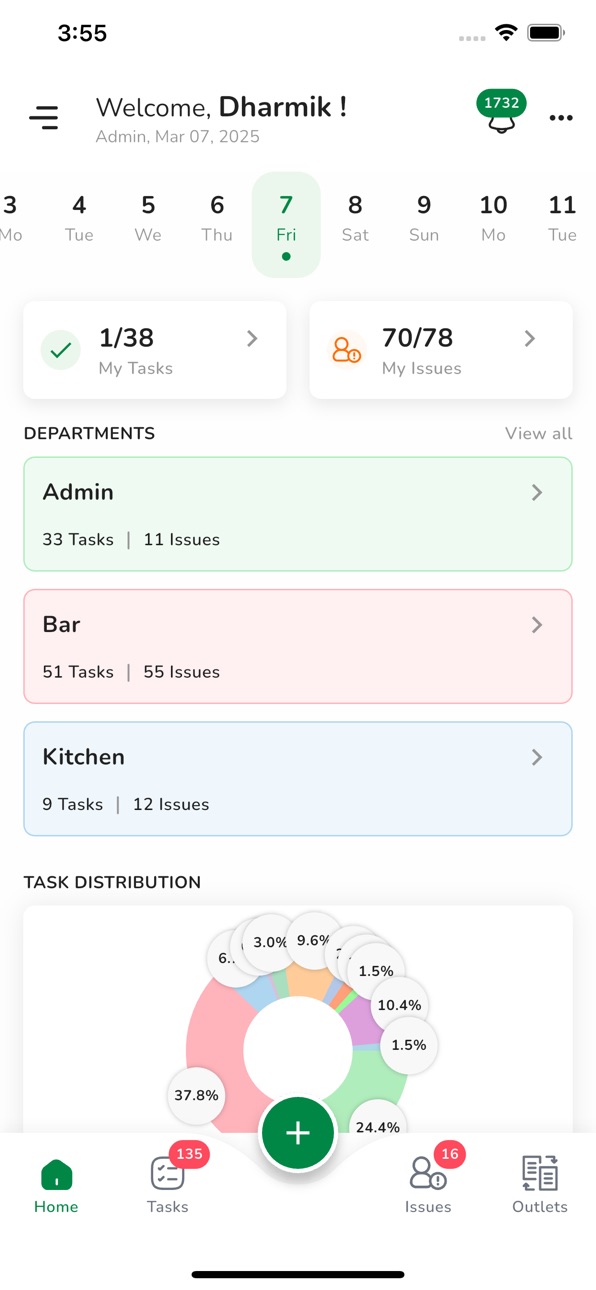


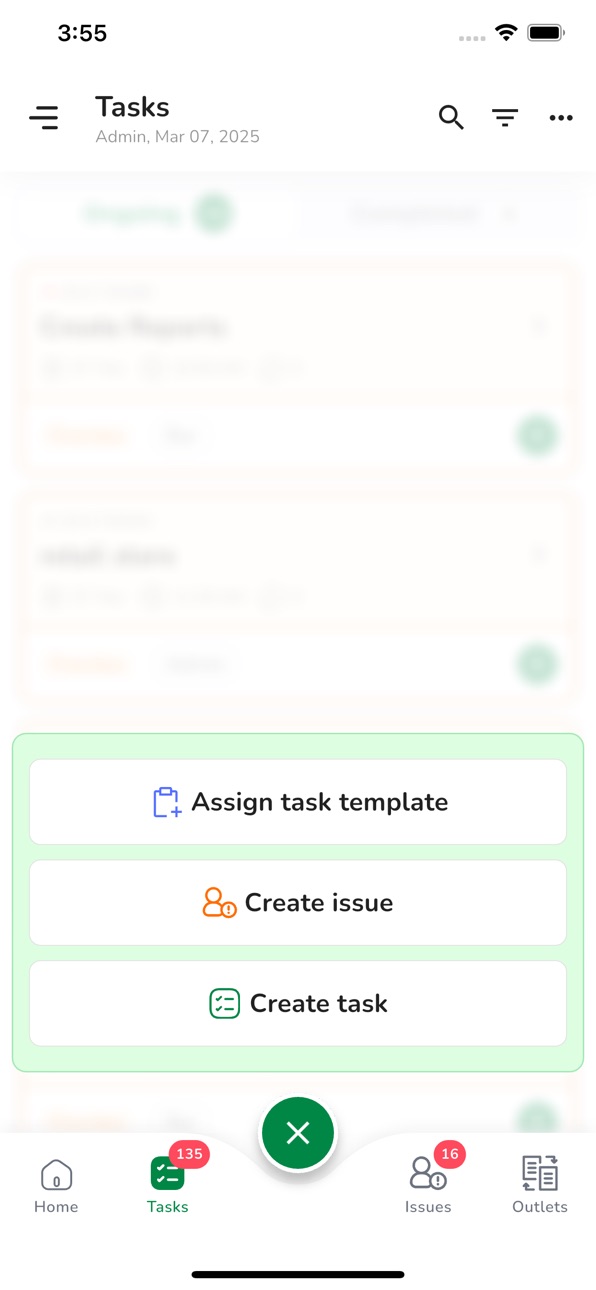

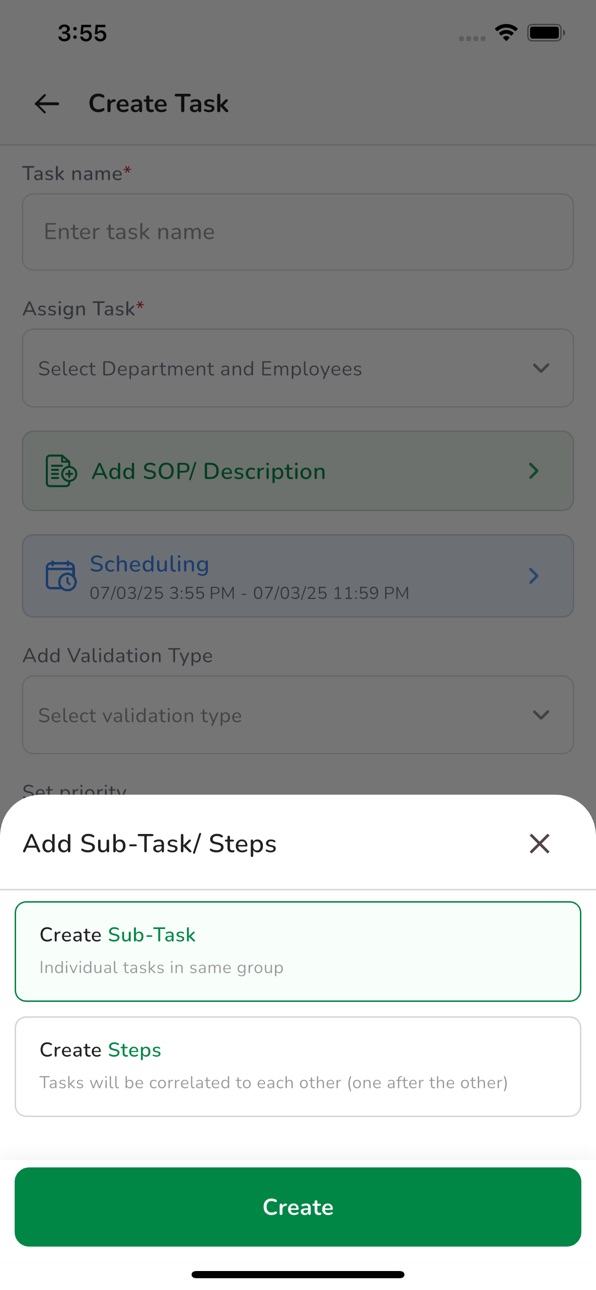
iPad 7 images


What’s New Version 1.0.98
What's New
• New Task Buzzer with instant alerts and reminders
• Works across all app states
• Multi-device buzzer synchronization
• Home-Screen Quick Shortcuts
• Bug fixes and performance improvements
Description
Systemise Project Management. Simplify Success
Plan smarter & track faster with an all-in-one tool
Automate routine tasks and let AI handle verifications for you.
This smart project management app helps you create, allocate, and track your team’s daily tasks and milestones with complete transparency. Assign responsibilities, monitor progress, escalate issues, and verify completion with photo, video, audio, checklist, or document attachments — all in one place.
No more endless follow-ups, reminders, or confusion that slow down your projects. Get real-time progress updates, raise or resolve blockers instantly, and keep your workflow running smoothly.
You can also create standardized project templates and SOPs for each process to maintain consistency and simplify onboarding for new team members.
Designed for teams of all sizes across any industry, this tool is ideal for organizations managing multiple projects, teams, and deadlines — where precision and accountability matter most.
Easily manage multiple departments or clients and customize user roles based on hierarchy or project needs.
Key Features:
- Track project progress & resolve issues instantly
- Share quick updates via text, voice notes & media
- Create reusable SOPs & project templates
- Access real-time dashboards & detailed reports
- Prevent task duplication & improve visibility
- Set custom permissions for managers & team members
Key Benefits:
- Improves accountability & ownership across teams
- Simplifies project planning & task assignment
- Reduces micromanagement and manual tracking
- Saves time so you can focus on strategic goals
- Builds consistent processes for easy team training
Now, manage and monitor your projects efficiently with our intuitive software and 24/7 customer support.
Accessibility
ipadiphonemacrealityDevicetvoswatch
Version history 20 versions
Build 886520244v1.0.982026-06-04 18:03:57
What's New
• New Task Buzzer with instant alerts and reminders
• Works across all app states
• Multi-device buzzer synchronization
• Home-Screen Quick Shortcuts
• Bug fixes and performance improvements
Build 885897120v1.0.962026-05-20 20:27:03
Bug fixes and enhancements
Build 884529056v1.0.882026-04-15 17:19:44
Petpooja Payroll × Petpooja Tasks
• One-click import of users from Payroll to Tasks
• One-way sync (Payroll to Tasks)
Build 882285629v1.0.842026-02-10 23:33:58
Petpooja Payroll × Petpooja Tasks
• One-click import of users from Payroll to Tasks
• One-way sync (Payroll to Tasks)
Build 881285812v1.0.762026-01-07 19:47:20
Bug Fix: Fixed Geo Fence issues (location selection/search and validation stability).
Improvement: Added/updated “Help me setup” button for easier onboarding and guidance.
Build 881237537v1.0.742026-01-06 19:29:23
Team Management (CRUD)
- Create, view, edit, and delete teams/departments
- Team impact analysis before deletion
- Enhanced team assignment in tasks, issues, and projects
- Smart team removal with user impact confirmation
Build 880711269v1.0.722025-12-22 15:59:04
A fresh upgrade flows into your workspace:
Teams Update
• Departments are now Teams across the platform.
• Assign users directly to tasks without department limits.
• Add multiple teams to a single task for true cross-functional work.
• Changes now reflect across Tasks, Issues, and Projects.
Industry-Wise Project Tags
Quickly organize projects with tags tailored for:
Manufacturing, Corporate Offices, Retail, Hotels & Resorts, and Clinics & Hospitals.
Build 879661793v1.0.602025-11-11 20:46:48
Introducing Projects — a brand-new way to categorize, manage, and track your outlets’ daily operations with powerful new capabilities.
Project Management & Tracking:
Take control of your operations like never before. The new Projects feature gives you flexibility, visibility, and efficiency across your entire team.
Key Highlights:
- Manage Your Projects: Track work Team-wise, Department-wise, and User-wise effortlessly.
- Create Projects with Custom Tags: Use tags such as Rooms, Batch, Floors, etc. for better categorization.
- Add Existing Tasks to New Projects: Organize your work without starting from scratch.
- Save Projects as Templates: Create reusable templates for future projects.
- Copy Project Templates to Multiple Outlets: Scale your operations with ease.
- View Progress Team, Department & User Wise: Get a clear view of performance metrics.
- Store Project-Specific Files: Keep relevant documents easily accessible for your teams.
- Track Progress Tag-wise: Improve visibility and reporting at a granular level.
Task and Group Task Enhancements:
We’ve refined task management to make collaboration smoother and tracking more efficient.
What’s New:
- Add Brief Descriptions: Give context and clarity to your Tasks and Group Tasks.
- Assign a Responsible User to Group Tasks: Ensure accountability within every team.
- Link Existing Projects to Tasks or Group Tasks: Keep everything connected and organized.
- Dynamic Group Task Status: Group Task status now automatically updates based on the progress of its tasks.
This is just the beginning!
Projects open the door to a smarter, more scalable way of managing your daily operations.
Update now and experience the most powerful Petpooja Tasks yet!
Build 879261390v1.0.562025-10-28 08:34:03
We’ve made big improvements in this version to give you more control and a smoother experience!
- We are giving the user an ability to self onboard themselves on the platform
- Self tutorial so that users can now explore the app by themselves
- Email Login for all users
- User can add points to task and manage outlet points
Build 878946381v1.0.532025-10-16 05:55:44
We’ve made big improvements in this version to give you more control and a smoother experience!
- We are giving the user an ability to self onboard themselves on the platform
- Self tutorial so that users can now explore the app by themselves
- Email Login for all users
- User can add points to task and manage outlet points
Build 877143931v1.0.442025-08-11 16:49:08
We’ve made big improvements in this version to give you more control and a smoother experience!
- User Management in App
You can now manage users directly from the app: add, update, and organize user access without switching to the dashboard.
- New & Improved UI
Enjoy a fresh, modern interface designed for better accessibility, faster navigation, and a more intuitive experience.
Build 875838488v1.0.422025-06-24 16:28:20
We’re excited to bring you a smoother and faster experience with this update!
- Performance Improvements
Faster Load Times – We've optimized the app to load significantly faster, improving overall responsiveness and user experience.
- Task Management Upgrade
All Tasks in One Place – Users can now view and manage all their assigned tasks from the **My Task** page with ease.
- Smarter Filtering
New & Improved Filters – Find what you need faster with advanced filter options tailored to help you navigate your tasks and data better.
- Enhanced User Experience
Streamlined User Flow – Enjoy smoother navigation and improved interactions throughout the app, making it more intuitive and user-friendly.
Update now to make the most of these enhancements and get more done, faster and smarter!
Build 875200153v1.0.402025-05-30 21:54:12
Auto Review With AI
You now have the option to review tasks manually or let AI do it for you!
AI will automatically validate tasks and checklists that use image-based validation, saving you valuable time and effort.
How It Works:
Create a task or checklist using image as the validation type.
Mark it as "Need Approval".
Complete the task by uploading relevant images.
The task will enter "In Review" status.
AI auto-validates the submission in under 5 seconds.
If approved, the task is marked Completed automatically!
You can still manually review tasks if needed, especially when using non-image validation types.
Manual Review Mode
Users can manually approve or reject tasks with any type of validation.
For rejections, you can add reasons and the task will revert to active for revision.
Updated Checklist Validation Types
Now supporting:
Text Box Validation
Request responses in text format for specific checkpoints while creating your checklist.
Q&A Type Validation – New!
Add structured knowledge checks into your tasks.
Key Highlights:
Add Questions in SOPs.
Employees can respond via:
Text Input
Single Option Dropdown
Multiple Choice
All responses are compiled into the Employwise Outletwise Task Summary Report for easy review.
Important Notes
AI Review only works with Image validations.
Tasks with non-image validations require manual review.
Ensure images are clear and task-specific for accurate AI validation.
Explore the new features now and elevate your task management game with AI-powered reviews!
Build 874209928v1.0.362025-04-24 13:24:30
Workflow Module Enhancements
The Workflow module just got a major upgrade to help you simplify operations, collect data, and trigger tasks effortlessly.
What’s New:
Add & Update Columns with Validation
One-Click Export of responses and task data
Track Task Progress and monitor completions with ease
Built to streamline your everyday operations — use Workflows to gather internal or external data and automate execution steps.
Key Features:
Create customizable workflows
Add powerful components: dropdowns, opinion scales, videos, files & more
Allow multiple responses per workflow
Trigger tasks automatically based on inputs
See status updates on each workflow response (done/not done)
Syncs seamlessly between mobile and web
Create automated execution paths for your teams
Use Cases:
Audit Workflow – Ask structured questions and link relevant tasks
Basic CRM – Add leads and track task follow-ups
Property Management – Collect room/floor data and assign tasks accordingly
Coming Soon:
Logic Jumps – Add conditional flows inside workflows for smarter execution paths
Build 873052238v1.0.312025-03-07 18:22:43
1. Enhanced Search Functionality:
Easily find tasks and issues with our new, robust search feature.
2. Bug Fixes & Performance Improvements:
We’ve squashed various bugs and made critical improvements to ensure a smoother, more stable user experience.
3. App Stage Optimizations:
The app’s staging environment has been refined to better support upcoming features and overall performance.
Build 872308675v1.0.292025-02-07 13:59:55
100+ Free Templates To Choose From
Login to Your App or Web Dashboard >> Go to "Browse Templates"
Search and select the template that is most relevant to your need
Edit the template if you feel the need and create tasks within minutes
Save the edited template as "Save as Template"
The saved template will be visible in in Task Template Gallery
Make sure you have updated to the latest version of the Application to enjoy the templates and more upcoming features
Build 871989096v1.0.282025-01-25 00:29:20
1. Subtask Creation
Users can now create sub-tasks under a master task group, this will help them to give their teams a set of tasks to complete within themselves, sub-tasks will not have any dependencies on each other.
2. Steps Creation
Users can now create dependent tasks called steps, the first step will have to be completed for the next step to start until then it will remain scheduled.
3. Group Tasks
Subtasks and steps will be part of the group task, these tasks can be copied to multiple outlets, and the user will be able to see the progress of each task in the group and can set repetition as per their need.
4. Update Template Flow
Users can View and edit the templates from the web dashboard while assigning them to any department or user, this shall help them to make changes if they need to these changes can be done one time or permanently as well.
5. New Homepage with Universal Filter
We have refreshed the look and feel of our main page, which includes clear and better graphs with a calendar view, and a universal filter in the task table that will have all the possible fields and combinations you can try out.
Build 870580079v1.0.272024-11-21 09:34:44
Task & Issues Creation
- With the new flow the tasks and issues will be assigned to a department along with the managers of those department
Task & Issues Details & Reassignment
- Users Can also assign the tasks from the details sections depending on their need
Tasks & Issues - "Overdue"
- Users are now will get an "overdue" status if the task is not completed within due time and the user when completes the task the "completed' will also turn orange
Tasks & Issues - "Ongoing With Issue"
- We have also changed the term from "completed with issue to " Ongoing with issue" if the users are raising issue in an ongoing task
Filters In Tables
- Overdue, Completed with overdue & ongoing with issues all the them have been added in the filter across all the pages for ease of visibility
Build 870076239v1.0.252024-11-04 13:10:11
We have fixed a few points keeping user empathy in mind so that the end user can easily navigate through the platform.
Bug Fixes:
- Multiple Checklist Completion
Users were facing issues while the competition of multiple checklists where is the system was showing errors now been resolved
- Scheduling & Completion
Users were facing issues where they were able to complete the scheduled tasks changes in logic had been done
- Unauthorized Access
Employees and managers were getting locked out of the outlet while doing tasks, this also has been resolved.
Build 864474254v1.0.02024-08-28 12:52:57
No pricing data captured yet — comparisons appear once the app has paid storefronts or in-app purchases.
Availability 1 of 6 storefronts
| Region | Language | Price | Ratings | Avg | Version |
|---|---|---|---|---|---|
| US | en-US | Free | 1 | 1.0 | 1.0.98 |
Not available in: GH, KE, NG, TZ, UG
Change log 24 changes · US
✎
releaseNotes updated
What's New
• New Task Buzzer with instant alerts and reminders
• Works across all app states
• Multi-device buzzer synchronization
• Home-Screen Quick Shortcut
✎
description updated
Systemise Project Management. Simplify Success
Plan smarter & track faster with an all-in-one tool
Automate routine tasks and let AI handle verifications for y
✎
subtitle updated
Project & Work Management
✎
name updated
Petpooja Tasks
◆
Version 1.0.98 released
What's New
• New Task Buzzer with instant alerts and reminders
• Works across all app states
• Multi-device buzzer synchronization
• Home-Screen Quick Shortcuts
• Bug fixes and performance improvements
◆
Version 1.0.96 released
Bug fixes and enhancements
◆
Version 1.0.88 released
Petpooja Payroll × Petpooja Tasks
• One-click import of users from Payroll to Tasks
• One-way sync (Payroll to Tasks)
◆
Version 1.0.84 released
Petpooja Payroll × Petpooja Tasks
• One-click import of users from Payroll to Tasks
• One-way sync (Payroll to Tasks)
◆
Version 1.0.76 released
Bug Fix: Fixed Geo Fence issues (location selection/search and validation stability).
Improvement: Added/updated “Help me setup” button for easier onboarding and guidance.
◆
Version 1.0.74 released
Team Management (CRUD)
- Create, view, edit, and delete teams/departments
- Team impact analysis before deletion
- Enhanced team assignment in tasks, issues, and projects
- Smart team removal with user impact confirmation
◆
Version 1.0.72 released
A fresh upgrade flows into your workspace:
Teams Update
• Departments are now Teams across the platform.
• Assign users directly to tasks without department limits.
• Add multiple teams to a single task for true cross-functional work.
• Ch
◆
Version 1.0.60 released
Introducing Projects — a brand-new way to categorize, manage, and track your outlets’ daily operations with powerful new capabilities.
Project Management & Tracking:
Take control of your operations like never before. The new Projects fea
◆
Version 1.0.56 released
We’ve made big improvements in this version to give you more control and a smoother experience!
- We are giving the user an ability to self onboard themselves on the platform
- Self tutorial so that users can now explore the app by thems
◆
Version 1.0.53 released
We’ve made big improvements in this version to give you more control and a smoother experience!
- We are giving the user an ability to self onboard themselves on the platform
- Self tutorial so that users can now explore the app by thems
◆
Version 1.0.44 released
We’ve made big improvements in this version to give you more control and a smoother experience!
- User Management in App
You can now manage users directly from the app: add, update, and organize user access without switching to the dashboa
◆
Version 1.0.42 released
We’re excited to bring you a smoother and faster experience with this update!
- Performance Improvements
Faster Load Times – We've optimized the app to load significantly faster, improving overall responsiveness and user experience.
- Tas
◆
Version 1.0.40 released
Auto Review With AI
You now have the option to review tasks manually or let AI do it for you!
AI will automatically validate tasks and checklists that use image-based validation, saving you valuable time and effort.
How It Works:
Create a
◆
Version 1.0.36 released
Workflow Module Enhancements
The Workflow module just got a major upgrade to help you simplify operations, collect data, and trigger tasks effortlessly.
What’s New:
Add & Update Columns with Validation
One-Click Export of responses and ta
◆
Version 1.0.31 released
1. Enhanced Search Functionality:
Easily find tasks and issues with our new, robust search feature.
2. Bug Fixes & Performance Improvements:
We’ve squashed various bugs and made critical improvements to ensure a smoother, more stable user
◆
Version 1.0.29 released
100+ Free Templates To Choose From
Login to Your App or Web Dashboard >> Go to "Browse Templates"
Search and select the template that is most relevant to your need
Edit the template if you feel the need and create tasks within minutes
◆
Version 1.0.28 released
1. Subtask Creation
Users can now create sub-tasks under a master task group, this will help them to give their teams a set of tasks to complete within themselves, sub-tasks will not have any dependencies on each other.
2. Steps Creation
U
◆
Version 1.0.27 released
Task & Issues Creation
- With the new flow the tasks and issues will be assigned to a department along with the managers of those department
Task & Issues Details & Reassignment
- Users Can also assign the tasks from the details sections d
◆
Version 1.0.25 released
We have fixed a few points keeping user empathy in mind so that the end user can easily navigate through the platform.
Bug Fixes:
- Multiple Checklist Completion
Users were facing issues while the competition of multiple checklists where i
◆
Version 1.0.0 released