Home › Productivity

 US
US
1 of 1 storefronts
Content in en-US
Content in en-US
Information
Preview 1 platform
iPhone 4 images



What’s New Version 3.0.5
* Device Assistant now has an improved NFC setup tracking to accurately report successful Cevo Mini device configurations.
* Added support for viewing and updating the Secure Web Port in Control System Settings.
Description
Transform device deployment to minutes!
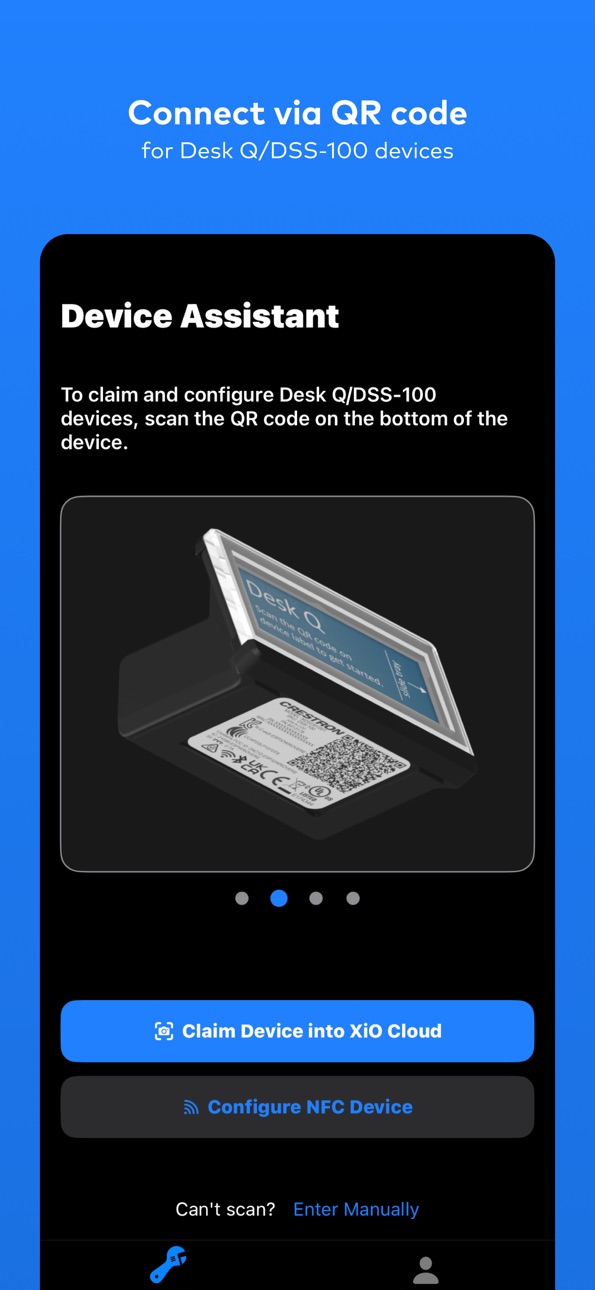
Crestron Device Assistant revolutionizes how you deploy and configure Crestron devices. Simply point, scan, and watch your devices seamlessly connect—whether you're claiming to XiO Cloud, deploying Desk Q scheduling panels, or pairing CEVO Mini with Crestron Home.
What makes it amazing:
- Instant scanning - Camera recognizes serial numbers and MAC addresses automatically
- Works everywhere - Deploy from packaging, labels, or directly from devices
- One-tap workflows - Devices configure and connect in moments
- Mobile-first - Leverage Bluetooth and camera technology already in your pocket
Supported workflows:
- Claim devices to XiO Cloud accounts
- Deploy Desk Q scheduling panels with third-party calendar integration
- Pair CEVO Mini with Crestron Home
Accessibility
ipadiphonemacrealityDevicetvoswatch
Version history 16 versions
Build 886689976v3.0.52026-06-11 13:33:03
* Device Assistant now has an improved NFC setup tracking to accurately report successful Cevo Mini device configurations.
* Added support for viewing and updating the Secure Web Port in Control System Settings.
Build 885290569v2.5.742026-05-12 13:39:37
Users must now accept the site license agreement before creating rooms and groups in the Device Assistant app.
Build 883976714v2.5.712026-04-10 22:28:22
This update for 2.5 improves the experience of adding and managing rooms and groups in XiO Cloud from the Device Assistant app, with clearer editing options, fewer interruptions, and smoother workflows.
• Deleted rooms will no longer appear as selectable options when assigning devices in the Device Assistant app.
• You can now rename rooms and groups successfully directly from the Device Assistant app.
• A new “Add New Building” option is available in the building dropdown when creating rooms.
• Room details including the Capacity field, are now visible and editable when using the rename (pencil) icon.
• The Capacity field is also available when creating a new room.
• The building list now updates automatically if a building name is changed during room creation.
• The “Try Again” button has been removed from the Insufficient Permissions error page for users with restricted permissions, helping reduce confusion.
Build 883231455v2.4.272026-03-12 15:14:41
* Added Custom Programming button in the DA App during Cevo Mini remote setup.
* For Crestron Home setups, Confirm Details page now alerts that a v2 processor and v4.008 or later are required.
* For Crestron Home setups, Transfer Complete page now reminds you to dock/plug in the remote until setup finishes.
* Transfer Complete page firmware updates are clearer: shows Update Firmware when available, otherwise Continue.
Build 882381822v2.4.252026-02-11 23:33:05
Resolved a bug that prevented the device’s active Wi‑Fi SSID from appearing in the NFC-based setup flow.
Build 881904618v2.4.212026-01-31 16:07:42
* Users can now add new groups directly in the Device Assistant App, without needing to go to the XiO Cloud portal first.
* Users can now add new rooms directly in the Device Assistant App while claiming their device, removing the need to visit the XiO Cloud portal during setup.
* Users can now see the “+” button to create groups and rooms whenever their permissions allow it (Global Admin or Standard Users with Admin/Tech access).
* Users at the maximum hierarchy level (7th level) will no longer see the option to create new groups, so the app only shows actions they are allowed to perform.
* Users can now see a clear message when selecting a room if their access level is hidden for the entire hierarchy, helping them understand why certain spaces aren’t available instead of leaving them confused.
Build 880052990v2.3.572025-12-11 18:39:23
Users can now use Device Assistant to commission the new Cevo Mini handheld remote using NFC.
Build 878662786v2.3.222025-10-06 10:57:37
* Users can now search for rooms either globally or within the context of their current location in the hierarchy, making navigation faster and more intuitive.
* Now supporting FaceID and Touch ID for quicker and more secure login.
Build 878375643v2.3.52025-10-03 21:05:05
* Users can now search for rooms either globally or within the context of their current location in the hierarchy, making navigation faster and more intuitive.
* Now supporting FaceID and Touch ID for quicker and more secure login.
Build 876777214v2.1.452025-07-29 15:54:01
Bug fix
Build 875830697v2.1.352025-06-30 21:27:46
New Feature: Effortless Device Claiming into XiO Cloud Rooms via Device Assistant
We’ve made it easier than ever to claim devices directly into specific rooms using the Device Assistant! Previously, devices were only added to the Unassociated Devices or Device Assistant Group (DAG). Now, you can skip the extra steps and place devices exactly where they belong—right from the start.
What’s new?
Claim devices directly into a specific room from the Device Assistant
Streamlined process eliminates the need for manual reorganization in XiO Cloud
Multiple intuitive ways to find the right room, including:
Searching by room name
Navigating the XiO Cloud group hierarchy
Why it matters: This long-requested enhancement simplifies workflows, saves time, and reduces friction—so you can focus on what matters most.
Note: Desk claiming support will be available in a future release.
Build 874221982v2.0.422025-04-26 14:59:51
Now claim all XiO Cloud Supported Crestron devices with Device Assistant! Deploying is now as easy as scanning a label with your phone and following the instructions.
Build 870870707v1.3.382024-12-06 22:10:37
Changes to support new login flow that includes home realm discovery
Build 869771925v1.3.352024-10-22 20:49:29
* Fixed issue with navigational back button not working
* Removed memory leak with secured communications to DSS-100
* Added authentication token expiration tracking to provide better user experience when it expires
Build 869495559v1.3.292024-10-08 15:53:30
Resolved an issue where the phone occasionally displayed a Bluetooth disconnection error while assigning the Wi-Fi SSID and passphrase.
Build 864362339v1.3.242024-09-27 19:48:02
No pricing data captured yet — comparisons appear once the app has paid storefronts or in-app purchases.
Availability 1 of 1 storefronts
| Region | Language | Price | Ratings | Avg | Version |
|---|---|---|---|---|---|
| US | en-US | Free | 6 | 4.3 | 3.0.5 |
Change log 19 changes · US
✎
releaseNotes updated
* Device Assistant now has an improved NFC setup tracking to accurately report successful Cevo Mini device configurations.
* Added support for viewing and updat
✎
description updated
Transform device deployment to minutes!
Crestron Device Assistant revolutionizes how you deploy and configure Crestron devices. Simply point, scan, and watch y
✎
name updated
Crestron Device Assistant
◆
Version 3.0.5 released
* Device Assistant now has an improved NFC setup tracking to accurately report successful Cevo Mini device configurations.
* Added support for viewing and updating the Secure Web Port in Control System Settings.
◆
Version 2.5.74 released
Users must now accept the site license agreement before creating rooms and groups in the Device Assistant app.
◆
Version 2.5.71 released
This update for 2.5 improves the experience of adding and managing rooms and groups in XiO Cloud from the Device Assistant app, with clearer editing options, fewer interruptions, and smoother workflows.
• Deleted rooms will no longer appea
◆
Version 2.4.27 released
* Added Custom Programming button in the DA App during Cevo Mini remote setup.
* For Crestron Home setups, Confirm Details page now alerts that a v2 processor and v4.008 or later are required.
* For Crestron Home setups, Transfer Complete p
◆
Version 2.4.25 released
Resolved a bug that prevented the device’s active Wi‑Fi SSID from appearing in the NFC-based setup flow.
◆
Version 2.4.21 released
* Users can now add new groups directly in the Device Assistant App, without needing to go to the XiO Cloud portal first.
* Users can now add new rooms directly in the Device Assistant App while claiming their device, removing the need to v
◆
Version 2.3.57 released
Users can now use Device Assistant to commission the new Cevo Mini handheld remote using NFC.
◆
Version 2.3.22 released
* Users can now search for rooms either globally or within the context of their current location in the hierarchy, making navigation faster and more intuitive.
* Now supporting FaceID and Touch ID for quicker and more secure login.
◆
Version 2.3.5 released
* Users can now search for rooms either globally or within the context of their current location in the hierarchy, making navigation faster and more intuitive.
* Now supporting FaceID and Touch ID for quicker and more secure login.
◆
Version 2.1.45 released
Bug fix
◆
Version 2.1.35 released
New Feature: Effortless Device Claiming into XiO Cloud Rooms via Device Assistant
We’ve made it easier than ever to claim devices directly into specific rooms using the Device Assistant! Previously, devices were only added to the Unassocia
◆
Version 2.0.42 released
Now claim all XiO Cloud Supported Crestron devices with Device Assistant! Deploying is now as easy as scanning a label with your phone and following the instructions.
◆
Version 1.3.38 released
Changes to support new login flow that includes home realm discovery
◆
Version 1.3.35 released
* Fixed issue with navigational back button not working
* Removed memory leak with secured communications to DSS-100
* Added authentication token expiration tracking to provide better user experience when it expires
◆
Version 1.3.29 released
Resolved an issue where the phone occasionally displayed a Bluetooth disconnection error while assigning the Wi-Fi SSID and passphrase.
◆
Version 1.3.24 released