Home › Utilities

 US
US
1 of 1 storefronts
Content in en-US
Content in en-US
Information
Preview 1 platform
iPhone 7 images


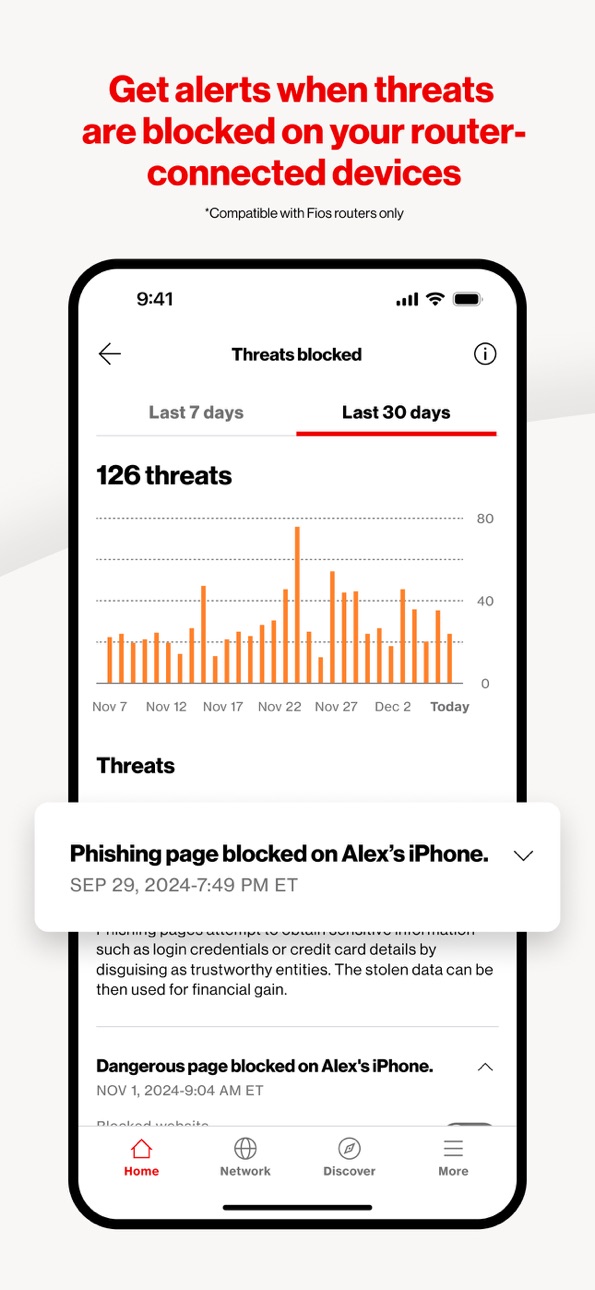
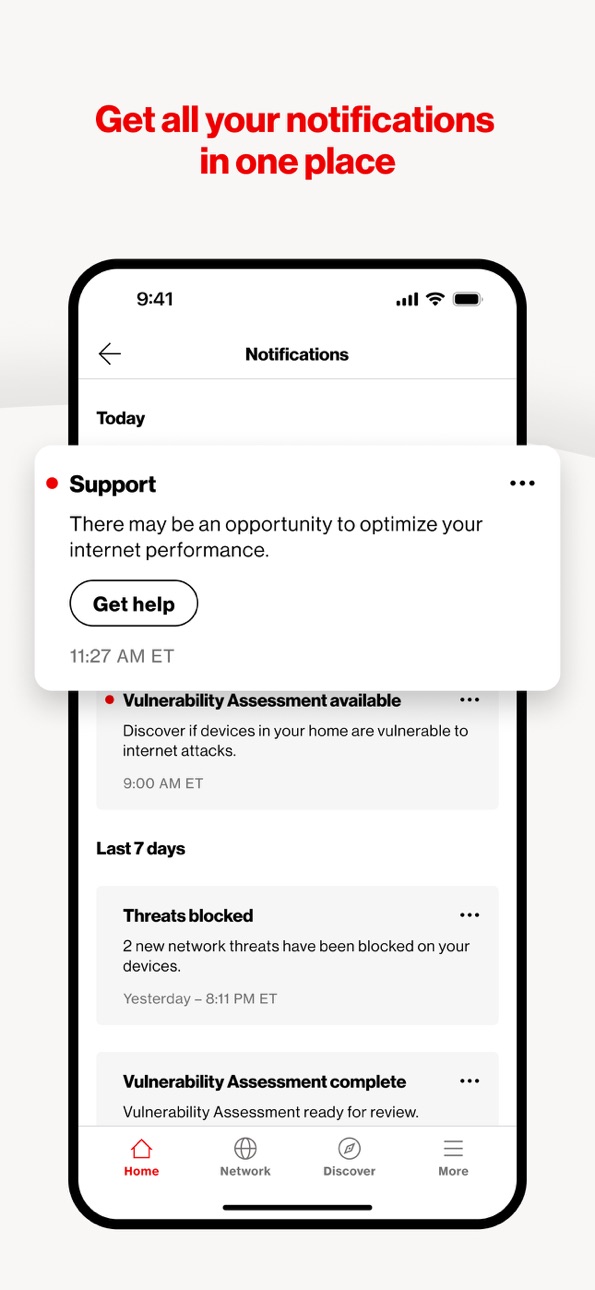
What’s New Version 2.4.1
What’s New
• Enhanced Device Prioritization: Direct bandwidth to specific devices when needed most (select Verizon routers).
• Parental Controls: Manage screen time with category limits, usage insights, and device pausing.
• In-App Shopping: Easily buy compatible smart home gear via the Shop Tile.
• Wi-Fi Performance: Better diagnostics and metrics to track network health.
Improvements
• UI updates, system optimizations, and bug fixes for a smoother, more stable experience.
Description
Manage and Optimize Your Fios, 5G Home, or LTE Home Network with Ease
Verizon Home is your all-in-one solution for managing and optimizing your home network. With a suite of powerful features and functionalities, you can take full control of your Verizon equipment and connected devices, ensuring a seamless and secure internet experience for your entire household. The app is only available to active subscribers of Verizon's Fios Home Internet, 5G Home Internet, or LTE Home Internet Service.
Key Features:
Network Management:
- View Equipment Details: Access information about your Verizon routers and extenders.
- Connected Devices: See details of all devices connected to your network.
- Network Control: Enable or disable individual networks (primary, guest, IoT).
- SSID & Password: View and change your network name (SSID), password, and encryption type.
- Advanced Settings: Enable/disable SON, 6 GHz (for applicable routers), and more.
- Wi-Fi Sharing: Easily share your Wi-Fi credentials.
- Speed Test: Run speed tests and view your speed test history.
- Router Management: Restart your router, adjust LED brightness, use WPS for easy device setup, and save/restore settings or factory reset to default.
Troubleshooting:
- Diagnose and resolve network issues step-by-step using our guided troubleshooting flows
Parental Controls:
- Device Grouping: Group devices for easier management.
- Pause & Schedule: Pause internet access or schedule access times for multiple devices.
Discover:
- New Features: Stay updated with new features and functionalities.
- Video Tips: Learn more about your network with helpful video tips.
Account Management:
- Profile Settings: Update your user ID, password, and contact information.
Support & Feedback:
- Contact Verizon: Reach out via chatbot or phone for assistance.
- Report Issues: Submit issues and get support.
- Feedback: Provide feedback to help us improve the app.
Verizon Home is designed to give you complete control over your home network, making it easy to manage, troubleshoot, and optimize your internet experience. Download now and take the first step towards a smarter, more efficient home network.
Download Verizon Home Today!
Capabilities
Wallet
Accessibility
ipadiphonemacrealityDevicetvoswatch
Version history 25 versions
Build 887316357v2.4.12026-06-23 16:13:36
What’s New
• Enhanced Device Prioritization: Direct bandwidth to specific devices when needed most (select Verizon routers).
• Parental Controls: Manage screen time with category limits, usage insights, and device pausing.
• In-App Shopping: Easily buy compatible smart home gear via the Shop Tile.
• Wi-Fi Performance: Better diagnostics and metrics to track network health.
Improvements
• UI updates, system optimizations, and bug fixes for a smoother, more stable experience.
Build 886749429v2.4.02026-06-19 02:01:08
What’s New
• Enhanced Device Prioritization: Direct bandwidth to specific devices when needed most (select Verizon routers).
• Parental Controls: Manage screen time with category limits, usage insights, and device pausing.
• In-App Shopping: Easily buy compatible smart home gear via the Shop Tile.
• Wi-Fi Performance: Better diagnostics and metrics to track network health.
Improvements
• UI updates, system optimizations, and bug fixes for a smoother, more stable experience.
Build 886171797v2.2.32026-05-27 22:35:48
Improvements:
• UI enhancements and bug fixes
Build 885640775v2.2.22026-05-14 18:51:39
Improvements:
• UI enhancements and bug fixes
Build 884652891v2.2.12026-04-24 17:48:51
What's New:
• Support for Verizon Home Internet Lite Extra
Improvements:
• UI enhancements and bug fixes
Build 883722792v2.2.02026-03-25 22:17:58
What's New:
• Wi-Fi Performance optimization is now available for more router models
Improvements:
• UI enhancements and bug fixes
Build 881684356v2.1.22026-02-11 23:15:19
Improvements
• Improved user interface and overall app performance.
• Various bug fixes.
Build 880322104v2.1.02025-12-12 21:39:27
What's New
• Network Hub: Centralized dashboard providing comprehensive visibility and management for all connected devices and network equipment.
• Wi-Fi Optimizer (Beta): Now available in beta, this feature visualizes your Wi-Fi signal strength and device connection quality throughout your living area for proactive network management. (Available on select Verizon equipment)
• Wi-Fi Performance (Beta): Access detailed diagnostics and metrics to evaluate the overall efficiency and health of your internet connection. (Available on select Verizon equipment)
• Latency Analyzer: A dedicated tool to test connectivity and responsiveness to common external web platforms, helping isolate whether performance issues originate outside your home network.
• Verizon Home Assistant: Introducing your new AI-powered chatbot, built to provide instant, curated support, intelligent troubleshooting, and proactive management assistance right within the Home app.
Improvements
• UI enhancements, system optimizations, and bug fixes for improved stability and user experience.
Build 879684860v2.0.22025-11-14 20:50:57
Improvements
• UI improvement and bug fixes.
Build 879464523v2.0.12025-11-07 20:59:18
Improvements
• Improvements and bug fixes.
Build 879180253v2.0.02025-11-01 20:14:38
Improvements
• Updated error handling.
• UI improvement and bug fixes.
Build 879127572v1.9.12025-10-22 22:19:11
What's New
• Verizon Home Internet Lite: Eligible customers will be able to upgrade to the new "Verizon Home Internet Lite" plan from Home app and manage the data usage for the billing cycle.
Improvements
• Various bug fixes
Build 878691919v1.9.02025-10-09 21:02:37
What's New
• Verizon 5G Home Internet self-setup: Now, customers with select gateways can set up their Verizon 5G Home Internet right from the app.
Improvements
• Improved user interface and overall app performance
• Various bug fixes
Build 877813490v1.8.12025-09-03 22:12:54
What's New
• Enhanced Device Management: Find and organize your connected devices more easily with new, improved filtering and sorting options in your device list.
Improvements
• Improved user interface and overall app performance.
• Various bug fixes.
Build 877553548v1.8.02025-08-28 20:20:17
What's New
• Enhanced Device Management: Find and organize your connected devices more easily with new, improved filtering and sorting options in your device list.
Improvements
• Improved user interface and overall app performance.
• Various bug fixes.
Build 877064624v1.7.12025-08-08 14:18:42
What's new
• Proactive Care Alerts: Get in-app alerts on your home internet status.
• Notification Center: View all your notifications in one place.
• Revamped help and feedback: Get assistance and share your thoughts easily with our new integrated help and feedback system.
Improvements
• UI improvements, performance enhancements, and bug fixes
Build 876616683v1.7.02025-08-06 19:57:50
What's new
• Proactive Care Alerts: Get in-app alerts on your home internet status.
• Notification Center: View all your notifications in one place.
• Revamped help and feedback: Get assistance and share your thoughts easily with our new integrated help and feedback system.
Improvements
• UI improvements, performance enhancements, and bug fixes
Build 875766666v1.6.02025-06-25 16:55:48
Improvements
• Improved categorizations of speed test results
• UI improvements, performance enhancements, and bug fixes
Build 875036154v1.4.12025-06-04 16:38:21
What’s New:
• Updated in-app messaging
• Smarter issue tracking logic
• Minor fixes and improvements
Build 874400331v1.4.02025-04-30 22:00:11
What's New:
• Additional Fios Device Management: Now manage more of your Fios devices, such as Set Top Boxes, from the Verizon Home app.
Improvements:
• UI Enhancements: Enjoy a more intuitive interface designed for better usability.
• Bug Fixes: We’ve addressed several reported bugs to ensure a smoother experience.
Build 874224795v1.3.12025-04-24 19:03:37
Improvements:
• Bug Fixes: We’ve addressed several reported bugs to ensure a smoother experience.
Build 873255167v1.3.02025-03-25 23:18:14
What's New:
• Customizable Device List Sorting: Sorting options to suit your preferences.
• Enhanced Device List Filtering: Quickly locate any device connected to your network using our new filters.
• Unique Router Naming: Assign your router a unique name for easy recognition.
Improvements:
• UI Enhancements: Enjoy a more intuitive interface designed for better usability.
• Bug Fixes: We’ve addressed several reported bugs to ensure a smoother experience.
Build 872947397v1.1.12025-03-04 10:31:21
• Wi-Fi Backup: Wi-Fi Backup from Verizon is a new way to stay connected if your primary home internet connection goes down. Keep your home office running smoothly, your gaming and streaming connected, and your online learning on track. If your primary Internet is down, Wi-Fi Backup lets you keep doing what matters. Backup power source required for use during power outage.
Improvements:
• Bug Fixes: We’ve addressed several reported bugs to ensure a smoother experience.
Build 872444113v1.1.02025-02-26 21:49:53
• Wi-Fi Backup: Wi-Fi Backup from Verizon is a new way to stay connected if your primary home internet connection goes down. Keep your home office running smoothly, your gaming and streaming connected, and your online learning on track. If your primary Internet is down, Wi-Fi Backup lets you keep doing what matters. Backup power source required for use during power outage.
Improvements:
• UI Enhancements: Enjoy a more intuitive interface designed for better usability.
• Bug Fixes: We’ve addressed several reported bugs to ensure a smoother experience.
Build 871781815v1.0.52025-01-30 20:44:04
• Quick Actions Menu: Now access frequently used features directly from the Home Screen.
• Real-Time Notifications: Stay informed about support ticket updates instantly.
• Verizon Community Forums: Connect with other users and find solutions to common issues.
Improvements:
• UI Enhancements: Enjoy a more intuitive interface designed for better usability.
• Bug Fixes: We’ve addressed several reported bugs to ensure a smoother experience.
No pricing data captured yet — comparisons appear once the app has paid storefronts or in-app purchases.
Availability 1 of 1 storefronts
| Region | Language | Price | Ratings | Avg | Version |
|---|---|---|---|---|---|
| US | en-US | Free | 17.0k | 4.4 | 2.4.1 |
Change log 29 changes · US
✎
releaseNotes updated
What’s New
• Enhanced Device Prioritization: Direct bandwidth to specific devices when needed most (select Verizon routers).
• Parental Controls: Manage screen
✎
description updated
Manage and Optimize Your Fios, 5G Home, or LTE Home Network with Ease
Verizon Home is your all-in-one solution for managing and optimizing your home network. W
✎
subtitle updated
Manage your home network
✎
name updated
Verizon Home
◆
Version 2.4.1 released
What’s New
• Enhanced Device Prioritization: Direct bandwidth to specific devices when needed most (select Verizon routers).
• Parental Controls: Manage screen time with category limits, usage insights, and device pausing.
• In-App Shopping
◆
Version 2.4.0 released
What’s New
• Enhanced Device Prioritization: Direct bandwidth to specific devices when needed most (select Verizon routers).
• Parental Controls: Manage screen time with category limits, usage insights, and device pausing.
• In-App Shopping
◆
Version 2.2.3 released
Improvements:
• UI enhancements and bug fixes
◆
Version 2.2.2 released
Improvements:
• UI enhancements and bug fixes
◆
Version 2.2.1 released
What's New:
• Support for Verizon Home Internet Lite Extra
Improvements:
• UI enhancements and bug fixes
◆
Version 2.2.0 released
What's New:
• Wi-Fi Performance optimization is now available for more router models
Improvements:
• UI enhancements and bug fixes
◆
Version 2.1.2 released
Improvements
• Improved user interface and overall app performance.
• Various bug fixes.
◆
Version 2.1.0 released
What's New
• Network Hub: Centralized dashboard providing comprehensive visibility and management for all connected devices and network equipment.
• Wi-Fi Optimizer (Beta): Now available in beta, this feature visualizes your Wi-Fi signal st
◆
Version 2.0.2 released
Improvements
• UI improvement and bug fixes.
◆
Version 2.0.1 released
Improvements
• Improvements and bug fixes.
◆
Version 2.0.0 released
Improvements
• Updated error handling.
• UI improvement and bug fixes.
◆
Version 1.9.1 released
What's New
• Verizon Home Internet Lite: Eligible customers will be able to upgrade to the new "Verizon Home Internet Lite" plan from Home app and manage the data usage for the billing cycle.
Improvements
• Various bug fixes
◆
Version 1.9.0 released
What's New
• Verizon 5G Home Internet self-setup: Now, customers with select gateways can set up their Verizon 5G Home Internet right from the app.
Improvements
• Improved user interface and overall app performance
• Various bug fixes
◆
Version 1.8.1 released
What's New
• Enhanced Device Management: Find and organize your connected devices more easily with new, improved filtering and sorting options in your device list.
Improvements
• Improved user interface and overall app performance.
• Vario
◆
Version 1.8.0 released
What's New
• Enhanced Device Management: Find and organize your connected devices more easily with new, improved filtering and sorting options in your device list.
Improvements
• Improved user interface and overall app performance.
• Vario
◆
Version 1.7.1 released
What's new
• Proactive Care Alerts: Get in-app alerts on your home internet status.
• Notification Center: View all your notifications in one place.
• Revamped help and feedback: Get assistance and share your thoughts easily with our new in
◆
Version 1.7.0 released
What's new
• Proactive Care Alerts: Get in-app alerts on your home internet status.
• Notification Center: View all your notifications in one place.
• Revamped help and feedback: Get assistance and share your thoughts easily with our new in
◆
Version 1.6.0 released
Improvements
• Improved categorizations of speed test results
• UI improvements, performance enhancements, and bug fixes
◆
Version 1.4.1 released
What’s New:
• Updated in-app messaging
• Smarter issue tracking logic
• Minor fixes and improvements
◆
Version 1.4.0 released
What's New:
• Additional Fios Device Management: Now manage more of your Fios devices, such as Set Top Boxes, from the Verizon Home app.
Improvements:
• UI Enhancements: Enjoy a more intuitive interface designed for better usability.
• B
◆
Version 1.3.1 released
Improvements:
• Bug Fixes: We’ve addressed several reported bugs to ensure a smoother experience.
◆
Version 1.3.0 released
What's New:
• Customizable Device List Sorting: Sorting options to suit your preferences.
• Enhanced Device List Filtering: Quickly locate any device connected to your network using our new filters.
• Unique Router Naming: Assign your route
◆
Version 1.1.1 released
• Wi-Fi Backup: Wi-Fi Backup from Verizon is a new way to stay connected if your primary home internet connection goes down. Keep your home office running smoothly, your gaming and streaming connected, and your online learning on track. If
◆
Version 1.1.0 released
• Wi-Fi Backup: Wi-Fi Backup from Verizon is a new way to stay connected if your primary home internet connection goes down. Keep your home office running smoothly, your gaming and streaming connected, and your online learning on track. If
◆
Version 1.0.5 released
• Quick Actions Menu: Now access frequently used features directly from the Home Screen.
• Real-Time Notifications: Stay informed about support ticket updates instantly.
• Verizon Community Forums: Connect with other users and find solution