Home › Productivity

 US
US
USen-US INen-GB
 CNzh-Hans-CN
 DEde-DE
 CAen-CA
 VNen-GB
 ESes-ES
 IDen-GB
 JPja
JPja NLnl
NLnl ATde-DE
 CHde-CH
 FRfr-FR
 GBen-GB
 ITit
ITit KRko
KRko SAen-GB
 TWzh-Hant-TW
 AUen-AU
 LBen-GB
 SEsv
SEsv THen-GB
 AEen-GB
 BEen-GB
 CYen-GB
 CZen-GB
 FIen-GB
 HKzh-Hant-HK
 HRen-GB
 KWen-GB
 KZen-GB
 LVen-GB
 MYen-GB
 ROen-GB
 SKen-GB
 TRen-GB
 AFen-GB
 ALen-GB
 AMen-GB
 AZen-GB
 BGen-GB
 BHen-GB
 BMen-GB
 BNen-GB
 BTen-GB
 DKen-GB
 EEen-GB
 EGen-GB
 FJen-GB
 FMen-GB
 GEen-GB
 GRen-GB
 HUen-GB
 IEen-GB
 ILen-GB
 IQen-GB
 ISen-GB
 JOen-GB
 KGen-GB
 KHen-GB
 LAen-GB
 LKen-GB
 LTen-GB
 LUen-GB
 MDen-GB
 MEen-GB
 MKen-GB
 MMen-GB
 MNen-GB
 MOzh-Hant-HK
 MRen-GB
 MTen-GB
 MVen-GB
 NOen-GB
 NPen-GB
 NRen-GB
 NZen-AU
 OMen-GB
 PGen-GB
 PHen-GB
 PKen-GB
 PLen-GB
 PTpt-PT
 PWen-GB
 QAen-GB
 SBen-GB
 SGen-GB
 SIen-GB
 TJen-GB
 TMen-GB
 TOen-GB
 UZen-GB
 VUen-GB
 XKen-GB
 YEen-GB
 ZAen-GB
96 of 96 storefronts
Content in en-US
Content in en-US
Information
Apple ID6477563940
Bundle IDcom.theblackholecompany.Prismoria
SellerSeller
Min iOS17.0
Device familiesmac, iphone, ipad
Released2024-05-05
Copyright© 2025 Blackhole
Privacy policyLink ↗
Preview 3 platforms
iPhone 7 images


iPad 6 images


Mac 5 images




What’s New Version 1.8.5
Hey there, fellow collector!
This update is all about making Trace sync rock solid. We dug deep into iCloud and fixed the issues that could leave your captures out of sync between your iPhone, iPad, and Mac.
What we fixed and improved:
• More reliable iCloud sync, so your captures, notes, and collections stay consistent across every device
• Faster, more dependable syncing after you add or edit items
• Fewer cases of duplicated or missing captures
• Smoother performance and lower memory use on large libraries
• A batch of bug fixes and stability improvements throughout the app
We also slipped in some nice extras while we were at it: full Markdown notes, a redesigned capture details screen, full Threads support, a new masonry layout, and live video previews right in the grid.
Enjoying Trace? A quick review on the App Store means the world to us. It helps other people discover the app and keeps us motivated to keep building.
Got feedback or hit a snag? We read and reply to every message:
hello@theblackholecompany.com
Thanks for being here.
Description
Save articles, screenshots, PDFs, and links from any app -- then read them later, even offline. Trace is the bookmark manager for people who save a lot and hate losing track of it all.
One tap from Safari, Instagram, X, YouTube, Reddit, Pinterest, TikTok, or any app -- and your content is saved with the thumbnail, title, and source automatically. No copying, no pasting, no extra steps.
Never lose something interesting again.
SAVE FROM ANYWHERE
- Save links, articles, videos, and web pages from any app using the share sheet
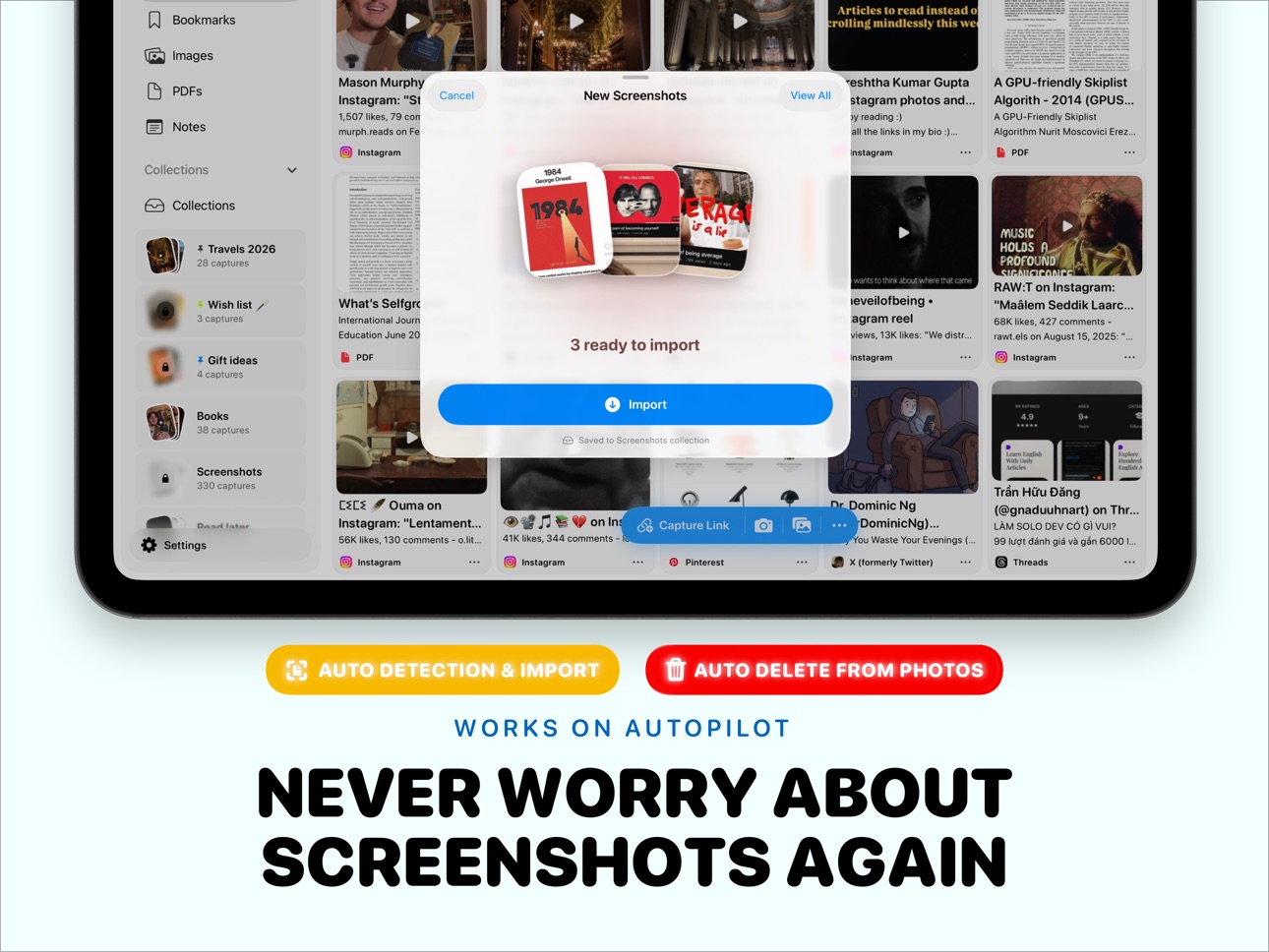
- Import screenshots directly, even with limited photo library access
- Auto-import screenshots as you take them
- Add photos from your camera or photo library
- Save PDFs with automatic thumbnail and page count
- Capture anything using Siri Shortcuts without opening the app
- Paste a link from your clipboard and save instantly
DISTRACTION-FREE READER
- Open saved articles in a clean reader with no ads or clutter
- Customize font size and reading theme
- Highlight text in multiple colors and add notes to any section
- Read offline -- cached for planes, commutes, and subways
- Highlights and notes sync across all your devices
ORGANIZE YOUR WAY
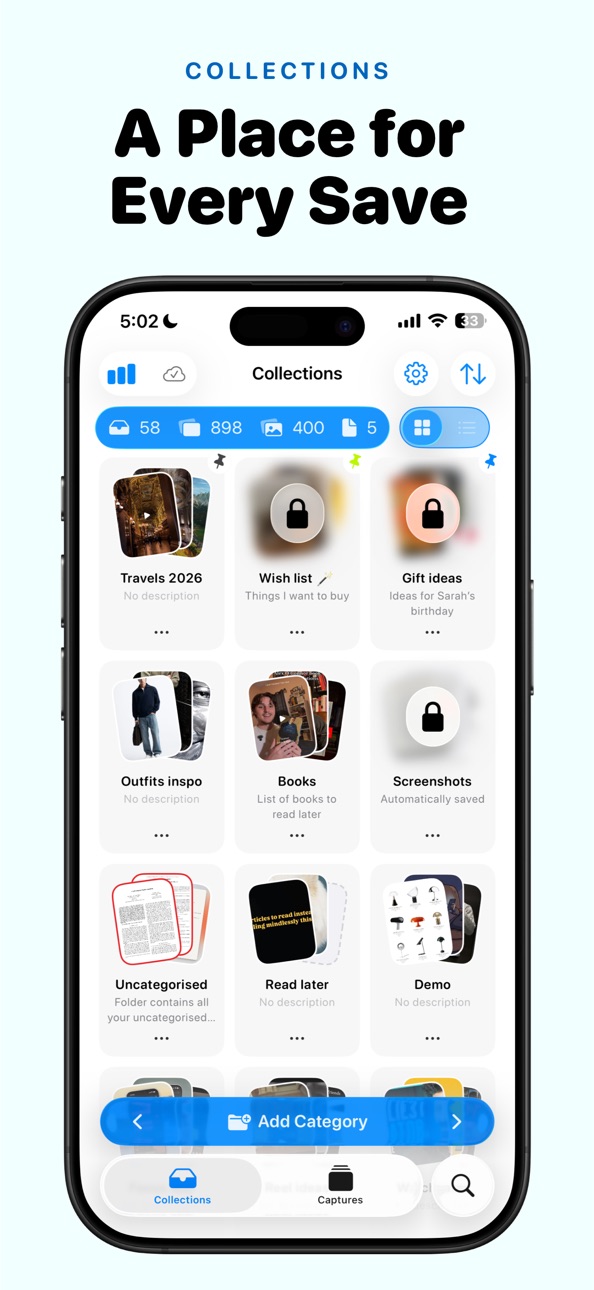
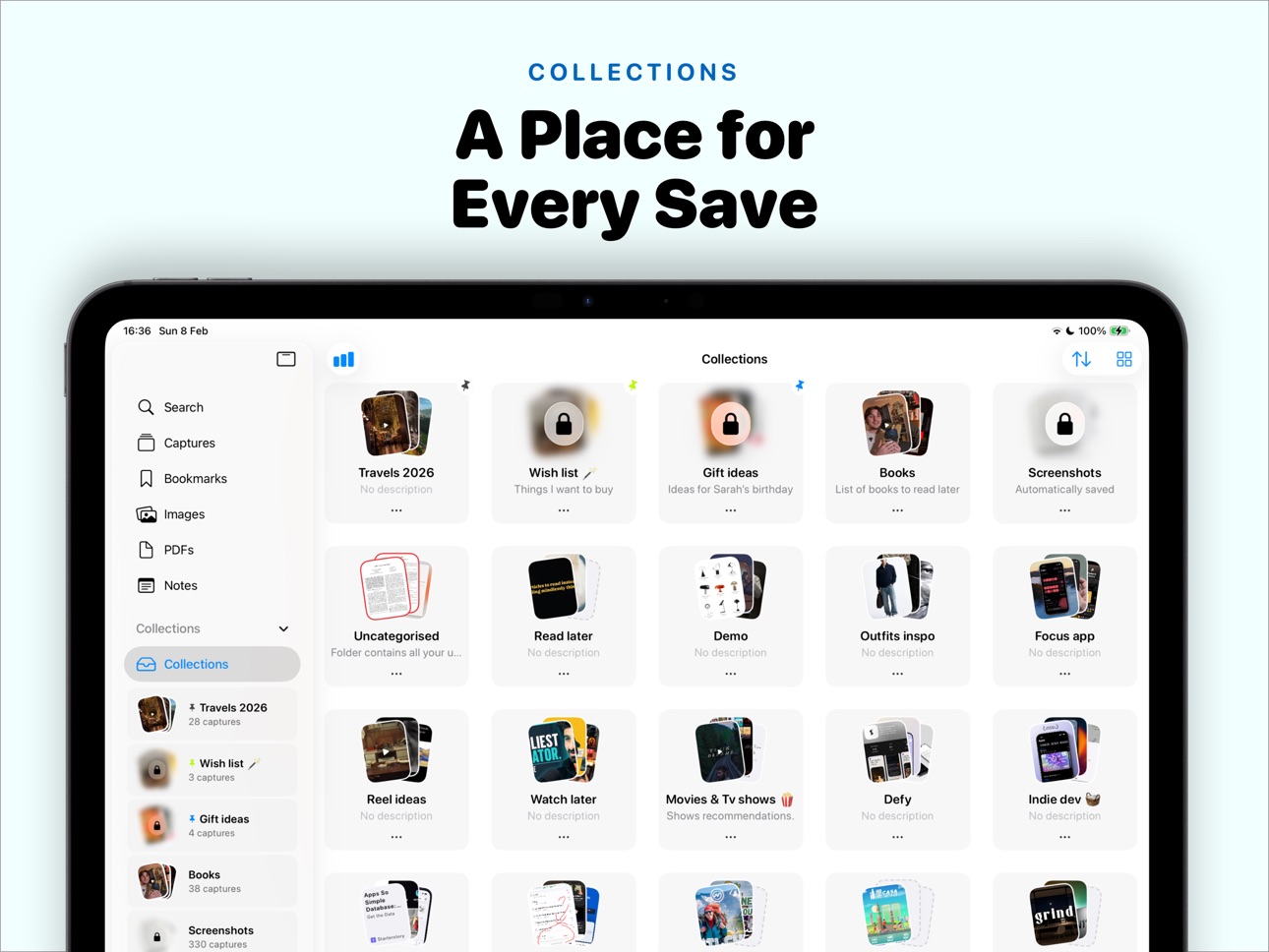
- Create collections to group content by topic, project, or mood
- Color-coded tags with custom icons for flexible filtering
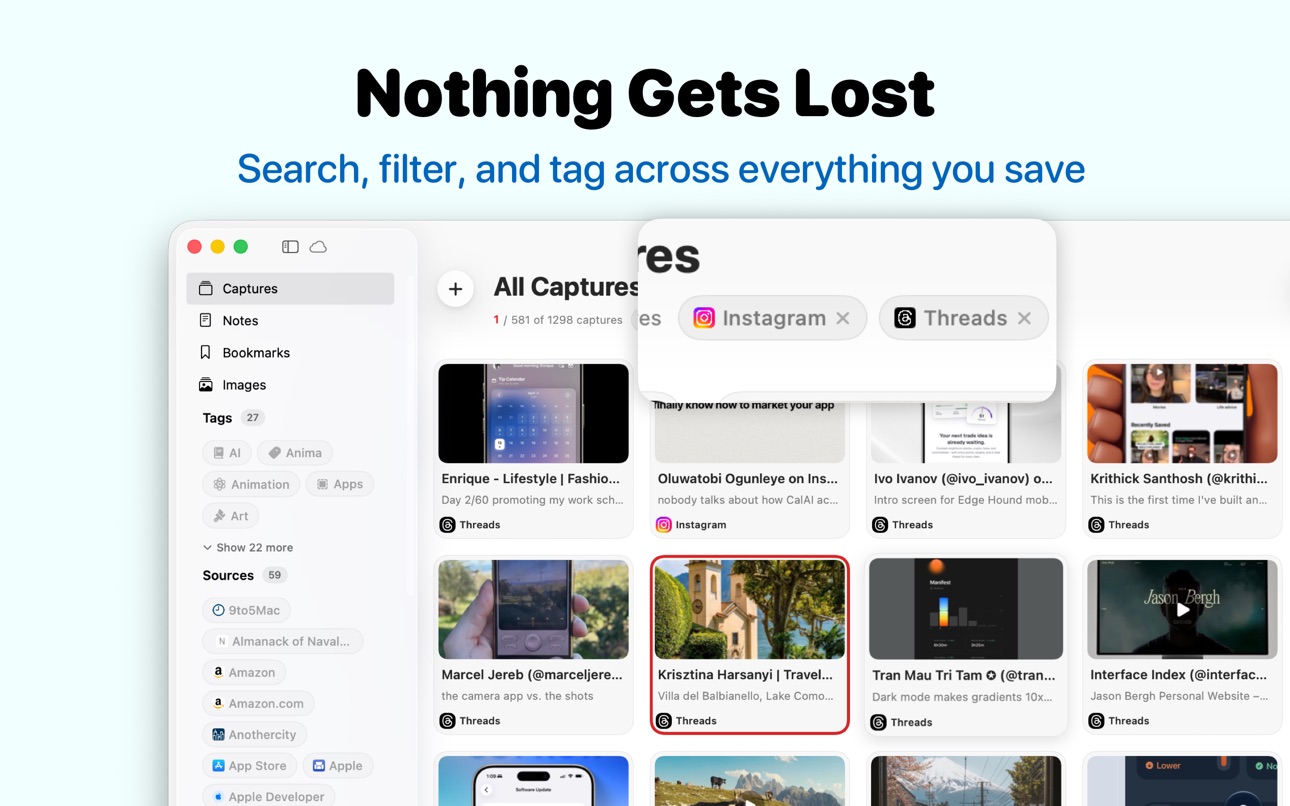
- Filter captures by source website alongside your tags
- Set a default collection so new saves go exactly where you want
- Pin important items, archive what you have finished
- Multi-select for quick batch actions
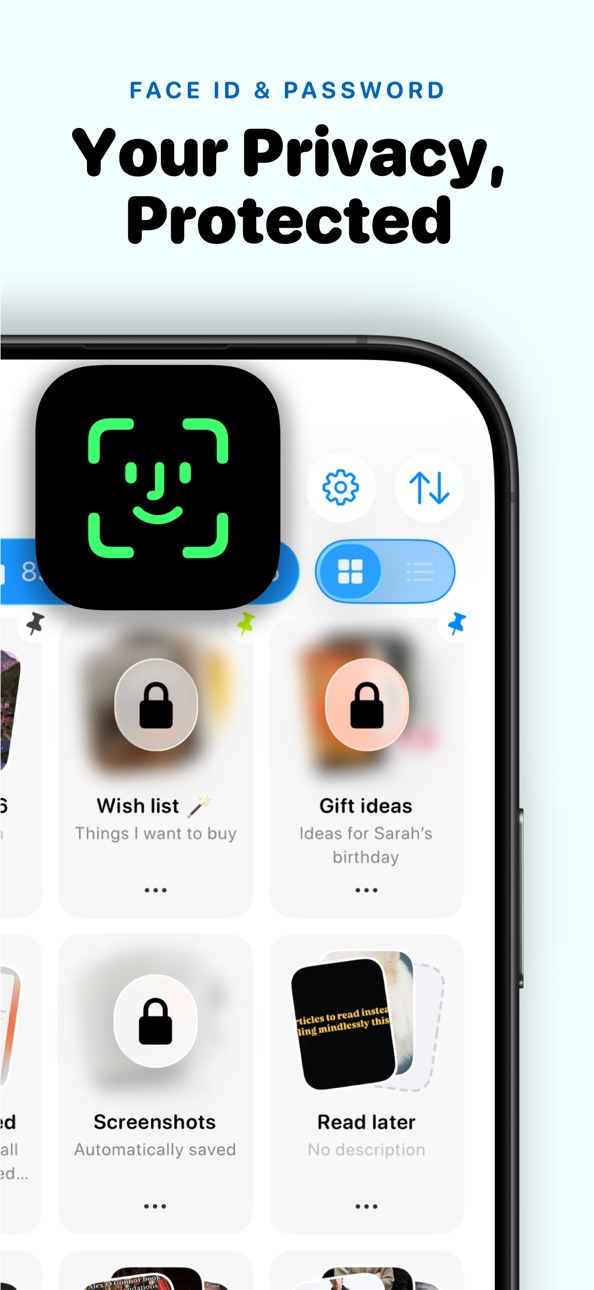
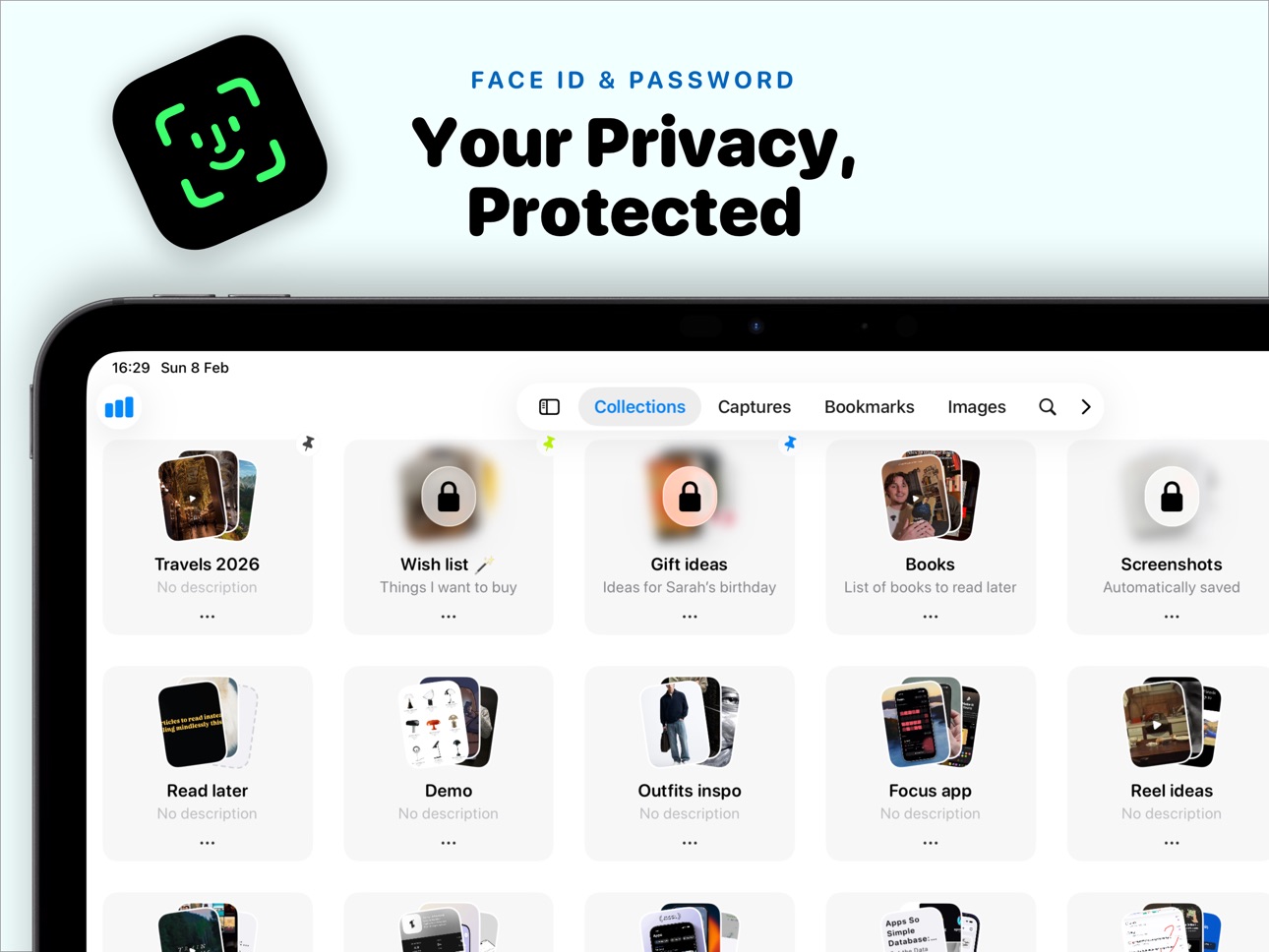
- Password-protect and hide private collections
POWERFUL SEARCH
- Search across titles, descriptions, notes, tags, and sources
- Combine text search with tag and source filters
- Find that article you saved months ago in seconds
iPHONE AND iPAD
- Designed for both iPhone and iPad with adaptive layouts
- Full Split View and Slide Over support on iPad
- Sidebar navigation for quick access to collections
- Grid, list, and stack views to browse your way
SWITCH FROM OTHER APPS
- Import bookmarks from Safari, Chrome, and Firefox
- Import your library from Raindrop or GoodLinks
- Brings in your bookmarks, folders, and tags
- Smart duplicate detection so nothing gets added twice
iCLOUD SYNC
- Save on iPhone, read on iPad, continue on Mac -- everything syncs automatically
- Bookmarks, collections, tags, highlights, and notes all stay in sync
- No account to create, no sign-up required
MORE
- Set reminders so you actually come back to saved items
- Export to CSV, JSON, or HTML bookmarks anytime
- Share collections or individual captures with anyone
- Customizable app icon and tint colors
- Smart duplicate detection to keep your library clean
BUILT FOR PRIVACY
No account. No data collection. No tracking.
Everything stays in your iCloud account, on your devices, exactly where it should be.
PERFECT FOR
- Researchers collecting reference material
- Students saving study resources
- Designers gathering visual inspiration
- Writers and content creators organizing research
- Shoppers saving products and wish lists
- Anyone who takes a lot of screenshots or bookmarks things online
NEW IN 2.0
- Now available on Mac -- save on any device, pick up on another
- Set any collection as your default for new captures
- Redesigned collection indicators with pin and default badges
- Refined glass design with cleaner visual hierarchy
- Updated share extension with new paywall and smoother flow
- Improved onboarding experience
- Stability improvements and bug fixes
Download Trace and stop losing track of articles, screenshots, and ideas.
Terms of Use: https://www.theblackholecompany.com/termsConditions.html
In-App Purchases US pricing
Prismoria Subscription Subscription
Prismoria Monthly Premium · Monthly$2.99
Trace Pro · Yearly 3-day free trial$19.99
Trace Pro Yearly · Yearly$9.99
One-Time Purchases
Trace Pro Lifetime$19.99
Trace Lifetime $39.99
Capabilities
In-App Purchases
Accessibility
ipadiphonemacrealityDevicetvoswatch
Version history 25 versions
Build 884951116v1.8.52026-06-07 09:37:52
Hey there, fellow collector!
This update is all about making Trace sync rock solid. We dug deep into iCloud and fixed the issues that could leave your captures out of sync between your iPhone, iPad, and Mac.
What we fixed and improved:
• More reliable iCloud sync, so your captures, notes, and collections stay consistent across every device
• Faster, more dependable syncing after you add or edit items
• Fewer cases of duplicated or missing captures
• Smoother performance and lower memory use on large libraries
• A batch of bug fixes and stability improvements throughout the app
We also slipped in some nice extras while we were at it: full Markdown notes, a redesigned capture details screen, full Threads support, a new masonry layout, and live video previews right in the grid.
Enjoying Trace? A quick review on the App Store means the world to us. It helps other people discover the app and keeps us motivated to keep building.
Got feedback or hit a snag? We read and reply to every message:
hello@theblackholecompany.com
Thanks for being here.
Build 884508559v1.8.12026-04-21 00:57:35
Trace is now on Mac — with dramatically better imports, a smarter default collection, a refined design, and sync upgrades across every device.
NOW ON MAC
• Native Mac app with a menu-bar quick-add, a proper window, and full iCloud sync.
• Capture from any browser and pick up everything you've saved on iPhone or iPad — it's already waiting on your Mac.
IMPORT, REIMAGINED
• Far more reliable imports from Safari, Chrome, Firefox, Raindrop, Pocket, and other apps.
• Links, tags, and folders come across cleanly, even from large libraries and deeply nested folders.
• Squashed a long list of import bugs and edge cases so unusual file formats no longer trip things up.
COLLECTIONS, YOUR WAY
• Pick any collection as your default. New saves from the share sheet, Shortcuts, and clipboard go straight where you want them.
• Redesigned pin and default badges across grid, list, and stack views.
• Tighter layout, smoother transitions, and better previews in the Collections stack.
DESIGN REFRESH
• Lighter materials, calmer contrast, and more refined corners across every screen.
• New search bar with clearer filter affordances.
• Better error states for captures that fail to load.
• Share extension and Shortcuts now correctly follow your system appearance.
iCLOUD & PERFORMANCE
• Faster initial sync and better recovery when you sign back into iCloud.
• Priority sync for subscribers — highlights, notes, and thumbnails across every device.
• Faster scrolling in large libraries, snappier transitions, and reduced memory usage.
FIXES & POLISH
• Dozens of small bug fixes across capture, reader, and sync.
Thanks for using Trace. If you're enjoying the update, a quick App Store review means the world.
Build 882194247v1.82026-02-10 23:32:02
Version 1.8 - Refined design, better performance, and iPad improvements.
DESIGN IMPROVEMENTS
- Glass design refinements with more subtle effects and cleaner visual hierarchy across iPhone and iPad.
- Improved grid layout with better rounded corners and spacing for a more polished look on all devices.
- Simpler, streamlined interface with less visual clutter. Prefer the old look? Enable background colors in Settings.
- Polished reader experience with improved typography, spacing, and controls.
iPAD IMPROVEMENTS
- Fixed layout issues in Split View and Slide Over modes.
- Better sidebar navigation and responsiveness.
- Fixed custom layout toggle to properly persist your preference.
SELECTION AND ORGANIZATION
- Redesigned floating action bar for easier multi-select actions on iPhone and iPad.
- Fresh new look for tags with improved visual styling.
- Filter captures by source website alongside your tags.
- Fixed an issue where collections could appear duplicated.
NEW FEATURES
- Import screenshots even with limited photo library access. Just select the photos you want to add.
- Revisit the onboarding experience anytime from Settings.
PERFORMANCE
- Faster loading for large libraries on both iPhone and iPad.
- Smoother animations and transitions throughout the app.
- Reduced memory usage with optimized grid and list views.
BUG FIXES
- Fixed an issue where tags would not display correctly on captures.
- General stability improvements and various bug fixes.
Build 881452087v1.7.12026-01-16 02:57:58
- Fixed grid layout issues on some iPhone models
- You can now enable or disable Face ID for specific collections
- Set a global password or a different password for each collection
- Password protection can now be activated directly from Password Settings
- Performance improvements and bug fixes
Build 881424493v1.72026-01-13 00:07:48
What's New in Trace
Advanced Reader
Enjoy a beautiful, distraction-free reading experience with 6 customizable themes, multiple fonts, and adjustable line spacing. Highlight important passages with 5 color options and add notes to remember key insights.
Offline Reading
Save articles for offline access with one tap. Images are cached automatically so you can read anywhere, anytime—no internet required.
Log into Premium Sites
Access paywalled content from your newspaper and magazine subscriptions. Log in once, and Trace will fetch full articles using your credentials.
Also in this update:
- Edit capture titles, descriptions, and thumbnails
- Add missing thumbnails from your photos
- Delete collections while keeping captures
- Improved bookmark importer with duplicate detection
- Multi-select captures from search results
- Enhanced Siri Shortcuts reliability
- Performance improvements and bug fixes
Build 880676992v1.62025-12-15 17:58:36
• Bug fixes and performance improvements
• Edit saved links easily
• View and copy links directly from the details screen
• Improved full-screen image viewing experience
• Export options moved to Settings → Import & Export
• More compact collection row design
• New ultra-compact layout option available in Settings
• New Privacy page explaining that your data is private and never accessed by us
Build 880346530v1.52025-12-04 19:34:07
We’ve added powerful new features and refined the experience to make your captures even easier to manage and explore:
• Auto-import Screenshots
New captures flow in instantly, no need to add them manually.
• Protect Your Collections
You can now set a password on any collection for extra privacy.
• Improved App Review Alert
A small but important fix to make the review prompt behave correctly.
• Export Your Data
Export collections or captures in CSV or JSON format — perfect for backups or external tools.
• Choose Your Compression
You decide whether to compress images or keep them at full quality.
• Keep Hidden Collections Truly Hidden
Captures from hidden collections now stay out of all views unless you unlock them.
• New Image Presentation
A cleaner, more polished UI for viewing images.
• Revamped Hidden Captures View
Navigate hidden captures with a fresh design and smoother flow.
Bug fixes and performance improvements
Build 879445693v1.42025-11-07 07:34:15
What's New in Version 1.4
- Seamless Import - Bring your bookmarks from anywhere!
- Insights & Analytics - Track your reading habits and see how your digital library grows with beautiful insights.
- Product Roadmap - Check out our roadmap in Settings to see what's coming next and share your feedback.
- iOS 26 Ready - Updated interface to match the latest iOS design language for a smoother, more native experience.
- Performance & Stability - Bug fixes and improvements for a faster, more reliable app.
Build 877973689v1.3.12025-09-10 00:44:05
Performance improvements and bug fixes
Build 877771959v1.3.02025-09-07 13:13:15
• Squashed bugs + major performance boost
• Quick open for links/images (no more extra taps!)
• Full PDF import & reading support
• Completely redesigned note-taking space
• New Actions Menu
Build 876900961v1.2.92025-08-01 22:47:11
Fixed a bug with lifetime subscriptions
Build 876860754v1.2.82025-07-31 18:26:31
Bug fixes and Performance improvements
Build 876812686v1.2.72025-07-30 01:30:41
We’ve made some under-the-hood improvements to make your experience even smoother:
– Performance enhancements for faster and more reliable use
– Bug fixes for a more stable experience
– Design refinements for a cleaner, more polished look
Build 875657357v1.2.62025-06-21 21:07:24
This update makes capturing and organizing your bookmarks and inspiration even easier:
• Multi-tag filtering – Filter your captures using multiple tags at once.
• Hide & unhide collections – Keep your space clean without deleting anything.
• Redesigned Share Page – A smoother, faster way to save and preview content.
• Instant Bookmarking – Save now, sync metadata later — no waiting required.
• Share Extension Boost – You can now select and save multiple images at once directly from the Share Sheet.
• iCloud Sync Fix – Improved syncing across your devices to keep everything up-to-date.
• General improvements – Faster, smoother, and more polished all around.
Build 872616324v1.2.52025-02-19 09:48:24
V1.2.5
- Performance improvements and bug fixes
V1.2.4
- Now available in Simplified Chinese, Spanish (Spain), and Latin American Spanish
- Showing only nessarry tags in the filter for the specific collection
- Fixed Cloud sync reliability issues
- Improved app performance with large capture libraries
- Added new financial icon set for tags
- Introduced dedicated tag management view in Settings
- Various bug fixes and stability improvements
Build 872554873v1.2.42025-02-18 20:58:13
- Now available in Simplified Chinese, Spanish (Spain), and Latin American Spanish
- Fixed Cloud sync reliability issues
- Improved app performance with large capture libraries
- Added new financial icon set for tags
- Introduced dedicated tag management view in Settings
- Various bug fixes and stability improvements
Build 872225336v1.2.32025-02-04 12:10:48
- Added an option to deselect an already selected tag when reselecting it, thereby removing the filter.
- Added option to open the link of your capture directly from the menu, without opening the note page
- Added the app version in settings.
- Added the option to disable auto reminders and clear pending notifications.
- Made the toolbar buttons more distinct in size and background.
- Resolved the unexpected crash of the app on iOS 17.
- Fixed navigation and menu access issues on iOS 17.
- Fixed the moving capture ot different collections issue (problem was in the list row layout).
- Fixed the selection of the green app icon.
- Fixed the alignment of the capture title and description in list layout.
Build 872018643v1.2.22025-01-27 07:46:49
Hey there awesome users! I've been listening to your feedback and I'm thrilled to deliver the most requested features in this major update. I've worked hard to pack in everything you've been asking for. Let's dive in!
Lightning-Fast Capture with iOS Shortcuts
- Game-changer alert! I've added full iOS Shortcuts support so you can save anything, from anywhere, in seconds. No need to open the app - just capture and go. Your workflow just got supercharged!
A Fresh New Look
- I've said goodbye to empty thumbnails! Every capture now comes with a snazzy preview – yes, even the ones without images. Your feed just got a whole lot prettier!
Stay Organized with Tags
- Finally! You asked, I delivered. Tag your captures to find them in a snap. Whether you're a meticulous organizer or just love adding #coffee to everything, I've got you covered.
Export Like a Pro
- I've added the ability to take your captures and bookmarks anywhere! Export your favorite photos and bookmarks whenever you want. Perfect for sharing or creating backups.
Declutter with Archive
- Not ready to delete but need to clear some space? I've built a new Archive feature that lets you tuck away captures until you need them again. Out of sight, but never out of reach!
Power User Features
- Become a capture ninja with the new multi-selection tool! I've added batch actions - tag, archive, or share multiple captures at once.
- Lost? I've created a brand new user guide to help you unlock all the cool features and become a pro.
Under the Hood
- I've squashed bugs and turbocharged performance because I know you love a smooth, speedy experience.
Get out there and start capturing! And hey, let me know what you think of these new features. I built them for you!
Build 871272102v1.2.12024-12-19 20:40:17
Redesigned Experience
- Fresh three-row category layout for better navigation (you can switch between 2 or 3 columns layout)
- Sleek new collection grid design for easier browsing
- Modern app icons to match your style
Performance Boost
- Major speed improvements for all grid layouts
- Smoother scrolling and faster loading times
Plus various bug fixes to enhance your experience
Build 870717647v1.2.02024-12-04 07:17:31
Say hello to TRACE !
- Major Updates
• We've rebranded from Prismoria to Trace with a beautiful new UI that delivers a faster, more refined experience
• Completely redesigned interface with enhanced performance and aesthetics
- New Features
• New Captures page showing all your saved content in one place
• Collection search functionality
• Customizable layout sizes and color tints
• Smart reminders with adjustable notification intervals
- Share Extension Improvements
• Choose your target collection directly from the quick capture 2 seconds window
We're committed to making Trace the best tool for your content collection needs. Thank you for your continued support!
Build 869940919v1.1.102024-10-24 16:05:11
• Bug fixes and performance improvements
Build 869727684v1.1.92024-10-15 15:44:38
What's New in Prismoria
V 1.1.9
Bug fixes related to smaller screen size and loading data performance improvement
V 1.1.8
• Redesigned Capture Cards: Choose between classic and modern card styles for your captures.
• Personalized Color Themes: Customize the app's look with a variety of tint colors.
• Colorful App Icons: Select from new vibrant icons to personalize your home screen.
• Enhanced Performance: Enjoy faster, smoother app operation with our latest optimizations.
• Bug Fixes and Improvements: Experience a more stable app with our latest updates.
To apply these changes, navigate to:
Settings > Appearance in Prismoria
Thank you for using Prismoria. Explore, learn, and enjoy!
Build 869686666v1.1.82024-10-14 09:30:57
What's New in Prismoria
• Redesigned Capture Cards: Choose between classic and modern card styles for your captures.
• Personalized Color Themes: Customize the app's look with a variety of tint colors.
• Colorful App Icons: Select from new vibrant icons to personalize your home screen.
• Enhanced Performance: Enjoy faster, smoother app operation with our latest optimizations.
• Bug Fixes and Improvements: Experience a more stable app with our latest updates.
To apply these changes, navigate to:
Settings > Appearance in Prismoria
Thank you for using Prismoria. Explore, learn, and enjoy!
Build 868849470v1.1.72024-10-02 08:54:14
1. Easier Settings
Change app options quickly with our new, simple settings page.
2. Better Dark Mode
Pick between dark gray or black backgrounds for night use.
3. Move Your Notes
Easily move your saved items between folders with our new tool.
4. All Reminders in One Place
See all your learning alerts on a single page.
5. Faster App
Use a quicker, more reliable Prismoria after our latest fixes.
6. iOS 18 Ready
Works great with the new iOS 18, including new app icons for light, dark, and tinted modes.
7. More Upgrades
Find other small improvements as you use the updated app.
Build 868687389v1.1.62024-09-02 22:55:28
Enhancements and New Features
- Customizable Layout: Personalize your experience with the new option to change bookmark layouts within folder detail pages.
- Streamlined Editing: Introducing an easy-to-use edit button for quick modifications to photos and screenshots.
- Improved Bookmark Details: Enjoy a refined and more intuitive layout on the bookmark details page.
Major Bug Fixes and Performance Upgrades
-Share Extension Stability: Resolved blocking issues with share extension features for smoother operation.
-Folder Management: Fixed an error that previously prevented some folders from being deleted.
-Sync Reliability: Addressed and resolved synchronization errors for more dependable data transfer.
-Bookmark Cleanup: Implemented a solution to remove lingering bookmarks that were deleted from categories but not fully removed from the app.
Price history by region
Currency
Show
Columns
Search
Availability 96 of 96 storefronts
| Region | Language | Price | Ratings | Avg | Version |
|---|---|---|---|---|---|
| US | en-US | Free | 54 | 4.7 | 1.8.5 |
| IN | en-GB | Free | 16 | 4.6 | 1.8.5 |
| CN | zh-Hans-CN | Free | 10 | 4.4 | 1.8.5 |
| DE | de-DE | Free | 10 | 4.9 | 1.8.5 |
| CA | en-CA | Free | 7 | 3.0 | 1.8.5 |
| VN | en-GB | Free | 5 | 5.0 | 1.8.5 |
| ES | es-ES | Free | 4 | 5.0 | 1.8.5 |
| ID | en-GB | Free | 4 | 5.0 | 1.8.5 |
| JP | ja | Free | 4 | 5.0 | 1.8.5 |
| NL | nl | Free | 4 | 5.0 | 1.8.5 |
| AT | de-DE | Free | 3 | 5.0 | 1.8.5 |
| CH | de-CH | Free | 3 | 3.7 | 1.8.5 |
| FR | fr-FR | Free | 3 | 5.0 | 1.8.5 |
| GB | en-GB | Free | 3 | 3.7 | 1.8.5 |
| IT | it | Free | 3 | 5.0 | 1.8.5 |
| KR | ko | Free | 3 | 5.0 | 1.8.5 |
| SA | en-GB | Free | 3 | 3.3 | 1.8.5 |
| TW | zh-Hant-TW | Free | 3 | 5.0 | 1.8.5 |
| AU | en-AU | Free | 2 | 4.0 | 1.8.5 |
| LB | en-GB | Free | 2 | 4.5 | 1.8.5 |
| SE | sv | Free | 2 | 5.0 | 1.8.5 |
| TH | en-GB | Free | 2 | 4.0 | 1.8.5 |
| AE | en-GB | Free | 1 | 5.0 | 1.8.5 |
| BE | en-GB | Free | 1 | 5.0 | 1.8.5 |
| CY | en-GB | Free | 1 | 5.0 | 1.8.5 |
| CZ | en-GB | Free | 1 | 4.0 | 1.8.5 |
| FI | en-GB | Free | 1 | 5.0 | 1.8.5 |
| HK | zh-Hant-HK | Free | 1 | 5.0 | 1.8.5 |
| HR | en-GB | Free | 1 | 5.0 | 1.8.5 |
| KW | en-GB | Free | 1 | 4.0 | 1.8.5 |
| KZ | en-GB | Free | 1 | 5.0 | 1.8.5 |
| LV | en-GB | Free | 1 | 5.0 | 1.8.5 |
| MY | en-GB | Free | 1 | 5.0 | 1.8.5 |
| RO | en-GB | Free | 1 | 5.0 | 1.8.5 |
| SK | en-GB | Free | 1 | 5.0 | 1.8.5 |
| TR | en-GB | Free | 1 | 5.0 | 1.8.5 |
| AF | en-GB | Free | 0 | — | 1.8.5 |
| AL | en-GB | Free | 0 | — | 1.8.5 |
| AM | en-GB | Free | 0 | — | 1.8.5 |
| AZ | en-GB | Free | 0 | — | 1.8.5 |
| BG | en-GB | Free | 0 | — | 1.8.5 |
| BH | en-GB | Free | 0 | — | 1.8.5 |
| BM | en-GB | Free | 0 | — | 1.8.5 |
| BN | en-GB | Free | 0 | — | 1.8.5 |
| BT | en-GB | Free | 0 | — | 1.8.5 |
| DK | en-GB | Free | 0 | — | 1.8.5 |
| EE | en-GB | Free | 0 | — | 1.8.5 |
| EG | en-GB | Free | 0 | — | 1.8.5 |
| FJ | en-GB | Free | 0 | — | 1.8.5 |
| FM | en-GB | Free | 0 | — | 1.8.5 |
| GE | en-GB | Free | 0 | — | 1.8.5 |
| GR | en-GB | Free | 0 | — | 1.8.5 |
| HU | en-GB | Free | 0 | — | 1.8.5 |
| IE | en-GB | Free | 0 | — | 1.8.5 |
| IL | en-GB | Free | 0 | — | 1.8.5 |
| IQ | en-GB | Free | 0 | — | 1.8.5 |
| IS | en-GB | Free | 0 | — | 1.8.5 |
| JO | en-GB | Free | 0 | — | 1.8.5 |
| KG | en-GB | Free | 0 | — | 1.8.5 |
| KH | en-GB | Free | 0 | — | 1.8.5 |
| LA | en-GB | Free | 0 | — | 1.8.5 |
| LK | en-GB | Free | 0 | — | 1.8.5 |
| LT | en-GB | Free | 0 | — | 1.8.5 |
| LU | en-GB | Free | 0 | — | 1.8.5 |
| MD | en-GB | Free | 0 | — | 1.8.5 |
| ME | en-GB | Free | 0 | — | 1.8.5 |
| MK | en-GB | Free | 0 | — | 1.8.5 |
| MM | en-GB | Free | 0 | — | 1.8.5 |
| MN | en-GB | Free | 0 | — | 1.8.5 |
| MO | zh-Hant-HK | Free | 0 | — | 1.8.5 |
| MR | en-GB | Free | 0 | — | 1.8.5 |
| MT | en-GB | Free | 0 | — | 1.8.5 |
| MV | en-GB | Free | 0 | — | 1.8.5 |
| NO | en-GB | Free | 0 | — | 1.8.5 |
| NP | en-GB | Free | 0 | — | 1.8.5 |
| NR | en-GB | Free | 0 | — | 1.8.5 |
| NZ | en-AU | Free | 0 | — | 1.8.5 |
| OM | en-GB | Free | 0 | — | 1.8.5 |
| PG | en-GB | Free | 0 | — | 1.8.5 |
| PH | en-GB | Free | 0 | — | 1.8.5 |
| PK | en-GB | Free | 0 | — | 1.8.5 |
| PL | en-GB | Free | 0 | — | 1.8.5 |
| PT | pt-PT | Free | 0 | — | 1.8.5 |
| PW | en-GB | Free | 0 | — | 1.8.5 |
| QA | en-GB | Free | 0 | — | 1.8.5 |
| SB | en-GB | Free | 0 | — | 1.8.5 |
| SG | en-GB | Free | 0 | — | 1.8.5 |
| SI | en-GB | Free | 0 | — | 1.8.5 |
| TJ | en-GB | Free | 0 | — | 1.8.5 |
| TM | en-GB | Free | 0 | — | 1.8.5 |
| TO | en-GB | Free | 0 | — | 1.8.5 |
| UZ | en-GB | Free | 0 | — | 1.8.5 |
| VU | en-GB | Free | 0 | — | 1.8.5 |
| XK | en-GB | Free | 0 | — | 1.8.5 |
| YE | en-GB | Free | 0 | — | 1.8.5 |
| ZA | en-GB | Free | 0 | — | 1.8.5 |
Change log 29 changes · US
✎
releaseNotes updated
Hey there, fellow collector!
This update is all about making Trace sync rock solid. We dug deep into iCloud and fixed the issues that could leave your captures
✎
description updated
Save articles, screenshots, PDFs, and links from any app -- then read them later, even offline. Trace is the bookmark manager for people who save a lot and hate
✎
subtitle updated
Save Screenshots & Favorites
✎
name updated
Bookmark URL Saver - Trace
◆
Version 1.8.5 released
Hey there, fellow collector!
This update is all about making Trace sync rock solid. We dug deep into iCloud and fixed the issues that could leave your captures out of sync between your iPhone, iPad, and Mac.
What we fixed and improved:
•
◆
Version 1.8.1 released
Trace is now on Mac — with dramatically better imports, a smarter default collection, a refined design, and sync upgrades across every device.
NOW ON MAC
• Native Mac app with a menu-bar quick-add, a proper window, and full iCloud sync.
•
◆
Version 1.8 released
Version 1.8 - Refined design, better performance, and iPad improvements.
DESIGN IMPROVEMENTS
- Glass design refinements with more subtle effects and cleaner visual hierarchy across iPhone and iPad.
- Improved grid layout with better rounde
◆
Version 1.7.1 released
- Fixed grid layout issues on some iPhone models
- You can now enable or disable Face ID for specific collections
- Set a global password or a different password for each collection
- Password protection can now be activated directly from P
◆
Version 1.7 released
What's New in Trace
Advanced Reader
Enjoy a beautiful, distraction-free reading experience with 6 customizable themes, multiple fonts, and adjustable line spacing. Highlight important passages with 5 color options and add notes to re
◆
Version 1.6 released
• Bug fixes and performance improvements
• Edit saved links easily
• View and copy links directly from the details screen
• Improved full-screen image viewing experience
• Export options moved to Settings → Import & Export
• More compact co
◆
Version 1.5 released
We’ve added powerful new features and refined the experience to make your captures even easier to manage and explore:
• Auto-import Screenshots
New captures flow in instantly, no need to add them manually.
• Protect Your Collections
You c
◆
Version 1.4 released
What's New in Version 1.4
- Seamless Import - Bring your bookmarks from anywhere!
- Insights & Analytics - Track your reading habits and see how your digital library grows with beautiful insights.
- Product Roadmap - Check out our roadma
◆
Version 1.3.1 released
Performance improvements and bug fixes
◆
Version 1.3.0 released
• Squashed bugs + major performance boost
• Quick open for links/images (no more extra taps!)
• Full PDF import & reading support
• Completely redesigned note-taking space
• New Actions Menu
◆
Version 1.2.9 released
Fixed a bug with lifetime subscriptions
◆
Version 1.2.8 released
Bug fixes and Performance improvements
◆
Version 1.2.7 released
We’ve made some under-the-hood improvements to make your experience even smoother:
– Performance enhancements for faster and more reliable use
– Bug fixes for a more stable experience
– Design refinements for a cleaner, more polished look
◆
Version 1.2.6 released
This update makes capturing and organizing your bookmarks and inspiration even easier:
• Multi-tag filtering – Filter your captures using multiple tags at once.
• Hide & unhide collections – Keep your space clean without deleting anything
◆
Version 1.2.5 released
V1.2.5
- Performance improvements and bug fixes
V1.2.4
- Now available in Simplified Chinese, Spanish (Spain), and Latin American Spanish
- Showing only nessarry tags in the filter for the specific collection
- Fixed Cloud sync reliabilit
◆
Version 1.2.4 released
- Now available in Simplified Chinese, Spanish (Spain), and Latin American Spanish
- Fixed Cloud sync reliability issues
- Improved app performance with large capture libraries
- Added new financial icon set for tags
- Introduced dedicated
◆
Version 1.2.3 released
- Added an option to deselect an already selected tag when reselecting it, thereby removing the filter.
- Added option to open the link of your capture directly from the menu, without opening the note page
- Added the app version in setting
◆
Version 1.2.2 released
Hey there awesome users! I've been listening to your feedback and I'm thrilled to deliver the most requested features in this major update. I've worked hard to pack in everything you've been asking for. Let's dive in!
Lightning-Fast Captur
◆
Version 1.2.1 released
Redesigned Experience
- Fresh three-row category layout for better navigation (you can switch between 2 or 3 columns layout)
- Sleek new collection grid design for easier browsing
- Modern app icons to match your style
Performance Boost
◆
Version 1.2.0 released
Say hello to TRACE !
- Major Updates
• We've rebranded from Prismoria to Trace with a beautiful new UI that delivers a faster, more refined experience
• Completely redesigned interface with enhanced performance and aesthetics
- New Featur
◆
Version 1.1.10 released
• Bug fixes and performance improvements
◆
Version 1.1.9 released
What's New in Prismoria
V 1.1.9
Bug fixes related to smaller screen size and loading data performance improvement
V 1.1.8
• Redesigned Capture Cards: Choose between classic and modern card styles for your captures.
• Personalized Colo
◆
Version 1.1.8 released
What's New in Prismoria
• Redesigned Capture Cards: Choose between classic and modern card styles for your captures.
• Personalized Color Themes: Customize the app's look with a variety of tint colors.
• Colorful App Icons: Select from n
◆
Version 1.1.7 released
1. Easier Settings
Change app options quickly with our new, simple settings page.
2. Better Dark Mode
Pick between dark gray or black backgrounds for night use.
3. Move Your Notes
Easily move your saved items between folder
◆
Version 1.1.6 released
Enhancements and New Features
- Customizable Layout: Personalize your experience with the new option to change bookmark layouts within folder detail pages.
- Streamlined Editing: Introducing an easy-to-use edit button for quick modification