Home › Sports

 US
US
1 of 1 storefronts
Content in en-US
Content in en-US
Information
Preview 2 platforms
iPhone 7 images




iPad 7 images



What’s New Version 3.2.2
This update includes a new Stroke training mode and a fully redesigned Settings menu.
Redesigned Settings — profile, membership, credits, units, analysis, metrics, and recording options are now organized into clear categories, with a sidebar split view on iPad.
Fixed putt history, stat tiles, and selection wheels appearing faded in portrait mode on iPad.
Fixed the selected value in training screen wheels showing in gray instead of white.
Selected and unselected metrics in the Slow-Mo stats panel are now easier to tell apart.
Fixed Template/BPM buttons overlapping on smaller iPhones.
Fixed crashes that could occur during measurement, improving overall stability.
Description
Scan on the green for putting line guide
Best putting guide in real-time
Available Devices:
iPhone 12 +
iPad (2021+)
We use your data to track advertising performance and deliver personalized ads tailored to your interests.
By downloading this app, you agree to the Terms of Use: [https://www.apple.com/legal/internet-services/itunes/dev/stdeula/](https://www.apple.com/legal/internet-services/itunes/dev/stdeula/)
In-App Purchases US pricing
PerfectLine_Membership Subscription
Pro_Yearly · Yearly$199.00
Pro_Monthly · Monthly$19.90
Premium_Yearly · Yearly$99.00
Premium_Monthly · Monthly$9.90
One-Time Purchases
$1 후원$1.00
100 Credits$1.99
550 Credits$9.99
$20 후원$20.00
3300 Credits$49.99
10000 Credits$99.99
Capabilities
In-App Purchases
Accessibility
ipadiphonemacrealityDevicetvoswatch
Version history 25 versions
Build 887775056v3.2.22026-07-04 06:43:24
This update includes a new Stroke training mode and a fully redesigned Settings menu.
Redesigned Settings — profile, membership, credits, units, analysis, metrics, and recording options are now organized into clear categories, with a sidebar split view on iPad.
Fixed putt history, stat tiles, and selection wheels appearing faded in portrait mode on iPad.
Fixed the selected value in training screen wheels showing in gray instead of white.
Selected and unselected metrics in the Slow-Mo stats panel are now easier to tell apart.
Fixed Template/BPM buttons overlapping on smaller iPhones.
Fixed crashes that could occur during measurement, improving overall stability.
Build 887425473v3.2.12026-06-29 07:26:02
Improved iPad layout — camera, putt history, and training info (green speed, stats, BPM) are now organized into one easy-to-view screen.
Faster session start — significantly reduced the initialization wait when entering Starting Line and Slow-Mo on iPad.
Stability improvements — fixed crashes that could occur during high-speed capture, analysis playback, and replay statistics.
Build 887016713v3.2.02026-06-18 00:29:17
English Update Notes (v3.2.0)
This update launches a brand-new iPad landscape experience and adds a new stroke analysis mode.
• New iPad landscape mode — experience a completely redesigned iPad landscape UI/UX.
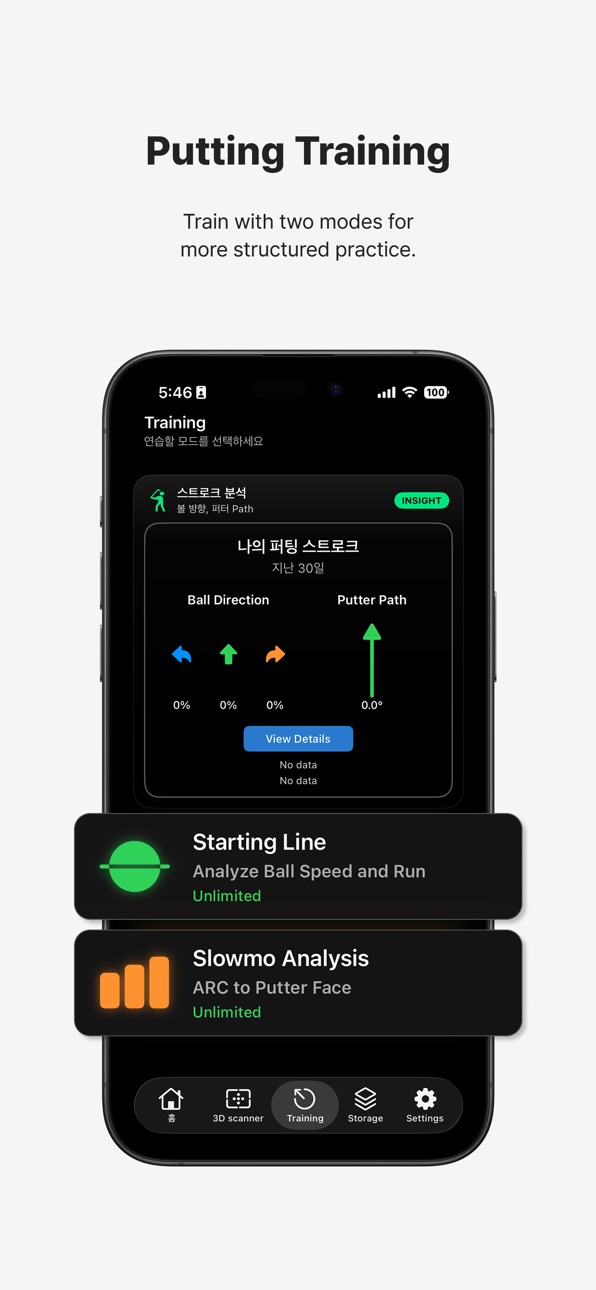
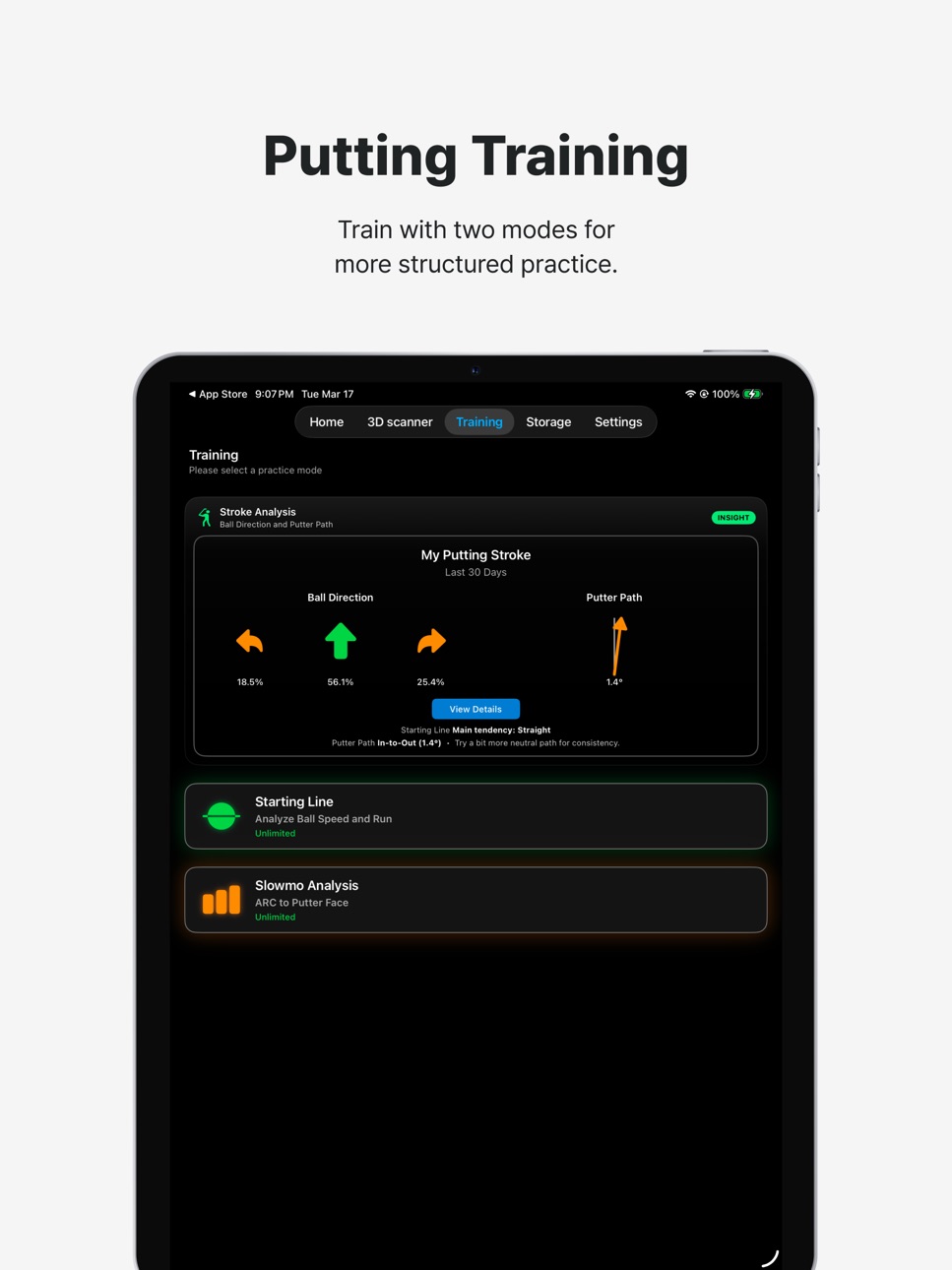
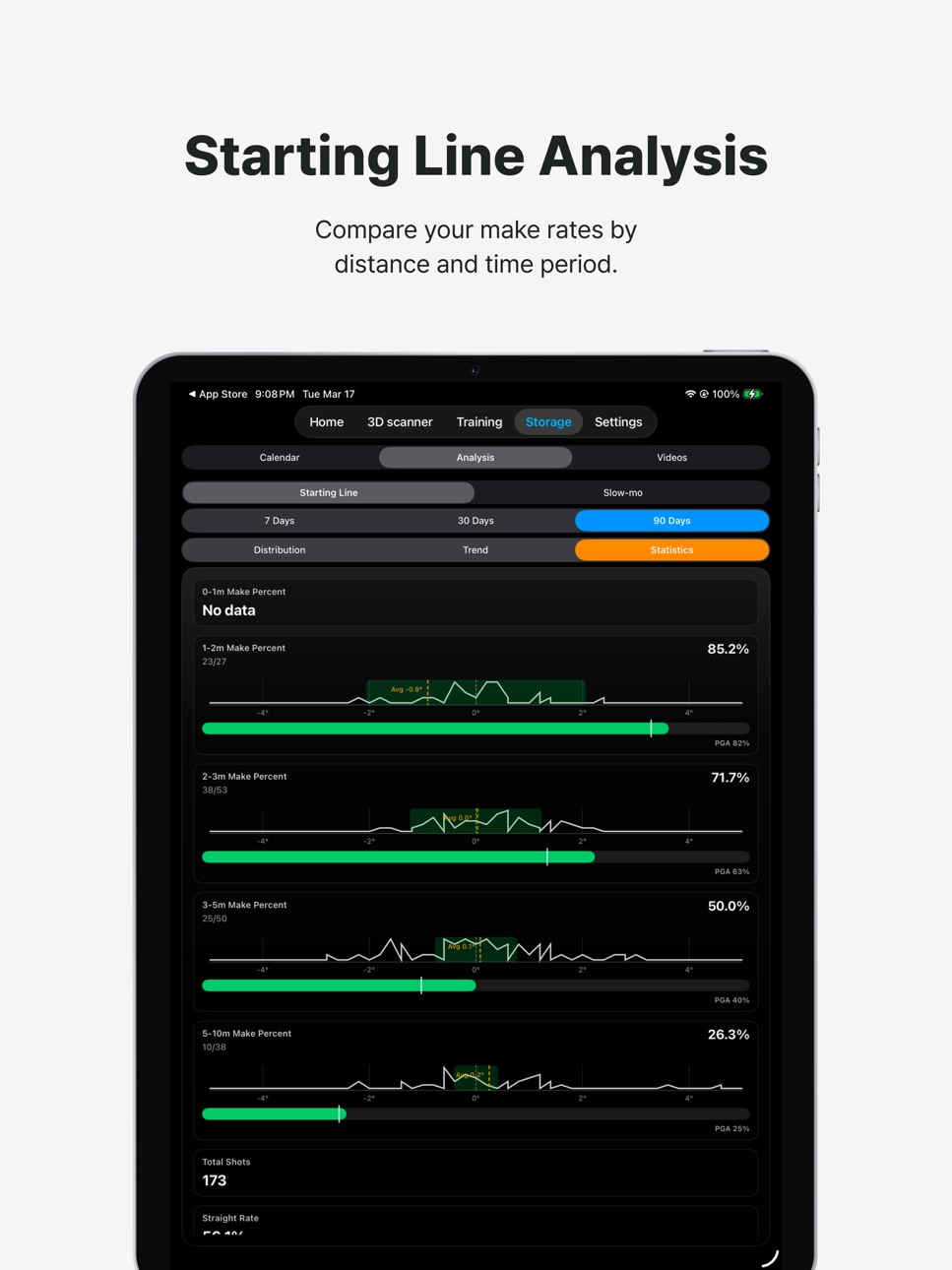
• New Starting Line (Stroke) mode — measures your stroke's speed and angle from the ball alone, then shows roll distance and direction.
• Live putting-guide (arc) customization — double-tap the camera screen to adjust guide-line/arc thickness and tick length.
• New Arc 84° guide template.
• Redesigned 'My Putting Stroke' summary card — a grade badge and gauges show ball direction, putter path, and Path-to-Face at a glance.
• Improved replay overlay accuracy, plus various display and stability fixes.
We're always working to improve your putting experience.
For any questions, please contact us through the in-app support.
Build 886820517v3.1.122026-06-13 11:35:22
PerfectLine: Putting Guide — v3.1.12 Update Notes (English)
This update includes the new Path-to-Face putting metric and stability improvements.
New metric: Path-to-Face — see your face angle relative to putter path at impact in live sessions, putt replays, and statistics charts (selectable in Settings)
Fixed intermittent crashes during slow-mo replay and camera startup
Build 885938601v3.1.112026-06-06 01:41:16
This update reimagines Performance Drills—record every putt of a hole like real play and analyze your game with golf-grade stats.
Multi-stroke tracking: log each putt to hole-out, including misses (direction & distance)
Strokes Gained (SG) analysis: automatic per-hole and per-session SG to see your progress in numbers
Drill stats dashboard: average SG, average putts, 1-putt rate, fail rate by slope & break direction, and miss tendencies (short/long/left/right)
Multi-select drill setup: pick multiple distances, breaks, slopes, and directions to build your own randomized course
Expanded cloud backup: Drill, Starting Line, and Slow-mo sessions now sync automatically, so your data is safe across devices
Strengthened connection security and overall stability
We're always working to improve your putting experience.
For any questions, please contact us through the in-app support.
Build 885825478v3.1.102026-05-19 01:29:03
PerfectLine: Putting Guide — v3.1.10 Update Notes (English)
This update introduces Virtual Green Custom mode and more accurate, smoother putting analysis graphs.
Virtual Green Custom mode (PRO only): Design your own holes by setting distance, slope, and ball speed
Position graph split into Position(X)/Position(Y) — view horizontal and vertical putter motion separately
Tap the graph area to instantly cycle through Position(X)/Position(Y)/Velocity/Acceleration
Current data type is always shown at the bottom-left of the graph
We're always working to improve your putting experience.
For any questions, please contact us through the in-app support.
Build 885491126v3.1.92026-05-12 01:39:30
This update introduces a brand-new Image Training mode and monthly prize claims for top finishers.
Image Training (new training mode): A virtual-green putting simulator where you read distance and slope, then dial in line and ball speed. Includes 3 difficulties (Easy/Pro/Tour), 18-hole sessions with cumulative Strokes Gained tracking, monthly leaderboards (This Month / Last Month), and personal best display.
Plays system: Hold up to 3 plays + auto-recharge 1 per hour. Earn extra plays by watching an ad or inviting a friend.
Monthly winner prize claim: Top 3 finishers on the monthly leaderboard see a popup at the next sign-in to enter shipping info and receive their prize.
Build 885012308v3.1.82026-05-05 04:15:44
This update brings a refreshed Tour Pro verification experience and unlocks ArcToFace data customization for Premium members.
- Premium members can now freely customize all 6 ArcToFace Data Selection items
- Upgraded ArcToFace AI model for more accurate putter/ball detection
Build 884635920v3.1.72026-04-18 21:35:47
PerfectLine: Putting Guide — v3.1.7 Update Notes
This update includes Tour Pro verification.
Tour Pro Badge: Verified tour professionals now receive a special badge displayed in their profile and throughout the app.
We're always working to improve your putting experience.
For any questions, please contact us through the in-app support.
Build 884313630v3.1.62026-04-11 04:45:34
This update introduces the all-new Drill training feature to level up your putting practice.
• [New] Performance Drill — Record each putt as Holed or Missed and track your Strokes Gained (SG) in real time.
• [New] Course Record — Log putts for all 18 holes with distance, slope, and break direction, and review your total SG for the round.
• Input detailed conditions (Flat / Uphill / Downhill, Left / Right break) for more accurate putting analysis.
• Review past drill sessions anytime in Drill History to track your progress over time.
We're always working to improve your putting experience.
For any questions, please contact us through the in-app support.
Build 883526777v3.1.52026-04-02 03:40:48
Left Handed Available
Build 882587152v3.1.42026-03-04 09:57:38
Face Angle Live (PRO Membership only)
Build 882427472v3.1.32026-02-16 03:03:55
- Face Angle Detection Algorithm UPDATED
- Training Storage UI/UX UPDATED
Build 882170127v3.1.22026-02-05 06:54:52
Fix some bugs
Build 881914066v3.1.12026-01-28 23:31:04
Membership update Bug Fixed
Build 881172632v3.1.02026-01-12 02:31:46
UI/UX Updated
Membership Plan Updated
ArcToFace: Face Detection algorithm Updated
Build 880581692v3.0.22025-12-13 03:50:37
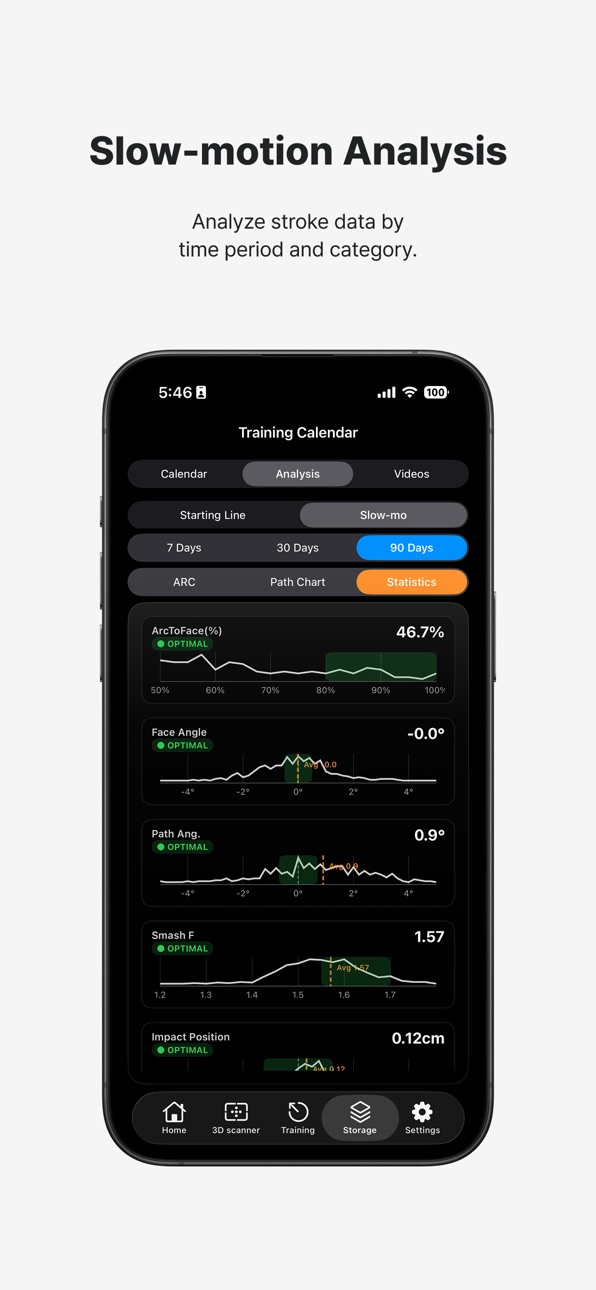
Training Analytics Added: Putter Path
Tempo Metronome Added: Starting Line, Slow-mo Analysis
ArcToFace:
- Putter Recognition Algorithm improved
Build 880362751v3.0.12025-12-09 03:57:39
UI/UX updated
Fix some bugs
Arc To Face:
- Ball, Putter detection algorithm improved
Build 879958695v3.0.02025-11-22 06:45:53
- UI/UX Updated
- Fix some bugs
Build 879707733v2.1.32025-11-14 08:19:00
ArcToFace:
- Arc Number (Data Type) Added (choose on Setting Menu)
- Faster Data Analyze (upto 10x)
Build 879230908v2.1.22025-10-31 23:51:03
Arc To Face:
Graphs and Parameters are selectable in Settings
Build 879042387v2.1.12025-10-20 15:46:05
ArcToFace:
Parameter updated
ArcToFace Graph updated
Build 877771839v2.1.02025-09-03 11:15:32
Analyze Mode:
- ArcToFace mode added(slomo)
Build 876887047v2.0.92025-08-05 02:45:17
Fix some bugs
Build 876397648v2.0.82025-07-28 04:38:34
- Remove App open Ads
- Fix some bugs
Price history by region
Currency
Show
Columns
Search
Availability 1 of 1 storefronts
| Region | Language | Price | Ratings | Avg | Version |
|---|---|---|---|---|---|
| US | en-US | Free | 6 | 3.7 | 3.2.2 |
Change log 29 changes · US
✎
releaseNotes updated
This update includes a new Stroke training mode and a fully redesigned Settings menu.
Redesigned Settings — profile, membership, credits, units, analysis, metr
✎
description updated
Scan on the green for putting line guide
Best putting guide in real-time
Available Devices:
iPhone 12 +
iPad (2021+)
We use your data to track advertising pe
✎
subtitle updated
Guide for putting line
✎
name updated
PerfectLine: Putting Simulator
◆
Version 3.2.2 released
This update includes a new Stroke training mode and a fully redesigned Settings menu.
Redesigned Settings — profile, membership, credits, units, analysis, metrics, and recording options are now organized into clear categories, with a sideb
◆
Version 3.2.1 released
Improved iPad layout — camera, putt history, and training info (green speed, stats, BPM) are now organized into one easy-to-view screen.
Faster session start — significantly reduced the initialization wait when entering Starting Line and Sl
◆
Version 3.2.0 released
English Update Notes (v3.2.0)
This update launches a brand-new iPad landscape experience and adds a new stroke analysis mode.
• New iPad landscape mode — experience a completely redesigned iPad landscape UI/UX.
• New Starting
◆
Version 3.1.12 released
PerfectLine: Putting Guide — v3.1.12 Update Notes (English)
This update includes the new Path-to-Face putting metric and stability improvements.
New metric: Path-to-Face — see your face angle relative to putter path at impact in live sessi
◆
Version 3.1.11 released
This update reimagines Performance Drills—record every putt of a hole like real play and analyze your game with golf-grade stats.
Multi-stroke tracking: log each putt to hole-out, including misses (direction & distance)
Strokes Gained (SG
◆
Version 3.1.10 released
PerfectLine: Putting Guide — v3.1.10 Update Notes (English)
This update introduces Virtual Green Custom mode and more accurate, smoother putting analysis graphs.
Virtual Green Custom mode (PRO only): Design your own holes by setting dist
◆
Version 3.1.9 released
This update introduces a brand-new Image Training mode and monthly prize claims for top finishers.
Image Training (new training mode): A virtual-green putting simulator where you read distance and slope, then dial in line and ball speed. I
◆
Version 3.1.8 released
This update brings a refreshed Tour Pro verification experience and unlocks ArcToFace data customization for Premium members.
- Premium members can now freely customize all 6 ArcToFace Data Selection items
- Upgraded ArcToFace AI model for
◆
Version 3.1.7 released
PerfectLine: Putting Guide — v3.1.7 Update Notes
This update includes Tour Pro verification.
Tour Pro Badge: Verified tour professionals now receive a special badge displayed in their profile and throughout the app.
We're always working to
◆
Version 3.1.6 released
This update introduces the all-new Drill training feature to level up your putting practice.
◆
Version 3.1.5 released
Left Handed Available
◆
Version 3.1.4 released
Face Angle Live (PRO Membership only)
◆
Version 3.1.3 released
- Face Angle Detection Algorithm UPDATED
- Training Storage UI/UX UPDATED
◆
Version 3.1.2 released
Fix some bugs
◆
Version 3.1.1 released
Membership update Bug Fixed
◆
Version 3.1.0 released
UI/UX Updated
Membership Plan Updated
ArcToFace: Face Detection algorithm Updated
◆
Version 3.0.2 released
Training Analytics Added: Putter Path
Tempo Metronome Added: Starting Line, Slow-mo Analysis
ArcToFace:
- Putter Recognition Algorithm improved
◆
Version 3.0.1 released
UI/UX updated
Fix some bugs
Arc To Face:
- Ball, Putter detection algorithm improved
◆
Version 3.0.0 released
- UI/UX Updated
- Fix some bugs
◆
Version 2.1.3 released
ArcToFace:
- Arc Number (Data Type) Added (choose on Setting Menu)
- Faster Data Analyze (upto 10x)
◆
Version 2.1.2 released
Arc To Face:
Graphs and Parameters are selectable in Settings
◆
Version 2.1.1 released
ArcToFace:
Parameter updated
ArcToFace Graph updated
◆
Version 2.1.0 released
Analyze Mode:
- ArcToFace mode added(slomo)
◆
Version 2.0.9 released
Fix some bugs
◆
Version 2.0.8 released
- Remove App open Ads
- Fix some bugs