Home › Reference

 US
US
1 of 1 storefronts
Content in en-US
Content in en-US
Information
Preview 3 platforms
iPhone 8 images


iPad 7 images



Mac 7 images



What’s New Version 8.3.0
- New 'Story Bible' template for new collections
- Various improvements and corrections
- Beta: Merging different collection versions during sync
Description
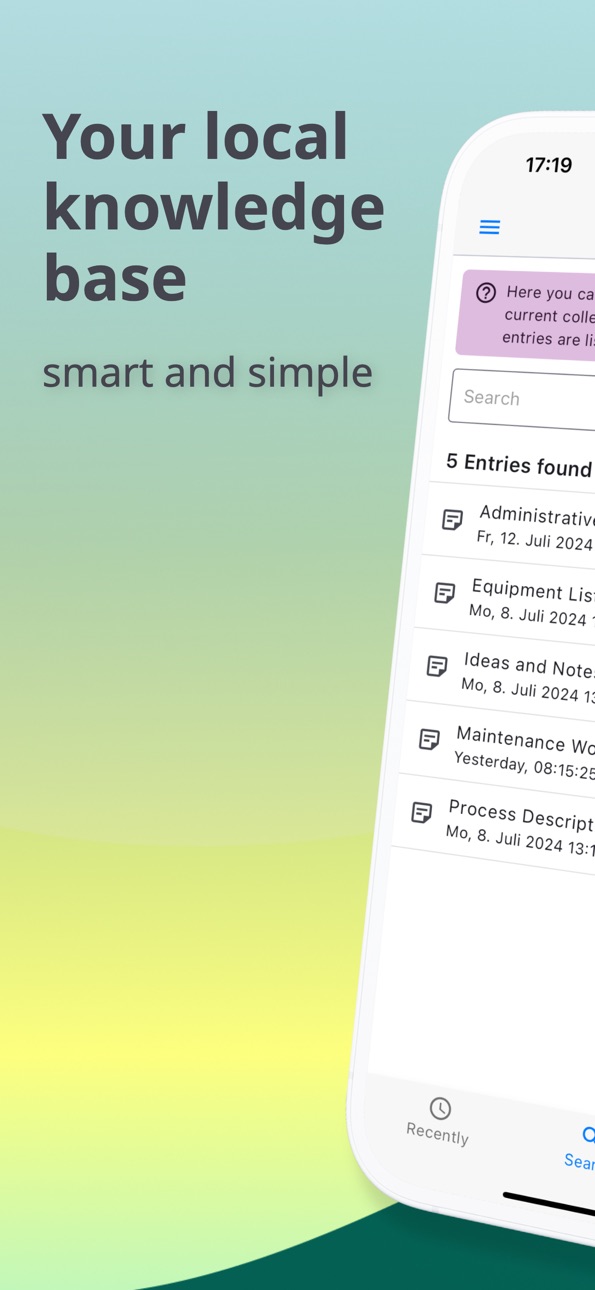
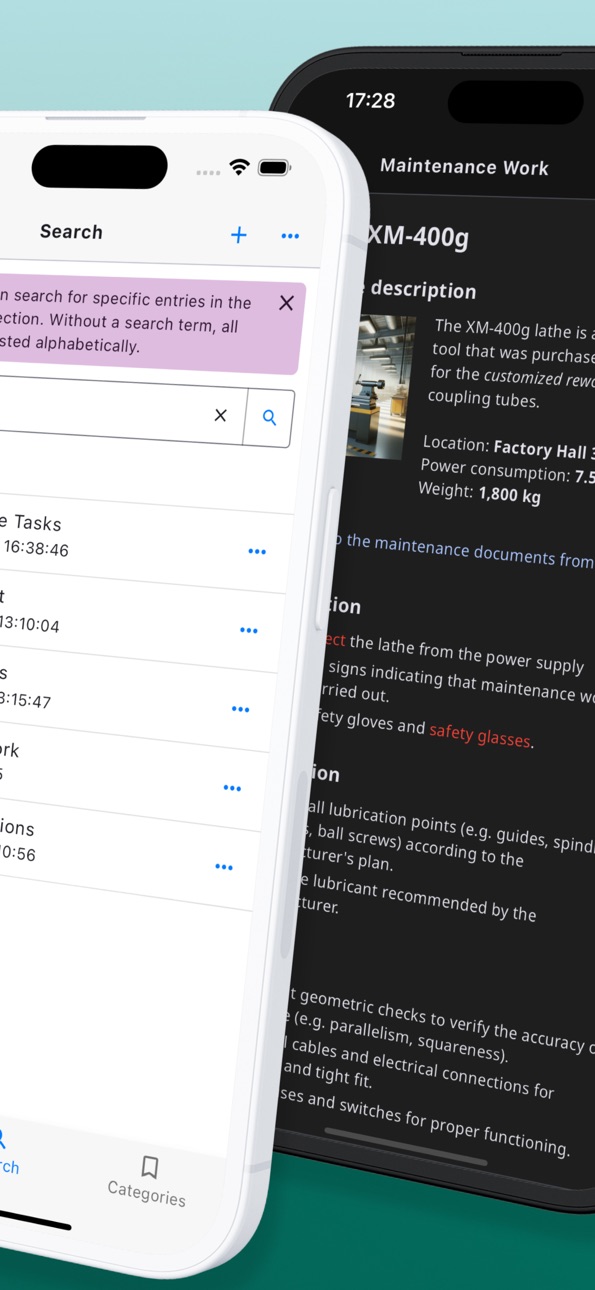
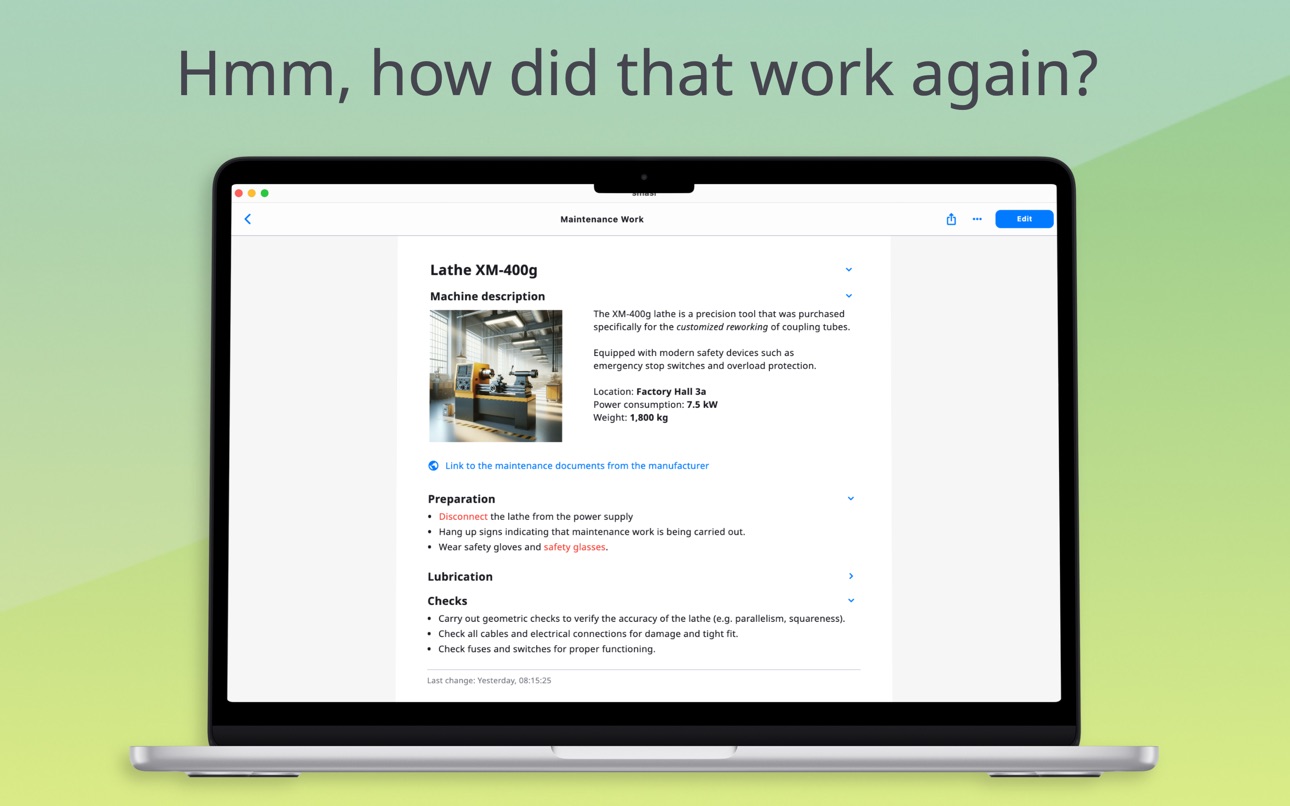
How was that done again? Capture your knowledge, information or work steps briefly and concisely as instructions directly on your device.
Organize your information effortlessly with intuitive section templates instead of Markdown syntax. Focus on your content instead of formatting text or positioning images, and create structured notes with ease. The clean reading mode allows you to conveniently look up the content later. The content cannot be changed accidentally - smart and simple.
This knowledge database is ideal for craftsmen, self-employed individuals, and anyone who prefers working in the workshop rather than on a computer but still wants to organize their knowledge systematically. Possible areas of application are:
• Books collection
• Collection of ideas and notes
• Checklists
• Experience reports / Testimonials
• Instructions of all kinds
• Inventory list
• Knowledge database (wiki)
• Project documentations
• Process descriptions
• Recipes
• Story Bible / World Building
• Summary of learning content
• Travel planning
• Work descriptions
It’s worth trying out this app!
No login is required to use this wiki software and no subscription is necessary. All collected wiki content is stored locally on your device. Your data belongs to you and remains guaranteed to stay with you. Collections can be transferred to your various devices by iCloud or a local NAS server via WebDAV.
With this free Starter Edition, you can try out all the features. The only restriction is that you can enter a maximum of 20 new entries. You can get the unlimited version with a one-time in-app purchase for 18 USD or 15 EUR per device (no subscription).
Are you missing an important feature? Help shape the development of this wiki software by sending an e-mail with your ideas to support@smasi.software. I would be happy to improve and extend the app!
Attention: Deleting the app will also remove all locally stored knowledge bases, including your notes and documentation. Use the built-in backup feature to back up your data and easily transfer it to another device. You can also export your content at any time in PDF, Markdown, HTML, JSON, or SQLite format for archiving, sharing, or further use.
In-App Purchases US pricing
One-Time Purchases
Unlimited (for your mobile)$17.99
Unlimited (for your Mac)$17.99
Capabilities
In-App Purchases
Accessibility
ipadiphonemacrealityDevicetvoswatch
Version history 25 versions
Build 888075419v8.3.02026-07-10 04:00:50
- New 'Story Bible' template for new collections
- Various improvements and corrections
- Beta: Merging different collection versions during sync
Build 887571597v8.2.12026-06-29 18:46:32
- New 'Show Category' action for links
- New option in group categories to make only a single category selectable
- The text cursor is positioned more precisely in edit mode
- The creation and modification dates are listed in the properties
- Various improvements and corrections
Build 887544024v8.2.02026-06-28 16:59:24
- New 'Show Category' action for links
- New option in group categories to make only a single category selectable
- The text cursor is positioned more precisely in edit mode
- The creation and modification dates are listed in the properties
- Various improvements and corrections
Build 886165863v8.1.02026-05-27 04:14:54
- 'Last Modified' page with subheadings
- New 'Save as ZIP file' feature for specific collections, making it easy to share them
- Load an exported collection directly from a ZIP file
- You can access the roadmap directly from the 'What is New' page
- Various improvements and corrections
Build 885463011v8.0.02026-05-10 19:09:41
- Queries on content, metadata, properties of entries
- Queries on metadata of images or attachments
- Execute a query using an action (link)
- Various improvements and corrections
Build 884293914v7.4.02026-04-08 21:17:34
- New section type 'Quote'
- Set placeholders for missing photos
- New 'Print Quality' setting for PDF export and printing, which allows you to control file size
- Various improvements and corrections
Build 883901624v7.3.02026-03-30 00:21:10
- Sync functionality for easy transfer of collections to other devices
- iCloud as a sync service for sharing between iOS and macOS devices
- WebDAV as a sync service for sharing by your local NAS server
- Various improvements and corrections
Build 883069720v7.2.02026-03-06 00:17:47
- Import function for loading exported entries from other collections
- Entries without categories are displayed on the 'Categories' page
- Various improvements and corrections
Build 882273133v7.1.02026-02-08 22:03:00
- Export option with Markdown, HTML, JSON und SQLite
- 16k pages (technical requirement from Google)
- Various improvements and corrections
Build 881180598v7.0.02026-01-04 01:29:55
- Start Page
- Links (hyperlinks) in text content
- Link section now supports multiple and different links
- Links can also be displayed as buttons
- Actions as links
- Various improvements and corrections
Build 880286559v6.3.12025-12-03 01:56:59
Various improvements and corrections
Build 880250440v6.3.02025-12-02 00:31:15
- Thanks to the new toolbar, text content can be formatted more conveniently (instead of the context menu)
- Providing web addresses as links in text content
- Various improvements and corrections
Build 879812683v6.2.02025-11-16 20:14:30
- New 'Typewriter (mono space)' typeface as setting
- The backup and restore dialog has the option to display the backup directory
- Limitation of Starter Edition increased from 10 to 20 entries
- Beta/preview version: Sync functionality for easy transfer of collections to other devices
- Beta/preview version: iCloud as a sync service for sharing between iOS and macOS devices
- Beta/preview version: WebDAV as a sync service for sharing by your local NAS server
Build 878574968v6.1.02025-10-01 10:15:33
- Paste function to insert content from other applications such as Apple Notes or Pages via the clipboard
- The 'Save as' function is now also available for mobile devices under Backup and Content Sharing.
Build 877685909v6.0.72025-08-30 19:20:19
Various improvements and corrections
Build 877590003v6.0.62025-08-27 15:53:28
Various improvements and corrections
Build 876720662v6.0.42025-07-26 07:49:41
Various improvements and corrections
Build 875932905v6.0.02025-06-29 06:43:18
- Icon and color of an individual entry can be defined
- Over 70 icons are available for entries
- Collections can be structured using folders
- Collections can be marked with a color
- Layout image with text on the right or left is now also kept without text
- Under Info you find details such as the number of entries and the data size of the currently opened collection
- Deleting a collection moves the data to the recycle bin for 30 days
- Deleted collections can be recovered within 30 days, after that the data is automatically removed
- Deleting an entry also moves the content to the trash for 30 days
- Deleted entries can be recovered within 30 days, after that the data is automatically removed
- Various improvements and corrections
Build 875060893v5.7.42025-05-26 05:45:44
- New section type ‘Picture series’ to display several pictures as a gallery
- In the new image series, images can be arranged using drag & drop
- PDF output supports links to entries if the page exists in the PDF
- Various improvements and corrections
Build 874907705v5.7.32025-05-20 23:49:09
- New section type ‘Picture series’ to display several pictures as a gallery
- In the new image series, images can be arranged using drag & drop
- PDF output supports links to entries if the page exists in the PDF
- Various improvements and corrections
Build 874862063v5.7.12025-05-19 05:37:39
- New section type ‘Picture series’ to display several pictures as a gallery
- In the new image series, images can be arranged using drag & drop
- PDF output supports links to entries if the page exists in the PDF
- Various improvements and corrections
Build 874506257v5.7.02025-05-04 18:33:12
- New section type ‘Picture series’ to display several pictures as a gallery
- In the new image series, images can be arranged using drag & drop
- PDF output supports links to entries if the page exists in the PDF
- Various improvements and corrections
Build 873848900v5.6.02025-04-08 07:01:21
- New section type 'Phone number' as link
- Save as PDF offers the option of opening the folder
- Print out several entries at once via the search result or share as PDF
- Various improvements and corrections
Build 873664171v5.5.02025-04-01 07:51:28
- Define picture cropping
- Before changes are discarded, you are first asked whether changes should be saved
- The question for saving can be switched off via the settings
- Various improvements and corrections
Build 873239616v5.4.22025-03-14 18:10:23
- First desktop version for MacOS released (see Mac App Store to download)
- First desktop version for Windows released (see Microsoft Store to download)
- Various improvements and corrections
Price history by region
Currency
Show
Columns
Search
Availability 1 of 1 storefronts
| Region | Language | Price | Ratings | Avg | Version |
|---|---|---|---|---|---|
| US | en-US | Free | 9 | 4.6 | 8.3.0 |
Change log 29 changes · US
✎
releaseNotes updated
- New 'Story Bible' template for new collections
- Various improvements and corrections
- Beta: Merging different collection versions during sync
✎
description updated
How was that done again? Capture your knowledge, information or work steps briefly and concisely as instructions directly on your device.
Organize your inform
✎
subtitle updated
Local Knowledge Database
✎
name updated
Your personal Wiki - smasi
◆
Version 8.3.0 released
- New 'Story Bible' template for new collections
- Various improvements and corrections
- Beta: Merging different collection versions during sync
◆
Version 8.2.1 released
- New 'Show Category' action for links
- New option in group categories to make only a single category selectable
- The text cursor is positioned more precisely in edit mode
- The creation and modification dates are listed in the properties
◆
Version 8.2.0 released
- New 'Show Category' action for links
- New option in group categories to make only a single category selectable
- The text cursor is positioned more precisely in edit mode
- The creation and modification dates are listed in the properties
◆
Version 8.1.0 released
- 'Last Modified' page with subheadings
- New 'Save as ZIP file' feature for specific collections, making it easy to share them
- Load an exported collection directly from a ZIP file
- You can access the roadmap directly from the 'What is N
◆
Version 8.0.0 released
- Queries on content, metadata, properties of entries
- Queries on metadata of images or attachments
- Execute a query using an action (link)
- Various improvements and corrections
◆
Version 7.4.0 released
- New section type 'Quote'
- Set placeholders for missing photos
- New 'Print Quality' setting for PDF export and printing, which allows you to control file size
- Various improvements and corrections
◆
Version 7.3.0 released
- Sync functionality for easy transfer of collections to other devices
- iCloud as a sync service for sharing between iOS and macOS devices
- WebDAV as a sync service for sharing by your local NAS server
- Various improvements and correctio
◆
Version 7.2.0 released
- Import function for loading exported entries from other collections
- Entries without categories are displayed on the 'Categories' page
- Various improvements and corrections
◆
Version 7.1.0 released
- Export option with Markdown, HTML, JSON und SQLite
- 16k pages (technical requirement from Google)
- Various improvements and corrections
◆
Version 7.0.0 released
- Start Page
- Links (hyperlinks) in text content
- Link section now supports multiple and different links
- Links can also be displayed as buttons
- Actions as links
- Various improvements and corrections
◆
Version 6.3.1 released
Various improvements and corrections
◆
Version 6.3.0 released
- Thanks to the new toolbar, text content can be formatted more conveniently (instead of the context menu)
- Providing web addresses as links in text content
- Various improvements and corrections
◆
Version 6.2.0 released
- New 'Typewriter (mono space)' typeface as setting
- The backup and restore dialog has the option to display the backup directory
- Limitation of Starter Edition increased from 10 to 20 entries
- Beta/preview version: Sync functionality fo
◆
Version 6.1.0 released
- Paste function to insert content from other applications such as Apple Notes or Pages via the clipboard
- The 'Save as' function is now also available for mobile devices under Backup and Content Sharing.
◆
Version 6.0.7 released
Various improvements and corrections
◆
Version 6.0.6 released
Various improvements and corrections
◆
Version 6.0.4 released
Various improvements and corrections
◆
Version 6.0.0 released
- Icon and color of an individual entry can be defined
- Over 70 icons are available for entries
- Collections can be structured using folders
- Collections can be marked with a color
- Layout image with text on the right or left is now als
◆
Version 5.7.4 released
- New section type ‘Picture series’ to display several pictures as a gallery
- In the new image series, images can be arranged using drag & drop
- PDF output supports links to entries if the page exists in the PDF
- Various improvements and
◆
Version 5.7.3 released
- New section type ‘Picture series’ to display several pictures as a gallery
- In the new image series, images can be arranged using drag & drop
- PDF output supports links to entries if the page exists in the PDF
- Various improvements and
◆
Version 5.7.1 released
- New section type ‘Picture series’ to display several pictures as a gallery
- In the new image series, images can be arranged using drag & drop
- PDF output supports links to entries if the page exists in the PDF
- Various improvements and
◆
Version 5.7.0 released
- New section type ‘Picture series’ to display several pictures as a gallery
- In the new image series, images can be arranged using drag & drop
- PDF output supports links to entries if the page exists in the PDF
- Various improvements and
◆
Version 5.6.0 released
- New section type 'Phone number' as link
- Save as PDF offers the option of opening the folder
- Print out several entries at once via the search result or share as PDF
- Various improvements and corrections
◆
Version 5.5.0 released
- Define picture cropping
- Before changes are discarded, you are first asked whether changes should be saved
- The question for saving can be switched off via the settings
- Various improvements and corrections
◆
Version 5.4.2 released
- First desktop version for MacOS released (see Mac App Store to download)
- First desktop version for Windows released (see Microsoft Store to download)
- Various improvements and corrections