Home › Music

 US
US
1 of 1 storefronts
Content in en-US
Content in en-US
Information
Preview 3 platforms
iPhone 7 images


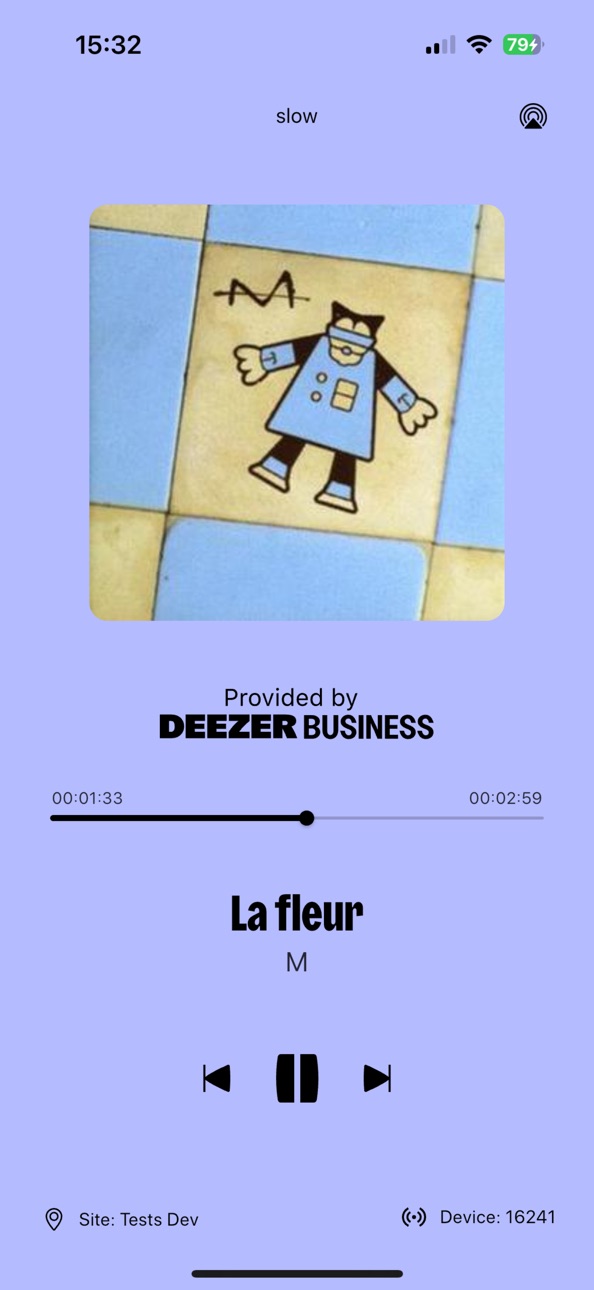
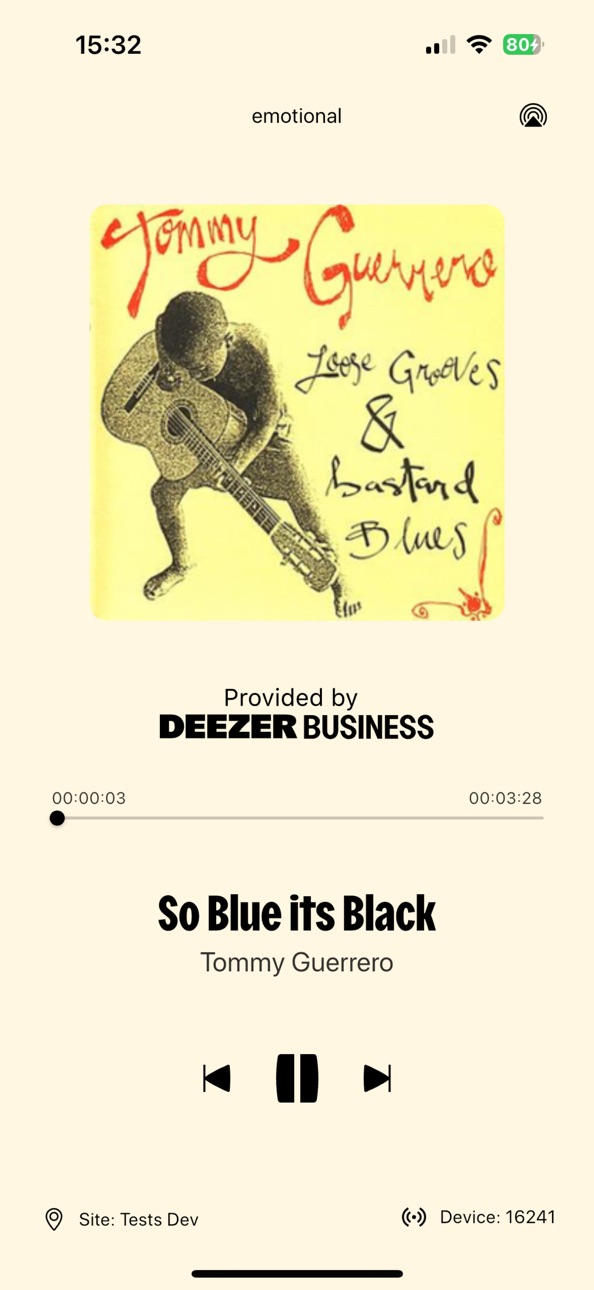

iPad 10 images


Mac 4 images


What’s New Version 5.8.01
This update brings several improvements to make the app smoother and easier to use:
Queue system: manage waiting content more clearly and efficiently.
New Settings panel: access and adjust app options from a redesigned interface.
Fresh new design: improved visuals for a cleaner and more modern experience.
We’ve also made small fixes and performance improvements to keep everything running smoothly.
Description
Please note that access to Deezer Business requires an activation code, it is not the classic Deezer player (available on the App Store).
Deezer Business App is the music player of our solution for professionals, Deezer Business.
With Deezer Business, you can create, control and broadcast your own soundscape.
Compose your own playlists and integrate audio communication messages.
For one or hundreds of establishments.
The Deezer Business platform (admin.deezer-business.com), soundscape management software tailored to the needs of professionals:
- A large catalog of titles and ready-to-use playlists
- Fast music programming
- Centralized real-time control of your soundscape
- Simplified broadcasting, with the Deezer Business app available on iPhone and iPad
- Control your music from the app: play/pause, next/previous, and navigation within the song
How does it work?
1. Go to the Deezer Business platform (admin.deezer-business.com) to create and program your playlists.
2. Download the Deezer Business app to your devices (iPhone or iPad) connected to your audio devices.
3. Open the app, and the playlist launches automatically.
From the app :
- Start and stop broadcasting your program
- View title, artist, cover, duration and playlist currently playing
- View the title of the audio message currently playing
What are the advantages of the Deezer Business app?
- Low deployment costs: no hardware to send or install
- Reliability: the app stores your playlists and even works off-line.
- Simplicity: the app enables 100% automatic music playback without modifying your programming
- Security: the app is installed on your network in compliance with your security rules.
Privacy Policy :
https://deezer-business.com/politique-de-confidentialite/
Terms and conditions of use and sale :
https://deezer-business.com/conditions-generales/
Contact us: support@deezer-business.com
Accessibility
ipadiphonemacrealityDevicetvoswatch
Version history 17 versions
Build 886154487v5.8.012026-07-01 05:55:38
This update brings several improvements to make the app smoother and easier to use:
Queue system: manage waiting content more clearly and efficiently.
New Settings panel: access and adjust app options from a redesigned interface.
Fresh new design: improved visuals for a cleaner and more modern experience.
We’ve also made small fixes and performance improvements to keep everything running smoothly.
Build 882596234v5.4.132026-02-20 06:58:13
The app is improving to bring you an even smoother, more stable, and enjoyable audio experience.
Update now to take advantage of the latest optimizations and enhancements.
Build 882563297v5.4.122026-02-19 07:43:01
The app is improving to bring you an even smoother, more stable, and enjoyable audio experience.
Update now to take advantage of the latest optimizations and enhancements.
Build 882435041v5.4.112026-02-15 05:50:47
The app is improving to bring you an even smoother, more stable, and enjoyable audio experience.
Update now to take advantage of the latest optimizations and enhancements.
Build 876416291v5.3.102025-12-08 06:55:54
Customize your audio fade.
Improved user experience.
Build 875193764v5.1.082025-07-15 12:34:11
You can now choose how long songs fade into each other. Customize your crossfade duration for a smoother listening experience!
Build 874074816v5.0.152025-04-16 20:15:12
Customize your audio fade between songs.
Build 872600179v2.0.112025-02-18 16:47:33
Listen to music without any internet connection.
Build 871720973v2.0.102025-01-14 09:11:09
Improved interface.
Build 871059523v2.0.062024-12-11 11:36:09
Improved interface.
Build 870947595v2.0.052024-12-06 11:14:31
Improved user interface.
Build 870829337v2.0.042024-12-02 11:45:12
You can now skip, pause or resume a content.
Build 870764664v2.0.032024-12-01 19:34:46
You may now pause, resume or skip a content.
Build 870730574v2.0.022024-11-28 00:34:21
You can now pause, resume and skip a content.
Build 870726146v2.02024-11-27 12:35:23
You can now, pause, resume or skip a content.
Build 865264121v1.12024-10-01 18:36:00
Airplay2 Support
Build 862782035v1.02024-03-22 12:31:09
No pricing data captured yet — comparisons appear once the app has paid storefronts or in-app purchases.
Availability 1 of 1 storefronts
| Region | Language | Price | Ratings | Avg | Version |
|---|---|---|---|---|---|
| US | en-US | Free | 0 | — | 5.8.01 |
Change log 21 changes · US
✎
releaseNotes updated
This update brings several improvements to make the app smoother and easier to use:
Queue system: manage waiting content more clearly and efficiently.
New Sett
✎
description updated
Please note that access to Deezer Business requires an activation code, it is not the classic Deezer player (available on the App Store).
Deezer Business App i
✎
subtitle updated
Music player
✎
name updated
Deezer Business
◆
Version 5.8.01 released
This update brings several improvements to make the app smoother and easier to use:
Queue system: manage waiting content more clearly and efficiently.
New Settings panel: access and adjust app options from a redesigned interface.
Fresh new
◆
Version 5.4.13 released
The app is improving to bring you an even smoother, more stable, and enjoyable audio experience.
Update now to take advantage of the latest optimizations and enhancements.
◆
Version 5.4.12 released
The app is improving to bring you an even smoother, more stable, and enjoyable audio experience.
Update now to take advantage of the latest optimizations and enhancements.
◆
Version 5.4.11 released
The app is improving to bring you an even smoother, more stable, and enjoyable audio experience.
Update now to take advantage of the latest optimizations and enhancements.
◆
Version 5.3.10 released
Customize your audio fade.
Improved user experience.
◆
Version 5.1.08 released
You can now choose how long songs fade into each other. Customize your crossfade duration for a smoother listening experience!
◆
Version 5.0.15 released
Customize your audio fade between songs.
◆
Version 2.0.11 released
Listen to music without any internet connection.
◆
Version 2.0.10 released
Improved interface.
◆
Version 2.0.06 released
Improved interface.
◆
Version 2.0.05 released
Improved user interface.
◆
Version 2.0.04 released
You can now skip, pause or resume a content.
◆
Version 2.0.03 released
You may now pause, resume or skip a content.
◆
Version 2.0.02 released
You can now pause, resume and skip a content.
◆
Version 2.0 released
You can now, pause, resume or skip a content.
◆
Version 1.1 released
Airplay2 Support
◆
Version 1.0 released