Home › Navigation

 US
US
USen-US AGNot Available
 AINot Available
 AONot Available
 ARNot Available
 BBNot Available
 BFNot Available
 BJNot Available
 BONot Available
 BRNot Available
 BSNot Available
 BWNot Available
 BZNot Available
 CDNot Available
 CGNot Available
 CINot Available
 CLNot Available
 CMNot Available
 CONot Available
 CRNot Available
 CVNot Available
 DMNot Available
 DONot Available
 DZNot Available
 ECNot Available
 GANot Available
 GDNot Available
 GHNot Available
 GMNot Available
 GTNot Available
 GWNot Available
 GYNot Available
 HNNot Available
 JMNot Available
 KENot Available
 KNNot Available
 KYNot Available
 LCNot Available
 LRNot Available
 LYNot Available
 MANot Available
 MGNot Available
 MLNot Available
 MSNot Available
 MUNot Available
 MWNot Available
 MXNot Available
 MZNot Available
 NANot Available
 NENot Available
 NGNot Available
 NINot Available
 PANot Available
 PENot Available
 PYNot Available
 RWNot Available
 SCNot Available
 SLNot Available
 SNNot Available
 SRNot Available
 STNot Available
 SVNot Available
 SZNot Available
 TCNot Available
 TDNot Available
 TNNot Available
 TTNot Available
 TZNot Available
 UGNot Available
 UYNot Available
 VCNot Available
 VENot Available
 VGNot Available
 ZMNot Available
 ZWNot Available
1 of 75 storefronts
Content in en-US
Content in en-US
Information
Preview 2 platforms
iPhone 6 images


iPad 6 images


What’s New Version 3.5
We've polished County Names & Lines for iPad: the location card and the county-crossing banner now sit at a comfortable width instead of stretching across the whole screen.
Plus a few under-the-hood improvements for a smoother, more reliable experience. Thanks for using the app!
Description
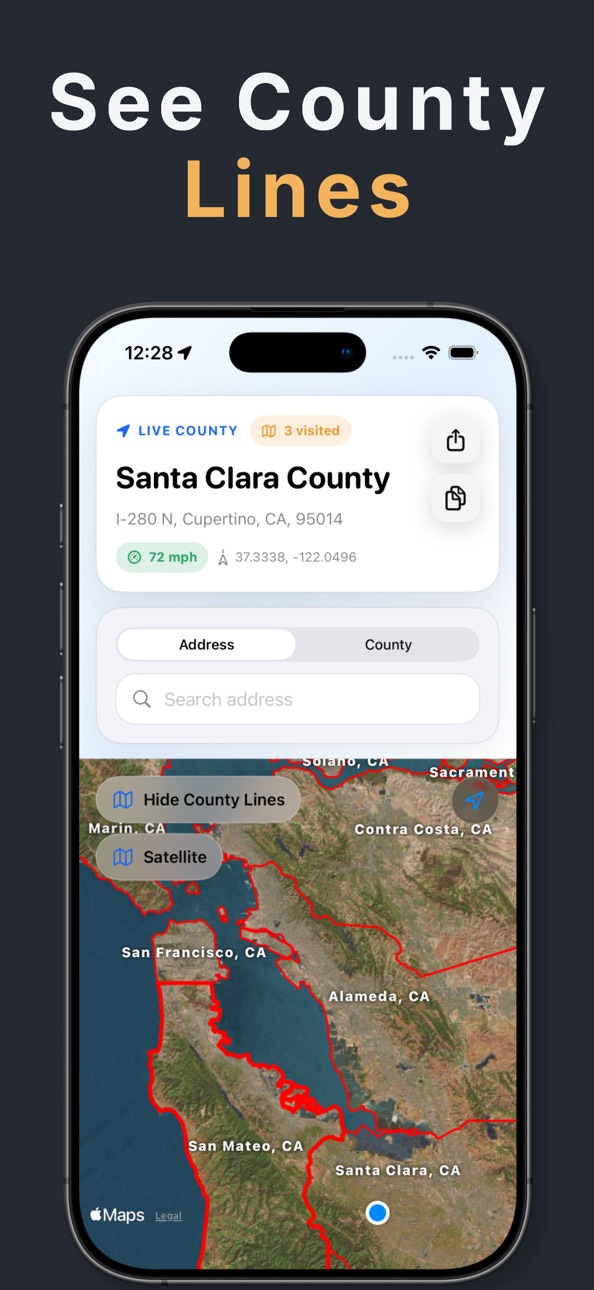
Road signs do not always tell you when you crossed a county line. County Lines & Names shows your live county, address context, speed, and FIPS details on a clean map, then unlocks full
county boundaries with Pro when you need exact borders.
Whether you are driving a county-hunting route, checking a jurisdiction in the field, researching an address, or just trying to answer “what county am I in right now?”, the app keeps the
answer close. Open the map, see your current county, search an address, or tap around the map to understand the place in front of you.
FREE FEATURES
• See the county you are currently in
• View your current address, coordinates, and speed
• Switch speed between mph and km/h
• See county FIPS codes when available
• Search U.S. addresses and view the county result
• Drop a point on the map to check a location
• Copy or share your county, address, coordinates, and FIPS details
• Track counties you have visited automatically
• Get county crossing notifications as your detected county changes
• Switch map styles for easier navigation
COUNTY LINES PRO FEATURES
• Show county boundary lines directly on the live map
• Switch between standard and coastal boundary views
• See large county name labels across the map
• Search more than 3,000 U.S. counties by name
• Search counties by FIPS code
• Jump directly to a county from search
• Keep county boundaries, names, and search unlocked on every trip
• Use built-in county boundary data for map overlays when service is limited
BUILT FOR
• Road trips and county hunting
• Field work, surveying, and jurisdiction checks
• Address lookup and location research
• Outdoor travel and coastal navigation
• Anyone who needs a fast county answer without digging through maps
County Lines & Names is free to use for live county lookup, address search, speed, FIPS details, sharing, visited county tracking, and county crossing alerts.
County Lines Pro is required for county boundary lines, coastal boundary views, on-map county name labels, and county name or FIPS search. Pro is available as an auto-renewing weekly,
monthly, or annual subscription. Payment is charged to your Apple ID account at confirmation of purchase. Subscriptions renew automatically unless canceled at least 24 hours before the end
of the current period. You can manage or cancel your subscription in your App Store account settings.
Stop guessing where one county ends and the next begins. Open County Lines & Names and get the county answer quickly.
Terms of Use: https://www.apple.com/legal/internet-services/itunes/dev/stdeula/
In-App Purchases US pricing
County Names & Lines Pro Subscription
County Names & Lines Weekly · 7 days$2.99
County Names & Lines Annual · Yearly$24.99
County Names & Lines Annual · Yearly$14.99
County Names & Lines Monthly · Monthly$4.99
One-Time Purchases
County Lines and Names$2.99
Capabilities
In-App Purchases
Accessibility
ipadiphonemacrealityDevicetvoswatch
Version history 25 versions
Build 886546269v3.52026-06-04 23:02:11
We've polished County Names & Lines for iPad: the location card and the county-crossing banner now sit at a comfortable width instead of stretching across the whole screen.
Plus a few under-the-hood improvements for a smoother, more reliable experience. Thanks for using the app!
Build 885877908v3.42026-05-19 22:28:24
New in 3.4:
• County Names & Lines now gives the map more room, with floating controls and a cleaner search-focused layout.
• Searching is smoother: location details collapse while you type, and county/FIPS search is easier to understand.
• Visited counties now include milestones, richer list styling, and a clearer path to view boundary lines on the map.
• Improved localized text for map labels, offers, pricing, and French users, plus reliability polish around boundary loading.
Build 885092385v3.32026-04-29 23:31:56
A major design refresh is here.
What’s new:
- Cleaner, more polished interface across the app
- New Visited Counties history view
- Sort visited counties by name or group them by state
- Improved main screen readability and layout
- Removed the Zoom Out limitation
This update makes County Names & Lines feel faster, sharper, and more useful every time you open it.
Build 885034798v3.22026-04-28 18:35:58
A major design refresh is here.
What’s new:
- Cleaner, more polished interface across the app
- New Visited Counties history view
- Sort visited counties by name or group them by state
- Improved main screen readability and layout
- Removed the Zoom Out limitation
This update makes County Names & Lines feel faster, sharper, and more useful every time you open it.
Build 884593684v3.12026-04-16 22:11:12
A major design refresh is here.
What’s new:
- Cleaner, more polished interface across the app
- New Visited Counties history view
- Sort visited counties by name or group them by state
- Improved main screen readability and layout
- Removed the Zoom Out limitation
This update makes County Names & Lines feel faster, sharper, and more useful every time you open it.
Build 884503918v3.02026-04-14 20:30:49
A major design refresh is here.
What’s new:
- Cleaner, more polished interface across the app
- New Visited Counties history view
- Sort visited counties by name or group them by state
- Improved main screen readability and layout
- Removed the Zoom Out limitation
This update makes County Names & Lines feel faster, sharper, and more useful every time you open it.
Build 884412990v2.122026-04-12 21:47:46
- Added County FIPS code to county search. Available in the Pro version of the app.
Build 884160426v2.112026-04-10 21:05:54
Added a county line preview to the free version of the app.
Build 881085866v2.102025-12-30 08:25:43
Minor layout updates.
Build 879404031v2.92025-10-31 18:55:07
- Fixed bug where county lines were not showing for paid subscribers.
- Fixed bug where new county line overlays were showing on top of previously loaded lines.
Build 877936385v2.82025-09-09 12:00:25
This version of County Names & Lines includes several huge improvements based on user feedback:
- Much faster panning of the map to render dozens of county lines at once without slowing down.
- Smaller county name labels when zoomed out.
- Thinner county lines when zoomed out.
- County labels now show closer to the edge of the county lines when zoomed in, so you can quickly see which county is on either side of the border.
- Removed the banner ad.
Please continue to e-mail feedback and suggestions.
Build 877313858v2.72025-08-19 10:33:40
This version of County Names & Lines includes several huge improvements based on user feedback:
- Much faster panning of the map to render dozens of county lines at once without slowing down.
- Smaller county name labels when zoomed out.
- Thinner county lines when zoomed out.
- County labels now show closer to the edge of the county lines when zoomed in, so you can quickly see which county is on either side of the border.
- Removed the banner ad.
Please continue to e-mail feedback and suggestions.
Build 876622710v2.62025-07-23 15:36:58
This version of County Names & Lines includes several huge improvements based on user feedback:
- Much faster panning of the map to render dozens of county lines at once without slowing down.
- Smaller county name labels when zoomed out.
- Thinner county lines when zoomed out.
- County labels now show closer to the edge of the county lines when zoomed in, so you can quickly see which county is on either side of the border.
Please continue to e-mail feedback and suggestions.
Build 876111462v2.52025-07-04 05:51:07
This version of County Names & Lines includes minor UI updates.
Build 875606456v2.42025-06-17 07:42:54
This version of County Finder: Lines & Names:
- Adds search for county by name
- Much faster loading of county lines and names when panning and zooming around the map
- New icon
Build 874597615v2.32025-05-07 22:31:41
- New icon.
- Long press anywhere on the map to see the county name, address, and coordinates. You can Share and Copy those.
- Search for an address and find what county it’s in.
- Your current address now shows and can be copied along with the county name and coordinates.
Build 874455688v2.22025-05-02 00:10:17
- Long press anywhere on the map to see the county name, address, and coordinates. You can Share and Copy those.
- Search for an address and find what county it’s in.
- Your current address now shows and can be copied along with the county name and coordinates.
Build 871868957v2.12025-01-21 08:40:51
- Long press anywhere on the map to see the county name, address, and coordinates. You can Share and Copy those.
- Search for an address and find what county it’s in.
- Your current address now shows and can be copied along with the county name and coordinates.
Build 871842885v2.02025-01-19 07:25:09
- Long press anywhere on the map to see the county name, address, and coordinates. You can Share and Copy those.
- Search for an address and find what county it’s in.
- Your current address now shows and can be copied along with the county name and coordinates.
Build 871787309v1.92025-01-16 22:54:36
- Long press anywhere on the map to see the county name, address, and coordinates. You can Share and Copy those.
- Search for an address and find what county it’s in.
- Your current address now shows and can be copied along with the county name and coordinates.
Build 871593936v1.82025-01-07 21:41:16
- Added latitude/longitude coordinates.
- Added a quick copy button for county name and coordinates.
Build 871280397v1.72024-12-20 03:45:35
- Updated name to County Finder: Lines & Names.
- Updated the upgrade button to a simple blue.
Build 870963782v1.62024-12-07 12:17:34
- Updated name to County Lines to more accurately reflect the purpose of the app. It’s still the same County Finder you know & love.
Build 870877376v1.52024-12-04 08:12:29
- Increased inland county line precision by 50% (please email support at v5cqpsj4e3u4@opayq.com if this causes the app to be too slow for you)
- Enabled landscape device orientation for iPads.
Build 870737988v1.42024-11-28 01:03:19
- Added Coastal Zone Management county boundaries: great for birding, fishing, and marine activities!
Price history by region
Currency
Show
Columns
Search
Availability 1 of 75 storefronts
| Region | Language | Price | Ratings | Avg | Version |
|---|---|---|---|---|---|
| US | en-US | Free | 19 | 4.3 | 3.5 |
Not available in: AG, AI, AO, AR, BB, BF, BJ, BO, BR, BS, BW, BZ, CD, CG, CI, CL, CM, CO, CR, CV, DM, DO, DZ, EC, GA, GD, GH, GM, GT, GW, GY, HN, JM, KE, KN, KY, LC, LR, LY, MA, MG, ML, MS, MU, MW, MX, MZ, NA, NE, NG, NI, PA, PE, PY, RW, SC, SL, SN, SR, ST, SV, SZ, TC, TD, TN, TT, TZ, UG, UY, VC, VE, VG, ZM, ZW
Change log 29 changes · US
✎
releaseNotes updated
We've polished County Names & Lines for iPad: the location card and the county-crossing banner now sit at a comfortable width instead of stretching across the w
✎
description updated
Road signs do not always tell you when you crossed a county line. County Lines & Names shows your live county, address context, speed, and FIPS details on a cle
✎
subtitle updated
What County Am I In?
✎
name updated
County Names & Lines
◆
Version 3.5 released
We've polished County Names & Lines for iPad: the location card and the county-crossing banner now sit at a comfortable width instead of stretching across the whole screen.
Plus a few under-the-hood improvements for a smoother, more reliab
◆
Version 3.4 released
New in 3.4:
• County Names & Lines now gives the map more room, with floating controls and a cleaner search-focused layout.
• Searching is smoother: location details collapse while you type, and county/FIPS search is easier to understa
◆
Version 3.3 released
A major design refresh is here.
What’s new:
- Cleaner, more polished interface across the app
- New Visited Counties history view
- Sort visited counties by name or group them by state
- Improved main screen readability and layout
- Remov
◆
Version 3.2 released
A major design refresh is here.
What’s new:
- Cleaner, more polished interface across the app
- New Visited Counties history view
- Sort visited counties by name or group them by state
- Improved main screen readability and layout
- Remov
◆
Version 3.1 released
A major design refresh is here.
What’s new:
- Cleaner, more polished interface across the app
- New Visited Counties history view
- Sort visited counties by name or group them by state
- Improved main screen readability and layout
- Remov
◆
Version 3.0 released
A major design refresh is here.
What’s new:
- Cleaner, more polished interface across the app
- New Visited Counties history view
- Sort visited counties by name or group them by state
- Improved main screen readability and layout
- Remov
◆
Version 2.12 released
- Added County FIPS code to county search. Available in the Pro version of the app.
◆
Version 2.11 released
Added a county line preview to the free version of the app.
◆
Version 2.10 released
Minor layout updates.
◆
Version 2.9 released
- Fixed bug where county lines were not showing for paid subscribers.
- Fixed bug where new county line overlays were showing on top of previously loaded lines.
◆
Version 2.8 released
This version of County Names & Lines includes several huge improvements based on user feedback:
- Much faster panning of the map to render dozens of county lines at once without slowing down.
- Smaller county name labels when zoomed out.
-
◆
Version 2.7 released
This version of County Names & Lines includes several huge improvements based on user feedback:
- Much faster panning of the map to render dozens of county lines at once without slowing down.
- Smaller county name labels when zoomed out.
-
◆
Version 2.6 released
This version of County Names & Lines includes several huge improvements based on user feedback:
- Much faster panning of the map to render dozens of county lines at once without slowing down.
- Smaller county name labels when zoomed out.
-
◆
Version 2.5 released
This version of County Names & Lines includes minor UI updates.
◆
Version 2.4 released
This version of County Finder: Lines & Names:
- Adds search for county by name
- Much faster loading of county lines and names when panning and zooming around the map
- New icon
◆
Version 2.3 released
- New icon.
- Long press anywhere on the map to see the county name, address, and coordinates. You can Share and Copy those.
- Search for an address and find what county it’s in.
- Your current address now shows and can be copied along with
◆
Version 2.2 released
- Long press anywhere on the map to see the county name, address, and coordinates. You can Share and Copy those.
- Search for an address and find what county it’s in.
- Your current address now shows and can be copied along with the county
◆
Version 2.1 released
- Long press anywhere on the map to see the county name, address, and coordinates. You can Share and Copy those.
- Search for an address and find what county it’s in.
- Your current address now shows and can be copied along with the county
◆
Version 2.0 released
- Long press anywhere on the map to see the county name, address, and coordinates. You can Share and Copy those.
- Search for an address and find what county it’s in.
- Your current address now shows and can be copied along with the county
◆
Version 1.9 released
- Long press anywhere on the map to see the county name, address, and coordinates. You can Share and Copy those.
- Search for an address and find what county it’s in.
- Your current address now shows and can be copied along with the county
◆
Version 1.8 released
- Added latitude/longitude coordinates.
- Added a quick copy button for county name and coordinates.
◆
Version 1.7 released
- Updated name to County Finder: Lines & Names.
- Updated the upgrade button to a simple blue.
◆
Version 1.6 released
- Updated name to County Lines to more accurately reflect the purpose of the app. It’s still the same County Finder you know & love.
◆
Version 1.5 released
- Increased inland county line precision by 50% (please email support at v5cqpsj4e3u4@opayq.com if this causes the app to be too slow for you)
- Enabled landscape device orientation for iPads.
◆
Version 1.4 released
- Added Coastal Zone Management county boundaries: great for birding, fishing, and marine activities!