Home › Utilities

 US
US
USen-US DEde-DE
 ITit
ITit JPja
JPja RUru
RUru CAen-CA
 ESes-ES
 KWen-GB
 AEen-GB
 AFen-GB
 ALen-GB
 AMen-GB
 AOen-GB
 ATde-DE
 AUen-AU
 AZen-GB
 BAen-GB
 BEen-GB
 BFen-GB
 BGen-GB
 BHen-GB
 BJen-GB
 BMen-GB
 BNen-GB
 BTen-GB
 BWen-GB
 BYen-GB
 CHde-CH
 CIfr-FR
 CMfr-FR
 CNzh-Hans-CN
 CVen-GB
 CYen-GB
 CZen-GB
 DKen-GB
 EEen-GB
 EGen-GB
 FIen-GB
 FJen-GB
 FMen-GB
 FRfr-FR
 GBen-GB
 GEen-GB
 GHen-GB
 GRen-GB
 HKzh-Hant-HK
 HRen-GB
 HUen-GB
 IDen-GB
 IEen-GB
 ILen-GB
 INen-GB
 IQen-GB
 ISen-GB
 JOen-GB
 KEen-GB
 KGen-GB
 KHen-GB
 KRko
KRko KZen-GB
 LAen-GB
 LBen-GB
 LKen-GB
 LTen-GB
 LUen-GB
 LVen-GB
 MDen-GB
 MEen-GB
 MKen-GB
 MLen-GB
 MMen-GB
 MNen-GB
 MOzh-Hant-HK
 MRen-GB
 MTen-GB
 MUen-GB
 MVen-GB
 MYen-GB
 MZen-GB
 NAen-GB
 NGen-GB
 NLnl
NLnl NOen-GB
 NPen-GB
 NRen-GB
 NZen-AU
 OMen-GB
 PGen-GB
 PHen-GB
 PKen-GB
 PLen-GB
 PTpt-PT
 PWen-GB
 QAen-GB
 ROen-GB
 RSen-GB
 SAen-GB
 SBen-GB
 SEsv
SEsv SGen-GB
 SIen-GB
 SKen-GB
 SNen-GB
 THen-GB
 TJen-GB
 TMen-GB
 TOen-GB
 TRen-GB
 TWzh-Hant-TW
 TZen-GB
 UAen-GB
 UGen-GB
 UZen-GB
 VNen-GB
 VUen-GB
 XKen-GB
 YEen-GB
 ZAen-GB
 ZMen-GB
 ZWen-GB
120 of 120 storefronts
Content in en-US
Content in en-US
Information
Preview 2 platforms
iPhone 10 images






iPad 9 images


What’s New Version 1.4.6
New: Propagation & Space Weather
Know the band conditions before you tune. SWList now includes a built-in space-weather dashboard built for shortwave listeners.
At-a-glance summary bar on the main screen showing the current HF outlook, solar flux and K-index — tap it to open the full dashboard.
Complete solar & geomagnetic picture: Solar Flux (SFI), sunspot number, A- and K-index, X-ray level, solar wind, MUF, aurora and more.
Day & night band conditions for the 80–10 m range, so you can see at a glance which bands are open right now.
Plain-language explanations: tap any value to learn what it means and how it affects propagation — great for newcomers.
Optimized for iPhone and iPad, with a layout that adapts to your screen.
Prefer a cleaner home screen? Hide the summary bar in Settings; you can still open the dashboard anytime from the Space Wx button.
Where the data comes from
Propagation data is delivered through our own dedicated server, which collects and caches readings from trusted public sources for fast, reliable access — with thanks to HamQSL.com (N0NBH) and NOAA Space Weather Prediction Center (SWPC).
Description
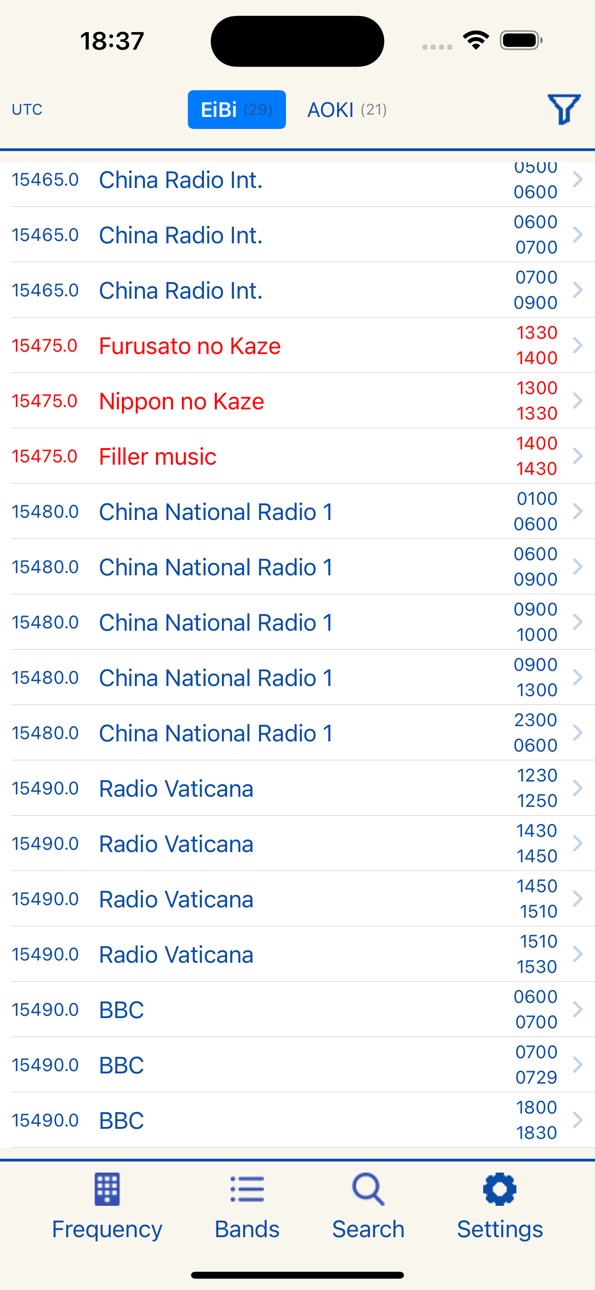
SWList gives you access to the popular EiBi and Aoki lists, helping you easily discover and identify shortwave radio stations.
The EiBi list, curated by Eike Bierwirth, is a highly valued resource within the SWL community.
The Aoki list, curated by Shigenori Aoki, is also widely used and recognized for its reliability.
SWList offers four convenient ways to explore radio stations:
- Enter a listening frequency to display stations transmitting nearby.
- Select a specific radio band to view all stations within it.
- Search by station name, country, or broadcast language.
- Retrieve the frequency manually or automatically from your radio receiver, if connected via Hamlib.
You can also filter results to show only stations that are currently broadcasting.
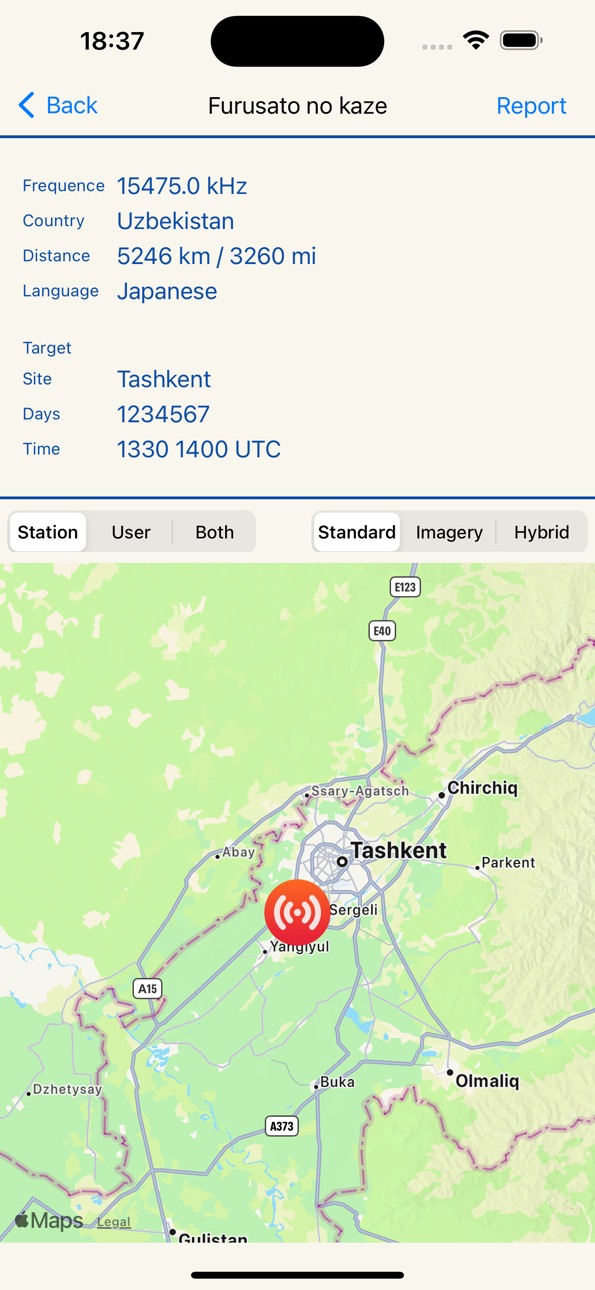
For each station, detailed information is available, including transmission location, target area, and spoken language.
If the transmitter’s location is available, you can display it on a geographic map and calculate the distance from your location.
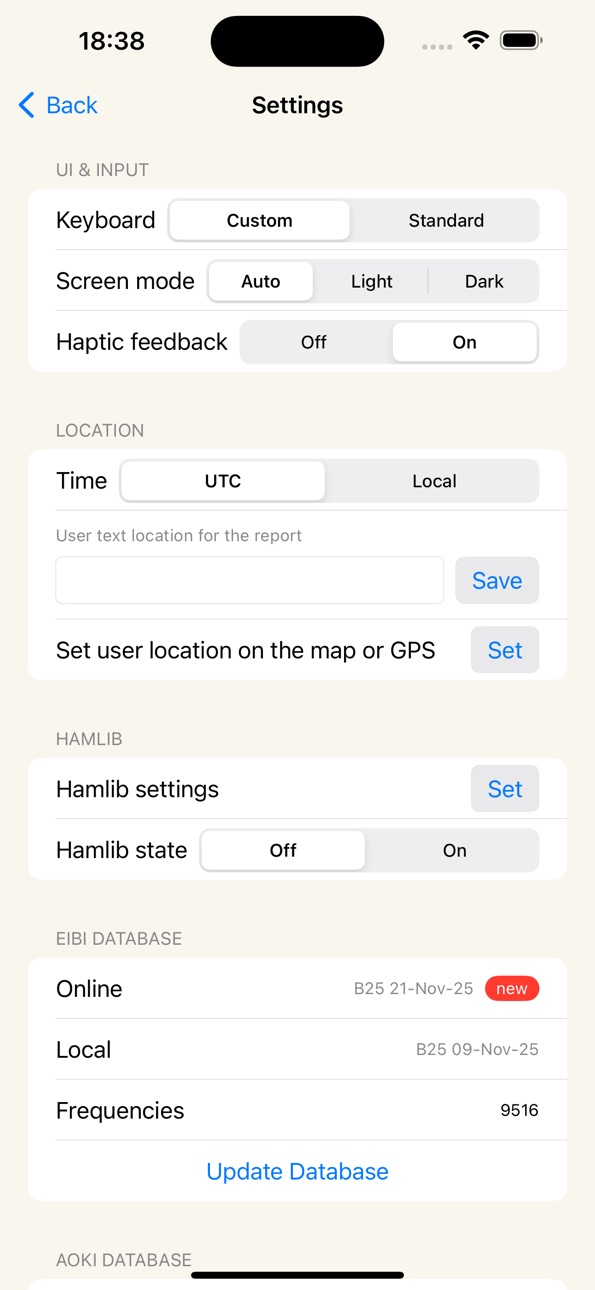
SWList also supports light and dark modes to suit your viewing preferences.
Accessibility
ipadiphonemacrealityDevicetvoswatch
Version history 12 versions
Build 887028944v1.4.62026-06-16 16:03:08
New: Propagation & Space Weather
Know the band conditions before you tune. SWList now includes a built-in space-weather dashboard built for shortwave listeners.
At-a-glance summary bar on the main screen showing the current HF outlook, solar flux and K-index — tap it to open the full dashboard.
Complete solar & geomagnetic picture: Solar Flux (SFI), sunspot number, A- and K-index, X-ray level, solar wind, MUF, aurora and more.
Day & night band conditions for the 80–10 m range, so you can see at a glance which bands are open right now.
Plain-language explanations: tap any value to learn what it means and how it affects propagation — great for newcomers.
Optimized for iPhone and iPad, with a layout that adapts to your screen.
Prefer a cleaner home screen? Hide the summary bar in Settings; you can still open the dashboard anytime from the Space Wx button.
Where the data comes from
Propagation data is delivered through our own dedicated server, which collects and caches readings from trusted public sources for fast, reliable access — with thanks to HamQSL.com (N0NBH) and NOAA Space Weather Prediction Center (SWPC).
Build 884844410v1.4.52026-04-23 20:34:11
• Fixed a bug causing incorrect local times during
Daylight Saving Time
• Improved large text support: the station list now
switches to a more readable vertical layout at
accessibility text sizes
• Added full VoiceOver support for station rows,
frequency keyboard, band list and station detail
• The numeric keyboard now scales proportionally
across all screen sizes
Build 880082593v1.4.42025-11-26 21:23:26
Aoki List support has been added
Updates are now processed more quickly
Interface refinements for a cleaner look
Build 876710224v1.4.32025-07-28 18:46:53
Fixed a bug affecting the text editing field in dark mode.
Fixed very rare crashes that occurred when viewing maps.
Switching from dark to light mode no longer requires restarting the app.
Build 866279832v1.4.22024-05-28 18:40:50
Fixed an issue that could occur when updating frequencies: update not saved
Build 865915162v1.4.12024-05-14 17:35:26
Minor bugs fixed :
- Time filtering failed in some cases (intraday transmission).
- Map display error under certain circumstances
Build 863739272v1.42024-02-15 18:28:57
Added haptic feedback ( it can be disabled by preferences )
It can now seamlessly communicate with your radio receiver through the hamlib library.
This allows you to effortlessly retrieve the current tuned frequency from your radio.
You have the flexibility to manually request the frequency or set up an automatic refresh every 2 seconds.
SWList will then display radio stations in proximity to the obtained frequency.
Further you can effortlessly fine-tune your radio by simply tapping on the desired frequency from the list displayed.
You can find in the developer web site a guide to setup the hamlib software and connect your radio to the LAN.
Build 863360187v1.3.12024-02-02 17:59:39
Fixed a problem in the results list: now the exact frequency matches (in red) are always displayed at the top of the list
Build 863265623v1.32024-02-01 19:11:43
- improved ability to filter results: now it is possible to filter with multiple criteria
- the search function has been improved: it is now possible to perform searches with multiple criteria
- bands viewing has been enhanced: now it is possible to view all available frequencies
- added the function of creating a listening report
- in the settings you can now choose whether to view the times in your local time zone or in UTC
- improved readability if large text is set
- cosmetic changes
Build 861912784v1.22023-12-04 17:59:27
New graphic appearance
Two different ways to enter frequencies that can be set by preferences (standard keyboard or specific keypad)
Online server for data updates to stay up to date with the current EiBi list
Light, Dark mode by preference or automatic.
Build 861389731v1.12023-11-12 17:19:53
Minor bug fixed
Build 861310904v1.02023-11-09 18:46:29
Price history by region
Currency
Show
Columns
Search
Availability 120 of 120 storefronts
| Region | Language | Price | Ratings | Avg | Version |
|---|---|---|---|---|---|
| US | en-US | USD 3.99 | 4 | 3.8 | 1.4.6 |
| DE | de-DE | EUR 4.99 | 3 | 3.7 | 1.4.6 |
| IT | it | EUR 4.99 | 2 | 4.0 | 1.4.6 |
| JP | ja | JPY 600 | 2 | 5.0 | 1.4.6 |
| RU | ru | RUB 349 | 2 | 5.0 | 1.4.6 |
| CA | en-CA | CAD 4.99 | 1 | 5.0 | 1.4.6 |
| ES | es-ES | EUR 4.99 | 1 | 5.0 | 1.4.6 |
| KW | en-GB | USD 3.99 | 1 | 5.0 | 1.4.6 |
| AE | en-GB | AED 14.99 | 0 | — | 1.4.6 |
| AF | en-GB | USD 3.99 | 0 | — | 1.4.6 |
| AL | en-GB | USD 4.99 | 0 | — | 1.4.6 |
| AM | en-GB | USD 4.99 | 0 | — | 1.4.6 |
| AO | en-GB | USD 3.99 | 0 | — | 1.4.6 |
| AT | de-DE | EUR 4.99 | 0 | — | 1.4.6 |
| AU | en-AU | AUD 5.99 | 0 | — | 1.4.6 |
| AZ | en-GB | USD 4.99 | 0 | — | 1.4.6 |
| BA | en-GB | EUR 4.99 | 0 | — | 1.4.6 |
| BE | en-GB | EUR 4.99 | 0 | — | 1.4.6 |
| BF | en-GB | USD 3.99 | 0 | — | 1.4.6 |
| BG | en-GB | EUR 4.99 | 0 | — | 1.4.6 |
| BH | en-GB | USD 3.99 | 0 | — | 1.4.6 |
| BJ | en-GB | USD 4.99 | 0 | — | 1.4.6 |
| BM | en-GB | USD 3.99 | 0 | — | 1.4.6 |
| BN | en-GB | USD 3.99 | 0 | — | 1.4.6 |
| BT | en-GB | USD 3.99 | 0 | — | 1.4.6 |
| BW | en-GB | USD 3.99 | 0 | — | 1.4.6 |
| BY | en-GB | USD 4.99 | 0 | — | 1.4.6 |
| CH | de-CH | CHF 3 | 0 | — | 1.4.6 |
| CI | fr-FR | USD 4.99 | 0 | — | 1.4.6 |
| CM | fr-FR | USD 4.99 | 0 | — | 1.4.6 |
| CN | zh-Hans-CN | CNY 28 | 0 | — | 1.4.6 |
| CV | en-GB | USD 3.99 | 0 | — | 1.4.6 |
| CY | en-GB | EUR 4.99 | 0 | — | 1.4.6 |
| CZ | en-GB | CZK 99 | 0 | — | 1.4.6 |
| DK | en-GB | DKK 39 | 0 | — | 1.4.6 |
| EE | en-GB | EUR 4.99 | 0 | — | 1.4.6 |
| EG | en-GB | EGP 199.99 | 0 | — | 1.4.6 |
| FI | en-GB | EUR 4.99 | 0 | — | 1.4.6 |
| FJ | en-GB | USD 3.99 | 0 | — | 1.4.6 |
| FM | en-GB | USD 3.99 | 0 | — | 1.4.6 |
| FR | fr-FR | EUR 4.99 | 0 | — | 1.4.6 |
| GB | en-GB | GBP 3.99 | 0 | — | 1.4.6 |
| GE | en-GB | USD 4.99 | 0 | — | 1.4.6 |
| GH | en-GB | USD 4.99 | 0 | — | 1.4.6 |
| GR | en-GB | EUR 4.99 | 0 | — | 1.4.6 |
| HK | zh-Hant-HK | HKD 32 | 0 | — | 1.4.6 |
| HR | en-GB | EUR 4.99 | 0 | — | 1.4.6 |
| HU | en-GB | HUF 1790 | 0 | — | 1.4.6 |
| ID | en-GB | IDR 69000 | 0 | — | 1.4.6 |
| IE | en-GB | EUR 4.99 | 0 | — | 1.4.6 |
| IL | en-GB | ILS 14.9 | 0 | — | 1.4.6 |
| IN | en-GB | INR 399 | 0 | — | 1.4.6 |
| IQ | en-GB | USD 3.99 | 0 | — | 1.4.6 |
| IS | en-GB | USD 4.99 | 0 | — | 1.4.6 |
| JO | en-GB | USD 3.99 | 0 | — | 1.4.6 |
| KE | en-GB | USD 4.99 | 0 | — | 1.4.6 |
| KG | en-GB | USD 3.99 | 0 | — | 1.4.6 |
| KH | en-GB | USD 3.99 | 0 | — | 1.4.6 |
| KR | ko | KRW 6600 | 0 | — | 1.4.6 |
| KZ | en-GB | KZT 2490 | 0 | — | 1.4.6 |
| LA | en-GB | USD 3.99 | 0 | — | 1.4.6 |
| LB | en-GB | USD 3.99 | 0 | — | 1.4.6 |
| LK | en-GB | USD 3.99 | 0 | — | 1.4.6 |
| LT | en-GB | EUR 4.99 | 0 | — | 1.4.6 |
| LU | en-GB | EUR 4.99 | 0 | — | 1.4.6 |
| LV | en-GB | EUR 4.99 | 0 | — | 1.4.6 |
| MD | en-GB | USD 4.99 | 0 | — | 1.4.6 |
| ME | en-GB | EUR 3.99 | 0 | — | 1.4.6 |
| MK | en-GB | USD 3.99 | 0 | — | 1.4.6 |
| ML | en-GB | USD 3.99 | 0 | — | 1.4.6 |
| MM | en-GB | USD 3.99 | 0 | — | 1.4.6 |
| MN | en-GB | USD 3.99 | 0 | — | 1.4.6 |
| MO | zh-Hant-HK | USD 3.99 | 0 | — | 1.4.6 |
| MR | en-GB | USD 3.99 | 0 | — | 1.4.6 |
| MT | en-GB | EUR 4.99 | 0 | — | 1.4.6 |
| MU | en-GB | USD 4.99 | 0 | — | 1.4.6 |
| MV | en-GB | USD 3.99 | 0 | — | 1.4.6 |
| MY | en-GB | MYR 19.9 | 0 | — | 1.4.6 |
| MZ | en-GB | USD 3.99 | 0 | — | 1.4.6 |
| NA | en-GB | USD 3.99 | 0 | — | 1.4.6 |
| NG | en-GB | NGN 6900 | 0 | — | 1.4.6 |
| NL | nl | EUR 4.99 | 0 | — | 1.4.6 |
| NO | en-GB | NOK 49 | 0 | — | 1.4.6 |
| NP | en-GB | USD 4.99 | 0 | — | 1.4.6 |
| NR | en-GB | USD 3.99 | 0 | — | 1.4.6 |
| NZ | en-AU | NZD 6.99 | 0 | — | 1.4.6 |
| OM | en-GB | USD 3.99 | 0 | — | 1.4.6 |
| PG | en-GB | USD 3.99 | 0 | — | 1.4.6 |
| PH | en-GB | PHP 249 | 0 | — | 1.4.6 |
| PK | en-GB | PKR 1100 | 0 | — | 1.4.6 |
| PL | en-GB | PLN 19.99 | 0 | — | 1.4.6 |
| PT | pt-PT | EUR 4.99 | 0 | — | 1.4.6 |
| PW | en-GB | USD 3.99 | 0 | — | 1.4.6 |
| QA | en-GB | QAR 14.99 | 0 | — | 1.4.6 |
| RO | en-GB | RON 19.99 | 0 | — | 1.4.6 |
| RS | en-GB | EUR 4.99 | 0 | — | 1.4.6 |
| SA | en-GB | SAR 17.99 | 0 | — | 1.4.6 |
| SB | en-GB | USD 3.99 | 0 | — | 1.4.6 |
| SE | sv | SEK 49 | 0 | — | 1.4.6 |
| SG | en-GB | SGD 5.98 | 0 | — | 1.4.6 |
| SI | en-GB | EUR 4.99 | 0 | — | 1.4.6 |
| SK | en-GB | EUR 4.99 | 0 | — | 1.4.6 |
| SN | en-GB | USD 4.99 | 0 | — | 1.4.6 |
| TH | en-GB | THB 149 | 0 | — | 1.4.6 |
| TJ | en-GB | USD 3.99 | 0 | — | 1.4.6 |
| TM | en-GB | USD 3.99 | 0 | — | 1.4.6 |
| TO | en-GB | USD 3.99 | 0 | — | 1.4.6 |
| TR | en-GB | TRY 199.99 | 0 | — | 1.4.6 |
| TW | zh-Hant-TW | TWD 120 | 0 | — | 1.4.6 |
| TZ | en-GB | TZS 11900 | 0 | — | 1.4.6 |
| UA | en-GB | USD 4.99 | 0 | — | 1.4.6 |
| UG | en-GB | USD 4.99 | 0 | — | 1.4.6 |
| UZ | en-GB | USD 3.99 | 0 | — | 1.4.6 |
| VN | en-GB | VND 119000 | 0 | — | 1.4.6 |
| VU | en-GB | USD 3.99 | 0 | — | 1.4.6 |
| XK | en-GB | EUR 4.99 | 0 | — | 1.4.6 |
| YE | en-GB | USD 3.99 | 0 | — | 1.4.6 |
| ZA | en-GB | ZAR 79.99 | 0 | — | 1.4.6 |
| ZM | en-GB | USD 4.99 | 0 | — | 1.4.6 |
| ZW | en-GB | USD 4.99 | 0 | — | 1.4.6 |
Change log 15 changes · US
✎
releaseNotes updated
New: Propagation & Space Weather
Know the band conditions before you tune. SWList now includes a built-in space-weather dashboard built for shortwave listeners
✎
description updated
SWList gives you access to the popular EiBi and Aoki lists, helping you easily discover and identify shortwave radio stations.
The EiBi list, curated by Eike Bi
✎
name updated
SWList
◆
Version 1.4.6 released
New: Propagation & Space Weather
Know the band conditions before you tune. SWList now includes a built-in space-weather dashboard built for shortwave listeners.
At-a-glance summary bar on the main screen showing the current HF outlook, so
◆
Version 1.4.5 released
• Fixed a bug causing incorrect local times during
Daylight Saving Time
• Improved large text support: the station list now
switches to a more readable vertical layout at
accessibility text sizes
• Added full VoiceOver support for
◆
Version 1.4.4 released
Aoki List support has been added
Updates are now processed more quickly
Interface refinements for a cleaner look
◆
Version 1.4.3 released
Fixed a bug affecting the text editing field in dark mode.
Fixed very rare crashes that occurred when viewing maps.
Switching from dark to light mode no longer requires restarting the app.
◆
Version 1.4.2 released
Fixed an issue that could occur when updating frequencies: update not saved
◆
Version 1.4.1 released
Minor bugs fixed :
- Time filtering failed in some cases (intraday transmission).
- Map display error under certain circumstances
◆
Version 1.4 released
Added haptic feedback ( it can be disabled by preferences )
It can now seamlessly communicate with your radio receiver through the hamlib library.
This allows you to effortlessly retrieve the current tuned frequency from your radio.
You h
◆
Version 1.3.1 released
Fixed a problem in the results list: now the exact frequency matches (in red) are always displayed at the top of the list
◆
Version 1.3 released
- improved ability to filter results: now it is possible to filter with multiple criteria
- the search function has been improved: it is now possible to perform searches with multiple criteria
- bands viewing has been enhanced: now it is po
◆
Version 1.2 released
New graphic appearance
Two different ways to enter frequencies that can be set by preferences (standard keyboard or specific keypad)
Online server for data updates to stay up to date with the current EiBi list
Light, Dark mode by preferenc
◆
Version 1.1 released
Minor bug fixed
◆
Version 1.0 released