Home › Graphics & Design

Information
Preview 3 platforms
iPhone 10 images


iPad 10 images


Mac 10 images



What’s New Version 3.4.4
Minor bugs fixed. Added moving the scene using a long press. Added scaling of the interface for different screen sizes. Fixed some bugs. Added the ability to replace already placed objects on the scene. All you need to do is long press on the object you want to replace. A scroll bar will appear on the right, in which you need to select the desired object, and it will automatically take the position, color and size of the old object! Kitchen design has become even easier!
Description
Kitchen Editor 3D is a simple and convenient application for 3D design of a kitchen space, color selection, and counting of materials.
Please watch the video before starting to use the application!
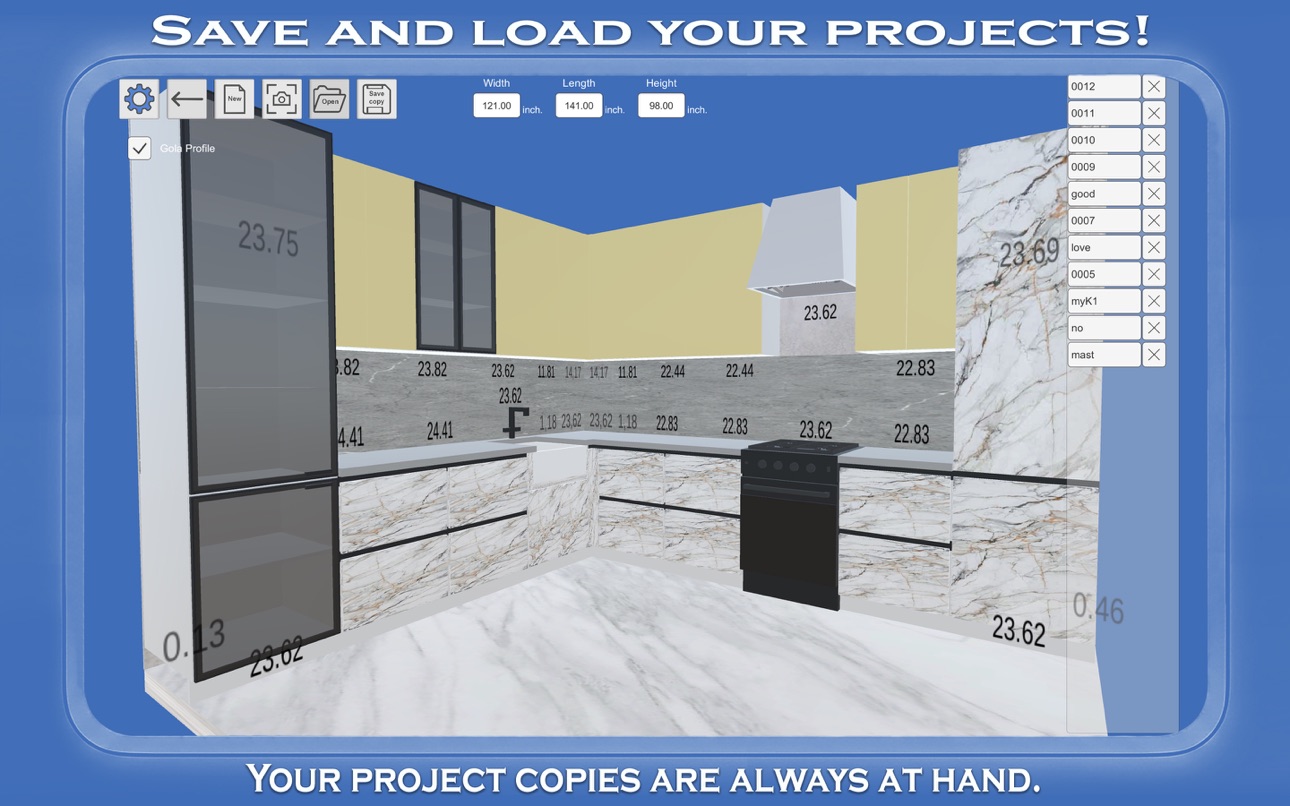
The application has a large set of standard modules that can be edited to fit your needs. Designing a kitchen interior has become much easier. Available measurement systems in the application are millimeters and inches. The application will automatically save your project before closing and you can always continue designing after some time. You can also save versions of your projects in separate files and open them as needed. You can replace an already placed object on the stage with another one by simply clicking on it. This adds new possibilities for kitchen design.
Accessibility
ipadiphonemacrealityDevicetvoswatch
Version history 20 versions
Build 883810091v3.4.42026-03-27 14:37:25
Minor bugs fixed. Added moving the scene using a long press. Added scaling of the interface for different screen sizes. Fixed some bugs. Added the ability to replace already placed objects on the scene. All you need to do is long press on the object you want to replace. A scroll bar will appear on the right, in which you need to select the desired object, and it will automatically take the position, color and size of the old object! Kitchen design has become even easier!
Build 881296131v3.4.32026-01-12 16:26:48
Added moving the scene using a long press. Added scaling of the interface for different screen sizes. Fixed some bugs. Added the ability to replace already placed objects on the scene. All you need to do is long press on the object you want to replace. A scroll bar will appear on the right, in which you need to select the desired object, and it will automatically take the position, color and size of the old object! Kitchen design has become even easier!
Build 880950321v3.4.22025-12-24 23:22:57
Fixed some bugs. Added the ability to replace already placed objects on the scene. All you need to do is long press on the object you want to replace. A Scroll View will appear on the right, in which you need to select the desired object and it will automatically take the position, color and size of the old object!
Build 872027245v3.4.12025-01-28 10:07:17
Added the ability to replace already installed objects on the scene. All you need to do is long press on the object you want to replace. A Scroll View will appear on the right in which you need to select the desired object and it will automatically take the position, color and size of the old object! Now creating kitchen furniture options has become even easier! This will add new possibilities for kitchen design.
Build 871544763v3.4.02025-01-06 20:55:02
Added Save Copy of Project button, Open Project button, Screenshot button. Now you can Save copies of your projects, open them and take screenshots without unnecessary buttons on the picture. This will add new possibilities for kitchen design.
Build 870974464v3.3.52024-12-09 00:02:32
Added handles profile Gola. This will add new possibilities for kitchen design. Simply select the toggle next to the Gola profile in menu 1 and install the modules as usual. Unnecessary door handles will be removed automatically.
Build 870545305v3.3.42024-11-21 00:48:41
End glass modules have been added. This will add new possibilities to kitchen design.
Build 870464491v3.3.32024-11-16 22:30:43
The corner elements are made in the form of separate buttons. This will add new possibilities to kitchen design.
Build 869928280v3.3.22024-10-24 08:38:14
Added furniture elements such as hoods, shelves, upper bases with glass fronts, etc. This will add new possibilities in the design of kitchens.
Build 869771753v3.3.12024-10-17 22:20:54
Added furniture elements such as hoods, shelves, upper bases with glass fronts, etc. This will add new possibilities in the design of kitchens.
Build 868357796v3.3.02024-08-22 05:59:53
Added: windows, doors, refrigerators, gas stoves, washing machines. Fixed some bugs.
Build 866738050v3.2.72024-06-17 00:44:24
Managing the scene has become easier. Fixed some bugs.
Build 865447915v3.2.52024-04-26 12:12:16
Added U-shaped kitchen type. Added the ability to zoom scenes. Fixed errors in data entry in inches.
Build 864623388v3.2.12024-03-22 16:51:15
Added U-shaped kitchen type. Added the ability to zoom scenes. Fixed errors in data entry in inches.
Build 864500520v3.2.02024-03-21 02:07:33
Added U-shaped kitchen type. Added the ability to zoom scenes.
Build 863865089v3.1.02024-02-20 16:24:28
Added wood and stone textures. In future updates we plan to add the ability to save, open and share projects.
Build 861601079v3.0.62023-11-21 22:21:27
Added the button with the link to the Tutorial Video. Wood textures will be added to RAL colors in future updates.
Build 861454012v3.0.52023-11-14 15:55:12
Minor design improvements. Wood textures will be added to RAL colors in future updates.
Build 861254464v3.0.42023-11-06 06:53:56
The default base color has been changed. The image on the logo has been reduced. Fixed some bugs.
Build 860432619v3.0.32023-10-09 06:59:06
Price history by region
Currency
Show
Columns
Search
Availability 21 of 21 storefronts
| Region | Language | Price | Ratings | Avg | Version |
|---|---|---|---|---|---|
 US US | en-US | USD 5.99 | 110 | 3.6 | 3.4.4 |
 AU AU | en-AU | AUD 8.99 | 9 | 3.4 | 3.4.4 |
 CA CA | en-CA | CAD 7.99 | 7 | 3.7 | 3.4.4 |
 GH GH | en-GB | USD 5.99 | 1 | 2.0 | 3.4.4 |
 IE IE | en-GB | EUR 5.99 | 1 | 5.0 | 3.4.4 |
 VE VE | es-MX | USD 5.99 | 1 | 5.0 | 3.4.4 |
 AI AI | en-GB | USD 5.99 | 0 | — | 3.4.4 |
 BO BO | es-MX | USD 5.99 | 0 | — | 3.4.4 |
 BS BS | en-GB | USD 5.99 | 0 | — | 3.4.4 |
 CM CM | fr-FR | USD 5.99 | 0 | — | 3.4.4 |
 DZ DZ | en-GB | USD 5.99 | 0 | — | 3.4.4 |
 KY KY | en-GB | USD 5.99 | 0 | — | 3.4.4 |
 ML ML | en-GB | USD 5.99 | 0 | — | 3.4.4 |
 MS MS | en-GB | USD 5.99 | 0 | — | 3.4.4 |
 PY PY | es-MX | USD 5.99 | 0 | — | 3.4.4 |
 SZ SZ | en-GB | USD 5.99 | 0 | — | 3.4.4 |
 TC TC | en-GB | USD 5.99 | 0 | — | 3.4.4 |
 TT TT | en-GB | USD 5.99 | 0 | — | 3.4.4 |
 TZ TZ | en-GB | TZS 14900 | 0 | — | 3.4.4 |
 VG VG | en-GB | USD 5.99 | 0 | — | 3.4.4 |
 ZM ZM | en-GB | USD 5.99 | 0 | — | 3.4.4 |
Change log 24 changes · US
✎
releaseNotes updated
Minor bugs fixed. Added moving the scene using a long press. Added scaling of the interface for different screen sizes. Fixed some bugs. Added the ability to re
✎
description updated
Kitchen Editor 3D is a simple and convenient application for 3D design of a kitchen space, color selection, and counting of materials.
Please watch the video
✎
subtitle updated
Design, planning, modeling
✎
name updated
Kitchen Editor 3D: Design App
◆
Version 3.4.4 released
Minor bugs fixed. Added moving the scene using a long press. Added scaling of the interface for different screen sizes. Fixed some bugs. Added the ability to replace already placed objects on the scene. All you need to do is long press on t
◆
Version 3.4.3 released
Added moving the scene using a long press. Added scaling of the interface for different screen sizes. Fixed some bugs. Added the ability to replace already placed objects on the scene. All you need to do is long press on the object you want
◆
Version 3.4.2 released
Fixed some bugs. Added the ability to replace already placed objects on the scene. All you need to do is long press on the object you want to replace. A Scroll View will appear on the right, in which you need to select the desired object an
◆
Version 3.4.1 released
Added the ability to replace already installed objects on the scene. All you need to do is long press on the object you want to replace. A Scroll View will appear on the right in which you need to select the desired object and it will autom
◆
Version 3.4.0 released
Added Save Copy of Project button, Open Project button, Screenshot button. Now you can Save copies of your projects, open them and take screenshots without unnecessary buttons on the picture. This will add new possibilities for kitchen desi
◆
Version 3.3.5 released
Added handles profile Gola. This will add new possibilities for kitchen design. Simply select the toggle next to the Gola profile in menu 1 and install the modules as usual. Unnecessary door handles will be removed automatically.
◆
Version 3.3.4 released
End glass modules have been added. This will add new possibilities to kitchen design.
◆
Version 3.3.3 released
The corner elements are made in the form of separate buttons. This will add new possibilities to kitchen design.
◆
Version 3.3.2 released
Added furniture elements such as hoods, shelves, upper bases with glass fronts, etc. This will add new possibilities in the design of kitchens.
◆
Version 3.3.1 released
Added furniture elements such as hoods, shelves, upper bases with glass fronts, etc. This will add new possibilities in the design of kitchens.
◆
Version 3.3.0 released
Added: windows, doors, refrigerators, gas stoves, washing machines. Fixed some bugs.
◆
Version 3.2.7 released
Managing the scene has become easier. Fixed some bugs.
◆
Version 3.2.5 released
Added U-shaped kitchen type. Added the ability to zoom scenes. Fixed errors in data entry in inches.
◆
Version 3.2.1 released
Added U-shaped kitchen type. Added the ability to zoom scenes. Fixed errors in data entry in inches.
◆
Version 3.2.0 released
Added U-shaped kitchen type. Added the ability to zoom scenes.
◆
Version 3.1.0 released
Added wood and stone textures. In future updates we plan to add the ability to save, open and share projects.
◆
Version 3.0.6 released
Added the button with the link to the Tutorial Video. Wood textures will be added to RAL colors in future updates.
◆
Version 3.0.5 released
Minor design improvements. Wood textures will be added to RAL colors in future updates.
◆
Version 3.0.4 released
The default base color has been changed. The image on the logo has been reduced. Fixed some bugs.
◆
Version 3.0.3 released