Home › Entertainment

 US
US
1 of 1 storefronts
Content in en-US
Content in en-US
Information
Preview 1 platform
iPhone 9 images




What’s New Version 1.4.5
Bug fixes for Photo Grid mode.
Description
Magicians already have a bunch of ways to peek or force a word:
From analogue methods like a Center Tear, to something more modern, such as WikiTest or DFB X.
But what magicians *don't* have are many interesting ways to reveal that word.
This is why I created Subliminal:
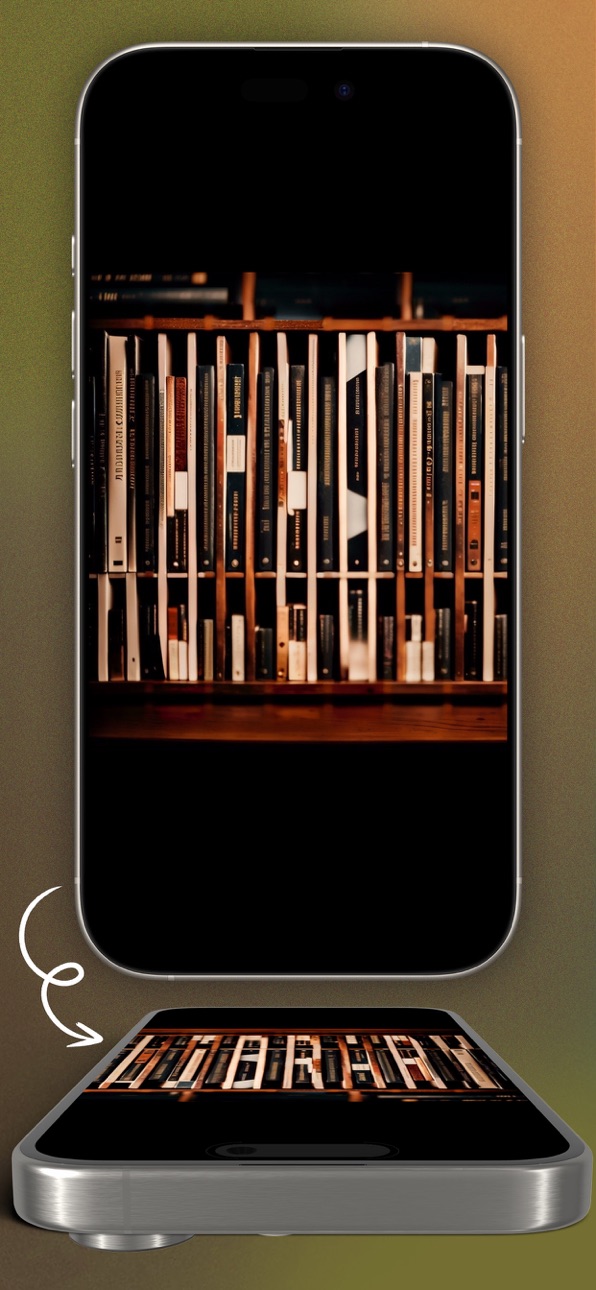
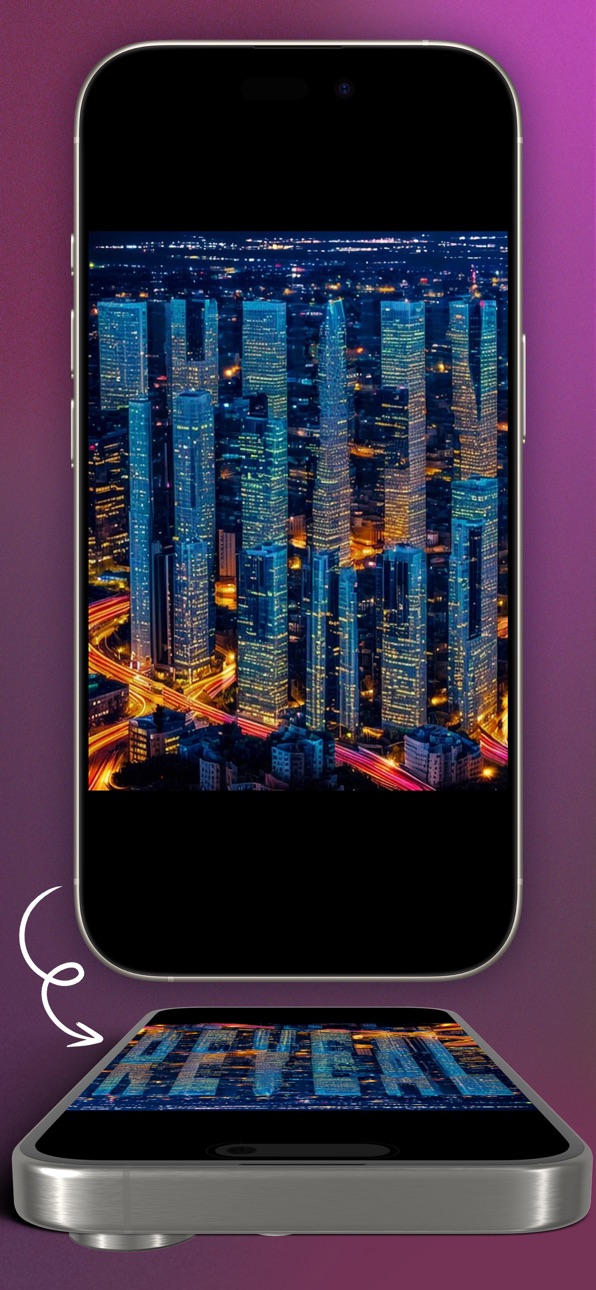
Subliminal uses AI generated imagery to reveal a spectator's thought, hidden in a photo that they were looking at *the entire time*!
** Here's an example of one effect possible with Subliminal:
- To begin, you show your spectator a photo on your phone.
- You zoom in on the photo, before leaving your phone on the table and you never touch it again.
- The spectator is asked to name a word.
- You then ask the spectator to zoom out of the image, where they now realise that the word they named has been seemingly hidden within the photo the entire time.
** Subliminal also works perfectly with your existing effects!
Let's say you've performed an effect (perhaps you’ve peeked a word) and have learned the spectator's thought-of word.
Rather than just telling your spectator their thought, Subliminal lets you reveal this thought creatively! It's perfect in conjunction with existing analogue and digital effects, from a Center Tear peek to DFB.
Features:
* Photo Grid
You show the spectator some photos in the Photos app on your phone. As you slowly zoom out, the photos turn into letters, which reveal the spectator's thought!
* Single Image Modes
Reveal the spectator's thought of word within a photo of dogs, windows on a street, the tops of mountains, and more!
* Stretched Images
Stretched image modes further disguise the reveal until the spectator looks at the screen at an angle, for a fun reveal.
* Upside down stretched images
Flip the phone upside down to see the hidden word.
** Multiple input methods are included, enabling multiple effects:
- Gyro input - for precision typing.
- Voice input - with voice peek.
- Earworm Notes - a realistic notes app input.
- Earworm Web Search - use covert web search input with Subliminal.
- WikiTest integration - have the spectator’s Wikipedia search automatically update the image.
- Bridge integration - for use with many other apps and AI text inputs.
- Open API - for third party integrations.
- URL triggers - use Shortcuts to change your iPhone's wallpaper, and more!
As well as native WikiTest, Earworm and Bridge integration, Subliminal also supports your favourite magic app’s API.
Plus, Subliminal can even be triggered via a URL, meaning Shortcuts can tie in with the app to change your iPhone’s wallpaper, and more!
Subliminal currently supports any words or phrases that use the characters A-Z, spaces, and numbers 0-9.
At the conclusion of the effect performed with Subliminal, you can even share the photo with the word to your spectator, leaving them with the memory of the effect on their phone!
No extra hidden costs, purchases or subscriptions - Subliminal is all you need to generate your own hidden text AI images!
Accessibility
ipadiphonemacrealityDevicetvoswatch
Version history 23 versions
Build 888058018v1.4.52026-07-09 19:43:45
Bug fixes for Photo Grid mode.
Build 876356796v1.4.42025-07-14 09:21:42
- Added setting to allow inputs to save automatically to photos
- Bug fixes
Build 872715342v1.4.22025-02-24 10:29:30
- Refined settings UI
- Easier integration UI
- Image info symbols added
- App Store metadata update
Build 872634508v1.4.12025-02-19 22:34:41
- New images added
- Bridge integration
- Image fixes for "Rainy" image set
- Bug fixes
Build 867066484v1.3.92024-06-29 08:50:27
- More images
- Voice input bug fix
Build 861623390v1.3.82023-11-21 10:44:42
- Christmas themed image added.
Build 861517153v1.3.62023-11-16 01:40:08
- New image preset added.
Build 861530542v1.3.72023-11-16 15:00:09
URL scheme bug fix (thanks to Patrick Kun)
Build 860910497v1.3.52023-10-24 09:54:14
- Voice input fixes
Build 860662035v1.3.42023-10-14 10:33:55
- New NYC image preset
- Aspect ratio fix (thanks to Tom Elderfield)
Build 860647564v1.3.32023-10-13 21:12:39
- Added new upside down buildings image
Build 860595234v1.3.22023-10-12 00:35:56
- Halloween image added
Build 860560551v1.3.12023-10-11 08:21:03
- Clouds image added
- Tokyo image added
- Leaves 2 image added
- Bug fixed: better handling of accented characters
Build 860500678v1.32023-10-09 18:27:08
- Loading animation bug fixed
- Photos UI bug fixed
- More general bug fixes
- Audience photos added
- Increased character limit on some presets
- Character count displayed
- More text & video instructions added
Build 860443932v1.2.12023-10-06 03:57:12
1.2.1: Bug fixes (Thanks to Charlie Hewish)
1.2:
- UI updates and bug fixes.
- Multiple input methods added.
- Gyro input for precision typing.
- Voice input added for voice recognition input with voice peek.
- WikiTest integration added.
- Earworm integration added.
- Open API added for third party integrations.
- More images added.
Build 860440289v1.22023-10-05 20:23:16
- UI updates and bug fixes.
- Multiple input methods added.
- Gyro input for precision typing.
- Voice input added for voice recognition input with voice peek.
- WikiTest integration added.
- Earworm integration added.
- Open API added for third party integrations.
- More images added.
Build 860330882v1.1.22023-10-01 16:47:16
- UI fixes & enhancements.
- More single photo modes added.
- Set which mode is used via URL scheme.
Build 860299218v1.12023-09-29 17:41:42
Single photo modes added - you can now reveal the spectator's thought of word within a photo of dogs, or windows on a street!
Build 860310653v1.1.12023-09-29 23:32:23
v1.1.1: More single photo options added.
v1.1: Single photo modes added - you can now reveal the spectator's thought of word within a photo of dogs, or windows on a street!
Build 860147972v1.0.12023-09-23 16:51:39
- Fixed ordering bug.
- Added setting to space out words.
Build 860149035v1.0.22023-09-23 18:53:57
Bug fixes for iOS 16 users
Build 860151275v1.0.32023-09-23 22:31:57
- Added support for numbers
- Added support for URL scheme activation
Build 860126093v1.02023-09-22 22:38:56
Price history by region
Currency
Show
Columns
Search
Availability 1 of 1 storefronts
| Region | Language | Price | Ratings | Avg | Version |
|---|---|---|---|---|---|
| US | en-US | USD 59.99 | 14 | 4.9 | 1.4.5 |
Change log 27 changes · US
✎
releaseNotes updated
Bug fixes for Photo Grid mode.
✎
description updated
Magicians already have a bunch of ways to peek or force a word:
From analogue methods like a Center Tear, to something more modern, such as WikiTest or DFB X.
✎
subtitle updated
Generate hidden text AI images
✎
name updated
Subliminal
◆
Version 1.4.5 released
Bug fixes for Photo Grid mode.
◆
Version 1.4.4 released
- Added setting to allow inputs to save automatically to photos
- Bug fixes
◆
Version 1.4.2 released
- Refined settings UI
- Easier integration UI
- Image info symbols added
- App Store metadata update
◆
Version 1.4.1 released
- New images added
- Bridge integration
- Image fixes for "Rainy" image set
- Bug fixes
◆
Version 1.3.9 released
- More images
- Voice input bug fix
◆
Version 1.3.8 released
- Christmas themed image added.
◆
Version 1.3.7 released
URL scheme bug fix (thanks to Patrick Kun)
◆
Version 1.3.6 released
- New image preset added.
◆
Version 1.3.5 released
- Voice input fixes
◆
Version 1.3.4 released
- New NYC image preset
- Aspect ratio fix (thanks to Tom Elderfield)
◆
Version 1.3.3 released
- Added new upside down buildings image
◆
Version 1.3.2 released
- Halloween image added
◆
Version 1.3.1 released
- Clouds image added
- Tokyo image added
- Leaves 2 image added
- Bug fixed: better handling of accented characters
◆
Version 1.3 released
- Loading animation bug fixed
- Photos UI bug fixed
- More general bug fixes
- Audience photos added
- Increased character limit on some presets
- Character count displayed
- More text & video instructions added
◆
Version 1.2.1 released
1.2.1: Bug fixes (Thanks to Charlie Hewish)
1.2:
- UI updates and bug fixes.
- Multiple input methods added.
- Gyro input for precision typing.
- Voice input added for voice recognition input with voice peek.
- WikiTest integration added.
-
◆
Version 1.2 released
- UI updates and bug fixes.
- Multiple input methods added.
- Gyro input for precision typing.
- Voice input added for voice recognition input with voice peek.
- WikiTest integration added.
- Earworm integration added.
- Open API added for
◆
Version 1.1.2 released
- UI fixes & enhancements.
- More single photo modes added.
- Set which mode is used via URL scheme.
◆
Version 1.1.1 released
v1.1.1: More single photo options added.
v1.1: Single photo modes added - you can now reveal the spectator's thought of word within a photo of dogs, or windows on a street!
◆
Version 1.1 released
Single photo modes added - you can now reveal the spectator's thought of word within a photo of dogs, or windows on a street!
◆
Version 1.0.3 released
- Added support for numbers
- Added support for URL scheme activation
◆
Version 1.0.2 released
Bug fixes for iOS 16 users
◆
Version 1.0.1 released
- Fixed ordering bug.
- Added setting to space out words.
◆
Version 1.0 released