Home › Health & Fitness

 US
US
1 of 1 storefronts
Content in en-US
Content in en-US
Information
Apple ID6466278977
Bundle IDcom.vertex.v360
SellerSeller
Min iOS13.0
Min macOS11.0
Device familiesiphone, ipad, ipod
Released2023-10-12
Copyright© Faraz Rana
Privacy policyLink ↗
Preview 2 platforms
iPhone 5 images



iPad 3 images


What’s New Version 2.24.24
In our latest update, workers can now set their key strengths directly within the app and add an emergency phone number to their profile for enhanced safety and personalization.
Description
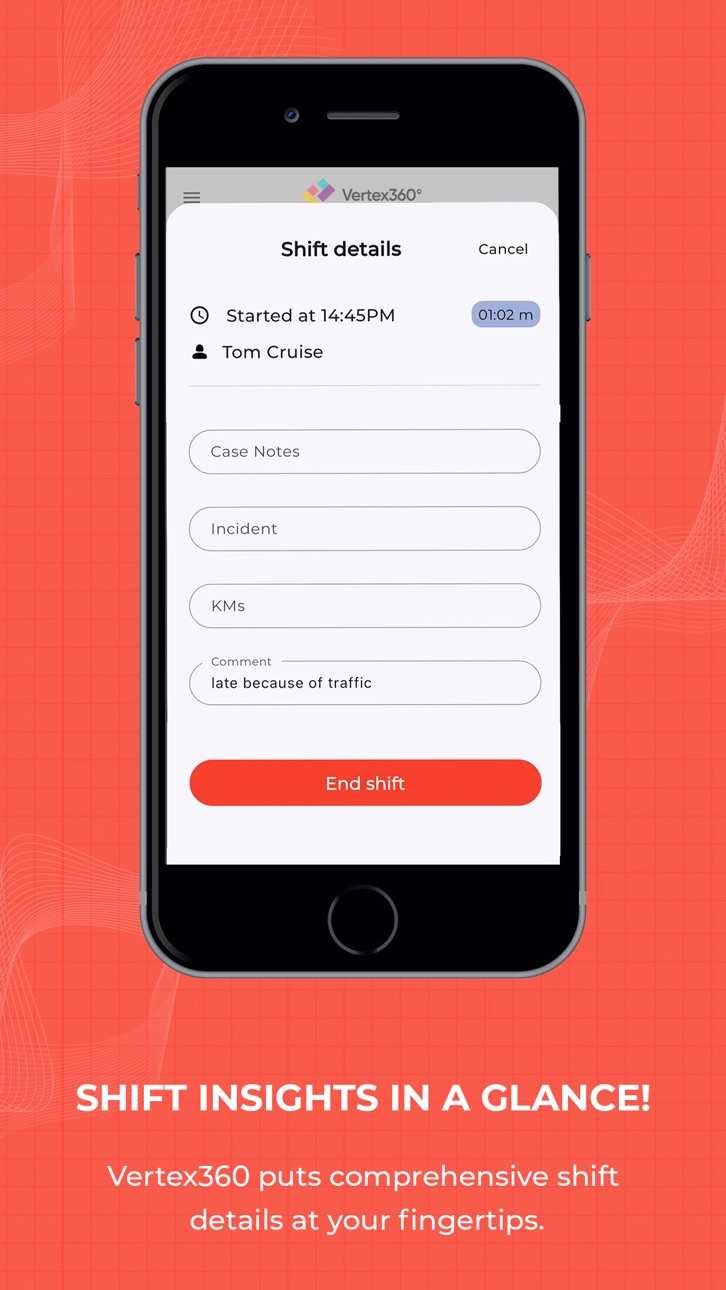
Vertex360 is the ultimate solution for NDIS providers. It provides dedicated solution for seamless worker rostering, shift tracking, and incident reporting. Vertex360 is developed to simplify the lives of support workers and the providers who rely on them. With our app, you can manage schedules, record clock-ins and clock-outs, handle emergencies, report incidents, and keep essential case notes—all in one place.
Key Features
Efficient Rostering: Say goodbye to complex scheduling challenges. Vertex360 empowers you to create, manage, and view worker schedules effortlessly. Ensure your team is always where they need to be when they need to be there.
Clock In / Clock Out: Tracking your working hours has never been this simple. Record your clock-ins and clock-outs with just a tap. Accurate and hassle-free, Vertex360 takes the guesswork out of timesheets.
Emergency Shift Coverage: Life happens, and emergencies arise. Vertex360 offers a lifeline. If a worker is unavailable due to illness or any other unforeseen event, easily assign alternate staff to ensure uninterrupted support for participants.
Incident Reporting: Safety is paramount. Vertex360 lets you report incidents promptly and comprehensively. Document crucial details and keep everyone informed, ensuring participant well-being is always the top priority.
Case Notes: Capture and organize vital information effortlessly. Vertex360's intuitive case notes feature allows you to seamlessly record participant interactions, milestones, and essential details, ensuring exceptional care.
Benefits
Effortless Rostering: Simplify the complex task of worker scheduling and shift management. Ensure your team is always in the right place at the right time.
Accurate Time Tracking: Say goodbye to timesheet errors. Vertex360 records clock-ins and clock-outs accurately and ensures precision in attendance recording, making payroll a breeze.
Emergency Preparedness: Be ready for the unexpected. Quickly assign replacement staff to maintain consistent support, even in emergencies.
Safety First: Prompt incident reporting and documentation ensure the safety and well-being of participants.
Streamlined Records: Keep participant information organized with convenient case note recording.
Vertex360 is the ultimate companion for support workers and providers who understand the importance of efficiency, accuracy, and participant care.
Download Now!
Download Vertex360 today and experience the future of worker rostering and support provision. Join the Vertex360 community and unlock a world of possibilities in NDIS service delivery. Your success is our mission!
Accessibility
ipadiphonemacrealityDevicetvoswatch
Version history 25 versions
Build 884979154v2.24.242026-04-28 05:53:37
In our latest update, workers can now set their key strengths directly within the app and add an emergency phone number to their profile for enhanced safety and personalization.
Build 884848618v2.23.242026-04-24 04:20:32
This update improves shift location for scheduled shifts to ensure better accuracy and a smoother experience.
Build 884633700v2.23.232026-04-20 04:27:05
This update introduces enhanced management tools and smoother workflows for both managers and workers. Managers can now manage Participant Documents directly and access a dedicated Worker View within the Schedule tab. We’ve also improved Worker Document management and added a custom date selector for Case Notes to provide greater flexibility.
To streamline reporting, we’ve added address auto-suggestions for incident reports and refined distance restrictions to ensure more accurate shift start-ups.
Build 883379487v2.22.232026-03-16 03:59:45
We have enhanced shift notes by making them permission-based, ensuring workers only see and manage notes relevant to their roles. This update also includes general improvements for a more reliable and smoother experience.
Build 883212964v2.21.232026-03-11 04:23:46
Introducing a new Documents section in the Participant Profile, where workers can securely view, search, and upload files based on their permissions. The update features an in-app viewer for PDFs and images, easy file uploads from your device or camera, and clear progress indicators for a seamless experience.
Build 882732044v2.20.232026-02-25 04:27:15
We have improved the policy document downloading process to ensure a smoother and more reliable experience.
Build 882570734v2.20.222026-02-19 04:23:12
We’ve improved the shift and incident attachment features to ensure a more reliable and seamless experience when uploading documentation.
Build 882293129v2.20.212026-02-10 04:06:35
Our latest update introduces key improvements to the Incident Management system, providing a more reliable and efficient experience for reporting and tracking incidents.
Build 882194634v2.20.202026-02-06 07:38:13
The Vertex360 Mobile App now supports Incident Management, enabling Workers to report participant incidents directly from their device in line with NDIS requirements. The guided reporting flow includes clear instructions, mandatory incident outcomes, and conditional forms such as Medication Incidents, ensuring accurate, compliant incident submission while on the go.
Build 882118355v2.19.202026-02-04 04:13:22
Improves the shift notes feature for a more reliable and user-friendly experience
Build 882072084v2.19.192026-02-03 04:04:17
Enhancements for a smoother, faster loading experience and overall app improvements
Build 882005027v2.19.182026-02-02 05:46:24
In our latest update, we’ve added the ability to log Units of Measure, instructions, and side effects within your medication records. We have also optimized the shift rejection feature for a more seamless and intuitive user experience.
Build 880675109v2.18.182025-12-16 04:55:18
This update includes improvements and enhancements to participant shift notes for a smoother experience.
Build 880520914v2.18.172025-12-12 05:14:10
Easily switch service providers
Workers can now switch between service providers with a single tap using the same email address—quick, seamless access to multiple organisations.
Form visibility controls for admins
A new “Show to Worker” toggle lets SP admins choose which participant forms are visible on the mobile app. Enabled forms appear in a dedicated Forms section where workers can view and filter by category.
Compliance Progress Bar
Worker profiles now include a Compliance Progress Bar, giving workers and managers a clear snapshot of compliance status and any outstanding tasks.
Add participant case notes
Workers can now add case notes for participants directly from the mobile app.
Apply for partial leave
Partial leave applications are now supported on mobile.
Participant forms on mobile
All participant forms are now accessible in the mobile app.
Build 879431308v2.17.172025-11-03 04:01:43
We’ve made several enhancements and improvements to the Scheduled screen for a smoother and better user experience.
Build 878956457v2.17.162025-10-17 07:10:01
The mobile app now allows users to retry fetching location or continue ending a shift if the location isn’t captured. This update ensures smoother shift completion, even when GPS signals are weak or unavailable.
Build 878823343v2.17.152025-10-13 04:12:50
- Fixed reject shift issue
- Fixed location issue
Build 878651146v2.17.142025-10-06 06:49:27
Get ready for a more powerful and seamless experience! We’ve completely redesigned the Home, Timesheet, Open Shift, Upcoming Shift, and Schedule screens with a fresh, modern look.
- You can now approve or reject employee leave and time-off requests right from the app.
- Open Shifts are smarter than ever – Open shifts have two modes and are handled from business settings. Workers can accept open shifts directly or request manager approval.
- Shift rejection made easy – disable it, set a custom timeframe, or let managers take control.
- Shift end questions now appear during shift work, letting workers respond quickly and keep records up to date.
- Location is crystal clear! Shifts now come with Google Maps integration so workers know exactly where they’re needed.
- Plus, loads of fixes and behind-the-scenes enhancements for a faster, smoother, and more reliable app experience.
Build 878229851v2.16.142025-09-19 05:15:36
- Fixed a bug in Open Shifts and introduced enhancements to improve Timesheets.
Build 877711050v2.16.132025-09-01 04:32:12
Fixed an issue with participant shift notes during shifts.
Build 876901801v2.16.122025-08-05 08:17:18
-Workers can now view and upload all required documents in a dedicated tab
-Company policy documents are now accessible from the app’s menu for easy reference
Build 875762566v2.15.122025-06-22 09:26:52
Workers can set their availability and mark unavailable days in the mobile app, with real-time sync and conflict alerts.
Participant care tags can now be assigned via web and viewed in the mobile app for better clarity.
Admins can control access to key mobile features (unscheduled shifts, timesheets) using new permission toggles.
Workers can view other worker's shifts for the same participant (past and upcoming 15 days) to improve coordination.
Build 874440125v2.14.122025-05-05 04:24:28
- Previous shift notes now show with the latest first.
- Managers now see only participants/workers from their assigned region.
- Search bar added to Participant and Worker lists.
- Users can now view, upload, and download documents.
- Fixed issue where Managers couldn’t see the full worker list.
- Resolved issue where timesheets were not loading for Managers.
Build 873900406v2.13.122025-04-10 04:17:41
A new Medication button is now available during shifts, enabling workers to view scheduled medications and update their status after administration.
Build 873622884v2.12.122025-04-02 13:56:32
Managers can now create and publish open shifts, add or edit shift instructions, and worker receive notification when a shift’s end time has passed. The login screen now includes a "Remember Me" option for quicker access. Plus, we've made improvements and minor bug fixes for a smoother experience.
No pricing data captured yet — comparisons appear once the app has paid storefronts or in-app purchases.
Availability 1 of 1 storefronts
| Region | Language | Price | Ratings | Avg | Version |
|---|---|---|---|---|---|
| US | en-US | Free | 0 | — | 2.24.24 |
Change log 29 changes · US
✎
releaseNotes updated
In our latest update, workers can now set their key strengths directly within the app and add an emergency phone number to their profile for enhanced safety and
✎
description updated
Vertex360 is the ultimate solution for NDIS providers. It provides dedicated solution for seamless worker rostering, shift tracking, and incident reporting. Ver
✎
subtitle updated
Rostering & Shift Management
✎
name updated
Vertex360
◆
Version 2.24.24 released
In our latest update, workers can now set their key strengths directly within the app and add an emergency phone number to their profile for enhanced safety and personalization.
◆
Version 2.23.24 released
This update improves shift location for scheduled shifts to ensure better accuracy and a smoother experience.
◆
Version 2.23.23 released
This update introduces enhanced management tools and smoother workflows for both managers and workers. Managers can now manage Participant Documents directly and access a dedicated Worker View within the Schedule tab. We’ve also improved Wo
◆
Version 2.22.23 released
We have enhanced shift notes by making them permission-based, ensuring workers only see and manage notes relevant to their roles. This update also includes general improvements for a more reliable and smoother experience.
◆
Version 2.21.23 released
Introducing a new Documents section in the Participant Profile, where workers can securely view, search, and upload files based on their permissions. The update features an in-app viewer for PDFs and images, easy file uploads from your devi
◆
Version 2.20.23 released
We have improved the policy document downloading process to ensure a smoother and more reliable experience.
◆
Version 2.20.22 released
We’ve improved the shift and incident attachment features to ensure a more reliable and seamless experience when uploading documentation.
◆
Version 2.20.21 released
Our latest update introduces key improvements to the Incident Management system, providing a more reliable and efficient experience for reporting and tracking incidents.
◆
Version 2.20.20 released
The Vertex360 Mobile App now supports Incident Management, enabling Workers to report participant incidents directly from their device in line with NDIS requirements. The guided reporting flow includes clear instructions, mandatory incident
◆
Version 2.19.20 released
Improves the shift notes feature for a more reliable and user-friendly experience
◆
Version 2.19.19 released
Enhancements for a smoother, faster loading experience and overall app improvements
◆
Version 2.19.18 released
In our latest update, we’ve added the ability to log Units of Measure, instructions, and side effects within your medication records. We have also optimized the shift rejection feature for a more seamless and intuitive user experience.
◆
Version 2.18.18 released
This update includes improvements and enhancements to participant shift notes for a smoother experience.
◆
Version 2.18.17 released
Easily switch service providers
Workers can now switch between service providers with a single tap using the same email address—quick, seamless access to multiple organisations.
Form visibility controls for admins
A new “Show to Worker” tog
◆
Version 2.17.17 released
We’ve made several enhancements and improvements to the Scheduled screen for a smoother and better user experience.
◆
Version 2.17.16 released
The mobile app now allows users to retry fetching location or continue ending a shift if the location isn’t captured. This update ensures smoother shift completion, even when GPS signals are weak or unavailable.
◆
Version 2.17.15 released
- Fixed reject shift issue
- Fixed location issue
◆
Version 2.17.14 released
Get ready for a more powerful and seamless experience! We’ve completely redesigned the Home, Timesheet, Open Shift, Upcoming Shift, and Schedule screens with a fresh, modern look.
- You can now approve or reject employee leave and time-off
◆
Version 2.16.14 released
- Fixed a bug in Open Shifts and introduced enhancements to improve Timesheets.
◆
Version 2.16.13 released
Fixed an issue with participant shift notes during shifts.
◆
Version 2.16.12 released
-Workers can now view and upload all required documents in a dedicated tab
-Company policy documents are now accessible from the app’s menu for easy reference
◆
Version 2.15.12 released
Workers can set their availability and mark unavailable days in the mobile app, with real-time sync and conflict alerts.
Participant care tags can now be assigned via web and viewed in the mobile app for better clarity.
Admins can control a
◆
Version 2.14.12 released
- Previous shift notes now show with the latest first.
- Managers now see only participants/workers from their assigned region.
- Search bar added to Participant and Worker lists.
- Users can now view, upload, and download documents.
- Fixe
◆
Version 2.13.12 released
A new Medication button is now available during shifts, enabling workers to view scheduled medications and update their status after administration.
◆
Version 2.12.12 released
Managers can now create and publish open shifts, add or edit shift instructions, and worker receive notification when a shift’s end time has passed. The login screen now includes a "Remember Me" option for quicker access. Plus, we've made i