Home › Productivity

 US
US
1 of 1 storefronts
Content in en-US
Content in en-US
Information
Apple ID6461310524
Bundle IDskylar.app.Record2Text
SellerSeller
Min iOS17.0
Device familiesmac, iphone, ipad
Released2023-09-01
Copyright© 2023 Hu Ying
Privacy policyLink ↗
Preview 3 platforms
iPhone 6 images


iPad 6 images



Mac 4 images


What’s New Version 11.10
This update includes:
- Full keyboard shortcut support, making common actions faster on Mac and iPad keyboards.
- Reduced local model memory usage for more stable long-audio transcription and larger model workflows.
Description
RecAI - Extract the Text Inside Your Audio & Video!
Tired of struggling to understand, remember, or keep up with audio & video content? RecAI is here! This powerful speech-to-text and translation app makes it effortless to extract content from any audio or video, from any audio or video file!
One-Click Extraction, Unlimited Possibilities!
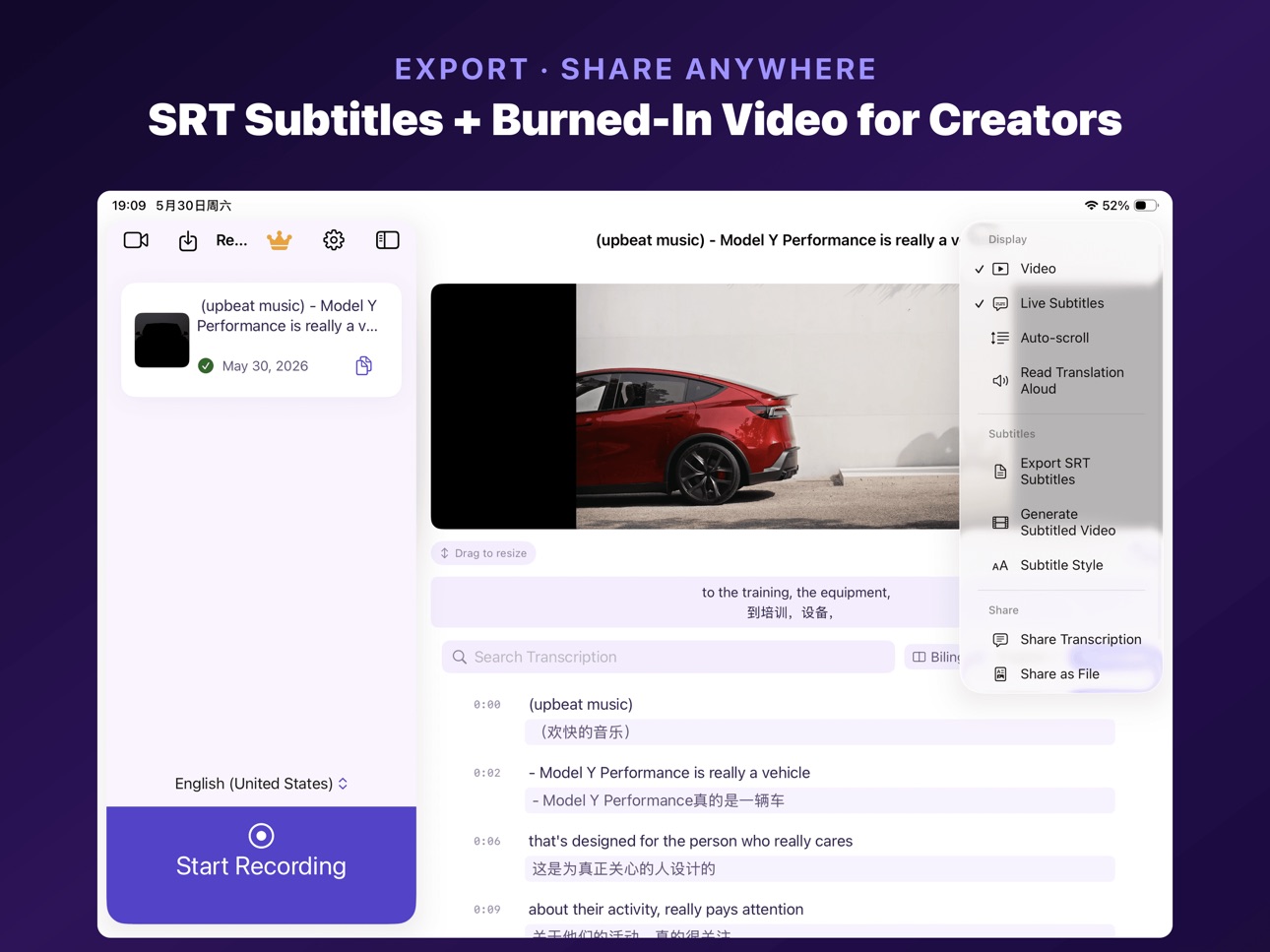
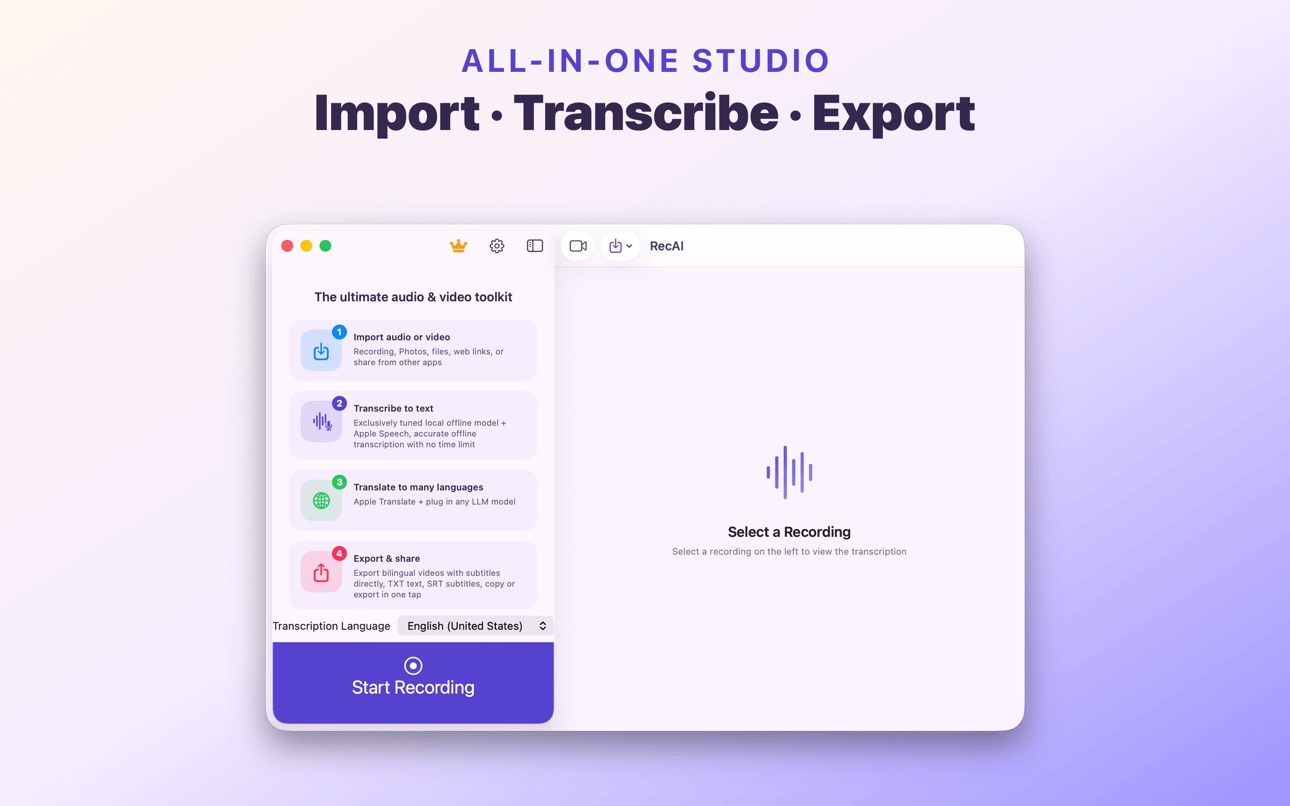
- Easy Import: Import audio and video files in any format and extract text and subtitles instantly!
- AI-Powered Transcription: With support for over 30 languages and incredible accuracy, say goodbye to manual note-taking!
- Translation, Break Language Barriers: Translate between over 30 languages and effortlessly understand foreign language videos!
- Privacy Guaranteed: Our offline AI model ensures your data never leaves your device, giving you complete peace of mind!
Feature-Packed for an Unparalleled Experience!
- Synchronized Subtitle Playback: Watch and listen simultaneously for easier comprehension and more effective learning!
- Fast Search: Quickly locate key information and save valuable time!
- Audio Editing: Trim, merge, and personalize your audio recordings with ease!
- Multi-Format Export: Share your creations with the world on any platform!
- User-Friendly Design: Simple and intuitive, with comprehensive accessibility features for everyone, including visually impaired users!
Try It Free, Start Now!
- Download RecAI and enjoy unlimited free audio transcription!
- One try and you'll be hooked!
We Value Your Feedback!
- afforwork@outlook.com
Terms of Service & Privacy Policy
- https://www.apple.com/legal/internet-services/itunes/dev/stdeula/
- https://thinkworld.club/privacy2.html
In-App Purchases US pricing
Pro Subscription
Monthly · Monthly$2.99
Annual · Yearly$17.99
One-Time Purchases
Pro$29.99
Capabilities
In-App Purchases
Accessibility
ipadiphonemacrealityDevicetvoswatch
Version history 25 versions
Build 887679290v11.102026-07-01 16:30:40
This update includes:
- Full keyboard shortcut support, making common actions faster on Mac and iPad keyboards.
- Reduced local model memory usage for more stable long-audio transcription and larger model workflows.
Build 887215157v11.92026-06-24 19:55:10
Smoother transcript page: tap the scope icon on subtitles to jump to the playing segment; collapse the search and translate bar to save space; auto-scroll preference is remembered.
Press space on Mac to play or pause anytime while reviewing transcripts.
Share menu adds plain transcript and transcript-as-file formats for more flexible export.
Build 887185758v11.82026-06-19 22:02:25
Download a larger Whisper offline model for noticeably improved transcription accuracy in complex scenarios
Build 887030814v11.72026-06-16 19:47:26
New AI assistant (bring your own OpenAI / DeepSeek / GLM / Qwen API key)
• AI translation: significantly better quality than the built-in translator
• AI summary: extract the topic, key points and action items from your transcript in one tap
• AI correction: automatically fix typos, sentence breaks and punctuation in your transcript
Settings cleanup: the transcription engine is now a choice between “Speech / local AI model” instead of a toggle; FunASR only appears for Chinese, Japanese, Korean and Cantonese.
Build 886282053v11.62026-05-30 20:56:42
This update brings three improvements:
• Smoother imports: An "Importing" placeholder row appears when importing videos or recordings; iCloud files no longer freeze the UI while downloading.
• Native macOS experience: Settings rebuilt with native macOS grouped style; subtitle style sheet and save video dialog redesigned for macOS; Apple Translation enabled on macOS 15+.
• Subtitled video export fixes: Fixed missing subtitles at the start of long videos, exports stuck at 100%, and frozen progress bar on macOS.
Thank you for using RecAI!
Build 886065568v11.52026-05-27 10:39:51
What's new in 11.5
• Bilingual subtitles always shown in full: fixed the truncation that turned them into a single line in iPad landscape; original and translation now display in every orientation.
• Drag to resize video height: a new handle below the video lets you expand or shrink the playback area, and your preference is remembered across launches.
• Stability improvements: fixed a crash on the PiP button, the paywall now opens at full size so the pricing options are no longer cut off, and you can switch between bilingual / source-only / translation-only from the translation menu.
Build 885948779v11.42026-05-22 22:52:58
- New: Pause & Resume Transcription. Pause long-audio transcription anytime; the next time you open the file, RecAi resumes from where you stopped (Whisper / FunASR supported).
- Stability: Fixed list-render jitter, download memory leaks, silent transcription failures, and more.
Build 885158438v11.32026-05-02 02:04:47
- Fixed some issues reported by users
Build 884526384v11.22026-04-15 16:44:46
- New High-Quality Engine: Massively improved offline transcription for Chinese/English/Japanese/Korean/Cantonese, powered by SenseVoice — fully offline and privacy-preserving
- Accessibility Improved: Continuous TTS reading of translations, no more stuttering
- New UI Design: Redesigned interface, more beautiful and intuitive
- New Core Engine: Rebuilt core architecture, faster and more stable
- Link Import Fixed: Fixed import from links
Build 884409334v11.12026-04-13 16:16:01
- Accessibility Improved: Continuous TTS reading of translations, no more stuttering
- New UI Design: Redesigned interface, more beautiful and intuitive
- New Core Engine: Rebuilt core architecture, faster and more stable
- Link Import Fixed: Fixed import from links
Build 883974143v10.22026-04-01 19:48:45
- New: Apple Translation framework support with smart paragraph-by-paragraph translation for better results
Build 883265465v10.12026-03-14 19:37:39
- Optimized subtitle video export, long video export no longer crashes
- Fixed sharing crashes
- Reduced memory usage and improved overall stability
Build 882862663v10.02026-03-03 01:23:08
- Fixed some known issues
- Optimized app memory usage
- Added smart anti-crash mode
Build 874318479v9.02025-04-28 01:27:55
- Support hiding subtitles.
- Subtitles in the video can display translation, original text, or bilingual text, synchronized with the 'Display Mode' settings.
Build 873547832v8.92025-03-26 14:22:05
- Support exporting and sharing text (txt) files.
- Remember Last Selected Translation Display Mode.
Build 872724478v8.82025-02-24 08:18:09
Added Anti-Crash Mode: Automatically splits large files to reduce memory usage and prevent app crashes. You can manually enable or disable this feature in settings.
Build 871427408v8.52024-12-30 07:01:11
- Support customization of subtitle font, color, and background color in exported subtitle videos
- Fix the issue of oversized fonts when adding subtitles to portrait videos during export
Build 871137875v8.42024-12-16 03:02:10
- Fixed the issue of not being able to access the paywall in mainland China
Build 870415056v8.32024-11-14 08:54:18
- Support Direct Export of Bilingual Subtitled Videos
- Only Read 2 Lines When VoiceOver in List View
Build 869669688v8.22024-10-13 14:57:13
- Support fullscreen video playback with synchronized subtitles.
- Almost entirely rewrote the app's underlying code, making it more stable and smooth.
- Accessibility improvements:
• Improved voiceover performance on the list page.
• Added support for double-tapping with two fingers to play or pause on the details page.
• Recently selected languages now appear first when choosing the transcription target language.
- Feature enhancements:
• Removed video download restrictions, but users need to obtain download links themselves.
• Improved stability of in-app recording.
• Added video thumbnails.
Build 869284088v8.12024-10-12 03:40:57
- Almost entirely rewrote the app's underlying code, making it more stable and smooth.
- Accessibility improvements:
• Improved voiceover performance on the list page.
• Added support for double-tapping with two fingers to play or pause on the details page.
• Recently selected languages now appear first when choosing the transcription target language.
- Feature enhancements:
• Removed video download restrictions, but users need to obtain download links themselves.
• Improved stability of in-app recording.
• Added video thumbnails.
Build 868207162v7.12024-08-14 17:59:20
- By default, the in-app recording feature is turned off. It can be manually enabled through settings.
Build 867682844v7.02024-07-25 16:00:38
- Accessibility Optimization TTS : The translation can be read aloud continuously from the current segment.
Build 866996921v6.92024-06-27 10:04:11
- Accessibility Optimization: Support Double Tap with Two Fingers.Double tap with two fingers to start or stop recording.
- Accessibility Optimization: VoiceOver Enhancement During Recording.VoiceOver audio outputs through the speaker during recording.
- Accessibility Optimization: Recording Button Label Enhancement.Combine start and stop recording into a single button label.
Build 866895705v6.82024-06-22 21:45:38
- Bug fix.
- App size reduced by 40%:Thanks to a more compact model, the app size has been reduced by 40%.
- Transcription speed increased by up to 40%:Optimized model quantization for even faster transcription speeds.
- Optimized memory usage:Memory usage is now much lower.
Price history by region
Currency
Show
Columns
Search
Availability 1 of 1 storefronts
| Region | Language | Price | Ratings | Avg | Version |
|---|---|---|---|---|---|
| US | en-US | Free | 20 | 4.4 | 11.10 |
Change log 29 changes · US
✎
releaseNotes updated
This update includes:
- Full keyboard shortcut support, making common actions faster on Mac and iPad keyboards.
- Reduced local model memory usage for more stab
✎
description updated
RecAI - Extract the Text Inside Your Audio & Video!
Tired of struggling to understand, remember, or keep up with audio & video content? RecAI is here! This pow
✎
subtitle updated
Watch Foreign Drama with AI
✎
name updated
RecAI: AI Translator for Video
◆
Version 11.10 released
This update includes:
- Full keyboard shortcut support, making common actions faster on Mac and iPad keyboards.
- Reduced local model memory usage for more stable long-audio transcription and larger model workflows.
◆
Version 11.9 released
Smoother transcript page: tap the scope icon on subtitles to jump to the playing segment; collapse the search and translate bar to save space; auto-scroll preference is remembered.
Press space on Mac to play or pause anytime while reviewing
◆
Version 11.8 released
Download a larger Whisper offline model for noticeably improved transcription accuracy in complex scenarios
◆
Version 11.7 released
New AI assistant (bring your own OpenAI / DeepSeek / GLM / Qwen API key)
• AI translation: significantly better quality than the built-in translator
• AI summary: extract the topic, key points and action items from your transcript in one t
◆
Version 11.6 released
This update brings three improvements:
• Smoother imports: An "Importing" placeholder row appears when importing videos or recordings; iCloud files no longer freeze the UI while downloading.
• Native macOS experience: Settings rebuilt wit
◆
Version 11.5 released
What's new in 11.5
• Bilingual subtitles always shown in full: fixed the truncation that turned them into a single line in iPad landscape; original and translation now display in every orientation.
• Drag to resize video height: a new hand
◆
Version 11.4 released
- New: Pause & Resume Transcription. Pause long-audio transcription anytime; the next time you open the file, RecAi resumes from where you stopped (Whisper / FunASR supported).
- Stability: Fixed list-render jitter, download memory leaks, s
◆
Version 11.3 released
- Fixed some issues reported by users
◆
Version 11.2 released
- New High-Quality Engine: Massively improved offline transcription for Chinese/English/Japanese/Korean/Cantonese, powered by SenseVoice — fully offline and privacy-preserving
- Accessibility Improved: Continuous TTS reading of translations
◆
Version 11.1 released
- Accessibility Improved: Continuous TTS reading of translations, no more stuttering
- New UI Design: Redesigned interface, more beautiful and intuitive
- New Core Engine: Rebuilt core architecture, faster and more stable
- Link Import Fixe
◆
Version 10.2 released
- New: Apple Translation framework support with smart paragraph-by-paragraph translation for better results
◆
Version 10.1 released
- Optimized subtitle video export, long video export no longer crashes
- Fixed sharing crashes
- Reduced memory usage and improved overall stability
◆
Version 10.0 released
- Fixed some known issues
- Optimized app memory usage
- Added smart anti-crash mode
◆
Version 9.0 released
- Support hiding subtitles.
- Subtitles in the video can display translation, original text, or bilingual text, synchronized with the 'Display Mode' settings.
◆
Version 8.9 released
- Support exporting and sharing text (txt) files.
- Remember Last Selected Translation Display Mode.
◆
Version 8.8 released
Added Anti-Crash Mode: Automatically splits large files to reduce memory usage and prevent app crashes. You can manually enable or disable this feature in settings.
◆
Version 8.5 released
- Support customization of subtitle font, color, and background color in exported subtitle videos
- Fix the issue of oversized fonts when adding subtitles to portrait videos during export
◆
Version 8.4 released
- Fixed the issue of not being able to access the paywall in mainland China
◆
Version 8.3 released
- Support Direct Export of Bilingual Subtitled Videos
- Only Read 2 Lines When VoiceOver in List View
◆
Version 8.2 released
- Support fullscreen video playback with synchronized subtitles.
- Almost entirely rewrote the app's underlying code, making it more stable and smooth.
- Accessibility improvements:
• Improved voiceover performance on the list page.
• Added
◆
Version 8.1 released
- Almost entirely rewrote the app's underlying code, making it more stable and smooth.
- Accessibility improvements:
• Improved voiceover performance on the list page.
• Added support for double-tapping with two fingers to play or pause on
◆
Version 7.1 released
- By default, the in-app recording feature is turned off. It can be manually enabled through settings.
◆
Version 7.0 released
- Accessibility Optimization TTS : The translation can be read aloud continuously from the current segment.
◆
Version 6.9 released
- Accessibility Optimization: Support Double Tap with Two Fingers.Double tap with two fingers to start or stop recording.
- Accessibility Optimization: VoiceOver Enhancement During Recording.VoiceOver audio outputs through the speaker durin
◆
Version 6.8 released
- Bug fix.
- App size reduced by 40%:Thanks to a more compact model, the app size has been reduced by 40%.
- Transcription speed increased by up to 40%:Optimized model quantization for even faster transcription speeds.
- Optimized memory us